Expert Review & Guide

Best CPU Coolers for Ryzen 7 7800X3D 2026

AMD’s Ryzen 7 7800X3D remains one of the most efficient high-FPS gaming chips you can put on AM5, but that efficiency does not mean cooler choice is optional. The processor’s 3D V-Cache stack, 120 W class power envelope, and 89°C package limit reward coolers that keep sustained game loops quiet and stable without forcing fans into a constant scream. Stock-style single towers can work in open airflow cases; dual-tower air and well-mounted 360 mm AIOs give you headroom for warm rooms, dense GPU heat, and long streaming sessions.

This roundup sticks to one fixed product pack: real cooler listings plus the 7800X3D CPU and CPU-plus-cooler bundle entries that shoppers commonly see next to cooling gear. We treat the processor listings as thermal context—what you are cooling—and focus editorial recommendations on the air and AIO options that clear AM5 mounts, RAM, and typical mid-tower side panels. No dollar prices appear here because cooler and CPU street pricing moves weekly; use the linked listings for current availability.

If you already know you want a showpiece dual tower, a quiet single-tower redesign, or a 360 mm liquid cooler with an LCD pump, start with the three top picks. Otherwise skim the comparison table for height, heat-pipe count, and fan style, then read each review for fit notes, noise behavior, and honest tradeoffs—including when a listing is the CPU alone, a bundled cooler kit, or a low-profile cooler meant for SFF rather than maximum gaming headroom.

Top Cooler Picks for Ryzen 7 7800X3D Builds

Best Quiet Air Cooler

Cooler Master V4 Alpha 3DHP CPU Air Cooler

★★★★★9.2/10
Cooler Master V4 Alpha 3DHP CPU Air Cooler
  • Patented 3DHP heat pipes claim stronger cooling than standard pipe layouts
  • Dual Mobius 120P PWM fans in push-pull for smooth, lower turbulence airflow
  • 161 mm single-tower footprint fits many mid-towers while staying AM5 ready
Check Price →

As an Amazon Associate we earn from qualifying purchases. We may earn a commission at no additional cost to you.

7800X3D Cooler Comparison: Air, AIO, Bundle, and Chip Listings

Compare cooling hardware first—tower height, heat pipes, fan count, and radiator size—then note which rows are CPU-only or CPU-plus-cooler bundles. Specs omit prices so clearance and thermal design stay the focus.

#ProductSpecificationsScore
1
  • 8-core/16-thread Zen 4 gaming CPU, AM5
  • 96 MB L3 3D V-Cache; Tjmax 89°C
  • Cooler sold separately—pair with air or AIO
9.6
2
  • 7800X3D CPU plus 150W 120mm PWM air cooler
  • Boost up to 5.0 GHz; OEM/bulk packaging note
  • Empowered PC 1-year warranty on listed components
9.2
3
  • Dual tower, 6 heat pipes, twin 120 mm fans
  • 5-inch IPS LCD top; ≤27 dB(A) fan claim
  • 125×135×164 mm; AM5/AM4 and Intel kits
9.6
4
  • 360 mm aluminum radiator, ceramic-bearing pump
  • 3×120 mm PWM fans, up to 75.8 CFM each
  • 2.8-inch LCD; needs USB 2.0 and 5V ARGB
8.2
5
  • Single tower, four 6 mm heat pipes
  • 120 mm fan to 1650 RPM, ~68.2 CFM, ≤26 dB(A)
  • ~6.1 in height; broad AM5 and Intel support
9.2
6
  • Single tower with patented 3DHP heat pipes
  • Dual Mobius 120P PWM fans, push-pull layout
  • 161 mm height; AM5/AM4 and LGA1851/1700
9.2
7
  • Tray/WOF-style 7800X3D, cooler not included
  • 4.2 GHz base class, 8C/16T, AM5, PCIe 5.0
  • Authorized dealer listing with warranty notes
9.2
8
  • Dual tower rated to 235W TDP class
  • Four 6 mm pipes; dual ARGB PWM fans
  • Pixel LED display; 155×122×115 mm; AM5
8.8
9
  • Compact tower, 4×6 mm copper heat pipes
  • 92 mm removable PWM RGB fan
  • AM5/AM4 and Intel 1851/1700/1200/115X
9.2
10
  • 36 mm total height low-profile cooler
  • 4×6 mm AGHP pipes; TL-9015 slim PWM fan
  • AM4/AM5 and Intel 115x/1200/1700/1851
9.2

1. AMD Ryzen 7 7800X3D 8-Core - The Chip You

AMD Ryzen 7 7800X3D 8-Core

AMD Ryzen 7 7800X3D 8-Core

9.6/10★★★★★

Before ranking fans and radiators, it helps to lock what the Ryzen 7 7800X3D actually asks of a cooler. This is an eight-core Zen 4 chip with a massive 96 MB L3 cache stack aimed at gaming frame-time consistency, not at melting through every stress test on the internet. AMD lists a maximum operating temperature of 89°C, and in real gaming loops many boards will ride near that limit while still delivering excellent FPS. Your cooler’s job is not always to produce ice-cold idle screenshots—it is to keep boost behavior consistent, keep coil and VRM heat manageable, and keep fan noise tolerable while you play for hours.

  • 8 cores / 16 threads on Zen 4, AM5 socket
  • 96 MB L3 3D V-Cache; integrated Radeon graphics
  • Tjmax 89°C — cooler choice still matters for noise
Check Price →
✓ Pros
  • Elite gaming IPC and cache behavior for the AM5 platform
  • Efficient enough that strong dual-tower air is often enough
  • Clear thermal ceiling (89°C) helps you tune fan curves honestly
  • Huge owner community for cooler clearance and paste tips
  • Pairs cleanly with B650/X670 boards and DDR5 kits
✕ Cons
  • Does not include a cooler—plan the cooler purchase separately
  • Hot GPU exhaust in poorly vented cases still raises CPU temps
  • Aggressive PBO-style experiments need more cooling headroom

Detailed review

Because the 7800X3D is relatively efficient for its gaming class, a competent dual-tower air cooler or a well-mounted 240/360 mm AIO is usually plenty in a case with front intake and rear exhaust. Where people get into trouble is combining a weak single-fan cooler, a glass-panel case with almost no intake, and a high-wattage GPU dumping heat into the CPU chamber. In that scenario the chip still works, but fans ramp earlier and the build feels louder than the CPU’s reputation suggests. Treat case airflow as part of the cooling stack, not as an afterthought.

This Amazon listing is the processor itself, not a cooler. It belongs in a cooler guide because shoppers researching “best coolers for 7800X3D” often land on the CPU page first, then need a clear next step. If you are buying the chip tray-style or retail-without-cooler, budget mounting time for a quality aftermarket cooler on day one. Do not boot for extended gaming sessions on a bare heatspreader, and do not assume a tiny OEM aluminum cooler from an older AM4 box will behave the same on this socket and package.

Thermal paste application on AM5 is straightforward: a pea or short line on the heat spreader, then even cooler pressure from the AM5 retention kit. The bigger installation risk is mechanical—overtightening brackets, forgetting to remove cold-plate film on AIOs, or seating a tall dual tower that collides with tall RAM. Measure cooler height against your case’s published maximum, and check whether your DIMMs have tall heat spreaders that need offset towers or fan relocation.

If you already own the 7800X3D and are only shopping coolers, use this review as the thermal target: quiet gaming under sustained load, temperatures that stay within AMD’s envelope without constant thermal alarms, and a mount that does not flex the board. The coolers ranked later in this guide are evaluated against that target, from showpiece dual towers to SFF low-profile options that trade headroom for height.

One more practical note: motherboard BIOS versions, Expo/DOCP memory profiles, and case fan curves change results more than people expect. After installing any cooler from this list, update BIOS if your board vendor recommends it for Zen 4 stability, set a reasonable CPU fan curve in BIOS or software, and retest with a game you actually play rather than only a synthetic burn. That is how you validate a cooler for this specific chip.

Who should buy this CPU listing

Buy this when you need the 7800X3D processor and already have a cooler plan—or when you want the chip page as a reference while you compare the air and AIO options below. Skip treating it as a cooling solution; it is the heat source your cooler must manage.

Cooling expectations for 7800X3D

Aim for a dual-tower air cooler or mid-to-large AIO in warm rooms and closed mid-towers. Budget single towers can work in airy cases. Ultra-low-profile coolers are for SFF constraints, not maximum silence under heavy GPU heat soak.

Check Price on Amazon →

We may earn a commission at no additional cost to you.

2. 7800X3D with Cooler Master Hyper Spectrum - Best CPU +

7800X3D with Cooler Master Hyper Spectrum V3

7800X3D with Cooler Master Hyper Spectrum V3

9.2/10★★★★★

This listing is a convenience play: the Ryzen 7 7800X3D plus a Cooler Master Hyper Spectrum V3 150W-class 120 mm PWM air cooler in one package. For builders who want the gaming CPU online and do not want a second research rabbit hole the same night, a bundle like this removes friction. The cooler is framed as adequate thermal support for intense sessions rather than as a competition dual-tower, which matches how many 7800X3D systems actually behave in mid-tower cases with decent intake.

  • 7800X3D CPU bundled with 150W-class 120mm PWM air cooler
  • Boost clocks up to 5.0 GHz on Zen 4 AM5
  • OEM/bulk packaging; Empowered PC 1-year warranty note
Check Price →
✓ Pros
  • One cart checkout covers the gaming CPU and a matching air cooler
  • 120 mm PWM cooler is sized for the chip’s efficient gaming power draw
  • Useful for first-time AM5 builders who do not want to research coolers yet
  • Warranty messaging on the bundle can reduce purchase anxiety
  • Avoids the “CPU arrived, cooler forgotten” shipping delay problem
✕ Cons
  • OEM/bulk packaging means you may not get retail CPU box cosmetics
  • Included cooler is not in the same class as top dual-tower or 360 mm AIO picks
  • Less upgrade theater if you already planned a premium cooler separately

Detailed review

Read the packaging note carefully. The seller calls out OEM/bulk packaging and that retail packaging is not included. That does not automatically mean a bad chip, but it does mean unboxing will look different from a sealed AMD retail tray experience, and resale optics may matter to some buyers. The Empowered PC warranty language is part of the listing’s value proposition—keep your order documentation if you need support later.

From a pure cooling hierarchy view, this bundle sits below the Peerless Assassin Vision MAX, Cooler Master V4 Alpha 3DHP, and GT360M AIO for enthusiasts who want lower noise under heat soak or more visual flair. It sits above “CPU only, cooler TBD” for people who need to boot and game this weekend. If your case clears a taller dual tower and you care about acoustic polish, consider buying the CPU-without-cooler variants and pairing one of the stronger dedicated coolers in this guide instead.

Installation still follows normal AM5 steps: motherboard backplate and cooler mount, thermal paste if not pre-applied as instructed, PWM fan header on CPU_FAN, and a quick stress or game check. Confirm the Hyper Spectrum V3’s height against your case maximum before you commit if you are in a compact chassis. Bundles are easy to impulse-buy into cases that barely clear 155–160 mm coolers.

Professionally, the listing also markets workstation and productivity angles for the 7800X3D. Cooling-wise that means mixed loads—compile, stream encode, browser tabs, and a game—still benefit from consistent contact pressure and a fan curve that ramps before the package parks at the thermal limit. The included 120 mm cooler is a starting point; if your room runs hot or your GPU is a furnace, upgrading the cooler later remains an option without changing the CPU.

Choose this bundle when simplicity beats maximizing every degree of thermal headroom. Skip it when you already own a capable AM5 cooler, when you specifically want an LCD dual tower or 360 mm radiator look, or when you require sealed retail packaging for warranty or gift reasons. In those cases, buy a CPU-only listing and one of the dedicated coolers ranked higher for cooling performance.

When the bundle makes sense

First AM5 build, tight timeline, and a mid-tower with normal cooler clearance. You get a working thermal solution without picking heat-pipe counts yourself.

When to buy CPU and cooler separately

You want the Vision MAX screen cooler, a quiet 3DHP tower, a 360 mm AIO, or an SFF low-profile unit. Separate purchases let you match clearance and noise goals more precisely.

Check Price on Amazon →

We may earn a commission at no additional cost to you.

3. Thermalright Peerless Assassin 120 Vision MAX - Best Dual-Tower Overall

Thermalright Peerless Assassin 120 Vision MAX

Thermalright Peerless Assassin 120 Vision MAX

9.6/10★★★★★

If you want one air cooler that covers Ryzen 7 7800X3D thermals and still looks intentional in a windowed case, the Peerless Assassin 120 Vision MAX is the strongest all-around pick in this pack. Thermalright’s dual-tower formula—six copper heat pipes, nickel-plated copper base, two 120 mm fans—has a long track record on AM5 gaming chips. The Vision MAX layer adds a magnetically attached 5-inch IPS top screen at 480×854 so you can watch temperatures, customize backgrounds, or play light visuals without moving to liquid cooling.

  • Dual-tower design with six pure copper heat pipes
  • Twin 120 mm fans to 2150 RPM; ~69 CFM; ≤27 dB(A)
  • 5-inch IPS LCD top; 164 mm height; AM5 kits included
Check Price →
✓ Pros
  • Dual-tower cooling headroom fits 7800X3D gaming and mixed loads
  • 5-inch IPS display adds monitoring and custom themes without an AIO
  • White ARGB presentation suits glass mid-towers and white builds
  • RAM-friendly tower layout helps with tall DDR5 kits
  • Strong Amazon rating for a feature-rich air cooler
✕ Cons
  • 164 mm height needs a case that actually clears tall dual towers
  • LCD needs motherboard USB 2.0 header and TRCC software setup
  • More cables and setup steps than a plain black dual tower

Detailed review

For the 7800X3D specifically, dual-tower air is often the sweet spot: enough fin mass to keep fan RPMs moderate during long gaming sessions, no pump to fail, and no radiator crowding your GPU intake. Fans spinning up to 2150 RPM give you headroom when a room is warm or a high-power graphics card heats the chamber. At the same time, the ≤27 dB(A) claim and PWM control mean you can tune a quiet curve for overnight or office use. You are buying thermal margin you can leave unused most of the time.

Installation on AM5 uses the motherboard’s original backplate—Thermalright notes that the AMD backplate is not included because it stays on the board. Follow the included Intel/AMD kits carefully, keep mounting pressure even, and route the PWM, ARGB, and USB display cables before you close the side panel. The cooler’s 125×135×164 mm envelope fits many ATX cases, but verify your case’s CPU cooler clearance; “ATX” alone is not a guarantee if the manufacturer published a 155 mm limit.

TRCC software is part of the product experience. Download it from Thermalright’s official site, confirm the USB header connection, and set the screen to the metrics you actually care about—CPU temperature and utilization are more useful day to day than a looping wallpaper that distracts from gameplay. If you hate RGB software, you can still treat this as a high-performance dual tower and keep lighting subtle; the cooling hardware does not require flashy themes to work.

Compared with the Cooler Master V4 Alpha 3DHP, the Vision MAX emphasizes dual-tower capacity and the large top display. Compared with the PCCOOLER GT360M, it avoids radiator mounting and pump noise while still offering a screen. Compared with budget four-pipe singles, it simply has more fin area and two fans for lower RPM at the same heat. That is why it leads this guide for most 7800X3D mid-tower builds that clear 164 mm.

White ARGB styling is a genuine differentiator if your build theme is white or silver. Black interiors still look fine with it, but the product is clearly aimed at showcase PCs. Fans use S-FDB V2 bearings for longevity claims, and the dual-fan layout is described as friendly to tall RAM and GPU installs—still double-check your tallest DIMM against the front fan position before you buy exotic memory kits.

Buy the Vision MAX when you want top-tier air cooling for the 7800X3D with a modern LCD flex. Skip it if your case is shorter than ~164 mm, if you refuse USB headers for a display, or if you prefer a minimalist cooler with zero software. In those cases look at the V4 Alpha for quieter aesthetics, the GT360M for liquid, or the AXP90 X36 for SFF height limits.

Best for

AM5 gaming mid-towers with side glass, white or ARGB themes, and owners who want dual-tower performance plus an on-cooler status screen.

Setup tips for 7800X3D

Mount with even torque, connect CPU_FAN and the USB header before first boot, set a gentle PWM curve, and confirm RAM clearance with the front fan installed. Use TRCC after Windows is up if you want custom screen content.

Versus other pack coolers

Beats single-tower budget air on sustained headroom, rivals AIO spectacle without radiator plumbing, and out-features the CR1400 and AXP90 when height is available.

Check Price on Amazon →

We may earn a commission at no additional cost to you.

4. PCCOOLER GT360M 360mm AIO - Best 360mm AIO Option

PCCOOLER GT360M 360mm AIO

PCCOOLER GT360M 360mm AIO

8.2/10★★★★☆

Liquid cooling is optional on a 7800X3D, but a 360 mm AIO still earns a place when you want lower CPU fan noise at the socket, a clean tower look without a giant heatsink, or radiator mounting that pulls heat to the case front or top. The PCCOOLER GT360M packages a copper micro-channel cold plate, ceramic-bearing pump, 360 mm aluminum radiator, and three PWM ARGB fans with a 2.8-inch customizable LCD. For creators and gamers who already planned a 360 mm mount, it is the pack’s dedicated AIO answer.

  • 360 mm radiator with copper micro-channel cold plate
  • Three 120 mm ARGB PWM fans, 500–2200 RPM
  • 2.8-inch 320×240 LCD; AM5/AM4 mounts included
Check Price →
✓ Pros
  • 360 mm radiator gives strong sustained cooling for gaming PCs
  • LCD pump cover personalizes stats and visuals
  • High-pressure fans help push air through thicker rad + case dust filters
  • Full AM5 hardware in the box simplifies first installs
  • Hidden daisy-chain fan wiring reduces cable clutter
✕ Cons
  • Requires a case that truly fits a 394×120×27 mm radiator plus fans
  • Needs free internal USB 2.0 and correct 5V ARGB headers
  • Lower aggregate rating than the top air coolers in this pack

Detailed review

Before ordering, measure twice. PCCOOLER calls out a radiator envelope of 394×120×27 mm plus the installed fans—many cases advertise “360 mm support” that only works without a thick front filter, vertical GPU, or top PSU shroud interference. Also reserve an internal USB 2.0 header for the LCD and a 5V 3-pin ARGB header for lighting. Do not plug ARGB into a 12V RGB header. Those checklist items matter more than marketing CFM numbers.

On the 7800X3D, a healthy 360 mm loop typically lets you run quieter fan curves than a small single-tower air cooler while keeping the package in a comfortable zone during long game sessions. That said, air dual towers in this guide can match everyday gaming thermals with fewer failure modes. Choose the GT360M when radiator real estate is available and you specifically want the LCD pump aesthetic; choose Vision MAX or V4 Alpha when you want air simplicity and similar practical results.

Fans spin from 500 to 2200 RPM with up to 75.8 CFM and 3.2 mmH₂O static pressure per fan—useful against restrictive meshes. Magnetic screen repositioning helps keep the display upright depending on how you rotate the pump block. Software from PCCOOLER handles images, animations, and system info; budget an evening for cable routing and first-time LCD setup rather than expecting a five-minute install.

Mounting hardware covers Intel LGA1851/1700/1200/115X and AMD AM5/AM4. Remove the cold-plate protective film, apply paste as directed, and tighten in a cross pattern so the plate sits flat on the 7800X3D heat spreader. After the first boot, watch pump header detection in BIOS and confirm the AIO pump is on a header that will not sleep incorrectly. Then validate with a thirty-minute game, not only idle desktop temperatures.

The 4.1 rating is lower than several air coolers here, so read recent owner comments for leak-free install reports, software quirks, and case fit notes before you commit. AIO ownership always includes a small long-term maintenance mindset: dust the radiator, keep tubing unstressed, and listen for pump changes years down the road. If that tradeoff bothers you, stay on dual-tower air—the 7800X3D will not mind.

Pick the GT360M for showcase liquid builds and top/front 360 mounts. Skip it for SFF cases, for builds without USB headers to spare, or if you want the highest-rated simplest cooler in the pack. Pair it with strong case intake so the radiator is not breathing GPU exhaust exclusively.

Case and header checklist

Confirm 360 mm clearance with fans installed, free USB 2.0 header for the LCD, 5V ARGB header only, and a CPU_OPT or dedicated pump strategy that matches your motherboard manual.

Who should choose AIO over air for 7800X3D

Builders who already have radiator mounts, want a clear view of the motherboard without a dual tower, or prefer moving heat to the case edge. Not required solely because the CPU is a 7800X3D.

Check Price on Amazon →

We may earn a commission at no additional cost to you.

5. CPU Air Cooler with 4×6mm Heat - Best Budget Everyday

CPU Air Cooler with 4×6mm Heat Pipes

CPU Air Cooler with 4×6mm Heat Pipes

9.2/10★★★★★

Not every 7800X3D build needs a showpiece dual tower. If your case has decent airflow and you mainly game at stock-ish settings, a straightforward four-pipe single-tower cooler can keep the chip honest without dominating the parts list. This listing’s pitch is universal: four 6 mm heat pipes, a 120 mm PWM-class fan, roughly 6.1 inches of height, and mounts spanning modern AMD AM5/AM4 and a long list of Intel sockets. It is the pack’s practical budget air option.

  • Four 6 mm heat pipes with direct-contact style base area
  • 120 mm fan up to 1650 RPM; ~68.2 CFM; under 26 dB(A)
  • About 6.1 inches tall; AM5/AM4 and wide Intel support
Check Price →
✓ Pros
  • Inexpensive path to a real tower cooler on AM5
  • Quiet-leaning fan speed ceiling versus screaming budget fans
  • Broad socket support helps multi-platform households
  • Designed with RAM clearance and simpler fan installation in mind
  • Solid rating for a no-frills four-pipe cooler
✕ Cons
  • Less thermal headroom than six-pipe dual towers in this guide
  • Generic branding means fewer premium software/RGB features
  • Warm sealed cases may push fans harder on long sessions

Detailed review

Noise claims stay modest—up to about 1650 RPM with airflow near 68 CFM and noise under 26 dB(A). That profile suits desk-side PCs where you would rather not hear a jet during cutscenes. You will not match the Vision MAX or a 360 mm AIO for absolute thermal headroom in a heat-soaked chamber, but you also avoid LCD cables, radiator brackets, and dual-fan clutter. For many 7800X3D owners, that trade is acceptable.

Installation notes emphasize non-disassembly fan mounting and RAM clearance so you are not fighting tall DDR5 kits as much as with some older wide towers. Still measure: “RAM friendly” marketing is not a substitute for checking your exact DIMM height. Use the 4-pin header on CPU_FAN, apply a normal paste pattern, and ensure the cooler’s base contacts the center of the heat spreader evenly.

Where this cooler struggles is the edge case pile-up: tiny case, blocked front intake, undervolt ignored, and a 350 W+ GPU dumping heat upward. In that stack, upgrade to a dual tower or improve case fans before blaming the CPU. Where it shines is a standard ATX mid-tower with mesh front, one rear exhaust, and a gamer who wants the 7800X3D’s efficiency to translate into a quiet PC.

Socket universality is a quiet advantage if you service multiple machines. The same cooler body that cools an AM5 gaming chip today might move to an older Intel board tomorrow. Just swap the mounting kit parts carefully and keep screws organized. Do not force AM4 clips onto AM5 or mix Intel plates—follow the diagram for your socket.

Buy this when you need a dependable, quiet-enough tower for a 7800X3D without paying for screens and ARGB ecosystems. Skip it when you are chasing the lowest possible fan RPM under heavy mixed loads, when you want a white showpiece, or when your case barely clears low-profile coolers only—in that last case jump to the AXP90 X36 instead.

Good partner cases

Mesh mid-towers with clear CPU cooler height above ~160 mm and unobstructed front intake. Large side-panel glass boxes with weak intake need better case fans or a stronger cooler.

Upgrade path

Start here, then move to Peerless Assassin Vision MAX or V4 Alpha 3DHP if noise or sustained temperatures bother you after real gaming tests—not after a five-minute idle check.

Check Price on Amazon →

We may earn a commission at no additional cost to you.

6. Cooler Master V4 Alpha 3DHP - Best Quiet Air

Cooler Master V4 Alpha 3DHP

Cooler Master V4 Alpha 3DHP

9.2/10★★★★★

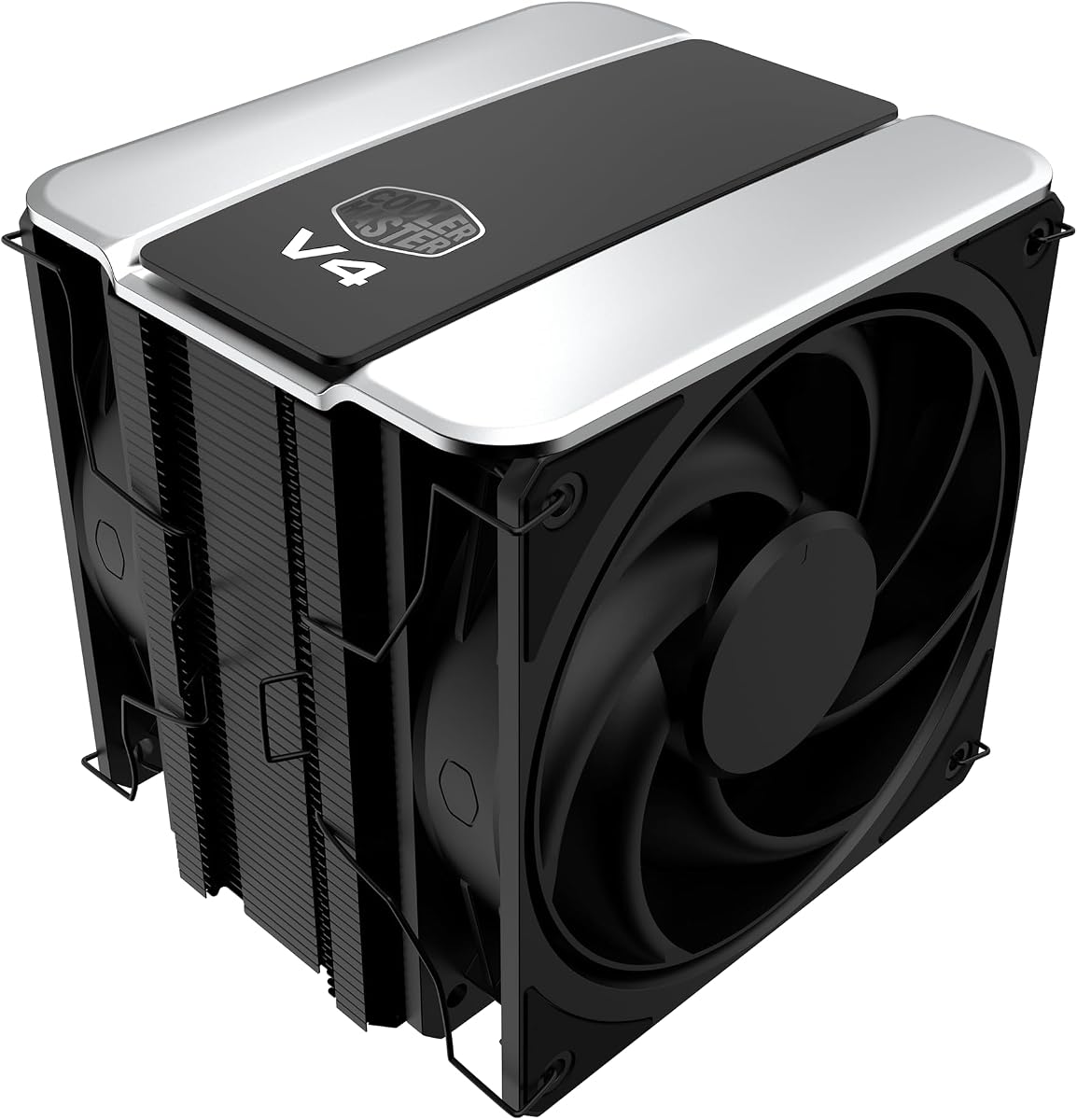
Cooler Master’s V4 Alpha 3DHP is the quiet-leaning specialist in this pack. Instead of stacking two fin arrays, it uses patented 3DHP heat pipes that Cooler Master claims improve cooling versus standard designs while reducing radiator turbulence. Pre-installed Mobius 120 mm fans in push-pull then move air through the tower with a focus on sustained, lower-noise operation. For a 7800X3D that already runs efficiently, that philosophy matches the chip: smooth performance without theatrical fan spikes.

  • Patented 3DHP heat-pipe design in a single tower
  • Dual Mobius 120P PWM fans in push-pull
  • 161 mm height; AM5/AM4 and LGA1851/1700 support
Check Price →
✓ Pros
  • 3DHP design targets stronger cooling and less turbulence noise
  • Push-pull Mobius fans improve airflow without needing a second tower
  • 161 mm height fits more cases than taller 164–170 mm dual towers
  • Minimalist look blends into black builds cleanly
  • Cooler Master mounting ecosystem is familiar to many builders
✕ Cons
  • Single tower still trails the best dual towers in absolute fin mass
  • No LCD screen if you want on-cooler visuals
  • Push-pull fans mean two PWM cables to manage

Detailed review

At 161 mm, the cooler clears many mid-towers that reject taller dual-tower showpieces by a few millimeters. That clearance win matters in the real world more than another five degrees on a synthetic chart. If your case manual lists 160–162 mm CPU cooler limits, the V4 Alpha is often the safer air pick than a 164 mm Vision MAX—always trust the millimeter number over brand loyalty.

Push-pull configuration is the other headline. Two fans can move the same heat at lower RPM than one fan screaming alone, which is exactly what you want behind a desk during long ranked sessions. Wire both fans to a splitter or to CPU_FAN plus CPU_OPT as your board allows, and tune a shared curve. The Mobius fans are part of Cooler Master’s higher-end airflow family; keep them dusted so the acoustic advantage does not disappear under carpet fuzz.

Aesthetically the V4 Alpha is restrained. There is no five-inch billboard on top. If your build language is clean black hardware and subtle lighting elsewhere, that is a feature. If you bought a white case specifically for an LCD cooler centerpiece, the Vision MAX or GT360M will satisfy that itch better. Cooling for the 7800X3D does not require RGB to be effective.

Socket support covers AMD AM5/AM4 and Intel LGA1851/1700, so the cooler can follow you through a platform refresh. Installation is marketed as easy—still take your time seating the AM5 brackets and confirming the pipes sit centered. After mounting, a short gaming loop plus a monitoring overlay tells you whether your curve needs a slightly earlier ramp in summer months.

Compared with the darkFlash E400 Plus, the V4 Alpha trades the pixel display and dual-tower 235W marketing for Cooler Master’s 3DHP acoustic story and Mobius fans. Compared with the generic four-pipe cooler, it is the more engineered quiet upgrade. Compared with the GT360M, it avoids liquid complexity while remaining competitive for this CPU’s power class.

Choose the V4 Alpha 3DHP when silence, fitment, and refined air cooling matter more than screens. Skip it only if you need ultra-low 36 mm SFF height, or if you have already committed to a 360 mm radiator layout and want that aesthetic instead.

Who it is for

7800X3D gamers in mid-towers who sit close to the PC, dislike pump hum, and want dual-fan airflow without a massive dual-tower footprint.

Noise tuning tips

Start with a linear PWM curve that reaches moderate RPM around mid-package temperatures, then adjust after a real game session. Keep case intake strong so the cooler is not fighting stagnant GPU heat.

Versus Peerless Assassin Vision MAX

Pick V4 Alpha for quieter minimalist air and slightly easier height clearance. Pick Vision MAX for dual-tower mass, white ARGB presence, and the large IPS top display.

Check Price on Amazon →

We may earn a commission at no additional cost to you.

7. AMD Ryzen 7 7800X3D WOF - CPU Without Cooler

AMD Ryzen 7 7800X3D WOF

AMD Ryzen 7 7800X3D WOF

9.2/10★★★★★

This entry is the “without cooler” path to the same Ryzen 7 7800X3D silicon. Shoppers who already picked the Peerless Assassin Vision MAX, V4 Alpha 3DHP, GT360M, or another AM5 cooler should buy a WOF-style CPU listing rather than a CPU-plus-basic-cooler bundle they will discard. Thermally, nothing changes: you still need proper mounting pressure, paste, and airflow. Commercially, you gain freedom to match cooler height and features to your case.

  • Ryzen 7000-series 7800X3D, cooler not included
  • AM5 socket, 5 nm process, PCIe 5.0 support
  • Authorized dealer listing with warranty framing
Check Price →
✓ Pros
  • Clear WOF-style purchase when you already chose a cooler
  • Lets you pair any AM5 cooler in this guide without bundle constraints
  • Authorized dealer angle appeals to warranty-conscious buyers
  • Same gaming CPU target as the other 7800X3D rows
  • Avoids paying for a bundle cooler you would immediately replace
✕ Cons
  • Zero cooling included—budget and ship a cooler before long gaming
  • Listing details vary; confirm seller packaging and warranty terms
  • Not a cooler recommendation by itself

Detailed review

The listing highlights AM5 compatibility, 5 nm process technology, PCIe 5.0 support, and authorized dealer positioning with multi-year warranty language. Always read the current seller’s warranty card and return window—authorized dealer claims are only as good as the invoice and support process behind them. Photograph serial labels if that helps your personal records.

Because no cooler ships in the box, your build checklist must include cooler arrival before stress testing. A common failure mode is assembling the PC, applying power, and discovering the cooler is still in transit. Plan SKUs together. If shipping times diverge, the Empowered bundle earlier in this guide can be a fallback, but dedicated coolers remain the better long-term match for enthusiast cases.

Pairing advice is simple: Vision MAX or darkFlash E400 Plus for dual-tower air with displays; V4 Alpha for quiet single-tower push-pull; GT360M for 360 mm liquid; generic four-pipe or JONSBO CR1400 for tight budgets or smaller towers; AXP90 X36 only when height is the binding constraint. The CPU does not demand liquid; it demands a competent mount and a case that breathes.

BIOS readiness still matters. AM5 boards should run a BIOS known to support your Ryzen 7000X3D model before you chase thermal ghosts. Update from a USB flashback method if the board ships too old to POST. After that, Expo memory settings and a sane PBO policy (often default for this chip) will influence temperatures as much as swapping between two good dual towers.

Use this listing when your cooler decision is already made or when you want maximum cooler flexibility. Do not treat the product page as evidence that the 7800X3D runs without cooling—WOF means you supply the cooler, not that the chip invents one.

Recommended cooler pairings from this pack

Best overall air: Peerless Assassin 120 Vision MAX. Best quiet air: V4 Alpha 3DHP. Best AIO: GT360M. Best SFF: AXP90 X36. Best budget: four-pipe 120 mm tower.

Warranty and packaging vigilance

Confirm whether you receive tray, WOF, or retail-style packaging, keep order records, and verify return eligibility before applying paste if you think you might RMA the chip.

Check Price on Amazon →

We may earn a commission at no additional cost to you.

8. darkFlash E400 Plus - Best Dual-Tower with Status Display

darkFlash E400 Plus

darkFlash E400 Plus

8.8/10★★★★☆

The darkFlash E400 Plus targets builders who want dual-tower capacity and a live hardware readout without jumping to a full AIO LCD pump. Four 6 mm direct-touch copper heat pipes feed two aluminum fin stacks, and darkFlash rates the cooler up to a 235W TDP class—well above what a stock-leaning 7800X3D needs for gaming. The headline feature is the pixel-style LED screen that can show CPU temperature, usage, power, frequency, voltage, plus GPU and memory stats through the included USB connection and software.

  • Dual-tower air cooler rated up to 235W TDP class
  • Four 6 mm direct-touch copper heat pipes
  • Pixel LED display; dual ARGB PWM fans; AM5 support
Check Price →
✓ Pros
  • 235W-class dual-tower rating is ample for 7800X3D gaming loads
  • On-cooler pixel display shows temps and system stats
  • Reverse-blade plus standard fan pairing improves visual airflow stack
  • Cable lengths revised for ATX and mATX routing
  • ARGB sync for builders who already light their boards
✕ Cons
  • Display and ARGB add USB and lighting cable overhead
  • Shorter overall dimensions than some tall dual towers—check RAM/GPU fit
  • Software/display setup is another moving part versus plain coolers

Detailed review

Fan configuration uses a 120 mm front fan at 800–1800 RPM and a reverse-blade fan at 800–2100 RPM, both with hydro bearings and 5V ARGB. That combination is aimed at stacked airflow aesthetics and service life around a 40,000-hour rating. For the 7800X3D, you can keep RPMs modest most of the time; the dual-tower mass is there so you are not forced into aggressive curves during long raids or creator exports.

Physical size is listed at 155 × 122 × 115 mm—compact for a dual-tower class product, which can help in cases where a 164 mm monster is tight but a true dual tower is still desired. Always reconcile those dimensions with your motherboard layout, tall RAM, and side-panel glass. Compact dual towers sometimes sit closer to DIMM slots; dry-fit when possible.

Cable support is a practical differentiator. The black version includes revised cable length for ATX and Micro-ATX cases, with PWM, 5V ARGB, and USB 2.0 for the display. Map those headers before you bury the board in cables. If your mATX board has limited USB headers because of an RGB hub or wireless adapter, plan a header priority list—display versus other accessories.

Against the Vision MAX, the E400 Plus offers a different display language (pixel LED versus large IPS) and a shorter chassis. Against the V4 Alpha, it offers dual-tower structure and a status screen at the cost of more visual noise and software. Against the GT360M, it keeps you on air while still giving telemetry on the cooler itself. That middle ground is why it ranks as a strong alternative pick rather than the default for everyone.

Install with the included AM5 hardware, confirm even base contact, and update any darkFlash software from official sources only. After mounting, set ARGB in your motherboard utility if you want sync, or run a static color to reduce distraction. Validate cooling with the games you play; the 235W badge is marketing headroom, not a requirement to run synthetic torture daily on a gaming X3D chip.

Buy the E400 Plus when you want dual-tower air plus a data display in a relatively compact cooler body. Skip it if you prefer zero RGB/USB complexity, if you want the larger IPS canvas of the Vision MAX, or if your case only accepts low-profile coolers.

Display features worth using

CPU temperature and utilization are the highest-signal readouts for 7800X3D tuning. Fancy animations are optional; thermal feedback helps you refine fan curves.

Fit notes

Measure DIMM clearance and side-panel gap. The cooler’s compact dual-tower footprint helps many ATX/mATX cases but is not a free pass for every ITX sandwich layout.

Check Price on Amazon →

We may earn a commission at no additional cost to you.

9. JONSBO CR1400 RGB - Best Compact RGB Tower

JONSBO CR1400 RGB

JONSBO CR1400 RGB

9.2/10★★★★★

JONSBO’s CR1400 RGB is a compact tower aimed at builders who need AM5 compatibility and a splash of rainbow lighting without the bulk of a Peerless Assassin-class cooler. Four 6 mm copper heat pipes feed a 41-fin stack with bending technology meant to improve ventilation between fins. The 92 mm PWM RGB fan is removable via metal fasteners, which helps with maintenance and reduces transit damage risk compared with fragile plastic clips alone.

  • Compact tower with 41 penetrate-design fins
  • Four 6 mm copper heat pipes, direct contact style
  • Removable 92 mm PWM RGB fan; AM5/AM4 support
Check Price →
✓ Pros
  • Smaller 92 mm fan tower helps in tighter chassis zones
  • Four heat pipes are a step up from tiny aluminum OEM coolers
  • Removable metal fan fasteners ease cleaning and transport
  • RGB top/nameplate look without a huge dual-tower silhouette
  • Covers current AMD and Intel mainstream sockets
✕ Cons
  • Less cooling headroom than 120 mm dual-tower options for hot chambers
  • 92 mm fans can sound sharper than larger Mobius-style 120 mm fans
  • Not ideal as a maximum-performance 7800X3D silence build

Detailed review

For a 7800X3D, treat the CR1400 as a fitment-first cooler rather than a thermal king. In a well-ventilated micro-ATX or smaller mid-tower where a dual 120 mm tower hits the glass, a compact 92 mm tower can be the difference between a closed panel and a compromised build. You should still expect higher fan RPM under GPU heat soak than you would with the V4 Alpha or Vision MAX. Tune expectations to the chassis.

Socket support includes Intel LGA1851/1700/1200/115X and AMD AM5/AM4, so it is a flexible spare cooler for shops and multi-PC homes. Mounting is conventional: choose the correct brackets, seat the pipes on the heat spreader, and connect the PWM RGB fan per your motherboard’s RGB philosophy—some boards sync, some need a small controller mentality. Avoid forcing RGB onto incompatible headers.

Acoustically, smaller fans often need more RPM to move comparable air, which can introduce a higher-pitched tone. If you sit close to the PC with open headphones off, that character may bother you more than a larger 120 mm fan at lower RPM. Case intake upgrades sometimes help more than swapping paste brands when a compact cooler runs warm.

Versus the AXP90 X36, the CR1400 is a short tower rather than a true 36 mm low-profile slab—different SFF philosophies. Versus the generic 120 mm four-pipe cooler, the CR1400 trades some airflow potential for a smaller fan diameter and stronger RGB identity. Versus dual towers, it is the compromise you accept when millimeters are gone.

Buy the CR1400 RGB when clearance and compact RGB styling matter more than winning thermal charts. Skip it when you have room for a 120 mm dual tower or quiet push-pull single tower—the 7800X3D will be happier with the extra fin area in warm rooms.

Best use cases

Compact AM5 builds, secondary gaming PCs, and cases where a 120 mm dual tower collides with the side panel but a short tower still fits.

Maintenance

Remove the fan via the metal fasteners, dust the fins with short bursts of air, and reseat the fan firmly so it does not rattle at mid-RPM.

Check Price on Amazon →

We may earn a commission at no additional cost to you.

10. Thermalright AXP90 X36 - Best Low-Profile SFF Pick

Thermalright AXP90 X36

Thermalright AXP90 X36

9.2/10★★★★★

The Thermalright AXP90 X36 exists for one reason: height. At 36 mm total, it is a true low-profile ITX cooler with four 6 mm AGHP heat pipes, nickel plating for corrosion resistance and low thermal resistance, and a TL-9015 slim PWM fan. If your 7800X3D build is a sandwich SFF case, optical-drive-slim chassis, or console-like shell that forbids even compact towers, this is the pack’s correct tool. If you have a normal mid-tower, buy a taller cooler instead—using the AXP90 there only throws away free thermal performance.

  • 36 mm total height low-profile ITX cooler
  • Four 6 mm AGHP heat pipes; nickel-plated finish
  • TL-9015 slim PWM fan; AM4/AM5 and Intel support
Check Price →
✓ Pros
  • Extreme 36 mm height enables sandwich ITX and slim consoles-style cases
  • AGHP heat pipes and metal construction are serious for the size class
  • Quiet fan claim suitable for living-room HTPC noise targets
  • AM5 support means real 7800X3D SFF builds are possible
  • Backplate fastener design aids secure low-profile mounting
✕ Cons
  • Thermal headroom is far below dual-tower and 360 mm options
  • Case airflow must be excellent or the 7800X3D will run hotter/louder
  • Not the right cooler if your mid-tower can accept a full tower

Detailed review

Can a low-profile cooler handle the 7800X3D? Often yes for gaming, because the chip is efficient, but the margin is thin when a powerful GPU sits inches away with little fresh air. Success stories usually include strong directed airflow, careful fan curves, sometimes undervolt or power limit discipline, and realistic expectations about noise under load. Failure stories usually involve sealed aluminum boxes with decorative intake only.

Thermalright’s all-metal platform, secondary reflow soldering, and backplate fastener approach are meant to keep a short cooler secure despite the leverage differences versus tall towers. Follow AM5 mount instructions precisely; low-profile coolers punish uneven pressure because there is less fin mass to hide a bad mount. Confirm the slim fan’s orientation for your case’s primary airflow vector—sometimes exhausting toward a side mesh beats fighting a GPU shroud.

Noise is quoted at or below roughly 22.4 dB(A) at the cooler’s operating point, which sounds excellent on paper. Remember that as temperatures climb, PWM will raise RPM, and small fans change character quickly. Living-room builds should prioritize case ventilation so the fan can stay near its quiet zone. Dust the slim fan regularly; restricted fins hurt low-profile coolers first.

Versus the JONSBO CR1400, the AXP90 X36 wins on absolute height for the most extreme SFF limits. Versus every dual tower and AIO here, it loses on headroom and ease. That is not an insult—it is the physics of a 36 mm stack. Choose with your case CAD drawings, not with generic “best cooler” charts.

Buy the AXP90 X36 when the case manual’s cooler height makes every other product in this guide impossible. Skip it when you have 150 mm-plus of clearance; your 7800X3D gaming PC will be cooler and usually quieter with the Vision MAX, V4 Alpha, E400 Plus, or GT360M instead.

Final SFF tip: mock up cable volume and SSD placement before you commit. Low-profile CPU clearance is only one constraint; GPU length, dual-slot coolers, and thick cables often decide whether an SFF 7800X3D build stays pleasant. The AXP90 solves the CPU millimeter problem—you still have to solve the rest of the sandwich.

SFF airflow priorities

Give the AXP90 a clear path of cool air, avoid dead zones above the socket, and do not trap GPU exhaust with zero exhaust path. A low-profile cooler cannot invent airflow your case lacks.

When to reconsider the case instead

If you wanted a silent 7800X3D desktop and your case forces 36 mm cooling, a slightly larger case plus a dual-tower cooler often beats heroic undervolting in a tiny shell.

Who it is for

ITX enthusiasts, HTPC builders, and compact AM5 gamers who already accepted SFF thermal tradeoffs and need a proven low-profile brand option.

Check Price on Amazon →

We may earn a commission at no additional cost to you.

Best CPU Coolers for Ryzen 7 7800X3D 2026

How to Choose a CPU Cooler for Ryzen 7 7800X3D

Start with case clearance, not internet myths

The 7800X3D does not magically require a 360 mm AIO. It requires a cooler that fits. Read your case’s maximum CPU cooler height, subtract a few millimeters for cable bumps and manufacturing tolerance, then shortlist products. A perfect dual tower that forces the side panel open is worse than a slightly smaller cooler that seals the case and maintains intended airflow.

Match cooler class to your room and GPU heat

In a mesh mid-tower with a moderate GPU, a strong single tower or dual tower air cooler is enough for quiet gaming. In a warm climate, sealed panoramic case, or next to a high-power graphics card, prefer dual-tower air or a 360 mm AIO with dedicated intake. Low-profile coolers are for SFF geometry, not for winning silence contests in hot boxes.

AM5 mounting and paste basics

Use the AM5 kit supplied with the cooler, keep the motherboard backplate as instructed, and apply a pea-sized amount of quality thermal paste unless the cooler ships with a pre-applied pad you are meant to use. Tighten screws in a cross pattern until firm—do not crush the board. Remove any protective film from AIO cold plates before mounting.

Air versus AIO for this chip

Air coolers win on simplicity and long-term “set and forget” ownership. AIOs win when you want radiator placement, a clear motherboard shot, or an LCD pump face. For the 7800X3D’s efficiency, either path works if installed correctly. Do not buy liquid solely because a marketing chart showed a few degrees difference you will never feel in FPS.

Displays, ARGB, and headers

LCD and pixel displays need internal USB headers. ARGB needs 5V 3-pin headers—not 12V RGB. If your board is header-poor, prioritize the CPU fan and pump headers first, then decide whether a screen cooler is worth a USB hub or sacrificed accessory. Plain coolers remain excellent for header-constrained builds.

Fan curves beat paste brand debates

After installation, spend ten minutes on a fan curve. A cooler with excellent hardware can still sound bad on a stock BIOS curve that stays silent too long and then jumps. Aim for gradual RPM increases as the 7800X3D climbs through mid temperatures so you never hear a sudden step change during game loading screens.

Frequently Asked Questions

01

Does the Ryzen 7 7800X3D need an AIO cooler?

No. Many 7800X3D systems run excellently on dual-tower or strong single-tower air coolers, including options like the Thermalright Peerless Assassin 120 Vision MAX and Cooler Master V4 Alpha 3DHP in this guide. Choose an AIO such as the PCCOOLER GT360M when you want radiator placement, a specific aesthetic, or you already have a case built around 360 mm mounts—not because the chip is uniquely liquid-only.

02

What cooler height should I target for a 7800X3D mid-tower?

Follow your case manual first. As a shopping pattern, coolers around 155–164 mm cover most ATX mid-towers, which includes the Vision MAX at 164 mm and the V4 Alpha at 161 mm. If your case lists a lower limit, look at compact towers like the JONSBO CR1400 or true low-profile units like the AXP90 X36. Never assume “ATX case” equals unlimited cooler height.

03

Is a bundled Cooler Master cooler enough for the 7800X3D?

For many mesh mid-tower builds, a 150W-class 120 mm PWM cooler bundled with the CPU is sufficient for gaming. It will not match the acoustic comfort or thermal margin of the best dual-tower and 360 mm options here under heat soak. If you are sensitive to noise or run a hot GPU in a restrictive case, buy the CPU without a cooler and pair a higher-capacity air or AIO cooler instead.

04

Can the Thermalright AXP90 X36 cool a 7800X3D in an ITX case?

It can in well-designed SFF systems with strong airflow, but it is a compromise cooler by nature of its 36 mm height. Expect less thermal headroom and potentially higher fan RPM than mid-tower dual towers. If your ITX case allows a taller compact tower, that is usually the more comfortable path. If 36 mm is mandatory, invest effort in case airflow and realistic power expectations.

05

Do I need the LCD screen coolers for performance?

No. Screens on the Vision MAX, GT360M, and E400 Plus are monitoring and personalization features. They do not redefine the 7800X3D’s gaming performance by themselves. Buy them if you enjoy on-hardware telemetry and visuals and you have the USB headers free. Buy non-screen coolers if you want fewer cables and simpler ownership.

06

Will a budget four-pipe cooler bottleneck my 7800X3D FPS?

Unlikely in a normal gaming scenario if temperatures stay within AMD’s operating range and the chip is not hard-throttling from a terrible mount or sealed case. FPS is usually GPU-bound at 1440p and 4K. A weak cooler is more likely to increase fan noise and reduce comfort than to slash frame rates. Still, upgrading to a dual tower can improve acoustics and consistency in warm rooms.

07

What thermal paste should I use when installing these coolers?

Any reputable modern paste applied correctly outperforms exotic techniques with poor mounting pressure. Use the paste included with your cooler if the manufacturer supplies it and instructions say to, or a known quality aftermarket paste in a pea or short-line pattern. The 7800X3D responds better to even contact and a sensible fan curve than to endless paste brand swaps.

08

Should I enable Precision Boost Overdrive when cooling a 7800X3D?

Many owners leave the 7800X3D near default behavior because the cache-driven gaming design already delivers strong FPS without aggressive power experiments. If you enable board enhancements, watch temperatures and noise. Stronger coolers like the Vision MAX, E400 Plus, or GT360M give more margin for experimentation, but they do not obligate you to push power limits.

09

How important is case airflow compared to the cooler itself?

Critical. A premium cooler inhaling GPU-heated air in a stagnant chamber will sound worse than a mid cooler in a mesh case with clear intake and exhaust. Before upgrading from a decent four-pipe tower to an AIO, add or improve case fans and clean dust filters. Several “cooler problems” on X3D builds are actually case airflow problems.

10

Why does this guide include CPU listings alongside coolers?

The product pack mixes 7800X3D processor listings, a CPU-plus-cooler bundle, and dedicated coolers—the same mix shoppers encounter while researching this keyword. We keep every pack product so comparisons stay honest: CPU rows explain the thermal target and purchasing paths, while cooler rows provide the actual cooling hardware recommendations. Always check whether a given row includes a cooler before you checkout.

Conclusion

For most Ryzen 7 7800X3D gaming PCs in 2026, a well-chosen air cooler remains the smart default. The Thermalright Peerless Assassin 120 Vision MAX leads this pack when you have dual-tower clearance and want performance plus a large IPS status screen. The Cooler Master V4 Alpha 3DHP is the quieter minimalist alternative with push-pull Mobius fans, and the PCCOOLER GT360M is the path if your case is already built around a 360 mm radiator and LCD pump face.

Budget four-pipe towers, the darkFlash E400 Plus, and the JONSBO CR1400 cover value, compact dual-tower telemetry, and smaller RGB towers respectively, while the AXP90 X36 exists for extreme low-profile SFF duty. CPU-only and CPU-bundle listings round out the shopping reality of this niche—use them to acquire the chip, then judge cooling on mount quality, case airflow, and fan curves.

Measure your case, reserve the headers your display cooler needs, and validate with the games you actually play. Do that, and the 7800X3D’s efficiency shows up where you feel it: stable FPS and a PC that stays calm instead of constantly ramping fans.