Expert Review & Guide

Best Budget PC Cases in 2026 for Cool Value Builds

A budget PC case is not the place to chase the cheapest empty metal box and hope for the best. In 2026, even mid-range processors and graphics cards run hot enough that front mesh, honest clearance for long GPUs, and a few decent stock fans matter as much as the motherboard tray. Spend the case budget on airflow architecture and included cooling first; paint and RGB can follow if the chassis already moves air.

This roundup sticks to ten cases from our best-budget-pc-cases product pack. You will see fan-loaded Lian Li and MOROVOL mid-towers, the always-practical Cooler Master Q300L, NZXT’s compact H5 Flow, dual-chamber options from HYXN and MOROVOL, a walnut-front FOIFKIN, and the highly rated Okinos Aqua UNO for air-cooled Micro-ATX builds. We weighed included fans, motherboard support, GPU length, radiator reality, front I/O, and how forgiving each chassis is for first-time builders.

Use the three top picks for a fast shortlist, then read the comparison table and full reviews to match desk footprint, ATX versus Micro-ATX plans, and whether you want addressable lighting or a quieter mesh box. There are no dollar prices in this guide—only fit, cooling behavior, and the tradeoffs that show up after the side panel clicks shut.

Top Budget PC Case Picks for 2026

Best Overall Fan Bundle

Lian Li V100-ATX

★★★★★9.6/10
Lian Li V100-ATX
  • Four pre-installed 120mm ARGB PWM fans plus an integrated LED strip
  • Room for GPUs up to 420mm, coolers to 178mm, and a 360mm top radiator
  • Tool-less side panels and back-connect motherboard support for cleaner builds
Check Price →
Best Compact Airflow ATX

NZXT H5 Flow

★★★★★9.4/10
NZXT H5 Flow
  • Ultra-fine mesh on front, top, and side panels for low-restriction intake
  • Two Quiet Airflow 120mm fans included with 360mm front radiator support
  • Perforated PSU shroud and cable channels that keep first builds tidy
Check Price →
Best Compact Showcase

Okinos Aqua UNO

★★★★★9.8/10
Okinos Aqua UNO
  • Three ARGB fans and quick-release panoramic glass in a Micro-ATX footprint
  • Air-cooling focused design with coolers up to 165mm and GPUs to 309mm
  • Type-C front I/O, full dust filters, and generous cable clearance for neat builds
Check Price →

As an Amazon Associate we earn from qualifying purchases. We may earn a commission at no additional cost to you.

Budget PC Cases Comparison at a Glance

Scan stock fans, board size, and clearance before you commit. Specs below emphasize cooling layout and build flexibility so you can shortlist without scrolling every review.

#ProductSpecificationsScore
1
  • 4x 120mm ARGB PWM fans + LED strip
  • GPU to 420mm, cooler to 178mm
  • ATX through Mini-ITX, tool-less panels
9.6
2
  • Micro-ATX / Mini-ITX perforated cube
  • GPU to 360mm, cooler to 159mm
  • Modular I/O + magnetic dust filters
9
3
  • Mesh front ATX mid-tower, Type-C ready
  • Up to 8x 120mm fans, 360mm front rad
  • GPU to 340mm, one stock fan included
8.8
4
  • 4x fixed RGB 120mm fans pre-installed
  • Diamond mesh front, tempered glass side
  • GPU to 300mm, cooler to 155mm
8.4
5
  • Compact Micro-ATX mini tower
  • 3x 120mm FRGB fans included
  • GPU to 280mm, USB Type-C front I/O
9
6
  • Compact ATX mid-tower with mesh panels
  • 2x 120mm Quiet Airflow fans included
  • 360mm front / 240mm top radiator support
9.4
7
  • Dual-cavity mid-tower, 3 ARGB fans
  • GPU to 400mm, Type-C 3.2 front I/O
  • 360mm radiator support, glass panels
8.2
8
  • 270° panoramic Micro-ATX glass case
  • 3 fans pre-installed, A/B dual chamber
  • GPU to 320mm, cooler to 158mm
8.6
9
  • Walnut front ATX mid-tower
  • 4x PWM ARGB fans pre-installed
  • Type-C I/O, up to eight 120mm fans
8.6
10
  • Micro-ATX panoramic, air cooling only
  • 3x 120mm ARGB fans pre-installed
  • GPU to 309mm, Type-C 5Gbps front I/O
9.8

1. Lian Li V100-ATX - Best Overall Fan Bundle

Lian Li V100-ATX

Lian Li V100-ATX

9.6/10★★★★★

The Lian Li V100-ATX lands at the top of this budget roundup because it solves the two problems that usually force a second purchase after you open a cheap case: missing fans and tight clearance. Four 120mm ARGB PWM fans arrive pre-installed with daisy-chain connectivity, so intake and exhaust duty is already mapped before you seat the motherboard. Hydraulic-bearing fans rated around 1800 RPM deliver meaningful airflow without sounding like a leaf blower at moderate curves, and PWM control lets motherboard software quiet them for office days and push them during long gaming sessions.

  • 4x 120mm ARGB PWM fans + 26-LED ARGB strip
  • GPU up to 420mm, CPU cooler up to 178mm
  • ATX / Micro-ATX / Mini-ITX including back-connect boards
Check Price →
✓ Pros
  • Four PWM ARGB fans included so most builds skip an immediate fan shopping trip
  • Excellent GPU and cooler clearance for a value-oriented mid-tower
  • Tool-less side panels speed up installs and upgrades
  • Back-connect motherboard support keeps the showcase side cleaner
  • Integrated ARGB strip syncs with motherboard lighting software
✕ Cons
  • ARGB complexity can overwhelm builders who only want quiet mesh and no lighting
  • Display platform styling may feel busy if you prefer a plain interior
  • Top 360mm radiator builds still need careful planning around fan clearance

Detailed review

Clearance is where the V100 separates itself from many lookalike mid-towers in the same shopping lane. Graphics cards up to 420mm and CPU coolers up to 178mm give you room for thick dual-slot cards and larger air coolers that budget builders often choose instead of liquid cooling. Top radiator support up to 360mm keeps an upgrade path open if you later move to an AIO. Support for ATX, Micro-ATX, Mini-ITX, and back-connect boards means the case does not punish you if your parts list changes mid-build.

Tool-less side panels and tempered glass make the V100 friendly for first builds and for people who open the case more than once a year. The integrated 26-LED ARGB strip adds a continuous lighting band that pairs with the fans, which is useful if you want a cohesive look without buying separate LED strips and controllers. Lian Li’s reputation for cable-friendly routing shows up in how accessible the backside of the motherboard tray feels compared with bare-bones chassis that leave you fighting zip ties in a two-centimeter gap.

Airflow strategy with the stock fans is straightforward: keep front intake clear, maintain a rear exhaust, and use the PWM curve to avoid constant high RPM. The published airflow and static-pressure figures put these fans in a practical midrange—enough for gaming CPUs and GPUs when dust filters stay clean. If you run a high-wattage graphics card, leave the front intake path unblocked by desk clutter and avoid stuffing the case against a wall. That advice applies to every mesh case here, but it matters more when you are relying on the included fans instead of a six-fan custom stack.

Who should skip the V100? Builders who want a completely dark, silent HTPC box, or anyone committed to a tiny Micro-ATX cube, will find better fits later in this list. Everyone else assembling a mainstream ATX gaming PC on a budget should shortlist it first. The combination of brand familiarity, fan count, and hardware room is rare at this tier, and the 4.8 rating lines up with how complete the package feels out of the box.

In daily use, the V100 rewards builders who take ten extra minutes on cable management. Route the 24-pin and EPS cables early, park excess length behind the tray, and let the glass side show GPU and cooler instead of a nest of SATA leftovers. Sync lighting once through your motherboard utility, then leave it alone—the strip and fans look intentional without constant rainbow cycling. For a best-budget-pc-cases shortlist in 2026, this is the safest “buy once, build once” mid-tower in the pack.

Who it is for

Choose the V100 if you want an ATX mid-tower that arrives with a real cooling starter kit and enough room for long GPUs. It suits first-time builders who dislike buying fans separately and upgraders moving out of a cramped prebuilt shell.

Build and setup tips

Install the motherboard and cooler before the GPU so you can reach socket screws. Connect the ARGB and PWM hubs early, set a sensible fan curve in BIOS, and confirm front intakes are pulling air rather than fighting each other.

How it compares nearby

Versus the NZXT H5 Flow, the V100 includes more stock fans and deeper GPU clearance; the H5 Flow answers with a cleaner mesh-first design language and excellent compact ATX thermals. Versus MOROVOL’s four-fan 621, Lian Li offers PWM control and higher published clearance for bigger parts.

Check Price on Amazon →

We may earn a commission at no additional cost to you.

2. Cooler Master Q300L V1 - Best Compact Cube Workhorse

Cooler Master Q300L V1

Cooler Master Q300L V1

9/10★★★★★

Cooler Master’s Q300L V1 remains a budget classic because it treats airflow as a structural choice, not a sticker. Perforations wrap the chassis so heat can escape even when fan counts are modest, which is why so many small-form builders still recommend it for Micro-ATX and Mini-ITX boards. If your desk cannot host a full mid-tower, this cube-like case keeps a gaming GPU viable without forcing you into an expensive boutique SFF shell.

  • Micro-ATX / Mini-ITX open thermal design
  • GPU up to 360mm, cooler up to 159mm, PSU to 160mm
  • Modular I/O panel and magnetic dust filters
Check Price →
✓ Pros
  • Perforated panels on multiple sides promote strong passive and active airflow
  • Surprisingly long GPU support for a compact Micro-ATX chassis
  • Modular I/O can relocate to suit desk orientation
  • Magnetic dust filters make maintenance less annoying
  • Transparent side panel shows the build without a full panoramic glass cage
✕ Cons
  • Stock cooling is minimal compared with four-fan mid-towers in this guide
  • Open perforated look is louder and less sealed than solid-front cases
  • PSU length limit of 160mm rules out some longer units

Detailed review

Component clearance is better than the exterior suggests. Graphics cards up to 360mm, coolers up to 159mm, and a 240mm AIO option cover most mainstream parts lists. Power supplies are capped around 160mm, so measure your unit before ordering. Storage and cable space are tighter than in ATX towers, but the interior is usable if you plan drive placement and sleeve the messiest cables.

The modular I/O panel is the Q300L’s signature quality-of-life feature. Moving ports to the front, top, or bottom on either side helps when the case sits on a shelf, under a desk, or sideways in a media cabinet. Magnetic dust filters match the perforated aesthetic and are easier to rinse than screw-down mesh that you forget exists until thermals climb.

Expect more fan noise and more dust exposure than a sealed glass mid-tower. That is the trade for open thermal design. Budget for at least one strong intake and one exhaust if the case does not arrive with everything you want, and consider rubber feet or a small riser so bottom intake is not choked by carpet. The transparent panel is more showcase than fortress—fine for a bedroom build, less ideal if you need acoustic isolation.

In a 2026 budget shortlist, the Q300L is the pick when footprint beats fan count. Pair it with a Micro-ATX board, a dual-slot GPU that actually fits your desk depth, and a modest air cooler. Skip it if you already own a long ATX board or a 360mm radiator you refuse to abandon. For students, LAN travelers, and anyone reclaiming desk space, it still earns its reputation.

Build rhythm is different from a mid-tower: install the PSU and motherboard early, dry-fit the GPU before locking cables, and decide I/O placement before the side panel goes on. Once configured, the Q300L is easy to live with—just clean filters more often than you would on a denser mesh ATX case.

Who it is for

Ideal for Micro-ATX builds that need real GPU length in a small shell. Great for dorm desks, LAN bags, and secondary PCs where a full tower would waste space.

Cooling reality check

Plan a clear intake-to-exhaust path and do not assume the perforated shell alone replaces fans. A 240mm AIO or a well-aimed air cooler plus case fans keeps thermals honest under load.

Versus other compact options

Compared with the Zalman CUBIX-G and Okinos Aqua UNO, the Q300L is more utilitarian and less panoramic-glass glamorous, but GPU length support and modular I/O remain hard to beat for practical small builds.

Check Price on Amazon →

We may earn a commission at no additional cost to you.

3. DARKROCK EC2 - Best Mesh Shell to Customize

DARKROCK EC2

DARKROCK EC2

8.8/10★★★★☆

The DARKROCK EC2 is the budget case for builders who want a mesh ATX shell they can finish themselves. One stock fan keeps the box cheap and empty enough that you are not paying for RGB you will replace. If you already own fans, or you prefer picking exact models for noise and static pressure, that blank canvas is a feature. The meshed front panel is the right starting point for cooling performance in 2026.

  • Mesh front ATX mid-tower with tempered glass side
  • Up to 8x 120mm fans and 360mm front radiator
  • GPU to 340mm, PSU to 200mm, Type-C ready I/O
Check Price →
✓ Pros
  • Mesh front prioritizes intake for modern high-TDP parts
  • Room to grow into an eight-fan or 360mm radiator setup
  • Type-C ready front connectivity for current peripherals
  • Magnetic dust filters on top and bottom simplify cleaning
  • ATX through ITX board support with 50-series GPU length headroom
✕ Cons
  • Only one pre-installed fan means you should budget extras immediately
  • GPU max length of 340mm is shorter than Lian Li’s 420mm class cases
  • Build quality and accessory kit feel more basic than premium brands

Detailed review

Compatibility covers ATX, Micro-ATX, and ITX boards, with graphics cards up to about 340mm and power supplies up to 200mm. That GPU figure fits many current cards, including claims of 50-series support, but always measure your specific cooler shroud and cable bend. Front 360mm radiator support and mounts for up to eight 120mm fans mean the chassis will not become obsolete the moment you upgrade cooling.

Tempered glass on the side gives you a standard showcase window without forcing a dual-chamber panoramic layout. Magnetic dust filters on top and bottom reduce the grit that mesh cases otherwise invite. Type-C readiness on the I/O panel matters more each year as phones, SSDs, and handhelds standardize on the connector.

Expect to spend an evening planning fan directions. A common budget layout is three front intake, one rear exhaust, and optional top exhaust if noise allows. Without those extras, the single included fan will not showcase what the mesh front can do. Cable management is adequate rather than luxurious—use the PSU shroud and motherboard tray cutouts, and do not assume endless hidden depth.

Choose the EC2 when the rest of your cart already includes fans or an AIO and you simply need an honest ATX box. Skip it if you want a turnkey four-fan RGB package like the Lian Li V100 or MOROVOL 621. As a mesh platform, it is one of the more flexible “finish it your way” options in this pack.

For noise-sensitive rooms, pair the EC2 with PWM fans and a conservative curve; mesh moves air but also leaks fan sound. Keep the front filter clean and give the case a few centimeters of clearance from the wall so intake is not recycling warm exhaust.

Who it is for

Builders with spare fans, or anyone planning a custom airflow stack, will get the most from the EC2. It also suits upgrades from older solid-front cases that trapped GPU heat.

First weekend shopping list

Add at least two or three quality 120mm PWM fans, confirm your GPU length, and decide whether a 360mm AIO belongs up front before you mount the motherboard tray cables.

Check Price on Amazon →

We may earn a commission at no additional cost to you.

4. MOROVOL 621 - Best Fixed RGB Starter Tower

MOROVOL 621

MOROVOL 621

8.4/10★★★★☆

MOROVOL’s 621 targets the builder who wants a glowing mid-tower without buying fans on day two. Four pre-installed 120mm RGB fans and a diamond-shaped mesh front create the classic budget gaming aesthetic: bright interior, visible intake texture, tempered glass side. Important caveat from the product notes—the lighting is fixed RGB, not addressable—so expect simpler color modes rather than per-LED motherboard choreography.

  • 4x fixed RGB 120mm fans pre-installed
  • Diamond mesh front with tempered glass side
  • GPU to 300mm, PSU to 160mm, cooler to 155mm
Check Price →
✓ Pros
  • Four fans included deliver an instant lit gaming look
  • Diamond mesh front supports stronger airflow than solid plastic faces
  • Removable tempered glass eases component installation
  • USB 3.0 plus dual USB 2.0 cover basic front I/O needs
  • Storage for dual 2.5-inch and dual 3.5-inch drives suits mixed setups
✕ Cons
  • Lighting is fixed RGB, not addressable, so motherboard sync effects are limited
  • 300mm GPU and 155mm cooler limits exclude some thicker modern parts
  • Overall finish and noise tuning trail better-known brands

Detailed review

Hardware limits are the main planning homework. Graphics cards up to 300mm, power supplies up to 160mm, and CPU coolers up to 155mm cover many mainstream parts but leave less margin than Lian Li or NZXT options. Measure thrice if your GPU includes a chunky triple-fan cooler. Motherboard support spans ATX, Micro-ATX, and Mini-ITX, which keeps the case flexible for board bargains.

Airflow benefits from the mesh front more than from exotic chamber tricks. The four fans provide considerable stock movement of air for the price tier; keep filters and carpet fuzz from blocking the diamond mesh. The removable glass panel helps during the fiddly stages—mounting the cooler, plugging EPS cables, and seating a stiff PCIe power connector.

Front I/O is practical rather than cutting-edge: one USB 3.0, two USB 2.0, audio jacks, reset and power. That is enough for keyboards, headsets, and older flash drives, though frequent Type-C users may miss a modern port. Storage support for two 2.5-inch and two 3.5-inch drives remains useful for people migrating spinning disks alongside an NVMe boot drive.

Pick the 621 when visual punch and fan count matter more than PWM addressable ecosystems. Skip it for silent office PCs or for GPUs that need more than 300mm. As a cost-effective ATX starter case, it still makes sense for gift builds and first gaming PCs that prioritize looking finished on night one.

If you later outgrow the fixed lighting, you can replace fans gradually; the chassis itself remains a workable mesh mid-tower. Until then, enjoy the out-of-box glow and focus budget on GPU and SSD instead of cosmetic upgrades.

Who it is for

First gaming builds, RGB-friendly desks, and shoppers who want four fans included without navigating ARGB hub wiring.

Clearance checklist

Confirm GPU length under 300mm, cooler height under 155mm, and PSU length under 160mm before you commit. Those three numbers prevent most returns.

Lighting expectations

Treat the fans as fixed-color accents. If synchronized rainbow waves are mandatory, look at Lian Li V100, HYXN H3, FOIFKIN M1, or Okinos options with ARGB instead.

Check Price on Amazon →

We may earn a commission at no additional cost to you.

5. Zalman CUBIX-G - Best Tiny Desk Mini Tower

Zalman CUBIX-G

Zalman CUBIX-G

9/10★★★★★

Zalman’s CUBIX-G is a compact Micro-ATX mini tower for people who want a gaming PC that disappears into a small desk corner while still showing hardware through panoramic glass. Three preinstalled FRGB fans bring fixed-style lighting and immediate airflow, which matters because tiny cases punish empty fan mounts. USB Type-C on the front I/O is a welcome modern touch at this size.

  • Compact Micro-ATX mini tower with panoramic glass
  • 3x 120mm FRGB fans (3-pin DC) included
  • GPU to 280mm, PSU to 140mm, cooler to 155mm
Check Price →
✓ Pros
  • Genuinely small footprint for clean desktop setups
  • Three FRGB fans included for lighting and basic airflow
  • USB Type-C and USB 3.0 on the modern front I/O
  • Panoramic tempered glass shows off compact builds well
  • Flexible 2.5-inch and 3.5-inch storage combinations
✕ Cons
  • 280mm GPU and 140mm PSU limits are strict—measure everything
  • FRGB fans use 3-pin DC rather than full PWM control
  • Not suitable for long triple-slot cards or large tower coolers

Detailed review

Hardware support is intentionally limited: GPUs up to 280mm, ATX PSUs up to 140mm, and air coolers up to 155mm. That combination favors short dual-fan graphics cards and SFX or shorter ATX power supplies. If your parts list includes a long 7900/5070-class triple-fan card, look at larger ATX options instead. Storage includes paths for multiple 2.5-inch drives and a 3.5-inch option depending on configuration.

Thermals in compact glass cases depend on disciplined cable routing. Use every Velcro point you can find, keep the GPU power cables from blocking side intake, and accept that fan noise may rise under load because there is less internal volume to dilute heat. The included FRGB fans are 3-pin DC, so speed control may be simpler or more limited than PWM ARGB kits on Lian Li or FOIFKIN cases.

Aesthetically, the CUBIX-G sells the idea of a small showcase rather than a silent workstation. Panoramic panels look excellent with a tasteful parts theme—black motherboard, muted GPU shroud, restrained lighting. Dusting glass takes minutes; budget that into ownership. For dorm rooms and minimalist desks, the size-to-presence ratio is the main reason to buy.

Choose CUBIX-G when Micro-ATX compactness and three included fans beat raw expansion. Skip it for workstation boards, thick AIOs, or future-proof GPU length. Within this pack it sits beside the Okinos Aqua UNO and MOROVOL V3 as a small-case alternative with a more traditional mini-tower stance.

Dry-fit the GPU and PSU before final cable ties. Compact cases forgive fewer mistakes, and a five-minute mock assembly saves an hour of rework once the glass is on.

Who it is for

Apartment desks, HTPC-adjacent gaming PCs, and builders standardized on short GPUs and Micro-ATX boards.

Parts pairing advice

Prefer shorter PSUs, dual-fan GPUs, and low-profile or mid-height air coolers. Verify cable lengths on modular PSUs so GPU power leads are not stretched.

Check Price on Amazon →

We may earn a commission at no additional cost to you.

6. NZXT H5 Flow - Best Compact Airflow ATX

NZXT H5 Flow

NZXT H5 Flow

9.4/10★★★★★

NZXT’s H5 Flow earns a top-pick badge because it focuses on airflow geometry instead of stuffing the box with lit fans. Ultra-fine mesh on the top, front, and side panels lowers intake restriction while still filtering dust. Two Quiet Airflow 120mm fans—one front, one rear—provide a sane baseline, and the perforated PSU shroud helps feed cooler air toward the GPU from below and the side.

  • Compact ATX mid-tower with ultra-fine mesh panels
  • 2x 120mm Quiet Airflow fans pre-installed
  • 360mm front and 240mm top radiator support
Check Price →
✓ Pros
  • Mesh front, top, and side strategy prioritizes GPU and CPU cooling
  • Perforated PSU shroud improves bottom-path airflow to the graphics card
  • Cable channels, hooks, and straps make clean routing realistic for beginners
  • 360mm front radiator support for serious liquid cooling later
  • Compact ATX footprint fits more desks than full-size towers
✕ Cons
  • Only two stock fans—many builders will still add a third intake
  • Less out-of-box RGB spectacle than four-fan value cases
  • Compact interior is less forgiving of bulky cable piles

Detailed review

Radiator support is unusually strong for a compact ATX case: up to 360mm in front and 240mm up top. That keeps an upgrade path open if you start on air cooling and later add an AIO. Tempered glass remains for showcase builds, but the visual identity is mesh-first rather than aquarium-first, which is the right call for thermals.

Cable management is a quiet strength. Wide channels, hooks, and straps make it realistic to hide ATX 24-pin slack and fan wires without a premium dual-chamber price. First-time builders often underestimate how much tidy cables help airflow; the H5 Flow’s interior coaching nudges you in the right direction.

Compared with the Lian Li V100, you get fewer stock fans and a more restrained aesthetic, but the airflow design language is more purpose-built. Compared with DARKROCK EC2, you get a more polished cable kit and brand ecosystem at the cost of less “empty shell” customization mindset. The 4.7 rating reflects how consistently this case just works for mainstream ATX gaming PCs.

Noise behavior depends on your fan curve. The included Quiet Airflow units are tuned to avoid harsh drone at moderate speeds; adding aggressive high-static fans can undo that. Keep mesh panels clear of fabric and posters, and clean the fine mesh on a schedule—fine filters clog gradually and raise temperatures before you notice visually.

Buy the H5 Flow when you want a compact ATX case that treats cooling as the headline feature. Skip it only if you need four ARGB fans included today or if you require Micro-ATX panoramic glass. For best-budget-pc-cases shoppers who still want a name-brand airflow chassis, it is the polished middle path.

Who it is for

ATX gamers who want strong thermals in a smaller mid-tower, especially first airflow builds that may later gain a 360mm front AIO.

Recommended first upgrade

Add one extra front intake fan if GPU temperatures feel high in your room. Otherwise leave the stock pair and spend savings on a better CPU cooler.

Versus Lian Li V100

Pick H5 Flow for mesh-driven thermals and cable polish; pick V100 for four PWM ARGB fans and longer GPU clearance out of the box.

Check Price on Amazon →

We may earn a commission at no additional cost to you.

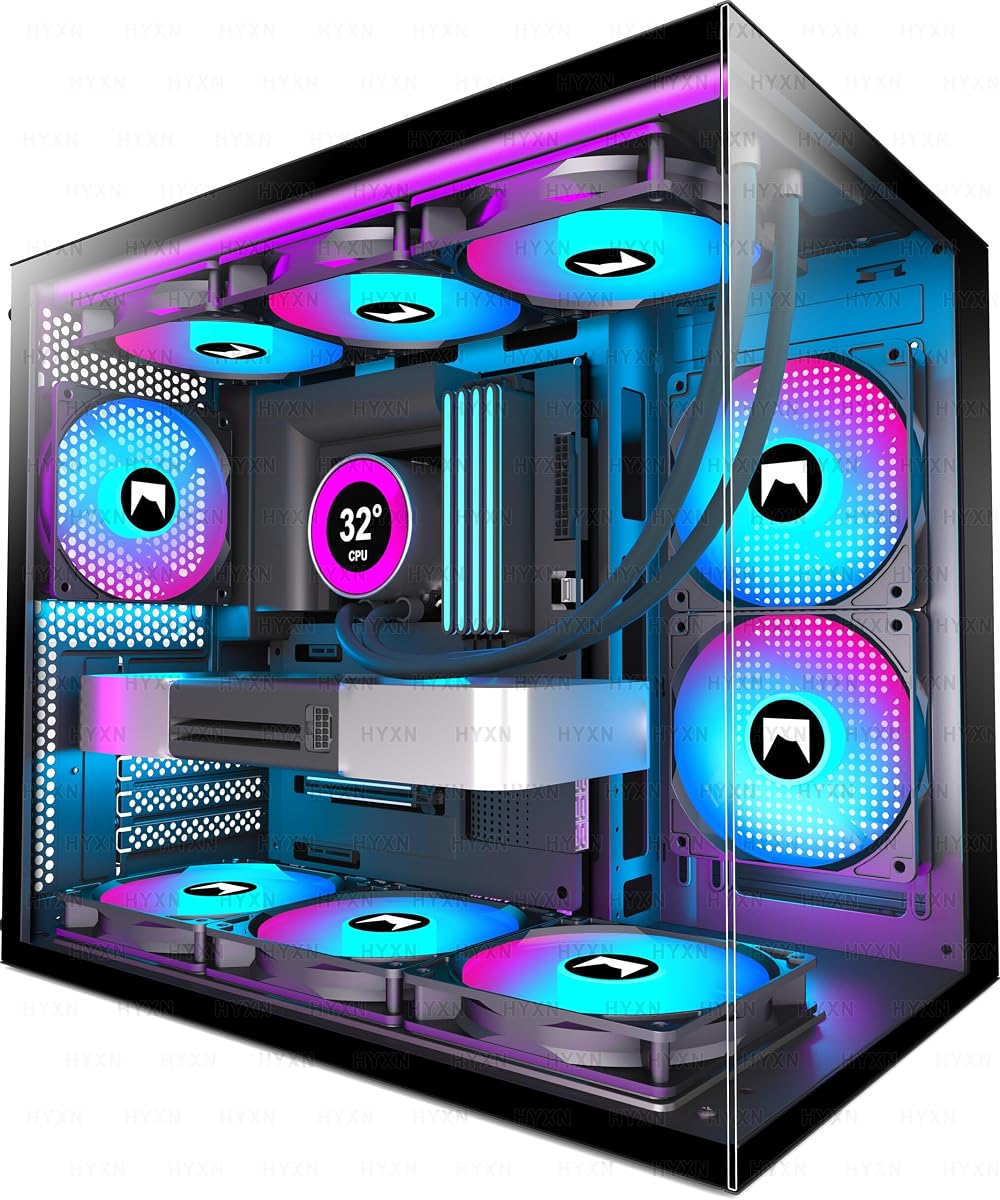
7. H3 HYXN ATX - Best Dual-Chamber Value Showcase

H3 HYXN ATX

H3 HYXN ATX

8.2/10★★★★☆

The H3 HYXN ATX case chases the dual-chamber look that usually costs more: hardware on display in one bay, power supply and drives tucked in another. Fully transparent tempered glass shows the build, while the A/B partition design aims to simplify cable management with built-in anchor points. For budget builders who want fish-tank vibes without leaving this price lane, it is one of the more ambitious shapes in the pack.

  • Dual-cavity ATX mid-tower with panoramic glass
  • 3 ARGB fans (including reverse blades) pre-installed
  • GPU to 400mm, PSU to 200mm, Type-C 3.2 front I/O
Check Price →
✓ Pros
  • Dual-chamber layout hides PSU and drives for cleaner showcase photos
  • Three ARGB fans included, with reverse fans for glass-facing intake aesthetics
  • Long GPU support up to 400mm suits many modern cards
  • Type-C 3.2 front port is faster-friendly for external SSDs
  • 360mm radiator support and back-mounted motherboard compatibility noted
✕ Cons
  • Brand familiarity and long-term support trail NZXT and Lian Li
  • Compact dual-cavity interiors can feel tight during first cable routing
  • Storage is limited to roughly one HDD and two SSD positions

Detailed review

Cooling starts with three ARGB fans, including reverse-blade units that look correct when mounted as intakes behind glass. Radiator support up to 360mm keeps liquid cooling on the table. Motherboard support covers ATX, Micro-ATX, and ITX, with notes about back-mounted board compatibility and a B-mode Micro-ATX dual-fan configuration—read your board manual if you use unusual layouts.

Clearance is generous on paper: GPUs up to 400mm and PSUs up to 200mm. Dimensions around 420 x 285 x 370mm keep the case compact relative to full towers while still hosting long cards. Front I/O with Type-C 3.2, USB 3.0, USB 2.0, and audio covers modern daily use better than USB2-heavy budget panels.

Tradeoffs show up in storage and brand ecosystem. One HDD and two SSD mounts may be enough for NVMe-centric builds but lean for archival disks. Fit and finish should be inspected on arrival—glass panels and dual-chamber frames punish rough shipping more than simple steel boxes. Fan hub documentation may be thinner than premium brands, so label cables as you go.

Choose HYXN H3 when showcase geometry is the point and you accept a less famous badge. Skip it if you prefer proven support channels or need dense drive bays. Thermally, dual chambers help when the secondary bay is ventilated and cables are not choking the primary GPU path—do not treat the glass aesthetic as a substitute for intake planning.

During assembly, mount the PSU and storage in the secondary cavity first, then build the motherboard side. That order prevents the common dual-chamber mistake of finishing the pretty side and discovering the PSU cables cannot reach.

Who it is for

Builders chasing panoramic dual-chamber aesthetics on a budget, especially with long GPUs and ARGB themes.

Setup notes

Confirm reverse versus forward fan orientation so lighting faces the glass correctly. Connect Type-C internal headers early—those cables are easy to forget behind the tray.

Check Price on Amazon →

We may earn a commission at no additional cost to you.

8. MOROVOL MATX V3 - Best Panoramic Micro-ATX Value

MOROVOL MATX V3

MOROVOL MATX V3

8.6/10★★★★☆

MOROVOL’s MATX V3 is the panoramic Micro-ATX answer for budget builders who want glass on more than one face without an ATX tower footprint. The 270° view shows motherboard, GPU, and any desk toys you stage inside, while the dual-chamber A/B layout parks the power supply and drives toward the rear for cleaner photos and somewhat independent airflow paths.

  • 270° panoramic glass Micro-ATX case
  • 3 pre-installed fans with A/B dual-chamber cooling
  • GPU to 320mm, PSU to 160mm, cooler to 158mm
Check Price →
✓ Pros
  • Panoramic glass makes small builds look premium on a desk
  • A/B division separates PSU and drives from the showcase chamber
  • Three fans included with support for larger multi-fan configurations
  • GPU length up to 320mm is workable for many Micro-ATX gaming cards
  • Magnetic top dust filter is easy to remove and clean
✕ Cons
  • Front I/O lacks Type-C—only USB 3.0 and USB 2.0
  • Compact panoramic cases need careful cable discipline
  • Cooling depends on keeping mesh vents unblocked around the PSU area

Detailed review

Three pre-installed fans cover basic cooling, and the case claims support for more ambitious multi-fan layouts up to a higher total count. That flexibility matters because panoramic glass can trap heat if intakes are weak. Mesh openings near the side panel fan position and PSU area are intentional—keep them clear of shelves and fabric.

Compatibility centers on Micro-ATX and Mini-ITX boards with GPUs up to 320mm, PSUs up to 160mm, and coolers up to 158mm. Storage options include combinations such as dual 2.5-inch plus dual 3.5-inch, or triple 2.5-inch plus one 3.5-inch, which is generous for a compact showcase. The top magnetic dust filter is a practical maintenance win.

I/O is simpler than several rivals: USB 3.0 and USB 2.0 without Type-C. If your phone and portable SSD both need USB-C, plan on a rear motherboard port or a cheap desk hub. Build difficulty is moderate—glass corners and dual chambers slow first-timers, but the end result looks more expensive than the category suggests.

Pick the V3 when desk presence and Micro-ATX efficiency matter together. Skip it for ATX boards or for builders who need Type-C on the front panel. Against the Okinos Aqua UNO, MOROVOL offers a different panoramic personality and dual-chamber split; Okinos counters with higher ratings, Type-C, and a clearer air-cooling-only philosophy.

Stage cables in the rear chamber before hanging the panoramic glass. Once the panels are on, small fixes become big chores. A tidy V3 build photographs well and still leaves room on the desk for a keyboard and a drink—the actual point of going Micro-ATX.

Who it is for

Micro-ATX gamers who want a showcase PC without surrendering half the desk to a full tower.

Thermal habits that help

Leave breathing room around mesh vents, clean the magnetic top filter monthly if your room is dusty, and avoid blocking side intakes with speakers shoved against the glass.

Versus Zalman CUBIX-G

V3 emphasizes panoramic dual-chamber presentation and longer GPU support; CUBIX-G is a more conventional mini tower with Type-C and slightly stricter length limits.

Check Price on Amazon →

We may earn a commission at no additional cost to you.

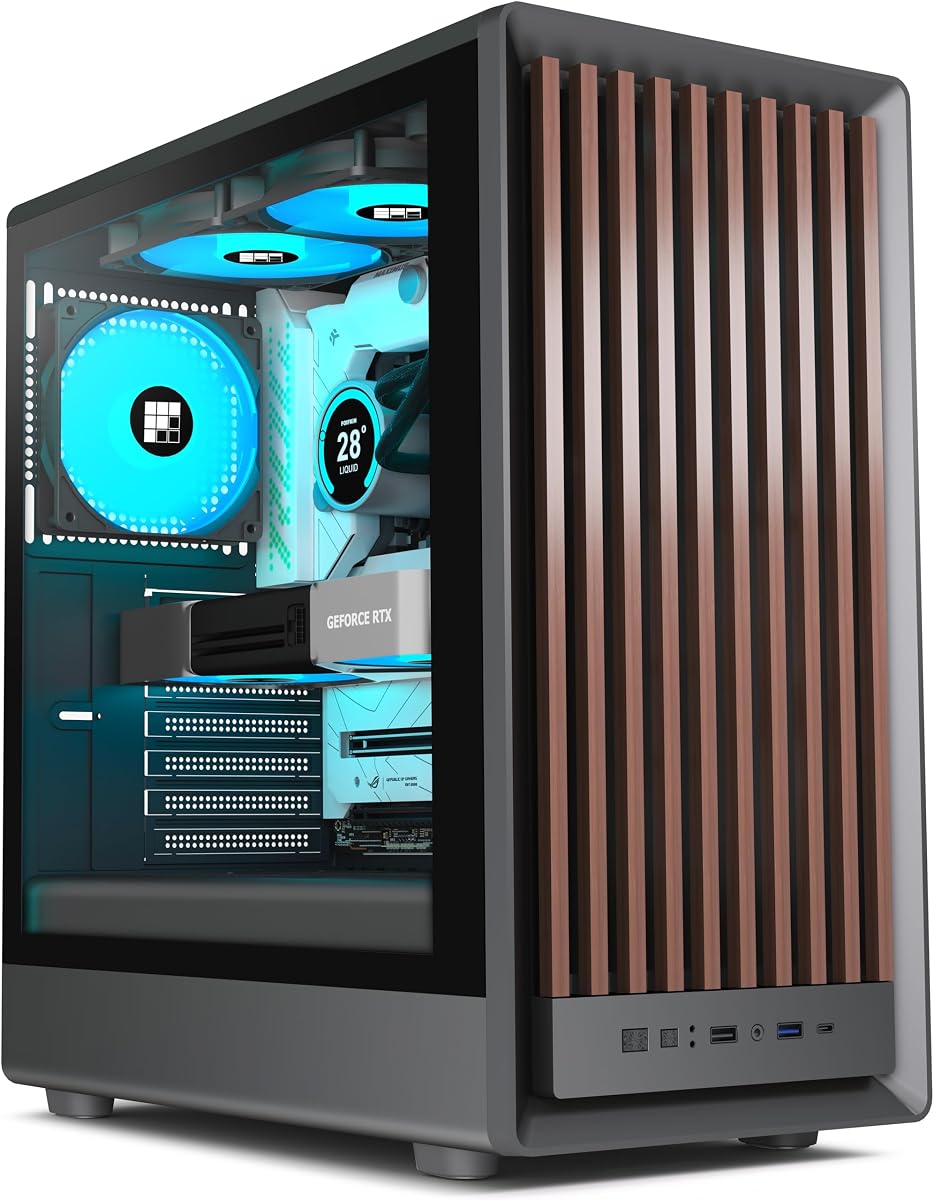
9. FOIFKIN M1 - Best Wood-Accent Mid-Tower

FOIFKIN M1

FOIFKIN M1

8.6/10★★★★☆

FOIFKIN’s M1 stands out in a sea of black mesh by putting a walnut front panel on an ATX mid-tower and backing it with four PWM ARGB fans. The wood element softens a gaming desk without forcing a full boutique furniture-case budget. Dimensions around 370 x 220 x 450mm keep it mid-tower practical rather than living-room furniture huge.

  • Walnut-front ATX mid-tower, ~370x220x450mm
  • 4x PWM ARGB fans pre-installed
  • Type-C I/O; mounts for up to eight 120mm fans
Check Price →
✓ Pros
  • Walnut front panel adds warmth most plastic mesh towers lack
  • Four PWM ARGB fans arrive ready for controlled lighting and speed
  • Snap-on glass side panel speeds tool-free access
  • Type-C plus USB 3.0/2.0 covers modern and legacy peripherals
  • Up to eight 120mm fan mounts for custom cooling later
✕ Cons
  • 240mm radiator support is more limited than 360mm-class rivals
  • Wood-and-metal hybrids need careful handling to avoid finish scuffs
  • Brand support experience varies—keep packaging until you verify the build

Detailed review

Cooling hardware starts strong with four pre-installed ARGB PWM fans and mounting points that can grow to eight 120mm fans across front, rear, top, and bottom. Radiator support is listed around 240mm, so plan AIOs accordingly rather than assuming a 360mm front fit. Snap-on glass helps during installation and cleaning without a screwdriver scavenger hunt.

Front I/O includes Type-C 3.0, USB 3.0, USB 2.0, audio, power, and reset—balanced for 2026 peripherals. PWM fans mean you can set curves in BIOS or software instead of living with fixed DC speeds. ARGB gives more lighting flexibility than MOROVOL’s fixed RGB 621, which matters if you already sync RAM and GPU accents.

Wood accents change ownership habits slightly. Avoid harsh cleaners on the walnut face, watch for humidity extremes if the case sits near a window, and handle the panel with two hands during cable work. The metal chassis still does the structural job; the wood is the personality layer.

Choose the M1 when you want a distinctive desk presence and four controllable ARGB fans included. Skip it if you need a 360mm radiator up front or prefer pure mesh maximalism like the H5 Flow. As a best-budget-pc-cases wildcard, it is the option people notice when they walk into the room.

Build tip: connect ARGB and PWM cables before installing a long GPU, because front-panel hubs are annoying to reach afterward. Set a warm white or soft amber lighting theme if you want the walnut to feel intentional rather than drowned in neon.

Who it is for

Builders decorating a shared living space, wood-and-black desk themes, and anyone tired of identical mesh rectangles.

Cooling boundaries

Lean on the four PWM fans and optional extras; treat 240mm as your liquid-cooling ceiling unless FOIFKIN documentation for your exact revision says otherwise.

Check Price on Amazon →

We may earn a commission at no additional cost to you.

10. Okinos Aqua UNO - Best Compact Showcase

Okinos Aqua UNO

Okinos Aqua UNO

9.8/10★★★★★

The Okinos Aqua UNO posts the highest rating in this pack and earns a top-pick slot by being honest about what it is: a Micro-ATX panoramic showcase designed exclusively for air cooling. It does not support radiator installation. That limitation scares liquid-cooling fans and liberates everyone else who wanted a simple, maintainable, good-looking small case without pretending a 360mm AIO would fit.

  • Micro-ATX panoramic case, air cooling only
  • 3x 120mm ARGB fans pre-installed
  • GPU to 309mm, cooler to 165mm, Type-C 5Gbps
Check Price →
✓ Pros
  • Outstanding rating paired with a clear air-cooling design brief
  • Three ARGB fans and quick-release panoramic glass feel premium in use
  • Type-C 5Gbps plus USB 3.0 and an LED control button on the front
  • Full-coverage dust filters on top, side, and bottom
  • Thoughtful cable clearances with included Velcro straps
✕ Cons
  • No radiator support—AIO fans need not apply
  • GPU length tops out around 309mm
  • Area above the PSU shroud does not take extra fans

Detailed review

Three 120mm ARGB fans come pre-installed for airflow and lighting immediately. Air coolers up to 165mm and GPUs up to 309mm cover a wide slice of mainstream Micro-ATX gaming parts. Quick-release panoramic glass with a tool-free stud-mount design reduces the usual panic of tempered glass screws rolling under the desk. Two-tone limited editions and standard colors let you match desk themes instead of defaulting to anonymous black.

Dust control is unusually thorough for the category, with removable filters on top, side, and bottom. Cable space is called out with roughly 32mm front and 24mm rear clearance plus Velcro straps and dedicated routing paths for CPU, GPU, 24-pin, fan, and I/O cables. Those details are why compact builds either look intentional or look like spaghetti—Okinos clearly designed for the former.

Front I/O with Type-C 5Gbps, USB 3.0, and an LED control button covers daily plug-in needs and lighting toggles without opening software. Because the zone above the PSU shroud cannot take more fans, respect the stock layout and invest in a capable air cooler rather than chasing fan count vanity. Thermals will reward clean routing and filter maintenance more than exotic mods.

Buy Aqua UNO when you want a highly rated, glass-forward Micro-ATX case and you are committed to air cooling. Skip it if an AIO is non-negotiable or your GPU exceeds roughly 309mm. Against MOROVOL V3 and Zalman CUBIX-G, Okinos feels the most “finished” in panel hardware and cable coaching, which matches the 4.9 community signal.

Live with a calm fan curve and a tasteful ARGB preset; the two-tone body already provides visual interest. Clean filters on a schedule, and the case stays a desk centerpiece instead of a dust aquarium. For budget builders who value polish over radiator brackets, this is the compact showcase to beat in 2026.

Who it is for

Air-cooled Micro-ATX builders who want panoramic glass, strong dust filtration, and modern Type-C front I/O without liquid-cooling complexity.

Hard compatibility rules

No radiators, GPU at or under 309mm, cooler at or under 165mm, and no extra fan above the PSU shroud. If those rules fit your parts, the case is a joy; if not, move on early.

Versus NZXT H5 Flow

H5 Flow is the compact ATX mesh workhorse with radiator headroom; Aqua UNO is the Micro-ATX glass showcase that rejects radiators and doubles down on air-cooling simplicity.

Check Price on Amazon →

We may earn a commission at no additional cost to you.

Best Budget PC Cases in 2026 for Cool Value Builds

How to Choose a Budget PC Case in 2026

Prioritize airflow and clearance over empty RGB promises

Budget cases win when mesh or perforated intake is real and GPU length is honest. A glowing interior cannot fix a solid plastic front that starves a modern graphics card. Check published GPU, cooler, and radiator numbers against your exact parts—marketing photos rarely show cable bend radius.

Included fans matter because buying three decent PWM fans can erase the savings of an ultra-cheap shell. Cases like the Lian Li V100, MOROVOL 621, FOIFKIN M1, and Okinos Aqua UNO reduce day-one accessory spend. Empty mesh shells like the DARKROCK EC2 only make sense if fans are already in your cart.

Match motherboard format to desk reality

ATX mid-towers remain the easiest path for upgrades and cable space. Micro-ATX and mini towers reclaim desk area but punish long GPUs and thick coolers. If your desk depth is limited, shortlist Q300L, CUBIX-G, MOROVOL V3, or Aqua UNO before you fall in love with a wide dual-chamber ATX showcase.

Decide your cooling philosophy early

Air cooling keeps ownership simple and pairs well with mesh cases. Liquid cooling demands radiator clearance—H5 Flow and several ATX towers support large front radiators, while Aqua UNO explicitly does not. Do not buy a no-radiator case hoping adapters will appear later.

PWM control is worth preferring when you care about night noise. Fixed lighting is fine for set-and-forget RGB. Addressable lighting is for synchronized themes. Be honest about which camp you are in before paying for hubs you will never open in software.

Front I/O and maintenance are daily features

Type-C on the front panel ages better than USB 2.0 arrays alone. Magnetic dust filters save thermals over a dusty year. Tool-less or quick-release glass reduces the chance you avoid cleaning because disassembly is miserable. Budget ownership is measured in filter rinses and cable reseats, not only in unboxing night.

Brand polish versus feature packing

Name-brand cases often ship better documentation, more refined cable kits, and clearer return paths. Value brands often ship more fans and glass for the money. Neither approach is wrong—pick based on whether you want turnkey calm (NZXT, Lian Li, Cooler Master, Zalman) or maximum visual features per dollar (MOROVOL, HYXN, FOIFKIN, DARKROCK, Okinos).

Frequently Asked Questions

01

What makes a PC case a good budget buy in 2026?

A good budget case combines real intake area, accurate clearance specs, and enough stock fans or mounting points to cool modern CPUs and GPUs without an emergency accessory order. Fancy paint matters less than mesh, GPU length, and cable space. The best value picks in this guide—especially the Lian Li V100 and NZXT H5 Flow—earn their place by reducing hidden follow-up costs while staying flexible for upgrades.

02

Should I buy a case with four fans included?

Yes, if you do not already own PWM fans and you want the PC to look and cool acceptably on night one. Four-fan bundles from Lian Li, MOROVOL, and FOIFKIN can be smarter than a bare case plus a separate fan kit. If you already have preferred fans, a mesh shell like the DARKROCK EC2 or the H5 Flow with two quality fans may be the cleaner path.

03

Is Micro-ATX better than ATX for budget builds?

Micro-ATX is better when desk space is scarce and your parts list already uses a Micro-ATX board. ATX is better when you want easier cable management, more cooler options, and simpler future upgrades. Neither format is inherently cheaper—board sales matter more—but cases like the Q300L, CUBIX-G, MOROVOL V3, and Aqua UNO exist specifically to make small boards feel intentional rather than compromised.

04

Do I need a radiator-compatible case?

Only if you plan to run an AIO liquid cooler. Many excellent budget builds stay on air coolers forever. The Okinos Aqua UNO is explicit about air cooling only, which is fine for that audience. If you want a 240mm or 360mm AIO now or later, prioritize cases such as the NZXT H5 Flow, DARKROCK EC2, or Lian Li V100 with matching radiator support.

05

How important is a mesh front panel?

Very important for high-wattage GPUs. Mesh and perforated fronts lower intake restriction compared with solid decorative faces. Nearly every strong thermal performer in this roundup uses mesh, perforation, or dual-chamber ventilation strategies. If you choose panoramic glass, make sure the non-glass faces still breathe and that stock fans are competent.

06

What GPU length should I look for?

Match the case maximum to your card’s specification and add a little margin. In this pack, clearance ranges from about 280mm on the Zalman CUBIX-G to 420mm on the Lian Li V100, with many options landing near 300–360mm. Long triple-fan cards belong in the roomier ATX towers; short dual-fan cards unlock the compact showcases.

07

Is tempered glass necessary on a budget case?

No. Glass is for display. Airflow mesh matters more for temperatures. That said, most shoppers enjoy seeing their GPU, and every case here except the most utilitarian layouts includes some transparent panel. If you want maximum discretion or lower breakage risk during moves, prioritize solid or mesh side options—but within this specific pack, glass is the norm.

08

Fixed RGB or ARGB—what should budget buyers pick?

Fixed RGB is simpler and still looks bright; MOROVOL’s 621 is the clear example. ARGB costs a bit more complexity for synchronized effects across fans and strips, as seen on Lian Li, FOIFKIN, HYXN, and Okinos. If you never open lighting software, fixed RGB is enough. If your RAM and motherboard already speak ARGB, matching fans feel more cohesive.

09

How do I keep a budget mesh case from getting dusty?

Use the magnetic or removable filters, rinse them regularly, and avoid setting the intake directly on carpet. Slightly positive pressure—more intake than exhaust—can reduce dust entry through panel gaps. Cases with filters on top, front, and bottom, such as the Okinos Aqua UNO, make the habit easier. Dust is inevitable; clogged filters are optional.

10

Which case is best for a first-time builder?

The Lian Li V100 and NZXT H5 Flow are the friendliest ATX starting points thanks to clearance, cable features, and clearer ecosystems. Cooler Master Q300L remains a solid teacher for compact Micro-ATX airflow, though space is tighter. Avoid starting with the most cramped panoramic dual-chamber option unless you enjoy meticulous cable work—the glass looks great after you learn, not always during the first attempt.

Conclusion

The best budget PC case in 2026 is the one that fits your board, feeds your GPU cool air, and does not force an immediate pile of accessory purchases you did not plan. In this pack, the Lian Li V100-ATX is the most complete all-rounder with four PWM ARGB fans and excellent clearance, the NZXT H5 Flow is the compact ATX airflow specialist, and the Okinos Aqua UNO is the standout Micro-ATX showcase for air-cooled builds.

If your priorities differ, the Cooler Master Q300L still makes sense for perforated small-form practicality, DARKROCK EC2 for a mesh canvas you finish yourself, MOROVOL and FOIFKIN for fan-heavy visual value, Zalman CUBIX-G for tiny desks, and HYXN H3 for dual-chamber ambition. Measure twice, respect radiator and length limits, and spend the money you save on case theatrics on the cooler and SSD instead.

Start from the top picks, confirm the checklist against your parts, and you will end up with a chassis that supports the PC you are building—not just the one in the product photo.