Expert Review & Guide

Best Budget CPU Coolers 2026 for Quiet Value Builds

Budget CPU coolers in 2026 are no longer a compromise you tolerate until you can afford an expensive all-in-one. Dual-tower air coolers with six or seven heat pipes, quiet PWM fans, and solid AM5 plus LGA 1700/1851 mounting kits now keep Ryzen 5/7 and mainstream Intel chips in healthy temperature ranges during gaming and productivity work—without the pump noise, tubing clutter, or long-term maintenance anxiety of liquid cooling. The trick is matching cooler height to your case, heat-pipe count to your chip’s boost behavior, and fan noise to how close you sit to the PC.

This guide sticks strictly to one product pack: ten coolers that span the classic Cooler Master Hyper 212 Black, Thermalright’s Peerless Assassin and Phantom Spirit dual towers, slim Assassin X single towers, ARGB and LCD Vision MAX variants, a value dual-tower ARGB unit, and Thermalright’s Aqua Elite 240 V3 AIO for builders who still want liquid on a budget. Ratings reflect Amazon feedback at research time. We never list dollar prices because cooler deals move constantly; compare thermals, clearance, and features first.

Jump to the three top picks if you want a clear starting shortlist for raw cooling value, a compact single-tower upgrade, or the best dual-tower air cooler in this pack. Use the comparison table to filter by height and heat pipes, then read each review for real fit notes—RAM clearance, AMD backplate requirements, ARGB headers, and when a slim tower or 240 mm AIO makes more sense than another Peerless Assassin clone.

Top Budget CPU Cooler Picks for Thermals, Size, and Value

Best Overall Budget Cooler

Thermalright Phantom Spirit 120SE CPU Air Cooler

★★★★★9.6/10
Thermalright Phantom Spirit 120SE CPU Air Cooler
  • Seven 6 mm AGHP 4.0 heat pipes and dual TL-C12B V2 PWM fans for high-boost chips
  • 154 mm dual-tower stack with RAM-friendly offset clears most ATX mid-tower builds
  • Black anodized finish and copper base deliver serious cooling without RGB complexity
Check Price →
Best Value Dual Tower

Thermalright Peerless Assassin 120 SE CPU Cooler

★★★★★9.4/10
Thermalright Peerless Assassin 120 SE CPU Cooler
  • Six AGHP heat pipes and twin TL-C12C 120 mm fans rated ≤25.6 dB(A)
  • 155 mm dual tower that replaces stock coolers on Ryzen and Intel gaming CPUs
  • Metal kits for AM4/AM5 and Intel 115x/1200/1700/1851 with room for many RAM kits
Check Price →

As an Amazon Associate we earn from qualifying purchases. We may earn a commission at no additional cost to you.

Budget CPU Cooler Comparison: Heat Pipes, Fans, and Fit

Compare height and tower style first, then heat-pipe count and fan speed. Specs skip prices so you can shortlist by clearance and cooling headroom before opening a product page.

#ProductSpecificationsScore
1
  • Single tower, 4 heat pipes, copper base
  • SickleFlow 120 Edge PWM, 690–2500 RPM
  • 152 mm tall; AM5 and LGA 1851/1700 kits
9.4
2
  • Dual tower, 6×6 mm AGHP heat pipes
  • Twin TL-C12C 120 mm PWM, ≤25.6 dB(A)
  • 125×135×155 mm; AM4/AM5, LGA 1700/1851
9.4
3
  • Slim single tower, 4×6 mm AGHP pipes
  • One TL-C12C 120 mm PWM, ≤25.6 dB(A)
  • 125×71×148 mm; light builds and tight cases
9.4
4
  • Dual tower, 6×6 mm copper heat pipes
  • Dual 120 mm ARGB PWM fans up to 2000 RPM
  • 125×137×157 mm; listed up to 265W TDP class
9.2
5
  • Dual tower PA120 SE with ARGB TL-C12C-S fans
  • Six AGHP pipes; ~1500 RPM, ≤25.6 dB(A)
  • 125×135×155 mm; AM4/AM5 and Intel 1700/1851
9.4
6
  • Slim tower, 4×6 mm pipes, copper base
  • TL-C12C-L V2 RGB PWM fan at 1550 RPM
  • 120×71×148 mm; S-FDB bearings, AM5 ready
9.2
7
  • 240 mm AIO with 4th-gen pump up to 2800 RPM
  • Dual TL-C12B-S V2 ARGB fans, ≤25.6 dB(A)
  • AM4/AM5 and Intel LGA 115x/1200/1700/1851
9.4
8
  • Dual tower, 6 heat pipes, nickel copper base
  • 5-inch IPS LCD top + dual 2150 RPM fans
  • 125×135×164 mm; TRCC software via USB header
9
9
  • Dual tower, 7×6 mm AGHP 4.0 heat pipes
  • Dual TL-C12B V2 1500 RPM PWM fans
  • 125×135×154 mm black anodized finish
9.6
10
  • White dual tower with 5-inch IPS LCD cover
  • Six heat pipes; twin 2150 RPM ARGB fans
  • 164 mm height; TRCC themes and system stats
9.6

1. Cooler Master Hyper 212 Black - Classic Single-Tower Upgrade

Cooler Master Hyper 212 Black CPU Air Cooler

Cooler Master Hyper 212 Black CPU Air Cooler

9.4/10★★★★★

The Cooler Master Hyper 212 Black remains the budget cooler many builders recognize by name, and that familiarity still matters when you want a predictable upgrade away from a stock AMD or Intel cooler. Four heat pipes and a copper base are aimed squarely at Ryzen 7 and Core i7 class chips in everyday gaming and creative workloads. You will not match the thermal headroom of a six- or seven-pipe dual tower, but you also avoid the wider dual-tower footprint that can fight tall RAM or a thick front GPU in smaller chassis.

  • Four heat pipes with copper base for R7/i7-class cooling
  • SickleFlow 120 Edge PWM fan, 690–2500 RPM
  • 152 mm height; redesigned AM5 and LGA 1851/1700 brackets
Check Price →
✓ Pros
  • Familiar, well-documented install path for first-time builders
  • 152 mm height fits a huge range of mid-tower cases
  • PWM SickleFlow fan covers quiet idle and higher load RPM
  • Thermal paste included so you are not hunting a separate tube
  • Black finish blends with most non-RGB budget builds
✕ Cons
  • Single tower with four pipes trails dual-tower Peerless/Phantom models on hot chips
  • Peak 2500 RPM can become audible under sustained all-core loads
  • Less headroom than seven-pipe coolers if you push aggressive PBO or overclocks

Detailed review

Cooler Master’s SickleFlow 120 Edge fan uses dynamic PWM from roughly 690 to 2500 RPM. That wide band is useful: the fan can stay quiet at desktop idle, then ramp when a compile, export, or long gaming session raises package power. If your motherboard fan curve is aggressive by default, spend five minutes in BIOS flattening the mid-range—most Hyper 212 complaints about noise are curve problems, not heatsink problems.

At 152 mm tall, the Hyper 212 Black is one of the more case-friendly options in this pack. Most ATX and micro-ATX mid-towers clear it without drama. Always check your case’s CPU cooler height limit and confirm front radiator mounts or cable routing will not steal those last few millimeters. The redesigned brackets simplify mounting on AM5 and Intel LGA 1851/1700, which is exactly where most new budget and mid-range builds land in 2026.

Installation remains one of the Hyper 212’s strengths. Brackets are metal, the paste is in the box, and the single-tower layout leaves more room to see what you are tightening than a dense dual tower. Seat the cooler with even pressure, wipe old paste thoroughly if you are upgrading, and confirm the fan blows toward the rear exhaust so heat leaves the chassis instead of recirculating around the VRM heatsinks.

Who should buy this: anyone replacing a loud stock cooler on a mid-range CPU, building a first PC, or prioritizing chassis compatibility over maximum all-core thermals. Who should skip it: owners of high-boost Ryzen 7/9 or unlocked Intel chips who game and create in warm rooms—those builds get more breathing room from the Phantom Spirit 120SE or Peerless Assassin 120 SE later in this list.

Against the Assassin X120 Refined SE, the Hyper 212 is a similar single-tower idea with a more mainstream brand ecosystem and a slightly taller profile. Against dual towers, it is the safer pick when your case clearance is uncertain or your RAM heat spreaders sit high. Treat it as a proven foundation cooler, not as the last word in budget thermals.

Who the Hyper 212 Black fits best

Choose this cooler when your CPU is a Ryzen 5 or mainstream Intel chip, your case clearance is only average, and you want a single 120 mm fan path that is easy to cable. It is also a smart spare cooler to keep for test benches because the mounting kits cover current AMD and Intel sockets without exotic hardware.

Setup tips for quiet Hyper 212 operation

Use a PWM header set to a custom curve that stays under ~40% until the CPU hits your preferred temperature threshold, then rises smoothly. Orient the fan for rear exhaust, leave at least one intake fan in the case, and re-seat if idle temperatures look oddly high—poor paste spread is still the most common first-install mistake.

Hyper 212 vs dual-tower budget coolers

Dual towers in this pack will usually run cooler on sustained loads. Stick with the Hyper 212 when width clearance, RAM height, or simplicity matters more than chasing the lowest possible boost temperatures.

Check Price on Amazon →

We may earn a commission at no additional cost to you.

2. Thermalright Peerless Assassin 120 SE - Best Value Dual

Thermalright Peerless Assassin 120 SE CPU Cooler

Thermalright Peerless Assassin 120 SE CPU Cooler

9.4/10★★★★★

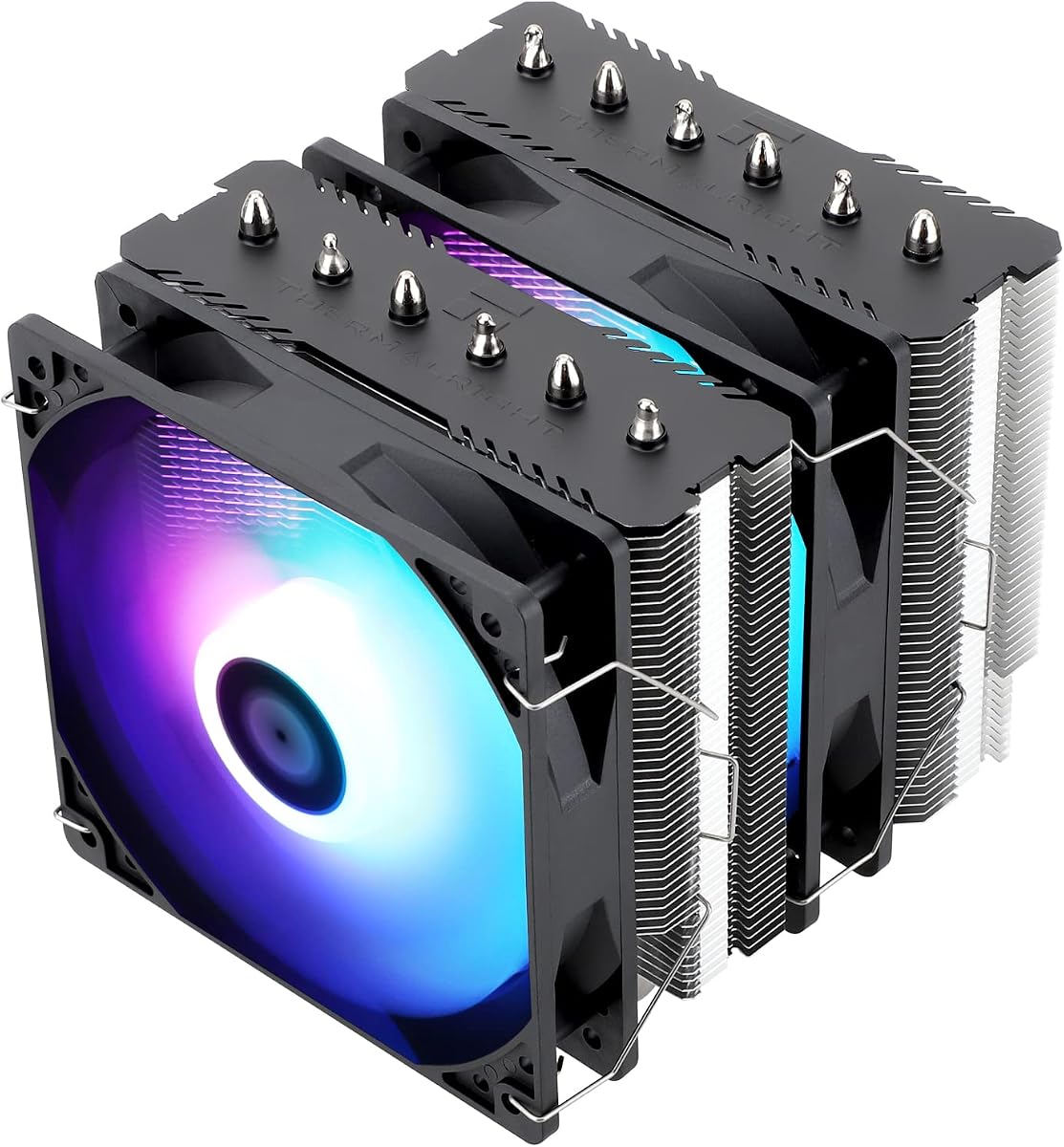
The Thermalright Peerless Assassin 120 SE is the budget dual-tower template other coolers in this pack keep echoing—and for good reason. Six 6 mm heat pipes with AGHP technology, a pure copper base, and twin TL-C12C 120 mm PWM fans give mid-range and upper mid-range CPUs far more thermal headroom than a four-pipe single tower. If your goal is quieter boost clocks and lower sustained temperatures without jumping to a premium Noctua or a thick AIO, this is usually the first cooler to shortlist.

  • Dual tower with six 6 mm AGHP heat pipes and copper base
  • Twin TL-C12C 120 mm PWM fans, ~1550 RPM, ≤25.6 dB(A)
  • 125×135×155 mm; AM4/AM5 and Intel 115x/1200/1700/1851
Check Price →
✓ Pros
  • Dual-tower cooling that outperforms most stock and slim single towers
  • Quiet TL-C12C fans with useful airflow at modest RPM
  • AGHP heat pipes help orientation-insensitive heat transfer
  • Strong socket coverage for current AMD and Intel platforms
  • Memory clearance designed into the dual-fan layout
✕ Cons
  • 155 mm height and dual-tower width need a real clearance check
  • AMD installs rely on the motherboard’s stock backplate
  • No ARGB if you want synchronized lighting out of the box

Detailed review

Thermalright lists dimensions at 125×135×155 mm. That 155 mm height clears many mid-towers but not every compact chassis, so measure before you buy. The dual fans are specified around 1550 RPM with up to roughly 66 CFM and noise at or below 25.6 dB(A). In a case with decent intake and exhaust, the cooler stays unobtrusive during gaming; only extended all-core stress will push the fans into a more noticeable range.

AGHP heat-pipe design is meant to reduce orientation penalties when the cooler is mounted in different case layouts. Combined with electroplated reflow soldering on the copper base, the heatsink contacts the IHS evenly when you tighten the mounting bars correctly. Paste quality still matters—use a thin, even layer and avoid over-tightening one corner of the bracket.

Socket support covers AMD AM4/AM5 and Intel 115x/1200/1700/1851 families with metal fasteners in the box. Important AMD note from the manufacturer: you need the motherboard’s original backplate; it is not included with the cooler. Confirm that backplate is present before you strip an old cooler, especially on used boards.

Compared with the Phantom Spirit 120SE, the Peerless Assassin 120 SE usually trails slightly on the hottest chips because it has six heat pipes instead of seven, but the gap is often small enough that case fit, availability, and whether you want a black Phantom finish matter more. Compared with the ARGB Peerless Assassin, this non-lighted SE version is the pick when you care about thermals and silence more than glow.

Buy the Peerless Assassin 120 SE for Ryzen 5/7 gaming builds, Intel mid-range CPUs, and quiet office machines that still spike under video calls plus browser tabs. Skip it only if your case is too short, your RAM is unusually tall and wide, or you specifically want an LCD showpiece like the Vision MAX models.

Ideal builds for the Peerless Assassin 120 SE

Pair it with a mid-tower that lists at least 160 mm cooler clearance, two to three case fans for airflow, and a CPU that boosts hard but is not a top-bin extreme overclocking chip. It is an excellent stock-cooler replacement that still leaves budget for a better GPU or SSD.

RAM and motherboard clearance notes

Thermalright designs the fan placement to leave room for memory chips, but oversized RGB DIMMs can still interfere. Install the rear tower fan first if needed, test-fit RAM with the front fan removed, then decide whether a low-profile kit or a single-fan temporary setup is required.

Peerless Assassin vs Phantom Spirit

Choose Peerless Assassin when value and proven dual-tower performance are enough. Step up to Phantom Spirit 120SE when you want the seventh heat pipe and blacked-out finish as your default budget performance cooler.

Check Price on Amazon →

We may earn a commission at no additional cost to you.

3. Thermalright Assassin X120 Refined SE - Best Slim Budget

Thermalright Assassin X120 Refined SE CPU Air Cooler

Thermalright Assassin X120 Refined SE CPU Air Cooler

9.4/10★★★★★

The Thermalright Assassin X120 Refined SE is the slim answer when a Peerless Assassin will not fit or when your CPU simply does not need dual towers. At roughly 125×71×148 mm and about 1.42 lb, it is a compact aluminum single tower with four 6 mm AGHP heat pipes and one TL-C12C 120 mm PWM fan. That combination is perfect for office PCs, HTPCs, and mid-range gaming chips in cases where RAM clearance or side-panel height is the real bottleneck.

  • Slim single tower: 125×71×148 mm aluminum heatsink
  • Four 6 mm AGHP heat pipes with TL-C12C PWM fan
  • AM4/AM5 and Intel 115x/1200/1700/1851 mounting kits
Check Price →
✓ Pros
  • Narrow 71 mm width avoids most tall RAM conflicts
  • 148 mm height suits many medium cases
  • Quiet TL-C12C fan with strong claimed CFM for the size
  • Lighter than dual-tower coolers for easier handling
  • AGHP pipes improve heat transfer across orientations
✕ Cons
  • Four pipes and one fan cannot match dual-tower sustained cooling
  • Not ideal for high-TDP chips under prolonged all-core loads
  • Aluminum cover looks clean but adds little thermal magic on its own

Detailed review

Fan specs mirror other Thermalright value coolers: around 1550 RPM, up to about 66 CFM, and noise at or under 25.6 dB(A). Because there is only one fan, the sound signature stays simpler than a push-pull dual tower. Keep case airflow honest—one rear exhaust and at least one front intake—so the single fan is not trying to cool a stagnant chamber.

AGHP technology again addresses inverse-gravity effects in vertical or horizontal mounting. S-FDB bearings are rated for long service life, which matters on a budget cooler you may leave installed for years. The aluminum heatsink cover gives the top a finished look through a tempered-glass side panel without turning the cooler into an RGB project.

Compatibility spans AMD AM4/AM5 and Intel sockets through LGA 1700 and 1851 with the included metal fasteners. Always match the correct bracket plate to your socket and follow the torque order in the instructions. The 148 mm height is friendly to medium cases, but still verify your case’s official cooler clearance.

This cooler sits beside the Assassin X 120R SE V2 in the pack. The Refined SE is the cleaner non-RGB-focused sibling in spirit; the V2 adds a self-luminous RGB fan and small detail updates. Either beats stock coolers on noise and temperatures for modest CPUs. Neither replaces a Phantom Spirit when you run a hot Ryzen 7 under long renders.

Pick the Assassin X120 Refined SE when you want a quiet, narrow upgrade that leaves DIMM slots free and keeps the build simple. Skip it if your CPU regularly hits high package power for hours—step up to the Peerless Assassin 120 SE or Phantom Spirit 120SE instead.

Best use cases for a slim Assassin X

ITX-adjacent mid-towers, builds with tall RGB RAM, and workstations that spend most of the day near idle benefit most. It is also a good cooler for secondary PCs where dual-tower mass is unnecessary.

Installation and paste guidance

Mount the backplate or use the AMD stock backplate as required, apply a pea-sized amount of quality paste, and seat the tower so the fan exhausts toward the rear. Confirm the fan cable reaches a CPU_FAN or AIO_PUMP header set to PWM mode.

Check Price on Amazon →

We may earn a commission at no additional cost to you.

4. Dual-Tower ARGB CPU Cooler - Budget Dual Tower with

CPU Cooler

CPU Cooler

9.2/10★★★★★

This dual-tower ARGB cooler targets builders who want Peerless-class hardware vibes—six 6 mm copper heat pipes, a copper base, twin 120 mm fans—plus lighting, without committing to a named Thermalright SKU. The listing markets up to a 265W TDP-class cooling capacity. Treat TDP marketing as a ceiling estimate, not a guarantee for every case and ambient temperature, but the dual-tower layout is still a meaningful step above slim four-pipe coolers.

  • Dual-tower aluminum sink with six copper heat pipes
  • Twin 120 mm ARGB PWM fans up to 2000 RPM, ~74.9 CFM
  • 125×137×157 mm; AM4/AM5 and Intel 115x/1200/1700/1851
Check Price →
✓ Pros
  • Six copper pipes and dual fans for strong budget thermals
  • ARGB fans with many lighting modes and motherboard sync
  • Higher 2000 RPM ceiling when you need extra airflow
  • Metal fasteners for both AMD and Intel platforms
  • Listed for high TDP-class cooling headroom on paper
✕ Cons
  • Brand recognition and long-term support trail Thermalright’s catalog
  • 2000 RPM fans can get louder than 1500 RPM Peerless/Phantom fans
  • 157 mm height is taller than several competitors—measure carefully

Detailed review

Fan specs are more aggressive than many Thermalright SE fans: up to 2000 RPM ±10%, about 74.9 CFM max, and noise up to roughly 27.8 dB(A). That means stronger peak cooling and potentially more audible ramps unless you tune PWM curves. If you like ARGB but prefer quieter stock RPM limits, compare the Peerless Assassin 120 SE ARGB, which caps nearer 1500 RPM with a lower claimed noise figure.

Physical size is 125×137×157 mm. The extra height versus a 154–155 mm Thermalright dual tower matters in short cases and in chassis where the side panel or top PSU shroud sits close to the socket. Metal fasteners cover Intel 115x/1200/1700/1851-class sockets and AMD AM4/AM5. As always, dry-fit the mounting bars before applying paste.

ARGB integration is the personality play. Treated fan blades are meant to diffuse light evenly across up to sixteen modes, and a motherboard ARGB header lets you sync the cooler with the rest of the build. Plan cable routing early—dual fans plus ARGB wires can look messy if you leave them floating above the motherboard tray.

In a value ranking, this cooler makes sense when lighting is a must-have and you still want dual-tower mass. The Phantom Spirit 120SE will usually be the safer performance pick without RGB complexity; the Peerless Assassin SE ARGB is the safer brand-familiar ARGB pick. This unit fills the gap when those SKUs are unavailable or you specifically want the higher RPM fans.

Buy it for tempered-glass gaming PCs that show off the CPU area and run mid-to-upper mid-range chips. Skip it if you build a silent office machine or if your case cooler limit is under 160 mm.

ARGB and fan-curve tuning

Connect PWM to CPU_FAN and ARGB to a 5V header. Create a quiet curve that only uses the upper RPM band when temperatures justify it. Sync lighting in your motherboard software so the cooler does not fight other devices with clashing effects.

When to choose this over Thermalright SE models

Prefer this listing if you want brighter ARGB and a higher fan-speed ceiling. Prefer Thermalright Peerless/Phantom models if you value a longer market track record and slightly calmer stock fan profiles.

Clearance checklist before ordering

Confirm case cooler height ≥160 mm, check first DIMM slot against the front fan, and ensure your GPU’s backplate or PCIe power cables will not collide with the lower fin stack in compact layouts.

Check Price on Amazon →

We may earn a commission at no additional cost to you.

5. Thermalright Peerless Assassin 120 SE ARGB - Best ARGB Dual

Thermalright Peerless Assassin 120 SE ARGB CPU Air Cooler

Thermalright Peerless Assassin 120 SE ARGB CPU Air Cooler

9.4/10★★★★★

The Peerless Assassin 120 SE ARGB is the lighted twin of the standard SE: same dual-tower aluminum stack, six AGHP heat pipes, copper base, and roughly 125×135×155 mm footprint, with TL-C12C-S ARGB fans instead of plain black ones. Thermalright’s TDP guidance in the roughly 120–245W range positions it as a serious cooler for gaming CPUs, not a decorative toy fan.

  • PA120 SE dual tower with six AGHP heat pipes
  • Dual TL-C12C-S ARGB PWM fans ~1500 RPM, ≤25.6 dB(A)
  • 125×135×155 mm; TDP guidance roughly 120–245W class
Check Price →
✓ Pros
  • Same dual-tower cooling recipe as the non-RGB Peerless Assassin
  • ARGB fans for glass-panel builds without jumping to LCD coolers
  • Quiet fan profile relative to 2000 RPM budget towers
  • Broad AMD and Intel socket support with metal hardware
  • Memory-friendly fan spacing for many mainstream kits
✕ Cons
  • ARGB adds cables and a motherboard header requirement
  • Still a 155 mm dual tower—compact cases may not fit
  • LCD Vision MAX models offer more showpiece flair if that is the goal

Detailed review

Fan speed sits near 1500 RPM ±10% with airflow around 66 CFM and noise at or below 25.6 dB(A). That calmer ceiling is why many builders prefer this ARGB SKU over generic dual towers that spin to 2000 RPM. You still get synchronized color effects through a 5V ARGB header, but everyday noise stays closer to the non-RGB Peerless Assassin.

At about 2.1 lb, the cooler is hefty enough that careful mounting matters. Support the motherboard when flipping a case, tighten mounting screws in a cross pattern, and confirm the AMD stock backplate is installed before you hang the towers. Intel kits are included for 115x/1200/1700/1851-class sockets.

Visually, the aluminum heatsink cover and dual ARGB fans look intentional behind tempered glass without the USB cable and software overhead of the Vision MAX LCD coolers. If your build already has ARGB strips and fans, this cooler joins the party. If your motherboard lacks a free 5V header, budget a splitter or controller, or buy the non-RGB SE instead.

Thermally, expect behavior in line with the standard Peerless Assassin 120 SE when fan curves are matched. Lighting does not cool silicon; heatsink mass and fan airflow do. The ARGB tax is about aesthetics and cabling, not a free performance upgrade.

Choose this model for a value dual tower in a show build. Skip it if you want maximum cooling per complexity—then the Phantom Spirit 120SE—or if you want a screen on top of the cooler—then the Vision MAX black or white variants.

ARGB wiring without cable chaos

Route both fan PWM cables to a splitter on CPU_FAN, send ARGB to a single 5V header or hub, and hide excess length behind the motherboard tray. Label cables before you close the side panel so future upgrades are less painful.

Who should pick ARGB SE over Vision MAX

Pick ARGB SE when you want Peerless thermals and soft lighting without dedicating a USB 9-pin header or installing TRCC software for an LCD. Vision MAX is for builders who want live stats and custom themes on a 5-inch panel.

Check Price on Amazon →

We may earn a commission at no additional cost to you.

6. Thermalright Assassin X 120R SE V2 - Slim Tower with

Thermalright Assassin X 120R SE V2 CPU Cooler

Thermalright Assassin X 120R SE V2 CPU Cooler

9.2/10★★★★★

The Assassin X 120R SE V2 refreshes Thermalright’s slim-tower formula with a TL-C12C-L V2 RGB PWM fan, S-FDB bearings, and the same practical 148 mm height class as the Refined SE. Four 6 mm heat pipes and a pure copper base handle everyday Ryzen 5 and mainstream Intel chips while the narrow 71 mm-class width stays out of the way of chunky memory heat spreaders.

  • AX120R SE V2 slim tower, 120×71×148 mm
  • Four heat pipes, copper base, TL-C12C-L V2 RGB fan
  • S-FDB bearings; AM4/AM5 and Intel 115x/1200/1700/1851
Check Price →
✓ Pros
  • Updated V2 fan with S-FDB bearings for smoother long-term running
  • Slim width keeps tall RAM and first PCIe slots happier
  • Self-luminous RGB without a complex dual-tower cable nest
  • 148 mm height works in many medium cases
  • Solid socket coverage for current AMD and Intel boards
✕ Cons
  • Still a four-pipe single fan cooler—limited on hot CPUs
  • RGB is simpler than full motherboard-synced ARGB ecosystems on some boards
  • Dual-tower SE models remain better for high boost sustained loads

Detailed review

Fan performance targets the familiar ~1550 RPM, ~66 CFM, and ≤25.6 dB(A) envelope. S-FDB bearings are called out specifically to reduce blade shake and keep noise down as the cooler ages. For a budget RGB single tower, that reliability focus matters more than flashy marketing CFM numbers.

Thermalright notes that the self-luminous fan’s power and lighting share a common interface—plug it in and it lights—which simplifies cabling versus separate ARGB leads on some coolers. Check your motherboard manual if you expected full 5V ARGB sync; implementation details can differ from addressable hubs on other products.

Dimensions around 120×71×148 mm make this a medium-case specialist. It will not solve a short ITX sandwich with a 160 mm limit the way a low-profile cooler would, but it is far easier to place than a 155 mm dual tower. Install with the included Intel or AMD hardware and keep the fan exhausting toward the rear.

Stack it against the Assassin X120 Refined SE: choose V2 when you want the RGB fan update and bearing refinements; choose Refined SE when you want the simplest quiet black-leaning single tower. Stack it against Peerless Assassin: the dual tower wins on thermals whenever clearance allows.

This is a smart cooler for streaming PCs, school builds, and quiet living-room machines. It is the wrong cooler for a fully unlocked high-core CPU that renders for hours—those builds deserve the Phantom Spirit or Peerless Assassin dual towers.

V2 updates that matter day to day

The bearing and fan revisions are about longevity and smoother acoustics more than a night-and-day thermal leap. If you already own a healthy Assassin X, upgrading solely for V2 is optional; if you are buying new, V2 is the fresher slim SKU in this pack.

Case and RAM pairing ideas

Pair with mid-towers that have average cooler clearance and with RGB RAM kits that would collide with a dual-tower front fan. Leave a clear rear exhaust path so the single 120 mm fan can push heat out efficiently.

Versus Hyper 212 Black

Both are single-tower four-pipe ideas. Hyper 212 brings Cooler Master’s mainstream install docs and a wider RPM fan; Assassin X V2 brings a slimmer Thermalright stack and RGB flair. Fit and aesthetics usually decide the winner.

Check Price on Amazon →

We may earn a commission at no additional cost to you.

7. Thermalright Aqua Elite 240 V3 - Best Budget 240mm

Thermalright Aqua Elite 240 V3 Water Cooling CPU Cooler

Thermalright Aqua Elite 240 V3 Water Cooling CPU Cooler

9.4/10★★★★★

The Thermalright Aqua Elite 240 V3 is the liquid option in this budget pack: a 240 mm aluminum radiator, protective mesh tubing, dual ARGB 120 mm fans, and a fourth-generation octagonal pump head with an ARGB halo under the logo. Choose it when you want a clean socket area, RGB coordination, and radiator mounting flexibility more than you want the zero-maintenance simplicity of a dual-tower air cooler.

  • 240 mm AIO with 4th-gen pump up to 2800 RPM ±10%
  • Dual TL-C12B-S V2 ARGB fans, ≤25.6 dB(A), ~66 CFM
  • AM4/AM5 and Intel LGA 115x/1200/1700/1851 support
Check Price →
✓ Pros
  • Clears the CPU socket area for tall RAM and clean cable views
  • ARGB pump halo and fans sync with 5V motherboard headers
  • PWM pump and fans for temperature-based noise control
  • 240 mm radiator fits many mid-towers that cannot take 360 mm
  • Strong socket coverage for current AMD and Intel platforms
✕ Cons
  • AIO adds pump noise risk and long-term failure modes air coolers avoid
  • Needs a free 240 mm radiator mount with decent case airflow
  • Top dual-tower air coolers can match or beat it depending on the chip and case

Detailed review

The pump spins up to about 2800 RPM ±10% with a claimed life up to 40,000 hours. Fans are TL-C12B-S V2 units at roughly 1500 RPM, ≤25.6 dB(A), and about 66 CFM, with 4-pin PWM and 5V/3-pin ARGB connectors. That combination can feel quieter at the CPU than a dual tower sitting next to your ear—while the radiator fans become the noise source at the top or front of the case.

Mounting support includes AMD AM4/AM5 and Intel LGA 115x/1200/1700/1851 with platform-specific hardware. Prefer radiator placement that keeps tubing from kinking and, when possible, puts the pump below the top of the radiator loop to reduce air sitting in the pump. Follow Thermalright’s install guide rather than improvising bracket orientation.

Budget AIOs earn their keep in cases that fit a 240 mm radiator easily but choke on 155 mm dual towers, or in builds where RAM clearance and motherboard aesthetics matter. They lose when you want the fewest failure points: air coolers do not have pumps. If your case has weak front intake, a 240 mm AIO can also underperform a well-ventilated Phantom Spirit.

Lighting sync uses motherboard 5V ARGB for both fans and the pump head, with soft multi-color effects and series linking to reduce header shortages. Plan your ARGB topology before you mount the radiator so you are not fishing cables through a filled case later.

Buy the Aqua Elite 240 V3 if you specifically want liquid on a budget and your case has a clear 240 mm mount. Prefer Phantom Spirit or Peerless Assassin if you want maximum cooling simplicity and your case clears a dual tower.

AIO versus dual-tower air in budget builds

Air wins for long-term simplicity and often equal thermals on mainstream chips. AIO wins for socket clearance, themed glass builds, and chassis that have radiator space but tight CPU cooler height limits.

Radiator mounting tips that prevent weak cooling

Use the fans as intake or exhaust consistently with the rest of the case, avoid sandwiching the radiator against a dusty mesh without cleaning access, and set pump power to a PWM header with a sane minimum duty cycle so the pump never stalls.

Who should skip a 240 mm AIO

Skip it for silent office PCs where any pump whine would annoy you, for ultra-small cases without 240 mm mounts, and for builders who prefer swapping a fan later instead of replacing an entire loop.

Check Price on Amazon →

We may earn a commission at no additional cost to you.

8. Thermalright Peerless Assassin 120 Vision MAX - Best LCD Showpiece

Thermalright Peerless Assassin 120 Vision MAX ARGB Black CPU Air Cooler

Thermalright Peerless Assassin 120 Vision MAX ARGB Black CPU Air Cooler

9/10★★★★★

The Peerless Assassin 120 Vision MAX ARGB Black turns Thermalright’s value dual tower into a dashboard. A magnetic top cover houses a 5-inch IPS LCD at 480×854, while six pure copper heat pipes and a nickel-plated micro-engraved copper base handle the actual cooling. Dual 120 mm fans spin up to about 2150 RPM with roughly 69 CFM and noise near 27 dB(A)—faster and a bit louder than classic SE fans when pushed.

  • Dual tower with six heat pipes and nickel-plated copper base
  • 5-inch 480×854 IPS LCD magnetic top cover
  • Dual 2150 RPM ARGB fans; 125×135×164 mm overall
Check Price →
✓ Pros
  • Live system stats and custom themes on a large IPS panel
  • Dual-tower cooling with AGHP Gen 5.0 heat pipes
  • 2150 RPM fans give strong peak airflow when needed
  • Matte black towers suit dark themed cases
  • TRCC software supports static, dynamic, and video backgrounds
✕ Cons
  • 164 mm height needs a roomier case than standard PA120 SE
  • Requires a motherboard USB 9-pin header for the display
  • More complexity than a plain Phantom Spirit for pure thermals

Detailed review

Overall size is 125×135×164 mm. That extra height versus the 155 mm Peerless Assassin SE is the first filter: many mid-towers clear 160–165 mm, but not all. The offset dual-tower layout still aims to respect tall RAM and GPU clearance, yet you should dry-fit before committing paste and cable ties.

TRCC software is central to the experience. After connecting power and data through the motherboard’s USB 9-pin header, you can monitor temperatures and other system parameters, apply custom themes, or play video backgrounds. Install software only after cables are seated; a blank screen is often a USB connection issue, not a dead panel.

AGHP Gen 5.0 heat pipes target orientation-related performance loss, and S-FDB V2 fan bearings support longer service life under the higher RPM ceiling. In practice, tune a quiet curve so the fans are not parked at 2150 RPM during light desktop use—the screen is the showpiece; the fans should only shout when the CPU earns it.

As a budget-pack pick, Vision MAX Black is less about absolute dollars-per-degree than about building a PC you enjoy looking at. Pure thermal shoppers can save complexity with the Phantom Spirit 120SE. Theme builders who want black hardware and a live CPU widget will prefer this over plain ARGB SE fans.

Note the Amazon rating sits a bit below some siblings; LCD coolers accumulate more setup variables—USB headers, software, magnetic covers—that can frustrate rushed installs. Follow the cable map carefully and the dual-tower core still behaves like a serious Peerless Assassin.

USB header and software checklist

Reserve a USB 9-pin connector, avoid unreliable front-panel hubs when possible, download TRCC from Thermalright’s official source, and confirm the magnetic display seats fully so it does not vibrate against the fin stack.

Who the black Vision MAX is for

Dark-themed gaming desks, content creators who glance at CPU temps during exports, and builders who want LCD flair without moving to a full AIO screen pump. Skip it if you hate companion apps or lack a free USB header.

Black vs white Vision MAX

Cooling hardware is in the same family; choose black for stealth PCs and white for snow-white or silver aesthetic builds. Match the cooler finish to your case panels and RAM for a cohesive look.

Check Price on Amazon →

We may earn a commission at no additional cost to you.

9. Thermalright Phantom Spirit 120SE - Best Overall Budget Cooler

Thermalright Phantom Spirit 120SE CPU Air Cooler

Thermalright Phantom Spirit 120SE CPU Air Cooler

9.6/10★★★★★

If this pack has a default recommendation for serious budget cooling, it is the Thermalright Phantom Spirit 120SE. Seven 6 mm heat pipes with AGHP 4.0, a finely carved pure copper base, dual TL-C12B V2 120 mm PWM fans, and a black anodized dual-tower body give gaming and creator CPUs the thermal ceiling most people actually need—without pumps, USB screens, or decorative overhead.

  • Seven 6 mm AGHP 4.0 heat pipes, copper base
  • Dual TL-C12B V2 PWM fans ~1500 RPM, ≤25.6 dB(A)
  • 125×135×154 mm black anodized dual-tower design
Check Price →
✓ Pros
  • Seven heat pipes lead this pack for air-cooling headroom
  • Excellent user rating reflecting real-world satisfaction
  • Quiet dual fans with strong everyday airflow
  • RAM-avoiding offset and 154 mm height fit many ATX cases
  • Black frosted finish looks premium without RGB cables
✕ Cons
  • No ARGB if your build theme demands lighted fans
  • Dual-tower width still conflicts with some oversized RAM kits
  • Overkill for very low-power office CPUs that a slim Assassin X could cool

Detailed review

Dimensions of 125×135×154 mm place it a hair under the Peerless Assassin’s 155 mm height while adding a seventh heat pipe. Fans run near 1500 RPM with about 66 CFM and noise at or below 25.6 dB(A). S-FDB bearings and industrial-grade fan materials are part of Thermalright’s longevity pitch; in day-to-day use, the cooler stays calm until you hammer all cores.

The frosted black top and full aluminum fin stack look intentional in glass cases even without RGB. That makes Phantom Spirit ideal for stealth builds, professional offices that still game after hours, and anyone tired of ARGB hubs. If you later want color, you can always swap aftermarket fans—but most owners leave the stock pair alone.

Socket support covers Intel LGA 1851/1700/115x/1200 and AMD AM4/AM5 with the appropriate plates and fasteners. Installation is standard dual-tower procedure: prepare the backplate, apply paste, seat the towers evenly, then mount both fans with the airflow arrow pointing toward rear exhaust. Confirm RAM clearance before you lock the front fan permanently.

Against Peerless Assassin 120 SE, Phantom Spirit is the performance-leaning sibling. Against Vision MAX, it is the simpler, often cooler-running choice because you are not spending clearance and attention on an LCD stack. Against the Hyper 212, it is the upgrade that finally makes high boost feel comfortable in warm rooms.

Buy the Phantom Spirit 120SE for Ryzen 7 gaming PCs, Intel mid-high chips, and any budget build where temperatures and noise outrank lighting. Skip it only for tiny cases, ultra-low-power CPUs, or themed white/LCD builds better served by other SKUs in this list.

Why seven heat pipes matter on a budget

Extra pipes spread heat into more fin area, which helps when a CPU sustains high package power. You may not notice the difference in short game menus, but long gaming sessions, compiling, and livestream encoding are where the seventh pipe earns its keep.

Quiet tuning recommendations

Start with a motherboard PWM curve that holds low RPM until your preferred temperature, then rises linearly. Ensure case intake is not starved; a great CPU cooler cannot hide a sealed front panel with zero airflow.

Phantom Spirit vs Aqua Elite 240 V3

Pick Phantom Spirit for fewer failure points and excellent air thermals. Pick the 240 mm AIO when radiator mounting and a clear motherboard view matter more than air-cooler simplicity.

Check Price on Amazon →

We may earn a commission at no additional cost to you.

10. Thermalright Peerless Assassin 120 Vision MAX - Best White LCD

Thermalright Peerless Assassin 120 Vision MAX ARGB White CPU Air Cooler

Thermalright Peerless Assassin 120 Vision MAX ARGB White CPU Air Cooler

9.6/10★★★★★

The white Peerless Assassin 120 Vision MAX ARGB is the aesthetic twin of the black Vision MAX: dual towers, six heat pipes, nickel-plated copper base, magnetic 5-inch IPS LCD at 480×854, and twin ARGB fans rated around 2150 RPM with about 69 CFM and ≤27 dB(A). It exists for builders who already committed to a white or silver case and refuse to drop a black heatsink into the middle of that theme.

  • White dual-tower Vision MAX with 5-inch IPS LCD
  • Six copper heat pipes; dual 2150 RPM ARGB fans
  • 125×135×164 mm; AM4/AM5 and Intel 1851/1700/115x
Check Price →
✓ Pros
  • High user rating with the same LCD dual-tower feature set as black
  • White finish matches snow and silver themed cases
  • Customizable 480×854 display via TRCC software
  • Strong dual-fan cooling with AGHP heat-pipe tech
  • Full AMD and Intel mounting kits included for current sockets
✕ Cons
  • 164 mm height and USB dependency match the black Vision MAX caveats
  • White parts show dust faster than matte black towers
  • Overkill if you never plan to use the screen features

Detailed review

Cooling fundamentals match the black model. AGHP heat pipes fight orientation losses, S-FDB V2 bearings support the higher fan speeds, and the 125×135×164 mm size demands a clearance check. The dual-tower offset still tries to coexist with tall RAM and GPUs, but white builds often use chunky RGB DIMMs—test-fit before final assembly.

TRCC remains the control center for live stats, custom backgrounds, and video playback. Power and data for the LCD ride the motherboard USB 9-pin header. White cable management benefits from deliberate routing; bright cables stand out, so hide USB and ARGB leads behind the tray whenever possible.

Dust visibility is the unglamorous white-PC tax. Plan a cleaning schedule for the fin stacks and fan blades so the cooler stays camera-ready. A simple compressed-air pass during GPU dusting is usually enough if your case filters are maintained.

Why consider white Vision MAX instead of Phantom Spirit? Theme and the screen. Why consider it instead of Aqua Elite 240 V3? You keep air-cooler simplicity while still getting a large display, and you avoid radiator mounting constraints—provided your case clears 164 mm. Why consider it instead of black Vision MAX? Paint match, not thermals.

AMD installs still need the motherboard’s original backplate, which is not included. Intel and AMD kits otherwise cover LGA 1851/1700/115x/1200 and AM4/AM5. Buy this cooler when the white LCD dual tower is the centerpiece of a glass show build; buy Phantom Spirit when temperatures and simplicity beat cosmetics.

Styling a white Vision MAX build

Match white fan frames, light gray or white cables, and soft ARGB themes so the LCD remains the focal point. Avoid flooding the case with every rainbow effect at once or the screen detail gets lost.

Practical setup order

Install motherboard mounts first, seat the cooler, connect PWM and ARGB, connect USB for the LCD, boot and verify temperatures, then install TRCC and apply themes. Saving software for last prevents chasing display bugs before the cooler is even mounted correctly.

White Vision MAX versus PA120 SE ARGB

PA120 SE ARGB is shorter, simpler, and enough if soft fan lighting satisfies you. Vision MAX White is the upgrade when you want a full IPS widget and a cohesive white dual-tower centerpiece.

Check Price on Amazon →

We may earn a commission at no additional cost to you.

Best Budget CPU Coolers 2026 for Quiet Value Builds

Budget CPU Cooler Buying Guide: How to Choose Without Overspending

Start with case clearance, not marketing TDP

Measure your case’s maximum CPU cooler height and compare it to the cooler’s published height with a margin for cable bumps and side-panel tolerance. A 155 mm dual tower in a case rated for 160 mm can still scrape if rubber gaskets or cable covers steal space. For AIOs, confirm you have a clean 240 mm mount with intake/exhaust planning, not just screw holes on a panel that blocks airflow.

Match heat pipes and tower style to your CPU

Four-pipe single towers like the Hyper 212 Black and Assassin X models are enough for many Ryzen 5 and mainstream Intel chips. Six-pipe dual towers such as Peerless Assassin 120 SE cover hotter gaming CPUs comfortably. Seven-pipe Phantom Spirit 120SE is the pack’s air-cooling ceiling for sustained boost. Do not buy dual-tower mass for a low-power office chip unless you simply like the look.

Noise is a system problem, not only a cooler problem

Socket kits, AMD backplates, and future upgrades

Every cooler in this pack covers modern AMD AM4/AM5 and Intel LGA 1700/1851-class sockets in some form, but details differ. Thermalright dual towers often require the motherboard’s original AMD backplate. Keep that plate when you strip a stock cooler. If you might jump platforms later, favor coolers with clearly documented multi-socket kits so you are not buying hardware twice.

ARGB, LCD, and when extras are worth it

Plain Phantom Spirit or Peerless Assassin SE models win when you want cooling and silence. ARGB SE and the generic dual-tower ARGB unit make sense for glass panels. Vision MAX LCD coolers are for builders who will actually use TRCC themes and stats—and who have a free USB 9-pin header. Buy the feature you will use weekly, not the feature that only looks good in a product photo.

Frequently Asked Questions

01

What is the best budget CPU cooler overall in this roundup?

The Thermalright Phantom Spirit 120SE is the strongest all-around pick because seven AGHP heat pipes, dual quiet PWM fans, and a 154 mm black dual-tower design deliver excellent thermals without ARGB or LCD complexity. If your case cannot fit it, step down to the Peerless Assassin 120 SE or a slim Assassin X model.

02

Is a dual-tower air cooler enough, or should I buy the 240 mm AIO?

For most mainstream and upper mid-range CPUs in a ventilated mid-tower, a Peerless Assassin or Phantom Spirit air cooler is enough and usually simpler long term. Choose the Thermalright Aqua Elite 240 V3 when you need radiator mounting for clearance reasons, want a clean socket area, or specifically prefer AIO aesthetics—and you accept pump maintenance and failure as tradeoffs.

03

Will these coolers fit AM5 and LGA 1700/1851 boards?

Yes—the pack focuses on current sockets. Each product listing includes AMD AM4/AM5 and Intel LGA 1700/1851-class support in some combination, often with older 115x/1200 kits as well. Always verify the exact socket list on the product page and follow the correct bracket for your platform. AMD installs for several Thermalright coolers require the motherboard’s original backplate.

04

How important is cooler height for budget cases?

It is often the make-or-break spec. Slim Assassin X coolers around 148 mm and the Hyper 212 at 152 mm fit more chassis than 155 mm dual towers, while Vision MAX models at 164 mm need the most room. Never assume a “mid-tower” clears every dual tower—check the case manual’s CPU cooler clearance number.

05

Do I need thermal paste, or is it included?

Cooler Master’s Hyper 212 Black includes paste for a hassle-free first install. Other coolers may ship with paste or assume you have your own depending on package revisions. Keep a reputable paste tube on hand for remounts either way, and always clean old paste thoroughly before applying a fresh thin layer.

06

Are ARGB and LCD coolers worse at cooling?

Not inherently. The Peerless Assassin 120 SE ARGB uses the same dual-tower heatsink approach as the non-RGB SE. Vision MAX models add faster fans and a taller LCD top, which can cool very well when tuned, but they also add USB/software complexity. Lighting itself does not reduce temperatures; heatsink design and airflow do.

07

Why is the Hyper 212 still worth considering?

Because it remains easy to find, easy to install, and easy to fit. Four heat pipes will not beat Phantom Spirit on a hot chip, but for first builds, replacements of loud stock coolers, and cases with average clearance, the Hyper 212 Black is still a sensible classic. Choose it when predictability matters more than maximum headroom.

08

Can I use a budget dual tower with tall RGB RAM?

Often yes, especially with Thermalright’s memory-friendly fan spacing, but oversized DIMMs can still block a front fan. Dry-fit RAM with the front fan removed, consider moving the taller sticks to slots farther from the cooler if your motherboard allows, or pick a slim Assassin X cooler when RAM clearance is chronic.

09

How should I set fan curves for quiet budget cooling?

Use PWM mode on the CPU_FAN header. Keep fans low through idle and light browsing, then ramp smoothly as temperatures approach your comfort threshold during games or renders. Avoid step curves that slam fans from silent to full speed. For AIOs, also give the pump a safe minimum duty cycle so it never stalls.

10

Should I buy the white or black Vision MAX?

Pick based on case theme. Cooling hardware is in the same family: six-pipe dual tower, 5-inch IPS LCD, dual high-speed ARGB fans, TRCC software. Black hides dust better and suits stealth PCs; white matches snow builds and stands out more on camera. Neither replaces Phantom Spirit if you want the simplest high-performance air cooler.

Conclusion

Budget CPU cooling in 2026 is a solved problem if you match clearance and heat-pipe count to your chip. Start with the Thermalright Phantom Spirit 120SE when you want the best overall air cooler in this pack, the Peerless Assassin 120 SE when you want the classic value dual tower, and the Assassin X120 Refined SE when a slim single tower is the only thing that fits. The Hyper 212 Black remains the friendly classic, while ARGB and Vision MAX models serve builders who care as much about the view through the side panel as they do about boost clocks.

If you specifically want liquid, the Aqua Elite 240 V3 is the pack’s 240 mm answer—provided your case has the radiator space and you are comfortable with AIO tradeoffs. Everyone else should treat dual-tower air as the default. Check height, RAM clearance, and motherboard headers before you buy, mount with even pressure, and spend a minute on a quiet PWM curve.

Use the comparison table to shortlist, then open the product pages for the latest kit details. Stay inside this pack’s ten coolers and you will cover nearly every sensible budget desktop scenario without wandering into overpriced cooling for thermals you will never use.