Expert Review & Guide

Best B760 Motherboards for Intel Builds in 2026

Intel's B760 chipset remains the practical sweet spot for LGA 1700 builds in 2026. You get official support for 12th, 13th, and 14th Gen Core processors, modern storage options, and enough connectivity for gaming or workstation desks without paying Z790 prices for unlocked overclocking most builders never use. The real decision is narrower: DDR4 versus DDR5, ATX versus microATX, Wi-Fi 6 versus Wi-Fi 6E, and how much VRM and M.2 headroom you want for a Core i5, i7, or lightly loaded i9.

This roundup sticks to boards from our curated product pack so every ASIN, image, rating, and feature claim maps to a live listing. We mixed MSI ProSeries workhorses, MSI Gaming Plus DDR5, ASUS ROG Strix and TUF options, ASRock Pro RS feature density, and Gigabyte microATX boards that squeeze Wi-Fi and dual M.2 into smaller cases. One listing is Renewed; we call that out so you can weigh the discount against refurbished-board risk.

Before you order, lock three constraints: case form factor, memory generation you already own or plan to buy, and whether wireless must include the 6 GHz band. A strong DDR4 ATX board can still be the smarter buy if you have fast DDR4 kits on the shelf. A DDR5 gaming board makes more sense if you want a clean platform for the rest of this LGA 1700 cycle. The reviews below help you pick without drowning in marketing phase counts.

Our Top B760 Motherboard Picks

Best Overall

MSI PRO B760-P WiFi DDR4

★★★★★9.2/10
MSI PRO B760-P WiFi DDR4
  • 12+1 Duet Rail power design with extended heatsinks for 12th–14th Gen CPUs
  • DDR4 support plus Wi-Fi 6E, Bluetooth 5.3, and 2.5Gb LAN on a full ATX board
  • Strong 4.6 rating with HDMI/DP outputs and PCIe 4.0 plus M.2 Shield Frozr
Check Price →
Best Premium ROG

ASUS ROG Strix B760-A Gaming WiFi

★★★★★9/10
ASUS ROG Strix B760-A Gaming WiFi
  • 12+1 power stages, thick VRM heatsinks, and DDR5 for polished gaming towers
  • PCIe 5.0 x16 SafeSlot plus Intel Wi-Fi 6E and Intel 2.5G Ethernet
  • USB 3.2 Gen 2x2 Type-C rear I/O and Aura Sync for themed builds
Check Price →
Best Feature Dense

ASRock B760 Pro RS WiFi 6E

★★★★★9.2/10
ASRock B760 Pro RS WiFi 6E
  • 10+1+1 50A Dr.MOS power design with DDR5 OC headroom and PCIe 5.0 x16
  • Multiple M.2 slots, Dragon 2.5G LAN, Wi-Fi 6E, and Bluetooth 5.3
  • HDMI, DisplayPort, and eDP outputs for unusual multi-display desks
Check Price →

As an Amazon Associate we earn from qualifying purchases. We may earn a commission at no additional cost to you.

B760 Motherboard Spec Comparison

Scan form factor, memory type, networking, and PCIe generation first. Those four filters eliminate half the list before you read a full review. Ratings reflect the pack listings and should be weighed alongside whether a board is new or Renewed.

#ProductSpecificationsScore
1
  • ATX, DDR4, 12+1 Duet Rail VRM
  • Wi-Fi 6E, BT 5.3, 2.5Gb LAN
  • PCIe 4.0, M.2 Shield Frozr
9.2
2
  • microATX, DDR4, dual M.2
  • PCIe 5.0 x16 + Wi-Fi 6
  • Realtek 2.5Gb Ethernet, Aura Sync
9.2
3
  • ATX, DDR5 6800+ (OC)
  • Wi-Fi 6E, 2.5G LAN, BT 5.3
  • PCIe 4.0 + Lightning Gen4 M.2
9
4
  • microATX ProSeries, DDR4
  • PCIe 4.0 + Gen4 M.2 Shield Frozr
  • HDMI/DP, no onboard Wi-Fi
9
5
  • mATX, DDR4, 4+1+1 hybrid VRM
  • Dual PCIe 4.0 M.2, Wi-Fi onboard
  • Front USB-C, Q-Flash Plus, EZ-Latch
8.8
6
  • ATX DDR5, 12+1 power stages
  • PCIe 5.0 x16 SafeSlot
  • Intel Wi-Fi 6E + Intel 2.5G LAN
9
7
  • ATX DDR5, 12+1+1 DrMOS stages
  • PCIe 5.0, triple M.2, Thunderbolt 4 header
  • Wi-Fi 6, 2.5Gb LAN, AI noise cancel
9
8
  • ATX DDR5, 10+1+1 50A Dr.MOS
  • PCIe 5.0 x16, multi M.2 layout
  • Wi-Fi 6E, 2.5G LAN, HDMI/DP/eDP
9.2
9
  • Renewed ATX ProSeries DDR5 board
  • PCIe 4.0, M.2, 2.5Gb LAN
  • Wi-Fi 5 — inspect condition carefully
8.4
10
  • mATX DDR4, 6+2+1 power phase
  • Dual PCIe 4.0 M.2, Wi-Fi 6E
  • 2.5GbE LAN, USB-C, Q-Flash Plus
8.4

1. MSI PRO B760-P WiFi DDR4 - Best Overall

MSI PRO B760-P WiFi DDR4

MSI PRO B760-P WiFi DDR4

9.2/10★★★★★

The MSI PRO B760-P WiFi DDR4 is our best overall pick because it solves the most common Intel 2026 build problem without drama: you want a reliable LGA 1700 board, modern wireless, multi-gig LAN, and the option to reuse or buy affordable DDR4 instead of forcing a full DDR5 kit into the budget. The 4.6 rating backs that up with real buyer satisfaction rather than brochure optimism. MSI's ProSeries framing also fits office-adjacent gaming PCs and quiet creator towers where loud RGB armor would feel out of place.

  • 12+1 Duet Rail VRM with 8-pin + 4-pin CPU power
  • DDR4 dual-channel with Memory Boost support
  • Wi-Fi 6E, Bluetooth 5.3, 2.5Gbps LAN
Check Price →
✓ Pros
  • Excellent 4.6 rating for a mainstream ATX B760 board
  • DDR4 compatibility stretches existing memory kits further
  • Wi-Fi 6E and 2.5Gb LAN avoid cheap networking cutbacks
  • Extended heatsinks and M.2 Shield Frozr suit long gaming sessions
  • ProSeries layout favors clean cable routing in mid-towers
✕ Cons
  • PCIe graphics path is 4.0 rather than 5.0 on this model
  • Not the flashiest board if you want ROG-level RGB presence
  • DDR4 focus means you skip the DDR5 platform path

Detailed review

Power delivery is a 12+1 Duet Rail design with P-PAK components, Core Boost, Memory Boost, and both 8-pin and 4-pin CPU power connectors. That combination is more reassuring for a Core i7 or a power-hungry 14th Gen chip than barebones entry boards that look similar from a distance. The six-layer PCB with thickened copper is not enthusiast mythology; it helps keep voltage delivery cleaner when the CPU spikes under gaming plus Discord plus browser tabs. Pair it with a decent tower cooler or AIO and you have a board that should remain stable through long sessions.

Thermals get real attention for a ProSeries SKU. Extended heatsinks, MOSFET pads rated for strong conductivity, choke pads, and M.2 Shield Frozr give the board a more complete cooling story than many budget ATX boards that leave the primary SSD naked. If your case has front intake and a clear path across the VRM zone, this board stays composed. If you stuff a thick radiator against the motherboard tray with almost no side airflow, no heatsink marketing will save you, so plan case fans first.

Connectivity is unusually complete for a DDR4 B760 board in this pack. Wi-Fi 6E and Bluetooth 5.3 cover congested apartments and controller pairing, while 2.5Gbps LAN is ready for a multi-gig router or NAS. HDMI and DisplayPort cover iGPU troubleshooting and dual-monitor office setups before a discrete GPU arrives. USB 3.2 Gen2 on the rear panel keeps external SSDs and docks happier than USB 3.0-only boards from earlier generations.

Choose this board when DDR4 is a feature, not a compromise. Plenty of builders still have high-quality DDR4 kits from previous Intel platforms, and B760 DDR4 boards let those sticks keep earning their keep on 12th through 14th Gen CPUs. If you are starting from zero and want maximum future memory bandwidth, look at the MSI Gaming Plus WiFi, ASUS Strix B760-A, TUF B760-PLUS, or ASRock Pro RS instead. For everyone else building a practical mid-tower, PRO B760-P WiFi DDR4 is the default recommendation.

BIOS maturity on MSI's B760 ProSeries boards has been solid through the 13th and 14th Gen launches, but still flash the latest firmware before installing a brand-new CPU if your board revision is older stock. Enable XMP only after a clean POST at JEDEC defaults, then validate with a memory stress tool. Mount the antennas finger-tight and keep them above GPU exhaust for better 6E reliability. Those small habits matter more than chasing one more advertised megahertz on the box.

In build planning terms, leave clearance for tall dual-tower coolers and confirm your PSU cables reach the 8-pin plus 4-pin CPU sockets without stretching. The ATX size gives you more PCIe slot breathing room than the microATX options later in this guide, which helps with thick GPUs and capture cards. If your case is a compact microATX chassis, skip ahead to the B760M boards rather than forcing this full-size PCB into a box that cannot take it.

Best fit for this board

Pick the PRO B760-P WiFi DDR4 for a Core i5 or i7 gaming PC, a school or office tower that still plays modern titles, or any builder sitting on quality DDR4 who wants Wi-Fi 6E without jumping to a flashy gaming brand stack.

Skip it if you already committed to DDR5 kits, need PCIe 5.0 graphics emphasis, or want aggressive RGB aesthetics as part of the product identity.

Setup notes

Update BIOS, seat memory in the recommended dual-channel slots first, and install the OS on the primary M.2 under the Shield Frozr. Only enable aggressive memory profiles after you confirm a stable baseline boot.

Versus MSI Gaming Plus WiFi

Gaming Plus moves you to DDR5 and a more gamer-facing look. PRO B760-P is the calmer DDR4 workhorse with the same MSI ecosystem familiarity and a slightly higher pack rating.

Check Price on Amazon →

We may earn a commission at no additional cost to you.

2. ASUS B760M-AYW WiFi D4 II - Best Compact mATX

ASUS B760M-AYW WiFi D4 II

ASUS B760M-AYW WiFi D4 II

9.2/10★★★★★

ASUS B760M-AYW WiFi D4 II is the compact pick when you want a smaller case without surrendering a modern GPU slot. PCIe 5.0 x16 support on a DDR4 microATX board is the headline feature that separates it from older mATX boards that still feel stuck in the PCIe 4.0-only conversation. Combined with a 4.6 rating, it reads like a board people actually finish builds with rather than return after first POST frustration.

  • microATX LGA 1700 with DDR4 support
  • PCIe 5.0 x16 plus two M.2 slots
  • Wi-Fi 6, Realtek 2.5Gb Ethernet, Aura Sync
Check Price →
✓ Pros
  • Strong 4.6 rating in a space-saving microATX footprint
  • PCIe 5.0 x16 support is rare among DDR4 B760 mATX boards
  • Dual M.2 plus 2.5Gb Ethernet covers storage and wired networking
  • Aura Sync headers help themed small-form builds
  • Fan Xpert 2+ and hybrid fan headers simplify cooling control
✕ Cons
  • Wireless is Wi-Fi 6 rather than Wi-Fi 6E
  • microATX expansion slots are limited versus full ATX boards
  • Less VRM theater than premium ROG or TUF ATX models

Detailed review

The layout targets practical small towers: two M.2 slots for a boot drive and a game library, Realtek 2.5Gb Ethernet for wired desks, Wi-Fi 6 for apartments, and HDMI for quick iGPU checks. Front USB 5Gbps support matters once your case includes a modern front-panel Type-A or Type-C lead. Aura Sync is available if you want addressable lighting in a fishbowl ITX or mATX chassis, but you can leave the headers unused for a stealth office box.

Cooling hardware is sensible rather than extravagant. A VRM heatsink, PCH heatsink, hybrid fan headers, and Fan Xpert 2+ give you the tools to keep a Core i5 or mainstream i7 in check inside denser cases. Dense mATX builds are where boards overheat from poor airflow more often than from weak silicon, so prioritize case intake before blaming the MOSFET sink. If you plan a high-wattage 14th Gen i9 in a tiny cube, consider a stronger ATX VRM board instead.

DDR4 support remains the budget and upgrade story. You can migrate kits from a previous B660 or Z690 DDR4 system and spend more of the build budget on GPU or SSD capacity. That is often the correct trade in 2026 for 1080p and 1440p gaming PCs where frame rates are GPU-bound long before memory generation becomes the limiter. If your wishlist already includes a fast DDR5 kit, the TUF or Strix ATX boards later in this roundup are cleaner long-term homes.

ASUS buyers also get a familiar UEFI and ecosystem. That matters when you are flashing for a newer 14th Gen CPU, tuning fan curves, or enabling XMP. The board is ready for 12th through 14th Gen Core processors plus Pentium Gold and Celeron options, so it works for both gaming upgrades and simpler classroom or office machines that still want a modern socket.

Cable management is tighter on microATX trays. Route the 24-pin and CPU power early, mount the M.2 drives before the GPU lands, and confirm rear I/O shield seating before you screw the board down. Small cases punish improvisation. If you need capture cards, sound cards, and a fat GPU together, admit you want ATX and move on. This board shines when the whole PC is intentionally compact.

Versus Gigabyte's mATX options in this pack, AYW WiFi D4 II leans on ASUS software comfort and PCIe 5.0 graphics positioning. Versus MSI's PRO B760M-P, it adds onboard Wi-Fi and a more current connectivity mix at the cost of a busier aesthetic. For most compact DDR4 Intel builds that still want wireless and multi-gig LAN, it is the neatest microATX answer here.

Who should buy it

Apartment builders, LAN-party travelers with mATX cases, and anyone reusing DDR4 who still wants a PCIe 5.0-ready GPU slot and dual M.2 storage without a full-size ATX tray.

Wireless caveat

Wi-Fi 6 is fine for many homes, but if your router and apartment congestion make the 6 GHz band important, prefer the MSI PRO B760-P WiFi DDR4, Gigabyte DS3H AX, or ASRock Pro RS WiFi 6E instead.

Build tip

Install both M.2 drives and connect front USB headers before mounting a long graphics card. In short cases, the GPU often blocks the exact screws and sockets you still need.

Check Price on Amazon →

We may earn a commission at no additional cost to you.

3. MSI B760 Gaming Plus WiFi - Best DDR5 Gaming

MSI B760 Gaming Plus WiFi

MSI B760 Gaming Plus WiFi

9/10★★★★★

MSI B760 Gaming Plus WiFi is the DDR5 value play for builders who want a gamer-facing ATX board without jumping straight to ROG Strix money. You get LGA 1700 support across 12th through 14th Gen Intel CPUs, dual-channel DDR5 with advertised 6800+ MHz OC capability, Wi-Fi 6E, Bluetooth 5.3, and 2.5G LAN. That networking trio alone eliminates the most painful cheap-board compromises we still see on stripped SKUs.

  • DDR5 dual-channel with 6800+ MHz OC support
  • Wi-Fi 6E, Bluetooth 5.3, and 2.5G LAN
  • PCIe 4.0 slot and Lightning Gen 4 x4 M.2
Check Price →
✓ Pros
  • DDR5 path with competitive OC memory headroom for the segment
  • Wi-Fi 6E and 2.5G networking match higher-priced boards
  • Extended heatsinks and thermal pads for sustained gaming loads
  • Familiar MSI Gaming Plus styling without full ROG cost
  • HDMI and DisplayPort simplify troubleshooting and iGPU setups
✕ Cons
  • Graphics slot is PCIe 4.0 rather than PCIe 5.0
  • Not as feature-dense as ASRock Pro RS or ASUS TUF on expansion
  • RGB-friendly look may be more than a silent office PC needs

Detailed review

The storage and graphics story is Lightning Gen 4 focused: a PCIe 4.0 graphics slot and Gen4 x4 M.2. In 2026 that is still plenty for current GPUs at 1440p and 4K, where card bandwidth is rarely the bottleneck compared with GPU silicon and settings. If you specifically want a PCIe 5.0 x16 slot for peace of mind or a future card that markets Gen5, the ASUS Strix B760-A, TUF B760-PLUS, ASRock Pro RS, or ASUS B760M-AYW are better matches.

Thermal design follows MSI's familiar extended heatsink approach with MOSFET pads and choke pads intended for nonstop gaming. That matters more on DDR5 boards because memory thermals and VRM heat can stack in poorly ventilated mid-towers. Keep intake fans spinning and avoid draping radiator tubes across the primary M.2 area. The board is built for sustained sessions, not for zero-airflow silent cubes.

Compared with the PRO B760-P WiFi DDR4, Gaming Plus is the cleaner choice when you are buying new memory anyway and want the DDR5 platform story for the rest of the LGA 1700 window. Compared with Strix B760-A, it trades some premium I/O polish and PCIe 5.0 graphics emphasis for a more approachable Gaming Plus package. Compared with TUF B760-PLUS, it is less about military-grade durability messaging and more about balanced everyday gaming features.

Daily use is straightforward. Enable a validated XMP or EXPO-style profile only after baseline stability, update BIOS for newer CPU stepping support, and use MSI's software stack only as deeply as you need. Many builders are happier setting fan curves in the UEFI and ignoring bloat. HDMI and DisplayPort remain useful even with a discrete GPU because they make bench testing and iGPU fallback painless.

This is also a strong pick for mixed-use family PCs that still get claimed for evening gaming. Wi-Fi 6E helps in busy households, 2.5G LAN helps if someone later adds a NAS, and the ATX form factor leaves room for a mainstream cooler and a modern dual-slot GPU. If you need Thunderbolt headers, triple M.2 layouts, or eDP outputs, keep reading. If you want a complete DDR5 gaming board without overthinking, Gaming Plus WiFi is an easy shortlist member.

One practical note on memory: dual-channel with two matched sticks remains the stability-friendly way to chase higher DDR5 frequencies. Four-DIMM populations can work, but they are less forgiving when you push OC profiles. Buy a kit rated for your target speed rather than hoping mismatched leftover sticks will train cleanly on day one.

Who it is for

Gamers building a new DDR5 Intel mid-tower around a Core i5 or i7, especially if Wi-Fi 6E and 2.5G LAN need to be onboard rather than add-in cards.

When to choose Strix or TUF instead

Move to ROG Strix B760-A for PCIe 5.0 graphics emphasis and Aura-heavy ecosystems. Move to TUF B760-PLUS for thicker durability messaging, triple M.2 focus, and Thunderbolt header support.

Check Price on Amazon →

We may earn a commission at no additional cost to you.

4. MSI PRO B760M-P DDR4 - Best Budget mATX

MSI PRO B760M-P DDR4

MSI PRO B760M-P DDR4

9/10★★★★★

MSI PRO B760M-P DDR4 is the no-nonsense microATX board for builders who already have Ethernet at the desk and want to put money into CPU, GPU, or storage instead of onboard radios. It still covers the essentials that matter on LGA 1700: 12th through 14th Gen support, DDR4 dual-channel operation, PCIe 4.0, a Lightning Gen4 M.2 slot with Shield Frozr, and USB 3.2 Gen2. The 4.5 rating suggests the fundamentals hold up when people actually assemble machines around it.

  • microATX ProSeries DDR4 board
  • Core Boost digital power design for multi-core CPUs
  • PCIe 4.0 and Gen4 M.2 with Shield Frozr
Check Price →
✓ Pros
  • Affordable microATX path that still supports 12th–14th Gen Intel CPUs
  • DDR4 Memory Boost focus helps stable kits on a budget build
  • M.2 Shield Frozr included instead of a bare drive slot
  • HDMI and DisplayPort cover basic display needs
  • Clean ProSeries look for office and classroom machines
✕ Cons
  • No onboard Wi-Fi on this listing, so plan Ethernet or a USB adapter
  • Fewer premium networking extras than WiFi-equipped siblings
  • Not ideal if you want PCIe 5.0 graphics or DDR5

Detailed review

Core Boost and Memory Boost are MSI's way of saying the board uses a more careful power and signal layout than disposable office motherboards from a decade ago. That matters if you drop in a modern multi-core Core i5 and expect it to boost under gaming loads without immediate instability. It is not a substitute for a high-end Z790 power stage stack, but for mainstream chips in small cases it is the right class of hardware.

Because Wi-Fi is absent, be honest about your room. If the PC sits next to a wall jack or a mesh node with Ethernet, this board can be the smartest spend in the pack. If you are in a dorm or apartment where drilling cable paths is impossible, pay up for the ASUS B760M-AYW, Gigabyte B760M Gaming Plus WiFi, or Gigabyte DS3H AX instead. Adding a random USB Wi-Fi dongle later often costs convenience and desk clutter.

The microATX form factor is ideal for compact towers, some SFF-leaning cases, and HTPC-like living room boxes that still want a discrete GPU. Expansion is limited, so prioritize the GPU and maybe one extra device. Install the M.2 drive under the Shield Frozr early, connect front-panel USB and audio, then seat the graphics card. That order prevents the classic small-case mistake of discovering a blocked M.2 screw after the GPU is already mounted.

Display outputs are HDMI and DisplayPort, which is enough for troubleshooting and dual-monitor productivity on iGPU-equipped CPUs. Creators who need three distinct wired outputs may prefer ASRock Pro RS with its HDMI, DisplayPort, and eDP combination. Gamers with a discrete GPU will mostly ignore the board outputs after day one, but having two modern digital outs still beats aging VGA-era panels on cheap boards.

We recommend PRO B760M-P DDR4 for student builds, secondary PCs, and Ethernet-first LAN desks where DDR4 kits are already purchased. It is also a clean match for IT closets and quiet work machines that should look boring on purpose. If your build brief includes wireless, RGB sync ecosystems, or PCIe 5.0 marketing, this is the wrong aisle.

One upgrade path tip: because the board is DDR4, your next platform jump later may be a full AM5 or future Intel reset anyway. That is fine. The goal here is a stable, cool-enough B760 machine for this generation, not a forever motherboard. Buy quality memory and a trustworthy PSU, and this ProSeries mATX board will do the unglamorous work well.

Best fit

Ethernet-connected budget gaming PCs, homework towers, and compact cases where onboard Wi-Fi would be unused dead weight.

What to add

If you later need wireless, prefer a quality PCIe or M.2 Wi-Fi kit only if you still have a free slot and antenna space. Otherwise choose a WiFi motherboard from the start.

Versus PRO B760-P WiFi DDR4

The full-size PRO B760-P adds Wi-Fi 6E, 2.5Gb LAN emphasis, and more ATX expansion. B760M-P is the smaller, leaner sibling when case size and budget dominate.

Check Price on Amazon →

We may earn a commission at no additional cost to you.

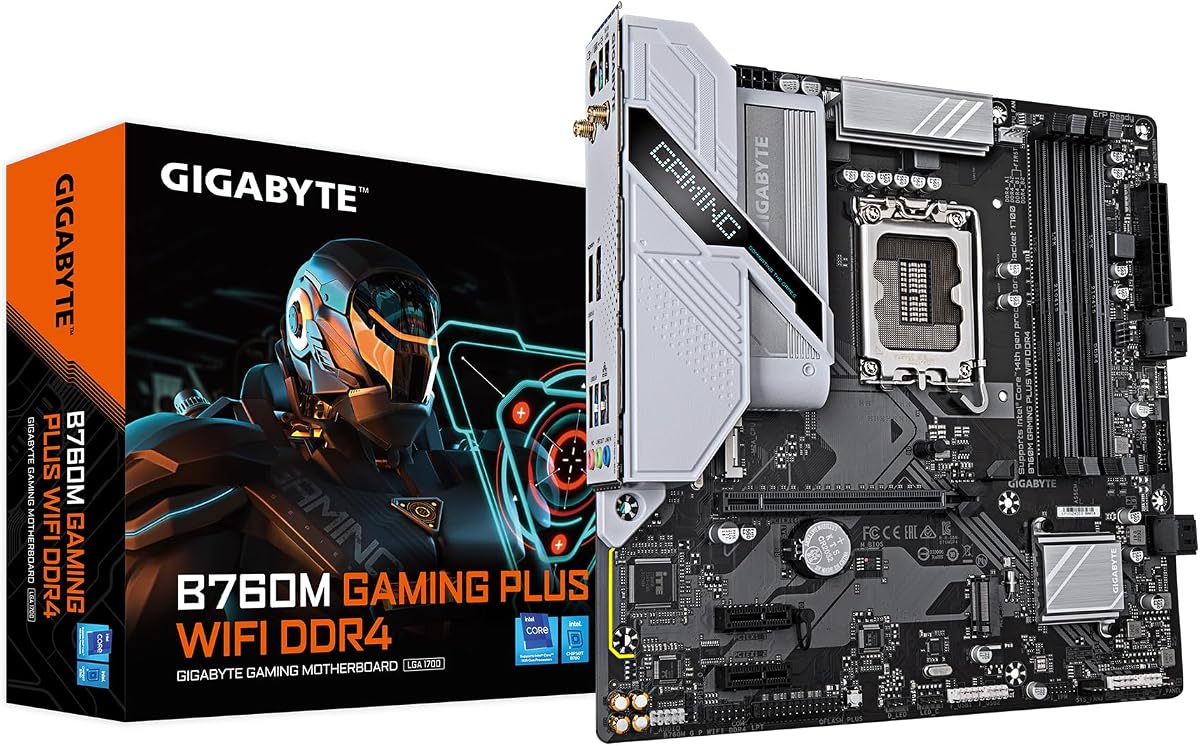
5. GIGABYTE B760M Gaming Plus WiFi DDR4 - Best Gigabyte mATX

GIGABYTE B760M Gaming Plus WiFi DDR4

GIGABYTE B760M Gaming Plus WiFi DDR4

8.8/10★★★★☆

GIGABYTE B760M Gaming Plus WiFi DDR4 targets builders who want a gaming-leaning microATX board with dual M.2 storage, onboard wireless, and the little quality-of-life features Gigabyte markets well: Q-Flash Plus and EZ-Latch. Those two extras sound minor until you are updating BIOS without a CPU installed or wrestling a heavy GPU out of a tight slot. In a small case, convenience features are not fluff.

  • Hybrid digital 4+1+1 power phase design
  • Dual PCIe 4.0 M.2 and reinforced PCIe armor
  • Onboard Wi-Fi with front USB Type-C support
Check Price →
✓ Pros
  • Dual M.2 layout suits boot plus games library in compact cases
  • Wi-Fi and front USB-C improve everyday usability
  • Q-Flash Plus and EZ-Latch reduce first-build friction
  • Enlarged MOSFET heatsinks help denser mATX airflow situations
  • DDR4 with XMP support keeps memory costs manageable
✕ Cons
  • VRM phase count is lighter than premium ATX boards in this pack
  • Owner rating trails the top 4.6 boards slightly
  • Wired LAN on this listing is GbE rather than 2.5Gb class

Detailed review

The hybrid digital 4+1+1 power phase design with premium chokes and capacitors is aimed at steady delivery for mainstream Intel CPUs rather than extreme overclocking theater. That is the correct honesty level for B760. Pair it with a Core i5 or moderate i7, keep case airflow alive, and the enlarged MOSFET heatsinks should be adequate. If your plan is a hot 14th Gen i9 in a low-airflow cube, step up to a stronger ATX VRM board.

Storage and expansion are practical. Two PCIe 4.0 M.2 slots cover OS and games, while a reinforced PCIe 4.0 x16 slot with UD armor gives chunky GPUs a sturdier mechanical home. Front USB 3.2 Gen 1 Type-C support is increasingly important as cases standardize on front USB-C. Four DDR4 DIMMs with XMP support let you populate capacity later, though two-stick kits remain the cleaner performance recipe.

Networking is a mixed bag depending on your priorities. Onboard Wi-Fi helps apartments and dorms, but the copper LAN on this listing is Gigabit rather than 2.5Gb. If your home network is already multi-gig, prefer MSI's WiFi ATX boards, ASUS options with 2.5Gb Ethernet, ASRock Pro RS, or Gigabyte's DS3H AX which advertises 2.5GbE. If you mostly use Wi-Fi anyway, the LAN generation matters less day to day.

We like this board as a Gigabyte-centered compact gaming pick when you want dual M.2 and wireless without stepping into full ATX. The 4.4 rating is respectable, though not as glowing as the 4.6 leaders. Read recent owner comments for BIOS notes on your exact CPU generation, then flash Q-Flash Plus if needed before you celebrate first boot.

Aesthetically, Gaming Plus styling is more expressive than MSI ProSeries. That helps in tempered-glass mATX cases where the motherboard is partly visible. If you want a pure office look, MSI PRO B760M-P may feel calmer. If you want ASUS Aura ecosystems, the B760M-AYW is the tighter software match. Gigabyte's strength here is the blend of dual M.2, Wi-Fi, and builder conveniences in one mATX package.

During assembly, use EZ-Latch as intended and do not force the GPU. Confirm antenna leads are connected before you close a small panel that is miserable to reopen. Map which M.2 slot is primary for boot in the manual so Windows installs where you expect. Those five minutes of reading prevent an hour of boot-order confusion later.

Who should buy it

Compact DDR4 gaming builds that need Wi-Fi, two NVMe slots, and Gigabyte's Q-Flash Plus workflow for easier CPU generation updates.

Power expectations

Treat the 4+1+1 design as mainstream-friendly. Great for Core i5 class gaming; think twice for sustained high-wattage i9 loads in tiny cases.

Check Price on Amazon →

We may earn a commission at no additional cost to you.

6. ASUS ROG Strix B760-A Gaming WiFi - Best Premium ROG

ASUS ROG Strix B760-A Gaming WiFi

ASUS ROG Strix B760-A Gaming WiFi

9/10★★★★★

ASUS ROG Strix B760-A Gaming WiFi is the premium face of this pack: DDR5, PCIe 5.0, Intel Wi-Fi 6E, Intel 2.5G Ethernet, Aura Sync, and a 12+1 power stage design with ProCool connectors, alloy chokes, and durable capacitors. It is the board you choose when the PC will be seen through tempered glass and you want the Strix I/O and heatsink language to match ROG coolers, fans, or cases you already own.

  • 12+1 power stages with ProCool connectors
  • PCIe 5.0 x16 SafeSlot and DDR5 support
  • Intel Wi-Fi 6E and Intel 2.5G Ethernet
Check Price →
✓ Pros
  • ROG Strix design and Aura Sync for showcase gaming towers
  • 12+1 stages with strong VRM heatsink coverage
  • PCIe 5.0 x16 SafeSlot for next-gen graphics positioning
  • Intel Wi-Fi 6E plus Intel 2.5G LAN is a premium networking pair
  • USB 3.2 Gen 2x2 Type-C rear I/O for fast external storage
✕ Cons
  • Costs more attention and budget than ProSeries workhorse boards
  • ROG software stack is heavier than some minimalists want
  • Overkill if you only need a quiet Ethernet office PC

Detailed review

Power and thermals are clearly aimed at multi-core Intel processors that spike hard in games and creation apps. Thick heatsinks bridged with high-conductivity pads keep the VRM solution cooler under heavy workloads. That does not mean you can ignore case airflow, but it does mean the board is less likely to be the weak thermal link when a Core i7 is rendering or a gaming session runs for hours.

Connectivity is where Strix separates itself from barebones B760 boards. A USB 3.2 Gen 2x2 Type-C rear port, additional USB ports, a USB 3.2 Gen 2 front-panel connector, HDMI 2.1, and DisplayPort 1.4 cover modern desks thoroughly. PCIe 5.0 x16 SafeSlot adds mechanical reinforcement for heavy GPUs while advertising a faster slot generation than the PCIe 4.0-focused MSI gaming board.

Networking uses Intel Wi-Fi 6E and Intel 2.5G Ethernet with ASUS LANGuard. That Intel-plus-Intel pairing is a real differentiator for builders who care about driver consistency and lower-latency wired play. If you live in a dense apartment building, the 6E radio is more than a checkbox. If you hardwire everything to a multi-gig switch, the 2.5G LAN still earns its keep for NAS and large game downloads.

Aura Sync will delight RGB-coordinated builds and mildly annoy people who want a dark stealth box. The good news is lighting can be tamed or disabled in software. The less good news is ASUS's broader software suite can feel heavy if you only wanted fan curves. Many experienced builders set what they need in UEFI and keep Windows lean.

Choose Strix B760-A when aesthetics, PCIe 5.0 graphics emphasis, and Intel networking matter together. Choose TUF B760-PLUS if you prefer durability cues, Thunderbolt header support, and a slightly different feature balance. Choose ASRock Pro RS if you want feature density and multi-display outputs without ROG branding. Strix is not the only excellent DDR5 board here; it is the one that looks and feels most like a showcase gaming platform.

BIOS updates still matter on LGA 1700 as CPU microcode and compatibility lists evolve. Budget time to flash before installing a newly released processor stepping, enable memory profiles carefully, and validate stability. A beautiful Strix board that blue-screens from an unstable DDR5 profile is still just an unstable board. The hardware gives you headroom; setup discipline keeps it.

Who it is for

Streamers and enthusiasts building a visible DDR5 Intel gaming tower who want ROG styling, Aura Sync, and Intel Wi-Fi 6E plus 2.5G LAN without moving to Z790.

Setup notes

Mount antennas clear of GPU exhaust, update BIOS early, and install the heaviest GPU with SafeSlot support in mind so the card is braced if your case includes a GPU support bracket.

Versus TUF B760-PLUS

Strix wins on ROG aesthetics and Intel Wi-Fi 6E prestige. TUF wins on rugged branding, triple M.2 emphasis, Thunderbolt header support, and AI noise-cancellation features for calls and streams.

Check Price on Amazon →

We may earn a commission at no additional cost to you.

7. ASUS TUF GAMING B760-PLUS WIFI - Best Durable TUF

ASUS TUF GAMING B760-PLUS WIFI

ASUS TUF GAMING B760-PLUS WIFI

9/10★★★★★

ASUS TUF GAMING B760-PLUS WIFI is the durability-and-expansion pick in this Intel pack. The 12+1+1 DrMOS power stage design, six-layer PCB, 8+4 ProCool sockets, and Digi+ VRM stack are aimed at builders who keep machines for years and occasionally move them between desks or LAN events. TUF's brand promise is toughness; the feature list backs that up with real connectivity rather than only camouflage aesthetics.

  • 12+1+1 DrMOS stages on a six-layer PCB
  • PCIe 5.0 slot plus three M.2 storage paths
  • Wi-Fi 6, 2.5Gb Ethernet, Thunderbolt 4 / USB4 header support
Check Price →
✓ Pros
  • TUF durability messaging with military-grade component language
  • Triple M.2 layout is excellent for boot, games, and scratch drives
  • PCIe 5.0 and Thunderbolt/USB4 header support future-proof connectivity
  • Enlarged VRM and M.2 heatsinks with Fan Xpert 4 control
  • Two-way AI noise cancellation helps streams and calls
✕ Cons
  • Wireless is Wi-Fi 6 rather than Wi-Fi 6E on this model
  • TUF styling is polarizing if you want a clean white or Pro look
  • Feature set may be more than a simple office build needs

Detailed review

Storage is a highlight. Three M.2 slots with heatsink coverage make it easier to separate operating system, game library, and content scratch space without SATA adapters. PCIe 5.0 on the primary graphics path keeps the board aligned with newer GPU marketing, while PCIe 4.0 M.2 slots handle the fast drives most people actually buy. If your build plan includes a growing NVMe collection, TUF's layout is more comfortable than dual-M.2-only boards.

Rear and front USB options are generous, including USB 3.2 Gen 2x2 Type-C and front-panel USB 3.2 Gen 2 Type-C support, plus Thunderbolt 4 and USB4 header support for compatible cases or add-in pathways. That matters for creators docking laptops, capturing from external devices, or running high-speed enclosures. Not every B760 board bothers with Thunderbolt headers; TUF does.

Networking is Realtek 2.5Gb Ethernet with Intel Wi-Fi 6 and TUF LANGuard. The missing 6E band is the main caveat versus Strix B760-A, MSI Gaming Plus WiFi, or ASRock Pro RS. If your router has no 6 GHz radio, you will not care. If you specifically bought a 6E or 7 router to escape congested 5 GHz neighborhoods, Strix or ASRock is the better wireless match.

Cooling hardware includes enlarged VRM heatsinks, M.2 heatsinks, a PCH heatsink, hybrid fan headers, and Fan Xpert 4. That package suits mid-towers with decent airflow and gives you software control when the PC sits in a warmer room. Two-way AI noise cancellation is a sleeper feature for people who game on headset mics in shared spaces; it cleans both incoming and outgoing audio paths in supported setups.

We recommend TUF B760-PLUS for DDR5 Intel gaming PCs that also do light creation work, especially if triple M.2 and Thunderbolt header support are on the must-have list. It is less ideal if you want the cleanest ProSeries office look or if Wi-Fi 6E is non-negotiable. Between TUF and Strix, pick with your eyes and your port checklist, not only phase-count spreadsheets.

During first boot, update BIOS for your exact 14th Gen CPU if required, set a conservative fan curve, and only then enable high-speed DDR5 profiles. Fill M.2 slots from the primary boot position outward, and label cables if you expect to service the PC often. TUF boards reward builders who treat them like long-term tools rather than disposable RGB toys.

Best fit

Gamers and creators who want a tough ATX DDR5 board with three M.2 slots, PCIe 5.0, and flexible USB/Thunderbolt header options.

Wireless tradeoff

Accept Wi-Fi 6 and enjoy the rest of the feature set, or pay up in attention for Strix or ASRock if 6E is mandatory in your apartment.

Versus ASRock Pro RS

TUF emphasizes ASUS ecosystem tools, Thunderbolt header support, and TUF durability cues. ASRock counters with Wi-Fi 6E, strong multi-display outputs, and dense ports at a more utilitarian design language.

Check Price on Amazon →

We may earn a commission at no additional cost to you.

8. ASRock B760 Pro RS WiFi 6E - Best Feature Dense

ASRock B760 Pro RS WiFi 6E

ASRock B760 Pro RS WiFi 6E

9.2/10★★★★★

ASRock B760 Pro RS WiFi 6E is the feature-density champion of this roundup. For builders who read spec sheets for fun, it piles on the good stuff: 10+1+1 power design with 50A Dr.MOS, DDR5 with high OC targets, PCIe 5.0 x16, multiple M.2 slots, Dragon 2.5G LAN, Wi-Fi 6E with Bluetooth 5.3, rear USB-C, front USB-C support, and a rare HDMI plus DisplayPort plus eDP output combo. The 4.6 rating suggests that density did not come at the cost of basic reliability.

  • 10+1+1 power phase with 50A Dr.MOS
  • DDR5 OC support with multiple M.2 slots
  • Wi-Fi 6E, 2.5G LAN, HDMI/DP/eDP outputs
Check Price →
✓ Pros
  • 4.6 rating with an unusually complete I/O and storage feature list
  • PCIe 5.0 x16 plus multiple Gen4 M.2 options for expansion
  • Dragon 2.5G LAN and Wi-Fi 6E cover modern networking
  • Triple display outputs including eDP for specialized desks
  • Strong DDR5 capacity and OC marketing for enthusiasts
✕ Cons
  • ASRock BIOS taste is different from ASUS/MSI regulars
  • Busy feature set can overwhelm first-time builders
  • Verify case clearance and cooler compatibility carefully

Detailed review

Power delivery is credible for high-end LGA 1700 CPUs when paired with sensible cooling. Fifty-amp Dr.MOS stages and a serious phase count matter more when you run a Core i7 or i9 under all-core loads than when you idle on browser tabs. Still, mount a capable cooler and keep intake air moving across the VRM area. Spec sheets do not replace airflow.

Storage flexibility is excellent. Dual Gen4 Hyper M.2 plus an additional Gen4x2 M.2 path, along with four SATA ports, means you can mix NVMe and archival disks without an immediate host bus adapter. Plan boot order in BIOS so the OS lands on the fastest primary slot. Creators who keep raw footage on a secondary NVMe will appreciate not fighting for a single M.2 socket.

The display trio is a niche superpower. HDMI 2.1, DisplayPort 1.4, and eDP make unusual multi-monitor or specialized panel setups possible even before a discrete GPU is installed. Most gamers will never touch eDP. People building productivity desks, industrial panels, or odd multi-screen arrangements might choose this board for that reason alone.

Networking is modern: 2.5G copper and Wi-Fi 6E with Bluetooth 5.3. That puts Pro RS in the same conversation as MSI's Wi-Fi 6E boards and ASUS Strix, with a more utilitarian ASRock personality. If you prefer ASUS Armoury Crate ecosystems or MSI's Gaming UI habits, there is a learning curve. If you are fine reading manuals and updating BIOS from ASRock's site, the hardware payoff is large.

We put Pro RS in the top-picks row because it covers almost every practical B760 checklist item without forcing ROG styling. It is ideal for a DDR5 Intel workstation-gamer hybrid that needs ports more than logos. Confirm ATX clearance, LGA 1700 cooler standoff compatibility, and rear I/O expectations before purchase, because dense boards sometimes surprise first-time cable managers.

Memory guidance is the usual DDR5 wisdom with extra caution because the board advertises high OC ceilings. Start with a quality kit inside a validated range, enable XMP 3.0 after a clean baseline POST, and stress test. Chasing the highest number printed on a retail box is how stable machines become weekend troubleshooting projects. Pro RS gives you headroom; you choose how much of it to use.

Who it is for

Enthusiasts and power users who want DDR5, PCIe 5.0, Wi-Fi 6E, multi-gig LAN, and rich display I/O on one ATX B760 board without paying for ROG cosmetics.

First-time builder tip

Label every cable as you connect front USB-C, USB-A, and display adapters. Dense rear panels are powerful and easy to misplug on day one.

Versus MSI Gaming Plus WiFi

Gaming Plus is the simpler MSI DDR5 gaming choice. Pro RS is the wider port-and-slot package if you outgrow basic boards quickly.

Check Price on Amazon →

We may earn a commission at no additional cost to you.

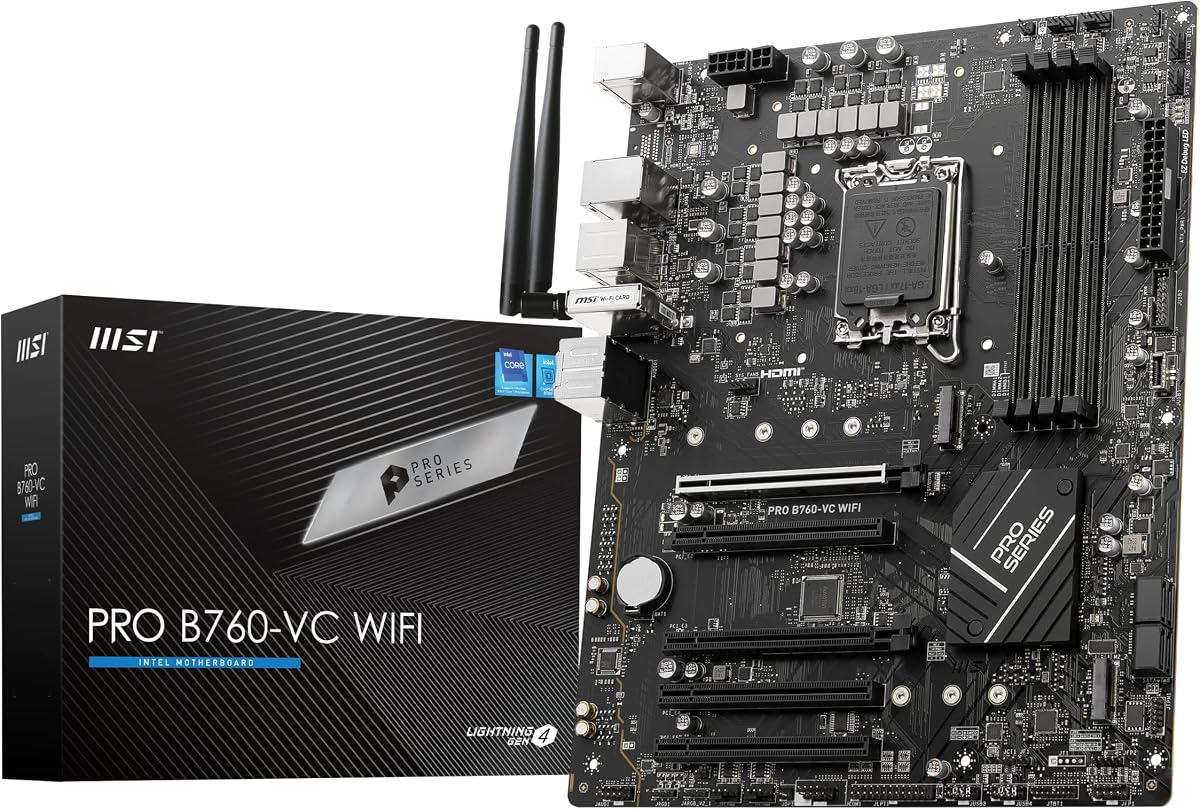
9. MSI PRO B760-VC WiFi (Renewed) - Best Renewed Budget

MSI PRO B760-VC WiFi (Renewed)

MSI PRO B760-VC WiFi (Renewed)

8.4/10★★★★☆

MSI PRO B760-VC WiFi appears in this pack as a Renewed ATX ProSeries board, and that single word should drive your buying decision more than any marketing phrase. Renewed motherboards can be excellent value when the seller grades them honestly and the board arrives with straight socket pins, clean PCIe slots, and a complete I/O shield. They can also be frustrating if cosmetic wear hides a bent pin or a flaky rear USB port. Buy this only if you are willing to inspect immediately and use return windows without hesitation.

  • Renewed ATX ProSeries DDR5 motherboard
  • PCIe 4.0, M.2, 2.5Gbps LAN onboard
  • Wi-Fi 5 wireless — older than 6E rivals
Check Price →
✓ Pros
  • Renewed pricing can stretch a DDR5 Intel build budget further
  • ATX ProSeries layout remains practical for mid-tower builds
  • 2.5Gbps LAN is still a strong wired networking feature
  • DDR5 support keeps you on the newer memory generation
  • Fine option if you accept refurbished risk and inspect on arrival
✕ Cons
  • Renewed condition varies — inspect I/O shield, pins, and slots carefully
  • Wi-Fi 5 lags Wi-Fi 6 and 6E boards elsewhere in this guide
  • Lower 4.2 rating and thinner about-text detail than new retail SKUs

Detailed review

On paper, the board still makes sense for a budget DDR5 LGA 1700 build: support messaging for 12th and 13th Gen Intel processors, DDR5 memory, PCIe 4.0, M.2 storage, 2.5Gbps LAN, and USB 3.2 Gen2. Wireless is Wi-Fi 5, which is the clearest feature cut versus Wi-Fi 6E leaders like the PRO B760-P WiFi DDR4, Gaming Plus WiFi, Strix B760-A, and ASRock Pro RS. If your PC will be wired anyway, Wi-Fi 5 may be irrelevant. If wireless is primary, spend on a newer radio.

The 4.2 rating is the lowest in this pack and should be read in context of Renewed variability as much as silicon quality. Some buyers get a board that behaves like new. Others hit BIOS quirks, missing accessories, or cosmetic issues. That is why we refuse to rank it among the top picks even though the DDR5 plus 2.5G LAN combination looks attractive for the money.

Compatibility planning still matters. Confirm your exact CPU generation against current MSI BIOS guidance before you assume a 14th Gen chip will boot on an older Renewed revision out of the box. Have a flash plan ready. Renewed listings sometimes sit in warehouses longer than fresh retail stock, which increases the odds you need a firmware update on day one.

Physically inspect the LGA 1700 socket under bright light before installing a CPU. Look for bent pins, debris, or evidence of improper prior installs. Check M.2 standoffs, rear I/O ports, and that the Wi-Fi antennas or antenna leads are present if advertised. Photograph anything questionable before you start assembly. Those habits are normal for Renewed motherboards and save arguments later.

Choose PRO B760-VC WiFi Renewed when the savings meaningfully improve another part of the build — a better GPU or SSD — and you accept the condition risk. Choose a new PRO, Gaming Plus, TUF, Strix, or ASRock board when the machine is mission-critical, far from return logistics, or destined for someone who should not be debugging a refurbished board. Value is not free; it is a trade.

If the board posts cleanly, treat it like any other ProSeries MSI ATX platform: update BIOS, set memory carefully, install a quality cooler, and keep drivers lean. A healthy Renewed board can serve for years. The point of this review is not to scare you away from refurbished hardware forever. It is to make sure you walk in with your eyes open and a return plan ready.

Renewed checklist

Verify seller rating, accessory completeness, socket condition, BIOS readiness for your CPU, and return window length before you open the thermal paste.

When to skip Renewed

Skip if you need Wi-Fi 6E, maximum warranty confidence, or a gift PC that must just work without troubleshooting.

Check Price on Amazon →

We may earn a commission at no additional cost to you.

10. GIGABYTE B760M DS3H AX DDR4 - Best Wi-Fi 6E

GIGABYTE B760M DS3H AX DDR4

GIGABYTE B760M DS3H AX DDR4

8.4/10★★★★☆

GIGABYTE B760M DS3H AX DDR4 closes the roundup as the compact networking specialist. In a microATX DDR4 board, getting both Wi-Fi 6E and 2.5GbE LAN is the feature combination that justifies attention even with a 4.2 rating. Many small boards still ship with older Wi-Fi or Gigabit copper. DS3H AX tries to avoid both cutbacks while keeping the DDR4 cost advantages that make Intel midrange builds easier to fund.

  • microATX DDR4 with 6+2+1 hybrid digital VRM
  • Dual PCIe 4.0 M.2 plus USB-C connectivity
  • Wi-Fi 6E and 2.5GbE LAN onboard
Check Price →
✓ Pros
  • Wi-Fi 6E in a microATX DDR4 package is a strong value angle
  • 2.5GbE LAN beats Gigabit-only compact boards
  • Dual M.2 and USB-C cover modern storage and front-panel needs
  • Q-Flash Plus and PCIe EZ-Latch help first-time builders
  • 6+2+1 power design is healthier than bare-entry phase counts
✕ Cons
  • 4.2 rating is lower than the pack leaders
  • DS3H positioning is more utilitarian than Gaming Plus styling
  • Not the board for showpiece RGB-centric builds

Detailed review

The hybrid digital 6+2+1 power phase design with premium chokes and capacitors is a step above the lightest entry VRMs and should be comfortable for mainstream Core i5 builds and many i7 configurations in ventilated cases. Chipset heatsinks handle PCH temperatures, while your case fans handle the rest. As always with mATX, density is the enemy: do not bury the board in cable clutter that blocks heatsink airflow.

Dual PCIe 4.0 M.2 slots make a clean boot-plus-games split, and USB-C support helps modern cases. PCIe EZ-Latch and Q-Flash Plus continue Gigabyte's theme of reducing mechanical and BIOS friction. If you are helping a friend build their first Intel PC in a compact tower, those features matter more than RGB logos they will disable later.

Compared with GIGABYTE B760M Gaming Plus WiFi DDR4, DS3H AX leans harder into Wi-Fi 6E and 2.5GbE networking while presenting a more utilitarian DS3H identity. Compared with ASUS B760M-AYW, you trade some PCIe 5.0 graphics marketing and Aura ecosystem comfort for 6E wireless and multi-gig copper. Compared with MSI PRO B760M-P, you gain onboard wireless and richer networking at the cost of a lower pack rating.

Who should buy it? Anyone building a compact DDR4 Intel machine in a Wi-Fi-heavy home who still wants a credible Ethernet port for big downloads or a NAS. Who should skip it? Buyers chasing the highest owner ratings in this pack, or builders who want aggressive gaming aesthetics and do not care about 6E. The board is a tool. Evaluate it as networking-first mATX hardware.

Setup advice mirrors other Gigabyte boards: flash BIOS with Q-Flash Plus when CPU support requires it, seat DDR4 in the preferred channels, install the primary NVMe first, and mount antennas where a metal case panel will not fully shield them. If your case has a perforated rear or top antenna mount area, use it. Wi-Fi 6E cannot fix antennas pressed against a GPU backplate.

In a 2026 buying climate where LGA 1700 boards are mature and plentiful, DS3H AX earns a spot by being specific. It is not trying to be ROG Strix. It is trying to be a compact DDR4 board that does not cripple networking. If that is your exact need, it belongs on the shortlist beside ASUS B760M-AYW and the MSI mATX options.

Best fit

Compact DDR4 builds that need Wi-Fi 6E and 2.5GbE without stepping up to full ATX boards.

Rating context

The 4.2 score means you should skim recent owner feedback for your CPU generation and BIOS experiences rather than buying on specs alone.

Versus ASUS B760M-AYW

Pick ASUS for PCIe 5.0 x16 emphasis and Aura Sync. Pick DS3H AX for Wi-Fi 6E plus 2.5GbE networking in a utilitarian Gigabyte package.

Check Price on Amazon →

We may earn a commission at no additional cost to you.

Best B760 Motherboards for Intel Builds in 2026

How to Choose a B760 Motherboard in 2026

Start with form factor and case reality

ATX boards in this roundup give you more slot spacing, easier cable routing, and usually richer rear I/O. microATX boards win when the case is small or you want a cleaner desk footprint. Measure USB header reach, cooler clearance, and GPU length before you fall in love with a feature list. A great board in the wrong case becomes a weekend of returns.

DDR4 versus DDR5 is the real fork

DDR4 B760 boards stretch older kits and often leave more budget for the GPU. DDR5 boards are the cleaner long-horizon choice if you are buying memory new and want higher peak bandwidth for creation workloads or future-proof bragging rights. Do not mix the two. The socket may be the same LGA 1700 family, but the memory generation is a hard board-level split.

VRM and cooling beat marketing adjectives

B760 boards do not unlock CPU overclocking the way Z790 can, but power delivery still matters for sustained boost behavior on modern Intel chips. Look for extended heatsinks, honest phase designs, and case airflow across the VRM zone. A 14th Gen chip in a hot mATX cube stresses boards harder than the same chip in an airy ATX mid-tower.

Networking and ports decide daily happiness

Wi-Fi 6E helps in congested multi-apartment environments. Wi-Fi 6 is still fine on many routers. Wi-Fi 5 on the Renewed MSI board is the compromise to notice. On copper, 2.5Gb LAN is worth having if you use a NAS or multi-gig ISP gear. Count USB-C front headers, rear USB-C speed, and display outputs if you troubleshoot with iGPUs or run multi-monitor desks.

Storage lanes and PCIe generation

Two M.2 slots are the practical minimum for OS plus games. Three M.2 slots on boards like the TUF B760-PLUS make creator setups easier. PCIe 5.0 graphics slots are forward-looking; PCIe 4.0 still runs current GPUs very well. Buy the generation you value, but do not sacrifice VRM quality, memory fit, or case compatibility just to win a slot-number argument.

New retail versus Renewed

Renewed can be smart if you inspect carefully and keep return options open. New retail is smarter for gifts, remote builds, and anyone who needs warranty confidence more than marginal savings. Motherboards are the worst place to gamble if you are not prepared to test sockets and slots on arrival.

Frequently Asked Questions

01

Is B760 still worth buying in 2026 for Intel desktops?

Yes for most mainstream builders on LGA 1700. B760 still supports 12th through 14th Gen Core processors on the boards in this pack, offers modern storage and networking options, and avoids paying for unlocked CPU overclocking that many gamers never use. If you specifically need extensive CPU overclocking features, look at Z790 instead. If you are starting a brand-new platform with no Intel parts yet, also compare AMD AM5 value, but B760 remains a strong way to finish or upgrade an Intel build you already planned.

02

Should I buy a DDR4 or DDR5 B760 motherboard?

Buy DDR4 if you already own good kits or need to protect GPU budget on a gaming PC that will be GPU-bound anyway. Buy DDR5 if you are purchasing memory new and want the newer platform direction for the rest of your LGA 1700 ownership. The MSI PRO B760-P WiFi DDR4 and several Gigabyte/ASUS mATX boards serve the DDR4 path well, while MSI Gaming Plus, ASUS Strix, ASUS TUF, ASRock Pro RS, and the Renewed MSI PRO B760-VC cover DDR5.

03

Do I need PCIe 5.0 on a B760 board right now?

Not strictly. Current graphics cards still perform very well on PCIe 4.0 in real games, which is why boards like MSI Gaming Plus WiFi remain sensible. PCIe 5.0 is worth preferring when the rest of the board already fits your needs and you want maximum future slot headroom, as on ASUS Strix B760-A, TUF B760-PLUS, ASRock Pro RS, or ASUS B760M-AYW. Treat it as a tie-breaker, not the only decision filter.

04

Which B760 board is best for a small case?

Start with the microATX options: ASUS B760M-AYW WiFi D4 II for PCIe 5.0 and Aura-friendly compact builds, MSI PRO B760M-P DDR4 for Ethernet-first budgets, GIGABYTE B760M Gaming Plus WiFi DDR4 for dual M.2 convenience features, or GIGABYTE B760M DS3H AX DDR4 when Wi-Fi 6E and 2.5GbE matter in a small chassis. Confirm cooler height and GPU length before ordering any of them.

05

Is Wi-Fi 6E necessary, or is Wi-Fi 6 enough?

Wi-Fi 6 is enough if your router has no 6 GHz radio or your PC will sit near a strong 5 GHz signal. Wi-Fi 6E becomes valuable in congested apartments, dorms, and offices where the 6 GHz band is less crowded. In this pack, MSI PRO B760-P WiFi DDR4, MSI Gaming Plus WiFi, ASUS Strix B760-A, ASRock Pro RS, and Gigabyte DS3H AX cover 6E, while ASUS TUF and ASUS B760M-AYW use Wi-Fi 6, and the Renewed MSI PRO B760-VC steps down to Wi-Fi 5.

06

Can these boards run 14th Gen Intel Core CPUs?

The pack boards are positioned for 12th, 13th, and often 14th Gen LGA 1700 support, but BIOS revision still matters. Fresh retail boards are more likely to be ready out of the box; warehouse or Renewed stock may need a flash. Check the manufacturer's CPU support list for your exact model and update firmware before you assume first-try success with a newly purchased chip.

07

Is a Renewed motherboard safe to buy?

It can be, if you treat inspection as part of the purchase. The MSI PRO B760-VC WiFi Renewed listing can save money on a DDR5 ATX board, but you should verify socket pins, slots, accessories, and BIOS compatibility immediately and keep returns available. For mission-critical PCs or gifts, a new board from the top picks is the lower-stress path.

08

What is the best overall B760 motherboard in this guide?

MSI PRO B760-P WiFi DDR4 is our best overall pick for most builders because it combines a strong 4.6 rating, ATX convenience, DDR4 flexibility, Wi-Fi 6E, 2.5Gb LAN, and practical cooling features. If you are committed to DDR5 and premium aesthetics, ASUS ROG Strix B760-A is the better showcase choice. If you want maximum ports and multi-display flexibility on DDR5, ASRock B760 Pro RS WiFi 6E is the feature-dense alternative.

09

How many M.2 slots do I actually need?

One is enough for a simple boot drive. Two is the comfort standard for OS plus games or media. Three, as on the ASUS TUF B760-PLUS, helps creators and hoarders who keep scratch disks and archives on NVMe. SATA ports still matter for older HDDs, but most modern gaming libraries are happier on M.2. Buy slots for the next two years of storage growth, not only the drive in your cart today.

10

Will a B760 board bottleneck a high-end GPU?

Unlikely in normal gaming. CPU choice, RAM configuration, resolution, and GPU silicon dominate frame rates more than whether the slot is PCIe 4.0 or 5.0 for current cards. Focus on case airflow, a strong PSU, and a CPU that matches your resolution target. Choose PCIe 5.0 boards when you want the option, not because a PCIe 4.0 B760 board will inherently cripple a modern graphics card at 1440p or 4K.

Conclusion

The best B760 motherboard in 2026 depends less on chipset myths and more on memory generation, case size, and networking needs. For most people, the MSI PRO B760-P WiFi DDR4 is the balanced ATX answer: strong owner feedback, Wi-Fi 6E, 2.5Gb LAN, and DDR4 flexibility that still makes financial sense. If your build is a showcase DDR5 gaming tower, ASUS ROG Strix B760-A Gaming WiFi is the premium pick. If you want ports and multi-display flexibility without ROG styling, ASRock B760 Pro RS WiFi 6E is the densest toolkit in the pack.

Compact-case builders should stay in the microATX lane with ASUS B760M-AYW WiFi D4 II, MSI PRO B760M-P DDR4, or the Gigabyte mATX options depending on whether PCIe 5.0, bare-bones budget, or Wi-Fi 6E plus 2.5GbE matters most. DDR5 gamers who want MSI's familiar Gaming Plus formula can lock the MSI B760 Gaming Plus WiFi and move on to cooler and GPU choices. ASUS TUF B760-PLUS remains the durability and triple-M.2 specialist when Thunderbolt header support and expansion depth matter.

Be cautious with the Renewed MSI PRO B760-VC WiFi: the savings are real only if inspection and returns are part of your plan, and Wi-Fi 5 is a step behind the rest of this list. Whichever board you choose, flash BIOS when needed, validate memory profiles, and give the VRM zone airflow. Do that, and B760 still builds into a capable Intel desktop without forcing a Z790 shopping trip.