Expert Review & Guide

Best 60 Percent Keyboards 2026 for Compact Desks and Travel

A 60 percent keyboard is less about deleting keys for sport and more about reclaiming desk real estate and packing a board that actually fits beside a laptop in a backpack. In 2026 the category still mixes true 61-key boards that live on Fn layers with “60%” 66- and 68-key boards that quietly keep arrow clusters. Both can be excellent—if you buy with eyes open. This guide judges every board on three things that decide daily happiness: compact layout honesty, how well layers (Fn remaps and physical sound-dampening stacks) do the work of missing keys and hollow cases, and real portability through USB-C cables, wireless modes, and chassis weight you will actually carry.

We stayed strictly inside the product pack: budget wired reds from DIERYA, MageGee, and TMKB; theme and multi-layer boards from Womier; gasket cream-switch RK R65 with a metal knob; magnetic Hall Effect AULA WIN68 HE; aluminum HyperX Alloy Origins 60; tri-mode HITIME x XVX M67; hot-swap RK61; and a Renewed Razer Huntsman Mini for optical clicky fans. Ratings mirror Amazon listings at research time. We never print dollar prices because keyboard deals swing by the week.

Start with the three top picks if you already know you want a rigid aluminum true 60%, a gasket wireless travel board, or a layered cream-switch desk board with a volume knob. Use the comparison table to separate true 60% footprints from arrow-friendly compact layouts. Then read each review for layer habits, bag packing reality, and who should skip the board.

Top 60% Keyboard Picks for Compact Layout, Layers, and Portability

Best Compact Aluminum

HyperX Alloy Origins 60 - Mechanical Gaming Keyboard

★★★★★9.4/10
HyperX Alloy Origins 60 - Mechanical Gaming Keyboard
  • True ultra-compact 60% footprint frees maximum mouse space on small desks
  • Aircraft-grade aluminum body stays stable in bag or on uneven hotel desks
  • Detachable USB-C, three tilt angles, and HyperX Red linears for travel FPS setups
Check Price →
Best Portable Wireless

HITIME x XVX M67 Wireless 60% Percent Keyboard

★★★★★9.2/10
HITIME x XVX M67 Wireless 60% Percent Keyboard
  • Tri-mode Bluetooth, 2.4 GHz, and USB-C with a 4000 mAh battery for multi-device travel
  • Gasket mount plus four-layer silencing for soft typing without a hollow shell
  • QMK/VIA layers let you rebuild missing keys once, then use them wired or wireless
Check Price →

As an Amazon Associate we earn from qualifying purchases. We may earn a commission at no additional cost to you.

60% Keyboard Comparison: Footprint, Layers, and Travel Readiness

Read layout size first, then mount or fill layers, then how the board connects when you leave the desk. Specs skip prices so you can compare form factor and feel before you open a listing.

#ProductSpecificationsScore
1
  • 68-key compact with arrows + Delete
  • Linear red switches, wired Type-C
  • Blue LED modes, full anti-ghosting
9
2
  • 61-key anime 60% with PBT pudding caps
  • Multi-layer sound-dampening fill
  • Hot-swap POM linear red, RGB
9.2
3
  • 66-key gasket mount, five fill layers
  • Pre-lubed cream linear, hot-swap
  • Metal volume knob, QMK/VIA RGB
9
4
  • 68-key compact with arrows
  • Hall Effect magnetic switches
  • 8000 Hz polling, wired USB-C
9.2
5
  • True 60% aluminum chassis
  • HyperX Red linear switches
  • Detachable USB-C, NGENUITY RGB
9.4
6
  • 67-key gasket, four silencing layers
  • Tri-mode wireless + 4000 mAh
  • QMK/VIA, hot-swap linear switches
9.2
7
  • 68-key portable mini with arrows
  • Red linear switches, blue LED
  • Detachable USB, kickstand feet
8.6
8
  • True 61-key ANSI 60% white board
  • 45g linear red switches
  • Detachable USB-C, 15 LED modes
9
9
  • True 61-key hot-swap 60%
  • Pre-lubed red linear switches
  • Detachable Type-C, QMK/VIA RGB
9.2
10
  • True 60% Renewed optical clicky
  • Razer Optical clicky switches
  • Aluminum top, Chroma RGB, PBT
9.2

1. DIERYA T68SE 60% Gaming Mechanical Keyboard - Best Budget Arrow

DIERYA T68SE 60% Gaming Mechanical Keyboard

DIERYA T68SE 60% Gaming Mechanical Keyboard

9/10★★★★★

DIERYA’s T68SE is the pack’s clearest answer when you want a compact board that still respects arrow keys. Marketed as a 60% gaming keyboard, it is really a 68-key mini: arrows and Delete stay dedicated, and Fn combinations unlock the rest of a full-size map. For portability that matters more than purist key counts. On a café table or a dorm desk, muscle memory for arrows beats learning a new layer on day one of a trip.

  • 68-key mini layout with arrows and Delete
  • Linear red switches, Type-C wired
  • 19 blue LED lighting modes
Check Price →
✓ Pros
  • Keeps dedicated arrows and Delete so compact travel typing needs fewer Fn layers
  • Linear reds feel light for long laptop sessions and casual FPS
  • Type-C cable and small footprint pack easily beside a 14-inch laptop
  • Full anti-ghosting covers chord-heavy games without driver installs
  • Blue LED modes are simple to toggle with Fn when hotel lighting is dim
✕ Cons
  • Not a true 61-key 60% if you want maximum mouse pad width
  • Blue LED looks dated next to full RGB gasket boards
  • Plastic case can sound hollow compared with multi-layer filled keyboards

Detailed review

Linear red switches define the travel feel. There is no tactile bump—just a smooth press that favors spammy movement keys and fatigue-light typing. If you are coming from a mushy laptop keyboard, the reds feel immediate without the loud crack of clicky opticals. They are not the cream-lubed thock of the RK R65, and the case does not advertise gasket foam stacks, so expect a brighter, more plastic sound unless you later add DIY foam.

Portability is the T68SE’s quiet strength. The mini chassis leaves room for a large mouse pad even when arrows remain. The Type-C connection is reversible and easier to replace than a captive cable when something snags in a backpack zipper. Plug-and-play compatibility across Windows versions and partial Mac support covers the usual travel laptop mix without hunting drivers in airport Wi-Fi.

Lighting stays in classic blue LED territory with nineteen static and dynamic modes. That is enough for night gaming in a dark room and less distracting in shared offices than rainbow waves. Brightness and speed adjust from the board, which matters when you refuse to install vendor software on a work laptop. Anti-ghosting across all sixty-eight keys keeps WASD plus modifiers honest in chaotic fights.

Buy the T68SE if your priority is a cheap, arrow-friendly compact that travels well and types lightly. Skip it if you need gasket layers for quiet open-office typing, hot-swap experimentation, or a rigid aluminum shell that survives being crushed under textbooks. Within this pack it is the practical starter for students who still want dedicated cursor keys on a board that fits in a sleeve.

Compared with the MageGee MK-Box in the same budget lane, DIERYA feels similar in mission—68 keys, reds, blue light, detachable cable—but wins for many buyers who specifically want Delete as a labeled neighbor rather than another Fn hunt. Neither board pretends to be a custom gasket build; both succeed as portable daily boards when desk space and price matter more than thock.

Who should buy the DIERYA T68SE

Students, LAN travelers, and laptop users who refuse to give up dedicated arrows should shortlist this board first. It is also sensible as a secondary keyboard you leave at a second desk so you are not relocating a heavier aluminum 60% every morning.

Writers who live in arrow-heavy spreadsheets will adapt faster here than on a pure 61-key RK61 or HyperX, where every cursor nudge is a layer. Gamers who mainly need WASD plus occasional arrows get the best of both without paying for Hall Effect polling rates.

Layout and layer tips

Map your most-used F-keys and media controls to Fn combinations you can reach without looking. Spend ten minutes on day one so the compact layout feels intentional instead of incomplete. If Delete is critical for coding, celebrate that it is already dedicated—then reclaim Fn real estate for Home, End, or volume.

Check Price on Amazon →

We may earn a commission at no additional cost to you.

2. Womier 60% Percent Keyboard Gaming - Best Themed Multi-Layer

Womier 60% Percent Keyboard Gaming

Womier 60% Percent Keyboard Gaming

9.2/10★★★★★

Womier’s WK61 V2 Kanagawa board is the pack’s showpiece for people who care how a compact keyboard sounds and looks, not just how small it is. The anime wave theme wraps the case, but the more important story is the multi-layer sound-dampening fill that targets the hollow ping many bare plastic 60% boards produce. On a desk, that fill stack is the difference between a toy and a board you enjoy for hour-long typing.

  • True 60% Kanagawa anime theme
  • Multi-layer dampening fill stack
  • Hot-swap POM linear red, PBT pudding
Check Price →
✓ Pros
  • Multi-layer fills reduce hollow resonance that ruins cheap compact boards
  • Hot-swap POM linear reds invite switch experiments without soldering
  • PBT pudding keycaps and north-facing RGB look vivid in small desk photos
  • Programmable software supports layout and lighting personalization
  • Compact 60% footprint maximizes mouse space for FPS
✕ Cons
  • Anime theme is polarizing for plain office setups
  • Wired-only connection is less flexible for multi-device travel than the M67
  • True 60% means arrows live on layers unless you remap creatively

Detailed review

Compact layout here is honest sixty-percent territory: sixty-one keys, no dedicated arrows, maximum mouse runway. That is ideal for FPS players who park a wide mouse pad against the board’s right edge. It is less ideal for spreadsheet travelers unless you commit to Fn-layer arrows or use software remaps. Portability stays solid because the wired Type-C cable detaches and the chassis is still backpack-friendly even with theme art that invites compliments—or questions—in a coworking space.

POM linear red switches arrive soft and smooth, rated for tens of millions of presses, and sit on a hot-swap PCB. That future-proofs the board if you later want heavier linears or a tactile bump without buying a new keyboard. Three extra sublimation keycaps in the box nudge DIY personalization without forcing a full keycap set purchase on day one. Console compatibility notes for PlayStation and Xbox widen the living-room use case for a compact wired board.

RGB through PBT pudding keycaps with north-facing LEDs washes color evenly across the short key rows. Lighting is part of the portable aesthetic when you game in dim apartments, but you can tone it down when you need focus. Software for macros and lighting helps power users; casual buyers can live on onboard modes. Versus the HyperX Origins 60, Womier trades aluminum rigidity for theme personality and fill layers that chase a creamier acoustic.

Choose the Womier if you want a true 60% that already includes dampening work many budget boards skip, plus hot-swap freedom and a distinctive look. Avoid it if your workplace dress code effectively bans loud case art, or if you refuse Fn arrows. For layer-focused shoppers, this is the pack’s clearest “fills matter” wired pick under a playful shell.

Setup advice: seat the board on a desk mat so the multi-layer stack can do its job without rattling against hollow laminate. Then remap a secondary arrow cluster if you edit text all day. The compact footprint only feels limiting when you fight the layout instead of teaching your fingers the layer map.

Layers: foam versus Fn

Womier markets physical multi-layer fills that absorb case resonance—the acoustic layers. Separately, you still need cognitive Fn layers for arrows and navigation on a true 60%. Plan for both. Foam makes the board pleasant; remaps make it usable for work.

If acoustic layers are your priority and wireless is not, this board beats the bare plastic MageGee and TMKB options even before you swap switches.

Portability notes

Pack the detachable cable separately so the theme case does not take stress at the USB port. The board is light enough for daily commuting but not as grab-and-go as the tri-mode M67 when you bounce between phone, tablet, and laptop without plugging in.

Versus other true 60% boards in this pack

Against RK61 you gain theme and marketed fill layers; against HyperX you gain hot-swap and softer acoustics but lose the aluminum tank chassis. Match the trade to whether you value sound, customization, or structural rigidity.

Check Price on Amazon →

We may earn a commission at no additional cost to you.

3. RK ROYAL KLUDGE R65 Wired Gaming - Best Layered Gasket

RK ROYAL KLUDGE R65 Wired Gaming Keyboard with Volume Knob

RK ROYAL KLUDGE R65 Wired Gaming Keyboard with Volume Knob

9/10★★★★★

The RK Royal Kludge R65 is the desk-first layered pick in this pack. Compact enough to free mouse space, it still keeps a denser 66-key cluster with arrows and a CNC metal volume knob that removes one of the most annoying Fn-layer chores: riding volume during streams or meetings. If your definition of “60% lifestyle” is reclaiming space without living entirely inside layers, this board understands the assignment.

  • Gasket mount with five sound-absorbing layers
  • Hot-swap pre-lubed cream linear switches
  • CNC metal volume knob, QMK/VIA, MDA PBT
Check Price →
✓ Pros
  • Five-layer gasket structure softens impact and quiets compact typing
  • Cream linears feel pre-lubed and thocky out of the box
  • Metal volume knob is faster than hunting Fn media layers during calls
  • QMK/VIA programming rebuilds navigation layers the way you think
  • MDA PBT keycaps resist shine better than thin ABS on budget minis
✕ Cons
  • Wired-only limits true backpack multi-device hopping
  • 66-key footprint is larger than a purist 61-key 60%
  • Cream switches may feel too soft for players who want sharp actuation feedback

Detailed review

Gasket mounting with five layers of sound-absorbing material is the headline for typists who hate hollow compact boards. Poron-style buffering between PCB and case reduces vibration so cream linear switches can sound deep instead of tinny. That physical layer stack is why the R65 earns a top-pick badge even though it is not the smallest footprint here. Portability remains fine for carrying between rooms; it is simply optimized for the desk you type on for hours.

Pre-lubed cream switches arrive smoother than dry budget reds on the MageGee or DIERYA. Hot-swap support for 3-pin and 5-pin switches means you can later stiffen the board for gaming or try tactiles without soldering. MDA-profile PBT double-shot keycaps give a taller, grippier feel than thin OEM clones and hold legends longer under heavy use.

RGB offers more than twenty modes, and QMK/VIA unlocks serious layer design: put arrows where you want, build a coding layer, mute a gaming layer’s Windows key. Indicator lights near the arrows clarify status at a glance—another quality-of-life detail rare on bare-bones 60% boards. Windows and macOS compatibility covers mixed households.

Pick the R65 when typing feel and layered construction matter more than squeezing every last centimeter of mouse pad. Skip it if you need tri-mode wireless like the HITIME M67 or a true aluminum 61-key tank like the HyperX. Competitive players chasing adjustable magnetic actuation should look at the AULA WIN68 HE instead.

In daily use the knob becomes addictive. Being able to roll volume without a Fn combo keeps you in flow while the gasket layers keep apartment neighbors happier than a clicky optical board. That combination—physical dampening layers plus fewer media-layer trips—is the R65’s portable-office sweet spot even though the cable stays plugged in.

Who it is for

Writers, programmers, and hybrid workers on compact desks who still want arrows and premium acoustics. Also strong for streamers who adjust volume constantly and refuse to reach for OS keys.

Custom beginners who want QMK/VIA without building a kit from scratch will learn layers here safely, then graduate to switch swaps on the hot-swap PCB.

Setup for better layers

Flash or configure VIA so your second layer mirrors the navigation keys you miss most. Keep the volume knob for analog control and reserve Fn for Escape alternatives, function rows, and macros. A desk mat under the gasket board further cleans the sound.

Versus Womier and HyperX

Versus Womier, the R65 adds a knob, cream-switch tuning, and a more work-friendly silhouette. Versus HyperX, you gain gasket softness and remapping depth but lose the aircraft aluminum true-60% rigidity preferred by some FPS purists.

Check Price on Amazon →

We may earn a commission at no additional cost to you.

4. AULA WIN68 HE Mechanical Gaming Keyboard - Best Magnetic Compact

AULA WIN68 HE Mechanical Gaming Keyboard 60%

AULA WIN68 HE Mechanical Gaming Keyboard 60%

9.2/10★★★★★

AULA’s WIN68 HE proves that compact does not have to mean compromised for competitive players. The sixty-eight-key layout keeps arrows and essential keys while claiming large desk-space savings versus full-size boards. That makes it a portability win for LAN travelers who still want rapid cursor control without Fn gymnastics mid-fight.

  • 68-key compact with arrows
  • Hall Effect adjustable actuation
  • 8000 Hz polling, web driver, RGB
Check Price →
✓ Pros
  • Adjustable magnetic actuation lets you tune depth per key for compact playstyles
  • 8000 Hz polling and sub-millisecond latency suit competitive wired setups
  • 68-key layout keeps arrows while still saving major desk space
  • Web driver enables RT/SOCD-style tools without a heavy install on some PCs
  • Detachable cable and light chassis stay travel-friendly for LAN bags
✕ Cons
  • Web driver focus is Windows-oriented; Mac users get less customization
  • Hall Effect ecosystem is overkill if you only browse and type email
  • South-facing RGB and magnetic features add complexity versus simple red boards

Detailed review

Hall Effect magnetic switches are the differentiator. Adjustable actuation from extremely shallow to deeper presses—down to fine increments—lets you build a personal layer of sensitivity: light WASD, deeper regen keys, hair-trigger abilities where Rapid Trigger-style resets matter. Traditional mechanical reds cannot retune mid-season without swapping switches. Here the “layer” is software-defined travel, not foam.

An 8000 Hz polling rate and roughly 0.3 ms latency narrative target players who already care about mouse polling parity. Wired USB keeps that story honest; detachable cabling still helps pack the board. RGB with south-facing LEDs and fourteen presets covers flair, and you can kill lights when you need battery-free focus—there is no battery because it is wired, which is itself a travel reliability feature.

The web driver approach aims to avoid stubborn desktop installs, exposing key mapping, macros, lighting, and advanced trigger behaviors on Windows. That is powerful for esports students who bounce lab machines, though Mac customization is a stated weak spot. If your portable workflow is a MacBook Air and Notes.app, prioritize the M67 or RK boards instead.

Buy the WIN68 HE if compact competitive play is the point and you will actually use adjustable actuation. Skip it if you wanted gasket thock for prose writing or tri-mode couch gaming. Among pack options it is the performance specialist: still portable, still space-saving, but tuned for milliseconds rather than café aesthetics.

Practical tip: start with moderate actuation on modifiers so you do not accidental-trigger in tense rounds, then shallow out movement keys after a week of aim trainers. The compact layout rewards that tuning more than a full-size board where your hands wander farther between clusters.

Portability for tournament bags

The light 68-key shell and detachable cable earn a slot next to a tournament mouse easier than a slab TKL. Bring a short USB-C cable you trust; do not rely on borrowed booth cables that introduce mystery latency.

Who should skip Hall Effect

If you will never open the web driver, a simple red TMKB or HyperX delivers less menu anxiety. Magnetic boards shine only when you engage the adjustment layers they advertise.

Check Price on Amazon →

We may earn a commission at no additional cost to you.

5. HyperX Alloy Origins 60 - Mechanical Gaming Keyboard -

HyperX Alloy Origins 60 - Mechanical Gaming Keyboard

HyperX Alloy Origins 60 - Mechanical Gaming Keyboard

9.4/10★★★★★

HyperX Alloy Origins 60 is the pack’s best pure compact layout. It does not pretend to be a 65% with missing marketing honesty—it is a petite sixty-percent board designed to widen your mouse pad. For FPS players on shallow desks, that footprint is the entire product thesis, and HyperX executes it with an aircraft-grade aluminum body that feels more premium than the plastic minis surrounding it in this roundup.

  • Ultra-compact true 60% aluminum body
  • HyperX Red linear, double-shot PBT
  • Detachable USB-C, NGENUITY, 3 tilt angles
Check Price →
✓ Pros
  • Aircraft-grade aluminum keeps a tiny board planted during aggressive play
  • True 60% footprint maximizes mouse space better than 68-key compact boards
  • Double-shot PBT keycaps with side printing clarify Fn-layer legends
  • Detachable USB-C and compact size make backpack packing painless
  • Console compatibility extends the board beyond a single PC desk
✕ Cons
  • No hot-swap PCB if you want to change switch types later
  • Wired only—no Bluetooth for tablet pairing on planes
  • Aluminum and true 60% purity cost you dedicated arrows

Detailed review

Portability is excellent for a wired board. The detachable USB-C cable means you can coil a short cable in a pouch and avoid stressing the PCB connector when the backpack shifts. Three tilt angles via two-step feet help hotel desks that are otherwise too flat. Side-printed secondary legends on PBT keycaps make Fn layers discoverable without a poster—critical when the compact layout hides arrows, navigation, and functions under layers.

HyperX Red linear switches balance speed and accuracy with an 80-million-press rating narrative. They are not gasket-creamy like the R65’s lubed creams, and the aluminum case transmits a firmer, higher-pitched sound. Some players prefer that clarity for feedback; apartment typists may still want a desk mat. Exposed LED RGB through NGENUITY delivers bright per-key effects and macros once you install the software on your main PC.

Compared with the RK61, Origins 60 trades hot-swap flexibility for structural integrity and brand software polish. Compared with the Huntsman Mini Renewed, it offers linear quietness instead of optical clickiness and avoids the uncertainty of renewed inventory condition—though both are true 60% aluminum-top experiences in spirit. Included keycap puller and alternate caps acknowledge customization without requiring a full DIY path.

Choose HyperX when compact layout and portable rigidity top your list and you accept Fn arrows as the price of mouse space. Skip it when you need wireless device switching, gasket silence, or magnetic rapid trigger. As a best-overall compact aluminum pick, it remains the board I would pack for a weekend LAN where the desk is tiny and the mouse pad is sacred.

Living with layers: spend a session binding media and navigation to muscle memory, then stop looking down. The side legends shorten that learning curve. Once Fn becomes automatic, the Origins 60 feels less like a compromise and more like a competitive stance—hands closer, mouse freer, bag lighter.

Who it is for

Competitive PC and console players who want a durable true 60% that survives travel. Also ideal as a permanent small-desk board where a TKL would shove the mouse into a monitor stand.

Portability checklist

Pack the board flat against a laptop sleeve, cable in a mesh pocket, and optional keycap puller if you swap Escape caps between machines. Avoid tossing loose change into the same pocket—the aluminum top shrugs off scuffs better than plastics, but legends still deserve care.

Software and layers

Use NGENUITY on your home PC for macros and lighting, then rely on onboard Fn behavior when traveling with locked-down work laptops. Game Mode toggles help prevent alt-tab disasters mid-match.

Check Price on Amazon →

We may earn a commission at no additional cost to you.

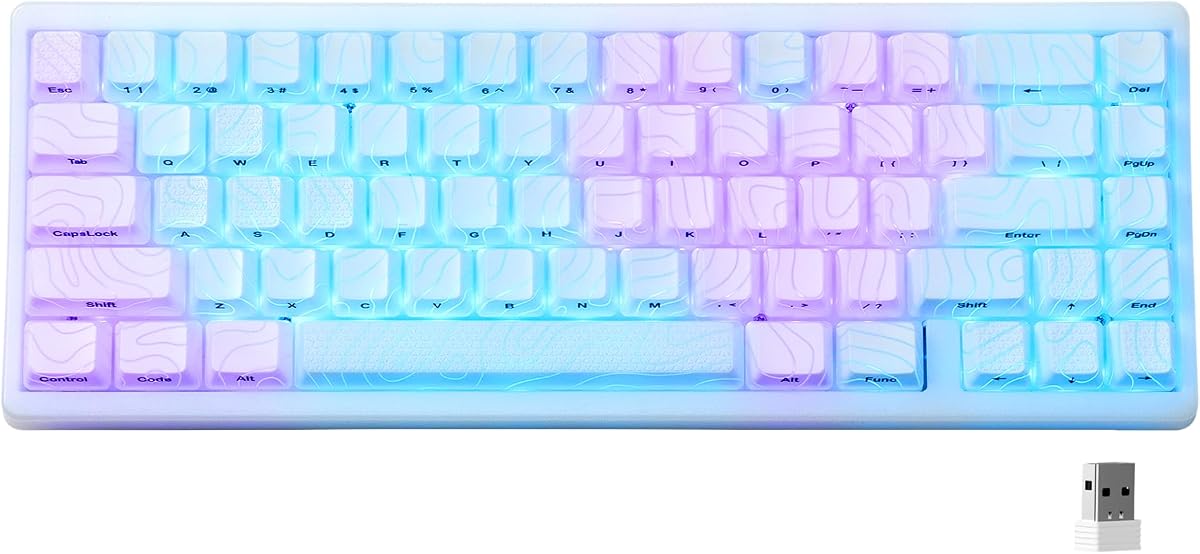
6. HITIME x XVX M67 Wireless 60% - Best Portable Wireless

HITIME x XVX M67 Wireless 60% Percent Keyboard

HITIME x XVX M67 Wireless 60% Percent Keyboard

9.2/10★★★★★

HITIME x XVX M67 is the portability champion of this pack. Bluetooth 5.0, 2.4 GHz wireless, and Type-C wired cover the real ways people move: phone outlining on a train, low-latency dongle gaming at a friend’s place, cable plugged in when batteries dip. A 4000 mAh cell backs that flexibility so compact wireless is not a two-hour gimmick.

  • Tri-mode BT / 2.4 GHz / USB-C
  • Gasket mount with four silencing layers
  • QMK/VIA hot-swap, 4000 mAh battery
Check Price →
✓ Pros
  • Tri-mode connectivity pairs up to multiple devices for true travel workflows
  • 4000 mAh battery supports long wireless sessions between charges
  • Gasket structure and four-layer fills deliver soft, quiet compact typing
  • QMK/VIA layers remap navigation once for wired and wireless use afterward
  • IMD shine-through theme and extra LEDs make a small board feel premium
✕ Cons
  • Wireless remapping caveats mean some edits require wired mode first
  • Themed topographic look may clash with strict corporate desks
  • More features to learn than a plug-and-play MageGee

Detailed review

Compact layout sits in the modern 67-key family—still far smaller than TKL, with room for thoughtful extras while keeping backpack viability high. Gasket mounting plus four layers of silencer fill between PCB, plate, and switches attack hollow sound, giving you physical comfort layers that budget bare boards lack. Single-key PCB slotting aims to improve flex consistency across the small typing cluster.

Hot-swap pre-lubed transparent linears invite long-term ownership. QMK/VIA support is the software layer story: rebuild arrows, function rows, and macros on macOS, Windows, or Linux. Note the practical caveat that remapping may require wired mode before those layers follow you into wireless—plan a ten-minute setup at home before a trip so airport Gate B12 is not your VIA classroom.

IMD patterning lets RGB shine through the theme for a distinctive portable aesthetic, with extra stabilizer and spacebar LEDs that punch above the board’s size. Seventeen-plus lighting modes and saturation tweaks scratch the custom itch without forcing a second board for looks. Versus the HyperX, you sacrifice aluminum tank vibes for wireless freedom and softer gasket acoustics.

Buy the M67 if your compact keyboard must follow you across devices and rooms. Skip it if you want the simplest possible plug-and-play red board or a renewed optical clicky Razer experience. For this roundup’s focus on portability plus layers—both foam and firmware—the M67 is the clearest dual win.

Travel ritual: charge overnight, pocket the 2.4 GHz dongle in a labeled sleeve, and keep a short USB-C cable as failsafe. On Bluetooth, remember which device slot maps to laptop versus tablet so Fn-layer muscle memory stays consistent when you context-switch.

Who should buy

Hybrid workers with a laptop, tablet, and desktop who hate owning three keyboards. Also strong for students moving between dorm and library tables where outlets are scarce.

Layer strategy on the road

Create a navigation layer that mirrors your laptop’s arrow habits, then a gaming layer that disables the OS key. Because VIA changes persist after wired configuration, you carry those layers without redoing homework on every Bluetooth reconnect.

Check Price on Amazon →

We may earn a commission at no additional cost to you.

7. MageGee Portable 60% Mechanical Gaming Keyboard - Best Bare-Bones Portable

MageGee Portable 60% Mechanical Gaming Keyboard

MageGee Portable 60% Mechanical Gaming Keyboard

8.6/10★★★★☆

MageGee’s MK-Box exists for people who want compact portability without reading a VIA manual. Sixty-eight keys, separate arrows, Fn access to F-row functions, red linear switches, and a detachable USB cable cover the student checklist. It will not win a custom keyboard sound contest, but it will fit in a backpack side pocket and just work on library PCs.

  • 68-key portable mini with arrows
  • Red linear switches, blue LED
  • Detachable USB, adjustable kickstands
Check Price →
✓ Pros
  • Genuinely portable 68-key size with arrows for travel typing
  • Linear reds keep noise and resistance modest for shared rooms
  • Detachable cable and kickstand feet adapt to random desks
  • Plug-and-play across Windows, Linux, and Mac without drivers
  • Anti-ghosting covers basic gaming needs on a budget compact
✕ Cons
  • No multi-layer foam story—expect a hollower sound than gasket boards
  • Blue LED and ABS-style caps feel entry-level next to PBT customs
  • Lacks hot-swap, wireless, and QMK depth found elsewhere in the pack

Detailed review

Compact layout here prioritizes familiarity. Keeping arrows means fewer cognitive layers, which is the right call when the keyboard is a temporary companion to a laptop trackpad life. Kickstand feet add tilt on cafeteria tables that otherwise force flat, fatiguing wrists. Blue LED modes—about sixteen—are controlled on-board so you are never hunting a driver on guest Wi-Fi.

Build and acoustics are honest budget territory. Double-shot legends help longevity relative to printed junk, yet the case lacks the gasket-and-fill narrative of Womier, RK R65, or HITIME. If layers of foam matter to you, step up. If layers of Fn complexity scare you, stay here and enjoy dedicated arrows.

Portability wins are simple: light weight, detachable cable, small rectangle. Pair it with a travel mouse and you have a portable workstation that still leaves mouse pad width. Gaming is fine for casual titles; competitive players chasing 8000 Hz magnetics should look at AULA instead.

Buy MageGee as a secondary or first mechanical when the goal is compact + arrows + low fuss. Skip it when you want cream thock, aluminum prestige, or wireless. In this pack it anchors the affordable portable end of the spectrum opposite HyperX and M67.

A practical upgrade path later is replacing keycaps or adding case foam yourself—the board is simple enough that DIY experiments are educational. Just do not expect out-of-box silence matching five-layer gasket flagships.

Best use cases

Dorm desks, temporary offices, and parents buying a first mechanical for a teen gamer who still needs arrows for homework.

Versus DIERYA T68SE

Both chase the same portable 68-key mission. Compare current listings, cable preference, and which legend layout you prefer—then pick the one in stock. Neither replaces a gasket layered board if sound is your obsession.

Check Price on Amazon →

We may earn a commission at no additional cost to you.

8. TMKB 60% Mechanical Gaming Keyboard - Best Clean White

TMKB 60% Mechanical Gaming Keyboard

TMKB 60% Mechanical Gaming Keyboard

9/10★★★★★

TMKB’s white sixty-percent board is a straight shooter: sixty-one ANSI keys, linear reds around forty-five grams of actuation, detachable USB-C, foldable feet, and fifteen LED modes. It is the clean portable option when Kanagawa art or topographic IMD feels like too much personality for your desk photo—or your office.

  • 61-key ANSI true 60% layout
  • 45g linear red switches
  • Detachable USB-C, double-shot keycaps, LED modes
Check Price →
✓ Pros
  • Honest 61-key compact layout maximizes mouse space on tight desks
  • 45g linear reds feel light for fast portable gaming sessions
  • Detachable USB-C and foldable feet favor bag packing and ergonomics
  • Double-shot keycaps keep legends readable under LED backlight
  • White aesthetic suits bright minimal setups without anime themes
✕ Cons
  • No gasket multi-layer fill marketing—sound is basic compact plastic
  • Arrows require Fn layers, which slows spreadsheet work
  • No wireless or hot-swap for multi-device or switch tinkering

Detailed review

Compact layout purity is the appeal. Like HyperX and RK61, you trade dedicated arrows for mouse space. That is correct for FPS and wrong for heavy Excel unless you embrace layers. Anti-ghosting across the sixty-one-key field covers competitive chording for the price bracket. Double-shot caps help backlighting stay legible, which matters when Fn legends are how you navigate.

Portability features are thoughtful for the tier: reversible USB-C, foldable feet for tilt, light chassis. There is no battery to remember, which some travelers prefer—plugged in means zero wireless dropouts during a ranked map. Compared with MageGee, TMKB is more true-60%; compared with HyperX, it is lighter on materials prestige but similar in mission.

Lighting modes adjust for brightness and speed without demanding a massive software suite. That keeps guest-laptop life simple. Durability ratings around fifty million keystrokes are standard marketing for this switch class—treat them as reassurance, not a stopwatch.

Choose TMKB if you want an unthemed true 60% wired board that packs easily and types lightly. Skip it if foam layers, cream lubed switches, or VIA programming define your must-have list. It is a solid mid-pack portable tool, not a custom endgame.

Learning tip: print a small Fn-layer cheat sheet for week one, tape it to the laptop lid, then throw it away once muscle memory lands. Compact boards reward that short investment forever after.

Who it fits

Minimalist desk builders and gamers who want white aesthetics without pudding-keycap RGB fireworks. Also a fine spare board to leave at a friend’s place for co-op weekends.

Portability versus wireless rivals

TMKB wins on simplicity; HITIME M67 wins on cable-free device hopping. If your bag already carries three USB cables, wired is fine. If you work from a tablet half the week, wireless matters more than a white finish.

Check Price on Amazon →

We may earn a commission at no additional cost to you.

9. RK ROYAL KLUDGE RK61 Wired 60% - Best Hot-Swap True

RK ROYAL KLUDGE RK61 Wired 60% Mechanical Gaming Keyboard

RK ROYAL KLUDGE RK61 Wired 60% Mechanical Gaming Keyboard

9.2/10★★★★★

Royal Kludge’s RK61 is the textbook portable true sixty-percent for tinkerers. Sixty-one keys, hot-swap PCB, pre-lubed red linears, QMK/VIA, and a detachable Type-C cable cover the modern compact checklist without gasket marketing extravagance. It is the board you buy when you know layers—firmware layers—will become part of your workflow.

  • 61-key ultra-compact hot-swap PCB
  • Pre-lubed red linear switches
  • QMK/VIA RGB, detachable Type-C
Check Price →
✓ Pros
  • True 60% layout is a classic FPS mouse-space choice
  • Hot-swap 3-pin/5-pin PCB invites switch experimentation
  • QMK/VIA layers make missing keys a solvable software problem
  • Pre-lubed reds feel smoother than dry budget linears
  • Detachable Type-C keeps portable packing clean
✕ Cons
  • Plastic build lacks HyperX aluminum rigidity
  • Wired only—no tri-mode convenience
  • Learning VIA adds setup time before the board feels complete

Detailed review

Compact layout maximalism frees the desk. FPS players have loved this footprint for years because the mouse starts closer to the keyboard’s right edge. Portability is strong for wired gear: slip it into a sleeve, pack the cable separately, and you are under the weight of a water bottle. Eighteen RGB modes plus monochrome options and vendor software or VIA keep lighting flexible.

Hot-swap is the long-term portability of feel—you can change switches when your tastes change without buying another chassis. Beginners can start on reds, then try tactiles for coding months later. Full anti-ghosting and low-latency wired connection keep gaming credible while you experiment.

Versus the R65, RK61 is smaller and more purist, losing the volume knobs and five-layer gasket story. Versus HyperX, you gain hot-swap and VIA openness but lose aluminum. Versus M67, you lose wireless. Those contrasts make RK61 the wired customizable middle path.

Buy it if you want to learn compact layers the right way with open tooling. Skip it if you need arrows dedicated out of the box or gasket silence immediately. Service responsiveness claims from the brand are a plus when you are new to hot-swap and might need guidance.

After unboxing, install VIA, map a navigation layer on hold-Caps or Fn, and only then judge the board. A true 60% without configured layers feels broken; with layers it feels intentional and portable in the best sense—everything you need is under your hands, not under a numpad continents away.

Layer starter map

Put arrows on IJKL or ESDF under Fn, park Home/End nearby, and keep volume on a simple chord. Stick to that map across devices so portable muscle memory survives desk changes.

Who should buy

Students entering the custom keyboard hobby, FPS players on small desks, and anyone who wants QMK/VIA without paying flagship kit prices.

Check Price on Amazon →

We may earn a commission at no additional cost to you.

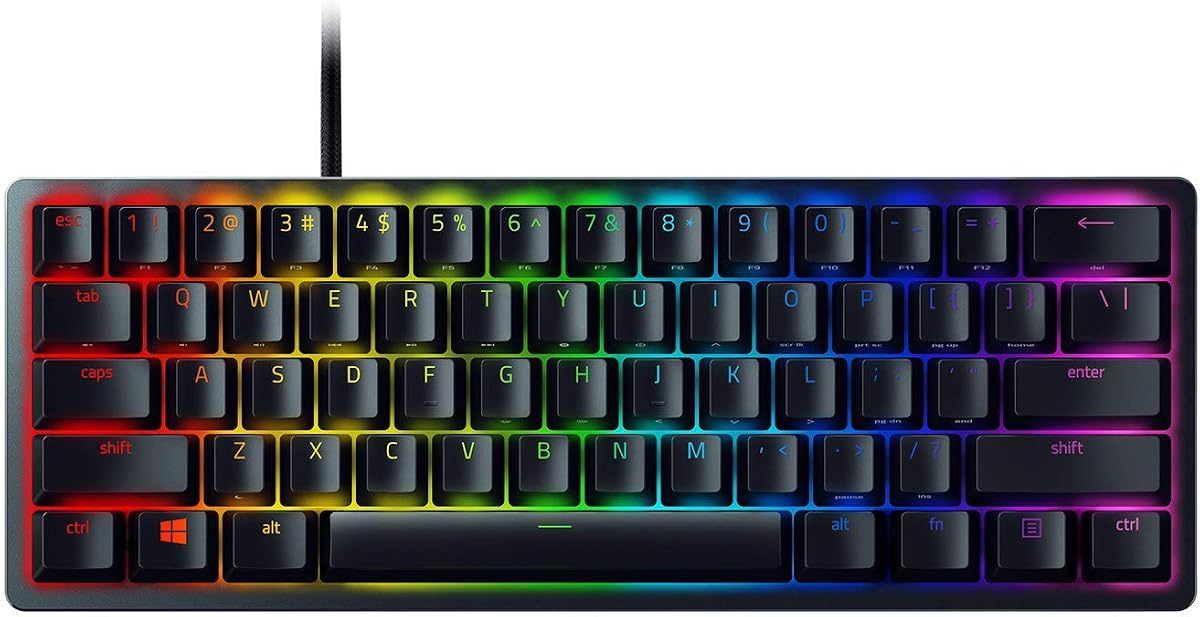
10. Razer Huntsman Mini 60 Percent Wired - Best Renewed Optical

Razer Huntsman Mini 60 Percent Wired Optical Clicky Switch Gaming Keyboard with

Razer Huntsman Mini 60 Percent Wired Optical Clicky Switch Gaming Keyboard with

9.2/10★★★★★

The Razer Huntsman Mini in this pack is a Renewed listing, and that word belongs in the first sentence of any recommendation. You are shopping a true sixty-percent optical clicky board with aluminum top plate pedigree and Chroma RGB—but condition depends on the renewed channel. Factor inspection, seller ratings, and return windows into the portability fantasy before you count on it for a flight next week.

  • True 60% Renewed Huntsman Mini
  • Razer Optical clicky switches
  • Aluminum top, Chroma RGB, PBT keycaps
Check Price →
✓ Pros
  • Optical clicky actuation feels snappy with short travel intent
  • True 60% aluminum-topped body stays compact for portable rigs
  • Doubleshot PBT keycaps resist greasy shine better than thin ABS
  • Chroma RGB and Hypershift macros deepen software layers for Razer users
  • Renewed listing can open a premium compact board at a softer outlay
✕ Cons
  • Renewed units vary—inspect condition, packing, and returns policy carefully
  • Clicky opticals are loud for open offices and shared dorms
  • Razer ecosystem software may be more than casual typists want

Detailed review

Compact layout is classic Mini: no dedicated arrows, maximum mouse space, Fn and Hypershift layers for everything else. Optical clicky switches actuate with light-based registration and a pronounced click that some gamers love for feedback. In a quiet library they are a social liability. If your portable use includes coworking, prioritize linear gasket boards instead.

Build quality aims premium: matte aluminum top frame, oil-resistant doubleshot PBT keycaps, and per-key Chroma that syncs inside Razer’s wider ecosystem. For users already on Razer mice, the software layer story is cohesive. For everyone else, Synapse is another install on a travel laptop you might prefer to keep clean.

Compared with HyperX Origins 60, the Huntsman Mini trades linear discretion for clicky optical speed branding and renewed pricing uncertainty. Compared with RK61, you lose hot-swap openness. Portability of size is excellent; portability of noise is poor. That distinction matters more than RGB screenshots.

Buy Renewed Huntsman Mini only if you specifically want Razer optical clickies in a true 60% and accept refurbished variability. Skip it for shared housing, stealth offices, or buyers who need gasket foam layers for acoustic comfort. When a clean unit lands, it remains one of the most iconic compact gaming boards of its generation.

If the renewed unit arrives with bent pins, sticky keys, or battery-less cable fray, use the return path immediately—do not “live with it” on a portable board you need to trust. Premium compact layouts only stay premium when every key and layer works on day one.

Renewed buying checklist

Photograph the unboxing, test every key, verify USB recognition on two machines if possible, and confirm Chroma control before the return window closes. Portable boards that fail mid-trip are worse than budget boards that simply feel cheap.

Noise and neighbors

Clicky opticals announce every keystroke. If portability means café work, this is the wrong switch family. Save Huntsman Mini energy for closed-door gaming dens.

Versus other true 60% picks

HyperX for linear aluminum reliability, RK61 for hot-swap VIA learning, Huntsman Mini Renewed for Razer clicky fans hunting a deal—and willing to vet condition.

Check Price on Amazon →

We may earn a commission at no additional cost to you.

Best 60 Percent Keyboards 2026 for Compact Desks and Travel

How to Choose a 60% Keyboard for Compact Desks, Layers, and Travel

Decide what “compact” means for you

True 60% boards (about 61 keys) delete the arrow cluster and often the dedicated navigation island. They maximize mouse space and bag space. Sixty-six to sixty-eight key “60%” boards keep arrows and feel closer to 65% keyboards. If your portable work includes spreadsheets, code navigation, or browser tabs with heavy arrow use, prefer 68-key compact layouts like DIERYA, MageGee, or AULA. If your portable work is primarily FPS and chat, true 60% boards like HyperX, RK61, TMKB, Womier, or Huntsman Mini reclaim the desk that matters.

Treat layers as a feature, not a punishment

There are two layer stories in this category. Firmware layers—Fn, Hypershift, QMK/VIA—replace missing keys. Physical layers—gasket mounts, Poron, multi-foam fills—replace hollow noise. Great portable boards eventually need both kinds of attention: configure navigation layers on day one, and prefer filled or gasket cases if you type in quiet rooms. Boards with VIA (RK61, R65, M67) make firmware layers less painful than memorizing opaque Fn charts alone.

Portability is cable, weight, and wireless—not just size

A tiny board with a captive cable that snags zippers is less portable than a slightly wider 68-key with detachable USB-C. Tri-mode wireless like the HITIME M67 unlocks tablet and phone pairing that wired minis cannot touch. Aluminum shells like HyperX survive bags better than brittle plastics but weigh more. Match the failure mode you fear: dead Bluetooth on stage (carry a cable), broken USB port (detachable cable), or crushed case (aluminum).

Pick switches for the rooms you enter

Linear reds and creams suit shared spaces and long typing. Optical clickies suit private gaming rooms. Hall Effect magnetics suit competitive players who will tune actuation. Hot-swap PCBs (Womier, R65, RK61, M67) let your portable board evolve when your room situation changes—dorm this year, office next year—without another full purchase.

Software boundaries on travel laptops

Work laptops often block vendor installs. Prefer boards with strong onboard Fn controls (DIERYA, MageGee, TMKB, HyperX basics) when you cannot install Synapse, NGENUITY, or web drivers. Configure VIA boards at home on a personal machine before the trip so layers follow you without admin rights on site.

Frequently Asked Questions

01

What is the difference between a true 60% keyboard and a 68-key “60%” keyboard?

A true 60% board typically has about sixty-one keys and drops dedicated arrows, nav clusters, and the F-row into Fn layers. Many products marketed as 60% are actually sixty-six or sixty-eight keys and keep arrows—and sometimes Delete—dedicated. Both are compact compared with full-size keyboards, but they feel different on day one. Choose true 60% for maximum mouse space and portability minimalism; choose 68-key compact layouts when travel typing still needs visible arrows.

02

Are 60% keyboards good for productivity and coding?

Yes—if you invest in layers. Programmers who remap Escape, arrows, and symbols onto hold-layers often end up faster than on sprawling full-size boards because their hands stay in the home cluster. Programmers who refuse remapping and constantly reach for missing keys will feel slowed down. Boards with QMK/VIA in this pack (RK61, R65, M67) make productivity layouts realistic; budget boards without remapping rely on stock Fn charts that you must memorize.

03

What do gasket mounts and foam layers actually change?

They change sound and sensation more than raw switch latency. Gasket mounts isolate the typing assembly with soft material so keystrokes feel cushioned and less pingy. Foam and multi-layer fills occupy empty case volume that would otherwise resonate. If you have tried a hollow plastic mini and hated the empty noise, prioritize Womier’s multi-layer fill, RK R65’s five-layer gasket stack, or HITIME M67’s four-layer silencing over bare bones options.

04

Which 60% keyboard in this guide is best for travel?

HITIME x XVX M67 wins multi-device travel with tri-mode wireless and a large battery. HyperX Alloy Origins 60 wins rugged wired travel with aluminum and detachable USB-C. For the lightest budget trips with dedicated arrows, DIERYA T68SE or MageGee MK-Box are easy packers. Match the trip: flights with a tablet favor M67; LAN parties with a PC favor HyperX or AULA.

05

Do I need hot-swappable switches on a portable 60% board?

Not required, but hot-swap is insurance. Portable boards live harder lives—different desks, climates, and moods. Being able to swap a linear for a tactile when you move from dorm gaming to office writing extends the chassis lifespan. Womier, RK R65, RK61, and M67 support that path. HyperX, TMKB, MageGee, DIERYA, AULA, and the Huntsman Mini path are more fixed-feel purchases.

06

Is the Razer Huntsman Mini Renewed safe to buy?

It can be a strong value if you want optical clickies and a true 60% Razer experience, but Renewed inventory is inherently variable. Inspect packaging, test every key, verify RGB and actuation, and keep the return window in mind. If you need a guaranteed pristine travel board for a work trip tomorrow, prefer new sealed options like HyperX or RK instead of gambling on refurbished condition.

07

Can 60% keyboards work with Mac and consoles?

Most wired boards in this pack enumerate as standard keyboards on Mac with partial shortcut differences. RK and HITIME call out Mac-friendly use more explicitly, while AULA’s advanced web driver is Windows-focused. HyperX lists console compatibility for PlayStation and Xbox families; Womier notes similar console support. Always check modifier key placement (Command/Option versus Windows/Alt) and plan a Mac layer if you switch platforms daily.

08

How should I learn Fn layers without rage-quitting?

Pick one navigation scheme and stick to it for two weeks. Use side-printed legends when available (HyperX). On VIA boards, place arrows in a logical cluster such as IJKL and avoid constantly redesigning the map. Practice in a low-stakes text editor before ranked games or live coding interviews. Compact layouts feel natural only after deliberate repetition—budget that practice like any other peripheral skill.

09

Linear red versus cream versus Hall Effect—what should portable users pick?

Linear reds are the versatile travel default: smooth, widely understood, usually quieter than clickies. Cream-style lubed linears add a deeper sound that feels luxurious on gasket boards like the R65. Hall Effect magnetic switches on the AULA WIN68 HE are for players who will tune actuation and Rapid Trigger-style behavior; they are less about café typing and more about competitive edge. Match the switch to the loudest room you work in and the most demanding game you play.

10

Will a 60% keyboard make my aim better?

Indirectly. A smaller board lets you center a wider mouse pad and reduce collisions between mouse cable and keyboard frame. That can improve consistency if desk space was your bottleneck. It will not replace aim training. If your desk is already huge, switching to 60% is comfort and portability—not a magic skill upgrade. Players on shallow desks see the biggest practical benefit.

Conclusion

The best 60 percent keyboard for 2026 is the one that matches your compact layout tolerance, your willingness to use layers, and the way you actually carry gear. HyperX Alloy Origins 60 remains the aluminum true-60% pick when mouse space and backpack durability lead. HITIME x XVX M67 is the portable wireless answer when devices change hourly and gasket fills keep typing civil. RK Royal Kludge R65 is the layered desk favorite when cream switches, five-layer damping, and a metal volume knob beat purist key counts.

Everyone else in the pack fills a lane worth respecting: AULA for magnetic competition, Womier for themed multi-layer acoustics, RK61 for hot-swap VIA learning, DIERYA and MageGee for arrow-friendly budget travel, TMKB for clean white true 60%, and Renewed Huntsman Mini for optical clicky fans who vet condition carefully. Ignore rainbow marketing long enough to answer those three focus questions—layout, layers, portability—and the right compact board usually becomes obvious.

Configure your navigation layer before you criticize the form factor, put a desk mat under hollow cases, and pack the cable or dongle like the critical accessory it is. Do that, and a 60% keyboard stops feeling like a compromise and starts feeling like the smallest complete setup you can take seriously at home or on the road.