Best Overall Power
ThinkPad P16 Gen 3 RTX PRO 3000

- Ultra 7 255HX with RTX PRO 3000 Blackwell 12GB GDDR7
- 64GB DDR5, 2TB Gen5 SSD, 16" WQUXGA 800-nit DCI-P3
- X-Rite factory calibration and unopened Lenovo retail config
Expert Review & Guide
Workstation laptops exist because consumer gaming GPUs and pretty ultrabooks still fail the wrong stress tests: overnight SolidWorks rebuilds, Revit views that eat VRAM, After Effects comps with CUDA plugins, and ISV-certified driver stacks your IT policy actually allows. In 2026 that means NVIDIA RTX Ada or RTX PRO laptop GPUs, HX-class CPUs, 32–64GB of memory, and panels that can show CAD edges without guessing. Precision and ThinkPad P machines remain the two dialects of that language.
This pack concentrates serious Dell Precision 7680 configurations—RTX 2000 Ada with 64GB/1TB, 64GB/2TB, and 32GB/1TB cuts, plus an RTX 1000 Ada i5-13600HX entry—alongside Lenovo ThinkPad P1 Gen 7 with RTX 3000 Ada, P16 Gen 2/Gen 3 with high-nit WQUXGA color panels, P16s and P14s Copilot+ mobile workstations on Ryzen AI 7 PRO 350, and one Renewed Precision 5570 with RTX A1000. We treat Renewed units as condition-variable and thin P14s iGPU machines as “mobile workstation” in the ThinkPad sense, not as substitutes for Ada discrete CAD horses.
Buy a workstation laptop when driver certification, ECC-minded workflows, and sustained multi-core matter more than RGB. Match GPU tier to your app’s recommended VRAM, match RAM to your largest assemblies, and match panel gamut to whether you deliver color or geometry. Reviews follow pack order with those filters applied.


As an Amazon Associate we earn from qualifying purchases. We may earn a commission at no additional cost to you.
Scan GPU class (Ada/PRO/A-series), RAM, panel nit/gamut, and Renewed status before diving into ISV-oriented notes in each review.
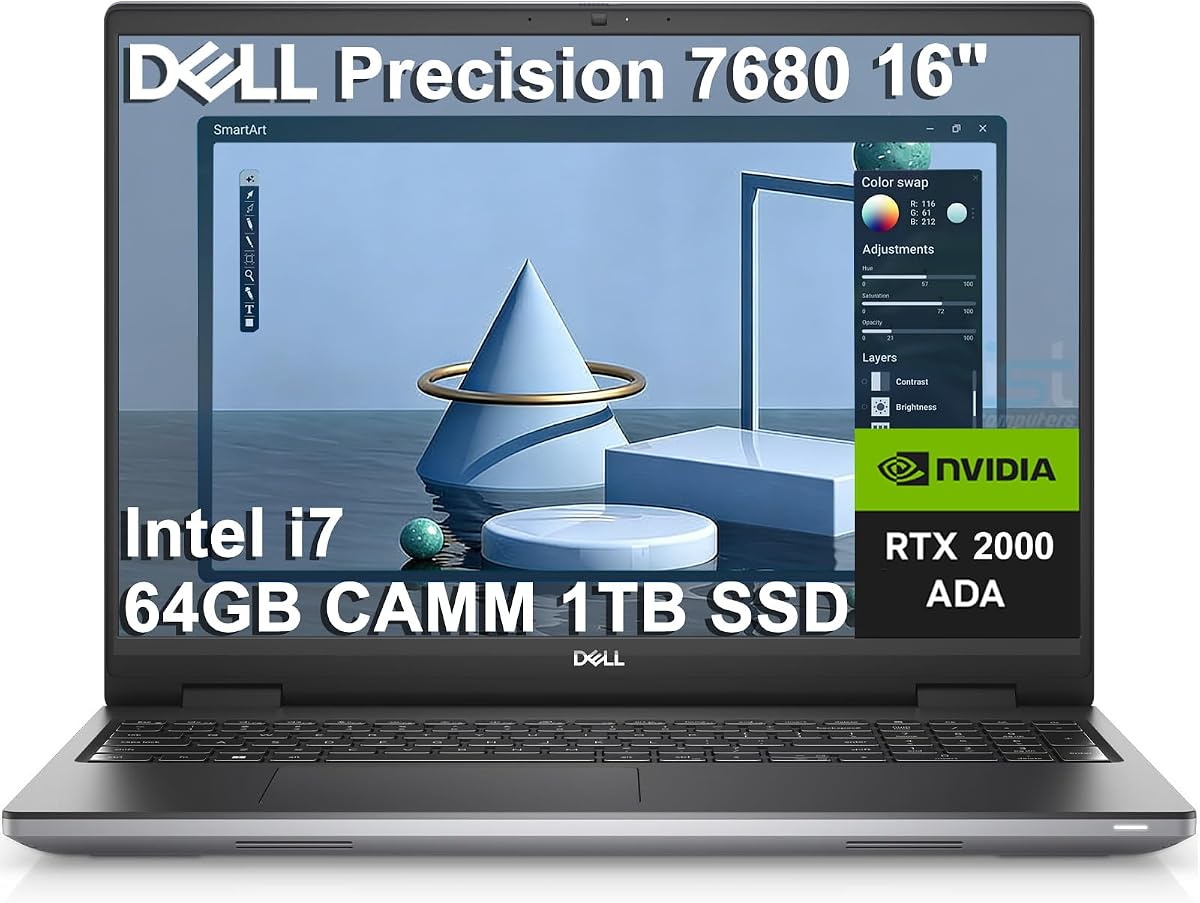
Dell’s Precision 7680 sits at the top of the Precision pyramid for a reason: HX silicon, Ada professional GPU, and memory capacities consumer ultrabooks do not attempt. This configuration pairs an Intel Core i7-13850HX vPro with NVIDIA RTX 2000 Ada 8GB, 64GB of DDR5 CAMM memory, a 1TB NVMe SSD, a 16-inch FHD+ anti-glare panel, and Windows 11 Pro. Architects, mechanical engineers, and editors who need certified pro drivers should shortlist it before any RGB “creator” laptop.
CAMM memory is Dell’s answer to SODIMM thickness limits—designed for faster routing and thinner profiles while still delivering workstation RAM counts. Sixty-four gigabytes is the difference between keeping Revit, Chrome, and a soft-proof viewer resident versus constant unloading. The RTX 2000 Ada’s 8GB of ECC-minded workstation memory hierarchy (in the pro driver sense) targets SolidWorks, Inventor, and CUDA pro apps more cleanly than GeForce Game Ready stacks.
Display expectations should stay grounded: FHD+ 1920×1200 is excellent for geometry and UI scale, with Dell noting roughly 45% NTSC class color in related bullets—fine for CAD, not your print-proof OLED. Expand the desk with HDMI, USB-C, and Thunderbolt to multiple 4K monitors when you return from site.
AI optimization language in Dell’s Precision copy refers to application-aware performance tuning for data/pro apps—not a Copilot+ ultraportable NPU story. Treat it as workflow acceleration, then still install the ISV-certified NVIDIA driver branch your vendor recommends.
Versus the 2TB twin: same brain, half the attic—choose 1TB if projects live on NAS. Versus 32GB cut: buy 64GB if assemblies are heavy. Versus ThinkPad P16 color monsters: Precision wins ecosystem familiarity for Dell fleets; ThinkPad wins panel spectacle.
Buy for Ada CAD desks that need 64GB now. Skip if you mainly need OLED grading with lighter GPU needs—the P16s OLED may fit better.
After Windows setup, install the NVIDIA RTX Enterprise/ISV branch your CAD suite documents—not the first Game Ready driver Google shows. Stability beats a 3% FPS flex nobody asked for.
HX + Ada wants hard surfaces and clear vents. A laptop riser during long FEM solves is cheaper than thermal throttling excuses to a client.
We may earn a commission at no additional cost to you.
Double the internal storage and the Precision 7680 becomes a self-contained site machine. Identical i7-13850HX, RTX 2000 Ada 8GB, and 64GB CAMM story, but a 2TB NVMe drive that can hold reality-capture chunks, Unreal scenes, and a clone of last quarter’s project without constant pruning. If your firm’s VPN to the file server is the bottleneck, local terabytes are a feature.
Everything said about Ada drivers, FHD+ geometry panels, and multi-monitor Thunderbolt/HDMI paths still applies. The unique decision is archival philosophy: 2TB for local-first, 1TB for cloud/NAS-first. Neither changes the GPU.
Data science and AI optimization blurbs in Dell’s copy matter more when datasets are resident. Keep working sets on the fast internal drive; park cold archives elsewhere.
Versus ThinkPad P16 Gen 3: less panel glory, different GPU tier (2000 Ada 8GB vs PRO 3000 12GB), often simpler Dell docking for existing fleets. Versus Renewed 5570: generational leap in platform and supportability.
Thermals and power bricks remain workstation-class—pack the right adapter wattage for GPU loads. Battery is for meetings, not overnight renders on a plane tray.
Best Precision Ada Desk when 64GB + Ada + 2TB matches how you actually store work. If color delivery is the product, keep reading to WQUXGA ThinkPads.
Partition or folder-discipline active projects versus libraries. Two terabytes still fragments when everything lands in Downloads.
Reality capture, video, and Unreal folks. Pure CAD line-work with server libraries can save attention on the 1TB SKU.
We may earn a commission at no additional cost to you.

If Ada professional graphics are mandatory but your assemblies are mid-size, the 32GB Precision 7680 cut is the value latch onto the same i7-13850HX + RTX 2000 Ada 8GB platform. One terabyte of NVMe and a USB-C hub in the listing reduce dongle panic on day one. Dell’s multi-monitor story—up to four external 4K displays via HDMI/USB-C/Thunderbolt mixes—turns the laptop into a desk spine.
Thirty-two gigabytes handles a lot of CAD and Adobe. It will not forgive simultaneous twin VMs, Chrome archaeology, and a 4GB texture bomb. Know your peak RAM from Task Manager on your current machine before you economize.
CAMM modules are not the old SODIMM ritual—budget professional service if you plan to grow to 64GB later. Sometimes buying 64GB on day one is the cheaper human time.
Versus RTX 1000 Ada i5 config: stronger GPU and CPU here. Versus ThinkPad P14s: discrete Ada versus iGPU Copilot+ thinness—different sports.
Include the hub in your cable map so Thunderbolt docks and hub ports do not fight for PD. Workstations accumulate adapters like tool bags accumulate bits.
Buy for Ada credibility with disciplined RAM use. Stretch to 64GB if your last crash was memory, not GPU.
Validate your dock’s DisplayPort streams against Dell’s four-display claim. Mixed MST hubs behave differently than dual TB4 native outputs.
Detail drawings, mid Revit models, Lightroom + one browser profile. Not: huge civil surfaces + Unreal + Docker.
We may earn a commission at no additional cost to you.
The ThinkPad P1 Gen 7 is the slim-firepower argument: Intel Core Ultra 7 165H vPro, NVIDIA RTX 3000 Ada 8GB, 32GB LPDDR5x-class CAMM2 memory, a 1TB Opal SSD, and a 16-inch 2560×1600 IPS anti-glare panel at 500 nits and 165Hz with 100% sRGB. Unopened retail packaging and Lenovo’s one-year courier/carry-in warranty (extendable on registration) matter when the laptop is a billable instrument.
RTX 3000 Ada’s extra professional GPU muscle versus RTX 2000 configs shows up in denser viewports and CUDA pro effects. The 165Hz 2.8K canvas makes pan/zoom in large boards feel fluid—underrated for long detailing sessions. Five-megapixel RGB+IR camera with privacy shutter is unusually good for workstation video reviews.
Thunderbolt 4 / USB4 with PD and DisplayPort 2.1, Wi-Fi 7 BE200 vPro, Bluetooth 5.4, and a 170W adapter telegraph a modern dock life. Opal encryption on the SSD aligns with firm security policies.
Versus P16 Gen 3: less peak HX/PRO GPU ceiling, more P1 mobility ethos. Versus Precision 7680 FHD+: sharper/faster panel, different Dell vs Lenovo dock cultures. Versus P14s: discrete Ada versus iGPU thin workstation.
Thermals in a P1 chassis are tuned but not silent under GPU load—use performance modes intentionally. Battery covers standup reviews, not overnight crowdrenders.
Best Creator Panel P1 for pros who need Ada 3000 and a bright 2.8K lid without jumping to full P16 tanks.
100% sRGB at 500 nits is strong for design UI and video calls; DCI-P3 800-nit WQUXGA P16 panels still win print/HDR delivery. Match panel to deliverable.
Register with Lenovo promptly if you want multi-year Premier options. Workstations earn their keep when support is boring.
We may earn a commission at no additional cost to you.

P16s Gen 4 with a 4K OLED Dolby Vision touchscreen at 100% DCI-P3 is the color-forward mobile workstation in this pack. AMD Ryzen AI 7 PRO 350, 32GB DDR5, 1TB performance SSD, Wi-Fi 7, Windows 11 Pro, Copilot+ labeling, Thunderbolt 4 pair, HDMI 2.1, Ethernet, and a numeric keypad make it a hybrid of ThinkPad practicality and creator-panel ambition. Unopened Lenovo retail packaging again supports warranty sanity.
OLED blacks and DCI-P3 coverage change soft-proofing on the road. Touch helps markup. Burn-in mindfulness—auto-hide taskbars, vary UI—matters more than on IPS CAD panels. Factory expectations for color work still benefit from a reference desktop when stakes are print contracts.
Ryzen AI PRO NPUs accelerate Copilot+ productivity and some AI-enhanced pro features; they do not replace RTX Ada CUDA for every plugin. Verify whether your sold unit includes discrete graphics—P16s SKUs historically span iGPU and discrete options, and Amazon titles sometimes blur lines. This listing emphasizes the OLED Copilot+ platform.
Versus P1 Ada: potentially less CUDA certainty, more OLED spectacle. Versus Precision FHD+: color win, different GPU story. Versus P14s: bigger OLED canvas versus thinnest carry.
Battery claims for P16s lines are typically stronger than HX tanks—good for client sites. Still plug in for long exports.
Buy when color-accurate OLED and Copilot+ ThinkPad manners outrank peak Ada HX. Validate GPU line on the invoice.
Dark mode helps OLED power and burn-in risk, but verify contrast on thin linework. Calibrate with a puck if you deliver color-critical assets.
RJ-45 saves trailer Wi-Fi days. Test the port before the first dusty job trailer trip.
We may earn a commission at no additional cost to you.

Lenovo calls the P14s Gen 6 its thinnest and lightest mobile workstation, and the pack listing confirms the trade: AMD Ryzen AI 7 PRO 350 Copilot+ with integrated Radeon 860M, 32GB DDR5, 1TB SSD, and a 14-inch WUXGA 500-nit 100% sRGB panel—not an Ada discrete hammer. This is the workstation you buy when travel weight and ThinkPad keyboards matter more than ray-traced viewports.
Thirty-two gigabytes and a bright accurate panel still outclass consumer ultraportables for Excel-heavy PMs, documentation authors, and light CAD over VPN. Heavy local SolidWorks with large assemblies wants Precision/P16 Ada instead. Be honest about which days you actually open the heavy file.
Copilot+ features help summarization and Windows AI assists on battery. Wi-Fi 7 keeps modern offices happy. Win 11 Pro and Lenovo warranty registration options suit managed pros.
Versus P1/P16 discrete: carry win, GPU loss. Versus Renewed 5570: newer platform, different risk profile, less discrete CUDA than A1000 depending on workload. Versus ultraportable N100 machines outside this guide: far more RAM and panel quality.
Rating 4.0 suggests mixed expectations—buyers hoping for invisible Ada may leave unhappy; buyers wanting thin P-series manners leave calmer.
Buy as a true mobile workstation for light/mid pro apps on the move. Do not buy as a silent substitute for RTX 2000/3000 desks.
Docs, light CAD, BIM review (not always authoring), AI-assisted writing, VPN analysis. Not: huge GPU renders.
Use Thunderbolt docks when available on your SKU to reclaim screen space at the office. The 14-inch lid is for transit.
We may earn a commission at no additional cost to you.

Not every seat needs RTX 3000. The Precision 7680 with RTX 1000 Ada 6GB, i5-13600HX, 32GB CAMM, and 1TB SSD is the on-ramp: professional drivers, HX thermals, workstation chassis, tempered GPU/CPU bins. Photography retouching, lighter CAD, and architecture documentation often thrive here without paying for unused VRAM.
Six gigabytes of Ada laptop memory is the governor on giant GPU textures and some AI denoise settings. Watch your app’s recommended VRAM table. Thirty-two gigabytes of system RAM remains more important than people admit—pair wisely.
Versus 2000 Ada 64GB twins: less headroom, often better fit for junior seats or specialized light tools. Versus Renewed A1000 5570: newer platform, new warranty certainty versus Renewed risk.
Dell’s Precision AI optimization story still applies at this tier for supported apps. Install ISV drivers. Use vPro features if IT images the fleet.
FHD+ anti-glare keeps wireframes readable outdoors-ish; colorists should still dock. Fans spool under GPU—expected.
Buy as entry Ada Precision honesty. Step up when viewports stutter or VRAM warnings become weekly.
If your scenes already warn at 6–8GB on a desktop, do not downshift to RTX 1000 6GB and hope. Buy 2000/3000/PRO instead.
Great for firms standardizing Precision docks while assigning GPU tiers by role.
We may earn a commission at no additional cost to you.

The P16 Gen 2 configuration in this pack is what many visualization leads actually want: a 16-inch WQUXGA 3840×2400 IPS anti-glare panel at 800 nits with HDR 400, 100% DCI-P3, and low blue light, driven by i7-14700HX and RTX 2000 Ada 8GB, with 32GB DDR5 (2×16 SODIMM), 1TB Gen4 Opal-class SSD, fingerprint, backlit keyboard, and Windows Pro. Storm Grey keeps it office-serious.
800 nits helps sunlit client trailers and bright studios. DCI-P3 coverage supports lookdev and marketing stills pulled from CAD. 60Hz means you bought pixels and color, not 165Hz flair—the P1’s 165Hz 2.8K is the motion alternative.
Versus P16 Gen 3: older CPU/GPU story, still excellent, usually different attention tier. Versus Precision FHD+: massive panel win. Versus OLED P16s: IPS high-nit durability versus OLED contrast—pick your religion.
SODIMM memory can be a serviceability comfort for shops used to classic upgrades—confirm procedures before you crack the chassis. Fingerprint + Pro OS speed secure logins on shared desks.
Thermals on 14700HX + Ada in a P16 tank are built for it—still use a flat desk. Battery is secondary.
Buy for color-critical CAD visualization on a bright IPS brick. Choose Gen 3 when you need PRO 3000 12GB and 64GB now.
800-nit panels are bright enough to fatigue eyes—use ambient light sensors or manual dimming for night detailing.
If you plan 64GB later, verify kit compatibility. Sometimes matched dual-channel kits behave better than random sticks.
We may earn a commission at no additional cost to you.

The Renewed Precision 5570 is the compact, condition-variable door into Dell workstation life: listing text cites i7-12800H/12700H-class fourteen-core performance, 32GB RAM, 1TB SSD, FHD+ 1920×1200, and NVIDIA RTX A1000 4GB with Windows 11 Pro. Title CPU strings disagree slightly (12800H vs 12700H in bullets)—verify the unit you receive in Windows and return if mismatched.
A1000 4GB handles lighter CAD and pro apps with proper drivers; it will choke earlier than RTX 2000 8GB Ada on dense GPU workloads. Thirty-two gigabytes of system RAM remains the saving grace for multitasking.
Renewed rules: battery report, keyboard wear, GPU artifact tests (furmark-level stress carefully), charger confirmation. Workstation Reneweds that pass are bargains; those that fail must leave during the return window.
Versus new 7680: less GPU/CPU headroom, more portability, more risk. Versus P14s: discrete pro GPU versus iGPU Copilot+ thinness—different compromises.
Use as a secondary mobile seat or junior station after QC. Do not bet a critical deadline render farm on an unchecked Renewed battery.
Buy only with inspection time. Prefer new Ada Precisions when uptime is contractual.
Run a short viewport stress in your actual CAD app. Look for sparkles or driver crashes before you migrate licenses.
Photograph the invoice and System → About. Mismatched SKUs happen on Renewed marketplace cards.
We may earn a commission at no additional cost to you.
When the brief is “do not compromise,” the ThinkPad P16 Gen 3 answers with Intel Ultra 7 255HX (20-core class, P-cores up to about 5.2GHz), NVIDIA RTX PRO 3000 Blackwell laptop GPU with 12GB GDDR7, 64GB DDR5, a 2TB Gen5 performance SSD, and a 16-inch WQUXGA 3840×2400 IPS anti-glare panel at 800 nits, 100% DCI-P3, HDR 400, Dolby Vision, low blue light, DC dimming, and X-Rite factory calibration. That is a mobile workstation that can author, visualize, and even host serious local AI prep without apology.
Twelve gigabytes of pro GPU memory changes which scenes fit. Sixty-four gigabytes of system RAM keeps digital twins and softwares coresident. Gen5 storage cuts project open times. The calibrated high-nit panel means fewer “it looked different on my laptop” fights with clients—though contracts may still require soft-proof protocol.
Lenovo’s unopened retail packaging and one-year courier/carry-in warranty with Premier extension options are how firms should buy tools. Register the machine. Image it. Move on with life.
Versus Precision 7680 2000 Ada: stronger GPU/panel/RAM/storage story here; Dell may still win if your dock farm is Precision-standardized. Versus P1 Gen 7: more peak power, less slim flex. Versus P14s: different planet of GPU capability.
Thermals and fans will announce GPU AI and ray-traced viewports—use performance modes deliberately. Battery is for standup reviews.
Best Overall Power because every pillar—CPU, pro GPU, RAM, SSD, panel—clears a professional bar simultaneously. Buy it when downtime costs more than the chassis.
Lenovo positions this class for end-to-end local AI workflows alongside CAD/BIM. Still validate your framework’s GPU support on PRO Blackwell drivers.
Import the X-Rite profile, then verify with a hardware calibrator quarterly if you deliver color. Factory calibration is a start, not a forever spell.
Writers who only touch Word, students without GPU coursework, and anyone unwilling to carry a workstation brick. Those humans want P14s or business ultraportables.
We may earn a commission at no additional cost to you.
SolidWorks, Revit, CATIA, NVIDIA Omniverse, DaVinci, and Blender publish recommended GPUs and VRAM. Match Ada/PRO tiers to those tables. GeForce gaming laptops can run apps; ISV certifications and pro drivers are why Precisions and ThinkPad P exist.
Thirty-two gigabytes is a modern workstation floor. Sixty-four gigabytes is comfort for large BIM/VMs. Watch your current machine’s peak working set before economizing.
FHD+ anti-glare Precisions prioritize clear CAD UI. WQUXGA 800-nit DCI-P3 ThinkPads prioritize visualization and client-facing color. OLED P16s maximize contrast with burn-in care. Buy the deliverable.
P14s Copilot+ iGPU machines are mobile workstations for light/mid work and travel. HX + Ada/PRO machines are for authorship and simulation. Mixing them up creates ticket storms.
Viable with GPU artifact tests and battery reports. Risky as the only machine before a deadline. Prefer new retail ThinkPad/Precision configs when uptime is contractual.
Thunderbolt docks, calibrated monitors, and input devices are part of the workstation system. Leaving them out of planning wastes the laptop GPU.
Ada generation professional GPUs (and RTX PRO SKUs) target ISV certifications, ECC-minded reliability features, and pro driver branches. GeForce targets games and many creative apps. Overlap exists, but firms often standardize on Precision/ThinkPad P + pro drivers for supportability.
Light parts may survive on 4–6GB. Complex assemblies, large textures, and GPU denser workflows prefer 8GB+, with 12GB PRO cards helping future scenes. Check your ISV’s guidance for your dataset size.
Often yes for mid-size work. Large BIM, soft-body sims, and multi-VM setups push toward 64GB. Track your peak usage before buying.
Not for pure geometry CAD. Yes if you present high-fidelity visuals or color-sensitive marketing pulls from 3D. Many engineers are happier with sharp FHD+/2.8K anti-glare and an external reference display.
It is a real ThinkPad P mobile workstation focused on AI PRO CPUs, memory, build, and certified platform features—with iGPU graphics in this pack’s listing. It is not a substitute for Ada discrete authorship machines.
Only if you can test GPU stability and battery health immediately. For primary deadline machines, prefer new 7680/P16 configs.
CAMM enables thinner/faster memory designs on some Precisions and P1 configs. SODIMM can be more familiar to service techs. Neither matters as much as getting enough capacity on day one.
For many traveling engineers, yes when docked. For maximum GPU/CPU TDP and expandability, towers still win. Hybrid: tower at office, P1/P14s on the road—or one P16 that does both if you accept weight.
It signals tested driver/application combinations and gives vendors a support path when a file crashes. That reduces “works on my gaming laptop” arguments during outages.
Choose Precision when Dell docks/ fleets dominate and RTX 2000 Ada 64GB configs fit. Choose P16 Gen 3 when you want PRO 3000 12GB, 64GB, 2TB Gen5, and an 800-nit calibrated WQUXGA panel in one Lenovo retail package.
Workstation shopping gets easier when you ignore RGB and follow GPU, RAM, and panel truth. In this pack, the ThinkPad P16 Gen 3 with RTX PRO 3000, 64GB of RAM, and a calibrated 800-nit WQUXGA display is the set-and-forget power answer, while Dell’s Precision 7680 64GB Ada configurations remain the Precision-desk standard—especially with 2TB when projects live locally. The ThinkPad P1 Gen 7 pairs RTX 3000 Ada with a bright 2.8K 165Hz canvas for pros who still carry the machine weekly.
Use P16s OLED and P14s Copilot+ when color or thin carry outranks discrete peak, and treat the Renewed 5570 as a tested secondary—not a blind primary. Match the chassis to the heaviest file you open every week, install the correct pro drivers, and let the workstation be boring in the best way: it just works.