Expert Review & Guide

Best WiFi 6E Motherboards and Upgrades for 2026

WiFi 6E matters when your router actually offers a 6GHz band and your desktop still fights neighbors on congested 2.4/5GHz airspace. The standard adds that cleaner 6GHz lane with the efficiency tricks of WiFi 6—OFDMA, better multi-device behavior, modern security—so gaming PCs, creator towers, and compact office boxes stop begging for Ethernet tape across the hallway. A motherboard with a true WiFi 6E module is the cleanest path; a PCIe AX210 card or better antennas can rescue boards that shipped with weaker radios or stubby stock aerials.

Our best-wifi-6e-motherboards pack mixes onboard WiFi 6E AM4/AM5/Intel boards, one WiFi 6 Prime board that needs an honest caveat, a high-gain tri-band antenna kit, and a TP-Link Intel AX210 adapter for upgrades. We ranked every item for radio generation accuracy, antenna practicality, LAN backup options, and whether the rest of the board is worth building around once wireless works. Ratings mirror Amazon averages in the pack; prices are omitted because wireless SKUs rotate constantly.

Start with the top picks if you want a current AM5 WiFi 6E ATX board, a compact B850M option, or a Tomahawk-class AM4 board that already speaks 6E. Then read the antenna and PCIe card reviews if your motherboard is fine but your signal path is not.

Top WiFi 6E Motherboard Picks

Best AM5 WiFi 6E ATX

MSI B850 Gaming Plus WIFI6E

★★★★★9.4/10
MSI B850 Gaming Plus WIFI6E
  • AM5 B850 ATX with premium WiFi 6E, Bluetooth 5.3, and 2.5Gb LAN backup
  • 12 Duet Rail P-PAK VRM and Frozr Guard cooling for Ryzen 9000 gaming PCs
  • Gen5 + Gen4 M.2 with Shield Frozr and Steel Armor PCIe for modern GPUs
Check Price →
Best Compact AM5 6E Board

GIGABYTE B850M Gaming X WIFI6E

★★★★☆8.8/10
GIGABYTE B850M Gaming X WIFI6E
  • mATX AM5 board with onboard WiFi 6E, 2.5GbE, and USB-C for small cases
  • 10+2+2 power design with fully covered MOSFET heatsinks
  • PCIe 5.0 and dual M.2 with EZ-Latch DIY helpers
Check Price →
Best AM4 WiFi 6E ATX

MSI MAG B550 Tomahawk MAX WiFi

★★★★★9/10
MSI MAG B550 Tomahawk MAX WiFi
  • AM4 ATX with AMD WiFi 6E, Bluetooth 5.2, and 2.5Gbps LAN
  • Extended heatsinks, 2oz copper PCB notes, and Gen4 M.2 Shield Frozr
  • Proven Tomahawk layout for Ryzen 5000 final-form gaming PCs
Check Price →

As an Amazon Associate we earn from qualifying purchases. We may earn a commission at no additional cost to you.

WiFi 6E Boards, Antennas, and Upgrade Cards

Every pack product appears below. Specs emphasize wireless generation, wired backup, and platform class so you can spot WiFi 6-only outliers and accessory upgrades quickly.

#ProductSpecificationsScore
1
  • 9dBi tri-band 2.4/5.8/6GHz antennas
  • Dual 6.5ft cables, RP-SMA male
  • For ROG/AORUS boards and PCIe cards
9
2
  • AM5 B850M, onboard WiFi 6E
  • 10+2+2 VRM, 2x M.2, PCIe 5.0
  • 2.5GbE, USB-C, EZ-Latch
8.8
3
  • AM4 ATX with onboard WiFi 6E
  • 12+2 stages, 2.5Gb Intel LAN
  • Dual M.2, HDMI 2.1, USB-C
9.2
4
  • AM5 B650 ATX, WiFi 6E onboard
  • 12+2 stages, 3x M.2 heatsinks
  • 2.5G LAN, USB Gen2x2 Type-C
9
5
  • AM4 mATX with WiFi 6E + BT 5.2
  • PCIe 4.0, Gen4 M.2 Shield Frozr
  • HDMI/DP, DDR4, Creator-friendly PRO
9.2
6
  • LGA 1700 ATX, WiFi 6E + BT 5.3
  • 12+1 VRM, DDR4, 2.5Gb LAN
  • PCIe 4.0, M.2 Shield Frozr
9.2
7
  • AM4 mATX with WiFi 6 (not 6E)
  • PCIe 4.0 SafeSlot, dual M.2
  • 1Gb LAN, HDMI 2.1, 5X Protection III
8.8
8
  • AM5 B850 ATX, WiFi 6E + BT 5.3
  • 12 Duet Rail VRM, Gen5 M.2
  • 2.5G LAN, Steel Armor PCIe 4.0 x16
9.4
9
  • Intel AX210 WiFi 6E PCIe card
  • Up to 2.4Gbps class, BT 5.3, WPA3
  • High-gain antennas, Win 10/11
9.2
10
  • AM4 ATX, AMD WiFi 6E + BT 5.2
  • 2.5Gb LAN, Gen4 M.2 Shield Frozr
  • Extended heatsinks, 2oz copper PCB
9

1. External WiFi 6E Tri-Band Antenna - Best Antenna Upgrade

External WiFi 6E Tri-Band Antenna

External WiFi 6E Tri-Band Antenna

9/10★★★★★

Stock motherboard antennas are often short, poorly placed, and trapped behind a desk against a wall. This tri-band kit exists for builders who already own a WiFi 6E board or PCIe card but live with one bar of 6GHz signal. Rated around 9dBi with dual 6.5-foot RP-SMA cables, it covers 2.4GHz, 5.8GHz, and 6GHz ranges used by WiFi 6/6E networks.

  • 9dBi tri-band 2.4/5.8/6GHz antennas
  • Dual 6.5ft cables, RP-SMA male
  • For ROG/AORUS boards and PCIe cards
Check Price →
✓ Pros
  • Explicit 6GHz coverage alongside 2.4/5.8GHz for true WiFi 6E band support
  • 9dBi gain claim and 6.5-foot cables let you escape metal case Faraday cages
  • RP-SMA male connectors match many ROG Strix, AORUS, and PCIe card mounts
  • Magnetic base and 180° rotatable design simplify desk placement
  • Cheaper than replacing an entire motherboard when stock antennas are the weak link
✕ Cons
  • Cannot add WiFi 6E to a board that only has WiFi 5/6 silicon
  • Cable clutter on small desks if you do not route cleanly
  • Results still depend on router band availability and driver health

Detailed review

Compatibility notes in the listing call out ASUS ROG Strix/Maximus and GIGABYTE series boards plus desktop PCIe WiFi cards—the exact ecosystems in this pack. Confirm your board uses RP-SMA male antenna connectors before ordering; most gaming boards do, but oddball adapters exist.

Placement beats mythology. Raise the magnetic base above the PC, keep line-of-sight toward the router when possible, and avoid coiling spare cable into an RF knot. Omni-directional design means you need not aim like a satellite dish, but height still wins.

This accessory will not magically create a 6GHz radio. If your board is WiFi 6 only—like the Prime B550M-A WiFi II in this pack—buy the TP-Link AX210 card instead, then consider these antennas if the card’s stock aerials disappoint.

Creators who move large footage wirelessly and gamers who refuse Ethernet should try antenna placement before blaming “bad WiFi 6E motherboards.” Often the PCB is fine and the plastic stubs are not.

Buy these when your 6E module is real and your signal path is tragic. Skip them when you can run 2.5Gb Ethernet—the lowest-latency upgrade remains a cable.

Quick install order

Power down, swap one antenna at a time so you do not cross-thread SMA connectors, route cables away from PSU modular spaghetti, then retest throughput on the 6GHz SSID specifically.

When antennas disappoint

Thick masonry, mesh nodes on the wrong band, or Windows preferring 5GHz can still bottleneck you. Force 6GHz SSID selection and update WLAN drivers.

Check Price on Amazon →

We may earn a commission at no additional cost to you.

2. GIGABYTE B850M Gaming X WIFI6E - Best Compact AM5

GIGABYTE B850M Gaming X WIFI6E

GIGABYTE B850M Gaming X WIFI6E

8.8/10★★★★☆

B850M Gaming X WIFI6E is the small-case answer for shoppers who typed WiFi 6E but still want a modern Ryzen platform. You get AM5 support for 9000/8000/7000 CPUs, DDR5, a 10+2+2 design, PCIe 5.0, dual M.2, USB-C, 2.5GbE, and—critically—WiFi 6E in the product name and feature set.

  • AM5 B850M, onboard WiFi 6E
  • 10+2+2 VRM, 2x M.2, PCIe 5.0
  • 2.5GbE, USB-C, EZ-Latch
Check Price →
✓ Pros
  • Onboard WiFi 6E on a current B850M AM5 board for Ryzen 9000 builds
  • 2.5GbE backup when you eventually run a cable
  • 10+2+2 power and covered MOSFET heatsinks suit compact gaming cases
  • PCIe 5.0 and dual M.2 with EZ-Latch convenience
  • Five-year warranty pitch for long wireless-dependent ownership
✕ Cons
  • mATX antenna placement can be awkward in squat cases
  • Only two M.2 slots for storage expansion
  • WiFi 6E trails WiFi 7 if your router already moved on

Detailed review

Wireless performance still depends on antenna routing. On mATX builds, mount antennas high on the rear I/O or use the external tri-band kit above if the case sits on the floor. 2.5GbE remains your competitive-play escape hatch.

Versus MSI B850 Gaming Plus WIFI6E, this board trades ATX space and some VRM/storage headroom for a smaller footprint. Versus Strix B650-A, you gain B850 freshness in mATX form. Versus AM4 6E boards, you gain DDR5 upgrade runway.

EZ-Latch helpers make SSD installs easier in cramped chassis where your knuckles already hate you. Keep M.2 shields on; compact cases run warmer around wireless modules and drives alike.

Choose Gaming X WIFI6E for SFF-ish Ryzen gaming PCs that need 6GHz. Skip it if you want ATX cable luxury or WiFi 7 specifically.

After Windows install, confirm the adapter enumerates as WiFi 6E-capable and join the 6GHz SSID deliberately—many routers still default clients to 5GHz.

Router prerequisites

You need a WiFi 6E (or tri-band WiFi 7) router that exposes 6GHz. A WiFi 6-only router will never unlock 6E client features no matter how good the motherboard is.

Ideal room layouts

Same-room or light-wall separation from the AP. 6GHz attenuates faster than 5GHz through dense walls—plan node placement accordingly.

Check Price on Amazon →

We may earn a commission at no additional cost to you.

3. ASUS ROG Strix B550-F WiFi II - Best AM4 Strix

ASUS ROG Strix B550-F WiFi II

ASUS ROG Strix B550-F WiFi II

9.2/10★★★★★

Strix B550-F WiFi II remains one of the clearest AM4 answers to “motherboard with WiFi 6E.” ASUS pairs the 6E radio with Intel 2.5Gb Ethernet, Bluetooth 5.2, a 12+2 power design, and the ROG software/BIOS comfort blanket. If you are finishing a 5800X3D-class tower and already own DDR4, this board still feels premium in 2026.

  • AM4 ATX with onboard WiFi 6E
  • 12+2 stages, 2.5Gb Intel LAN
  • Dual M.2, HDMI 2.1, USB-C
Check Price →
✓ Pros
  • Onboard WiFi 6E plus Intel 2.5Gb LAN with LANGuard for flexible networking
  • 12+2 teamed power stages suited to Ryzen 5000 gaming CPUs
  • Polished ROG UEFI, BIOS Flashback, and Aura Sync ecosystem
  • PCIe 4.0, dual M.2, HDMI 2.1, and USB-C complete a late AM4 feature set
  • Strong rating from years of real-world gaming use
✕ Cons
  • AM4/DDR4 platform—no Ryzen 9000 path
  • Only two M.2 slots versus newer AM5 boards
  • ROG pricing can approach entry AM5 6E options on sale

Detailed review

Wireless shoppers should still wire antennas correctly and keep the 2.5Gb port as plan A for tournaments. 6E shines for downloads, cloud sync, and everyday latency when Ethernet is ugly to run.

Versus Tomahawk MAX WiFi, Strix leans ROG aesthetics and ASUS tooling; Tomahawk leans MAG durability storytelling and similar 6E+2.5G networking. Versus Prime B550M WiFi II, Strix is actual WiFi 6E rather than WiFi 6.

Do not buy Strix B550 expecting AM5 longevity. Buy it because your AM4 gaming PC needs a proper 6GHz client without a PCIe adapter consuming a slot.

BIOS Flashback helps CPU swaps. Keep firmware current if you chase late Ryzen 5000 steppings.

Antenna tip: if stock aerials underperform behind a desk, the tri-band kit earlier in this guide is the first upgrade—not a new motherboard.

Best-fit AM4 gamer

Owners keeping DDR4 who just upgraded to a WiFi 6E router and hate USB WiFi dongles sticking out of the rear I/O.

Slot planning

Onboard 6E frees PCIe slots for GPUs and capture cards. That integration is the quiet advantage versus the TP-Link upgrade path.

Check Price on Amazon →

We may earn a commission at no additional cost to you.

4. ASUS ROG Strix B650-A - Best White AM5 WiFi

ASUS ROG Strix B650-A

ASUS ROG Strix B650-A

9/10★★★★★

Strix B650-A is the stylish AM5 WiFi 6E pick when you want DDR5 and a ROG board without jumping to WiFi 7 marketing. Onboard 6E, 2.5G LAN, three M.2 slots with heatsinks, USB Gen2x2 Type-C, ALC4080 audio, and Aura Sync make a complete wireless-capable gaming platform for Ryzen 7000–9000 CPUs.

  • AM5 B650 ATX, WiFi 6E onboard
  • 12+2 stages, 3x M.2 heatsinks
  • 2.5G LAN, USB Gen2x2 Type-C
Check Price →
✓ Pros
  • WiFi 6E on an AM5 Strix board with Ryzen 9000 support after BIOS updates
  • Three heatsinked M.2 slots for OS, games, and media
  • 2.5G LAN backup and USB 3.2 Gen 2x2 Type-C for modern desks
  • Strong VRM heatsinks and 12+2 stages for gaming CPUs
  • White aesthetic that matches popular mid-tower themes
✕ Cons
  • May need BIOS flash for newer Ryzen 9000/8000 CPUs
  • WiFi 6E rather than WiFi 7 on newer B850 WiFi7 SKUs
  • B650 generation trails B850 Gaming Plus on chipset freshness

Detailed review

If MSI’s B850 Gaming Plus WIFI6E is similarly priced, the newer chipset and 4.7 rating may win. If you love white Strix and find B650-A discounted, it remains an excellent 6E host—flash BIOS first when required.

Antenna placement on ATX boards is usually easier than mATX cubes. Still, raise aerials above the case. Glass-heavy showcases can attenuate signals if the PC sits in a corner.

Storage and power features exceed what wireless alone demands, which is good: you are buying a whole PC foundation, not a WiFi dongle with DIMM slots.

Choose B650-A for aesthetic AM5 6E builds. Choose B850 Gaming Plus when you want the freshest WiFi 6E ATX board in this pack. Choose Tomahawk MAX when staying on AM4.

Driver hygiene: install chipset and WLAN drivers from ASUS, then verify Windows reports 6GHz capability under the adapter’s properties.

WiFi 6E versus WiFi 7 shopping

If your router is WiFi 6E, this board matches it. If you already bought WiFi 7 access points, consider whether a WiFi 7 motherboard is worth the premium—or whether 6E still saturates your ISP plan.

Creative desk extras

USB Gen2x2 Type-C helps portable SSDs when wireless backups feel slow. Use both tools: 6E for convenience, fast USB for bulk archives.

Check Price on Amazon →

We may earn a commission at no additional cost to you.

5. MSI PRO B550M-VC WiFi - Best Budget AM4 mATX

MSI PRO B550M-VC WiFi

MSI PRO B550M-VC WiFi

9.2/10★★★★★

PRO B550M-VC WiFi proves WiFi 6E is not only a Strix tax. MSI packs 6E and Bluetooth 5.2 into a micro-ATX PRO board with PCIe 4.0, Shield Frozr M.2, Core Boost/Digital PWM language, and thickened copper notes aimed at quiet daily drivers and compact gaming PCs on Ryzen 5000/3000 (with listed APU exceptions).

  • AM4 mATX with WiFi 6E + BT 5.2
  • PCIe 4.0, Gen4 M.2 Shield Frozr
  • HDMI/DP, DDR4, Creator-friendly PRO
Check Price →
✓ Pros
  • WiFi 6E and Bluetooth 5.2 on a compact PRO-series price board
  • PCIe 4.0 and Gen4 M.2 with Shield Frozr for snappy game drives
  • 7W/mK pads and choke thermal extras unusual at budget tiers
  • HDMI/DP outputs cover APU and troubleshooting displays
  • Strong 4.6 rating for office/gaming hybrid AM4 boxes
✕ Cons
  • mATX AM4—no DDR5 upgrade path
  • Not compatible with Ryzen 5 3400G and Ryzen 3 3200G per MSI notes
  • Fewer luxury LAN features than Tomahawk’s 2.5Gb setup

Detailed review

For wireless-first bedrooms and dorms, onboard 6E beats USB dongles that fall out when you vacuum. Place antennas outside the metal shell. If signal still lags, try the magnetic tri-band kit before replacing the board.

Versus Tomahawk MAX, you give up ATX space and 2.5Gb LAN emphasis for a smaller cheaper PCB. Versus Prime B550M WiFi II, you gain actual 6E rather than WiFi 6. Versus AM5 boards, you stay on DDR4 by choice.

Creator Genie and DDR4 Boost extras are MSI sauce—use what helps, ignore what does not. The wireless radio is the headline for this article’s keyword.

Buy PRO B550M-VC WiFi for compact AM4 6E builds. Skip it when you need 2.5GbE onboard or a future AM5 CPU path.

Note the APU incompatibility list before you plan a budget graphics-free build with older G-series chips.

Office + light gaming niche

PRO styling suits muted office towers that still join a WiFi 6E SSID for video calls and after-hours games. RGB is optional; radios are not.

Bluetooth controllers

Bluetooth 5.2 covers many pads and headsets. Keep USB receiver spares for competitive latency-sensitive peripherals anyway.

Check Price on Amazon →

We may earn a commission at no additional cost to you.

6. MSI PRO B760-P WiFi DDR4 - Best Intel WiFi

MSI PRO B760-P WiFi DDR4

MSI PRO B760-P WiFi DDR4

9.2/10★★★★★

Intel builders searching for WiFi 6E motherboards should land here inside this pack. PRO B760-P WiFi DDR4 combines LGA 1700 support (listing covers 12th/13th/14th gen messaging across title/about variants), WiFi 6E, Bluetooth 5.3, 2.5Gb LAN, and a 12+1 power design on an ATX PCB with thickened copper construction notes.

  • LGA 1700 ATX, WiFi 6E + BT 5.3
  • 12+1 VRM, DDR4, 2.5Gb LAN
  • PCIe 4.0, M.2 Shield Frozr
Check Price →
✓ Pros
  • WiFi 6E and Bluetooth 5.3 on an Intel B760 ATX board with 2.5Gb LAN
  • 12+1 Duet Rail power with 8+4 pin CPU connectors for 12th–14th gen Core CPUs
  • DDR4 support keeps upgrade costs lower than DDR5 Intel boards
  • Extended heatsinks, 7W/mK pads, and M.2 Shield Frozr for sustained loads
  • ATX layout eases antenna and cable routing versus tiny mATX boxes
✕ Cons
  • DDR4 B760 means you are not on DDR5 Intel platforms
  • PCIe 4.0 focus trails some Z-series PCIe 5.0 boards
  • Intel-only—irrelevant to Ryzen WiFi 6E shoppers

Detailed review

Choosing DDR4 intentionally lowers memory spend for office and gaming hybrids that still want 6GHz wireless. If you already bought DDR5 kits, look outside this exact SKU. If you want affordable Intel + 6E, this is the on-pack answer.

Wireless setup mirrors AMD boards: update drivers, join 6GHz, place antennas high, keep 2.5Gb Ethernet as the competitive backup. Shield Frozr keeps the boot SSD from cooking beside a warm Intel gaming chip.

Versus AM5 B850 Gaming Plus, pick this for Intel CPUs you already own. Versus Z790 TUF boards in other guides, B760 is the value chipset with fewer overclocking toys—fine for locked gaming CPUs.

PRO aesthetics stay quiet in office glass cubes. That may be exactly what WiFi 6E productivity towers need.

Buy it for Intel DDR4 WiFi 6E ATX builds. Skip it for Ryzen or DDR5-first Intel plans.

BIOS and CPU support

Confirm your exact Core generation on MSI’s support list and update BIOS if purchasing older warehouse stock for newer CPUs.

Why 2.5Gb LAN still matters

Even on a WiFi 6E article, wired backups win tournaments and large NAS copies. This board smartly includes both.

Check Price on Amazon →

We may earn a commission at no additional cost to you.

7. ASUS Prime B550M-A WiFi II - Know Before You

ASUS Prime B550M-A WiFi II

ASUS Prime B550M-A WiFi II

8.8/10★★★★☆

Honesty first: Prime B550M-A WiFi II is a WiFi 6 board that appears in WiFi 6E shopping graphs. ASUS’s own about text specifies WiFi 6 (802.11ax), 1Gb LAN, PCIe 4.0 SafeSlot, dual M.2, HDMI 2.1, and 5X Protection III. It can be a fine AM4 mATX motherboard. It is not a WiFi 6E motherboard.

  • AM4 mATX with WiFi 6 (not 6E)
  • PCIe 4.0 SafeSlot, dual M.2
  • 1Gb LAN, HDMI 2.1, 5X Protection III
Check Price →
✓ Pros
  • Competent AM4 mATX board with WiFi 6, PCIe 4.0, and dual M.2
  • HDMI 2.1, D-Sub, and DVI cover many display fallbacks
  • 5X Protection III and SafeSlot Core durability features
  • Fan Xpert 2 and VRM/PCH heatsinks suit quiet small towers
  • Fair upgrade base if you add the TP-Link AX210 for true 6E
✕ Cons
  • Onboard wireless is WiFi 6, not WiFi 6E—no 6GHz band
  • Only 1Gb LAN versus 2.5Gb on better 6E boards
  • Easy to mis-buy when searching WiFi 6E motherboard lists

Detailed review

Why keep it in the roundup? Because this is how people accidentally buy the wrong radio generation. If you need 6GHz, either choose a true 6E board above or pair this Prime with the TP-Link Archer TXE72E AX210 card—and accept that a PCIe slot plus antenna mounts become part of the build.

As a WiFi 6 board, it still benefits from good antenna placement and 5GHz SSIDs. You simply will not join a 6GHz network with the onboard module.

ECC memory mention and OptiMem messaging hint at ASUS’s stability focus. Gamers should care more about the wireless mismatch than ECC headlines.

Buy Prime B550M-A only if WiFi 6 is enough or you planned a PCIe 6E card anyway. Everyone searching specifically for WiFi 6E should skip to Tomahawk, Strix B550-F WiFi II, B850 Gaming Plus, or B850M Gaming X.

Retail page skimming tip: “WiFi II” in ASUS names does not automatically mean 6E—read the standard line every time.

Upgrade path to 6E

Install the TP-Link AX210 card, disable or ignore the onboard WiFi in BIOS/Device Manager to avoid conflicts, and connect the Bluetooth USB header cable if you want BT from the card.

Who might still want it

Budget AM4 builders on WiFi 6 routers who do not need 6GHz and want HDMI 2.1 troubleshooting outputs in mATX form.

Check Price on Amazon →

We may earn a commission at no additional cost to you.

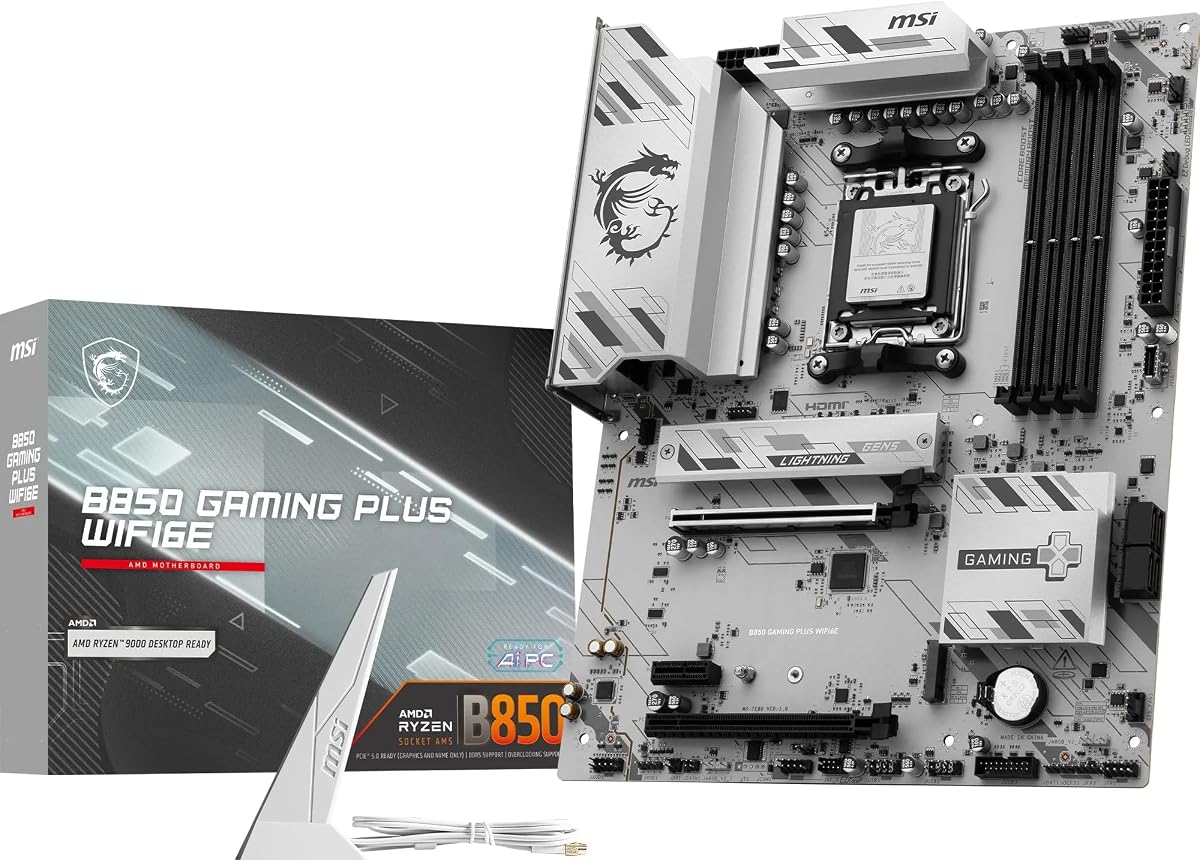
8. MSI B850 Gaming Plus WIFI6E - Best AM5 WiFi

MSI B850 Gaming Plus WIFI6E

MSI B850 Gaming Plus WIFI6E

9.4/10★★★★★

MSI B850 Gaming Plus WIFI6E is our overall pick for shoppers who want a current AM5 board that still takes the WiFi 6E keyword literally. A 12 Duet Rail power design, Frozr Guard cooling with 7W/mK pads, extended heatsinks, DDR5 Boost messaging, Gen5 and Gen4 M.2 with Shield Frozr, WiFi 6E, Bluetooth 5.3, and 2.5Gb LAN form a coherent 2026 gaming platform—with the pack’s strongest 4.7 rating snapshot.

  • AM5 B850 ATX, WiFi 6E + BT 5.3
  • 12 Duet Rail VRM, Gen5 M.2
  • 2.5G LAN, Steel Armor PCIe 4.0 x16
Check Price →
✓ Pros
  • Highest rating in this pack with explicit WiFi 6E and Bluetooth 5.3
  • 12 Duet Rail P-PAK VRM with Core Boost for Ryzen 9000 performance
  • Gen5 + Gen4 M.2 with Shield Frozr and EZ M.2 Clip II
  • 2.5Gb LAN backup plus USB 10Gbps Type-C and Audio Boost
  • Steel Armor PCIe slot for modern gaming GPUs
✕ Cons
  • PCIe 4.0 x16 messaging may matter to buyers insisting on PCIe 5.0 graphics slots
  • Only two M.2 connectors versus three/four on some rivals
  • WiFi 6E may feel last-gen if you already standardized on WiFi 7 routers

Detailed review

Wireless-first users get a premium 6E module without hunting adapters. Competitive users keep 2.5Gb Ethernet one cable away. That duality is what “best WiFi 6E motherboard” should mean: great radio, adult wired backup.

Note the PCIe 4.0 x16 Steel Armor slot language on this SKU. For the vast majority of GPUs and games, that is not a practical limiter; enthusiasts chasing PCIe 5.0 x16 specifically should read manuals carefully and compare sibling B850 boards.

Versus B850M Gaming X, you gain ATX space and the higher-rated MSI feature pack. Versus Strix B650-A, you gain B850 chipset freshness and a 6E-focused Gaming Plus identity. Versus Tomahawk MAX, you move to DDR5 AM5.

EZ M.2 Clip II and Shield Frozr keep storage installs friendly. Audio Boost is a nice onboard touch for headset gamers who have not bought a DAC yet.

Buy this board when WiFi 6E + modern AM5 is the brief. Skip to accessories only if you already love your motherboard and merely need better antennas or a PCIe radio.

Memory and EXPO tips

MSI advertises high DDR5 OC ceilings; for daily WiFi gaming stability, enable a validated EXPO profile near mainstream speeds first, then experiment.

Antenna and BT checklist

Attach both antennas, update WLAN/BT drivers, and test 6GHz throughput with a tool you trust. Stuttering often traces to power-saving wireless quirks, not motherboard VRMs.

Who should still pick WiFi 7 boards

Homes that already deployed WiFi 7 access points and want client parity. If your AP is 6E, Gaming Plus matches the network you actually own.
Check Price on Amazon →

We may earn a commission at no additional cost to you.

9. TP-Link Archer TXE72E AX210 - Best PCIe WiFi 6E

TP-Link Archer TXE72E AX210

TP-Link Archer TXE72E AX210

9.2/10★★★★★

Not every desktop needs a new motherboard to join WiFi 6E. The TP-Link Archer TXE72E uses Intel’s AX210 chipset to add tri-band 6E connectivity—up to 2402Mbps on 6GHz or 5GHz class links and 574Mbps on 2.4GHz—plus Bluetooth 5.3, WPA3, and OFDMA/MU-MIMO features aimed at busy networks and lower latency gaming.

  • Intel AX210 WiFi 6E PCIe card
  • Up to 2.4Gbps class, BT 5.3, WPA3
  • High-gain antennas, Win 10/11
Check Price →
✓ Pros
  • Intel AX210 WiFi 6E radio brings 6GHz to boards that lack it
  • Tri-band speeds up to 2.4Gbps class with MU-MIMO/OFDMA features
  • Bluetooth 5.3 and WPA3 security for modern peripherals and safer WiFi
  • Includes high-gain antennas plus standard and low-profile brackets
  • Ideal partner for the Prime B550M WiFi 6 board or older WiFi 5 desktops
✕ Cons
  • Uses a PCIe slot and requires a motherboard F_USB cable for Bluetooth
  • Windows 11 called out for utilizing 6GHz—plan your OS accordingly
  • Can conflict if onboard WLAN remains enabled carelessly

Detailed review

Installation is the tax: occupy a PCIe slot, mount antennas, and connect the Bluetooth USB cable to an F_USB header. Low-profile brackets help mini towers. If your case is a Faraday cage, combine this card with the magnetic tri-band antenna kit for better placement flexibility.

TP-Link notes Windows 11 for utilizing 6GHz. Treat that seriously—verify OS version before you blame the card. Driver installs from TP-Link/Intel usually beat generic Windows defaults for first-week stability.

This card is the redemption arc for Prime B550M-A WiFi II owners and any solid board stuck on WiFi 5/6. It is less ideal if you already own B850 Gaming Plus WIFI6E and simply need better antennas.

Disable onboard WiFi in BIOS or Device Manager after the AX210 works to prevent weird metric routing. Keep Ethernet enabled as failover.

Buy TXE72E to retrofit 6E. Buy a native 6E motherboard when you were upgrading the board anyway for CPU/socket reasons.

Bluetooth header reminder

Without the F_USB cable connected, WiFi may work while Bluetooth does not. Check the card’s cable before RMA-ing “dead BT.”

Latency expectations

WiFi 6E can feel excellent on a clean 6GHz SSID, but wired Ethernet still wins jitter-sensitive competitive play. Use the right tool for the match.

Check Price on Amazon →

We may earn a commission at no additional cost to you.

10. MSI MAG B550 Tomahawk MAX WiFi - Best AM4 WiFi

MSI MAG B550 Tomahawk MAX WiFi

MSI MAG B550 Tomahawk MAX WiFi

9/10★★★★★

Tomahawk MAX WiFi is the AM4 ATX board we trust when WiFi 6E and 2.5Gb LAN both need to be excellent. MSI’s extended heatsink stack, thickened copper notes, Gen4 M.2 Shield Frozr, and Turbo USB 3.2 Gen 2 features support nonstop gaming PCs that happen to live on wireless most weeknights.

  • AM4 ATX, AMD WiFi 6E + BT 5.2
  • 2.5Gb LAN, Gen4 M.2 Shield Frozr
  • Extended heatsinks, 2oz copper PCB
Check Price →
✓ Pros
  • AMD WiFi 6E solution plus Bluetooth 5.2 and 2.5Gb LAN with LAN Manager
  • Extended heatsink design with 7W/mK choke pads and 2oz copper PCB notes
  • PCIe 4.0 and Gen4 M.2 Shield Frozr for fast game installs
  • Tomahawk ATX layout beloved by AM4 gaming builders
  • Strong wired+wireless combo for final Ryzen 5000 platforms
✕ Cons
  • AM4 end-of-road platform versus AM5 B850 options
  • DDR4 only—no Zen 5 desktop CPU path
  • MAG styling is less flashy than white Strix boards

Detailed review

The networking story is dual-path done right: AMD WiFi 6E for the 6GHz SSID, 2.5Gb LAN with LAN Manager when you drop a cable. That flexibility is why Tomahawk still appears in WiFi 6E shortlists years after AM5 launched.

Versus Strix B550-F WiFi II, pick Tomahawk for MAG durability vibes and MSI BIOS familiarity; pick Strix for ROG ecosystem and HDMI 2.1 living-room quirks. Versus PRO B550M-VC, pick Tomahawk for ATX space and 2.5Gb LAN.

If you are building brand-new with upgrade ambitions, AM5 B850 Gaming Plus WIFI6E is the wiser long game. If you are maximizing a DDR4 gaming PC you love, Tomahawk MAX WiFi is the 6E ATX closer.

Keep antennas out of the cable nest. Update BIOS for your Ryzen 5000 CPU if needed. Enjoy a platform that finally matches a modern router.

Final thought: WiFi 6E motherboards only shine when the AP cooperates. Buy the board and audit your router bands the same weekend.

LAN Manager use case

Use wired 2.5Gb for ranked nights and large Steam downloads overnight; keep 6E for couch moves and cleaner desks.

Thermals and wireless coexistence

Extended heatsinks help CPUs; they also mean more metal near rear I/O. Raise antennas slightly to clear the heatsink forest.

Check Price on Amazon →

We may earn a commission at no additional cost to you.

Best WiFi 6E Motherboards and Upgrades for 2026

Buying Guide: Getting Real WiFi 6E Performance

Confirm the radio generation on the page

WiFi 6 and WiFi 6E are not synonyms. 6E adds 6GHz. Read the spec line, not just the title words “WiFi” and “II.” The Prime B550M-A WiFi II in this pack is the cautionary example.

Router and OS prerequisites

You need a 6E-capable access point and a client OS/driver stack that can use 6GHz. Several adapters call out Windows 11 for full 6GHz use—plan images accordingly.

Onboard module versus PCIe card versus antennas

Replace the motherboard when you also need a new socket/chipset. Add a PCIe AX210 card when the board is fine but the radio is old. Replace antennas when the radio is already 6E but placement is terrible.

Always keep a wired backup

Prefer boards with 2.5GbE alongside WiFi 6E. Wireless is convenience; copper is consistency for competitive play and huge transfers.

How to Validate WiFi 6E After Installation

01

Update chipset and WLAN drivers

Install vendor packages before judging speeds. Generic Windows drivers hide features.

02

Join the 6GHz SSID explicitly

Many meshes use separate SSIDs or band steering. Confirm the connection properties show 6GHz.

03

Place antennas with height in mind

Avoid trapping aerials behind the case against a wall. Use extension antennas if needed.

04

Benchmark with and without Ethernet

Know your wired baseline so you can tell RF issues from ISP issues.

05

Disable duplicate adapters

If you added a PCIe card, turn off onboard WiFi to prevent weird routing metrics.

Frequently Asked Questions

01

What is the best WiFi 6E motherboard in 2026?

For new AMD builds in this pack, the MSI B850 Gaming Plus WIFI6E is the best overall ATX choice with a 4.7 rating, WiFi 6E, Bluetooth 5.3, and 2.5Gb LAN. Compact builds should consider the GIGABYTE B850M Gaming X WIFI6E. AM4 finishers should look at MSI MAG B550 Tomahawk MAX WiFi or ASUS ROG Strix B550-F WiFi II.

02

Do I need a WiFi 6E router for these motherboards?

Yes, if you want the 6GHz band. A WiFi 6E motherboard on a WiFi 5/6-only router will fall back to older bands. Match client and access point generations.

03

Is WiFi 6E worth it versus WiFi 7 motherboards?

If your router is WiFi 6E, yes—buy a 6E board and stop overpaying for WiFi 7 you cannot use. If you already own WiFi 7 APs, a WiFi 7 motherboard can make sense, but many homes still see ISP limits before radio limits.

04

Can I upgrade an old motherboard to WiFi 6E?

Often yes, with a PCIe card like the TP-Link Archer TXE72E (Intel AX210). You need a free slot, antenna mounts, and usually an F_USB header connection for Bluetooth.

05

Why is the ASUS Prime B550M-A WiFi II in a WiFi 6E guide?

Because it appears in the same shopping set, yet its onboard radio is WiFi 6, not 6E. We include it as a warning and as a candidate for a PCIe 6E upgrade—not as a native 6E recommendation.

06

Will better antennas fix weak WiFi 6E?

They can if the motherboard already has a 6E module and stock aerials are poorly placed. They cannot add 6GHz support to WiFi 6-only silicon.

07

Should gamers still use Ethernet with WiFi 6E boards?

Yes for competitive play whenever possible. Choose boards that include 2.5GbE—like B850 Gaming Plus, Tomahawk MAX, Strix B550/B650, and PRO B760—so you can cable in without buying a USB LAN adapter.

08

Is mATX okay for WiFi 6E motherboards?

Yes. B850M Gaming X and PRO B550M-VC show that. Just be more intentional about antenna placement in small metal cases.

09

Does Windows version matter for WiFi 6E?

It can. Some adapters explicitly require Windows 11 to utilize 6GHz. Verify OS requirements on the card or motherboard support page before troubleshooting phantom band issues.

Conclusion

The best WiFi 6E motherboard is the one with a real 6E radio, antennas you can place sanely, and a wired port for the nights wireless is the wrong tool. In this pack, MSI’s B850 Gaming Plus WIFI6E leads fresh AM5 builds, GIGABYTE’s B850M Gaming X covers compact cases, and Tomahawk MAX WiFi / Strix B550-F WiFi II close strong AM4 chapters.

If your board is already right but your signal is wrong, upgrade antennas or add the TP-Link AX210 card—and double-check you did not accidentally buy WiFi 6 when you meant 6E. Then put the router on a shelf that is not the floor behind a fish tank, because physics still bats last.