CORSAIR 4000D RS ARGB Frame Modular Mid
- FRAME modular system for tray and front I/O upgrades over time
- Three RS ARGB PWM fans with Zero RPM mode and InfiniRail mounts
- Y-pattern airflow front plus optional side fan mounting path
Expert Review & Guide
A tower PC case is still the chassis most builders reach for when they want ATX motherboard room, long GPUs, and radiator space without jumping into full-size E-ATX servers. In 2026 the mid-tower category is less about plain steel boxes and more about airflow panels, modular trays, panoramic glass, and fan kits that arrive already installed. The ten options in this guide stretch from CORSAIR’s FRAME-ready 4000D RS to Lian Li’s fan-heavy V100 twins, NZXT’s compact H5 Flow, value mesh towers with four RGB fans, dual-chamber showpieces, a walnut-front FOIFKIN M1, and even a padded travel backpack for moving an entire desktop.
We only use products from the matching ReviewConsensus pack—every ASIN, image, rating, and feature bullet below comes from that source. Dollar prices are omitted on purpose because case and fan bundles swing constantly; judge clearance for your GPU length, cooler height, radiator plan, and whether you care more about mesh intake or glass display.
If you already know your priorities, jump to the three top picks. Otherwise use the comparison table to filter by pre-installed fans and glass layout, then read the full reviews for cable routing quirks, dust-filter placement, and who each chassis actually suits.
As an Amazon Associate we earn from qualifying purchases. We may earn a commission at no additional cost to you.
Scan pre-installed fans, glass style, and max hardware lengths before you commit. Specs stay hardware-focused with no prices so you can match the case to your cooler, GPU, and radiator plan.
CORSAIR 4000D RS ARGB Frame Modular Mid
CORSAIR’s 4000D RS Frame is the pack’s clearest answer if you want a mid-tower that is not a one-and-done sheet-metal box. The FRAME modular system is the headline: instead of locking you into a fixed motherboard tray and front panel forever, CORSAIR designed the chassis so you can swap those pieces—billet aluminum trays, richer USB fronts—when your build tastes change. That matters for people who keep a case for five years while boards, GPUs, and cable styles turn over twice.
Out of the box you already get three RS ARGB PWM fans in the front. They daisy-chain on 4-pin PWM, support Zero RPM for quiet idle, and each pack eight LEDs that talk to a motherboard +5V ARGB header. For a first ATX gaming build that is enough lighting and airflow to skip buying a separate triple-fan kit on day one, which is where many budget towers quietly nick you later.
InfiniRail is the practical cooling trick. The multi-point steel rails let you slide fan mounts so front fans can stretch toward 200 mm sizes and roof mounts can take up to 140 mm where the layout allows. Targeted airflow is easier when you are not stuck on a single rigid screw pattern, especially if you later add a thick radiator or shift intake toward a hot GPU path.
The internal side panel near the motherboard tray is a fork in the road. Leave it on and it behaves like a cable cover for clean lines in photos and LAN party bags. Pull it off and you gain side-mounted fan real estate when thermals beat aesthetics. That dual personality is rare in mid-towers that usually force you into either a sealed cable tunnel or a wide-open chamber.
Airflow starts at the 3D Y-pattern steel front. CORSAIR punched the panel in three dimensions specifically to keep restriction low while still looking finished, so this is not a solid plastic fascia pretending to be a gaming case. Pair that front with the RS fans and you have a coherent intake story before you ever touch aftermarket fans.
Compatibility notes in the listing call out ASUS BTF, MSI Zero, and Gigabyte Stealth style boards. If your next motherboard routes power connectors behind the PCB, this chassis is already thinking about that cleaner look. For classic ATX boards it still behaves like a modern 4000-series mid-tower—just with more upgrade runway than most peers in this pack.
Choose this if you want brand-backed fans included, modular longevity, and mesh-first cooling without going full dual-chamber glass. Skip it if you need a white chassis today or want seven pre-installed ARGB fans for a show-floor look.
Plan PSU cable length and GPU airflow before you screw the internal side panel permanently into your mental model. Photographers and RGB fans usually keep the cover; 5090-class cards with hot hotspots often prefer the open side fan path.
We may earn a commission at no additional cost to you.
Lian Li’s black V100RX is the pack’s highest-rated traditional tower for people who want the lights and fans already sorted. Four 120 mm ARGB PWM fans ship installed with daisy-chain connectivity, and an integrated 26-LED strip fills the gaps that lone corner fans often leave dark. Motherboard software can sync the lot, which is exactly what showcase builders want when they open a tempered-glass panel for the first time.
Hardware clearance is unapologetically high-end. GPUs up to 420 mm, CPU coolers up to 178 mm, and a top radiator up to 360 mm mean you are not fighting the chassis when you drop in a long Ada or Blackwell card plus a dual-tower air cooler or a thick AIO. That combination is why the V100 sits in our top picks next to CORSAIR’s more modular story.
Board support covers ATX, Micro-ATX, Mini-ITX, and back-connect ATX or Micro-ATX layouts. If you have been watching rear-connector motherboards for cable-free photos, this case is already on that wavelength. Classic boards still fit; you simply gain an option for cleaner routing when you upgrade later.
Tool-less side panels sound like a small comfort until you are the person reseating a GPU brace at midnight. Lian Li’s mechanism keeps access fast, which also helps first-time builders who will open the case more often than they expect while learning cable management.
Fan specs are unusually transparent for a bundled kit: up to about 1800 RPM, roughly 61 CFM, 2.5 mm-H2O class pressure, and 26.5–30.8 dBA depending on the fan, with hydraulic bearings. Those numbers will not replace a custom Noctua loop, but they prove the included fans are real cooling parts, not silent decorative spinners.
Treat the V100 as a display platform first and a pure airflow lab second. Tempered glass and the LED strip push aesthetics forward; if your room runs hot and you need every panel to be mesh, NZXT’s H5 Flow or CORSAIR’s Y-pattern front may suit better. For most RGB gaming desks, the V100’s balance is the more exciting default.
This listing is the black V100RX. The white V100RW later in the pack shares the same fan count, strip, and clearance numbers—pick color for the desk, not a different thermal class.
Daisy-chain the four fans and strip before you bury cables behind the tray. Confirm your board has enough +5V ARGB capacity or budget a powered hub so the 26-LED strip does not flicker under load.
We may earn a commission at no additional cost to you.
NZXT markets the H5 Flow as a great first airflow build, and the pack details back that up. Ultra-fine mesh wraps the top, front, and side so cool air is not fighting decorative plastic. In a compact ATX mid-tower that is the right bias: you get mainstream board space without the empty volume of larger dual-chamber showcases.
GPU cooling gets a specific design shout. The PSU shroud is perforated on the side and bottom so optional dual 120 mm fans under or beside the card can feed fresh air—NZXT notes those shroud fans are not included, but the chassis is ready when you add them. For modern cards that toast themselves in stagnant shrouds, that perforation is more valuable than another LED strip.
Radiator headroom is generous for the size: up to 360 mm in front and 240 mm up top. That lets a liquid-cooled CPU live happily while the mesh panels keep the GPU on air, which is still the most common high-performance split in 2026 gaming PCs.
Stock cooling is honest rather than flashy—one 120 mm Quiet Airflow fan in front and one in the rear. You will likely add intake fans later, yet the included pair is enough to boot, game, and learn airflow direction without an immediate fan shopping spree.
Cable management is where NZXT still earns its reputation. Wide channels, hooks, and straps make it easier to hide ATX 24-pin and PCIe power runs so the glass side shows components instead of spaghetti. First builders who dread cable work will feel the difference versus bare budget towers that only offer a handful of tie points.
Pick the H5 Flow when thermals and a tidy compact desk footprint beat seven-fan ARGB theater. It will not win a lighting contest against the RUIX OV303 or FOIFKIN F600, and that is fine—its job is cooler GPUs and a calmer first build.
Students, LAN travelers with smaller desks, and anyone moving from a prebuilt into a first custom ATX build. Pair it with a 360 mm front AIO if your CPU runs hot; add shroud fans if GPU temps climb in summer.
Fine mesh filters dust well until it clogs. Schedule monthly vacuuming of the front and top so the H5 Flow keeps the airflow advantage that justified buying it.
We may earn a commission at no additional cost to you.
MOROVOL’s 621-N4 is the value play in this tower pack: four RGB 120 mm fans already mounted, diamond-shaped mesh up front, and a removable tempered glass side. The important honesty in the listing is that lighting is fixed, not addressable. You get color and brightness as designed, not SignalRGB-style per-LED theater—fine for a first RGB desk, frustrating if you already orchestrate every fan from the board.
Clearance numbers define who should buy it. GPUs up to 300 mm, CPU coolers up to 155 mm, and PSUs up to 160 mm point at mainstream cards and single-tower or shorter dual-tower coolers. A 420 mm triple-slot monster that fits the Lian Li V100 will not live here. Read your GPU’s length twice before you click buy.
Storage is modest but complete for many builds: two 2.5-inch SSDs and two 3.5-inch HDDs. That covers a boot NVMe on the board plus a couple of archive drives without expecting a content-creation disk farm inside the chassis.
The diamond mesh front is the thermal bright spot. MOROVOL calls out stereo contouring for airflow while still showing fan lighting, which is the right compromise on a budget tower that could have shipped with a solid vanity panel. Combined with four intake/exhaust fans, heat dissipation is credible for mid-range CPUs and GPUs.
Front I/O stays basic: one USB 3.0, two USB 2.0, HD audio, mic, reset, and power. There is no Type-C on the panel, so USB-C phone users will keep using motherboard rear I/O or a hub. That omission is common at this tier and worth noting if desk cable minimalism matters to you.
Buy the MOROVOL when the goal is a glowing ATX starter that does not demand premium clearance. Step up to DARKROCK, RUIX, or Lian Li the moment your GPU longer than 300 mm or a 170 mm air cooler enters the parts list.
If synchronized rainbows across GPU, RAM, and case fans are mandatory, look at the ARGB Prism fans on the RUIX OV303 or Lian Li’s addressable kits instead of MOROVOL’s fixed LEDs.
Measure GPU length including any factory bracket. Many “300 mm class” cards grow past the limit once power adapters and support stems are counted.
We may earn a commission at no additional cost to you.
DARKROCK EC2 ATX Mid Tower Gaming Computer PC Case
DARKROCK’s EC2 targets builders who want mesh airflow and modern front I/O without paying for a famous badge. The meshed front panel is there for cooling first, and the tempered glass side still gives you a window into the build. Type-C readiness on the case is the lifestyle win—USB-C docks, phones, and handhelds plug in without crawling behind the desk.
Graphics compatibility language is unusually current: the listing calls out 50-series cards and supports GPUs up to 340 mm with PSUs up to 200 mm. That is a clearer fit path than older budget towers stuck at 300 mm. ATX, mATX, and ITX boards are all welcome, so the chassis can shrink with future Micro-ATX refreshes.
Cooling expandability is the EC2’s long game. Eight 120 mm fan mounts and a front 360 mm radiator mean you can start simple and grow into a serious air or liquid layout. Just remember the box only includes one fan—your day-one thermals depend on what you add.
Magnetic dust filters on the top and bottom are a quality-of-life detail many cheap cases skip. Pulling magnets to rinse filters beats fighting screwed mesh every month, especially if the PC lives on carpet.
Aesthetics are straightforward black gaming case rather than walnut wood or 270° panoramic glass. If you want the desk to look like furniture, FOIFKIN’s M1 is more interesting. If you want a working mesh ATX box with Type-C and room for a long GPU, the EC2 is the pragmatic middle.
Plan fan purchases with the radiator in mind. A front 360 mm AIO will consume mounts that could have held intake fans, so sketch intake versus exhaust before you fill every screw hole for RGB’s sake.
Use the included fan as rear exhaust, then add a matched trio up front before chasing top mounts. That simple path usually beats random RGB packs aimed in conflicting directions.
Skip it if you refuse to buy extra fans this month—Lian Li V100 or RUIX OV303 ship far more cooling hardware included.
We may earn a commission at no additional cost to you.
RUIX outfits the OV303 like a showroom mid-tower: four high-performance 120 mm Prism ARGB PWM fans already installed, panoramic tempered glass on the front and side for a three-panel depth effect, and exterior USB 3.0 plus Type-C. It is aiming at builders who open the side panel and want the PC to look finished on day one.
Ventilation claims are ambitious—up to ten fans, or seven fans paired with a 360 mm AIO—with large magnetic dust filters on top and bottom. That combination suits liquid-cooled CPUs and air-cooled GPUs in the same chassis, provided you respect intake/exhaust balance so the glass tunnels do not trap heat.
Space is a selling point. GPUs up to 420 mm, two 3.5-inch drives, and one 2.5-inch drive give flagship cards room to breathe. RUIX also includes a built-in GPU support bracket, which is increasingly mandatory as board warping stories follow heavier 40- and 50-series cards.
Compared with MOROVOL’s fixed RGB, Prism ARGB is the upgrade that matters for sync. Compared with NZXT’s mesh-first H5 Flow, the OV303 trades some raw intake purity for glass drama. Decide which compromise matches your desk photos.
Cable management benefits from the larger shell, but glass on multiple faces means messy routing is more visible. Budget sleeved extensions or combs if you care about the panoramic view—otherwise the four ARGB fans will illuminate every stray SATA power lead.
The OV303 is for RGB-forward ATX builds with long GPUs and a willingness to tune fan curves. Quiet office builds may prefer CORSAIR’s Zero RPM capable RS fans or NZXT’s quieter stock pair.
Install the included support before you tighten PCIe screws fully. Supporting the card early prevents sag that tempered-glass photos love to highlight later.
Magnetic top and bottom filters are easy to wash—use that convenience. Glass cases still pull dust through every seam if filters stay clogged.
We may earn a commission at no additional cost to you.
Computer Desktop Tower Large Carrying Case
This pack entry is the odd one out on purpose: it is a soft travel backpack for an existing desktop tower, not another ATX chassis. If your “tower case” problem is getting a finished PC to a dorm, LAN, or new apartment without cardboard chaos, the carrying bag solves a different job than CORSAIR or Lian Li.
Protection comes from high-density 5 mm EPE lining inside wear-resistant 600D Oxford cloth. The design goal is absorbing bumps, squeezes, and vibration while the tower, or even a small server chassis, rides inside. It will not make drops consequence-free, but it beats a trash bag and a prayer in a car trunk.
Capacity is quoted around 20.67 × 9.8 × 18.9 inches for the desktop compartment, with compatibility language aimed at ATX and M-ATX mainframes. Always measure your actual case including feet and front mesh protrusions—panoramic dual-chamber towers like the F600 can outgrow soft bags even when motherboard form factor matches.
Organization is better than a plain duffel. Front zip pockets split keyboard, cables, and a fleece mouse bay; side mesh pockets take bottles; an interior top mesh pocket adds another keyboard/mouse stash. LAN travelers can keep the whole station in one backpack instead of three shopping bags.
Carry options include a padded hand grip and backpack straps with a releasable chest buckle for stability. Desktop towers are awkward, heavy rectangles—chest stabilization matters more than it does on a school backpack.
Buy this alongside a real mid-tower from the rest of the list, not instead of one. It is logistics gear for people who already chose their airflow and glass story.
Park the drive heads by shutting down cleanly, remove loose GPU support rods that could puncture lining, and photograph cable positions if you must pull the side panel for height.
Apartment movers, campus gamers, and small-office IT folks transporting a tower between rooms. Pure desktop stay-at-home builds can ignore it.
We may earn a commission at no additional cost to you.
The white V100RW is not a different thermal product from the black V100RX—it is the aesthetic twin with the same four PWM ARGB fans, 26-LED strip, tool-less panels, and clearance sheet. Lian Li split colorways so snow-white desks do not have to live with a black box in the corner.
That sameness is useful. Everything we praise on the black model—420 mm GPU room, 178 mm cooler height, top 360 mm radiator support, hydraulic-bearing fan specs around 61 CFM—applies here. You are shopping finish and RGB contrast, not reinventing airflow.
White builds amplify LED colors. The integrated strip and four ARGB fans will look brighter against light panels, which also means cable discipline matters more; dark sleeved cables can look intentional, while bare yellow SATA power sticks out harshly.
Back-connect motherboard support remains a sleeper feature for white theme builders who hate visible connector forests. Pairing a rear-connector board with the V100RW is one of the cleaner ways to photograph an all-white ATX tower in 2026.
Dust is the tax on white cases. Schedule filter cleaning more often than you would on a black mesh tower, and consider lightly tinted cables if you want fewer fingerprints screaming from the glass.
Choose V100RW when the desk theme is non-negotiable white. Choose V100RX when you want the same hardware with lower visual maintenance. Choose neither if mesh thermals outrank showcase lighting—then the H5 Flow still makes more sense.
Match PSU cables and GPU shroud before you buy more ARGB. A white case with a black card and rainbow chaos often looks busier than a restrained two-color palette.
Copy PWM curves from any black V100 guide—the fans are the same hydraulic-bearing units with the same RPM and noise window.
We may earn a commission at no additional cost to you.
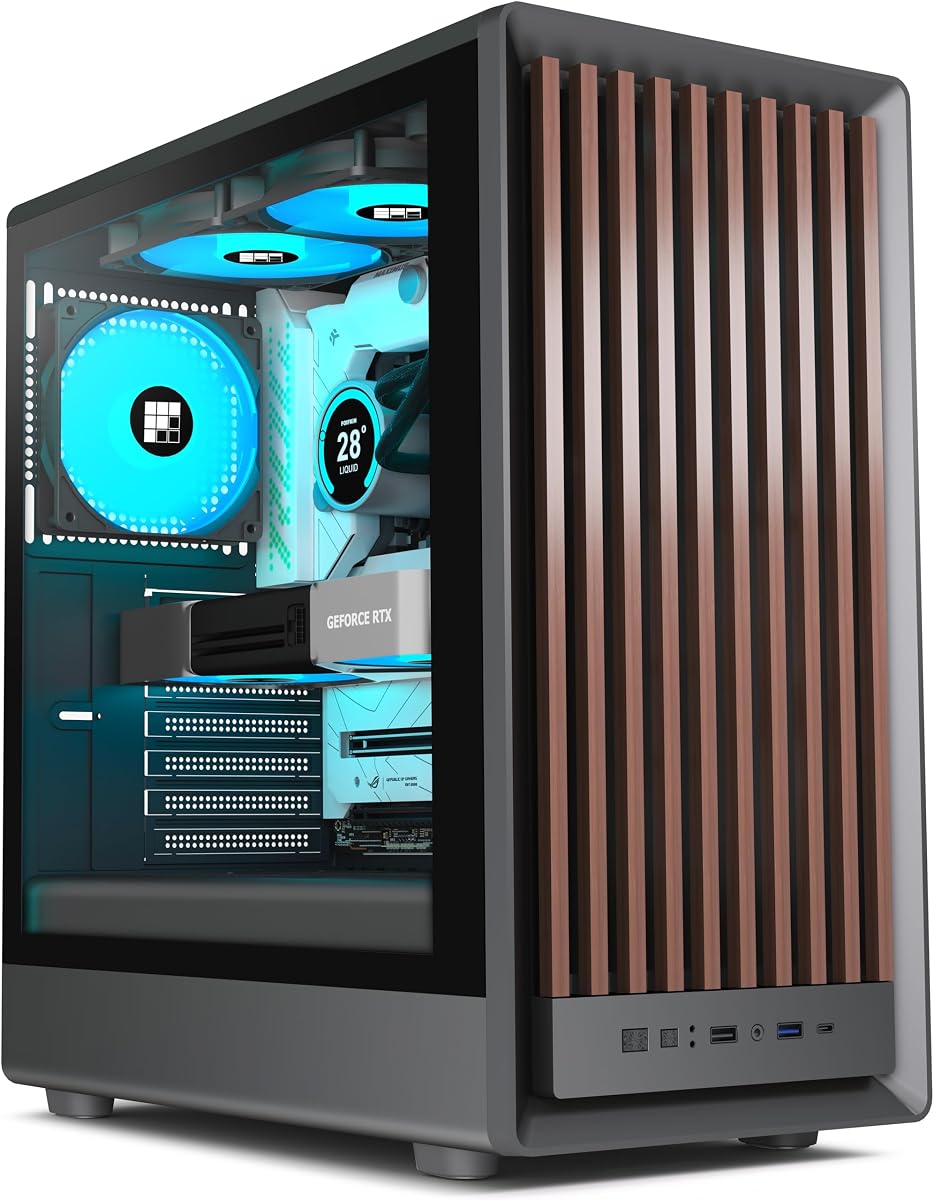
FOIFKIN’s M1 leans into furniture energy: a walnut front pane combined with metal structure, sized about 370 × 220 × 450 mm. If your PC sits in a living room or a wood-desk office, that front can blend better than aggressive angular RGB armor. It is still a gaming ATX mid-tower—just styled differently from everything else in this pack.
Cooling hardware starts with four pre-installed ARGB PWM fans and a snap-on glass side that comes off without tools. FOIFKIN also notes front, rear, top, and bottom mounts that can grow to eight 120 mm fans, so the wood face is not a thermal dead end if you populate the other panels intelligently.
Radiator expectations should stay moderate. The product title highlights 240 mm rad support, which suits many mainstream AIOs but will not replace the triple-360 ambitions of the F600 dual-chamber sibling. Match your cooler shopping to that reality.
I/O is contemporary enough: Type-C 3.0, USB 3.0, USB 2.0, mic/audio, plus power and reboot. That Type-C port alone puts it ahead of older budget towers that still ship USB 2.0-only fronts.
FOIFKIN’s listing leans on seller support messaging if something arrives damaged. Treat that as a reminder to inspect wood veneer and glass on unboxing—cosmetic pieces are the point of this chassis.
Pick the M1 when visual warmth matters as much as FPS. Pick the F600 or Lian Li when you want panoramic glass and maximum radiator theater instead of walnut calm.
Keep ARGB palettes warm white or soft amber if you want the walnut to stay elegant. Full rainbow modes can clash with natural wood grain.
Dust still wins. Wood-and-glass towers in open shelves need the same filter cleaning as mesh gaming cases—pretty fronts do not block particulate.
We may earn a commission at no additional cost to you.
The F600 is FOIFKIN’s maximalist answer in this pack: dual-chamber separation between hardware and PSU/drives, 270° panoramic high-hardness glass, and seven pre-installed 120 mm ARGB PWM fans with six reverse and one forward orientation. Reverse blades exist so intake fans can look “correct” through glass without a ugly hub view—pure showcase logic.
Thermally, dual-chamber designs help because the PSU and some cabling leave the GPU/CPU room. FOIFKIN also claims a super cooling system capable of three simultaneous 360 mm radiators. That is enthusiast territory—custom loops or stacked AIO fantasies—not a casual office PC.
Clearance stays serious: ATX/mATX/ITX boards, GPUs up to 400 mm, PSUs up to 200 mm, with dimensions about 420 × 285 × 430 mm. Measure desk depth; panoramic cases are wider visual objects than classic single-side towers.
Storage is lighter than old multi-bay towers—one HDD and two SSDs per the listing—so plan on motherboard NVMe for bulk capacity. The chassis is optimized for looking fast, not for racking four spinning archives.
Compared with the wood-front M1, the F600 is unapologetic RGB glass culture. Compared with CORSAIR’s modular airflow approach, it is less about upgrade trays and more about immediate visual impact. Neither is wrong; they solve different ego problems.
Buy the F600 if your build video needs seven fans spinning behind panoramic glass on day one. Buy something mesh-simpler if noise, dust, or desk space worry you more than Instagram angles.
Keep the six reverse fans on intake glass faces so blade presentation stays clean, and use the forward fan where exhaust efficiency matters more than looks.
Supporting three 360 mm radiators does not mean your pump loop or case airflow will automatically be optimal. Fill mounts with a purpose, not because the brochure allows it.
Front Type-C keeps modern peripherals handy even on a showpiece chassis—use it so the panoramic glass build still behaves like a daily PC.
We may earn a commission at no additional cost to you.

Every pretty fan kit is worthless if your graphics card physically will not fit. Measure the GPU from bracket to end of the shroud, then compare against the case’s published max length—300 mm on the MOROVOL, 340 mm on the DARKROCK EC2, 400–420 mm on Lian Li and RUIX class towers. Do the same for CPU cooler height if you are on air; 155 mm and 178 mm are different worlds for dual-tower heatsinks.
Mesh-heavy designs like the NZXT H5 Flow and CORSAIR’s Y-pattern front prioritize cool air. Panoramic glass towers like the RUIX OV303 and FOIFKIN F600 prioritize visibility and often need more intentional fan curves to move the same heat. If your room is warm or the PC sits in a cabinet, bias mesh. If the PC is a desk centerpiece, glass can win—just budget fans and filters accordingly.
Pre-installed fans change the true cost of a case. Lian Li’s four-fan kits, RUIX’s four Prism ARGB fans, FOIFKIN’s four- and seven-fan bundles, and CORSAIR’s three RS fans reduce day-one shopping. The DARKROCK EC2’s single fan means you must plan purchases immediately. Fixed RGB versus addressable ARGB also matters if sync is part of the fantasy.
Front 360 mm support (H5 Flow, many mesh towers) covers most CPU liquid coolers. Dual-chamber cases that advertise multiple 360 mm mounts invite more complex loops. Walnut M1-style cases with 240 mm rad focus should steer you toward smaller AIOs or strong air coolers instead of assuming every mid-tower is a triple-radiator playground.
Type-C on the front panel (DARKROCK, RUIX, FOIFKIN, and others) ages better than USB 2.0-only clusters. Magnetic dust filters save cleaning time. And if your real problem is transporting the tower, the padded carrying backpack in this pack is the tool—do not confuse it with a chassis when comparing airflow specs.
A mid-tower ATX case still covers the majority of gaming builds: full-size boards, long GPUs, and either a dual-tower air cooler or a 240–360 mm AIO. Go compact only if desk space is tight and you have verified cooler clearance. Go dual-chamber panoramic only if you want the display aesthetic and accept a larger footprint.
More included fans mean less shopping and often better stock thermals, but only if they point the right directions and run on sane curves. Seven ARGB fans can be louder and messier than three quality PWM fans with Zero RPM idle behavior. Prioritize airflow path and control over raw fan count.
Yes if you value modular FRAME upgrades, InfiniRail flexibility, and three RS ARGB fans with a polished airflow front. If you just need a temporary ATX box for a short GPU and will rebuild next year, a simpler mesh case can be enough. The Frame shines for builders who keep chassis longer than components.
Check length, not marketing generation alone. The DARKROCK EC2 explicitly mentions 50-series support with up to 340 mm GPU room. Lian Li V100 and RUIX OV303 stretch to about 400–420 mm. The MOROVOL’s 300 mm cap will reject many long flagship cards. Always compare your exact SKU’s published length.
No. Dual-chamber layouts like the FOIFKIN F600 help separate PSU heat and hide cables, which can improve both thermals and looks, but mesh mid-towers such as the NZXT H5 Flow cool extremely well with a simpler interior. Buy dual-chamber for organization and showcase potential, not because single-chamber cases cannot cool modern parts.
Fixed RGB, as on the MOROVOL 621, lights up in preset ways without per-LED motherboard control. ARGB fans on Lian Li, RUIX Prism, FOIFKIN, and CORSAIR RS kits can sync effects through a +5V header or controller. Choose ARGB if synchronization matters; fixed RGB is fine for simple color washes on a budget.
No. The carrying backpack protects and transports a tower you already built. It does not provide airflow, motherboard mounts, or radiator support. Use it when you move or travel with a finished PC, alongside whatever mid-tower you chose for thermals and aesthetics.
Critical if you value fan longevity and clean coils. Magnetic top and bottom filters, like those on the DARKROCK and RUIX models, make maintenance realistic. Mesh fronts also act as filters and clog—clean them. A beautiful panoramic case with neglected filters will run hotter than a humble mesh tower you actually vacuum.
Thermally, choose by clearance and airflow first. Visually, white V100RW and walnut FOIFKIN M1 reward coordinated cables, GPUs, and calmer lighting palettes. They do not require different CPUs—they require more attention to theme so the special exterior does not clash with random black parts.
Many can in the front or top—NZXT H5 Flow lists front 360 mm support, Lian Li V100 lists top 360 mm, and dual-chamber F600 claims multiple 360 mm mounts. Always check the exact mount location and thickness clearance against your AIO’s radiator depth plus fans. Title support is necessary but not sufficient without measuring.
The best tower PC case in 2026 depends on whether you are optimizing for modular longevity, stock fans and glass, compact mesh airflow, or pure desk theater. CORSAIR’s 4000D RS Frame leads builders who want InfiniRail flexibility and a FRAME upgrade path; Lian Li’s V100 twins deliver four ARGB fans and flagship clearance in black or white; NZXT’s H5 Flow remains the sensible compact airflow starter.
Value and niche picks fill the rest of the pack: MOROVOL for fixed-RGB budgets with shorter GPUs, DARKROCK EC2 for Type-C mesh expandability, RUIX OV303 for panoramic Prism ARGB, FOIFKIN M1 for walnut warmth, F600 for dual-chamber seven-fan spectacle, and the padded carrying bag for movers who already own a chassis.
Match clearance and airflow strategy first, lighting second, and brand lore last. When those three line up with your parts list, any of these towers can be the right ATX home—just do not buy panoramic glass when you needed mesh, or a travel backpack when you still need a case.