Expert Review & Guide

Best Tenkeyless Keyboards in 2026 for Mouse Room and Aim

Tenkeyless keyboards remove the number pad so your mouse can sit closer to your shoulder’s natural line. That single change is why TKL dominates competitive FPS desks and small WFH tables alike. In 2026 the category is wider than “87-key mechanical”: whisper-quiet scissor office boards, spill-resistant membrane gamers, low-profile mecha-membrane hybrids, Bluetooth Mac specialists, and analog optical esports weapons all wear the same compact silhouette.

This guide reviews ten pack options spanning Cherry Stream’s GS-marked quiet office TKL, SteelSeries Apex 3 and Corsair K55 CORE membrane RGB workhorses, Logitech’s G413 SE tactile mech and G515 Lightspeed low-profile wireless, Keychron K8 for Mac/Windows multitasking, Redragon’s metal-framed K552 beginner mech, Razer’s Ornata V3 mecha-membrane and Huntsman V3 Pro optical flagship, plus a thin rechargeable wireless TKL for console-adjacent desks. We judge mouse-space gains, switch quietness, wireless needs, and whether you actually miss the numpad after a week.

Pick for how you move the mouse first, then for switch feel. The right TKL should make wide swipes feel less cramped without turning Excel into a layer puzzle you resent.

Our Top Tenkeyless Picks

Best Wireless TKL

Logitech G515 Lightspeed TKL

★★★★★9/10
Logitech G515 Lightspeed TKL
  • Tri-mode LIGHTSPEED, Bluetooth, and wired with low-profile GL tactile switches
  • Thin tenkeyless mechanical design with double-shot PBT keycaps
  • LIGHTSYNC RGB and KEYCONTROL customization for mixed gaming and typing desks
Check Price →
Best Esports Analog TKL

Razer Huntsman V3 Pro TKL

★★★★☆8.8/10
Razer Huntsman V3 Pro TKL
  • Gen-2 analog optical switches with Rapid Trigger and adjustable actuation
  • Snap Tap for near-instant directional changes in competitive FPS titles
  • Doubleshot PBT keycaps, media dial, and magnetic wrist rest for long grinds
Check Price →
Best Mac-Friendly Wireless Mechanical TKL

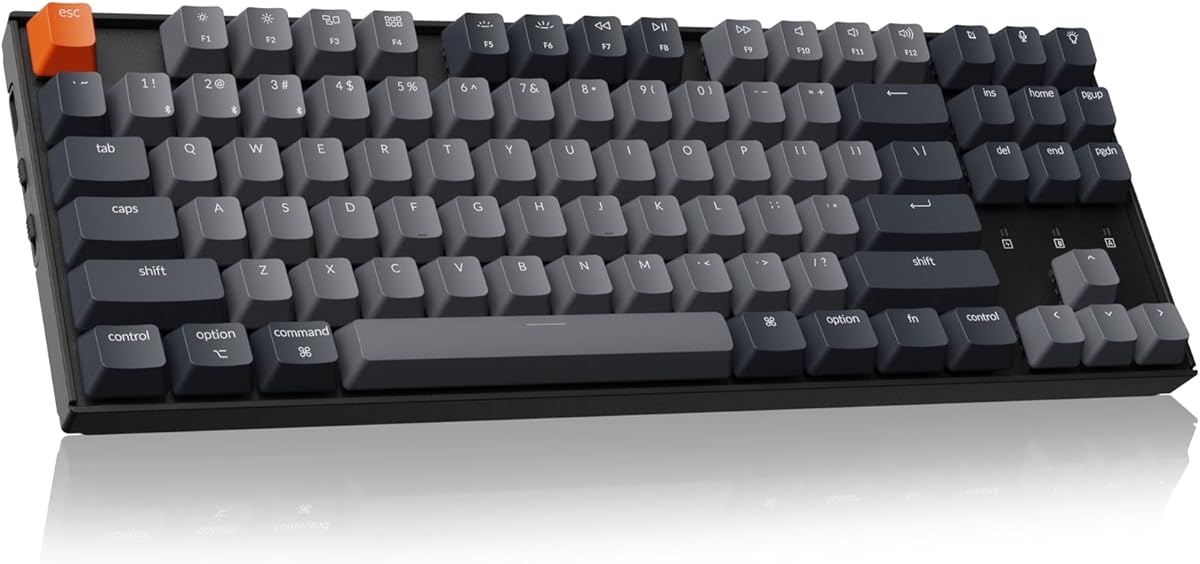
Keychron K8

★★★★☆8.6/10
Keychron K8
  • 87-key Bluetooth TKL with tactile brown switches and white backlight
  • Mac and Windows layout keycaps included for true dual-OS desks
  • Type-C wired mode with NKRO when latency matters more than cable-free typing
Check Price →

As an Amazon Associate we earn from qualifying purchases. We may earn a commission at no additional cost to you.

Tenkeyless Keyboard Comparison

Scan switch type (scissor, membrane, mechanical, optical), wireless vs wired, and noise character before diving into reviews. Every board here drops the numpad for mouse room—the differences are feel and features.

#ProductSpecificationsScore
1
  • Slim wired TKL with SX scissor switches
  • Whisper-quiet office typing, GS mark
  • Flat QWERTY design without number pad
8.6
2
  • Whisper-quiet gaming switches, anti-ghosting
  • 8-zone RGB, IP32 water & dust resistance
  • Pro-popular TKL form for mouse space
9.2
3
  • Quiet membrane TKL with 8-zone RGB
  • Spill resistant, media keys, 1000Hz polling
  • Space-saving layout for wide mouse swipes
9.4
4
  • Tactile mechanical TKL, anti-ghosting
  • PBT keycaps, wired compact chassis
  • Windows and macOS compatible
9.2
5
  • 87-key Bluetooth TKL with brown switches
  • Mac/Windows optimized layouts, white backlight
  • Type-C wired mode for multitasking desks
8.6
6
  • 87-key linear red mechanical TKL
  • Metal frame, LED lighting, anti-ghosting
  • Beginner-friendly compact gamer board
8.8
7
  • Low-profile mecha-membrane TKL
  • 8-zone RGB, spill-resistant, media keys
  • Magnetic wrist rest, UV-coated keycaps
9.4
8
  • Rechargeable thin quiet 87-key board
  • RGB backlight, mechanical-feel marketing
  • Compact wireless for PC and console desks
8.6
9
  • Analog optical Rapid Trigger esports TKL
  • Snap Tap, adjustable actuation, media dial
  • Doubleshot PBT caps with wrist rest
8.8
10
  • Low-profile tactile GL mechanical TKL
  • LIGHTSPEED / Bluetooth / wired tri-mode
  • LIGHTSYNC RGB with PBT keycaps
9

1. Cherry Stream TKL - Best Quiet Office TKL

Cherry Stream TKL

Cherry Stream TKL

8.6/10★★★★☆

Cherry Stream TKL is the grown-up answer to tenkeyless: SX scissor switches, whisper-quiet keys, slim flat chassis, and a GS-mark safety story aimed at offices rather than LAN parties. Removing the numpad is framed as ergonomics—mouse and keyboard sit closer, shoulders relax—which is the same benefit FPS players chase, just sold in professional language.

  • SX scissor switches in a slim flat TKL
  • Whisper-quiet GS-marked office design
  • Wired reliability without a number pad
Check Price →
✓ Pros
  • Truly office-quiet compared with gaming mechs
  • Slim profile looks professional on camera
  • TKL spacing improves mouse ergonomics at work too
  • GS mark messaging reassures workplace buyers
✕ Cons
  • Not a mechanical gamer board—enthusiasts may miss travel depth
  • Wired only for multi-device hoppers
  • RGB-free aesthetic is intentionally dull for battlestations

Detailed review

If your day is tickets, documents, and Teams, this board’s unique quiet typing feel will beat a clacky Redragon in political capital alone. Gamers who want Rapid Trigger should look at Huntsman; hybrid workers who share a room should shortlist Stream first.

The tradeoff is depth and feedback. Scissor travel is shorter and less “mechanical” than G413 or K552. That is why it wins offices and may feel polite to the point of boring for enthusiasts.

Buy Stream when silence and professionalism outrank RGB. Skip it when you want hot-swap custom culture.

The best TKL in this pack for open-plan knowledge work.

In shared offices, Stream’s politeness becomes a feature you notice only when someone else shows up with a clicky board. Keep a separate USB numpad in a drawer if quarterly budgeting weeks return; the rest of the year you will enjoy the cleaner mouse line.

Ergonomic placement

Center the TKL slightly left of your torso midline so the mouse lands where your right hand naturally rests—not where a full-size numpad used to shove it.

Who it fits

Writers, analysts, and IT buyers who need compact quiet input without gaming theatrics.

Check Price on Amazon →

We may earn a commission at no additional cost to you.

2. SteelSeries Apex 3 TKL - Best Whisper-Quiet Gaming TKL

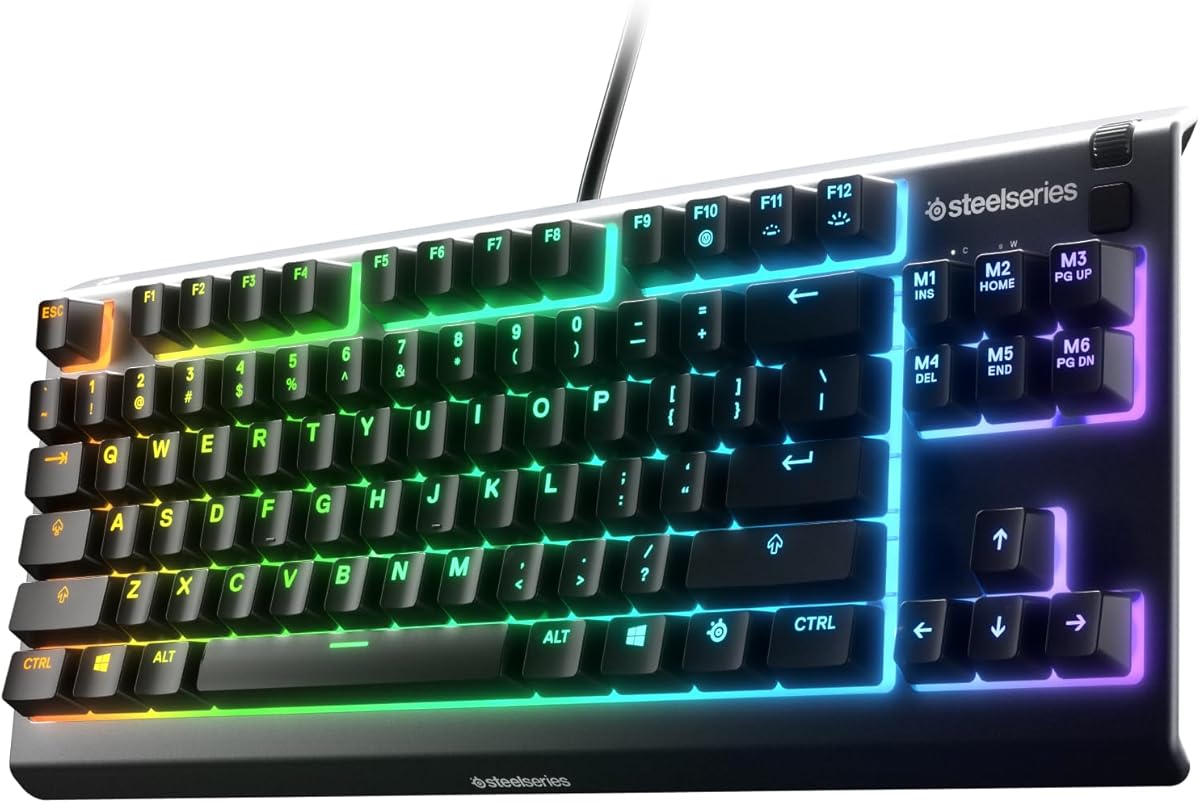
SteelSeries Apex 3 TKL

SteelSeries Apex 3 TKL

9.2/10★★★★★

SteelSeries markets Apex 3 TKL as the compact form factor pros favor—more mouse space, easier keyboard angles—and backs it with whisper-quiet gaming switches, anti-ghosting, 8-zone RGB, and IP32 water/dust resistance. It is the bridge between office quiet and gamer lighting.

  • TKL with whisper-quiet gaming switches
  • 8-zone RGB and IP32 spill/dust resistance
  • Anti-ghosting for competitive key combos
Check Price →
✓ Pros
  • Pro-loved TKL footprint for aim-centric setups
  • Quiet switches suit late-night ranked without mech clack
  • IP32 resistance helps messy desk lives
  • RGB zones personalize without demanding per-key obsession
✕ Cons
  • Not a hot-swap mechanical custom platform
  • Membrane-family feel differs from true mech tactility
  • Wired limits couch flexibility

Detailed review

If you tried mechanicals and hated the noise, Apex 3 TKL keeps competitive layout benefits without blue-switch diplomacy issues. Durability language around low-friction materials aims at long sessions. Spill resistance is real-world useful for energy-drink desks.

Compared with Corsair K55 CORE TKL, both chase quiet membrane-style gaming; brand software ecosystems and RGB personality may decide. Compared with Huntsman V3 Pro, Apex 3 is simpler and less esports-analog exotic.

Buy it for quiet competitive comfort. Skip it if you insist on analog Rapid Trigger tech.

A practical RGB TKL for players who share walls with sleepers.

Aim setup

Push the board left until your mousepad’s right edge feels unused—that unused strip is the TKL dividend.

Who it fits

FPS and battle-royale players who want quiet switches and spill resistance.

Check Price on Amazon →

We may earn a commission at no additional cost to you.

3. Corsair K55 CORE TKL - Best Value RGB Membrane

Corsair K55 CORE TKL

Corsair K55 CORE TKL

9.4/10★★★★★

Corsair K55 CORE TKL doubles down on accessible gaming: quiet membrane keys, eight RGB zones, spill resistance (including a 300ml-class story in listing details), media keys, and 1000Hz polling in a tenkeyless shell designed for sweeping mouse moves. It is less about switch hobbyism and more about not fighting your desk.

  • Quiet membrane TKL with 8-zone RGB
  • Spill resistant build, dedicated media keys
  • 1000Hz polling for responsive game input
Check Price →
✓ Pros
  • Highest-rated board in this pack for everyday satisfaction cues
  • Media keys speed playlist and call control
  • Spill resistance reduces accident panic
  • TKL space pitch matches Corsair’s big-play mouse room story
✕ Cons
  • Membrane keys will not satisfy mech purists
  • Zone RGB is not per-key customization heaven
  • Wired cable management still required

Detailed review

For many players coming from laptop keyboards, membrane quietness feels familiar while TKL geometry unlocks aim. Media keys are underrated during long sessions—volume without alt-tabbing matters. Polling at 1000Hz keeps the board responsive enough for mainstream competitive scenes.

Stack it against Apex 3 TKL as a peer; choose based on which brand’s lighting tools and handfeel you prefer. Stack it against G413 when you want real mechanical tactility instead.

A smart first TKL when you want RGB gaming energy without mechanical noise politics.

Especially easy to recommend for shared apartments and starter battlestations.

Spill honesty

Spill resistant is not spill proof. Still power down and dry if disaster hits—resistance buys time, not immortality.

Who it fits

Casual-to-serious gamers upgrading from full-size office membranes.

Check Price on Amazon →

We may earn a commission at no additional cost to you.

4. Logitech G413 TKL SE - Best Everyday Mechanical TKL

Logitech G413 TKL SE

Logitech G413 TKL SE

9.2/10★★★★★

G413 TKL SE remains the default mechanical tenkeyless recommendation for mixed-use desks: tactile switches, anti-ghosting, PBT keycaps, and a compact black design that behaves on Windows and macOS. It is not trying to win Synapse feature wars; it is trying to feel solid every day.

  • Tactile mechanical TKL with anti-ghosting
  • PBT keycaps and compact wired design
  • Windows/macOS friendly gaming board
Check Price →
✓ Pros
  • True mechanical tactility without blue-switch scream
  • PBT caps improve long-term texture
  • Familiar Logitech ecosystem comfort
  • TKL size works for workdays and ranked nights
✕ Cons
  • No wireless like G515 Lightspeed
  • No analog Rapid Trigger features
  • Less quiet than Stream or Apex 3 membrane approaches

Detailed review

Tactile feedback helps typing accuracy for people who overshoot on linear reds. PBT resists shine. The TKL cut gives mouse room without forcing 60% layer homework. Against Redragon K552, Logitech feels more refined and less “first RGB toy,” though K552’s metal frame and linear reds have their own charm.

Choose G413 when you want mechanical certainty. Choose G515 when low-profile wireless matters more. Choose Huntsman when your aim tech requires adjustable actuation.

The everyday mech TKL we keep recommending without caveats for most people.

Great gift board because it rarely shocks non-enthusiasts.

Durability expectations are why PBT and anti-ghosting still matter on a “simple” board. You can ignore software ecosystems for months and still have a tactile TKL that feels intentional. That boredom-proof reliability is underrated when flashier boards demand constant tweaking.

Mac note

Confirm modifier expectations—Windows-labeled keys still work, but screenshots and Option habits may need remaps.

Who it fits

Hybrid workers and gamers who want mechanical feel without esports complexity.

Check Price on Amazon →

We may earn a commission at no additional cost to you.

5. Keychron K8 - Best Mac-Friendly Wireless TKL

Keychron K8

Keychron K8

8.6/10★★★★☆

Keychron K8 is the TKL for people who live in macOS Monday and still boot Windows for a game on Friday. Bluetooth multitasking, Mac/Windows optimization, brown switches, white backlight, shine-through OEM-style keycaps, and Type-C wired fallback make it a dual-citizen board. The 87-key layout keeps Home/End/Page keys reachable without numpad bulk.

  • 87-key Bluetooth TKL with brown switches
  • Mac and Windows layout optimization
  • White backlight and Type-C wired mode
Check Price →
✓ Pros
  • Designed with Mac users in mind, not as an afterthought
  • Bluetooth multitasking across devices
  • Brown tactiles balance typing and general gaming
  • Keeps navigation cluster unlike smaller 60% boards
✕ Cons
  • Bluetooth latency anxiety for ultra-competitive play
  • White backlight only—no rainbow zone circus
  • Normal-profile height differs from low-profile G515/Ornata

Detailed review

Browns give tactile feedback without clicky drama—friendly for apartments. Wireless convenience is the headline for couch MacBook typing; wired mode covers firmware and latency-sensitive hours.

Versus Logitech G515, K8 is more Mac-traditional in layout branding and less esports-wireless polished. Versus Cherry Stream, K8 is mechanical and wireless rather than scissor-quiet office.

Buy K8 for Apple-centric desks that still want real switches. Skip it if Snap Tap optical features are the mission.

A cornerstone Mac TKL that still respects Windows gaming nights.

Bluetooth tip

Use wired or a strong 2.4G alternative if you climb ranked ladders; keep Bluetooth for writing and messages.

Who it fits

Developers and creators with MacBooks who refuse laptop keyboards for long sessions.

Check Price on Amazon →

We may earn a commission at no additional cost to you.

6. Redragon K552 - Best Budget Metal Mech TKL

Redragon K552

Redragon K552

8.8/10★★★★☆

K552 is the classic budget mechanical TKL: linear red switches, metal frame, LED lighting, anti-ghosting, 87 keys, beginner-friendly positioning. It has introduced countless players to mechanical feel without demanding custom-foam vocabulary.

  • 87-key linear red mechanical TKL
  • Metal frame with LED lighting
  • Anti-ghosting beginner-friendly gamer board
Check Price →
✓ Pros
  • Metal frame adds heft rare at beginner prices
  • Linear reds favor fast WASD spam
  • True mechanical on-ramp with TKL mouse space
  • Straightforward for first-time mech buyers
✕ Cons
  • Louder and less refined than Logitech/Keychron peers
  • LED lighting is simpler than modern RGB suites
  • Not wireless

Detailed review

Reds suit gaming smoothness; the metal plate fights the hollow flex of ultra-cheap plastics. As a typing board it is capable, though tactiles on G413 or browns on K8 may please writers more. Noise sits above Stream/Apex quiet options—plan accordingly.

Choose K552 when budget metal mech energy matters. Climb to Huntsman when your rank demands adjustable actuation. Move to G515 when wireless low-profile is the upgrade itch.

A rite-of-passage TKL that still earns a spot on starter desks in 2026.

Best when paired with a deskmat to tame case sound.

Beginner expectation

Your first mechanical will feel heavy compared with laptop keys—give it three days before judging travel.

Who it fits

New PC gamers who want mechanical TKL without flagship pricing anxiety.

Check Price on Amazon →

We may earn a commission at no additional cost to you.

7. Razer Ornata V3 TKL - Best Low-Profile Hybrid TKL

Razer Ornata V3 TKL

Razer Ornata V3 TKL

9.4/10★★★★★

Ornata V3 TKL chases comfort: low-profile keys, mecha-membrane switches that blend clicky snap with membrane familiarity, UV-coated keycaps, media keys, 8-zone RGB, spill resistance, and a magnetic wrist rest. It is for people who like Razer aesthetics but found full-height mechs tiring.

  • Low-profile mecha-membrane TKL switches
  • 8-zone RGB, spill-resistant design
  • Magnetic wrist rest and UV-coated keycaps
Check Price →
✓ Pros
  • Low-profile height reduces wrist strain for long hours
  • Mecha-membrane snap without full mech height
  • Wrist rest inclusion helps marathon sessions
  • Spill resistance and media keys add daily practicality
✕ Cons
  • Purists may reject hybrid switches as neither/nor
  • Not analog optical like Huntsman V3 Pro
  • Wired ties you to the desk

Detailed review

Low-profile geometry can feel closer to modern laptops while keeping gaming features. The hybrid switch feedback is polarizing—try to watch handfeel videos if you are sensitive. As a TKL, mouse space remains the structural win.

Versus G515, Ornata is wired hybrid vs Logitech’s low-profile wireless mech. Versus Huntsman, Ornata is comfort-first rather than actuation-tech-first.

Buy Ornata when wrist comfort and hybrid feel matter. Skip if you need Rapid Trigger optical performance.

A high-satisfaction comfort TKL for long mixed sessions.

Wrist rest use

Use the rest for typing; some FPS players remove it for more mousepad real estate—magnetic design makes that swap easy.

Who it fits

Razer fans and anyone migrating from laptop-height keyboards into a TKL desk.

Check Price on Amazon →

We may earn a commission at no additional cost to you.

8. Thin Wireless 87-Key TKL - Best Thin Wireless Budget

Thin Wireless 87-Key TKL

Thin Wireless 87-Key TKL

8.6/10★★★★☆

This thin rechargeable 87-key board targets living-room and laptop gamers who want TKL compactness, RGB lighting, quiet keys, and wireless convenience without committing to a heavy mechanical slab. Multimedia shortcuts and low-profile ABS keycaps support casual use across PC and console-adjacent setups listed on the product.

  • Rechargeable thin quiet 87-key TKL
  • RGB backlight with mechanical-feel positioning
  • Compact wireless for PC and console setups
Check Price →
✓ Pros
  • Wireless rechargeable freedom for TV/console desks
  • Thin quiet design friendlier than loud mechs
  • 87-key layout keeps arrows without numpad bulk
  • RGB readability for dark living rooms
✕ Cons
  • “Mechanical feel” is not the same as branded mech switches
  • Build refinement trails Logitech/Razer flagships
  • Latency/feel vary—prefer name-brand wireless for ranked

Detailed review

Expectations management is everything. It can be a great couch companion and a shaky substitute for Huntsman in serious esports. If you need trustworthy wireless competitive performance, G515 Lightspeed is the firmer pick.

As a secondary board for travel or TV typing, the thin TKL idea shines. As a primary office instrument, Cherry Stream or Keychron K8 make more sense.

Buy for portable quiet RGB convenience. Skip for pro actuation features.

A flexible budget wireless TKL when the desk is sometimes a coffee table.

Console desk tip

Place the receiver carefully and keep the board charged—wireless surprises mid-raid are avoidable.

Who it fits

Casual gamers and students who want thin wireless TKL convenience.

Check Price on Amazon →

We may earn a commission at no additional cost to you.

9. Razer Huntsman V3 Pro TKL - Best Esports TKL

Razer Huntsman V3 Pro TKL

Razer Huntsman V3 Pro TKL

8.8/10★★★★☆

Huntsman V3 Pro TKL is the esports end of this list: analog optical switches, Rapid Trigger, adjustable actuation, Snap Tap prioritization for advanced movement, doubleshot PBT keycaps, media keys/dial, and a wrist rest—explicitly pitched for FPS precision. Tenkeyless keeps the board competition-desk friendly while those analog features try to shave milliseconds off counter-strafes and peek timing.

  • Analog optical switches with Rapid Trigger
  • Snap Tap and adjustable actuation for FPS
  • PBT doubleshot caps, media dial, wrist rest
Check Price →
✓ Pros
  • Actuation control built for modern movement tech
  • TKL keeps mouse space while staying tournament-practical
  • PBT keycaps endure sweaty grind sessions
  • Media dial offers quick adjustments mid-match breaks
✕ Cons
  • Feature complexity is overkill for casual typing desks
  • Learning Snap Tap/Rapid Trigger settings takes practice
  • Premium positioning versus simpler TKL workhorses

Detailed review

This is not a subtle upgrade from K552. You are buying a tunable input device. Spend time in the software setting actuation points per game. Used poorly, Rapid Trigger feels weird; used well, it becomes hard to return from.

Versus G515, Huntsman wins raw competitive feature depth; G515 wins low-profile wireless lifestyle. Versus Apex 3/K55, Huntsman is a different species—optical analog versus quiet membrane convenience.

Our top pick when ranked FPS performance is the reason you want TKL.

Skip it if you mainly write docs and occasionally play chill co-op.

Tournament practicality also means fewer surprises at LAN: wired optical TKL, known wrist rest behavior, and settings profiles you can export. If your improvement curve depends on consistent counter-strafe timing, this is the class of keyboard that matches that obsession.

Settings homework

Start with moderate actuation, enable Rapid Trigger carefully, and test in aim trainers before changing every habit in a ranked match.

Who it fits

Competitive FPS players who already know why adjustable actuation matters.

Check Price on Amazon →

We may earn a commission at no additional cost to you.

10. Logitech G515 Lightspeed TKL - Best Low-Profile Wireless Mech

Logitech G515 Lightspeed TKL

Logitech G515 Lightspeed TKL

9/10★★★★★

G515 Lightspeed TKL is Logitech’s modern thin mechanical answer: low-profile GL tactile switches, PBT keycaps, LIGHTSYNC RGB, and tri-mode LIGHTSPEED/Bluetooth/wired connectivity in a tenkeyless footprint. It targets players who want mechanical feedback without the chunky 1990s height of older boards—and without surrendering wireless.

  • Low-profile GL tactile mechanical TKL
  • LIGHTSPEED, Bluetooth, or wired tri-mode
  • LIGHTSYNC RGB with PBT keycaps
Check Price →
✓ Pros
  • Low-profile mech feel with serious wireless options
  • Tactile GL Browns give discernible feedback
  • PBT caps and thin TKL design modernize the desk
  • Tri-mode covers competitive dongle and casual Bluetooth
✕ Cons
  • Low-profile aftermarket keycap ecosystem is smaller
  • Costs attention versus basic wired G413
  • Not an analog optical Rapid Trigger board

Detailed review

LIGHTSPEED mode is the competitive path; Bluetooth covers tablet/laptop multitasking; wired saves batteries. Tactile feedback helps typing on a low-profile deck that might otherwise feel mushy. Against Ornata’s hybrid approach, G515 stays mechanical. Against Huntsman, it trades actuation wizardry for wireless lifestyle.

If you loved G413 but wanted thinner and untethered, this is the glow-up. If you need Mac-first labeling, still consider Keychron—but G515’s tri-mode is hard to ignore for mixed device homes.

Best wireless low-profile mech TKL in this pack for 2026 desks that hate cables.

A polished closer that makes TKL feel current, not merely compact.

Low-profile mechanical wireless used to feel like a compromise pile. G515’s tactile GL switches and PBT caps make the thin shape feel finished rather than toy-like. If your desk hosts both serious games and long writing blocks, that versatility is the quiet reason to choose it over single-purpose esports bricks.

Battery habit

Charge on wired mode during workdays so LIGHTSPEED nights start full.

Who it fits

Gamers and hybrid workers who want thin mechanical TKL without abandoning wireless.

Check Price on Amazon →

We may earn a commission at no additional cost to you.

Best Tenkeyless Keyboards in 2026 for Mouse Room and Aim

How to Choose a Tenkeyless Keyboard

Why TKL exists

Removing the numpad shortens the board so your mouse sits nearer your body’s centerline. That can improve aim comfort and reduce shoulder reach on small desks. If you ten-key numbers all day, consider a separate numpad instead of returning to full-size by default.

Quiet membrane vs mechanical vs optical

Stream, Apex 3, and K55 prioritize quiet comfort. G413, K552, K8, and G515 deliver mechanical personalities. Huntsman adds analog optical esports controls. Match noise rules and competitive needs before RGB.

Low-profile vs normal height

Ornata and G515 reduce finger travel and can feel easier on wrists. Normal-profile boards (K8, G413, K552) offer classic mech depth and wider keycap options. Try to know which laptop height you already tolerate.

Wireless priorities

Keychron and G515 handle multi-device lives. Esports purists may still prefer wired Huntsman or G413. Bluetooth alone is rarely the best ranked path.

Mac vs Windows desks

Keychron K8 speaks Mac natively. Logitech boards work but may need shortcut remaps. Cherry Stream is OS-agnostic office quiet.

When not to go TKL

If your workflow is numpad-heavy accounting without room for a separate pad, full-size still wins. Everyone else should at least try TKL once—mouse space is addictive.

Mousepad geometry changes with TKL

When you remove the numpad, re-place the mousepad so the keyboard’s right edge nearly kisses the pad’s left edge. Many players leave a weird gap out of habit from full-size days. Closing that gap is how TKL actually improves flick distance consistency.

Firmware and software overhead

Membrane quiet boards may need little software. Analog optical boards need configuration time. Be honest about whether you enjoy tuning. The best keyboard you never configure loses to the good keyboard you actually learn.

Frequently Asked Questions

01

Is tenkeyless better for FPS gaming?

Often yes, because mouse space increases and keyboard angles improve. It will not aim for you, but many players feel less cramped immediately. Pair TKL with a wide mousepad to realize the benefit.

02

What is the difference between TKL and 75%?

Traditional TKL (about 87 keys) keeps a more standard navigation cluster and gap before arrows. 75% compresses further into a denser rectangle. This guide focuses on TKL-style compact boards in the pack, including some that market overlapping compact language.

03

Are membrane TKL keyboards worth it?

Yes if you want quiet RGB gaming without mechanical noise. Apex 3 and K55 CORE prove membrane TKLs can be satisfying. Choose mechanical when feedback and durability texture matter more.

04

Will I miss the numpad?

Number-heavy workers might. Most students and gamers adapt in a week or add a small numpad. Try living without it before assuming you cannot.

05

Is the Huntsman V3 Pro overkill?

For casual play, yes. For competitive FPS players who use movement tech, adjustable actuation and Rapid Trigger can be meaningful. Buy it for features you will configure, not for the box photos.

06

Which TKL is best for office use?

Cherry Stream for maximum quiet professionalism. Keychron K8 if you need Mac wireless mechanical. G413 if you want tactile mech and can tolerate more sound than Stream.

07

Low-profile or standard for wrist pain?

Many people with mild strain prefer low-profile (Ornata, G515). Others do better with standard height plus a proper wrist rest and desk height fix. Adjust the chair/desk first—keyboard choice alone rarely cures setup problems.

08

Wired or wireless TKL for ranked play?

Wired remains simplest. Quality LIGHTSPEED-style wireless can be excellent. Bluetooth is better for typing than for peak competitive anxiety. Keep a cable nearby regardless.

09

Can TKL keyboards work with consoles?

Some wireless/compact boards list Xbox/PlayStation compatibility for supported titles and interfaces. Always check your console’s keyboard support and on-screen key prompts. PC remains the most seamless home for TKL gaming boards.

10

Should I buy TKL or 60% for maximum mouse space?

60% frees even more space but costs dedicated arrows and often the F-row. TKL is the compromise that keeps useful navigation keys while still helping aim. If you already live in layers happily, 60% can be great; if not, TKL is the safer first compact step.

11

How do I transition from full-size without slowing down at work?

Keep a USB numpad for a month, move it out of the way during games, and track how often you actually reach for it. Most people discover number entry was habit, not necessity. Hotkeys and laptop top-row numbers cover the rest.

Conclusion

Tenkeyless is less a niche and more the default compact layout for people who care about mouse space. From this pack, Logitech G515 Lightspeed TKL leads when you want thin mechanical wireless without surrendering TKL aim geometry, Razer Huntsman V3 Pro TKL dominates when analog Rapid Trigger and Snap Tap are part of your competitive toolkit, and Keychron K8 remains the Mac-friendly wireless mechanical anchor that still respects Windows gaming nights.

Membrane RGB options from SteelSeries Apex 3 and Corsair K55 CORE keep shared rooms peaceful, Cherry Stream handles office quiet, G413 and Redragon K552 cover wired mechanical entry points, Ornata V3 bridges low-profile hybrid comfort, and the thin rechargeable wireless TKL fills couch-console gaps—honestly labeled as membrane with mechanical-feel marketing, not true switches.

Put the board left, give the mouse a runway, and TKL starts making sense the first time you swipe without hitting a numpad that was never earning its keep. Whatever you pick, give the new geometry a full week before you judge productivity—muscle memory built around a numpad fades faster than people fear once the mouse finally has room to breathe.