Best SATA Laptop Swap
Samsung SSD 870 EVO SATA III 2.5” 1TB

- Up to 560/530 MB/s sequential speeds that fully exploit SATA III
- Up to 600 TBW endurance with a 5-year limited warranty
- Samsung Magician tools plus AES 256-bit hardware encryption
Expert Review & Guide
Upgrading a laptop SSD is still one of the highest-payoff DIY fixes in 2026—if you match the bay correctly. Swap the right SATA 2.5", M.2 SATA, or M.2 NVMe stick and the same chassis boots faster and finally has room for OS, apps, and a working library. Get 2280 versus 2230, or NVMe versus SATA NGFF, wrong and the drive will not seat.
This roundup covers every drive in our best-ssds-for-laptop-upgrade pack: budget 2.5" SATA from fanxiang and KingSpec, the Samsung 870 EVO, the Samsung 990 EVO Plus 4TB, Crucial P310 sticks in 2230 and 2280, a carefully flagged Timetec M.2 SATA module, plus WD_Black SN7100 and Acer Predator GM7. We emphasize bay type, length, protocol, cloning, and why 256GB upgrades are painfully tight for modern Windows.
Start with the top picks for a proven SATA workhorse, a 4TB NVMe capacity king, or a Gen4 2280 everyday laptop stick. Then read each review before you order so screw length and heatsink clearance do not become weekend spoilers.


As an Amazon Associate we earn from qualifying purchases. We may earn a commission at no additional cost to you.
Confirm bay type and module length before you shop. Speeds are manufacturer claims; SATA tops out far below Gen4 NVMe. No prices listed.
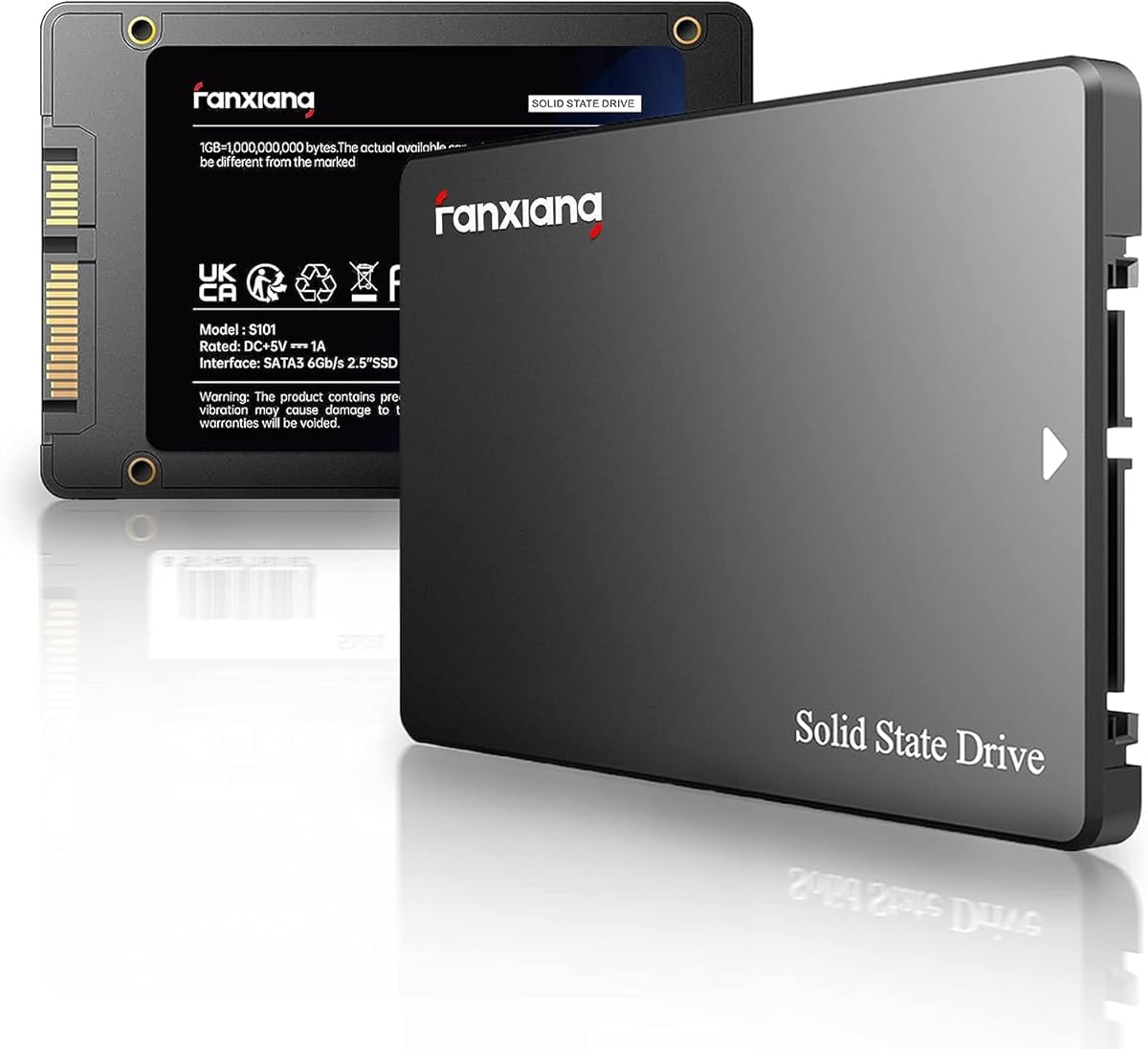
If your laptop still hides a 2.5-inch bay, the fanxiang S101 1TB is a practical way off a grinding hard disk. Up to 520MB/s sits in the everyday SATA III neighborhood that older ThinkPads and business notebooks can actually saturate. You are buying usable terabyte space and quiet boots, not synthetic fireworks.
One terabyte matters more than tiny speed deltas inside a SATA chassis. OS, a creative suite, a modest Steam library, and local photos can coexist without immediately spilling to USB. fanxiang’s TLC messaging is the right durability language for a daily-driver clone, not a cold archive disk.
Confirm the mechanical bay before ordering. Thin ultrabooks that only expose M.2 will not accept this drive internally. You need the SATA data/power connector, mounting screws or caddy, and usually a 7mm-height clearance.
Clone with a USB-to-SATA bridge or clean-install Windows before you wipe the donor. Once the S101 is the system volume, normal TRIM behavior applies. The three-year service plus lifetime tech-support language is adequate for a value 1TB stick.
Pick it to replace a failing HDD or cramped OEM SATA SSD. Skip it if your service manual shows an NVMe M.2 slot—you would leave multi-gigabyte-per-second performance on the table by staying in SATA.
2015–2020 business laptops and thicker gaming machines often keep a full SATA tray.
Verify the new SSD boots before reformatting the old drive.
We may earn a commission at no additional cost to you.

KingSpec’s 1TB 2.5" SATA III drive is another terabyte bay filler, but the listing leans into housekeeping: wear leveling, garbage collection, over-provisioning, NCQ, TRIM, and S.M.A.R.T. Those features keep a laptop responsive after months of browser caches and Windows updates.
Up to 550MB/s read and 520MB/s write nudge the practical top of SATA III. Subjectively you feel boots, sleep resume, and app launches—not leaderboard screenshots. Shock resistance, silence, and low power matter when the notebook lives in a backpack.
Compatibility spans modern Windows releases plus Linux/Unix notes, with SATA 6Gb/s backward compatible to older revisions. That long tail still includes docking-station era machines that never grew an NVMe slot.
Versus the 870 EVO, you trade encryption depth and a five-year warranty for value. Versus the 256GB fanxiang, you simply get breathing room—the difference between “Windows fits” and “Windows plus real work fits.”
Install like any SATA swap: power down, follow the battery disconnect guidance, seat the caddy, clone or clean-install.
Confirm TRIM is enabled and glance at S.M.A.R.T.
Midlife business notebooks with dying OEM SATA SSDs, or desktops that still have a spare SATA cable.
We may earn a commission at no additional cost to you.
The Samsung 870 EVO 1TB is our default when the bay is 2.5" SATA and you want the least drama for years. Up to 560/530 MB/s sits at the practical SATA ceiling, with Samsung’s buffer story aimed at heavier creator and gamer workloads—not just empty peaks.
Endurance separates it from bargain sticks: up to 600 TBW under a five-year limited warranty. AES 256-bit hardware encryption with TCG/Opal and IEEE1667 support fits environments that expect encrypted system volumes without awkward software-only schemes.
Magician is the ecosystem win—firmware, health, performance tools, and migration software that reduce first-time upgrade panic. Compatibility notes spanning chipsets, NAS, and recorders also help if the drive later moves into a secondary role.
Day to day you feel consistency: snappy boots months later, calmer scratch disks, fewer mysterious 100% disk spikes from aging HDDs. If the chassis allows NVMe, buy NVMe; if it does not, the EVO remains the SATA reference in this pack.
Make it the default SATA purchase unless budget forces fanxiang or KingSpec. Among SATA options here, nothing else matches warranty length, encryption, and software maturity in one 2.5" package.
Teachers, consultants, and small offices refreshing 2.5" fleets; creators stuck in SATA chassis who still want encryption; anyone who values a five-year warranty over a slightly cheaper no-name stick.
Install Magician after the clone, keep firmware current, and confirm health alerts actually reach you.
We may earn a commission at no additional cost to you.
When the laptop already speaks NVMe and you are tired of external juggling, the 990 EVO Plus 4TB is the capacity-first answer. Four terabytes on a 2280 module can hold Windows, Adobe caches, a serious game library, and years of camera cards—no USB cable at security. Up to 7,250/6,300 MB/s with TurboWrite 2.0 keeps large transfers lively.
The interface story covers PCIe 4.0 x4 and PCIe 5.0 x2, so current Gen4 hosts stay fast while newer wiring paths remain useful. HMB helps DRAM-lean designs feel responsive under mixed loads without users babysitting settings.
Nickel-coated controller efficiency matters in sealed notebooks: similar speed with less power and heat during long copies. Magician continues firmware and health support so the stick does not become an orphan after the cover screws go back in.
Verify length (2280, not 2230), protocol (NVMe, not SATA M.2), and thermal shield fit before buying. Soldered storage means you cannot upgrade at all—manual first, cart second.
After cloning from a smaller OEM drive, expand partitions so Windows sees the free space.
Confirm M.2 2280 NVMe support, slot count, screw location, and that the OEM drive is not soldered.
Choose Crucial P310 2280 for 1TB plus Acronis.
We may earn a commission at no additional cost to you.

Honest warning: a 256GB SSD in 2026 is triage, not a comfortable ceiling. Windows 11, Office, Chrome, and two creative apps can consume most of it before a single game lands. This fanxiang still makes sense when an HDD is clicking and you need the laptop bootable this weekend.
Reads around 500MB/s still transform spinning rust into something usable. TLC flash and broad laptop/desktop compatibility apply, with three-year quality assurance. Free-space math does not care about those upsides once hibernation files and updates land.
Secondary browse-and-Zoom machines can survive. Primary gamer, photo, or video laptops should stretch to the 1TB S101, KingSpec, or 870 EVO instead of scheduling a second upgrade.
If you proceed, install lean and offload downloads weekly. Cloning fails when used data exceeds 256GB—clean install is often the realistic path. Treat the drive as a bridge.
Mechanically it remains standard 2.5" SATA: confirm the bay, install, verify boot, and keep the old disk until trust is earned.
Updates, pagefiles, phone backups, and creative suites inflate quietly.
Lightweight OS volume paired with external archives, or a temporary rescue while a larger stick ships.
We may earn a commission at no additional cost to you.

Length is the whole plot. Steam Deck, ROG Ally, MSI Claw, some Surfaces/Dells, and assorted mini PCs use 30mm M.2 cards—not the 80mm sticks in most laptop photos. The P310 2230 exists so those devices can run real Gen4 NVMe instead of forcing awkward adapters.
Up to 7,100/6,000 MB/s and 1TB capacity change how a handheld feels: faster loads and a library that is not permanently stuck on microSD. Power-efficient design matters because greedy NAND shows up as heat and shorter sessions.
Follow device-specific teardowns, reuse shields carefully, and avoid crushing ribbons. Thick stacked thermal pads that bow the cover are a common DIY mistake.
Many ultrabooks are 2280—not 2230. Verify the standoff distance in the service manual. If your laptop takes 2280, buy that P310 sibling instead of inventing an adapter sandwich.
Budget an afternoon for imaging the stock drive the first time. When—and only when—your bay is 2230 NVMe, this is the correct Crucial SKU in the pack.
Both are 22mm wide; 2230 is 30mm long and 2280 is 80mm long.
Cloud-save games first.
We may earn a commission at no additional cost to you.
The P310 1TB 2280 is our everyday Gen4 laptop pick: correct length for most notebooks, modern speed class, and Acronis tooling for clone anxiety. Up to 7,100/6,000 MB/s makes Windows and creative apps feel immediate versus aging Gen3 or SATA OEM drives.
Compatibility stretches into Ally X, Legion Go, and AYANEO Kun territory—handhelds that standardized on longer modules. Gen3 hosts still benefit even when they cannot reach full Gen4 rates.
Micron G8 NAND and thermal control suit thin chassis and shared heat pipes. Reuse the OEM shield, especially during long game installs. Acronis is there so migration is not a scavenger hunt.
Versus the 990 EVO Plus 4TB you trade capacity for a leaner 1TB footprint. Versus SN7100 2TB you keep similar speed class with a productivity-leaning bundle. Versus the 2230 P310 you simply match 80mm bays.
Swap at a shallow angle, reseat the pad/shield, and keep BitLocker keys handy. Confirm the drive enumerates as PCIe NVMe after first boot, then expand partitions if you cloned from a smaller disk.
Image from the old system via enclosure or temporary dual-drive setup, verify boot, then erase the donor.
You will not see 7GB/s on Gen3-only laptops, but you should still clear SATA-era bottlenecks.
We may earn a commission at no additional cost to you.

Read twice: this Timetec is M.2 2280 SATA III NGFF, not NVMe. Same rectangle, different protocol. Older laptops sometimes wire M.2 for SATA only; modern boards are often NVMe-only. The wrong choice becomes an expensive paperweight until you reverse it.
When the slot truly is SATA M.2, you get up to 550/500 MB/s, 3D NAND, SLC cache, TRIM/SMART/ECC/wear-leveling, 128TBW, and a three-year warranty. Screws and brackets are not included.
256GB remains cramped in 2026—fine for resurrecting an older SATA-M.2 ultrabook as a lean OS volume, poor as a Steam library. If the laptop accepts NVMe, buy P310, SN7100, 990 EVO Plus, or GM7 instead.
OS support stretches from Windows 11 down through older Windows and Linux notes, matching the aging machines that still carry SATA M.2. Clone only if used data fits; otherwise clean-install.
Amazon photos blur “M.2” into “fast NVMe” in shoppers’ heads. Our badge exists to break that spell.
Manual first.
Aging business ultrabooks with replaceable SATA M.2 and soldered RAM.
We may earn a commission at no additional cost to you.

The SN7100 2TB is the Gen4 pick when 1TB already feels small but 4TB is more than you will fill. Up to 7,250/6,900 MB/s and a prior-gen performance bump claim put it in the same speed conversation as the 990 EVO Plus, with a library-friendly 2TB footprint.
WD leans into laptops and handhelds, with next-gen TLC and up to 100% more power efficiency versus the previous generation. That brief fits sealed notebooks and 2280 handhelds where watts become palm heat.
WD_BLACK Dashboard on Windows handles monitoring and optimization after the cover closes. Sandisk manufacturing lineage keeps you in a mainstream flash ecosystem rather than mystery silicon.
Versus P310 2280 you gain a terabyte and a gaming-efficiency wrapper. Versus 990 EVO Plus 4TB you give up capacity if you do not need the whole vault. Versus SATA, throughput is no contest—if the chassis is NVMe 2280.
Clone, then declutter; do not waste 2TB on decade-old downloads. Confirm temperatures during a long install and keep firmware current. Need 2230?
Ultrabooks and handhelds notice greedy SSDs as heat and shorter battery.
P310 2280 wins everyday top-pick status for Acronis and broad laptop messaging; SN7100 wins when 2TB capacity and WD’s handheld brief matter more.
We may earn a commission at no additional cost to you.

Predator GM7 1TB chases the Gen4 scoreboard with up to 7400/6500 MB/s over PCIe 4.0 x4 and NVMe 2.0. If you already confirmed a 2280 NVMe bay and care about big installs or timeline exports, those peaks are the attraction. HMB plus SLC cache keeps bursts responsive.
Thermal throttling and power management acknowledge thin-laptop heat reality. Still reuse the OEM shield—firmware thermal control cannot replace contact with the chassis heat path.
Biwin Intelligence covers performance tests, migration, and cloning for Predator storage. It is less culturally omnipresent than Magician, but it solves the DIY jobs that stall weekends.
The PS5 mention in the title needs a careful aside: consoles enforce heatsink height and install rules beyond any PC marketing line. Follow current Sony guidance if PlayStation expansion is the real goal; for Windows laptops, treat it as optional flexibility.
At 1TB it rivals P310 on capacity with higher claimed reads. Choose GM7 for peak MB/s and Biwin tools; P310 for Acronis and Micron’s laptop list; SN7100 or 990 EVO Plus when capacity outranks peak speed.
Reseat the OEM pad/shield, avoid thick stacked pads that prevent the cover from closing, and run a long write while watching temperatures.
Read current console SSD requirements separately.
We may earn a commission at no additional cost to you.
Open the service manual for your exact model. Determine whether storage is 2.5" SATA, M.2 2280, M.2 2230, soldered-only, or mixed. If storage is soldered, nothing in this pack can upgrade you.
Both are 22mm wide. 2280 (80mm) dominates mainstream laptops plus Ally X/Legion Go-class handhelds. 2230 (30mm) fits Steam Deck, ROG Ally, MSI Claw, some Surfaces, and certain mini PCs. Prefer native length over adapters.
2.5" drives here are SATA III. M.2 may be SATA or NVMe—the Timetec is SATA NGFF only. NVMe sticks need NVMe-capable slots. Protocol mismatch usually means the BIOS never sees the drive.
256GB options are emergency exits. Comfortable primaries start at 1TB; 2TB suits game/photo locals; 4TB consolidates what used to live on externals. Keeping free space above roughly 15–20% also helps sustained SSD behavior.
Clone to preserve apps; clean-install to shed OEM bloat. Suspend BitLocker as required, hold recovery keys, and prove the new SSD boots before wiping the donor. Keep the old disk a week as insurance.
Check the service manual or a reputable teardown for your exact model. A 2.5" bay is a rectangular tray with a SATA connector; an M.2 slot holds a stick-shaped module with one screw. Many modern ultrabooks are M.2 only, while older business laptops still hide 2.5" bays. Never assume from screen size alone.
Both are 22mm wide. 2280 is 80mm long and fits most Windows laptops plus Ally X/Legion Go-class handhelds. 2230 is 30mm long for Steam Deck, ROG Ally, MSI Claw, some Surfaces, and certain mini PCs. Crucial sells the P310 in both lengths because the wrong one is an automatic return.
No. Some older laptops wire M.2 for SATA only and need a Timetec-style SATA NGFF drive. Many newer laptops are NVMe-only. Protocol mismatch usually means the BIOS never sees the SSD. Verify with the manual or by identifying the existing OEM module.
Rarely for a primary machine. Windows, browsers, office suites, and a couple of creative apps can consume most of 256GB before games arrive. The fanxiang and Timetec 256GB options here are emergency or ultra-light OS drives. Prefer 1TB as a baseline, 2TB for game/photo locals, and 4TB when consolidating externals.
Clone when you need identical apps and licenses tomorrow. Clean-install when the old system is packed with OEM bloat or half-failed updates. Cloning to a larger SSD usually requires expanding the Windows partition afterward. Keep BitLocker keys and do not wipe the donor until the new drive boots cleanly for several days.
Usually yes, at Gen3 speeds. A P310, SN7100, 990 EVO Plus, or Predator GM7 should still outperform SATA even if the host cannot reach 7GB/s. Missing peak numbers is a host limit, not a defective drive. Confirm the slot is NVMe-capable at all before expecting PCIe gains.
Reuse the laptop’s metal shield and thermal pad. Same-thickness pad replacements are fine; thick aftermarket stacks that prevent the cover from seating are not. Software thermal throttling helps under load but cannot replace contact with the chassis heat path.
2230 devices such as Steam Deck, ROG Ally, and MSI Claw should use the Crucial P310 1TB 2230. Larger 2280 handhelds like Ally X or Legion Go align with the P310 2280 or WD_Black SN7100 2TB. Confirm your revision’s slot length and budget time to image the stock drive.
Yes—when your laptop only offers a 2.5" SATA bay. NVMe speed is irrelevant without an NVMe slot. The 870 EVO remains the premium SATA answer here for 560/530 MB/s class performance, up to 600 TBW, a five-year warranty, Magician, and hardware encryption.
Most 2.5" SATA and M.2 NVMe drives here work in desktops with the matching connector. The Predator GM7 title mentions PS5, but consoles enforce their own heatsink and install rules—follow current Sony docs. Laptop bay fit remains the priority of this guide.
The best SSD for a laptop upgrade is the one that fits the bay you actually have. Match 2.5" SATA to the 870 EVO or value 1TB options, match M.2 SATA only when you truly need Timetec-style NGFF, and match NVMe length so 2230 handhelds get the P310 2230 while mainstream laptops get 2280 Gen4 sticks.
Short path: Samsung 870 EVO 1TB for SATA, Samsung 990 EVO Plus 4TB when one NVMe bay must hold everything, and Crucial P310 1TB 2280 as the everyday Gen4 laptop pick—with SN7100 2TB ready when libraries need more room. Treat 256GB SKUs as temporary bridges only.
Verify the slot, clone with recovery keys ready, reseat the thermal shield, and confirm boot before erasing anything. Done carefully, a screwdriver weekend makes an aging laptop feel current without buying a whole new machine.