Best Overall PC Gaming
Razer Leviathan V2

- Multi-driver bar plus down-firing subwoofer for full-range PC audio
- THX Spatial Audio 7.1 for games, movies, and music detail
- Bluetooth 5.2 with compact under-monitor bar and angled feet
Expert Review & Guide
Laptop speakers and tiny monitor beeps are why PC soundbars exist. A bar that slides under a display reclaims desk width while aiming sound at your face instead of into a keyboard tray. In 2026 the category spans single-cable USB bars for offices, RGB gaming models with Bluetooth handoff, and true bar-plus-sub systems when footsteps and explosions need floor weight—not just wider stereo from a plastic stick.
This guide reviews every product in the PC soundbar pack: Razer Leviathan V2 with THX Spatial Audio and a down-firing subwoofer, the compact Leviathan V2 X, Creative Sound Blaster GS3 with SuperWide processing, high-rated Bluedee rechargeable and USB bars, bass-mode USB sticks for Zoom-to-gaming desks, plus detachable TV-leaning bars that still claim PC duty. We rank for monitor clearance, cable honesty, voice clarity on calls, and whether RGB helps or hijacks focus. Ratings reflect Amazon listing scores at research time.
Shortlist first: pick Razer Leviathan V2 when you want the pack’s fullest PC gaming system with a real subwoofer and THX Spatial. Choose the newer Bluedee rechargeable bar for balanced desk audio with Bluetooth 5.3 and cordless flexibility. Grab Creative GS3 when SuperWide immersion and modern Bluetooth 5.4 matter in a compact RGB chassis. The comparison table and ten reviews cover every pack listing so USB-only bargains and TV hybrids are judged on actual desk fit.

As an Amazon Associate we earn from qualifying purchases. We may earn a commission at no additional cost to you.
Focus on cable type (USB-C single cable versus USB power + AUX), whether a subwoofer is included, Bluetooth generation, and how the bar fits beneath a monitor stand. Peak wattage matters less than vocal clarity for calls and distortion behavior at desk volume. Ratings reflect listed customer scores at research time.

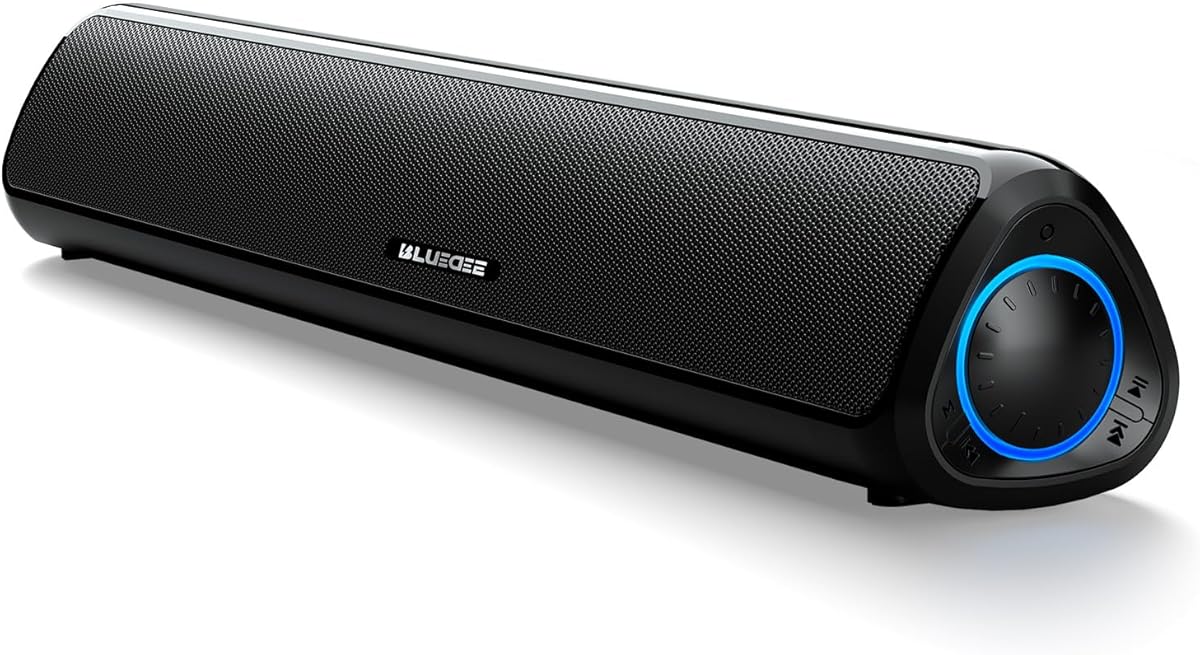
This earlier Bluedee bar is the pack’s straightforward USB introduction to under-monitor audio. Dual drivers with dual diaphragms chase a blend of highs and bass while anti-magnetic design aims to keep the soundstage cleaner around busy metal desks. It will not dethrone a Leviathan sub system, but it immediately beats the average laptop tin can for Zoom and YouTube.
Connectivity stays practical: a 3.5 mm path for classic PC jacks and Bluetooth 5.0 when you want a phone playlist without rewiring. USB or USB-C power means one less wall wart if your machine still has spare ports—verify power draw on tiny travel docks.
Ambiance light strips add desk mood without the Peak Meter showmanship of gaming bars. That restraint helps shared offices. If you want rechargeable freedom and clearer tweeter language, jump to Bluedee’s newer 4.8-rated bar later in this list.
Placement is the usual PC soundbar rule: directly under the monitor, vents unobstructed, not buried behind a cable spine. Angle is mostly fixed, so monitor height should leave a finger of clearance.
Choose this Bluedee when you need a cheap, known shape to escape laptop speakers today. Choose Razer V2 or Creative GS3 when immersion features justify more complexity.
Use the 3.5 mm connection for call stability and reserve Bluetooth for after-hours music to avoid mic routing surprises in conferencing apps.
Pick USB-only if you never move the bar. Pick rechargeable if you hot-desk between rooms or hate another permanent cable.
We may earn a commission at no additional cost to you.

Leviathan V2 X is Razer’s answer for desks that cannot host a subwoofer brick. Two full-range drivers plus two passive radiators chase a riveting, wider presentation in the most compact Leviathan V2 form factor. If your monitor already steals depth, this is the Razer that still fits.
USB Type-C carrying both power and audio is the quality-of-life win. One cable, dynamic output claimed up to about 90 dB, and fewer wall adapters fighting your power strip. Bluetooth 5.0 lets you jump to a phone or Nintendo Switch without rebuilding the desk.
Chroma RGB will delight ecosystem builders and annoy minimalist offices—fortunately lighting is part of the Razer app culture you can tame. Acoustically, expect strong desktop presence, not couch-shaking THX theater; that is what the fuller V2 with sub is for.
Competitive gamers who need precise footsteps should still audition the THX Spatial V2 system. Creators who want cleaner desks and solid all-purpose sound will like V2 X’s restraint.
Choose V2 X for compact Razer polish. Choose full Leviathan V2 when a down-firing sub and THX Spatial are the point of buying Razer at all.
Some hubs starve soundbars—plug V2 X into a direct motherboard USB-C port when volume seems weak or dropouts appear.
Bluetooth handoff is ideal for couch-endgame sessions; just remember to switch the PC default device back afterward.
Razer wins on ecosystem RGB and USB-C simplicity. Creative counters with Bluetooth 5.4, SuperWide processing, and a headphone-out passthrough.
We may earn a commission at no additional cost to you.

Detachable Smart TV/PC Soundbar
This detachable bar stretches the “PC soundbar” definition toward living-room duty—and that is useful if your gaming PC drives a bedroom TV as often as a monitor. Four drivers and an 80W output story aim at richer detail from whispers to roars, while automatic loudness boost fights the forever-quiet streaming mix problem.
Connectivity is the adult feature set: Bluetooth plus ARC, optical, and AUX. That matrix means the same bar can serve an HDMI-ARC TV tonight and an AUX PC tomorrow. Three EQ modes give you a starting map for content types without a full parametric app.
Placement versatility—horizontal, vertical, tabletop, wall—matters in odd rooms more than on a standard desk. Under a monitor, horizontal remains the sensible default; vertical tricks are for shelves and corners when you relocate the bar.
On a pure competitive desk, a thinner USB bar may feel more native. On a hybrid PC-TV wall, this detachable unit reduces the urge to own two mediocre speakers.
Choose it for room-flex and TV dual use. Choose Razer or Creative when the product should look and behave like dedicated PC gear every day.
Most PCs lack ARC—use optical via a capture/GPU path if available, or AUX/USB bars for simpler desks.
Test a quiet dialogue show and a loud game back-to-back; if jumps feel wild, prefer a manual EQ mode and disable aggressive loudness habits in the source app too.
We may earn a commission at no additional cost to you.
Creative’s GS3 is a Sound Blaster-branded reminder that DSP still matters on a desk. Racetrack drivers and a built-in port tube support up to 24W peak, while SuperWide technology pushes a broader stage than the metal length suggests—helpful for stereo music and cinematic games without a 7.1 headset.
Flexibility is excellent: USB-C, AUX-in, Bluetooth 5.4, and a headphone-out when you need silence for the house but not a trip behind the PC. That headphone jack alone saves daily friction.
RGB modes—Chasers, Aurora, Peak Meter, Glowing, Wave, Cycle—cover gamer mood lighting. Turn them down for spreadsheets. The all-black compact shell matches most setups without screaming for attention when lights sleep.
Compared with Leviathan V2 X, GS3 leans into Creative’s processing story and newer Bluetooth. Compared with full Leviathan V2, it concedes subwoofer authority. Know which compromise you are buying.
Choose GS3 for compact immersive DSP and modern wired/wireless options. Choose Leviathan V2 when THX Spatial plus a real sub defines your PC audio budget.
Leave GS3 as the PC default and plug headsets into the bar’s headphone-out for late nights—fewer Windows device switches.
It widens perception at the desk; it does not create rear surrounds. Sit reasonably centered for the effect to make sense.
GS3 prioritizes soundstage processing; some USB bars prioritize one-tap Deep Bass presets for hip-hop. Pick based on whether width or thump is your deficit.
We may earn a commission at no additional cost to you.

USB Soundbar with 4 Bass Modes
This under-monitor bar understands that the same desk hosts standup calls, Netflix, ranked matches, and bass-heavy playlists. Four adjustable bass modes—Standard, Movie, Game, Deep Bass—let you retune low frequencies with one tap instead of opening an EQ plugin every hour.
All-in-one USB power and digital audio removes the dual-cable tax many older bars impose. Bluetooth 5.4 covers mobile spillover. Touch buttons and RGB modes complete the modern budget aesthetic.
For calls, Standard mode (or whatever keeps vocals least muddy) should be your weekday default. Deep Bass is a Friday setting, not a Monday 9 a.m. setting. That discipline determines whether coworkers hear chesty voids or clear speech.
Gamers who need positional accuracy should still look at THX Spatial Razers; this bar is about tonal presets and convenience more than virtual 7.1 maps.
Choose it when preset practicality and a clean USB cable matter most. Choose Bluedee rechargeable when cordless rearranging matters more than bass modes.
Standard for calls, Movie for dialogue-heavy streams, Game for punch without obliterating footsteps, Deep Bass for music—then return to Standard overnight so morning you is not surprised.
Prefer rear motherboard USB for stable power; front-panel headers sometimes introduce noise or brownouts with powered bars.
We may earn a commission at no additional cost to you.

SOULION R50 Bluetooth Soundbar
SOULION’s R50 is a budget cloth-grille bar that still respects the two-path reality of PC audio: USB for power, then either 3.5 mm AUX mode or Bluetooth mode via the M key. That explicit switching prevents the “why is it silent” afternoon that haunts combo devices.
Four lighting modes cover gradient, breathing, rhythm, and fixed monochrome, with a dedicated light button—including a hold-to-clear Bluetooth memory trick when a previous phone hogs pairing. For shared desks, that matters.
Sound marketing leans surround-ish and rich; treat that as desk-filling stereo, not literal rear speakers. It will still outclass notebook speakers for everyday media.
If you need ARC/optical, look at the detachable TV hybrid. If you need THX maps, look at Leviathan V2. R50 is the inexpensive cloth option that stays understandable.
Choose SOULION for simple USB+mode control on a budget. Choose Tylubio or Creative when knob ergonomics or SuperWide DSP feel worth more.
Power via USB, set M to AUX, confirm Windows sound output, then try Bluetooth only after wired success—so you know the bar itself works.
Use the long-press light-key Bluetooth clear when the bar refuses a new phone because it still loves last week’s visitor.
We may earn a commission at no additional cost to you.
Bluedee Rechargeable PC Soundbar
The rechargeable Bluedee is the pack’s best “modern desk” compromise: balanced drivers with tweeters for crisp highs and clear vocals, Bluetooth 5.3 for stable wireless, and up to roughly thirteen hours of cordless playback at moderate volume when you want the USB-C cable gone from sightlines.
Work-from-home days benefit most. Clear speech on meetings, good enough bass for music, and the option to carry the bar to a dining table hotspot without unplugging a nest of adapters. Keep USB-C connected when the desk is the forever home.
TF playback and AUX fill gaps when laptops are asleep or when you want offline audio. Controls stay intentionally simple so you are not launching companion apps mid-standup.
Compared with Razer, you trade brand spatial audio ecosystems for rating strength and battery flexibility. Compared with GS3, you trade SuperWide DSP for cordless freedom.
Choose this Bluedee when balanced sound and rechargeable convenience top the checklist. Choose Leviathan V2 when low-frequency gaming authority is non-negotiable.
Park it on USB-C during work hours so evening cordless movie time starts from full—not from 12% surprise.
Prefer AUX or USB-connected modes for critical client calls if your Bluetooth environment is crowded with peripherals.
Bluedee wins on rechargeable freedom and rating confidence. LENRUE wins if you want always-powered touch-light theatrics and glued cable management out of the box.
We may earn a commission at no additional cost to you.

LENRUE G11 chases “surge stereo” with four amplifier IC horns and a distortion-free pitch aimed at movies, videos, games, and music. It is an always-powered, AUX-plus-USB bar for people who want plug-and-play without drivers and without battery calendars.
Touch angular game lights are the personality layer—one touch toggles atmosphere instead of fumbling micro switches. If your desk already looks like a cockpit, they fit. If you share video calls with a camera that sees the bar, maybe not.
Cables glued/bundled together acknowledge clutter as the enemy. You still owe the desk a USB power drop and a 3.5 mm run, which is more honest than pretending a bar can be fully wireless without tradeoffs.
Top-mounted volume knob access is better than inline wheely things lost under mousepads. Compatibility notes covering older Windows through modern machines match the plug-and-play brief.
Choose G11 for powered simplicity and touch-light fun. Choose single-cable USB digital bars when you refuse a separate AUX lead.
Run the combined leads down a monitor arm channel so the “glued together” design actually stays invisible.
Add a tiny BT receiver to AUX if needed, or pick Bluedee/Creative/Razer models with wireless built in.
We may earn a commission at no additional cost to you.
Leviathan V2 is the pack’s fullest expression of a PC soundbar system: a multi-driver bar paired with a down-firing subwoofer so low end is a physical object, not a DSP rumor. Full-range, high-fidelity aims are backed by hardware displacement—the reason competitive and cinematic PC users still look here.
THX Spatial Audio’s advanced 7.1 approach is the software soul. Pinpoint cues in games and a more believable movie stage are why you pay for a system instead of another RGB stick. Spend time enabling and tuning it; default stereo mode leaves value on the table.
Compact bar form still parks under a monitor, with detachable rubber feet angling output toward you so the desk edge does not eat the image. Bluetooth 5.2 handles stutter-free handoff to mobiles when the gaming session becomes a playlist session.
The 4.0 rating is a caution to read recent reviews about software, sub pairing, and expectations. People wanting silent one-cable simplicity sometimes punish products that ask for setup. If you meet it halfway, V2 remains the pack’s best PC gaming audio system.
Choose Leviathan V2 when subwoofer authority and THX Spatial define success. Choose V2 X when the sub simply will not fit.
Give the down-firing sub a hard floor or solid shelf; deep carpet and tiny cubbies mute the reason you bought it.
Calibrate with a game you know well—footsteps and layered effects—before judging the system on a random music video.
V2 wins low-frequency reality and THX mapping. GS3 wins cable simplicity, newer Bluetooth, and a smaller single-chassis footprint.
We may earn a commission at no additional cost to you.

Tylubio’s HiFi-leaning soundbar pairs dual high-sensitivity drivers with dedicated passive radiators—the right hardware metaphor for footsteps and soundtracks when you refuse a subwoofer brick. Immersive, low-distortion desk fill is the goal, and the 4.6 rating suggests many desks agree.
The hybrid USB/Type-C cable is quietly decisive on modern laptops that abandoned legacy ports. One lead, fewer dongles. A 1.8 m reach helps when the PC tower sits beside a desk rather than on it.
The front Easy-Control Knob is ergonomics done right: volume at thumb height without unlocking Windows or digging under a monitor lip. RGB auto-cycling modes decorate gaming nights and can sleep during deep work.
Dimensions around 15.9 by 3.5 by 2.1 inches fit common monitor stands; measure yours anyway—ultrawide feet sometimes win the space war.
Choose Tylubio for wired clarity, radiator-assisted bass, and knob speed. Choose Razer V2 when you are ready for a sub and spatial software. Choose Bluedee rechargeable when cables are the villain.
Slide the bar in with the monitor lifted slightly if feet are short; crushing the grille against metal plates dulls treble.
Disable lights before camera-on meetings unless your personal brand is “always cyberpunk.”
Tylubio emphasizes hardware radiators and a physical knob. The bass-mode bar emphasizes content presets and Bluetooth 5.4. Different kinds of convenience.
We may earn a commission at no additional cost to you.
Width, height under the panel, and depth behind the desk edge decide more purchases than wattage. A “great” bar that blocks ventilation or sticks past the display edge becomes visual noise. Bring a tape measure; marketing silhouettes lie.
USB-C audio+power (V2 X, some Creative paths) is elegant. USB power + 3.5 mm AUX is common and reliable for calls. Bluetooth adds phone convenience and occasional device-priority headaches. Pick the complexity your weekdays can tolerate.
If games feel thin and music lacks weight even at solid volumes, a bar+sub like Leviathan V2 beats another DSP wide mode. If you only need clearer meetings and YouTube, a tweeter-equipped USB bar is enough.
PC soundbars sit in offices. Prioritize vocal clarity, easy volume access, and modes that do not bury mids under Deep Bass presets during standups.
If a webcam sees your bar, assume lights are part of your professional appearance. Prefer models with instant light-off controls.
For narrow desks and under-monitor aesthetics, yes. For wider stereo imaging and upgrade paths, bookshelf pairs can still win. Choose based on surface area and whether you want one object or two.
No—the bar is an output device. It can make other people clearer to you, and clearer playback can reduce the urge to shout, but your microphone hardware and drivers still own uplink quality.
It helps when you want virtual positional cues without a headset. Many casual gamers are happy with a good stereo bar. Competitive players who already rely on headsets may use the bar mainly for movies and downtime music.
Undersupplied hubs, OS volume/app volume stacks, and monitor-stand muffling are common. Plug into a motherboard port, raise every volume stage carefully, and ensure the grille is not pressed against metal.
Sometimes, via AUX/optical/Bluetooth. TV bars may be physically oversized for desks and optimized for sofa distances. PC-first bars usually aim drivers for near-field sitting positions.
Nice for phones and Switch handoff; irrelevant for a permanent AUX/USB PC link. Prefer newer Bluetooth when wireless is daily—otherwise ignore it as a tiebreaker.
Only regarding control. If you cannot turn lights off, think twice for camera-facing offices. If lights disable cleanly, treat RGB as optional seasoning.
On the floor near the desk with breathing room for down-firing designs, away from wobbly IKEA shelves that rattle. Slight position moves can fix boominess more than EQ sometimes.
Yes for clean desks and multi-room hopping. No if you will forget charging and hate surprise shutdowns mid-movie—then keep a powered USB bar.
Razer Leviathan V2 for subwoofer + THX Spatial depth. If space is tight, Leviathan V2 X or Creative GS3 are the stronger compact gaming-leaning alternatives.
The best soundbar for PC use depends on whether your desk needs a full Razer bar-and-sub system, a rechargeable Bluedee that can wander, or a compact DSP bar like Creative GS3 that widens a small chassis. USB convenience models with honest vocal modes still deserve respect for office-first machines.
Measure the monitor cave, decide if a subwoofer has a home, and be ruthless about RGB and bass presets during work hours. Do that, and an under-monitor bar stops being a gadget and starts being part of how the PC feels every day.