Best Purpose-Built Silent 360
MONTECH HyperFlow Silent 360mm AIO CPU Cooler

- Three Metal Pro 12 Silent fans rated 24.8 dBA
- 3100 RPM pump with 27 mm slim radiator
- ARGB-free mirror-metal look; 6-year warranty
Expert Review & Guide
Silent AIO shopping is really about fan curves, pump pitch, and whether you are willing to skip RGB circus lighting. A “quiet” cooler with three fans locked at 80% will still ruin voice chat; a well-tuned 360 mm loop with Zero RPM idle and a sub-25 dBA fan claim can disappear beside a mechanical keyboard. This 2026 pack focuses on coolers that market low noise explicitly—MONTECH HyperFlow Silent models with Metal Pro 12 Silent fans at 24.8 dBA, CORSAIR Nautilus pumps near 20 dBA, NZXT Kraken Plus units with Zero RPM modes, plus a few LCD-equipped options that can still behave if you prioritize acoustics over rainbow storms.
We stick to the ten ReviewConsensus pack ASINs only. Ratings, images, and feature bullets come from those listings. No dollar prices appear; judge radiator size, noise claims, warranty length, and software baggage instead.
If your case cannot fit a 360 mm radiator, jump to the HyperFlow Silent 240 and Kraken Plus 240 sections. Silence favors surface area—do not buy a flashy pump face that forces a tiny rad into a hot cube.
Think of silence as a system property: mesh intake, undervolt-friendly CPUs, and SSD-only storage amplify every good AIO choice below, while solid front panels and default BIOS fan maps can make even HyperFlow Silent sound ordinary.


As an Amazon Associate we earn from qualifying purchases. We may earn a commission at no additional cost to you.
Compare noise-focused claims, Zero RPM support, and radiator class. Specs omit prices so acoustics and fit stay front and center.
MONTECH HyperFlow Silent 360mm AIO CPU Cooler
HyperFlow Silent 360 is what a best silent AIO coolers shortlist should open with: the product name, fan model, and dBA number all point at acoustics instead of GIF screens. Three Metal Pro 12 Silent fans at 24.8 dBA, a 3100 RPM pump, and a 27 mm slim 360 mm radiator form a loop meant to disappear under gaming loads when the case breathes.
The ARGB-free mirror-metal finish is not a missing feature—it is the point. Skipping addressable lighting removes a cable, a header load, and the temptation to run bright LEDs that make you notice the PC when you wanted to forget it.
Pre-installed fans and pre-applied paste reduce install fumbles that lead to uneven mounts and compensatory high fan speeds. Leakage protection language plus a 6-year warranty matter when you buy “set and forget” quiet hardware.
Socket support covers Intel LGA 1851/1700 and AMD AM5/AM4. Mount the rad as a deliberate intake or exhaust; silent fans still need a path for air or they will ramp despite the 24.8 dBA sticker.
Choose black HyperFlow Silent 360 for stealth ATX quiet builds. Choose the white Silent 360 when the case theme is snow but you still refuse RGB.
In quiet-PC ownership, the first week of curve tuning matters as much as the unboxing—spend that time once and the cooler fades into the background for years.
Start with a lazy PWM curve; the Silent fans often cool enough at modest duty cycles if the 360 mm rad is unobstructed.
Showcase builders who want LCD GIFs should look at Kraken Plus or Titan LCD—and accept more software for that privilege.
We may earn a commission at no additional cost to you.
CORSAIR Nautilus 360 RS Liquid CPU Cooler
CORSAIR’s black Nautilus 360 RS attacks silence from the pump side: a circulating motor claimed around 20 dBA, RS120 static-pressure fans with Magnetic Dome bearings, and zero obligatory RGB. For microphone-adjacent desks, pump pitch often matters as much as fan whoosh because pumps never fully sleep.
Daisy-chained PWM to one motherboard header keeps cable flaps from vibrating against side panels—an underrated noise source in glass cases. Convex cold plate and pre-applied paste reduce remount cycles that leave paste blotchy and fans compensating.
Thermally, 360 mm area is what lets you keep fans low during long gaming sessions. Silence is a radiator budget as much as a bearing choice.
Pick Nautilus black when you trust CORSAIR’s ecosystem familiarity and want motherboard-simple control. Pick HyperFlow Silent when the 24.8 dBA fan branding and 6-year warranty are the deciding story.
In quiet-PC ownership, the first week of curve tuning matters as much as the unboxing—spend that time once and the cooler fades into the background for years.
After install, record a minute of idle and gaming audio; pump whine shows up on headsets even when fans feel fine.
Prefer gradual PWM slopes. Sudden 40% jumps sound louder than steady 55% in human perception.
We may earn a commission at no additional cost to you.

CORSAIR Nautilus 360 RS ARGB Liquid CPU Cooler
Silent does not always mean invisible. The white ARGB Nautilus keeps the ~20 dBA pump narrative and 360 mm RS120 stack, then adds daisy-chained ARGB for builders who want a soft desk glow without a screaming RGB controller hub. Dim static colors are quieter for your brain than animated rainbow storms—even when decibels match.
Magnetic Dome bearings and AirGuide tech still aim to keep fan noise controlled while LEDs work. Use motherboard sync at low brightness; avoid max white strobing next to a bed.
Choose ARGB Nautilus when the PC is seen and heard in the same room. Choose black Nautilus or HyperFlow Silent when the PC should vanish completely.
In quiet-PC ownership, the first week of curve tuning matters as much as the unboxing—spend that time once and the cooler fades into the background for years.
Create a board lighting profile that disables radiator LEDs after evening hours while leaving fans on PWM control.
Clean white blades on a schedule; uneven dust can introduce a ticking noise that ruins the silent brief.
We may earn a commission at no additional cost to you.

Kraken Plus 240 earns its silent-AIO seat with Zero RPM Mode: high-static-pressure fans that can halt completely at light loads, leaving only the Turbine pump’s low-noise story. For writers and coders who leave the PC on all day, stopped fans are the closest AIO feeling to a sleeping machine.
The 1.54-inch LCD is optional personality—and a diagnostic tool. Glancing at coolant or CPU temps beats guessing why fans suddenly woke up. CAM integrations with media apps are fun; silence seekers can keep a minimal temperature face instead.
Remember the radiator limit. A quiet 240 mm under a hot CPU will eventually spin up harder than a HyperFlow Silent 360 under the same chip. Match rad size to heat first, Zero RPM second.
Choose Kraken Plus 240 when top mounts are short and idle silence matters. Choose Kraken Plus 360 or HyperFlow 360 when the case allows more radiator.
In quiet-PC ownership, the first week of curve tuning matters as much as the unboxing—spend that time once and the cooler fades into the background for years.
Enable the mode in CAM or board fan control, then verify fans actually stop at idle and restart smoothly under load.
Reserve a USB header for the LCD path before you fill the board with other hubs.
We may earn a commission at no additional cost to you.
MONTECH HyperFlow Silent 240mm AIO CPU Cooler
HyperFlow Silent 240 shrinks the Silent recipe for cases that only clear dual-fan radiators. You keep Metal Pro 12 Silent fans at 24.8 dBA, the 3100 RPM pump, slim radiator design, ARGB-free mirror-metal aesthetic, pre-applied paste, and 6-year warranty posture—then accept that two fans of radiator reject less heat than three.
For midrange CPUs and well-ventilated mATX boxes, that trade is often correct and still quieter than a bargain bright AIO with harsher fans. For hot unlocked chips, stretch to Silent 360 if the chassis allows.
Note that some marketing copy recycling mentions triple fans even on 240 SKUs—trust the 240 mm product intent and the two-fan radiator you unpack.
Choose Silent 240 when length is limited. Choose Silent 360 when silence under load is the main KPI.
In quiet-PC ownership, the first week of curve tuning matters as much as the unboxing—spend that time once and the cooler fades into the background for years.
Keep an eye on fan duty during long encodes; if it sits high, a 360 mm Silent upgrade will help more than paste brand debates.
Pair with matte black cases and dark cables so the mirror pump looks intentional, not orphaned chrome.
We may earn a commission at no additional cost to you.

Thermalright Peerless Vision 360 ARGB Black CPU Aio Cooler
Peerless Vision 360 proves silent-friendly AIOs can still wear a 3.95-inch 480×480 IPS panel. The magnetic pump screen, wireless splicing TL-M12Q fans with S-FDB bearings, and PWM temperature control give you tools to keep acoustics in check—if you use them. A 360 mm rad means you can often cool without pegging 2000 RPM.
Infinity-mirror side lighting is optional spectacle. For silent builds, set a dim static effect or disable lighting in motherboard software so the cooler’s motion noise—not LED attention—defines the experience.
TRCC software enables DIY themes and monitoring. Use it to watch package temperature while you flatten the fan curve; that feedback loop is how LCD coolers earn a place among best silent AIO coolers instead of fighting the category.
Choose Vision 360 when you want a big screen and are disciplined about fan curves. Choose HyperFlow Silent when you want fewer software moving parts.
In quiet-PC ownership, the first week of curve tuning matters as much as the unboxing—spend that time once and the cooler fades into the background for years.
Splicing fans cut visible cables, which also removes cable-on-panel rattle points in panoramic cases.
Lower backlight at night; a bright panel can feel “louder” in a dark room even when fans are stopped.
We may earn a commission at no additional cost to you.

MONTECH HyperFlow Silent 360 White
HyperFlow Silent 360 White is the snow-theme twin of the black Silent flagship: same 24.8 dBA Silent fans, 3100 RPM pump, slim high-efficiency radiator story, ARGB-free mirror-metal finish, leakage protection note, and 6-year warranty. It exists because white builds often get stuck with loud RGB AIOs when owners actually wanted calm.
Acoustically, treat it identically to black Silent 360—radiator mounting and PWM curves decide success. Aesthetically, pair it with white sleeved cables so the loop looks finished without needing light pipes.
Dust discipline matters more in white. A quarterly clean keeps fans from developing a rhythmic tick that destroys the silent promise.
Choose white Silent 360 for bright cases that still prioritize hush. Choose black Silent or Nautilus black for darker stealth rooms.
In quiet-PC ownership, the first week of curve tuning matters as much as the unboxing—spend that time once and the cooler fades into the background for years.
Match GPU support brackets and RAM heights visually; a white rad with black chaos cables still feels noisy to the eye.
Intel LGA 1851/1700 and AMD AM5/AM4 coverage mirrors the black unit—platform is not the differentiator.
We may earn a commission at no additional cost to you.

Kraken Plus 360 is the silence-minded NZXT answer when you refuse to compromise radiator size. Zero RPM fans, Turbine pump, F120P static-pressure fans, and a customizable 1.54-inch LCD arrive on a full 360 mm loop—so everyday loads can stay fanless at the radiator while heavy loads have area to spare before noise climbs.
Compared with HyperFlow Silent, you gain LCD telemetry and NZXT styling while accepting CAM. Compared with Nautilus, you gain Zero RPM explicitly called out. Compared with Plus 240, you simply get more hush under the same CPU heat.
Install with tool-free brackets for AM5 and LGA 1851, keep the single breakout cable tidy, and set CAM fan policies that prefer stopped blades until temperatures actually need air.
Choose Plus 360 for LCD + silence with rad size. Choose HyperFlow Silent 360 for non-RGB warranty-forward quiet without a screen.
In quiet-PC ownership, the first week of curve tuning matters as much as the unboxing—spend that time once and the cooler fades into the background for years.
After Windows boots, listen for fan spin-up loops—adjust Zero RPM thresholds if fans chatter on/off.
A dark temperature readout supports a silent desk better than bright animated loops.
We may earn a commission at no additional cost to you.

CORSAIR Titan 360 RX LCD Liquid CPU Cooler
Titan 360 RX LCD sits at the intersection of silent capability and showcase hardware. FlowDrive’s three-phase pump and precision cold plate are marketed for efficient low-noise cooling, while a 2.1-inch 480×480 IPS LCD (600 cd/m², 30 FPS class) can display CPU temperature instead of memes—use that mode if hush is the brief.
iCUE Link connectivity through the included System Hub collapses wiring. Fewer loose PWM leads means fewer panel ticks. RX120 RGB fans with AirGuide and Magnetic Dome bearings can stay calm if you author gentle iCUE curves rather than default performance profiles.
Silence seekers should dim or disable RGB in iCUE. The cooler can be quiet; the lighting persona is optional.
Choose Titan LCD when you already live in iCUE and want a screen. Choose Nautilus or HyperFlow Silent when you want fewer ecosystems and fewer LEDs.
In quiet-PC ownership, the first week of curve tuning matters as much as the unboxing—spend that time once and the cooler fades into the background for years.
Create a custom fan curve named Quiet and set it as default so game launches cannot reset you to aggressive.
Mount the Link hub behind the tray so it cannot buzz against metal with coil-like vibrations.
We may earn a commission at no additional cost to you.
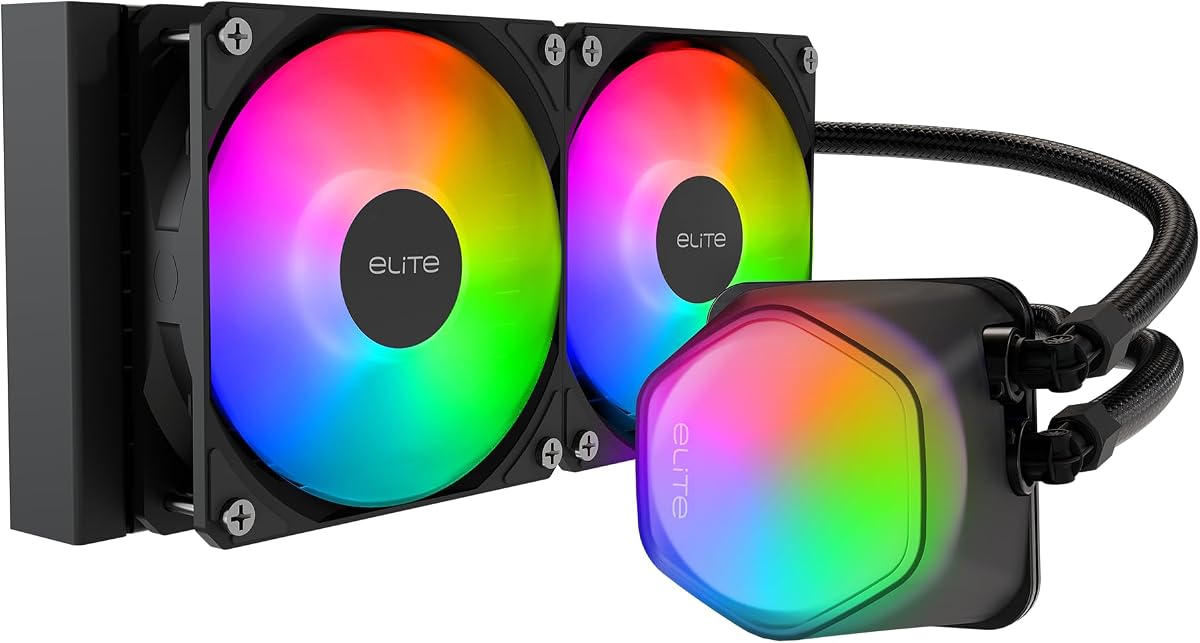
Cooler Master Elite Liquid 240 AIO Liquid CPU Cooler
Cooler Master Elite Liquid 240 is the pack’s budget-tinged quiet 240 mm option: dual-chamber pump, widened radiator water channels for more dissipation area, industrial-grade EPDM seal language for anti-leak longevity, and dual low-noise ARGB PWM fans. It will not out-spec HyperFlow Silent 360 on paper, but it can serve quieter midrange builds when 360 mm will not fit and Kraken’s LCD tax is unwanted.
The translucent dome offers lighting visuals with software customization. For silent rooms, keep effects slow and dim—or ignore them.
Socket support includes modern AMD and Intel lists, so platform fit is rarely the blocker. Case airflow and fan curves are.
Choose Elite Liquid 240 as a practical quiet-enough 240 mm. Choose MONTECH Silent or Nautilus 360 whenever silence under load is the primary scoreboard.
In quiet-PC ownership, the first week of curve tuning matters as much as the unboxing—spend that time once and the cooler fades into the background for years.
EPDM industrial seal marketing is aimed at long ownership—still mount tubes without sharp bends that stress fittings.
A 4.2 rating suggests more variability; inspect pump noise on day one and use returns if it ticks oddly.
We may earn a commission at no additional cost to you.
More area lets fans spin slower for the same CPU heat. That is why HyperFlow Silent 360 and Nautilus 360 dominate this guide’s recommendations over any 240 mm unit with prettier lights. If your case fits 360 mm cleanly, take it for silence even if a 240 mm “works” on paper.
Pumps contribute a constant tonal hum; fans contribute broadband whoosh that scales with RPM. CORSAIR’s ~20 dBA pump claims and MONTECH’s 24.8 dBA fan claims attack different parts of the noise pie. You want both under control—plus a case that does not amplify either through thin panels.
A silent AIO in a choking case will still ramp. Pair these coolers with mesh or vented intakes, slow quiet case fans, and a GPU fan curve that does not wake the room every time a menu shader compiles. The AIO cannot cancel a screaming dual-axial graphics card.
For purpose-built silence, MONTECH HyperFlow Silent 360 (black or white) leads with 24.8 dBA Silent fans and a non-RGB design. CORSAIR Nautilus 360 RS is equally serious thanks to its ~20 dBA pump claim and simple black wiring. Real-world winners still depend on case airflow and fan curves.
Not inherently—bearings and RPM matter more than LEDs. RGB does add cables and often encourages flashy default profiles. If you buy ARGB Nautilus or Titan, dim the lights and author a quiet curve.
Zero RPM typically stops fans, not the pump. The pump should keep circulating coolant. Follow each brand’s guidance in CAM/iCUE and ensure fans resume smoothly when temperatures rise.
360 mm whenever it fits. HyperFlow Silent 240 and Kraken Plus 240 are valid when mounts are short, but they will spin faster under the same heat. Silence favors surface area.
Not if you use a dark temperature display and keep fan policies calm. They become bad when bright animations and default performance curves run 24/7. Kraken Plus 360 and Titan LCD can be quiet with discipline.
Very, for silent PCs you do not want to reopen yearly. Long warranty coverage reduces anxiety about sealed-loop longevity and matches the “install once” mindset.
No. GPU fans, case fans, coil whine, and HDDs still matter. Pair a quiet AIO with a quiet GPU fan curve, quality case fans, and SSD storage for a coherent low-noise system.
Usually not on day one. Tune PWM first. If a fan develops noise years later, swapping to a known quiet high-pressure fan can help—but warranty and mounting compatibility are on you.
MONTECH HyperFlow Silent, CORSAIR Nautilus/Titan, NZXT Kraken Plus, Thermalright Vision, and Cooler Master Elite Liquid listings in this pack call out modern AMD and Intel sockets including AM5 and LGA 1851/1700 as applicable. Match the exact bullet list to your board.
Yes. Lower CPU package power means lower radiator demand and slower fans. A mild undervolt paired with HyperFlow Silent 360 or Nautilus 360 is one of the highest-leverage quiet-PC upgrades that costs nothing beyond patience in BIOS.
The best silent AIO coolers in 2026 start with MONTECH HyperFlow Silent 360 for purpose-built low-dBA non-RGB cooling, CORSAIR Nautilus 360 RS for a whisper-oriented pump and simple black install, and HyperFlow Silent 240 when radiator length is limited. NZXT Kraken Plus models add Zero RPM idle tricks with LCD feedback, while Titan LCD and Peerless Vision serve builders who want screens without abandoning 360 mm quiet potential.
Buy radiator area first, then pump and fan noise features, then lighting. Set gentle curves, keep dust out, and your liquid cooler will sound like part of the furniture—exactly what a silent AIO is for.