Expert Review & Guide

Best SD Cards for 4K Video in 2026: V30 Picks

Dropped frames mid-take are almost never a camera problem first—they are a card problem. When you push a hybrid body or camcorder into 4K UHD, the bitrate climbs fast enough that a bargain Class 10 card without a real Video Speed Class rating will stutter, stop, or force the camera into a lower quality mode. In 2026 the safe baseline for most 4K consumer and creator kits is still UHS Speed Class 3 (U3) paired with Video Speed Class 30 (V30), which guarantees a sustained write floor of 30 MB/s. Peak read numbers on the box matter for offload time; the V30 mark is what keeps the record light green.

This guide looks only at full-size SDXC and one high-speed microSD that creators actually drop into action cams and drones. Capacities here run from a compact 64GB Extreme PRO through several 128GB and 256GB workhorses, plus a two-pack option for dual-slot or backup shooting. We prioritized cards that advertise U3/V30 for 4K UHD, clear write and read claims, and durability language that matches field use—not just desk transfers.

Below you will find three headline picks, a full comparison of all ten products in the pack, and deep reviews that call out write ceilings, capacity tradeoffs, older discontinued SKUs, and when a value brand with a data-recovery promise is enough. No dollar prices—just the performance facts that decide whether your next wedding, travel reel, or documentary day survives the card slot.

Our Top SD Cards for 4K Shooting

Best Overall for Hybrid Shooters

SANDISK 256GB Extreme PRO SD UHS

★★★★★9.6/10
SANDISK 256GB Extreme PRO SD UHS
  • Up to 250MB/s read and 170MB/s write on this 256GB Extreme PRO SKU
  • U3 and V30 ratings aimed at 4K UHD and high-res stills
  • Works with SanDisk Memory Zone for backup and offload organization
Check Price →
Best Proven Workhorse

SANDISK 256GB Extreme PRO SDXC UHS

★★★★★9.6/10
SANDISK 256GB Extreme PRO SDXC UHS
  • QuickFlow offload up to 200MB/s read with shot speeds up to 140MB/s
  • U3/V30 for uninterrupted 4K UHD and burst stills
  • Pairs with SanDisk Professional PRO-READER for max transfer
Check Price →
Best for Action Cams & Drones

SANDISK 256GB Extreme microSD UHS

★★★★★9.6/10
SANDISK 256GB Extreme microSD UHS
  • Up to 245MB/s read and 170MB/s write for 5.3K and 4K UHD POV
  • U3/V30 with rugged environmental ratings for field abuse
  • Memory Zone app support on desktop and Android
Check Price →

As an Amazon Associate we earn from qualifying purchases. We may earn a commission at no additional cost to you.

4K Video SD Card Spec Snapshot

Every card below ships with U3/V30-class claims suited to 4K UHD recording. Use the three-spec columns as a quick filter for capacity, sustained video class, and the headline transfer number that matters for your camera or reader.

#ProductSpecificationsScore
1
  • 256GB SDXC · U3 / V30 / C10
  • Read up to 200MB/s (QuickFlow)
  • Write/shot up to 140MB/s
9.6
2
  • 128GB Extreme PRO · U3 / V30
  • Read up to 250MB/s
  • Write up to 120MB/s on this SKU
9.6
3
  • 256GB Extreme PRO · U3 / V30
  • Read up to 250MB/s
  • Write up to 170MB/s
9.6
4
  • 128GB full-size SDXC · A1 V30 U3
  • Transfer up to 100MB/s
  • 5-year warranty + mini case
9.2
5
  • 64GB Extreme PRO · U3 / V30
  • Read up to 200MB/s (QuickFlow)
  • Write/shot up to 90MB/s
9.6
6
  • 256GB full-size SDXC · A1 V30
  • Transfer up to 100MB/s
  • Weather/shock ratings + mini case
9.4
7
  • 256GB Extreme (non-PRO) · U3 / V30
  • Read up to 180MB/s (QuickFlow)
  • Write up to 130MB/s
9.4
8
  • Discontinued 128GB Extreme PRO
  • Transfer up to 170MB/s · shot ~90MB/s
  • U3 / V30 · ruggedized card body
9.6
9
  • 256GB microSD · U3 / V30
  • Read up to 245MB/s · write 170MB/s
  • 5.3K / 4K UHD for cams & drones
9.6
10
  • Two 128GB Elite-X SDXC cards
  • Class 10 U3 V30 · read ~100MB/s
  • Built for 4K UHD & burst stills
9.2

1. SANDISK 256GB Extreme PRO SDXC UHS - Best Proven Workhorse

SANDISK 256GB Extreme PRO SDXC UHS

SANDISK 256GB Extreme PRO SDXC UHS

9.6/10★★★★★

If you want one full-size card that most hybrid mirrorless and DSLR kits already trust, start with this 256GB Extreme PRO. SanDisk rates it Class 10, U3, and V30, which is the triad you should look for when the camera menu offers 4K UHD. The marketing language is not vague either: the card is called out for sequential burst photography and uninterrupted video when the host supports those UHS classes. That combination is why this SKU still shows up in wedding and documentary kits even as newer Extreme PRO revisions publish higher peak numbers.

  • 256GB SDXC · Class 10, U3, V30
  • QuickFlow read up to 200MB/s
  • Shot/write speeds up to 140MB/s
Check Price →
✓ Pros
  • Mature Extreme PRO SKU with clear 4K UHD and burst-stills positioning
  • 200MB/s QuickFlow offload shortens wrap time after long takes
  • 140MB/s write headroom above the V30 floor for higher bitrates
  • Explicit pairing path with SanDisk Professional PRO-READER
  • Strong 4.8 community rating for a daily-driver capacity
✕ Cons
  • Needs a matching high-speed reader to realize peak QuickFlow numbers
  • UHS-I only—bodies that prefer UHS-II/CFexpress will not unlock bus limits here
  • 256GB fills faster on high-bitrate 4K60 than on 4K24

Detailed review

Offload is where this card earns desk time. QuickFlow Technology pushes read speeds up to 200MB/s, which is above the classic UHS-I theoretical 104MB/s ceiling and requires a host that can actually take that rate. In practice that means a modern laptop SD slot or, better, SanDisk’s Professional PRO-READER. After a full day of multi-cam B-roll, cutting that dump window in half is the difference between editing tonight and waiting until morning.

On the write side, SanDisk lists shot speeds up to 140MB/s. That is well clear of the 30MB/s V30 sustained floor, so you have margin for cameras that spike bitrate during complex scenes, dual-pixel AF chatter, or when you stack high-quality audio tracks. Still, remember that camera firmware, codec choice (H.264 vs H.265), and thermal throttling on the body all influence whether you ever see that peak. Treat 140MB/s as headroom, not a promise in every body.

Capacity at 256GB hits a sweet spot for event shooters who swap cards between ceremonies rather than mid-vows. It is large enough for multiple 4K timelines at moderate bitrates, yet small enough that a lost or corrupted card does not vaporize an entire week of travel. Format in-camera before every job, and keep a second empty card in the same capacity so your muscle memory never changes mid-day.

Where this card is less ideal is any workflow that has already moved to CFexpress or dual UHS-II slots for 8K or raw video. Extreme PRO UHS-I remains excellent for 4K UHD on mainstream hybrids, but it will not magically unlock a bus that expects a faster physical interface. If your camera handbook already recommends V60/V90 or CFexpress Type A/B for the modes you shoot, step up the media class instead of stacking more Extreme PRO cards.

As a daily driver, though, this 256GB Extreme PRO remains the card I would hand a freelancer building their first reliable 4K kit. The ratings are honest for the use case, the reader ecosystem is mature, and the capacity matches how most people actually rotate media on a shoot day.

Who should buy this 256GB Extreme PRO

Hybrid shooters on Sony, Canon, Nikon, Fujifilm, or Panasonic bodies that list UHS-I U3/V30 as approved for 4K. Event videographers who dump cards once or twice per day and value QuickFlow offload. Photographers who still shoot long burst sequences alongside video and want one card that covers both.

Setup tip for maximum offload

Do not judge the card from an ancient USB 2.0 reader. Pair it with a UHS-I capable reader—ideally the SanDisk Professional PRO-READER mentioned in the product notes—and copy to a fast SSD. Enable verify-on-copy in your ingest tool if the footage is irreplaceable.

Check Price on Amazon →

We may earn a commission at no additional cost to you.

2. SANDISK 128GB Extreme PRO SD UHS - Best Compact High-Speed

SANDISK 128GB Extreme PRO SD UHS

SANDISK 128GB Extreme PRO SD UHS

9.6/10★★★★★

This 128GB Extreme PRO sits in SanDisk’s newer SDSDXXJ family, where the headline is a 250MB/s read ceiling. For editors who ingest every night, that number is more than bragging rights—it shortens the dead time between camera and timeline. The listing pairs that read claim with a 120MB/s write rating for this capacity, plus the same U3 and V30 video-class badges that matter for 4K UHD recording.

  • 128GB Extreme PRO · U3 / V30
  • Read up to 250MB/s
  • Write up to 120MB/s (this listing)
Check Price →
✓ Pros
  • Newer Extreme PRO line with up to 250MB/s read claims
  • U3/V30 explicitly for 4K UHD and high-res stills
  • 128GB keeps risk per card lower on travel days
  • Memory Zone desktop app for organize-and-transfer workflows
  • Rugged Extreme-series environmental positioning
✕ Cons
  • Write rating on this 128GB listing (120MB/s) trails the 256GB sibling’s 170MB/s
  • Fills quickly on long 4K interviews or multicam days
  • Peak speeds still depend on host and reader quality

Detailed review

SanDisk’s copy leans hard into “capture larger than life” messaging: 4K UHD brilliance, pristine stills, and durability against rough handling. That tone matches how creators actually abuse cards—hot car glove boxes, humid outdoor ceremonies, quick swaps with sandy fingers. The card is still electronics, not armor plating, but Extreme PRO’s environmental testing story is why many shooters stop buying no-name media after one scare.

Capacity strategy is the real reason to pick 128GB over 256GB. Smaller cards force disciplined swaps and reduce the blast radius if a card fails or is lost. Travel vloggers who dump to a laptop SSD between locations often prefer this rhythm. The tradeoff is obvious on a six-hour conference keynote: you will rotate media more often, so label your cases and keep a hot spare formatted in-camera.

Note the fine print on write speeds across the Extreme PRO family: SanDisk’s broader marketing cites up to 170MB/s write on 256GB–1TB capacities, while this specific 128GB Amazon title lists up to 120MB/s write. Always trust the SKU-level number on the listing you are buying. For most 4K30 H.264/H.265 modes the V30 floor is still the binding constraint, but if your body offers high-bitrate All-Intra or similar, the higher-capacity sibling’s write headroom is more attractive.

Content management gets a practical assist from the SanDisk Memory Zone desktop app, which the product highlights for backup, organize, and transfer—whether you use a built-in SD slot or an external reader. That software will not replace a proper DAM for pros, but it is useful for students and weekend creators who otherwise leave clips scattered across Downloads folders.

Choose this card when you want the newer Extreme PRO speed envelope in a smaller, lower-risk capacity. Skip it if you already standardized on 256GB swaps and want matching write ratings across every card in the pouch.

Ideal shooting scenarios

Travel days with frequent SSD dumps, dual-slot overflow where the second slot is a smaller card, and student projects where losing one card should not erase an entire semester’s footage.

Versus the 256GB Extreme PRO in this guide

Same U3/V30 video class story and similar 250MB/s read marketing, but this 128GB listing advertises a lower write ceiling. If your camera stays in moderate 4K bitrates, either works; if you chase maximum write headroom, prefer the 256GB SDSDXXJ card reviewed next.

Check Price on Amazon →

We may earn a commission at no additional cost to you.

3. SANDISK 256GB Extreme PRO SD UHS - Best Overall for

SANDISK 256GB Extreme PRO SD UHS

SANDISK 256GB Extreme PRO SD UHS

9.6/10★★★★★

This is the card I would standardize a small creative team on in 2026 if the cameras are still SDXC-primary. The SDSDXXJ 256GB Extreme PRO advertises up to 250MB/s read and up to 170MB/s write—the strongest write headline among the full-size cards in this pack—while keeping U3 and V30 for 4K UHD. That write ceiling gives cameras more room when bitrate spikes, which is exactly when cheaper cards start dropping frames.

  • 256GB Extreme PRO · U3 / V30
  • Read up to 250MB/s
  • Write up to 170MB/s
Check Price →
✓ Pros
  • Top write claim in this pack at up to 170MB/s
  • 250MB/s read for fast nightly ingest
  • 256GB balances runtime and swap frequency for events
  • U3/V30 for 4K UHD plus stills-focused marketing
  • Memory Zone support for simpler backup habits
✕ Cons
  • Overkill if you only shoot short social clips in 1080p
  • Still UHS-I—cannot replace CFexpress on flagship cinema modes
  • You need a quality reader to see the 250MB/s read figure

Detailed review

SanDisk’s capacity messaging around long 4K runtimes (their materials cite lengthy 4K UHD minutes at a stated bitrate) is a useful planning reminder even if your codec differs. Roughly speaking, higher bitrates shrink those minute counts fast. Build your day around conservative estimates, not the most optimistic marketing minute totals, and you will never scramble for an empty card during speeches.

Durability copy on this line matches the Extreme PRO reputation: engineered to keep working through rough handling and constant use. That does not mean you should leave a card on a dashboard in July, but it does mean the media is built for kit bags, not jewelry boxes. Combine that with a labeled Pelican-style case and you have a professional habit instead of a junk-drawer habit.

Compared with the older QuickFlow 200MB/s Extreme PRO 256GB earlier in this list, this newer SKU pushes both read and write claims higher. If you are buying fresh in 2026 and your reader can keep up, this is the cleaner long-term stock card. If you already own a drawer of the previous Extreme PRO generation and they still pass load/format tests, there is no emergency to rip them out of working kits.

The Memory Zone desktop app mention is again aimed at creators who want guided backup rather than raw Finder copies. Pros will still prefer dedicated ingest software with checksums; everyone else should at least copy twice—once to the edit drive, once to a backup SSD—before reformatting.

Bottom line: for hybrid 4K stills-and-video shooters who live on SDXC, this 256GB Extreme PRO is the overall pick in the pack. It has the capacity most people actually want and the speed claims that justify retiring mystery-brand cards.

Best matched cameras

Any mainstream mirrorless or DSLR that lists UHS-I SDXC U3/V30 as approved for 4K. Especially strong in dual-slot bodies where you record overflow or backup to a second Extreme PRO of the same capacity.

When to choose microSD instead

If your primary 4K camera is a drone, action cam, or Android device with a microSD slot, jump to the Extreme microSD reviewed later rather than relying on a full-size card plus a cheap adapter.

Ingest checklist

Format in-camera → shoot → verify clips play → checksum copy to two drives → only then reformat. Never format in a computer first if your camera vendor warns against it.

Check Price on Amazon →

We may earn a commission at no additional cost to you.

4. GIGASTONE 128GB 4K Camera Pro SD - Best Value with

GIGASTONE 128GB 4K Camera Pro SD

GIGASTONE 128GB 4K Camera Pro SD

9.2/10★★★★★

Gigastone’s 128GB 4K Camera Pro card is the pack’s clearest “good enough 4K without Extreme PRO money” story—anchored by UHS-I A1, V30, U3, and Class 10 ratings plus a full-size SDXC form factor. The listing leads with a five-year data-recovery angle and a five-year limited warranty, which is unusual packaging for budget media and tells you the brand is selling peace of mind as much as raw speed.

  • 128GB full-size SDXC · A1 / V30 / U3
  • Up to 100MB/s transfer
  • 5-year limited warranty · mini case included
Check Price →
✓ Pros
  • Explicit 4K UHD compatibility with V30/U3 Class 10 ratings
  • Five-year limited warranty plus data-recovery marketing angle
  • Includes a mini case for cleaner kit organization
  • Waterproof/temperature/x-ray/shock/magnetic resistance claims
  • Sensible 128GB size for secondary cameras
✕ Cons
  • 100MB/s transfer ceiling trails SanDisk Extreme PRO peaks
  • Brand pedigree is thinner than SanDisk for mission-critical weddings
  • A1 app-performance mark matters more for phones than cinema bodies

Detailed review

Transfer speed is listed up to 100MB/s. That will not win a dump-race against a 250MB/s Extreme PRO, but it is adequate for overnight ingest after a school recital or real-estate walkthrough. The binding requirement for recording remains V30’s sustained 30MB/s floor; as long as your camera’s 4K mode stays within that envelope, the card can keep the record rolling.

Physical resilience language covers waterproof, temperature-proof, x-ray-proof, shock-proof, and magnetic-proof claims, and you get a mini case in the box. For parents and travel creators who toss cards into pockets, that case alone prevents the classic “card in the lint” failure mode. Still treat those ratings as resistance, not an invitation to rinse the card under a faucet for fun.

Where I would deploy this card is on a second body, a loaner camera, or a student kit where Extreme PRO inventory is reserved for the A-cam. I would be slower to trust a single Gigastone as the only media on a once-in-a-lifetime ceremony unless I was dual-recording or dumping frequently. Ratings around 4.6 suggest most buyers are happy, but brand-tier caution still applies for irreplaceable work.

The A1 mark indicates strong random-read performance for applications—more relevant if you also use the card in devices that run apps from storage. For pure video, V30/U3 is the badge that matters. Do not buy this card because of A1 alone; buy it because it is a full-size V30 SDXC with a warranty story at a friendlier tier than Extreme PRO.

If your bitrate stays moderate and your risk tolerance includes value brands, this 128GB Gigastone is a practical spare. If clients are paying premium day rates, spend the difference on SanDisk Extreme PRO and sleep better.

Who it fits

Secondary cameras, classroom kits, and creators building a multi-card pouch on a budget who still refuse to buy unrated mystery cards.

Warranty habit

Register the card if the brand offers registration, keep the order record, and understand what “data recovery” actually covers before you need it. Prevention—dual slots and dual backups—beats recovery every time.

Check Price on Amazon →

We may earn a commission at no additional cost to you.

5. SANDISK 64GB Extreme PRO SDXC UHS - Best Small-Capacity Pro

SANDISK 64GB Extreme PRO SDXC UHS

SANDISK 64GB Extreme PRO SDXC UHS

9.6/10★★★★★

Sixty-four gigabytes sounds tiny next to 256GB siblings, yet this Extreme PRO still wears Class 10, U3, and V30 badges with QuickFlow reads up to 200MB/s. SanDisk positions it for 4K UHD and sequential burst photography, with shot speeds up to 90MB/s on this capacity. That write number is lower than the 140MB/s 256GB QuickFlow card, which is a capacity-tier reality you should factor into high-bitrate modes.

  • 64GB Extreme PRO · U3 / V30 / C10
  • QuickFlow read up to 200MB/s
  • Shot/write speeds up to 90MB/s
Check Price →
✓ Pros
  • Same Extreme PRO reliability story in a compact 64GB size
  • 200MB/s QuickFlow reads for fast short dumps
  • U3/V30 still valid for 4K UHD when capacity is enough
  • Lower loss impact if a card is misplaced on set
  • Pairs with SanDisk Professional PRO-READER ecosystem
✕ Cons
  • 64GB fills fast on modern 4K bitrates—plan frequent swaps
  • Write ceiling (90MB/s) is lower than larger Extreme PRO SKUs
  • Poor fit as the only card on a long documentary day

Detailed review

Why buy 64GB in 2026? Risk segmentation. Photojournalists and wedding second shooters sometimes prefer many small cards so a single failure cannot erase a whole half-day. Sports photographers dumping between innings like the short offload windows. And some cameras still behave more predictably when cards are not packed completely full—leaving headroom helps certain bodies avoid buffer weirdness.

For pure long-form 4K interviews, 64GB is a chore. You will swap during natural breaks, and you must stay organized. Color-code cases, number the cards, and never toss a full card into the same pocket as empties. The Extreme PRO speed envelope makes those frequent dumps less painful when your reader can hit QuickFlow rates.

Like its larger QuickFlow cousins, peak performance wants a capable host. Pair with the SanDisk Professional PRO-READER if you care about the upper read claim. A random multiport hub from a junk drawer will make every card look mediocre.

I treat this SKU as a specialist tool: overflow slot media, stills-primary hybrids that only occasionally roll 4K, or a labeled “B-roll only” card that gets wiped often. It is not the card I would hand someone filming a three-hour 4K conference alone.

If you already love Extreme PRO and simply need a small, fast, trustworthy SDXC, this 64GB remains a sharp instrument—just bring more of them than you think you need.

Capacity planning tip

Estimate minutes per card using your camera’s bitrate chart, then cut that estimate by a third for safety. Buy enough 64GB cards to cover the day plus two spares.

Versus stepping up to 128GB

Move to 128GB or 256GB if swap anxiety exceeds loss anxiety. Most hybrid shooters are happier with fewer, larger Extreme PRO cards once their ingest workflow is solid.

Check Price on Amazon →

We may earn a commission at no additional cost to you.

6. GIGASTONE 256GB 4K Camera Pro SD - Best Larger Value

GIGASTONE 256GB 4K Camera Pro SD

GIGASTONE 256GB 4K Camera Pro SD

9.4/10★★★★★

Gigastone’s 256GB 4K Camera Pro card scales the same value thesis as the 128GB model: V30-class 4K UHD compatibility, up to 100MB/s transfers, a mini case, and a five-year limited warranty story with data-recovery marketing. The jump to 256GB is what makes it interesting for vacation filmmakers and campus creators who hate mid-hike card swaps.

  • 256GB full-size SDXC · A1 / V30
  • Up to 100MB/s transfer
  • Mini case · multi-proof durability claims
Check Price →
✓ Pros
  • 256GB capacity at the value tier for longer 4K runtimes
  • V30 4K UHD compatibility called out for cameras and camcorders
  • Useful for point-and-shoot, DSLR, camcorder, and PC transfer use
  • Includes mini case and five-year limited warranty framing
  • Slightly higher rating than the 128GB Gigastone sibling
✕ Cons
  • 100MB/s class speeds lag Extreme PRO offload times
  • Not the first choice for paid cinematic work with high bitrates
  • A1 focus is secondary for dedicated video bodies

Detailed review

The about text explicitly nods to digital point-and-shoots, HD camcorders, DSLRs, and PC use. That wide net is honest—this is a generalist 4K-capable SDXC, not a cinema-tier V90 stick. If your camcorder’s manual asks for SDXC U3/V30, you are in the right aisle. If it demands V60/V90 for high-frame-rate 4K, look elsewhere.

Durability claims again span waterproof, temperature, x-ray, shock, and magnetic resistance. Field shooters should still use the included mini case and avoid leaving cards loose with keys. The plastic case is a workflow tool, not a freebie to throw away.

Performance expectations should stay grounded. At roughly 100MB/s transfers, overnight dumps of a full 256GB card take longer than Extreme PRO QuickFlow or 250MB/s SKUs. Plan ingest time accordingly, especially if you edit the same evening. For many family and travel projects, that tradeoff is acceptable.

I like this card as a “vacation A-cam / home B-cam” compromise: enough capacity for a week of clips, V30 assurance for 4K sightseeing, and a warranty narrative that softens the leap of faith on a non-SanDisk brand. I would still dual-record important ceremonies when possible.

If you already standardized on Extreme PRO for client work, keep Gigastone in the personal kit. Mixing brands on a single paid job is fine; mixing untested cards as your only media is not.

Good pairings

Travel vlogging kits, parent-created recital archives, and real-estate walkthrough cameras that record 4K but do not push extreme cinema bitrates.

What to verify in-camera

Before a trip, format the card in the camera and record a ten-minute 4K test at your real settings. Playback the file fully. A clean test beats any Amazon bullet list.

Check Price on Amazon →

We may earn a commission at no additional cost to you.

7. SANDISK 256GB Extreme SDXC UHS - Best Non-PRO SanDisk

SANDISK 256GB Extreme SDXC UHS

SANDISK 256GB Extreme SDXC UHS

9.4/10★★★★★

SanDisk’s Extreme line sits a step below Extreme PRO, and this 256GB SDSDXVV card shows that hierarchy clearly: QuickFlow reads up to 180MB/s and writes up to 130MB/s, versus higher numbers on PRO SKUs. You still get Class 10, U3, and V30 for uninterrupted 4K UHD recording when the host supports those classes, which is the requirement that actually protects your takes.

  • 256GB Extreme (not Extreme PRO)
  • QuickFlow read up to 180MB/s
  • Write up to 130MB/s · U3 / V30
Check Price →
✓ Pros
  • SanDisk Extreme reliability with U3/V30 4K positioning
  • 180MB/s QuickFlow reads still strong for nightly dumps
  • 130MB/s write offers solid headroom above V30
  • 256GB capacity matches event-day needs
  • PRO-READER pairing path remains available
✕ Cons
  • Trails Extreme PRO siblings on peak read/write claims
  • Easy to confuse with Extreme PRO when ordering—check the exact model
  • Not the fastest SanDisk option if you are buying new stock anyway

Detailed review

For many creators, Extreme is the rational buy—especially if a deal makes Extreme close to older PRO pricing, or if your camera never stresses write ceilings beyond moderate 4K. The 130MB/s write claim remains far above the V30 floor, so everyday 4K30 recording is not living on the edge.

Offload will feel a touch slower than 200–250MB/s PRO cards when your reader is fast enough to expose the difference. On a mediocre reader, you may not notice. Invest in the reader before obsessing over the last 20MB/s of card marketing.

SanDisk again mentions pairing with the Professional PRO-READER for maximum speeds. That ecosystem continuity is a quiet advantage of staying inside the SanDisk family when you already own the reader hardware.

Name confusion is the practical hazard. “Extreme” and “Extreme PRO” sit next to each other in search results. Confirm the model code (here SDSDXVV) and the listed read/write pair before checkout. Returning the wrong tier wastes a shoot week.

Pick Extreme 256GB when you want SanDisk trust and V30 assurance without paying for the absolute top PRO claims. Pick Extreme PRO when offload minutes and write headroom are part of how you bill your day.

Upgrade path

If you already own Extreme cards that still pass format and record tests, keep using them. Add Extreme PRO only when ingest time or higher bitrates justify the step.

Reliability note

Brand tier helps, but habits matter more: in-camera format, dual backup, and retiring cards that throw errors immediately.

Check Price on Amazon →

We may earn a commission at no additional cost to you.

8. [Older Version] SanDisk 128GB Extreme PRO - Buy With Eyes

[Older Version] SanDisk 128GB Extreme PRO

[Older Version] SanDisk 128GB Extreme PRO

9.6/10★★★★★

The listing itself warns you: this is an older Extreme PRO version discontinued by the manufacturer. That does not make every remaining card useless—U3, V30, and 4K UHD positioning remain—but it does mean you should prefer newer Extreme PRO SKUs when you are stocking a kit from scratch in 2026.

  • Discontinued Extreme PRO 128GB
  • Shot ~90MB/s · transfer up to 170MB/s
  • U3 / V30 · ruggedized card
Check Price →
✓ Pros
  • Still U3/V30 for 4K UHD recording on compatible hosts
  • Transfer speeds up to 170MB/s with a capable reader
  • Proven Extreme PRO durability testing story
  • High 4.8 rating from a long market life
  • Useful if you need a matching older SKU for an existing kit
✕ Cons
  • Manufacturer has discontinued this version
  • Shot speeds (~90MB/s) trail newer Extreme PRO write claims
  • Risk of older inventory or confusing marketplace listings

Detailed review

Performance on this generation is listed around 90MB/s shot speeds and up to 170MB/s transfers with a compatible UHS-I reader. That write figure is enough for many 4K modes, yet it is clearly behind the 120–170MB/s write claims on newer Extreme PRO cards in this same guide. If your camera is bitrate-hungry, buy current stock.

Durability language still covers temperature, water, shock, and x-ray resistance for the card. The Extreme PRO reputation was built on this kind of field testing, which is why older cards that still health-check clean can remain in rotation.

Marketplace caution is mandatory. Discontinued SKUs sometimes attract third-party sellers with gray stock. Buy from reputable sellers, inspect packaging, and run a full write/read/record test before trusting the card on paid work. If anything about the labeling looks off, return it.

When does this card still make sense? Matching an existing pouch of SDSDXXY cards, replacing one failed sibling without changing capacities mid-wedding season, or grabbing a known quantity if a trusted seller still has sealed inventory. It is not my default recommendation for a brand-new purchase when SDSDXXJ cards are available.

Respect the “Older Version” tag in the title. Nostalgia is not a media strategy; verified performance is.

How to validate an older card

Format in-camera, record the longest continuous 4K clip you can, play it back entirely, then run a full-capacity write/read test with a reputable SD utility. Retire any card that throws errors.

Better modern alternatives in this pack

The 128GB and 256GB SDSDXXJ Extreme PRO cards offer newer speed claims with the same U3/V30 video-class foundation.

Check Price on Amazon →

We may earn a commission at no additional cost to you.

9. SANDISK 256GB Extreme microSD UHS - Best for Action

SANDISK 256GB Extreme microSD UHS

SANDISK 256GB Extreme microSD UHS

9.6/10★★★★★

Not every 4K story starts in a mirrorless slot. Action cameras, drones, and many Android devices want microSD, and this 256GB Extreme card is the pack’s dedicated answer. SanDisk markets it for startling 5.3K point-of-view footage and 4K UHD, with U3 and V30 ratings and aggressive speed claims—up to 245MB/s read and 170MB/s write on higher capacities including this 256GB class.

  • 256GB Extreme microSD · U3 / V30
  • Read up to 245MB/s · write up to 170MB/s
  • Marketed for 5.3K POV and 4K UHD
Check Price →
✓ Pros
  • Built for action cams, drones, and Android devices—not just DSLRs
  • High 245/170MB/s speed claims with U3/V30 video class
  • 256GB supports longer POV and aerial sessions
  • Extensive environmental resistance list for harsh mounts
  • Memory Zone apps on desktop and Android
✕ Cons
  • Wrong form factor for cameras that only take full-size SD without an adapter
  • Adapters add a failure point if you force this into a DSLR
  • 5.3K support still depends on the host device’s codec and thermal limits

Detailed review

That write headroom matters on action cams that record high-bitrate 4K or 5.3K while vibrating on a helmet mount. Cheap microSD cards are infamous for randomly ending clips; V30 Extreme media is how you stop blaming the camera for media faults. Still run a manufacturer compatibility list check for your specific GoPro-class cam or drone before a once-only jump.

Durability copy is unusually thorough even by SanDisk standards: temperature, humidity, waterproof, shock, drop, magnet, X-ray, and wear-out resistance claims. Helmets, handlebars, and landing legs are hostile environments. You still should not treat the card as immortal—seat it fully, keep spares dry, and replace any card that has taken a hard impact with the host device.

Capacity at 256GB fits long hike days and multiple drone batteries better than 64/128GB cards that force mid-trail swaps with cold fingers. Offload through a quality USB reader or the device’s own cable workflow, and use SanDisk Memory Zone on desktop or Android if you want guided backup.

Do not buy this as a clever way to feed a full-size SD camera through a bargain adapter unless you accept the adapter as a risk. Full-size Extreme PRO cards earlier in this guide are the cleaner path for DSLRs and mirrorless bodies.

For POV and aerial 4K, though, this Extreme microSD is the correct specialist pick in the set—and one of the three headline recommendations for that reason.

Drone pilots

Format in the aircraft or app as the manufacturer requires, carry two cards per aircraft, and never fly a brand-new untested card over water on the first outing.

Action cam creators

Match the card to the exact recording mode you publish in. A card that survives 4K30 may still struggle if you jump to higher frame rates without checking the cam’s media chart.

Check Price on Amazon →

We may earn a commission at no additional cost to you.

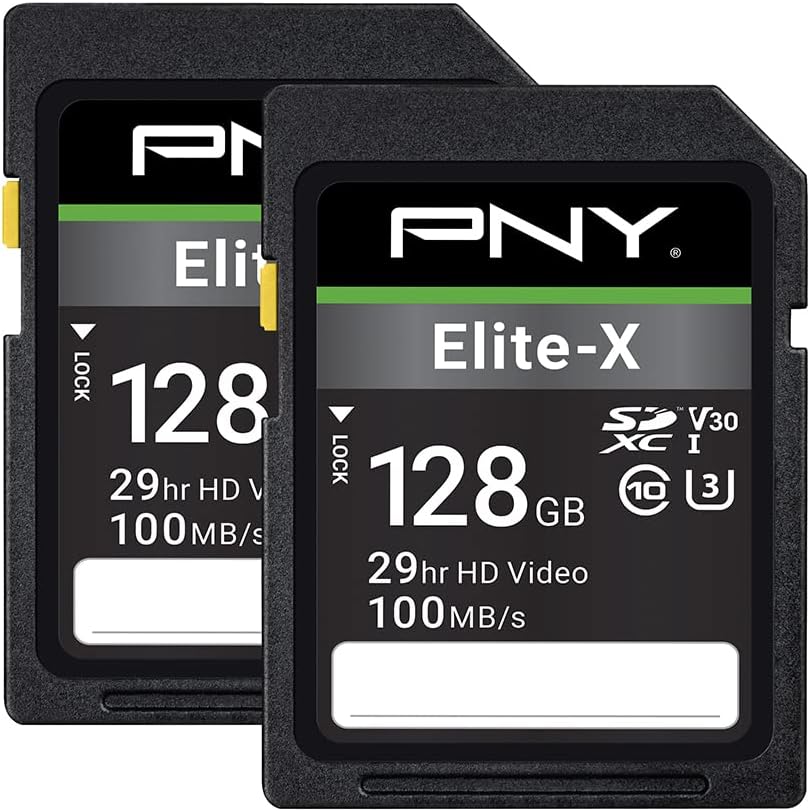
10. PNY 128GB Elite-X (Pack of 2) - Best Two-Pack for

PNY 128GB Elite-X (Pack of 2)

PNY 128GB Elite-X (Pack of 2)

9.2/10★★★★★

PNY’s Elite-X two-pack solves a logistics problem: you need matched media now. Each card is a full-size 128GB SDXC with Class 10, U3, and V30 ratings and read speeds up to 100MB/s, positioned for burst HD photography and 4K Ultra HD videography. For dual-slot cameras, putting identical cards in both slots reduces the chance that overflow recording behaves oddly because the cards differ.

  • Pack of two 128GB Elite-X SDXC cards
  • Class 10 · U3 · V30 · ~100MB/s read
  • Built for 4K UHD and burst HD stills
Check Price →
✓ Pros
  • Two matched 128GB cards simplify dual-slot or A/B body kits
  • U3/V30 Class 10 ratings aimed at 4K Ultra HD videography
  • PNY durability claims: magnet, shock, temperature, waterproof
  • Sensible for enthusiasts who need spares immediately
  • Works across point-and-shoot, DSLR, and HD video cameras
✕ Cons
  • 100MB/s read class is slower to dump than Extreme PRO peaks
  • 128GB ×2 may still be less flexible than a single 256GB plus spare
  • Not the prestige pick for luxury client deliverables

Detailed review

The enthusiast positioning is accurate. These are not cinema V90 cards, but they are a clear step above grocery-store SDHC leftovers. If your DSLR or camcorder handbook lists SDXC U3/V30 as acceptable for 4K, Elite-X is in-bounds. Run your own recording test anyway—especially on higher frame rates.

Durability marketing covers magnet, shock, temperature, and waterproof resistance. Pair that with any third-party hard case; do not rely on thin retail plastic long-term. Label the two cards “A” and “B” so dual-slot backup versus overflow roles stay consistent.

Offload expectations should match the 100MB/s class. Fine for many workflows; slower than SanDisk’s QuickFlow or 250MB/s Extreme PRO cards when your reader is fast. If dump speed is how you make evening edit deadlines, spend up.

I like this pack for families running two point-and-shoots, educators outfitting a pair of classroom cameras, or creators who want an immediate spare without buying two separate retail packages. I am more cautious handing PNY as the only media on a luxury wedding—dual-record and backup still apply.

As a closer for the pack, Elite-X is the practical multi-card answer: honest V30 4K credentials, matched twins in one buy, and realistic speed claims.

Dual-slot strategies

Use overflow when you want maximum continuous recording time, or redundant backup when the event cannot be restaged. Never assume backup mode is enabled—check the menu every job.

Versus two separate Extreme PRO cards

Extreme PRO wins on peak speed and brand comfort for paid work. The PNY twin-pack wins on matched convenience at the value tier for lighter projects.

Check Price on Amazon →

We may earn a commission at no additional cost to you.

Best SD Cards for 4K Video in 2026: V30 Picks

How to Choose an SD Card for 4K Video

Trust Video Speed Class before flashy peak numbers

V30 means the card is designed to sustain at least 30MB/s for video. U3 is the UHS Speed Class counterpart aimed at 4K-capable hosts. Peak read speeds (180–250MB/s on cards in this guide) change how fast you ingest; they do not replace V30 for recording. If a bargain card omits V30/U3 and only says “4K compatible,” treat that as marketing, not a guarantee.

Match the card to your bitrate, not your resolution label

Two cameras both shooting “4K” can differ wildly in bitrate. A highly compressed 4K30 mode may sip data; an All-Intra or high-frame-rate 4K mode can multiply demand. Check your camera’s recording bitrate chart, convert to MB/s, and keep comfortable margin under the card’s sustained rating. When in doubt, step up a tier rather than living on the V30 floor with no headroom.

Capacity is a risk decision as much as a runtime decision

Larger cards mean fewer swaps and longer continuous takes. Smaller cards limit how much you lose if media fails or disappears. Event shooters often standardize on 128GB or 256GB Extreme PRO cards with disciplined labeling. Travel creators sometimes prefer more 128GB cards and midday SSD dumps. There is no universal correct size—only a correct strategy for your failure tolerance.

Full-size SD vs microSD

Mirrorless, DSLR, and many camcorders want full-size SDXC. Action cams, drones, and phones want microSD. Using a microSD-in-adapter inside a cinema-adjacent hybrid body adds a contact point that can fail. Buy the native form factor for the device that earns your keep.

Readers and cables are part of the card’s real speed

SanDisk repeatedly notes that maximum QuickFlow or 250MB/s-class reads need compatible hosts. A USB 2.0 dongle will bottleneck every flagship card. Budget for a quality UHS-I reader—or the SanDisk Professional PRO-READER if you are deep in that ecosystem—when you invest in fast media.

Brand tier for paid vs personal work

SanDisk Extreme / Extreme PRO dominate professional kits for a reason: consistent ratings, wide camera compatibility lists, and predictable retail channels. Gigastone and PNY can be rational for personal projects, spares, and classrooms—especially when V30/U3 is clearly marked—but irreplaceable client work deserves conservative media choices and redundancy.

Frequently Asked Questions

01

Is V30 enough for 4K video in 2026?

For most consumer and creator 4K modes on hybrid cameras and camcorders, yes—V30 remains the widely recommended baseline because it guarantees a sustained 30MB/s write floor. Higher classes (V60/V90) become important when your camera’s bitrate chart shows sustained rates that approach or exceed what V30 comfortably supports, or when the manufacturer explicitly requires them for high-frame-rate or high-quality 4K modes. Always defer to the camera’s media requirements over generic internet rules.

02

What is the difference between SanDisk Extreme and Extreme PRO for 4K?

Both lines in this guide carry U3/V30 4K positioning, but Extreme PRO SKUs generally advertise higher peak read and write numbers. In this pack, for example, a 256GB Extreme lists up to 180MB/s read and 130MB/s write, while newer Extreme PRO 256GB cards claim up to 250MB/s read and 170MB/s write. If you ingest large volumes nightly or shoot higher bitrates, PRO’s headroom is worth it. If you shoot moderate 4K and value SanDisk reliability, Extreme can still be a smart buy.

03

Can I use a microSD with an adapter in my mirrorless camera?

Often it will physically work, but it is not the robust choice for paid 4K work. Adapters add another set of contacts and can introduce intermittents that look like camera failures. Prefer native full-size Extreme PRO cards for DSLRs and mirrorless bodies, and reserve Extreme microSD for devices designed around that form factor—action cams, drones, and phones.

04

How many minutes of 4K fit on a 256GB SD card?

It depends entirely on bitrate. SanDisk’s own materials for some Extreme PRO cards cite thousands of minutes at a specific 4K UHD bitrate assumption, but your camera may record at a much higher rate. Use the camera’s Mbps rating, convert to MB/s, and divide usable capacity by that rate. Then leave margin—cards should not be filled to the last gigabyte on critical jobs.

05

Should I buy the discontinued older Extreme PRO 128GB?

Only with eyes open. The listing notes the manufacturer discontinued that version. It can still record 4K under U3/V30 if healthy, but newer Extreme PRO cards offer stronger speed claims and clearer supply. If you need to match an existing older kit and can buy sealed stock from a reputable seller, test thoroughly. Otherwise, choose current SDSDXXJ Extreme PRO cards.

06

Do Gigastone or PNY cards work for client weddings?

They can record 4K when V30/U3 rated, and many users are satisfied, but professional risk management usually favors top-tier brands plus redundancy. If you use value cards on paid work, dual-slot backup, frequent dumps, and exhaustive pre-shoot testing are mandatory. For once-in-a-lifetime ceremonies, most working shooters still standardize on SanDisk Extreme PRO or equivalent pro media.

07

Why did my 4K recording stop even though the card says U3?

Common causes include a counterfeit or tired card, a mode that actually needs a higher Video Speed Class, overheating camera bodies throttling writes, a nearly full card, or a slow card that meets U3 in name but fails under sustained load. Format in-camera, test continuous recording, try a known-good Extreme PRO, and check whether your frame rate/codec combination has stricter media requirements.

08

Is UHS-II required for 4K?

No. Many excellent 4K cameras record reliably on UHS-I U3/V30 cards like those in this guide. UHS-II can help with faster bus speeds and demanding modes on cameras designed for it, but it is not a universal 4K requirement. Matching the manufacturer’s approved list matters more than buying the most exotic logo on the card.

09

How often should I replace SD cards used for 4K?

Replace on error, not on an arbitrary birthday—but heavy professional use warrants periodic retirement before failure. If a card has been dropped with a camera into water, shows mounting errors, or fails a full write/read test, remove it from client kits immediately. Keep a log of which cards are in which bodies so you can quarantine a bad batch quickly.

10

Does the SanDisk Memory Zone app matter?

It is helpful for creators who need guided backup and organization, especially on Android devices with Extreme microSD cards. Professionals with established checksum ingest tools can ignore it. The app does not make a slow reader fast and does not replace a second backup copy.

Conclusion

The best SD card for 4K video is the one that meets your camera’s U3/V30 (or higher) requirement, offers write headroom for your real bitrate, and fits a capacity strategy you will actually manage under stress. In this pack, the newer 256GB Extreme PRO with up to 250MB/s read and 170MB/s write is the all-around hybrid pick, the QuickFlow 256GB Extreme PRO remains a proven workhorse, and the 256GB Extreme microSD is the right tool when the camera on your helmet or drone never takes a full-size SD.

Value options from Gigastone and PNY can serve personal projects and spares when they clearly carry V30/U3, but irreplaceable work still deserves conservative brand choices, in-camera formatting, and dual backups. Skip discontinued inventory unless you are matching a known kit and can validate it end-to-end.

Pick your media like you pick lenses: for the job you are shooting tomorrow, not the logo that looks impressive in a shopping cart. Format, test, label, and duplicate—then the card becomes invisible, which is exactly what good storage should be.