Best Dual-Chamber Cable Case
NZXT H6 Flow

- Dual-chamber layout keeps PSU clutter off the show side
- Wide channels and straps simplify ATX and PCIe routing
- Three angled 120 mm fans plus perforated panels for airflow
Expert Review & Guide
Cable management is what separates a finished PC from a parts pile behind glass. In 2026 the cleanest builds usually combine a case that actually plans for routing—wide rear channels, straps, dual chambers, optional cable covers—with small tools like split loom, PSU combs, hook-and-loop ties, and adhesive clips for the desk side of the mess. This guide covers ten pack products that map to that whole workflow, not just one brand’s mid-tower brochure.
Four of the listings are full chassis: NZXT’s H5 Flow and H6 Flow, CORSAIR’s 4000D RS Frame, Lian Li’s O11D MINI V2, and Okinos’s panoramic mATX tower. The rest are management accessories—NOROCME’s 192-piece kit, Alex Tech split loom, Sirlyr’s 24-piece comb set, a 130-pack of reusable ties, and SOULWIT adhesive clips—because hiding 24-pin and 12VHPWR runs often needs both a smart case and desk-side organizers.
We stick to pack ASINs, images, ratings, and about facts only, and we skip dollar prices. Start with the top picks if you want a case-first recommendation, then mix accessories once the chassis routing is sorted.


As an Amazon Associate we earn from qualifying purchases. We may earn a commission at no additional cost to you.
Chassis entries highlight routing features and chambers; accessory rows highlight what mess they solve. No prices—compare fit and workflow instead.
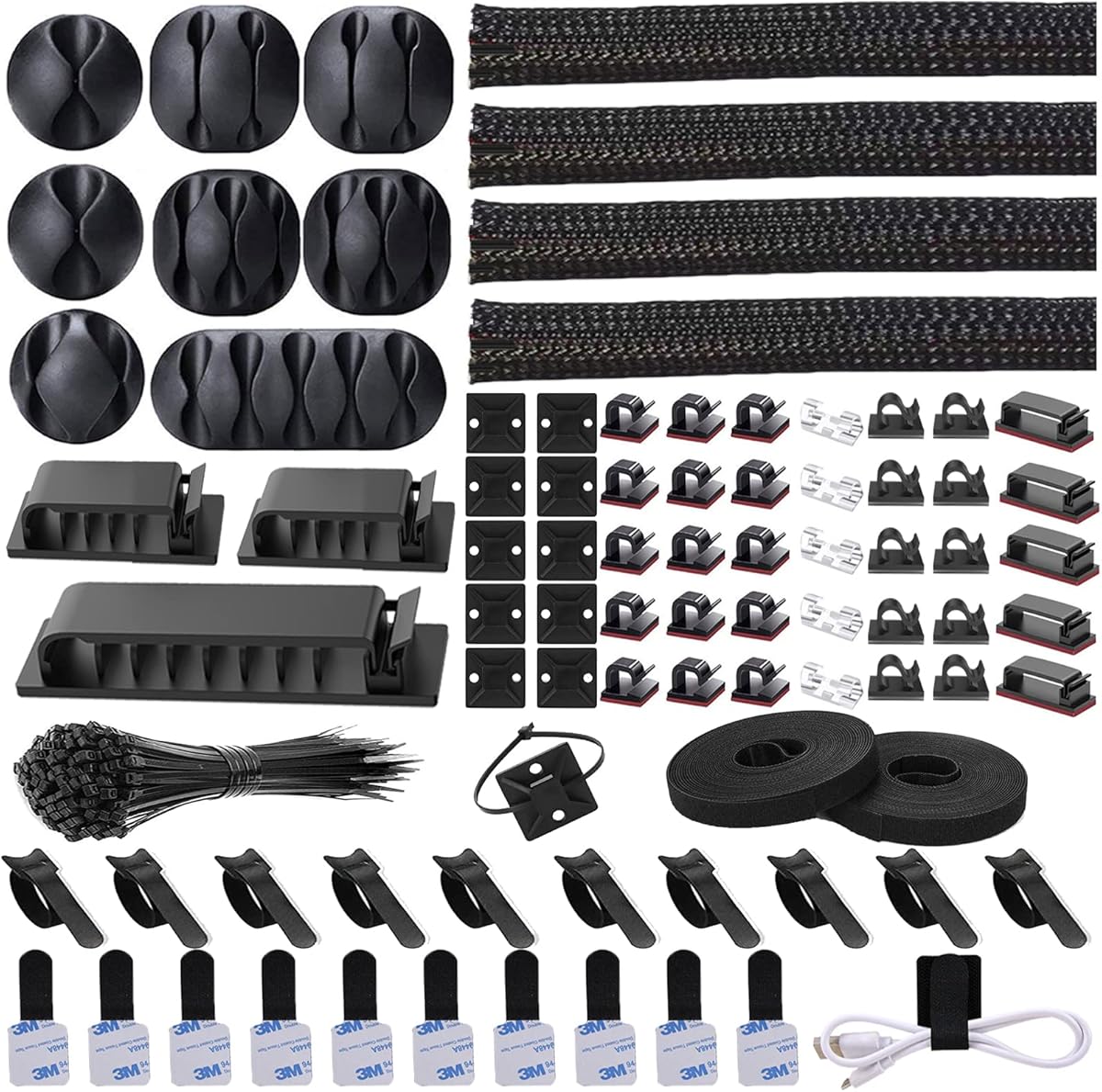
N NOROCME 192 PCS Cable Management Kit 4 Wire Organizer Sleeve
NOROCME’s 192-piece kit is the pack’s answer when the mess lives under the desk rather than only behind a motherboard tray. Four 20-inch braided sleeves, twenty reusable wire ties, thirty-five cable clips, eleven cord holders, two long self-adhesive tie rolls, twenty zip-tie mounts, and a hundred fastening ties give you enough variety to tame PSU wall-warts, monitor power, Ethernet, and daisy-chained USB hubs in one afternoon.
The sleeves are split so you can wrap existing runs without unplugging every device—critical when the gaming PC, console, and lamp already share a power strip. Once loaded, the braid closes on itself into a single wrap, which is also the listing’s suggested defense against curious pets chewing loose cords.
Clip materials are called out as Polyamide66 in black and transparent finishes for desks, walls, baseboards, cabinets, wood, and ceramics. That mix matters if you want invisible clear clips on a light oak desk and black ones along a PC case foot.
Self-adhesive holders and the two 118-inch tie rolls handle longer vertical drops from desk to floor. Eye holes on some ties let you hang bundles from hooks, which is handy when you want service loops instead of permanent zip-tie prisons.
Treat this kit as layer two after you pick a routing-friendly case. It will not create rear chamber depth that is not there, but it will stop the floor spaghetti that makes even a dual-chamber NZXT look unfinished from the doorway.
Start with the PC-to-wall power bundle and monitor cables, then move to headphone DAC and charger leads. Visible floor runs pay off faster than chasing every rear USB leftover.
Wipe adhesion points with isopropyl and wait until dry. Strong pads still peel off chalky paint and silicone desk mats.
We may earn a commission at no additional cost to you.
NZXT’s H5 Flow earns its place in a cable-management guide because the listing literally sells seamless routing: wide channels, hooks, and straps behind the motherboard tray. First builders feel that difference when the 24-pin finally disappears instead of floating in the GPU’s camera frame.
Airflow still matters after cables look pretty. Ultra-fine mesh on top, front, and side keeps dust filtered while feeding cool air, and the perforated PSU shroud invites optional fans under the GPU. Clean routing that blocks every vent is a false win; the H5 Flow tries to avoid that trap.
Radiator support up to 360 mm front and 240 mm top means liquid CPU tubes become part of your cable plan. Route AIO tubes along intentional paths and strap unused PSU modular leads in the rear channel so they cannot wander into fan blades.
Compared with the H6 Flow later in this pack, the H5 is the simpler compact chassis—excellent channels, less dual-chamber separation. Choose it when desk depth is limited and you are willing to practice classic behind-the-tray bundling.
Pair the H5 with Sirlyr combs on the show-side extensions and SOULWIT clips under the desk. The case hides the ATX internals; the accessories hide everything the glass never shows.
Mount the PSU and route the 24-pin and EPS cables before the GPU goes in. Working around a heavy graphics card is how tidy plans turn into zigzag compromises.
Use the included hooks and straps for anything you may service. Save disposable ties for permanent loom bundles you will not reopen.
We may earn a commission at no additional cost to you.
CORSAIR 4000D RS ARGB Frame Modular Mid
CORSAIR built an explicit cable-management fork into the 4000D RS Frame: keep the internal side panel near the motherboard tray as a cable cover for clean lines, or remove it to mount side fans when thermals win. Few mid-towers document that choice so clearly, and it is why this chassis lands in our cable-focused top picks.
FRAME modularity supports longer ownership—swap trays or front I/O as needs change—while the listing’s ASUS BTF, MSI Zero, and Gigabyte Stealth mentions speak to builders chasing connector-free show sides. Classic ATX boards still work; rear-connector boards simply maximize the clean look the cable cover starts.
Three RS ARGB PWM fans arrive up front with Zero RPM mode, so idle noise stays low while daisy-chained PWM keeps the rear chamber from growing a rat’s nest of fan splitters. InfiniRail lets you slide mounts for larger fans without inventing DIY brackets that steal cable space.
The Y-pattern airflow front keeps the case honest as a cooler, not only a photography prop. Cable covers fail when people seal every vent; CORSAIR’s perforated steel front keeps intake alive while the interior panel hides the ugly runs.
If your priority is dual-chamber PSU isolation, the H6 Flow may feel tidier with less effort. If you want a cable cover you can remove later for side cooling, the 4000D RS Frame is the more flexible tool.
Bundle excess modular PSU cables behind the tray before installing the cover panel. Fighting cables after the panel is on usually means taking it back off twice.
A Stealth or BTF board plus the cable cover is overkill in the best way—almost nothing remains on the show side except RAM and GPU.
We may earn a commission at no additional cost to you.

Alex Tech’s ten-foot, half-inch split loom is a single-purpose tool: gather power and peripheral cables into one armored snake. The split opens to accept wires, then closes on itself so you are not fishing ends through a closed tube. For PC desks that share a wall outlet with speakers and a lamp, that length is more useful than another decorative comb.
The listing calls out HiFi, HDMI, automotive-style wiring, and pet chew resistance, plus insulation and UL Recognition. Those details matter more under a desk than inside a tempered-glass chamber, which is exactly where this accessory belongs in a cable-management shopping list.
Temperature range from deep cold to 257°F operating (with a high melt point noted) means garage offices and warm entertainment centers are both in scope. Still, keep loom away from resting on hot PSU exhaust vents as a courtesy to plastics everywhere.
Inside a mid-tower, prefer the case’s own channels and Sirlyr combs. Loom shines on the exterior bundle from case I/O and PSU plug to the power strip—especially when cats treat USB cords as toys.
Cut only what you need and leave a service loop near the strip so you can unplug without destroying the wrap. Ten feet lets you sleeve multiple short segments instead of one inflexible trunk.
Half-inch loom swallows several IEC and brick cables easily but looks oversized on a lone Lightning cable. Bundle meaningfully or choose smaller sleeves from kits like NOROCME for thin runs.
Loom is a deterrent, not armor plating. Still route cables behind legs where possible and combine with adhesive clips so the loom is not a dangling toy.
We may earn a commission at no additional cost to you.
The H6 Flow is the cable-management case most people picture in 2026: wraparound glass, a compact dual-chamber split, and an intuitive channel-and-strap system. Separating the PSU and extra drives from the motherboard room removes the ugliest half of ATX wiring from the photograph before you even touch a comb.
NZXT includes three 120 mm fans already angled for out-of-box cooling, which also means fewer orphan fan cables to hide on day one. Perforated top and side panels keep the dual-chamber idea from becoming a hot glass box while still filtering dust.
Panoramic glass is both reward and judge. Route EPS and 24-pin with intention, keep GPU power along a single plane, and the seamless edge glass looks premium. Leave a SATA power vine dangling and every guest will see it.
Versus the H5 Flow, you trade a bit of simple mesh purity for chambered organization and a wider view. Versus Lian Li’s O11D MINI V2, you get NZXT’s more beginner-friendly strap language instead of back-connect-specific brackets—as long as you are not already committed to a rear-connector board.
Build with the second chamber closed in your mind: anything that can live with the PSU should. The show chamber only needs board, GPU, cooler, and the few cables those parts demand.
You can shove surplus modular leads into the PSU room without them visually fighting the GPU. That forgiveness is the H6’s real cable-management feature.
Fingerprints on panoramic panels make tidy interiors look messy. Keep a microfiber cloth in the same drawer as your spare screws.
We may earn a commission at no additional cost to you.

Sirlyr’s 24-piece comb kit is how show-side power cables go from wavy to architectural. Four 12VHPWR combs, four 24-pin combs, and sixteen 8-pin combs target the exact connectors modern builds still wrestle with, especially when you add sleeved extensions.
Material is reinforced polypropylene that flexes enough to clip on without cracking. The U-shape installs in seconds and grips without tools—important when you are already elbow-deep past a panoramic glass panel.
Read the compatibility note before you buy for a Corsair Type 4 stock loom: the kit can fit loosely on those originals, and the 16-pin comb may run tight on some Corsair Type 4 paracord 12V-2x6 sleeves, risking unwanted bends. Extensions in the 3–3.5 mm diameter range are the happier path.
Combs improve more than photos. Parallel conductors take less turbulent space in front of intake fans than a twisted rope of PCIe power. In glass dual-chamber cases, that visual calm is the whole point of buying H6 Flow or O11D MINI V2 in the first place.
Install combs after cables are roughly routed and before final tension. Sliding them on a fully stretched 24-pin is how teeth snap or wires kink at the connector strain relief.
If you run custom or aftermarket extensions, measure strand diameter. Sirlyr’s sweet spot is the common 18–16 AWG sleeved set, not every OEM ribbon.
Black combs disappear on black cables; on white theme builds you may want a different colorway if Sirlyr’s other finishes are available for your region.
We may earn a commission at no additional cost to you.

Lian Li’s O11D MINI V2 attacks cable clutter by changing where connectors live. The chassis is specifically optimized for ATX back-connect motherboards while still supporting standard ATX, mATX, and Mini-ITX. When power and USB headers move behind the PCB, the panoramic pillar-less glass finally shows components instead of connector forests.
Even on classic boards, Lian Li includes special brackets for the 24-pin cable to hold a tidy layout, plus horizontal and vertical GPU anti-sag brackets for heavy cards. Those brackets are cable-management adjacent: they stop droop that pulls PCIe power into ugly diagonals.
The 10° slanted bottom is about GPU cooling first—direct cold air under the card—but cooler GPUs also mean you are less tempted to wedge chaotic intake fans that fight your cable paths. A protruded mesh side panel keeps full-size ATX PSUs workable inside the compact footprint.
Compared with NZXT’s H6 Flow, the MINI V2 is more enthusiast-shaped: back-connect native, bracket-rich, airflow-slanted. Beginners may still prefer NZXT straps; builders already shopping rear-connector boards should put this Lian Li at the top of the shortlist.
Plan vertical GPU mode early if you use it—power cable approaches change, and the included braces only help if you mount them with the final orientation in mind.
Confirm your motherboard SKU actually routes connectors rearwards. A normal ATX board in a back-connect-optimized case still works, but you lose the headline clean look.
Full-size ATX PSUs fit with the protruded mesh design, yet cable lengths vary. Shorter modular kits often dress cleaner in MINI-class interiors.
We may earn a commission at no additional cost to you.

Okinos actually prints cable-management dimensions: about 95 mm on the right and 45 mm on the left, plus a cable grommet for cleaner pass-throughs. That specificity is rare and useful when you are choosing between mATX boxes that only say “easy cable management” in marketing adjectives.
The 270° panoramic glass and tool-free tempered panel make those channels visible, so the clearance better be real. Vertical airflow support for up to five fans, a 1.2 mm mesh right panel, and full-size magnetic dust filters on top and bottom keep the pretty interior from cooking itself.
Stock lighting kit includes two bottom H12R ARGB fans, one rear H12 ARGB fan, a four-port ARGB controller, and a 1-to-3 splitter. From a cable perspective the controller is gold—fewer motherboard header adapters stuffed behind the tray.
Five PCIe slots and room language for a 160 mm PSU aim at cooler GPU mounting in a smaller board format. Pre-locked copper standoffs speed board installs so you spend patience on cables instead of missing standoffs.
Pick Okinos when you are committed to mATX and want measured rear clearance plus grommets. Pick H6 Flow or 4000D when you need full ATX board space with equally serious routing stories.
Stack PSU surplus in the deeper right channel and keep EPS/24-pin pass-throughs on the shallower left neat with hook-and-loop, not bulky plastic junction blocks.
Mount the included controller where magnetic filters still pull free. Trapping controllers under cables is how future cleaning turns into a rebuild.
We may earn a commission at no additional cost to you.

130 PCS Reusable Cable Ties 6 Inch Hook & Loop Cable Management Straps
A 130-pack of six-inch hook-and-loop straps is the consumable you actually want behind a motherboard tray. Unlike zip ties, you can release a bundle when the next GPU needs a different PCIe cable count. The listing positions them for computer cables, TV wires, chargers, and speakers—the same mixed reality as most battlestations.
Nylon hook-and-loop that survives hundreds of reuse cycles is kinder to soft sleeving and easier to adjust while you test fan clearance. Inside NZXT or CORSAIR channels, a few straps often beat a web of permanent zips that shred fingers during the first upgrade.
Six inches is ideal for medium bundles—EPS pairs, USB headers, spare SATA—but huge leftover modular coils may need the longer adhesive rolls from NOROCME or multiple straps chained thoughtfully.
Keep a dozen straps inside the case accessory box and the rest in the desk drawer. Cable management fails when the only ties live in another room and you “temporary” twist wires forever.
Use straps for serviceable bundles; use Sirlyr combs for visible parallel shaping; use loom for floor runs. Each tool in this pack has a lane—hook-and-loop is the reusable workhorse lane.
Black straps vanish in dark rear chambers. If your pack color varies by seller photo, prioritize function over matching the glass theme.
Coil display and power cords with these straps before packing a tower bag so LAN trips do not become knot puzzles.
We may earn a commission at no additional cost to you.

SOULWIT 50Pcs Self Adhesive Cable Management Clips
SOULWIT’s fifty adhesive clips finish the cable story the case cannot see. Stick a clip under the desk, open the tab, drop in Ethernet, display, and charger leads, close the tab, and the foot-snag hazard disappears. That mundane ritual is what makes a dual-chamber showcase PC feel clean from the chair, not only on Instagram.
Polyamide66 construction with anti-static claims suits home offices where you are constantly sliding chairs past cable runs. The clips work on desks, walls, cabinets, wood, ceramics, and metal when surfaces are clean—same honesty as other adhesive organizers in this pack.
Capacity per clip is intentionally multi-cable. Group by destination (monitor cluster vs. chargers) instead of making fifty single-cable monuments that still look busy.
Do not use these as a substitute for rear case channels. Heat, paint texture inside chassis, and vibration are harsher than the underside of a desk. Clips are exterior citizens.
Combine with Alex Tech loom for vertical drops and NOROCME holders for corners. The H6 Flow can be perfect inside and still look messy if the desk edge rains cables—SOULWIT is how you close that gap.
Press firmly for 30 seconds and avoid loading the clip for an hour if the instructions suggest cure time. Yanking cables sideways is what peels pads, not gravity alone.
Clips on desks beat nails in drywall. If you must use a wall, prefer baseboard routes you can later de-stick with less paint damage.
We may earn a commission at no additional cost to you.

Look for wide rear channels, included straps or hooks, optional cable-cover panels, dual chambers, grommets, and published clearance depths (Okinos’s 95 mm / 45 mm split is a good example). “Cable management friendly” without those specifics is usually empty copy.
Dual-chamber cases like the NZXT H6 Flow hide PSU bulk by architecture. Cable-cover mid-towers like the CORSAIR 4000D RS Frame hide bundles behind a panel you can later remove for fans. Pick dual-chamber for easier showcase wins; pick covers if you want thermal optionality.
If you are buying a rear-connector motherboard, prioritize chassis that mention back-connect support—Lian Li O11D MINI V2 is explicit—rather than forcing a conventional case to fake the same cleanliness.
Combs shape show-side PSU wires, hook-and-loop ties service rear bundles, split loom protects floor runs, and adhesive clips tame the desk. Buying only accessories will not fix a shallow tray; buying only a case will not fix wall outlet spaghetti.
Never block mesh intakes with stacked unused cables “for neatness.” A clean build that throttles is a failed build. Mesh panels on H5/H6 Flow and perforated CORSAIR fronts exist so tidy routing and cool GPUs can coexist.
Pick H6 Flow for dual-chamber ease, 4000D RS Frame for a removable cable cover, H5 Flow for compact channels, O11D MINI V2 for back-connect plans, or Okinos for measured mATX clearance.
Route 24-pin, EPS, and GPU power before mounting the graphics card. Bundle surplus modular leads with hook-and-loop straps in the rear channel or PSU chamber.
Add Sirlyr combs on extensions once lengths are final. Keep AIO tubes intentional and away from fan hubs.
Fit CORSAIR’s cable-cover panel or the dual-chamber doors only after test-booting so you are not opening everything to move one PIN header.
Sleeve floor bundles with Alex Tech or NOROCME sleeves, clip under-desk runs with SOULWIT, and label power bricks so future you can unplug without archaeology.
Depth behind the motherboard tray, straps or hooks, grommeted pass-throughs, PSU shrouds or dual chambers, and optional cover panels. Glass quality does not equal cable friendliness—routing hardware does.
Often yes for showcase builds. The NZXT H6 Flow’s second chamber gives surplus PSU cables a place to disappear without advanced bundling skills. If you already dress cables carefully, a single-chamber case with a cover panel can look equally clean.
Channels hide what you cannot see from the glass side. Combs organize what remains visible—24-pin, EPS, and 12VHPWR runs. Sirlyr’s kit is optional cosmetics and mild airflow tidying, not a replacement for rear clearance.
They can fix the desk and improve show-side wires, but they cannot invent rear chamber space. Pair NOROCME, Alex Tech, ties, and clips with a routing-capable case for a complete result.
Quality clips on clean surfaces usually remove with care, but finishes vary. Test one clip in a hidden corner. Prefer under-desk mounting over painted walls when security deposits matter.
CORSAIR’s panel hides cables along the motherboard edge and can come off for side fans. NZXT’s H6 separates the PSU into another chamber. Cover panels are flexible; dual chambers are more automatically tidy for PSU bulk.
For anything you may upgrade, yes. The 130-pack of reusable straps opens without cutting and is gentler on sleeving. Zip ties still work for permanent loom you will not revisit.
Dramatically on the show side, because power connectors leave the visible PCB face. Lian Li’s O11D MINI V2 is built around that idea. You still manage cables behind the board—they just stop starring in every photo.
Measured clearance like Okinos’s 95 mm / 45 mm channels, grommets, and enough PCIe slot spacing for GPU coolers. Do not assume every ATX dual-chamber feature exists in smaller mATX panoramic cases—verify radiator and PSU limits.
Clean PC cable management in 2026 is a system: a case that provides channels, covers, or dual chambers, plus small tools that finish the desk. NZXT’s H6 Flow and H5 Flow, CORSAIR’s 4000D RS Frame, Lian Li’s O11D MINI V2, and the Okinos mATX tower are the chassis pillars in this pack; NOROCME, Alex Tech, Sirlyr, hook-and-loop ties, and SOULWIT clips are the detailing kit.
Pick architecture for your board size and showcase goals first, then spend an evening on combs and under-desk clips. When both layers are deliberate, the PC looks intentional from the glass and from the doorway—which is the actual standard that matters.