Best Low-Profile Ortho Split Kit
KBDcraft Israfel White

- 56-key 50% ortholinear layout with hinge-split angles
- Kailh-collaborative low-profile hot-swap system
- Vial/QMK programming with gasket-mounted comfort
Expert Review & Guide
Ortholinear keyboards arrange keys in straight columns instead of the staggered rows inherited from typewriters. In 2026 that idea usually arrives as a compact split—Corne-style 3x6 boards with thumb clusters, low-profile ergo-split kits like KBDcraft’s Israfel, or related columnar ergonomic experiments that ask your fingers to travel less diagonally. The learning curve is real; the payoff is less pinky contortion and more intentional layers.
This guide covers ten pack products: KBDcraft 07Israfel in white and black, multiple YIVU Corne variants (low-profile LP, V4.1 wired splits, silent-switch 4×6 knobs model), a Maketheone X-Bows-style butterfly board, and Perixx’s wireless ergonomic split membrane as the non-mechanical on-ramp. Several Corne ASINs look similar on purpose—we call out rating and layout differences so you do not assume every listing is identical firmware bliss.
Expect adaptation talk, Vial/QMK realities, and honest notes when ratings dip. No dollar prices, no invented ASINs—just whether columnar ortholinear life fits your wrists and patience.


As an Amazon Associate we earn from qualifying purchases. We may earn a commission at no additional cost to you.
Compare ortho versus column-stagger Corne geometry, low-profile versus MX hot-swap, wired versus wireless, and whether ratings suggest a steeper community learning curve.
KBDcraft’s Israfel is one of the few boards in this pack that is ortholinear in the strict grid sense: a 50% 56-key layout aligning keys vertically and horizontally rather than only column-staggering a Corne. The white full kit includes low-profile linear switches on a Core56 system developed with Kailh, hot-swap sockets, KeyTok low-profile MX-style compatible keycaps, adaptive gasket mounting, RGB, and Vial/QMK configuration for Windows and Mac.
The hinge-split design is the ergonomic party trick. Instead of two completely separate halves floating away, Israfel adjusts angle through a hinge with multiple tilt options—up to seven—so you can open the shoulders without losing a unified board feeling. That helps writers and programmers who want columnar logic without fully committing to two TRS-linked islands on day one.
Low-profile switches shorten travel and keep the stack thinner, which some wrists prefer during marathon sessions. Gasket mounting adds flex and dampens vibration so the board does not feel like typing on a credit card. Vial lets you redefine layers—numbers, symbols, and navigation that physical 50% boards cannot dedicate—without treating firmware as a weekend compiler project.
Lego-compatible case styling is either irresistible or irrelevant; either way, it signals KBDcraft’s modular brand identity. Versus YIVU Corne LP, Israfel is more “ortho grid + hinge” while Corne is classic split columnar stagger with thumb clusters. Versus Perixx, Israfel is mechanical and programmable rather than membrane plug-and-hope.
Buy Israfel White when you want ortholinear columns, adjustable split angle, and low-profile modern height. Skip it if you refuse any learning curve or need a wireless coffee-shop pair of halves.
Print a layer map and tape it above the monitor for week one—ortho speed returns faster with a cheat sheet than with stubborn pride.
Expect awkwardness for several days, usable speed in one to two weeks, and comfort gains after a month if you do not dual-wield a staggered board all day.
Programmers, writers, and tinkering-friendly typists curious about true ortho grids.
Black Israfel later in this guide is the same architecture in a darker shell.
We may earn a commission at no additional cost to you.
YIVU’s Corne LP is the strongest-rated Corne-style board in this set: a low-profile 40% split with a 3x6 column-staggered layout, three thumb keys per hand, hot-swappable low-profile linear switches around 40g actuation, Vial programmability, and roughly 16.8 million RGB colors with dozens of preset modes. A 1.5m USB-C cable and 28cm TRS cable let the halves work together or, carefully, as concepts you can angle independently.
Column stagger is the ergonomic idea—even when marketing says ortholinear, Corne geometry follows finger lengths more than a strict matrix. Thumb keys pull Enter, Space, and layer toggles into stronger digits, which is the whole point for people whose pinkies are tired of stretching to far Staggered corners.
Low-profile pre-lubed linears keep the board thin and fast. Gamers who also code may appreciate the light actuation; heavy tactile fans may eventually hot-swap. Vial remapping is mandatory for sanity—without custom layers, a 46-key board feels like a puzzle toy. RGB helps in dark rooms where unlabeled caps would otherwise hide.
Versus Israfel, Corne LP is a truer dual-island split with classic Corne thumb lore. Versus the 4×6 knobs Corne, LP stays lower and lighter on thumb count. Versus lower-rated V4.1 twins, the LP listing’s 4.5 rating and low-profile focus make it the safer first Corne experiment in-pack.
Choose Corne LP if you want modern low travel and a proven split shape. Skip it if you need a numpad physically present or refuse to learn layers.
Do not hot-unplug TRS-style interconnects on powered splits generally—read the cable warnings on sibling listings and treat them as family rules.
Map Space, Backspace, Enter, and a numbers layer to thumbs before you invent exotic macros.
Place halves under your shoulders, not glued together in the old rectangle habit.
We may earn a commission at no additional cost to you.
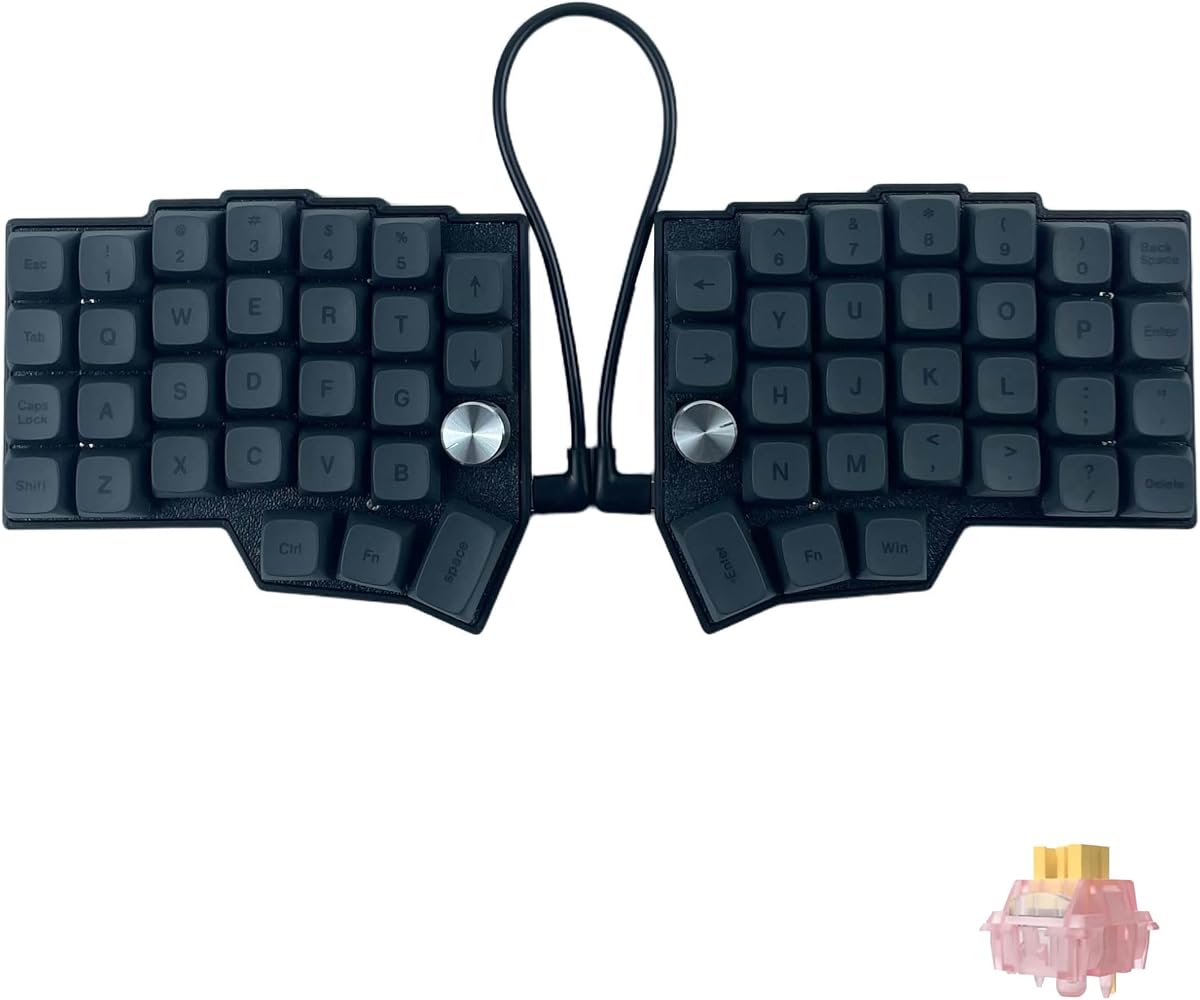
This 4×6 Corne-layout board expands the classic tiny split: four thumb keys per hand, two knobs, a 58-key-class footprint with 60% marketing language, hot-swappable MX-style sockets, Vial remapping, RGB with dozens of modes, and pre-lubricated linear switches with a silent-switch variant called out in the title. The listing explicitly says expect a one-to-two-week adaptation period—and that it is not for casual staggered die-hards. Believe that disclaimer.
Why four thumb keys? Because aggressive 40% boards run out of easy thumb real estate when you want Shift, Space, Enter, layer toggles, and still have a hand free for modifiers. Knobs further offload volume or workspace controls so layers stay cleaner.
Silent linears matter if your ortholinear journey happens in an open office. Hot-swap with a puller included means you can retreat from stock switches without soldering. Vial remains the brain—remapping is not optional fluff on a board this dense with intent.
Versus Corne LP, you gain MX ecosystem breadth, knobs, and more thumbs while losing low-profile thinness. Versus Israfel, this is a separated split rather than a hinge ortho grid. The honesty about not being beginner plug-and-play is refreshing in a category full of magical ergonomic promises.
Buy the knobs Corne when you want silent-ish MX flexibility and richer thumbs. Skip it if even Corne LP looked too small and strange.
Budget practice time like a new instrument—twenty minutes of typing tests daily beats occasional frustrated bursts.
Start with volume and brush size / scroll; add exotic macros after the alphas feel normal.
Silent switches are quieter, not mute. Desk mats still help.
We may earn a commission at no additional cost to you.

This YIVU Corne V4.1 listing is the MX-height wired split many enthusiasts recognize: 3x6 per half, three thumb keys each, hot-swap for Cherry-style 3/5-pin switches, pre-lubricated ~40g linears, per-key RGB with large preset libraries, and VIA/Vial remapping. The rating sits at 3.6—lower than the LP sibling—so treat it as a tinkerer’s experiment with documentation homework, not a magical pain cure.
Ergonomics still depend on placement. Set each half under a shoulder, rotate to neutral wrists, and keep elbows near ninety degrees. The hardware cannot fix a laptop-on-couch posture by itself. Hot-swap means you can try tactiles if linears feel too mushy for typing accuracy.
Critical cable rules appear clearly: do not connect both USB ports to the computer simultaneously; do not plug or unplug the TRS interconnect while powered, or you risk shorting a half. Those are the kinds of mistakes that generate one-star reviews unrelated to layout theory.
Versus Corne LP, this board speaks MX keycap language and may feel more “mechanical keyboard” traditional. Versus the similarly rated B0FX3PP1V8 twin, compare seller photos and included extras carefully—pack SKUs overlap visually. Versus Israfel, you get classic Corne islands instead of a hinged ortho slab.
Consider V4.1 if you already understand split hygiene and want MX flexibility cheaply. Prefer Corne LP or Israfel if you want higher aggregate ratings and clearer modern positioning.
Read the interconnect warning twice before the first power-on. Literally twice.
Adaptation frustration, cable mistakes, and expectation mismatches inflate negativity—factor that into your patience budget.
Mirror a popular Corne keymap community default before inventing a personal masterpiece.
We may earn a commission at no additional cost to you.

Black Israfel is not a different keyboard philosophy—it is the same 50% ortholinear hinge-split low-profile kit in a darker finish. You still get Kailh-collaborative hot-swap LP switches, KeyTok-compatible low-profile caps, adaptive gasket mounting, Vial configuration, and up to seven tilt options through the hinge design. Choose it when white shows every coffee fleck on camera or when your desk theme is already charcoal and RGB.
Why include both in a best-of list? Shoppers filter by color, and pack catalogs often carry parallel ASINs. The buying decision between white and black should take thirty seconds; the decision to go ortho at all should take a thoughtful week.
Everything about adaptation, layer maps, and gasket feel from the white review applies. Versus Corne splits, Israfel remains the pack’s clearest “straight grid ortho + hinge” story. Versus Maketheone’s butterfly board, Israfel is more ortholinear hobbyist and less single-piece sculpted ergo.
If you already own white Israfel, do not buy black hoping for different ergonomics. If you are choosing one, match the case to your keycap and deskmat palette so you enjoy looking at the experiment you are committing to.
Pick black Israfel for the same reasons as white—plus stealth aesthetics. Skip duplicate colors.
Photograph your Vial layers once configured; firmware experiments go smoother with screenshots.
Dark PBT low-profile sets and muted deskmats keep the Lego-compatible case from looking toy-like on professional calls.
Layer cheat sheets still apply—color does not shorten the learning curve.
We may earn a commission at no additional cost to you.

This ASIN restates the wired Corne V4.1 formula with explicit 46-key math: ortholinear-marketed 3x6 halves, hot-swappable pre-lubed linears, per-key RGB, Vial/QMK, and the now-familiar dual-USB and TRS warnings. If you are cross-shopping B0FB86Q1LB and B0FX3PP1V8, compare current photos, included switch types, and seller bundles rather than assuming unique hardware revolutions.
The ergonomic promise matches the family: adjustable spacing, tilt, and rotation; thumb keys for heavy hitters; reduced pinky gymnastics when layers are sane. Pre-lubed 40g linears keep force low for long sessions. Programmers who live in modals and terminals often adapt faster than novelists who need constant punctuation variety—plan your symbol layers accordingly.
Because ratings sit in the mid-3s, enter with eyes open. Some buyers thrive; others bounce back to staggered boards within a week and leave frustrated reviews. That social proof is data about fit, not necessarily a broken PCB.
Versus Corne LP, prefer LP for low-profile comfort and stronger rating. Versus the knobs 4×6, this stays purist-smaller. Versus Perixx, this is a mechanical hobby path with cables between halves.
Buy this twin only after you confirm it is the exact bundle you want. Skip duplicate Corne purchases—one split to learn on is enough.
If a deal looks confusingly similar across tabs, keep a spreadsheet of ASIN, rating, and switch description before checkout.
One host USB to the PC; TRS between halves; never hot-swap TRS live.
If thin travel and a 4.5 rating matter more than MX keycap shopping.
We may earn a commission at no additional cost to you.

Maketheone’s M board brings an X-Bows-inspired butterfly layout: a sculpted ergonomic arrangement that flares keys into a wing-like shape rather than a pure ortho matrix or a Corne split. It is USB-C wired, lit with white backlight, and ships in a Lite configuration with Gateron Brown tactile switches—an approachable tactile that clicks less than blues while still confirming actuation.
Why it belongs in an ortholinear shopping pack: buyers searching ortho often really want columnar or angled ergonomics, not only PLANK-style grids. Butterfly layouts reduce ulnar deviation with a single chassis—no TRS cable anxiety, no two-half drifting on a cramped desk.
Premium build and retro outlook messaging aim at desktop permanence. Hotkeys and an 80%-class key count ease the transition from full-size boards compared with 46-key Cornes. You will not get the same layer-centric lifestyle, which some people will celebrate.
The 3.4 rating means research recent reviews for QC and layout love/hate. Versus Israfel, Maketheone is less ortho-purist and more sculpted ergo. Versus Perixx, it is mechanical tactile rather than wireless membrane.
Try Maketheone if split cables intimidate you but staggered rows already hurt. Skip it if you specifically want Vial Corne culture or a true ortho grid.
Give Browns a week before judging—tactile bumps feel odd if you are coming from mushy laptop membranes.
More visible keys mean fewer layers, which can make butterfly boards kinder first ergo steps than 40% splits.
Read critical reviews for fit complaints versus defect complaints—they teach different lessons.
We may earn a commission at no additional cost to you.

This CORNE V4.1 variant markets itself with clearer columnar-stagger ortholinear wording: keys follow finger columns, halves split to shoulder width, QMK/Vial enables real-time remaps, hot-swap pre-lubed linears deliver smooth travel, and south-facing RGB lights the scene. Multi-OS compatibility and included host plus interconnect cables complete the wired package.
For software developers, the pitch writes itself—modals, snippets, and macros love layers. The risk writes itself too: if you will not open Vial, this keyboard will feel broken. The 3.4 rating suggests a portion of buyers underestimated that bargain.
Versus Corne LP, this leans MX/custom RGB programmer aesthetic with a weaker rating signal. Versus Israfel, it is a two-piece stagger split rather than a hinged 50% grid. Take the “alleviate neck and shoulder strain” claims as posture-dependent, not automatic.
Cross-check against other YIVU Cornes in your cart; packs often include near-duplicates. Pick one Corne, learn it, then decide if knobs or low-profile would have been better—not three overlapping ASINs.
Consider this listing if columnar-stagger language matches what you wanted all along. Prefer higher-rated LP if you want safer social proof.
Create a “symbols” layer on day one; English prose punctuation is where new Corne users bleed time.
Use the desktop/web GUI, save a layout file, and avoid flashing experiments until the defaults work.
Do not gift a 40% Corne to someone who asked for “a comfy office keyboard” without context.
We may earn a commission at no additional cost to you.
CORNE V4 continues the wired split saga with a slightly kinder 3.8 rating than some V4.1 ASINs. You get the 3x6 ortholinear-marketed layout, thumb clusters, QMK/Vial, hot-swap RGB, pre-lubricated linears around the same light actuation story, and the standard cable cautions. Treat it as another doorway into Corne life rather than a wholly new geometry.
Gamers appear in the marketing; understand that 40% gaming means meticulously layered binds. FPS movement on WASD translates, but utility keys need intentional homes. Wired latency is an advantage versus Bluetooth splits you might eye outside this pack.
If you are choosing among V4 and V4.1 YIVU listings, prefer clearer photos, stronger recent reviews, and whichever explicitly includes the puller and switch set you want. The architectural differences are smaller than the listing title fireworks imply.
Versus Perixx, V4 is mechanical and layer-based. Versus Israfel, V4 is dual-island Corne. Versus Corne LP, V4 is the more traditional MX-height cousin with a middling rating.
Buy V4 when the bundle and reviews look cleanest today. Skip buying it alongside two other Cornes “just in case.”
One split keyboard plus a spare TRS cable in a drawer is a better redundancy plan than three half-learned boards.
Place reload, crouch, and push-to-talk on thumbs or inner columns before a ranked night.
Sort recent one-star and five-star reviews by theme: QC vs learning curve.
We may earn a commission at no additional cost to you.
Perixx PERIBOARD-624B is the escape hatch for people who want split ergonomics without Vial homework. It is a wireless ergonomic split membrane keyboard with halves that separate without a connecting cable—up to multi-foot spacing—adjustable tilt angles, curved key wells, low-profile membrane keys, and multimedia shortcuts. US English layout. Windows 7 and newer are the stated lane.
This is not a PLANK ortho, and that is fine. Many “best ortholinear keyboards” shoppers discover they actually needed any columnar/split relief. Perixx delivers adjustable posture tools with familiar key counts and no firmware overlays. Long travel membrane feedback aims to reduce mistypes compared with ultralight laptop keys.
True wireless halves matter on real desks where a TRS cable snags notebooks. You can angle each side, open your chest, and still see a recognizable QWERTY. Versus Corne kits, you lose programmable layers and mechanical customization; you gain immediate usability for office software.
The 3.9 rating is middling—read about wireless dongle behavior and learning the curved layout. Versus Maketheone, Perixx is wireless membrane rather than butterfly mechanical. Versus Israfel, it is the non-hobbyist on-ramp.
Choose Perixx when you want split comfort this week, not a new identity as a keyboard enthusiast. Skip it if hot-swap ortho grids are specifically why you opened this guide.
Give yourself three days of exclusively using it; switching back to a laptop keyboard every hour resets the adaptation clock.
Start with halves closer than you think; widen gradually as shoulders relax.
If Perixx helps but you crave mechanical feel, try Israfel or Corne LP next—not simultaneously.
We may earn a commission at no additional cost to you.
Israfel’s 50% matrix is closer to classic ortholinear. Corne boards use columnar stagger with thumb clusters and often market themselves under the ortho umbrella. Decide whether you care about grid purity or finger-length stagger—your fingers care more than the SEO keyword.
Listings that warn about one-to-two-week learning curves are doing you a favor. Speed will drop before comfort rises. If your job bills by the keystroke this month, wait until a lighter deadline.
Vial/QMK boards without a plan are paperweights. Membrane splits like Perixx skip that tax. Butterfly boards sit in between. Be honest about whether you enjoy configuration.
LP boards (Israfel, Corne LP) reduce travel and bag height. MX Cornes unlock enormous switch/keycap ecosystems. Pick the ecosystem you already daydream about.
Ortholinear layouts align keys in clean rows and columns instead of staggering each row sideways like a typewriter. Some products labeled ortho are actually column-staggered splits (Corne-style). Both aim to reduce diagonal finger stretches, but the geometries differ.
Many people feel clumsy for a few days, functional in one to two weeks, and comfortable after several weeks of exclusive use. Mixing a staggered laptop keyboard all day slows adaptation. Practice drills help more than heroic eight-hour first days.
They can reduce awkward wrist angles when placed and angled well, but they are not medical devices. Persistent pain needs professional advice. Hardware is one tool beside breaks, chair height, and workload changes.
On 40–50% boards, yes—layers replace missing keys. On Perixx-style full splits, basic typing works without firmware hobbies. If you resent software, do not start with a 46-key Corne.
Expectation mismatches, adaptation frustration, and cable mishaps show up in reviews. Mid-3 ratings do not always mean “unique brick”; they often mean “niche product bought by mainstream shoppers.”
Low-profile feels closer to modern laptop travel and keeps kits thin. MX offers endless switches and keycaps. Try to borrow or type-test if possible; preference is personal.
Yes, with deliberate bind maps. Movement keys still exist; utilities move to layers or thumbs. Competitive players should not switch the night before a tournament.
It offers adjustable opening angles without fully separating into cable-linked halves, blending split ergonomics with a connected chassis and a true ortho grid.
It is an ergonomic wireless split with curved keys, not a strict ortho matrix. It appears in this pack as a practical related option for shoppers who want split relief without mechanical orthodoxy.
No. Pick one based on profile height, rating comfort, and knobs/thumbs needs. Learning three overlapping splits in parallel is how keyboards become shelf art.
The best ortholinear keyboard in 2026 is the one whose geometry you will actually practice on. KBDcraft Israfel is the clearest true-ortho hinge-split low-profile kit here. YIVU Corne LP is the strongest-rated classic thumb-cluster split for long sessions. Perixx PERIBOARD-624 is the wireless membrane on-ramp when firmware culture is a non-starter.
Treat mid-rated Corne twins as optional experiments with strict cable hygiene, and consider Maketheone’s butterfly when you want sculpted ergo without dual halves. Print a layer map, place the halves under your shoulders, and give adaptation the calendar space it demands.
Columnar comfort is a skill as much as a purchase—buy once, learn deeply, then decide if knobs or wireless halves are the next iteration.