Expert Review & Guide

Best Motherboard for RTX 5090 Builds in 2026

An RTX 5090 does not need a mystical chipset letter to draw frames, but it does punish bad platform choices. The card is long, thick, power-hungry, and happiest in a PCIe 5.0 x16 slot with steel reinforcement, clear airflow, and a PSU that will not brown out when DLSS 4 and path tracing turn the room into a heater. Motherboard shopping for a 5090 is less about squeezing 3% more synthetic score and more about slot integrity, SSD placement that does not fight the GPU cooler, USB and LAN that match a 4K/8K desk, and enough CPU power delivery if you also run a high-core Ryzen beside that flagship GPU.

This roundup covers every product in our best-motherboard-for-rtx-5090 pack: AM5 boards with PCIe 5.0 graphics paths, a board-plus-DDR5 bundle, a vertical mount kit aimed at 5090-class cards, two AORUS 5090 SKUs that define the physical problem you are solving, and a complete ZOTAC MEK prebuilt for people who would rather not cable a 1200W system themselves. We weighed reinforced PCIe slots, M.2 layout versus GPU length, networking suitable for large game downloads and creator uploads, and DIY features like Q-Release that matter the first time you reseat a three-slot monster.

No dollar prices—street tags on 5090s and X870E boards swing hard. Start with the top picks if you want a practical B850 host, a Tomahawk X870 with USB4 and 5Gb LAN, or the MEG ACE MAX when money is no longer the bottleneck. Then read each review for clearance reality checks and when a vertical kit or watercooled card changes the motherboard decision.

Top Motherboard Picks for an RTX 5090 PC

Best Practical 5090 Host

GIGABYTE B850 AORUS Elite WIFI7

★★★★★9.2/10
GIGABYTE B850 AORUS Elite WIFI7
  • AM5 B850 ATX with PCIe 5.0 pathways sized for modern flagship GPUs
  • 14+2+2 power design, three M.2 slots with guards, WiFi 7, and 2.5GbE
  • EZ-Latch conveniences that matter when a heavy 5090 blocks screw access
Check Price →
Best X870 Everyday Flagship

MSI MAG X870 Tomahawk WiFi

★★★★☆8.8/10
MSI MAG X870 Tomahawk WiFi
  • PCIe 5.0 and Gen5 M.2 for 5090-era AM5 builds without ACE-tier pricing
  • USB 40Gbps, WiFi 7, Bluetooth 5.4, and 5Gbps LAN for high-bandwidth desks
  • Extended PWM heatsinks aimed at keeping high-end CPUs boosting beside hot GPUs
Check Price →
Best No-Compromise X870E

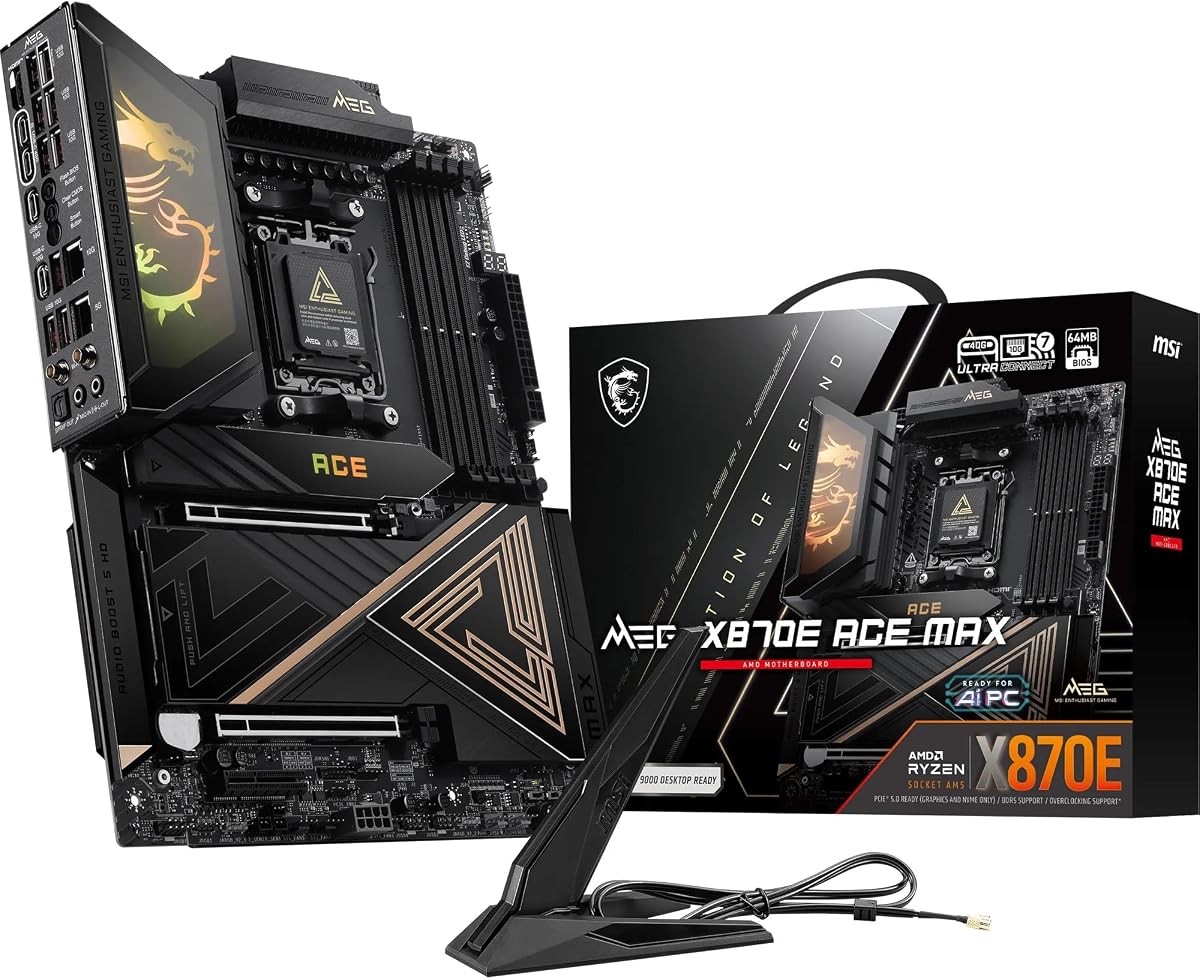
MSI MEG X870E ACE MAX

★★★★☆8/10
MSI MEG X870E ACE MAX
  • 18-phase 110A SPS VRM with Frozr Guard cooling for halo Ryzen + 5090 systems
  • Steel Armor II PCIe 5.0 x16 slot plus five M.2 connectors with Shield Frozr II
  • USB4, WiFi 7, and dual 10Gb plus 5Gb LAN for creator-class networking
Check Price →

As an Amazon Associate we earn from qualifying purchases. We may earn a commission at no additional cost to you.

RTX 5090 Platform Comparison: Boards, Cards, and Mounts

The table includes every pack item in review order—boards, the vertical kit, 5090 cards, and the prebuilt—so you can see how physical GPU choices interact with motherboard features. Specs skip prices and focus on PCIe, power, or cooling traits that change a 5090 install.

#ProductSpecificationsScore
1
  • Prebuilt with RTX 5090 AMP Extreme Infinity
  • Intel Ultra 9 285K, 32GB DDR5, 2TB NVMe
  • 1200W Gold PSU, WiFi 6E, 5Gb LAN
0
2
  • AM5 B850 ATX + 32GB DDR5-6000 kit
  • PCIe 5.0 x16, M.2 Gen5, WiFi 7
  • TEAMGROUP T-Force Delta EXPO/XMP ready
9.2
3
  • AM5 X870E, 18x 110A SPS VRM
  • PCIe 5.0 x16 Steel Armor II, 5x M.2
  • USB4, WiFi 7, 10G + 5G LAN
8
4
  • AM5 B850 ATX, 14+2+2 VRM
  • PCIe 5.0, 3x M.2, USB-C
  • WiFi 7, 2.5GbE, EZ-Latch
9.2
5
  • PCIe 4.0/5.0 riser for 5090-class GPUs
  • Fits ATX 7-slot; optional mATX mode
  • Tool-less adjust up to 65mm / 30mm
8.8
6
  • RTX 5090 32GB GDDR7, PCIe 5.0
  • WATERFORCE AIO cooling, metal backplate
  • 3x DP 2.1a + HDMI 2.1b, DLSS 4
8.4
7
  • RTX 5090 32GB GDDR7, PCIe 5.0
  • WINDFORCE air cooler, LCD side view
  • Dual BIOS, reinforced build, RGB Halo
9
8
  • AM5 B850 mATX, 14+2+1 80A stages
  • PCIe 5.0 SafeSlot, 4x M.2, WiFi 7
  • Q-Release DIY tools, 2.5G LAN
9.2
9
  • AM5 X870 ATX, PCIe 5.0 + Gen5 M.2
  • USB 40Gbps, WiFi 7, 5Gbps LAN
  • Extended PWM heatsink, Audio Boost 5
8.8
10
  • AM5 B650 ATX, 14+2+1 70A VRM
  • PCIe armor, PCIe 5.0 M.2, WiFi 6E
  • Heatpipe MOSFET cooling, 2.5GbE
8.8

1. ZOTAC MEK Gaming PC Desktop - Best Skip-the-Build 5090

ZOTAC MEK Gaming PC Desktop

ZOTAC MEK Gaming PC Desktop

0/10☆☆☆☆☆

If your search for the best motherboard for an RTX 5090 is really a search for “please make the 5090 problem go away,” the ZOTAC MEK desktop is the pack’s honest answer. It ships a ZOTAC GAMING GeForce RTX 5090 AMP Extreme Infinity 32GB GDDR7, an Intel Core Ultra 9 285K (up to 5.7GHz, 24 cores / 24 threads, 40MB cache), 32GB DDR5-6000 RGB memory, a 2TB NVMe SSD, and a 1200W 80+ Gold PSU inside a vertical tempered-glass body with a 360mm AIO and six 120mm ARGB fans. That is a complete flagship stack, not a bare board.

  • Prebuilt with RTX 5090 AMP Extreme Infinity
  • Intel Ultra 9 285K, 32GB DDR5, 2TB NVMe
  • 1200W Gold PSU, WiFi 6E, 5Gb LAN
Check Price →
✓ Pros
  • Factory-integrated RTX 5090 AMP Extreme Infinity with Windows 11 Pro ready to game
  • Intel Ultra 9 285K, 32GB DDR5-6000, 2TB NVMe, and 1200W 80+ Gold power in one chassis
  • 5-Gigabit LAN, WiFi 6E, HDMI 2.1b and triple DisplayPort 2.1b for multi-display 4K/8K desks
  • 360mm AIO, six ARGB fans, tempered glass showcase for the infinity-mirror GPU
  • 1-year system and 3-year GPU warranty messaging with USA-oriented support notes
✕ Cons
  • Not a DIY motherboard—you cannot pick B850 versus X870E internals à la carte
  • Pack rating is 0.0; scrutinize live reviews and return terms
  • Prebuilt upgrade paths are less flexible than a board-first custom build

Detailed review

Why it belongs in a motherboard article: many 5090 buyers bounce between DIY fear and boutique prebuilts. MEK documents the supporting cast you would otherwise specify yourself—5Gb LAN, WiFi 6E, Bluetooth 5.3, USB 3.2 Gen 2, 7.1 audio, and display outputs up to four panels via HDMI 2.1b and DisplayPort 2.1b. Those are the same I/O categories we evaluate on Tomahawk and ACE MAX boards, just already cabled.

The GPU side uses NVIDIA Blackwell features including DLSS 4 Multi Frame Generation and ray tracing, wrapped in AMP Extreme Infinity styling with an infinity mirror and reinforced mid-frame. Thermally, ZOTAC pairs that heat with a 360mm AIO on the CPU and a case designed to show the card rather than smother it. Still verify your desk clearance; showcase chassis are not small.

Warranty language matters at this tier: one-year complete system coverage and three-year GPU coverage without registration, with service through ZOTAC USA and return-shipping notes for U.S. addresses. Read the live terms—prebuilt support is part of what you buy when you skip DIY.

Choose MEK when time, cable management anxiety, or parts hunting fatigue outweighs the joy of picking a specific B850 PCB. Choose a discrete motherboard path when you already own a 5090, want AMD instead of Ultra 9, or care about USB4/10Gb LAN features MEK does not advertise.

If you stay DIY after reading this, use MEK’s bill of materials as a checklist: serious PSU wattage, fast storage, and networking that will not choke 100GB game updates on launch night.

Who should buy the prebuilt route

Creators and gamers who want 5090-class performance this month without learning EPS routing, 12VHPWR seating etiquette, and BIOS flash rituals under deadline pressure.

What you give up versus DIY

Exact motherboard brand preference, custom loop freedom, and the ability to reuse an existing AM5 board you already trust. You gain integration and a single warranty phone number.

Check Price on Amazon →

We may earn a commission at no additional cost to you.

2. MSI B850 GAMING PLUS WIFI + - Best Board-Plus-RAM Starter

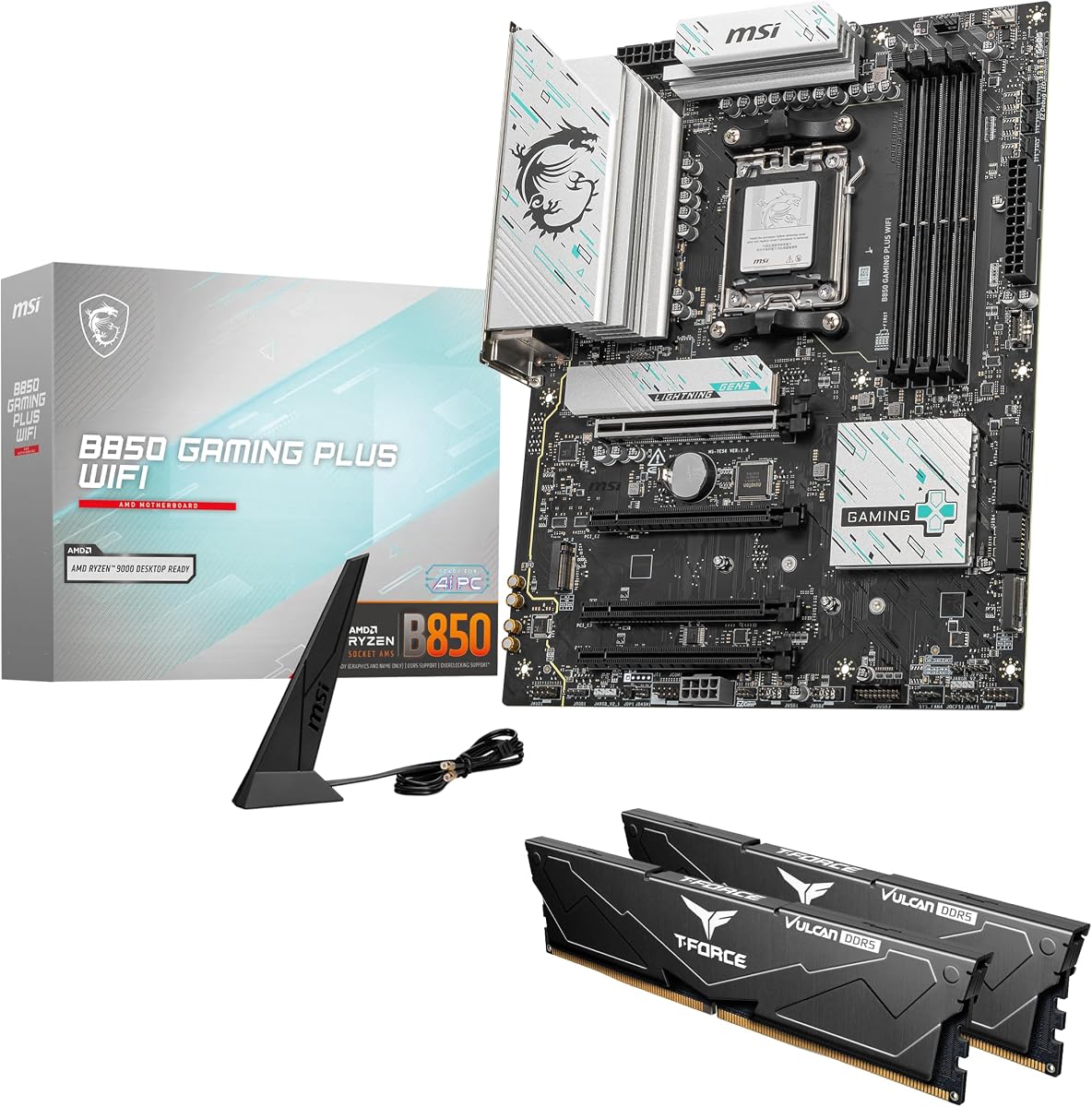
MSI B850 GAMING PLUS WIFI + 32GB

MSI B850 GAMING PLUS WIFI + 32GB

9.2/10★★★★★

The MSI B850 GAMING PLUS WIFI bundle is the pragmatic DIY on-ramp next to a 5090: AM5 board with PCIe 5.0 x16 and Gen5 M.2, WiFi 7, 5G LAN, and a matched 32GB DDR5-6000 CL38 kit. When your shopping cart already contains a GPU that costs more than some cars’ monthly payments, not guessing on memory kits is a feature.

  • AM5 B850 ATX + 32GB DDR5-6000 kit
  • PCIe 5.0 x16, M.2 Gen5, WiFi 7
  • TEAMGROUP T-Force Delta EXPO/XMP ready
Check Price →
✓ Pros
  • Pairs an AM5 B850 board with PCIe 5.0 x16 and Gen5 M.2 for 5090-era GPUs
  • Includes 32GB TEAMGROUP T-Force Delta DDR5-6000 CL38 ready for EXPO/XMP
  • WiFi 7 and 5G LAN cover high-bandwidth gaming homes
  • Removes the “wrong RAM kit” variable when you are already stressing about GPU power
  • Strong 4.6 pack rating for a bundle-style listing
✕ Cons
  • Not an X870E feature monster—USB4/10Gb dreams live on ACE MAX
  • Bundle aesthetics lock you into T-Force Delta styling
  • You still need a PSU and case that can physically host a 5090

Detailed review

For RTX 5090 hosts, the critical motherboard lines are PCIe 5.0 x16 and enough spacing/M.2 planning that your primary SSD is installed before the card eclipses the slot. B850 GAMING PLUS sits in the “works, modern, not theatrical” lane. It will not shame a 5090’s bandwidth, and it leaves budget for the PSU that actually keeps the lights on.

The included T-Force Delta kit advertises one-click EXPO/XMP to 6000MHz. Do that after BIOS is current and Windows is stable. A 5090 build has enough first-week variables—GPU cable seating, case airflow, driver branches—without unstable memory training on night one.

Versus AORUS Elite WIFI7, this MSI bundle wins when you need RAM included and prefer MSI’s BIOS. Versus Tomahawk X870, it trades some USB/LAN ceiling for value. Versus ACE MAX, it is the sane choice if your 5090 is already the budget supernova.

Build order tip: mount the board, install NVMe under its shield, seat CPU power, dry-fit the 5090 for slot stress and sag, then commit screws. Reinforced slots help; gravity and a three-slot cooler still invent leverage.

Buy this bundle for AMD 5090 systems that want WiFi 7 and 32GB ready. Skip it if you already own faster RAM or need USB4 docks every day—look at Tomahawk or ACE MAX instead.

PSU reality check

A clean B850 board cannot rescue an undersized PSU. Treat 5090 power guidelines seriously and use the manufacturer’s recommended cable layout—no unsafe adapters stacked like Jenga.

Who benefits most

AM5 gamers buying GPU + board + RAM together who want fewer compatibility tabs open at midnight.

Check Price on Amazon →

We may earn a commission at no additional cost to you.

3. MSI MEG X870E ACE MAX - Best No-Compromise X870E

MSI MEG X870E ACE MAX

MSI MEG X870E ACE MAX

8/10★★★★☆

The MEG X870E ACE MAX is what you buy when the RTX 5090 is not the only halo part in the case. MSI’s Ultra Power+ story—an 18-phase 110A SPS design for Ryzen 9000 on X870E—targets creators who also run heavy CPUs, while Steel Armor II on the PCIe 5.0 x16 slot acknowledges that modern GPUs are mechanical loads, not just electrical ones.

  • AM5 X870E, 18x 110A SPS VRM
  • PCIe 5.0 x16 Steel Armor II, 5x M.2
  • USB4, WiFi 7, 10G + 5G LAN
Check Price →
✓ Pros
  • 18 Duet Rail power phases with 110A SPS and Core Boost for halo Ryzen CPUs next to a 5090
  • Steel Armor II PCIe 5.0 x16 slot rated for cutting-edge graphics cards
  • Five M.2 slots (2x Gen5 + 3x Gen4) with EZ M.2 Shield Frozr II
  • USB4 Type-C 40Gbps, WiFi 7, Bluetooth 5.4, plus 10Gb and 5Gb LAN
  • Frozr Guard cooling stack with cross heat-pipe and high-spec thermal pads
✕ Cons
  • Flagship cost and complexity exceed needs if the 5090 is your only expensive part
  • 4.0 pack rating is softer than midrange alternatives—read recent owner notes
  • Feature density can intimidate builders who wanted a simple gaming BIOS

Detailed review

Frozr Guard cooling (wavy fins, direct-touch cross heat-pipe, 9W/mK MOSFET pads, choke pads, double-sided EZ M.2 Shield Frozr II) exists because a 5090 dumps heat into the same chassis volume as the VRM and SSDs. Keeping MOSFET and NVMe temperatures sane during long 4K sessions is part of sustaining boost on both ends of the PCIe slot.

Connectivity is unapologetically maximal: USB4 with display output, WiFi 7, Bluetooth 5.4, 10Gb plus 5Gb Ethernet, and Audio Boost 5 HD with S/PDIF. If your 5090 desk also moves huge footage to a NAS, those LAN options are not toys. Quintuple M.2 means the GPU does not force you onto slow externals for project overflow.

DDR5 SMT slots advertise extreme OC potential up to 9000+ MT/s in optimistic configs. For a daily 5090 gaming/creator hybrid, stabilize a proven EXPO kit first. The board can go wild later; the GPU already provides enough excitement.

Choose ACE MAX when you want the motherboard to match 5090 energy—USB4 docks, multi-gig LAN, five drives, armored PCIe. Skip it when B850 AORUS Elite or Tomahawk already covers your ports and you would rather fund a better display or UPS.

Install discipline still applies: support the card, seat power cables fully, and do not block the Steel Armor slot’s retention with cable spaghetti. Expensive boards fail the same sag physics as cheap ones if you ignore brackets.

Ideal ACE MAX + 5090 user

4K/8K creators who game, run docks over USB4, and keep multiple Gen4/Gen5 SSDs busy while a flagship GPU renders or plays.

Cooling coexistence

Plan radiator and GPU intake so the VRM heat-pipe area still receives air. A 5090 blower-less cooler can recirculate hot air onto the top of the board in poorly ducted cases.

Versus Tomahawk X870

Tomahawk covers USB 40Gbps and 5Gb LAN for less excess. ACE MAX adds 10Gb, denser VRM theater, and five-drive storage ambition.

Check Price on Amazon →

We may earn a commission at no additional cost to you.

4. GIGABYTE B850 AORUS Elite WIFI7 - Best Practical 5090

GIGABYTE B850 AORUS Elite WIFI7

GIGABYTE B850 AORUS Elite WIFI7

9.2/10★★★★★

Most RTX 5090 owners do not need a motherboard that costs as much as a midrange GPU. They need PCIe 5.0, sturdy construction, modern wireless, and M.2 slots they can reach. The B850 AORUS Elite WIFI7 nails that brief with a 14+2+2 power design, VRM/M.2 thermal guards, USB-C, WiFi 7, 2.5GbE, and EZ-Latch conveniences.

  • AM5 B850 ATX, 14+2+2 VRM
  • PCIe 5.0, 3x M.2, USB-C
  • WiFi 7, 2.5GbE, EZ-Latch
Check Price →
✓ Pros
  • PCIe 5.0-ready AM5 ATX layout that hosts flagship GPUs without X870E pricing
  • 14+2+2 design keeps CPU side stable while the 5090 owns the power budget narrative
  • Three guarded M.2 slots you can populate before the GPU blocks access
  • WiFi 7 and 2.5GbE for launches and patches that are tens of gigabytes
  • EZ-Latch helpers when you are working around a card the size of a bookshelf
✕ Cons
  • 2.5GbE trails 5Gb/10Gb boards if your NAS already speaks multi-gig
  • No USB4 like ACE MAX or Tomahawk’s 40Gbps port
  • ATX mid-towers still need careful GPU length measurement

Detailed review

In practice, install storage first. A 5090 Master or WATERFORCE card can make the area around the first PCIe slot feel like working in a crawlspace. Three M.2 slots give you OS, game library, and scratch without immediate HBAs. Keep shields on—GPU heat soak is real in closed glass cases.

Electrically, the 5090’s appetite lives mostly on the PSU and GPU power cables. The motherboard’s job is to keep the CPU boosting, the slot signaled cleanly, and USB devices awake during long sessions. B850 Elite is calm at that job. Spend paranoia budget on case airflow and a quality PSU.

Versus the MSI B850 bundle, choose AORUS when you already have RAM and want GIGABYTE’s warranty/EZ-Latch ecosystem. Versus Tomahawk, stay here if 2.5GbE and USB-C meet your desk. Versus ACE MAX, stay here if you want the 5090 to remain the star of the invoice.

Pairing notes with pack cards: air-cooled Master cards need intake clearance; WATERFORCE cards shift radiator planning to the case rather than slot sag alone. Either way, dry-fit before final cable combs.

We badge this best practical host because it is the board we would actually recommend to a friend who already stretched for the GPU. It is modern enough for 2026, boring in the ways that prevent RMA tickets, and feature-rich enough that you will not feel tricked.

Clearance checklist

Measure GPU length versus case, check vertical clearance over M.2 armor, confirm side-panel thickness if you use thick glass, and plan a sag bracket even when the slot is reinforced.

Networking for 5090 owners

2.5GbE is enough for many homes. Upgrade boards for 5Gb/10Gb only if your switch and NAS already can use it—otherwise you paid for LEDs on a gigabit network.

Check Price on Amazon →

We may earn a commission at no additional cost to you.

5. Cooler Master Vertical GPU Kit V3 - Best Vertical Mount

Cooler Master Vertical GPU Kit V3

Cooler Master Vertical GPU Kit V3

8.8/10★★★★☆

Motherboard choice and GPU mounting are cousins. The Cooler Master Vertical GPU Card Holder Kit V3 exists because people buy 5090s and then want the PCB standing tall in the window. It uses a PCIe riser rated for Gen4/Gen5 boards and GPUs, fits standard ATX 7-slot cases for modern 3-slot cards, and offers tool-less adjustment—up to 65mm horizontally and 30mm toward the side panel—so you can tune for glass clearance.

  • PCIe 4.0/5.0 riser for 5090-class GPUs
  • Fits ATX 7-slot; optional mATX mode
  • Tool-less adjust up to 65mm / 30mm
Check Price →
✓ Pros
  • Explicitly marketed for PCIe 4.0/5.0 boards and GPUs including RTX 5090 class cards
  • Handles modern 3-slot GPUs in traditional 7-slot ATX layouts
  • Tool-less adjustment up to 65mm horizontally and 30mm toward the side panel
  • Removable mATX bracket broadens case compatibility
  • Lets you install the GPU after the holder is positioned
✕ Cons
  • Vertical mounting can worsen thermals if the side panel starves the fans
  • May block a rear fan in some micro-ATX configurations
  • Riser quality and cable seating become another failure point to validate

Detailed review

From a motherboard perspective, vertical kits change which M.2 slots remain reachable and how hot air recirculates over VRM sinks. If you plan to stand a 5090 Master upright, prefer boards where primary SSD installation happens before the riser maze, and ensure your PCIe slot’s retention is not fighting a stiff riser cable.

Cooler Master notes the removable mATX bracket mode and warns it may block a rear fan in some cases. That warning is load-bearing for small chassis. A 5090 already taxes cooling; sacrificing exhaust to show RGB to Instagram is a bad trade.

Performance-wise, a good Gen5-capable riser should not be the reason you miss frames, but a pinched cable or poorly seated end can cause link issues. Reseat carefully, update GPU drivers, and check link width in GPU-Z-class tools if something feels off.

Buy the kit when your case supports vertical mounting and you accept possible thermal tradeoffs for aesthetics. Skip it when your 5090 already runs hot on horizontal mounts—fix airflow first.

Pairing tip with WATERFORCE cards: AIO tubing routes differently in vertical orientation. Dry-fit tubes before you celebrate the showcase photo.

Thermals versus showroom looks

If side-panel intake is weak, vertical GPUs can inhale their own exhaust. Mesh side panels or intentional spacing help; solid glass beauty shots sometimes cost clock speed.

Motherboard compatibility mindset

Any PCIe 5.0 x16 board in this pack can host the kit electrically; mechanically, confirm case manufacturer vertical-mount support and standoff patterns.

Check Price on Amazon →

We may earn a commission at no additional cost to you.

6. AORUS RTX 5090 Xtreme WATERFORCE - Best Watercooled 5090

AORUS RTX 5090 Xtreme WATERFORCE

AORUS RTX 5090 Xtreme WATERFORCE

8.4/10★★★★☆

Including the AORUS RTX 5090 Xtreme WATERFORCE in a motherboard guide is deliberate: this card changes what “GPU clearance” means. Instead of a four-slot air cooler shadowing half your ATX board, you manage tubing and radiator placement. Motherboard priorities shift toward clean PCIe 5.0 signaling, accessible M.2 slots, and cable paths that do not pinch AIO tubes against VRM sinks.

  • RTX 5090 32GB GDDR7, PCIe 5.0
  • WATERFORCE AIO cooling, metal backplate
  • 3x DP 2.1a + HDMI 2.1b, DLSS 4
Check Price →
✓ Pros
  • Flagship RTX 5090 32GB GDDR7 on PCIe 5.0 with DLSS 4 feature set
  • WATERFORCE AIO cooling shifts heat to a radiator instead of a massive air cooler stack
  • Metal backplate and AORUS build extras for a premium card
  • Triple DisplayPort 2.1a plus HDMI 2.1b for modern high-refresh panels
  • Four-year warranty with online registration
✕ Cons
  • AIO radiator volume competes with CPU radiator space in many cases
  • Not a motherboard—board choice still determines slot and SSD layout
  • Liquid cooling adds maintenance and mount complexity versus air Master cards

Detailed review

The hardware itself is the expected halo story—32GB of 512-bit GDDR7, PCIe 5.0, 2655 MHz class core frequency marketing, DLSS 4, RGB, protective metal backplate, and a WATERFORCE all-in-one cooling system. For boards, that means your case’s top or front radiator mounts become part of the motherboard decision only indirectly: leave room for EPS cables and USB headers when radiators claim the top edge.

WATERFORCE can reduce GPU sag drama compared with ultra-heavy air coolers, but pumps and tubes introduce new failure modes. Seat the PCIe latch fully, support the card during tube routing, and avoid sharp bends near the slot bracket.

Pair with ACE MAX or Tomahawk if you want multi-gig LAN while moving huge textures; pair with B850 AORUS Elite if you want the card to remain the expensive hero. The Strix B850-G mATX can work in smaller cases but demands ruthless radiator planning.

Warranty registration for the four-year coverage is on you—do it. Flagship GPUs are not the place to lose paperwork.

Buy WATERFORCE when you want quieter or cooler GPU operation and have radiator real estate. Buy the Master air card when you want simpler installs and LCD flex without tubing.

Motherboard traits that help AIO GPUs

Clear primary PCIe slot area, rear I/O that does not force awkward display adapters, and M.2 placement finished before tubes lock you out.

Case synergy

Prefer cases with dedicated 360mm mounts that do not smother motherboard VRM airflow. Document tube lengths before you commit to vertical mounting.

Check Price on Amazon →

We may earn a commission at no additional cost to you.

7. AORUS RTX 5090 Master 32G - Best Air-Cooled 5090

AORUS RTX 5090 Master 32G

AORUS RTX 5090 Master 32G

9/10★★★★★

The AORUS RTX 5090 Master is the air-cooled yardstick for motherboard clearance conversations. You get 32GB GDDR7, a 512-bit interface, PCIe 5.0, WINDFORCE cooling, an LCD side panel, RGB Halo, dual BIOS, and reinforced construction. Physically, that cooler is why Steel Armor slots, sag brackets, and “install SSDs first” advice exist.

  • RTX 5090 32GB GDDR7, PCIe 5.0
  • WINDFORCE air cooler, LCD side view
  • Dual BIOS, reinforced build, RGB Halo
Check Price →
✓ Pros
  • RTX 5090 32GB GDDR7 flagship performance on PCIe 5.0
  • WINDFORCE air cooling avoids separate GPU radiator planning
  • LCD side view and RGB Halo for showcase builds
  • Dual BIOS with Performance/Quiet modes
  • Reinforced construction and four-year warranty with registration
✕ Cons
  • Large air cooler increases slot sag and motherboard clearance pressure
  • Can obstruct M.2 shields and chassis intake if the case is tight
  • Still requires a serious PSU and PCIe power seating discipline

Detailed review

When pairing Master with boards in this pack, prioritize ATX layouts with the primary x16 slot in the standard top position and enough space beneath for airflow. mATX Strix B850-G can work in the right case, but thick triple-slot cards plus mATX cable density is a tighter puzzle.

Dual BIOS Performance/Quiet modes let you tone acoustics without touching motherboard fan curves—though you should still coordinate CPU and case fans so the Master is not fighting a positive-pressure oven. Quiet BIOS on the GPU plus stalled case intake is still loud in practice because thermals climb.

Versus WATERFORCE, Master is simpler: no GPU radiator, more PCB cooler volume hanging off the slot. Versus the ZOTAC prebuilt’s AMP Extreme Infinity, Master is the DIY card choice when you want AORUS LCD flair on your own board.

Motherboard features that feel better with Master: Q-Release/EZ PCIe latches for future swaps, PCIe armor, and rear I/O with plenty of USB so you are not daisy-chaining hubs behind a card that already fills the lower case.

Buy Master for showcase air builds. Measure twice. Support the card. Then pick B850 Elite or Tomahawk unless you truly need ACE MAX I/O.

Sag and bracket discipline

Use the case’s anti-sag bracket or an aftermarket support. Reinforced motherboard slots help, but they are not magic against months of torque from a heavy cooler.

Driver and BIOS notes

Update board BIOS for your CPU, then install NVIDIA drivers cleanly. If you chase undervolts, change one variable at a time so you know whether the board, PSU, or GPU settings caused instability.

Check Price on Amazon →

We may earn a commission at no additional cost to you.

8. ASUS ROG Strix B850-G - Best Compact mATX 5090

ASUS ROG Strix B850-G

ASUS ROG Strix B850-G

9.2/10★★★★★

Strix B850-G is the compact-board answer when you insist on an RTX 5090 inside a smaller footprint. ASUS packs 14+2+1 stages at 80A, PCIe 5.0 SafeSlot, WiFi 7, 2.5G LAN, USB-C 20Gbps, and four M.2 slots—including one on the underside—into mATX. That storage count punches above many ATX midrange boards.

  • AM5 B850 mATX, 14+2+1 80A stages
  • PCIe 5.0 SafeSlot, 4x M.2, WiFi 7
  • Q-Release DIY tools, 2.5G LAN
Check Price →
✓ Pros
  • mATX board with PCIe 5.0 SafeSlot and 14+2+1 80A power stages
  • Four M.2 slots including an underside slot for creative storage layouts
  • WiFi 7, 2.5G LAN, USB 20Gbps Type-C, and strong DIY toolset (Q-Release, Q-Latch)
  • AI Advisor / AI Networking helpers for builders who want guided tuning
  • High 4.6 rating in a category full of intimidating flagship cards
✕ Cons
  • mATX space makes 5090 length and radiator planning less forgiving
  • WiFi 7 on Windows has version caveats noted by ASUS for full features
  • USB 20Gbps is not USB4 if your dock requires it

Detailed review

DIY features are the unsung 5090 accessories: PCIe Slot Q-Release, M.2 Q-Latch/Q-Release, Q-Antenna, Q-Dashboard, Q-LED, BIOS FlashBack, Clear CMOS, and a pre-mounted I/O shield. The first time you remove a heavy Master card, Q-Release feels like civilization.

Thermals and spacing are the risks. Massive VRM heatsinks help the CPU side, but a thick 5090 can still blanket the board. Prefer cases with strong bottom/side intake and confirm GPU length against mATX case charts. Vertical kits may block rear fans—read Cooler Master’s note before combining both ideas.

ASUS’s WiFi 7 OS notes matter: full WiFi 7 features want recent Windows 11 builds; older Windows versions fall back to WiFi 6E/6 behavior. Plan your OS image accordingly if wireless is primary.

Choose B850-G for ROG mATX aesthetic builds with lots of NVMe. Choose ATX AORUS Elite or Tomahawk when you want easier cable space around a 5090. Choose ACE MAX when multi-gig LAN and USB4 are mandatory.

Audio with ALC1220P and Savitech amplification is a nice LAN-party flex. Still, most 5090 owners should prioritize headset DACs and display cables that can actually carry the refresh rates they paid for.

Four M.2 in mATX — use the underside wisely

Install the underside drive before the motherboard goes into the case. You will not want to remove a 5090 later just to add storage.

SafeSlot and heavy cards

SafeSlot reinforcement helps, but combine it with case support brackets. Treat mechanical care as seriously as driver updates.

Check Price on Amazon →

We may earn a commission at no additional cost to you.

9. MSI MAG X870 Tomahawk WiFi - Best X870 Everyday

MSI MAG X870 Tomahawk WiFi

MSI MAG X870 Tomahawk WiFi

8.8/10★★★★☆

The MAG X870 Tomahawk WiFi is our favorite “spend up once, stop thinking” board next to an RTX 5090 when ACE MAX feels excessive. You get Ryzen 9000-ready AM5, PCIe 5.0, Gen5 M.2, USB 40Gbps, WiFi 7, Bluetooth 5.4, 5Gbps LAN, HDMI/DP outputs, and extended PWM heatsinks tuned for CPUs that still need to boost while a flagship GPU toasts the lower case.

  • AM5 X870 ATX, PCIe 5.0 + Gen5 M.2
  • USB 40Gbps, WiFi 7, 5Gbps LAN
  • Extended PWM heatsink, Audio Boost 5
Check Price →
✓ Pros
  • PCIe 5.0 and Gen5 M.2 for 5090-class AM5 systems without ACE pricing
  • Built-in USB 40Gbps port for high-speed external gear
  • 5Gbps LAN plus WiFi 7 and Bluetooth 5.4 for modern networking
  • Extended PWM heatsink design aimed at high-end CPUs under GPU heat soak
  • Audio Boost 5 isolation for immersive gaming without a separate sound card
✕ Cons
  • MAG tier lacks some MEG ACE extravagance like 10Gb LAN
  • ATX Tomahawk still needs a case long enough for 5090 cards
  • Feature set may be redundant if you never use USB4-speed devices

Detailed review

5Gb LAN is the sleeper feature for 5090 owners who maintain a local scratch NAS or frequently move multi-gigabyte captures. WiFi 7 helps when you cannot wire the battlestation. USB 40Gbps covers the external SSD that holds the game install you refuse to delete.

Compared with B850 AORUS Elite, Tomahawk adds X870 connectivity muscle. Compared with ACE MAX, it keeps the essentials and leaves money for the GPU, display, or a UPS—highly recommended when a 5090 plus high-core CPU can spike household circuits.

Audio Boost 5 will not increase FPS, but clean onboard audio is welcome when your desk already has enough bricks for GPU adapters and monitor USB hubs. Isolated audio paths help when case EMI is messy.

Build with the same 5090 manners: storage first, support bracket always, validate PCIe link width after the first boot. Extended heatsinks need airflow; do not bury the MOSFET array under a stuffed cable wall.

Buy Tomahawk for balanced X870 life beside a 5090. Skip to B850 if you truly only need WiFi 7 and 2.5GbE. Skip up to ACE MAX when 10Gb and five M.2 slots are already on your must-have list.

Why USB 40Gbps matters beside a 5090

Game installs, capture dumps, and project folders spill off internal SSDs. A fast rear port keeps you from waiting on USB 5Gbps sticks that feel ancient next to GDDR7 hardware.

Tomahawk versus B850 bundle

Take the B850 GAMING PLUS bundle when you need RAM included. Take Tomahawk when networking and USB speed are the upgrades you will feel weekly.

Check Price on Amazon →

We may earn a commission at no additional cost to you.

10. GIGABYTE B650 AORUS Elite AX - Best Budget-Conscious PCIe

GIGABYTE B650 AORUS Elite AX

GIGABYTE B650 AORUS Elite AX

8.8/10★★★★☆

If the RTX 5090 already detonated your budget, the B650 AORUS Elite AX is the pack’s credible thrift option that still takes the card seriously. PCIe Ultra Durable Armor, a 14+2+1 70A digital VRM, 6mm heatpipe MOSFET cooling, and PCIe 5.0 NVMe support give you mechanical and electrical confidence without paying X870E taxes.

  • AM5 B650 ATX, 14+2+1 70A VRM
  • PCIe armor, PCIe 5.0 M.2, WiFi 6E
  • Heatpipe MOSFET cooling, 2.5GbE
Check Price →
✓ Pros
  • PCIe Ultra Durable Armor and stout 14+2+1 VRM for hosts that already spent everything on a 5090
  • PCIe 5.0 NVMe primary slot plus strong MOSFET heatpipe cooling
  • WiFi 6E and 2.5GbE remain solid if you are not on a WiFi 7 router yet
  • Q-Flash and EZ-Latch keep maintenance sane
  • Proven AM5 board for Ryzen 9000 after BIOS updates
✕ Cons
  • Older B650 wireless generation versus WiFi 7 boards in this pack
  • May need BIOS updates depending on CPU and revision
  • Fewer luxury LAN/USB toys than X870 Tomahawk or ACE MAX

Detailed review

Will a 5090 run in the top x16 slot? Yes—pair it with a proper PSU and case. Will you miss WiFi 7? Only if your access point offers it. For many people upgrading an existing AM5 board from a 4070-era card to a 5090, keeping Elite AX and spending on power and cooling is smarter than swapping motherboards for bragging rights.

Heat is the real enemy. A Master-class air cooler blows across the lower board; Elite AX’s covered MOSFET sinks and M.2 guards are there for that climate. Keep case intake clean. Consider undervolting the GPU if acoustics climb before you blame the motherboard.

Versus B850 AORUS Elite WIFI7, buy B650 when it is meaningfully cheaper and your wireless needs are already met. Versus Tomahawk, stay on Elite AX when 5Gb LAN and USB 40Gbps are unused luxuries.

BIOS hygiene still applies for newer CPUs—Q-Flash exists for a reason. Load optimized defaults after updates before you chase memory OC on a system whose GPU already draws headlines.

Verdict: not the flashiest 5090 partner, but a responsible one when the graphics card must remain the protagonist.

When keeping B650 is smart

You already own it, or the street price gap versus B850 funds a better PSU, UPS, or case with actual GPU clearance.

When to refresh the board anyway

You need WiFi 7, multi-gig LAN beyond 2.5GbE, USB4, or more M.2 slots than your current layout offers under a 5090’s shadow.

Check Price on Amazon →

We may earn a commission at no additional cost to you.

Best Motherboard for RTX 5090 Builds in 2026

How to Choose a Motherboard for an RTX 5090

PCIe slot generation and reinforcement

Prefer a PCIe 5.0 x16 slot with reinforcement (SafeSlot, Steel Armor, Ultra Durable Armor). Electrically, a 5090 is designed around modern PCIe; mechanically, the cooler is a lever. Reinforcement plus a sag bracket is the grown-up combo.

Form factor versus card length

ATX remains the easiest canvas for air-cooled Masters. mATX boards like Strix B850-G can work but demand careful case selection. E-ATX showcases pair naturally with ACE MAX feature sets but are unnecessary for FPS alone.

Storage layout before GPU install

Populate M.2 slots and attach shields before mounting the 5090. Cards in this class often block convenient screwdriver angles. Underside M.2 slots must be filled before the board goes into the tray.

Networking sized for modern game payloads

2.5GbE is the practical baseline. 5Gb and 10Gb pay off when your LAN already supports them. WiFi 7 is forward-looking; WiFi 6E is still fine on many routers.

Prebuilt versus DIY

Prebuilts like ZOTAC MEK solve cable and warranty integration. DIY boards solve upgrade freedom. Pick based on which failure mode you hate more: parts hunting or limited customization.

Frequently Asked Questions

01

What motherboard is best for an RTX 5090?

For most DIY AM5 builds in this pack, the GIGABYTE B850 AORUS Elite WIFI7 is the best practical host. Step up to the MSI MAG X870 Tomahawk WiFi for USB 40Gbps and 5Gb LAN, or to the MSI MEG X870E ACE MAX when you want 10Gb LAN, USB4, and five M.2 slots. If you do not want to build, consider the ZOTAC MEK prebuilt.

02

Does an RTX 5090 require PCIe 5.0?

The cards in this pack are PCIe 5.0 graphics cards, and new boards should expose a PCIe 5.0 x16 slot for a clean future-proof install. Real-world gaming often sees limited losses on prior generations, but buying a fresh 5090 platform without PCIe 5.0 is an unnecessary compromise when B850/X870 boards already include it.

03

Can I use a B650 board with an RTX 5090?

Yes. The GIGABYTE B650 AORUS Elite AX remains a sensible option if it is priced well and your CPU BIOS is current. You mainly trade newer wireless and some luxury I/O versus B850/X870 boards—not basic GPU compatibility.

04

Is a vertical GPU mount safe for RTX 5090?

It can be, if the riser supports PCIe 4.0/5.0, the case supports the mount, and thermals remain healthy. The Cooler Master Vertical GPU Kit V3 is built for this class of card, but watch for rear-fan blockage in mATX setups and side-panel heat soak against glass.

05

How much power supply do I need with a 5090 motherboard build?

Follow the GPU maker’s guidance and prefer high-quality units with proper native cables. The ZOTAC MEK’s 1200W Gold inclusion hints at the class of power these systems draw when a flagship GPU meets a flagship CPU. Undersized PSUs cause problems no motherboard BIOS setting can fix.

06

Should I buy the WATERFORCE or Master 5090 when picking a board?

WATERFORCE shifts cooling to a radiator and can ease slot-cooling bulk; Master keeps air cooling simpler but needs more clearance and sag support. Board choice stays similar—PCIe 5.0, good slot reinforcement, install SSDs first—while case radiator and airflow planning change.

07

Do I need 10Gb Ethernet on a 5090 gaming PC?

Only if your network stack can use it. Many gamers are fine on 2.5GbE (AORUS Elite) or 5GbE (Tomahawk). ACE MAX’s 10G+5G shines for creators with multi-gig NAS workflows.

08

Is the MSI B850 GAMING PLUS WIFI bundle enough for a 5090?

As a motherboard and RAM foundation, yes—it offers PCIe 5.0 x16, Gen5 M.2, WiFi 7, and 5G LAN with 32GB DDR5 included. You still must supply a suitable CPU, case, cooler, storage plan, and PSU that can feed the GPU.

09

Can an mATX board like Strix B850-G handle an RTX 5090?

Electrically yes, with a PCIe 5.0 SafeSlot and strong power stages. Mechanically you must confirm case clearance, airflow, and installation order. mATX leaves less margin for thick cards, vertical kits, and dual radiators.

Conclusion

The best motherboard for an RTX 5090 in 2026 is usually the one that respects physics: a reinforced PCIe 5.0 slot, M.2 access before the card goes in, networking that can swallow huge downloads, and enough platform calm to let the GPU be the drama. Inside this pack, that points most people to the GIGABYTE B850 AORUS Elite WIFI7, with the MSI MAG X870 Tomahawk WiFi and MEG X870E ACE MAX as deliberate step-ups for USB and multi-gig needs.

If DIY is not the point, the ZOTAC MEK prebuilt already pairs a 5090 with the supporting cast those boards would otherwise need to coordinate. Whichever path you take, measure clearance, support the card, and treat PSU cabling as seriously as chipset marketing—because your frames depend on both.