Best Left Handed Mouse in 2026: Vertical & True Lefty
By James ·
Most “left friendly” advice is a shrug: flip the primary button in Windows and suffer a right-hand shell. A real left handed mouse puts the main click under your left index finger, shapes the hump for a left palm, and—when it is vertical—keeps your forearm closer to a handshake instead of a twisted pronation all afternoon. In 2026, lefties finally have a denser shelf: vertical wireless MEETION options with dual Bluetooth and RGB, ELECOM’s silent wired left shape, Lekvey’s left-only vertical 2.4G, Logitech’s ambidextrous G PRO 2 for competitive play, an ELECOM left-hand thumb trackball, compact laser-engraved wired lefties, and Logitech Lift for Business in a dedicated left-hand graphite configuration.
This guide stays inside the ten-product pack and judges what actually matters to left-hand users: true button orientation versus ambidextrous symmetry, vertical angle comfort, wired reliability versus multi-mode wireless, silence for offices, and whether “left” is a hardware fact or a software checkbox. Gamers, analysts, and IT buyers get different winners on purpose.
You will find three top picks, a comparison table that flags true-left versus ambidextrous designs, detailed reviews with tradeoffs, and a buying guide that stops you from accidentally ordering another right-hand vertical that looks identical in a thumbnail.
As an Amazon Associate we earn from qualifying purchases. We may earn a commission at no additional cost to you.
Left-Handed Mouse Comparison
Note which products are true left-hand shells, which are vertical lefties, which are ambidextrous gaming tools, and which are left trackballs. Specs emphasize orientation and connection type so you do not buy a right-hand twin by mistake.
MEETION’s BTM010-style left vertical is the pack’s flashy ergonomic entry: a shell carved for the left hand’s handshake posture, wireless modes that cover Bluetooth and USB/2.4G realities, and RGB for users who refuse to let ‘ergonomic’ mean ‘visually boring.’ The point is strain reduction—less forearm twist than forcing a right-hand contour.
Left-handed vertical shape to ease wrist and forearm strain
Bluetooth plus 2.4G/USB multi-device connectivity options
RGB lighting on a rechargeable wireless lefty shell
Truly left vertical geometry instead of a flipped right-hand compromise
Multi-mode wireless helps laptop lefties who also touch a desktop
RGB personalization without abandoning ergonomic intent
Rechargeable power avoids AA hunts unique to niche lefty SKUs
Handshake posture can reduce twist versus flat right-hand leftovers
✕ Cons
Vertical angle needs an adaptation week for lifelong flat-mouse lefties
RGB costs some battery versus non-lighted MEETION twins
Not a lightweight esports ambidextrous aiming tool
Detailed review
Connectivity versatility matters because left-handed hardware is already niche; being stuck to one ancient dongle would make a bad week worse. Rechargeable power keeps the niche SKU feeling modern rather than like a clearance oddity.
Expect an adjustment period. Vertical mice change finger roles slightly and can feel ‘tall’ until tendons relax into the new angle. Give it several workdays before judging, especially if you came from a flat ambidextrous office mouse.
Gamers who fingertip-aim at high sens should look at G PRO 2 instead. Quiet office purists who hate lights may prefer ELECOM wired silent. For lefties who want wireless vertical comfort with personality, this MEETION fits.
Rank it as a lifestyle left vertical: expressive, flexible, and finally shaped for the correct hand.
Adaptation tips for new vertical users
Lower your chair armrest conflict, keep the mouse close to your body’s center line, and take micro breaks the first week. Soreness that fades differs from pain that sharpens—stop if sharp pain appears.
RGB at work
Use calmer static colors in offices if animated effects read as unprofessional on camera. Ergonomics can still look intentional without a rainbow strobe.
ELECOM states the quiet truth lefties need: the left click lives where a left index finger expects it. That hardware orientation beats a right-hand mouse with software swap that still digs into the wrong palm edge. Silent switches make it a meeting-room native.
Exclusive left-hand ergonomic shape with correct primary click side
Thoughtful height/angle ergonomics from a brand that obsesses over shape
Five buttons cover back/forward without a vertical learning curve
✕ Cons
Cable will annoy minimalist wireless-only desks
2000 DPI class is office-adequate, not pro-gaming extreme
Flat-ish ergonomic shape differs from handshake verticals
Detailed review
Wired USB is a feature for reliability. Niche left-handed wireless mice sometimes orphan you when a receiver goes missing; a cable does not. Optical tracking around 2000 DPI handles business apps and light creative work without drama.
Shape emphasis—from palm through wrist and arm—targets relaxed posture rather than esports claw grips. If you want vertical handshake angles, choose MEETION or Lekvey. If you want familiar flat-mouse motion with left-true buttons, ELECOM wired is the calmer teacher.
macOS and Windows compatibility notes make it a cross-platform office tool. Designers who need higher DPI ceilings may add a second ambidextrous gaming mouse for illustration days.
As a top pick, it is the best left handed mouse in this pack for quiet professional desks that value correctness over RGB.
Why hardware left matters
Software button swap on a right shell still leaves thumb grooves and side buttons in clumsy places. True left shells put those controls where your left thumb naturally rests.
Cable management
Use a light bungee or route the cable from the monitor arm so the left side of the desk stays clear for notebooks. Lefties already fight right-biased desk layouts—do not let the cable join the conspiracy.
Lekvey’s pitch is refreshingly narrow: still seeking a mouse designed exclusively for lefties? The vertical shell promotes a healthier neutral grip and refuses to be a mirrored afterthought. Plug the receiver, work, adjust DPI if the cursor feels sticky or slippery.
Marketing and geometry both insist: left-hand users only
Neutral handshake posture targets wrist comfort
Dead-simple pairing for non-technical lefties
DPI switch handles docs versus slightly faster browsing
Avoids RGB distractions for minimal desks
✕ Cons
Lower rating than some MEETION and Logitech options in-pack
2.4G only—no Bluetooth tablet hopping
DPI ceiling modest for large multi-monitor canvases
Detailed review
Simplicity is the product. There is no enterprise Bolt story, no 44K sensor flex, no light show. For many left-hand office workers, that is ideal—fewer failure points in a category with historically sparse retail shelf space.
Tradeoffs include single-mode wireless and a middling rating signal. If Bluetooth multi-device matters, MEETION dual-mode models win. If silence-wired correctness matters more than vertical angle, ELECOM wired wins.
Give the vertical posture a fair trial. Handshake mice feel alien for two days and obvious on day five for people who needed them.
Shortlist Lekvey when you want a straightforward best left handed mouse experience without joining a feature cult.
Receiver storage habit
Because lefty mice are harder to replace overnight, tape a backup note of the model in your drawer and keep the receiver in a labeled tin when traveling.
DPI suggestions
1000 for careful spreadsheet work, 1200 default, 1600 for wide monitors. Resist maxing out if your aim becomes jittery.
Left-handed gamers have suffered right-hand contour mice longer than office workers have. G PRO 2 Lightspeed is the pack’s answer: a symmetrical shell, LIGHTSPEED wireless, and HERO 2 tracking up to extreme DPI numbers with acceleration headroom that office sensors do not chase.
Symmetrical ambidextrous wireless gaming shape
HERO 2 sensor up to 44K DPI with high tracking specs
LIGHTSPEED wireless with customizable button layouts
True competitive path for left-hand aimers who refuse right-hand FPS shells
Sensor and wireless stack are in another league versus office verticals
Symmetry lets lefties place grips without fighting a right thumb wing
Customizable controls support left-hand macro preferences
Pro-validated design language for serious ranked play
✕ Cons
Not a vertical ergonomic therapy mouse for RSI office work
Overkill—and differently shaped—for pure spreadsheet lefties
Gaming focus means clicks may be crisper/louder than silent office ELECOMs
Detailed review
Ambidextrous does not mean ‘vertical left ergonomic.’ It means the chassis does not assume a right-hand wing. Claw and fingertip lefties can finally buy a pro mouse without carving foam. Remappable controls help move functions off awkward default sides.
If your primary pain is wrist twist during eight-hour Excel, buy Lift or MEETION vertical instead. If your primary pain is missing shots because your mouse is a right-hand brick, G PRO 2 is the correct category leap.
Battery and software live in Logitech’s gaming ecosystem—worth installing to set left-handed button maps and DPI cliffs properly before a tournament weekend.
Among best left handed mouse conversations that include play, this is the performance crown—just do not confuse it with a medical vertical.
Left-hand button remap starter
Put push-to-talk or melee on a reachable side button and keep DPI shifts away from panic keys. Symmetry helps, but remaps finish the job.
Office by day, ranked by night?
Some lefties keep G PRO 2 for games and ELECOM silent for work calls. Two mice can be cheaper than one injury.
Trackballs are a different ergonomic theology: move the ball, not the whole mouse. ELECOM’s left EX-G puts that theology in a left-hand chassis with thumb control, six buttons, and a DPI gate between precise and swift cursor moods.
Left-hand thumb-operated wireless trackball
Six remappable buttons via ELECOM Mouse Assistant
750/1500 DPI toggle with precise optical trackball sensing
Stationary trackball reduces sweeping shoulder motion on small desks
Genuine left-hand EX-G layout—not a right ball forced awkwardly
Button remaps unlock productivity shortcuts under the left hand
DPI toggle supports careful CAD-like moves versus faster browsing
Wireless 2.4G keeps the ball desktop clean
✕ Cons
Trackball skill curve—expect a week of overshooting
Not for FPS gaming aim culture
Thumb fatigue possible if you mash the ball aggressively all day
Detailed review
Left-handed trackballs are rare enough that this pack inclusion matters. Designers, editors, and anyone with limited mousepad real estate should try one before assuming vertical mice are the only relief path.
Software remapping is part of the value—install ELECOM Mouse Assistant when available to place copy/paste or app switcher actions under idle fingers. Out-of-box defaults are only a starting line.
Cleaning the ball occasionally keeps tracking honest. Lint is the silent enemy of trackball joy.
Choose EX-G when motion reduction matters more than conventional mouse muscle memory. It is a specialist best left handed mouse pick, not a universal default.
Who should try a trackball first
People with shoulder discomfort from wide mouse sweeps, tiny desk trays, and precision photo retouchers who like pixel creeping.
Learning drill
Spend fifteen minutes dragging windows between monitors slowly. Smooth arcs beat frantic flicks while your thumb learns inertia.
This generic-titled left vertical exists for lefties who have been priced or shelved out of branded ergonomic gear. The geometry still aims at handshake neutrality and left-hand exclusivity, with a 2.4G receiver and ordinary DPI steps.
Lowest rating in the pack—temper expectations on longevity polish
Generic branding may mean thinner support channels
No rechargeable story called out versus MEETION lithium models
Detailed review
Six buttons are welcome at the budget tier. Many cheap mice ship with two buttons and a prayer; having forward/back style controls matters when you live in browsers.
The 4.0 rating is a caution, not a veto. Inspect seller return windows, test immediately for sensor stutter, and do not buy five units ‘to be safe.’ One tested unit beats a pile of maybes.
Prefer Lekvey or MEETION if brand clarity and ratings matter more. Prefer this listing when availability and left-vertical shape are the urgent constraints.
Budget can still be correct—just validate quickly.
First-day QA checklist
Confirm primary click side, test all six buttons, circle the cursor on a large monitor for skippy tracking, and verify the receiver seats firmly.
When to return
Return for double-clicking left primary, severe RF dropouts, or a shell that clearly feels like a right-hand mold despite the title—thumbnail mistakes happen.
BTM008 earns Best Everyday Left Vertical by combining the handshake left shell with dual-mode wireless, rechargeable power, and a 4.7 rating signal that stands out in a category full of compromises. Precision DPI steps through 2400 help when a lefty finally docks to a big monitor after years of cramped laptop trackpads.
Left vertical ergonomic wireless mouse with strong comfort focus
Dual-mode connectivity for seamless device transitions
Dual-mode wireless matches modern two-computer lefties
Rechargeable convenience in a niche category that often ignores it
DPI up to 2400 covers larger displays better than 1600-only mice
Ergonomic prowess messaging aligns with all-day office reality
✕ Cons
Less RGB flair than BTM010 cousins if you wanted lights
Vertical adaptation still required for flat-mouse veterans
Not an ambidextrous gaming sensor platform
Detailed review
Multifaceted connectivity is practical: swap between devices without borrowing a right-hand mouse ‘just for a minute’—a minute that always becomes an hour of wrist regret.
Compared with Lekvey, you gain richer dual-mode/rechargeable framing and a stronger rating. Compared with Lift for Business, you gain approachability without IT deployment theater, while Lift counters with enterprise security and Logitech Options ecosystems.
Office lefties who want one primary mouse should start here. Add G PRO 2 only if ranked games demand it.
This is the safest overall best left handed mouse recommendation in the pack for vertical comfort seekers.
Why it beats random Amazon lefties
Clear left vertical identity, dual-mode story, rechargeable power, and better rating density reduce the usual niche-product roulette.
DPI ladder use
800–1200 for writing and sheets, 1600 for general Windows work, 2400 when an ultrawide makes lower DPI feel like swimming through syrup.
WishLotus C632-style lefty is a compact wired specialist: true left button hardware, plug-and-play, and a laser-engraved logo lit with a calming blue accent. It exists for left-handers who want correctness in a small footprint—think library carrels and travel laptop kits with a short USB run.
Compact true left-hand wired mouse with hardware button orientation
Laser-engraved logo with blue-light accent styling
Hardware left control—no control-panel dependency for basics
Small shell helps smaller left hands and tight trays
Wired simplicity for classrooms and lab PCs
Distinct visual identity compared with anonymous black bricks
Matte process reduces some fingerprint glare
✕ Cons
800 DPI feels slow on large high-resolution monitors
Not ergonomic-vertical; compact flat lefties still pronate more
Limited buttons versus five- and six-button rivals
Detailed review
800 DPI is honest and limiting. On a 14-inch laptop it can feel precise; on a 4K 32-inch display it can feel glacial. Know your screens.
This is not a vertical RSI tool and not a gaming ambidextrous tool. It is a correct-handed basic pointer with personality. ELECOM silent wired is the more ergonomic flat alternative; MEETION is the wireless vertical alternative.
Students and left-handed kids with smaller hands may prefer the compact scale over chunky verticals.
Buy it for true-left compactness. Look elsewhere for sensor flex or handshake posture.
OS note
Even with hardware left buttons, confirm OS primary-button settings if someone previously swapped them for a right-hand mouse on a shared PC.
Best companion setup
Pair with a compact left-biased keyboard or at least shift the keyboard left so your left mouse hand is not reaching across a right-centric desk kingdom.
This MEETION listing continues the left vertical RGB wireless theme with dual Bluetooth and 2.4GHz flexibility. Treat it as a closely related alternative to B0C3D6853V: same philosophy, potentially different firmware packaging or finish emphasis depending on the exact BTM010 family configuration you receive.
Another left vertical path if a sibling ASIN is out of stock
RGB effects for personalized lefty battlestations
Wireless versatility across common device types
Ergonomic vertical intent for strain-aware users
Rechargeable convenience in the MEETION family language
✕ Cons
Overlaps with other MEETION left verticals—compare photos carefully
Lights can shorten battery versus non-RGB BTM008 focus
Not for ambidextrous esports aiming
Detailed review
Vertical left geometry remains the reason to buy. RGB remains optional joy. Rechargeable wireless remains the lifestyle upgrade over ancient wired-only lefties.
When choosing among MEETION ASINs, prioritize in-stock reliability, recent reviews mentioning your OS, and whether you want the highest-rated BTM008 everyday pick versus RGB-forward models.
Do not own three near-twins. Own one vertical left that you will actually charge and use.
Functionally it reinforces that left-handed vertical wireless is no longer a single lonely SKU on the internet.
Avoiding duplicate MEETION carts
Compare ASIN, RGB mention, and DPI lists side by side before checkout. Thumbnail blackness hides differences.
Light profiles for focus
Static dim blue or off modes keep ergonomic benefits without turning deep work into a club.
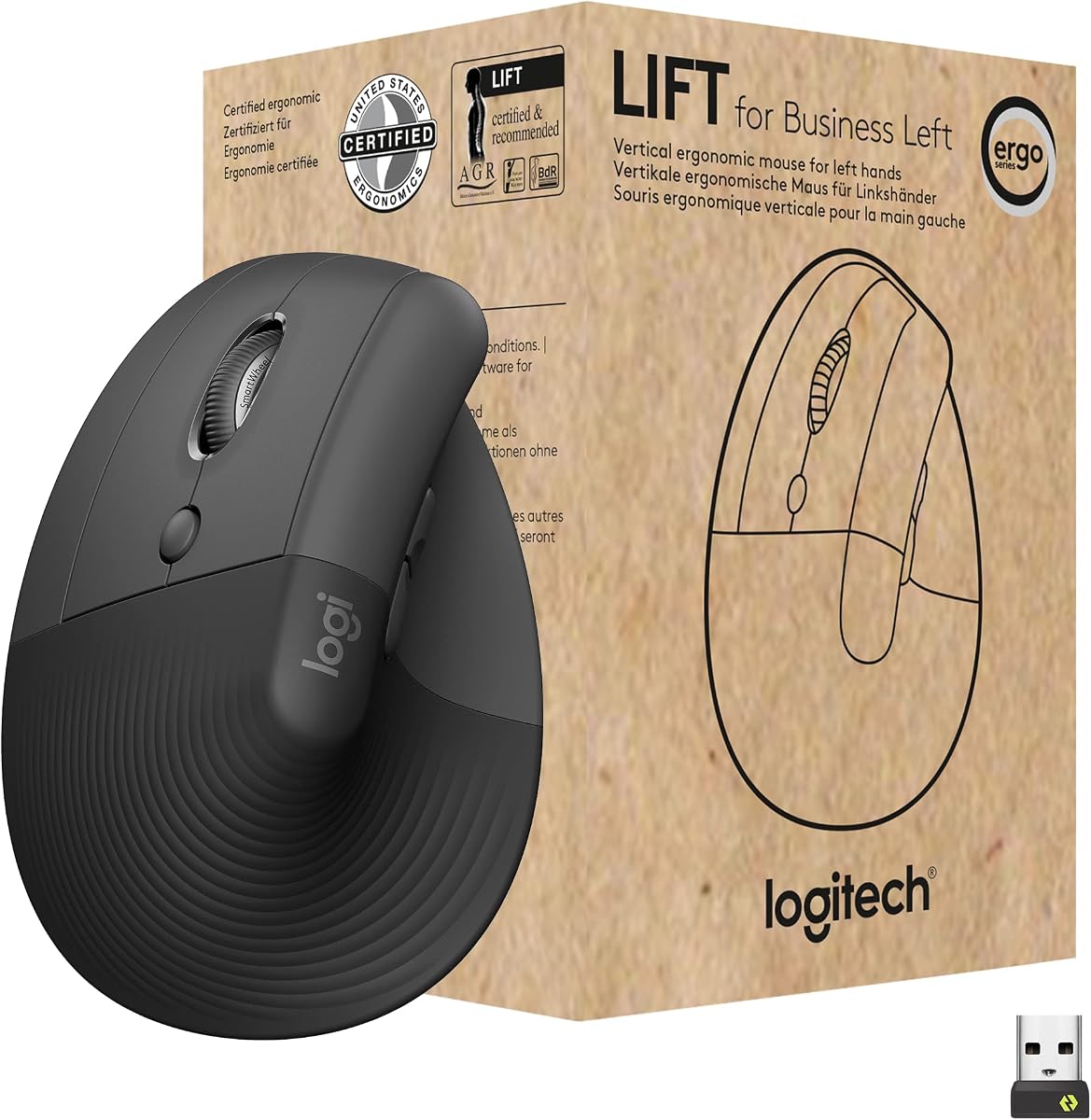
Lift for Business in left hand graphite is what IT should have ordered years ago instead of handing lefties right-hand Lifts ‘to reverse in software.’ The vertical ergonomic posture, quiet clicks, and Bluetooth or Logi Bolt connectivity are built for workdays, not RGB nights.
Left-handed Lift vertical ergonomic shape for all-day desk work
Bluetooth or Logi Bolt USB with enterprise-oriented security
Quiet clicks; Options app and IT deployment friendly features
Explicit left-hand Lift SKU—critical for bulk workplace orders
Logi Bolt secure wireless story suits managed companies
Quiet clicks align with open-office etiquette
Logitech Options support helps remaps and ease-of-use tooling
Certified broad deployment story for IT teams
✕ Cons
Business positioning may be more mouse than a student needs
Vertical still requires adaptation time
Gamers will find sensor priorities different from G PRO 2
Detailed review
Enterprise secure wireless language—encrypted Logi Bolt Secure Connections Only mode—matters in regulated offices where random 2.4G receivers make security teams nervous. Remote deployment and DFU support speak to fleets, not just one freelancer.
Individuals still benefit: left vertical comfort plus Logitech’s mature software. Students can buy it too; they will simply ignore the fleet narrative and enjoy the shape.
Versus MEETION, Lift is the polished workplace standard; MEETION is often the more approachable personal purchase with RGB cousins. Versus ELECOM wired, Lift frees you from cables at the cost of ecosystem pairing.
If your company asks what to standardize for left-hand staff, this is the pack’s grown-up answer.
IT buying note
Order the left SKU explicitly and label asset tags LEFT. Right Lift units look similar in catalogs and create expensive reverse-logistics headaches.
Individual setup
Install Logitech Options, set natural scrolling preferences, and remap side buttons to back/forward before your first full workday ends.
We may earn a commission at no additional cost to you.
Left-Handed Mouse Buying Guide
True left shell vs ambidextrous vs software swap
True left shells orient primary click and thumb zones for the left hand. Ambidextrous gaming mice (G PRO 2) are symmetrical and excellent for aim, but they are not vertical therapy tools. Software swap on a right-hand mouse is the last resort—avoid it when this pack already offers real left geometry.
Vertical handshake vs familiar flat
Vertical lefties (MEETION, Lekvey, Lift) reduce pronation for many people with wrist fatigue. Flat true-left mice (ELECOM wired, WishLotus) keep familiar motion with correct buttons. Trackballs (ELECOM EX-G left) minimize whole-arm movement. Match the mechanism to your pain, not to a trend.
Work versus play
Quiet wired or business verticals win on calls. LIGHTSPEED ambidextrous wins on competitive servers. Owning both is rational for lefties who have been forced into one wrong tool for a decade.
Wireless realities for niche SKUs
Receivers get lost. Prefer rechargeable dual-mode options or keep spares. Business Logi Bolt solves managed security; simple 2.4G solves home PCs; Bluetooth helps laptops with few ports.
Thumbnail vigilance
Right and left verticals look mirrored in photos. Confirm ‘left handed’ in the title, ASIN, and button orientation diagrams before you click buy. This is the most expensive mistake in the category.
Frequently Asked Questions
01
Is a left handed mouse different from flipping buttons on a right-hand mouse?
Yes. Flipping buttons in software changes click logic but not the molded thumb rest, flare, or side-button placement. A true left handed mouse puts those shapes under your left hand. Ambidextrous mice are a third path: symmetrical shells without a strong right-hand wing.
02
Are vertical left-handed mice better for wrist pain?
They help many people by promoting a handshake forearm posture that reduces pronation. They are not medical devices and do not guarantee relief. Pair any new mouse with better desk height, breaks, and professional advice if pain is persistent.
03
What is the best left handed mouse for gaming?
In this pack, Logitech G PRO 2 Lightspeed is the clear competitive choice thanks to its ambidextrous shape and high-end sensor/wireless stack. Vertical office lefties are usually poorer aiming tools. Some players keep a vertical mouse for work and G PRO 2 for games.
04
Can lefties use trackballs?
Absolutely—especially a left-specific model like the ELECOM EX-G left trackball. Thumb-driven balls reduce sweeping motion. Expect a learning curve and occasional cleaning. They shine for productivity and precision more than twitch FPS.
05
Wired or wireless for a left-handed mouse?
Wired (ELECOM, WishLotus) maximizes reliability and simplifies niche ownership. Wireless (MEETION, Lekvey, Lift, G PRO 2) frees motion and modernizes multi-device desks. Because left SKUs are harder to replace instantly, many people prefer rechargeable dual-mode or a wired backup.
06
Why are left-handed mice harder to find in stores?
Retailers stock for majority right-hand demand. Online packs like this one matter because they gather true left verticals, left trackballs, and left business SKUs that big-box shelves skip. Always verify orientation in photos and specs.
07
Will a left-handed mouse work on Mac?
Most USB and Bluetooth mice work for basic pointing on macOS. Specialty software (ELECOM Mouse Assistant, Logitech Options/G HUB) may have different Mac support depth than Windows. Verify button remaps on your OS if macros matter.
08
How long does it take to adapt to a vertical left mouse?
Often three to ten workdays for the posture to feel natural. Start with shorter sessions if needed. If numbness or sharp pain increases, stop and reassess setup rather than ‘pushing through.’
09
Is Logitech Lift for Business worth it for home users?
If you like the Lift shape and want quiet left vertical ergonomics with polished software, yes—even if you ignore IT features. Students on tight budgets may prefer MEETION or Lekvey. Companies should prefer Lift when security and deployment matter.
10
What is the best overall left handed mouse in this list?
For most office lefties seeking vertical relief, MEETION BTM008 (B0H1R5SSLM) is the strongest everyday pick. For quiet true-left wired correctness, choose ELECOM’s silent left mouse. For competitive gaming, choose G PRO 2. Match the tool to the job rather than hunting one universal trophy.
Conclusion
Left-handed computing should not require contorting around right-hand plastic. This pack shows real options: MEETION vertical wireless comfort, ELECOM’s silent true-left wired shape, Lekvey’s simple left vertical, G PRO 2’s ambidextrous competitive path, ELECOM’s left trackball, compact WishLotus wired correctness, and Logitech Lift for Business for workplace lefties.
Decide whether you need vertical relief, flat true-left buttons, trackball stillness, or symmetrical gaming speed—then verify the ASIN orientation twice. The best left handed mouse is the one carved for your hand and your work, not the one you apologize for in software settings.
Buy the correct shell once. Your wrist has waited long enough.