Best Lightweight Tri-Mode Shell
EWEADN S9 Max Wireless

- About 65g class shell with nano ice-skin coating
- PAW3395 sensor path up to 26K DPI with 8K polling claims
- 2.4G / Bluetooth 5.0 / USB-C tri-mode switching
Expert Review & Guide
Fingertip grip is a control style, not just a product category: you drive the mouse with fingers and micro-adjustments instead of parking your full palm on a tall hump. The best fingertip grip mouse in 2026 is usually light, low enough that your palm floats, and grippy enough that sweaty ranked nights do not turn into slip drills. Sometimes the winning move is not a new mouse at all—it is grip tape or side add-ons that make your current shell finally behave.
This pack is unusually mixed on purpose. You get a light tri-mode performer in the EWEADN S9 Max, Glorious Model I 2 for claw/palm-leaning customizability that fingertip users still borrow from, vertical and ring-style alternatives that change hand posture entirely, and a deep bench of grip accessories: Pulsar SUPERGRIP, Lizard Skins DSP, Elevation Lab Magic Grips, and two colors of three-dimensional esports grip patches. We review what is actually in the pack without pretending every ASIN is a traditional lightweight FPS mouse.
You will leave with three top picks for different fingertip paths, a comparison that separates mice from grip kits, and practical advice for knowing whether you need a new shell or better friction.

As an Amazon Associate we earn from qualifying purchases. We may earn a commission at no additional cost to you.
This pack mixes full mice and grip upgrades. Use the specs column to see whether you are comparing a sensor shell or a tape kit before you buy duplicates.
EWEADN S9 Max is the pack’s clearest attempt at a modern fingertip-friendly wireless gaming shell: light mass, PAW3395 tracking up to 26K DPI, 8K polling claims wired and wireless, and a matte nano ice-skin coating that tries to keep fingertips planted when ranked pressure spikes your sweat rate.
Tri-mode switching (2.4G, Bluetooth 5.0, USB-C) means one mouse can live on a main PC and a travel laptop. Kailh white-blade style micro switches advertise huge click lifespans and gold contacts against double-click disease—important when fingertip users spam micro-corrections for hours.
Ergonomics are described for right-handed medium and large hands with a claw-leaning comfort brief. Pure fingertip grip players should note that “light and coated” helps more than “has a giant palm hump.” If the shell still feels tall under your palm, lower your grip visually—let the palm float—and consider adding Lizard Skins or Pulsar tape on the sides for even more assurance.
Battery marketing is aggressive with a 500mAh cell and long-life claims; treat marathon numbers as best cases, especially with high polling. The braided parachute-style cable helps when you fall back to wired 8K mode.
Buy S9 Max when you want a light sensor-forward mouse for fingertip or claw aiming and accept a lower rating as a signal to verify current units. Add grip tape later if coating alone is not enough. Choose Glorious Model I 2 if you want stronger brand traction and swappable side buttons in a wired 66g package.
Lower in-game sens slightly when switching to a lighter mouse; your flicks will travel farther than your palm-grip brain expects.
A 3.6 average means research recent reviews for connection drops and QC. Sensor specs on paper are not a substitute for a good unit.
We may earn a commission at no additional cost to you.

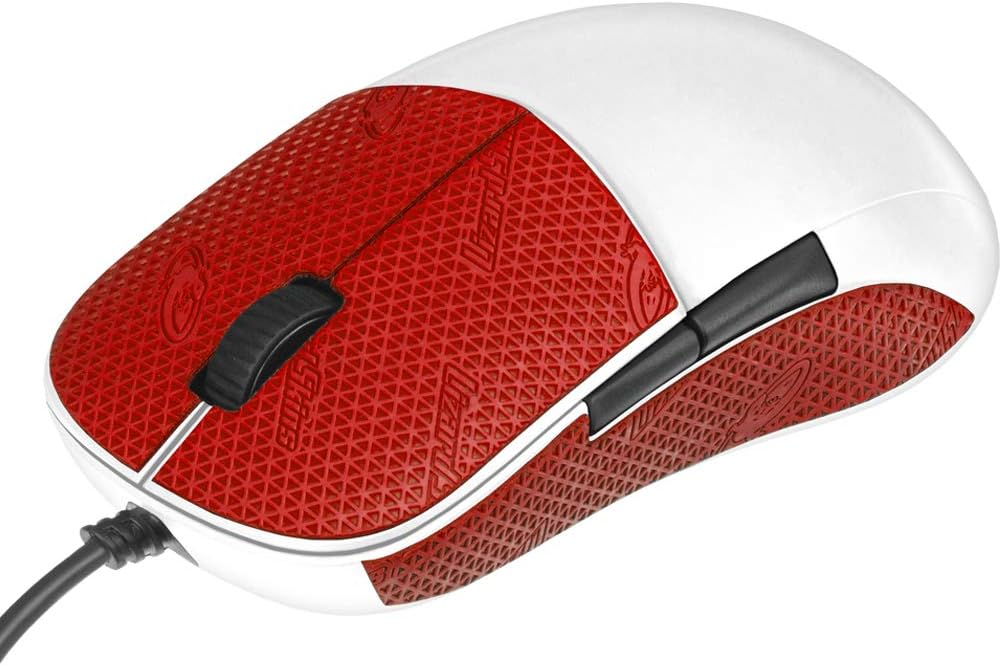
This black three-dimensional grip patch kit is an accessory, and that honesty belongs up front. Photos show a mouse for display; your box contains adhesive modules meant to create softer, higher-friction contact points for fingers and sides. For fingertip grip players, that is often the actual bottleneck—not DPI.
Esports-oriented marketing focuses on preventing finger slide during strenuous moves and reducing how hard you must squeeze. Less squeeze can mean less tremor, which fingertip aimers feel immediately. Optional left/right modules and spare pieces encourage experimentation rather than one forced layout.
Skin-like material aims to avoid the cold slickness of bare plastic. Compared with ultra-thin Lizard Skins sheets, these 3D patches are more sculptural—more “add geometry” than “add texture film.” Some players love the extra ledge; others find it changes width too much.
Install on a clean, dry shell. Place small pieces first under the fingertip contact zones you actually use. Avoid covering sensors, feet, or RGB diffusers you care about. Give adhesive time to set before a sweaty session.
Buy the black kit when your current mouse shape is fine but traction is not. Buy the pink twin only for color preference. Buy Lizard Skins or Pulsar if you want thinner full-coverage tape instead of chunky modules.
Put the highest friction under index/middle contact patches and a thin strip where the thumb pinches. Avoid building a fake palm shelf if you want to stay true fingertip.
Warm gently and peel slowly. Residue removers meant for electronics-safe adhesives beat scraping with keys.
We may earn a commission at no additional cost to you.
Glorious Model I 2 Wired is a 66-gram argument that fingertip and claw players deserve programmable flexibility without a brick on the pad. The BAMF 2.0 26K optical sensor with Motion Sync targets pixel-clean tracking, while an ultra-flexible ascended cable keeps the wired experience from fighting your micro-adjustments.
Nine programmable buttons sound like an MMO story, and they are—but fingertip users can ignore extras or convert them into DPI Shift and Layer Shift tools. Two side buttons swap among included shapes so thumb height and reach match your pinch style. That hardware customization is rare and relevant when fingertip grip makes every millimeter of thumb travel obvious.
Marketing calls out claw and palm comfort with a dedicated thumb rest. Pure fingertip players can still use it by floating the palm and treating the thumb rest as an optional brace rather than a palm shelf. If the rest forces your hand into palm grip, this shape may not be your endgame egg mouse—but as a light, accurate, customizable shell it still belongs in the conversation.
80-million-click-rated switches and white colorway aesthetics match streamer desks. For sweat, add Lizard Skins or Pulsar on the sides rather than assuming stock coating is enough for summer LAN rooms.
Choose Model I 2 when you want a light wired mouse with serious button flexibility. Choose EWEADN when wireless tri-mode matters more. Choose grip tape alone when your current sensor is already fine.
Keep physical clutter low: one Layer Shift button can double your binds without adding a 12-button ladder under your thumb.
Even flexible cables benefit from a bungee so fingertip flicks do not tow slack across the pad.
We may earn a commission at no additional cost to you.

Pulsar SUPERGRIP is what many fingertip grip players should try before buying another mouse. At 0.5 mm, it adds traction and sweat handling without turning your shell into a wider brick. Pre-laminated universal pieces reduce the agony of bubbles and mis-cuts that ruin first-time tape jobs.
Fingertip grip concentrates force on small contact patches. When those patches slick out, aim collapses. SUPERGRIP’s anti-slip, sweat-absorbing pitch maps directly onto that failure mode. Pros and dedicated amateurs have normalized grip tape for a reason.
Apply to cleaned sides and fingertip zones first. You do not have to wallpaper the entire mouse. A minimalist fingertip install often looks cleaner and is easier to reverse.
Compared with Lizard Skins DSP, Pulsar leans into the pre-cut universal kit experience. Compared with 3D patch modules, SUPERGRIP stays flatter and more “stock plus texture.” Many enthusiasts keep both philosophies in a drawer.
Buy SUPERGRIP when your mouse shape is already fingertip-viable and you only need friction. Buy a new light shell when the geometry itself fights a floating palm.
Wash hands, clean mouse with alcohol wipe, wait for dry-down, apply from center outward, press firmly, then wait before playing sweaty games.
Spare pieces can tack WASD zones if your fingertip style extends to a clawed left hand on glossy keycaps.
We may earn a commission at no additional cost to you.

Anker Vertical Ergonomic Mouse
Anker’s vertical mouse is in this fingertip pack as a posture alternative, not as a rival to PAW3395 aim trainers. The handshake angle can relieve wrists that hurt from aggressive fingertip gaming plus eight hours of flat editing. Some players keep a vertical mouse for work and a light flat shell for ranked.
DPI tops out at 1600 across three steps—fine for office work, modest for wide-pad low-sens FPS. Five buttons and a USB receiver stored in the mouse keep the kit simple. Batteries are required and not included; sleep after idle saves power.
If you searched best fingertip grip mouse because your hand hurts, do not ignore vertical options out of FPS tribalism. Pain-free hours matter more than grip purity. If you searched because you want to frag, Anker is the wrong main.
The listing notes that key click sounds are unavoidable—relevant if you also need quiet. Pair with realistic expectations.
Choose Anker as a productivity relief valve. Choose EWEADN/Glorious as gaming fingertip mains. Choose grip tape when your gaming shell is almost perfect.
Vertical for spreadsheets and email; lightweight flat mouse for aim training. Switching contexts can extend your gaming years.
Store the receiver in the mouse bay. Vertical mice are frequently “broken” only because the dongle vanished into a backpack lining.
We may earn a commission at no additional cost to you.

The pink 3D grip kit is the aesthetic twin of the black patch set. Soft skin-feel modules, self-adhesive backing, and adjustable placement carry over. Choose pink if your desk theme wants it; choose black if you want the patches to disappear visually on a dark shell.
Fingertip grip benefit remains mechanical: more friction, optional geometry for finger anchors, less desperate squeezing. It is still not a mouse. Budget accordingly.
Households with two gamers sometimes buy both colors so kits do not migrate. That mundane tip prevents more arguments than any DPI chart.
If you already tried thin tape and hated the flat feel, 3D modules are the alternate texture religion. If you hated added bulk, go back to Pulsar/Lizard Skins thin sheets.
Ranked beside the black kit to keep shoppers from thinking pink means a different adhesive chemistry. It does not—at least not in the pack copy.
Pink modules on a white mouse like Glorious Model I 2 White can look intentional. On a green EWEADN shell, black may clean up better.
Do not buy black and pink unless you need two kits. One successful layout is enough.
We may earn a commission at no additional cost to you.

Apple’s Magic Mouse is famously hostile to traditional grips: low, slippery, and awkward for large hands. Elevation Lab Magic Grips add concave side surfaces so fingertips and thumbs finally have somewhere to live. For Mac users who fingertip-nudge a Magic Mouse all day, this accessory can be more valuable than a random PC gaming shell they will never pair cleanly at work.
The kit widens and relaxes the grip, includes an XL thumb piece, and uses premium silicone with removable adhesive. Ambidextrous fit matters for left-handed Magic Mouse users who are tired of being ignored by right-hand gaming ergonomics.
This will not win a Valorant aim duel against EWEADN or Glorious. It will make email, design reviews, and browser work on a Mac less of a finger cramp. Know which problem you are solving.
Install carefully, align sides evenly, and give adhesive time. If you hate the look of add-ons on Apple aluminum aesthetics, you may prefer switching to a compact Bluetooth PC mouse instead.
Buy Magic Grips when your fingertip pain is specifically Magic Mouse shaped. Buy a light gaming mouse when your pain is competitive aiming on Windows.
Medium and large hands that overhang the stock Magic Mouse edges. Tiny hands may need less help.
Unlike RGB gaming shells, Magic Grips keep a professional Mac desk looking like a Mac desk—just more usable.
We may earn a commission at no additional cost to you.

elec Space Wireless Ring Mouse
The elec Space ring mouse interprets “fingertip control” literally: a wearable ring with a trackball for air pointing. It is ideal for slideshows, video streaming, remote photography triggers, and music control—not for low-sens Aim Labs grinding. Including it keeps this pack honest about how wide Amazon’s fingertip-adjacent results run.
Bluetooth and 2.4G connectivity plus multi-OS notes make it a gadget for living rooms and cockpits as much as desks. Adjustable clamp sizing helps different fingers. Rechargeable power beats hunting coin cells.
If your goal is the best fingertip grip mouse for gaming, skip this. If your goal is controlling a tablet UI without touching the screen during cooking videos, suddenly the ring makes sense.
Expect a learning curve. Trackball air mice punish old muscle memory. Give it a weekend of media use before judging.
Buy for novelty productivity and accessibility experiments. Buy EWEADN/Glorious for competitive fingertip aiming.
Presentations, couch Netflix pointing, camera apps, and situations where a desk mouse is impractical.
Replace a 26K sensor lightweight mouse for esports. Different tool, different job.
We may earn a commission at no additional cost to you.

MOJO Perfect Grip vertical sits beside Anker as a posture-first answer for people whose “fingertip grip” search began with aching tendons. Silent buttons and dual-mode wireless make it friendlier for offices and classrooms than loud gaming shells. DPI up to 2400 is enough for documents and light creative work.
Six silent buttons, including navigation keys, support browser-heavy days. Bluetooth or 2.4G mode can split across two computers—handy for work-plus-home pairs. Dimensions and 3.4 oz weight describe a substantial vertical tool, not a 60-gram flick mouse.
Competitive fingertip gamers should treat this as a daytime recovery device. Gaming mains stay with light flat shells; verticals keep you productive without aggravating the same tendons between matches.
Compared with Anker, MOJO adds silence and Bluetooth dual-mode flexibility. Compared with grip tape, it changes posture entirely rather than adding friction to a flat shell.
Buy MOJO Perfect Grip when silence plus vertical ergonomics are the brief. Buy light flat mice when aim performance is the brief.
Give vertical mice one to two weeks. Early awkwardness is normal and not proof the category failed.
Alternate vertical work sessions with short fingertip aim routines instead of eight flat hours plus four ranked hours.
We may earn a commission at no additional cost to you.
Lizard Skins DSP is often the first grip tape people mean when they say they “gripped their mouse.” The Durasoft polymer feel is distinct from hard plastic and from chunky 3D modules—tacky, comfortable, and thin at 0.5 mm. For fingertip grip, that thinness preserves the silhouette your fingers already learned.
A grid transfer sheet helps you trace and cut precise pieces for sides, buttons, and rear zones. Take a Saturday morning, watch a careful install video, and go slow. A clean tape job looks intentional; a rushed one looks like a sticker accident.
DSP works for sweaty fingertip aimers and for casual users who hate glossy OEM coatings. It is also reversible education: if tape makes your current mouse perfect, you just saved yourself from an unnecessary shell upgrade.
Compared with Pulsar SUPERGRIP pre-cuts, Lizard Skins rewards DIY precision and color picking. Many players prefer one or the other based on first install experience alone.
Buy Lizard Skins when you want proven cut-to-fit traction. Combine with EWEADN or Glorious if you need both a light shell and insurance against sweat. Skip only if you already love your stock coating.
Tape the left and right side walls and tiny button landing zones first. Leave the palm area bare if you truly float a fingertip grip.
Wipe with a slightly damp cloth. Heavy solvents can prematurely age adhesives.
We may earn a commission at no additional cost to you.

Fingertip: palm floats, fingers drive. Claw: palm rear contacts, fingers arched. Palm: full contact. Buy shape for the grip you use after an hour of play, not the grip you think sounds pro.
Sub-70g mice make finger flicks easier, yet a light mouse with a tall hump can still force palm contact. Optimize height and length before worshipping grams.
If tracking is fine and slip is the issue, Pulsar, Lizard Skins, or 3D patches are cheaper experiments than a new sensor body.
Fingertip contact patches are tiny. Coatings and tape matter as much as DPI. Keep a cloth at the desk.
Anker and MOJO verticals can save wrists on workdays. Keep a flat light mouse for aim training if gaming is the goal.
Read titles carefully. Several ASINs are grip kits only. Budget for both if you need a shell and traction.
One phone video reveals whether your palm is truly floating or secretly dragging.
Fingertip aiming loves a clear, large cloth pad. Clutter forces tense finger death-grips.
Sides first, then button zones. Play two sessions before covering more surface.
Lighter, grippier setups often need slight sens changes. Recalibrate in an aim trainer, not only in ranked.
Wash hands, optional grip powder or dry towel between maps, and clean tape weekly.
Vertical for productivity pain, light flat mouse for fingertip gaming—no rule says one device must do both.
Typically lower-profile, shorter humps, and light weight so the palm can float. Exact preference varies by hand size. Symmetrical eggs and low ambidextrous shells are common; large ergonomic palm humps are harder.
Not always, but many players notice better consistency with tape once sweat appears. If your stock coating is already matte and secure, skip it. If you micro-adjust and slip, tape is the first upgrade.
It can work, especially at 66g, though the thumb rest and ergonomic cues also serve claw/palm users. Pure fingertip purists should try floating the palm; if the rest forces contact you hate, look for lower shells or rely more on tape plus a different shape.
When the sensor and shape are already acceptable, yes. Patches and tape cannot fix heavy sluggish shells or sensors you distrust.
They use a handshake posture, which is a different grip family. They appear here because people with fingertip-related strain often need posture alternatives for work.
Whatever lets you aim with controlled finger movements on your pad size. Many play relatively low sens with larger pads; others prefer higher sens. Consistency beats copying a pro’s number.
Not for conventional FPS competition. It is a novelty/media/accessibility pointer. Keep expectations in the couch-control lane.
They add side topography to Apple Magic Mouse surfaces that otherwise starve fingertips of anchors. They improve comfort and control for Mac productivity more than they create a gaming mouse.
Choose Pulsar for pre-cut convenience and sweat-focused SUPERGRIP marketing. Choose Lizard Skins for cut-to-fit flexibility and color options. Both are 0.5 mm class solutions trusted by PC gamers.
Spec sheets and customer satisfaction are different. Strong sensor branding can coexist with QC or firmware complaints. Read recent reviews and buy somewhere with easy returns if you chase value flagship specs.
The best fingertip grip mouse setup in 2026 might be a light tri-mode shell like the EWEADN S9 Max, a customizable 66g Glorious Model I 2, or simply the mouse you already own wearing Lizard Skins or Pulsar SUPERGRIP. This pack’s mix of shells and grip kits is a feature if you read carefully—and a trap if you accidentally order patches when you meant to order a mouse.
Vertical options from Anker and MOJO deserve a place for pain management, while Magic Grips rescue Mac users stuck on slippery aluminum. Ring mice stay in the novelty lane.
Float the palm, secure the fingers, retune sens, and only then decide whether you need another sensor body.