Best Bluetooth Mouse for Laptop in 2026: Quiet Dual-Device Picks
By James ·
Laptop trackpads are fine until you spend a full afternoon in slides, code, or a browser with forty tabs. The best Bluetooth mouse for laptop in 2026 earns its spot by pairing without hunting for a USB receiver, staying quiet enough for a cafe table, and surviving a week of mixed work without nagging you for batteries every other night. Bluetooth also matters when your machine is USB-C only and you refuse to burn a port on a dongle.
This roundup sticks to the ten mice in the pack: TECKNET dual-mode office shells (rechargeable and AA), two WL300 silent sculpted greys that differ mainly by finish, Lenovo’s WL310, Yoga Pro, and 600 silent Bluetooth lineup, plus E-YOOSO’s RGB tri-mode gamer-leaning option and SUNGI’s slim jiggler-capable traveler. We weigh connection modes, silence claims, hand-size honesty, DPI flexibility, and whether side buttons actually work on Mac.
You will get three top picks aimed at different laptop lives, a full comparison table, product-by-product reviews that call out near-twins instead of pretending they are unrelated, and a buying guide for Bluetooth quirks that still trip people up in 2026.
As an Amazon Associate we earn from qualifying purchases. We may earn a commission at no additional cost to you.
Bluetooth Laptop Mouse Comparison
Scan connection mode, silence, power story, and DPI before diving into reviews. Two WL300 listings and three TECKNET models look similar on paper—use the names and specs below to keep finishes and power systems straight.
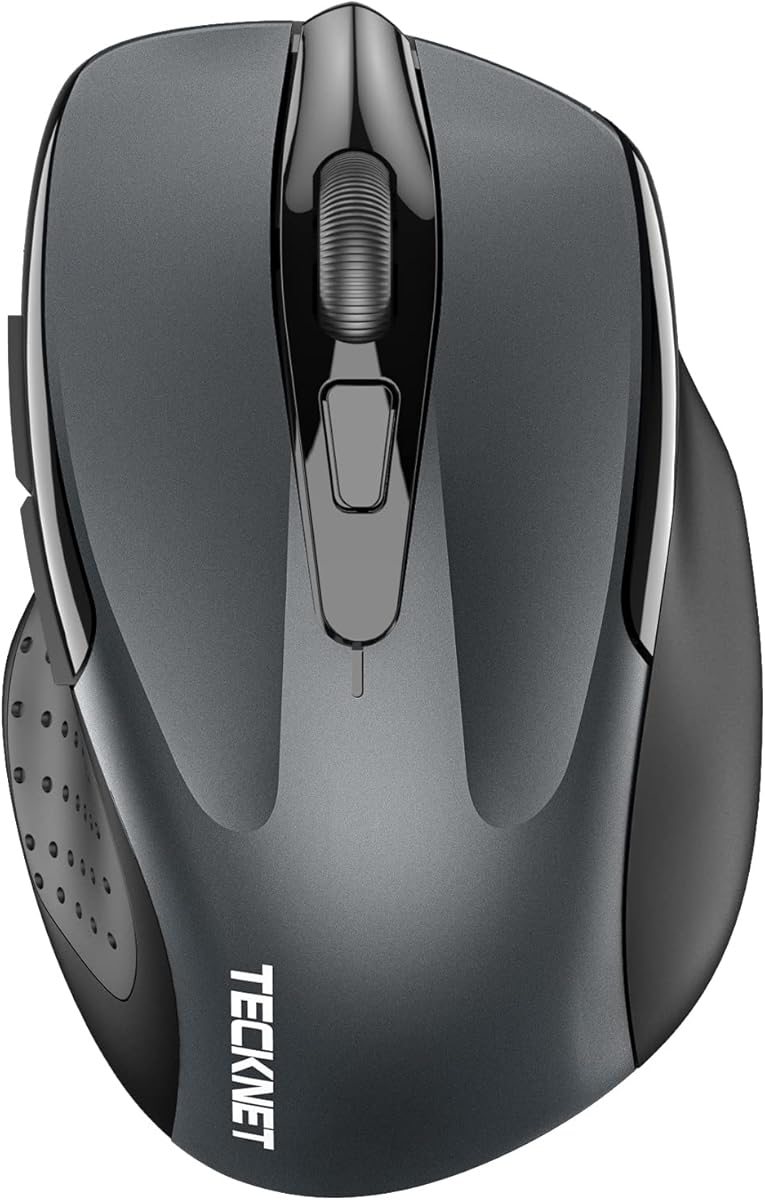
If you want one sentence definition of a modern Bluetooth laptop mouse, this grey TECKNET is close: silent clicks, a slide switch between two machines, and a lithium cell you top up a few times a year instead of every long weekend. Pair Bluetooth to the laptop that hates dongles, park the USB-A receiver in a secondary desktop if you still have one, and stop unpairing every Monday morning.
Bluetooth plus USB-A with two-device slide switching
Silent clicks; six DPI levels from 800 to 4800
Recharges in about 1.5–2 hours for multi-month light use
High rating with a proven laptop dual-device formula
Broad DPI ladder for careful cells and fast window tossing
Silent tuning fits open offices and late-night hotel desks
Rechargeable lifestyle beats hunting AA cells mid-trip
Windows, macOS, Chrome OS, and Linux compatibility notes
✕ Cons
Sized for small-to-medium hands; large palms may feel cramped
Side buttons are not compatible with macOS per the listing
No dedicated horizontal side-scroll like the black TECKNET sibling
Detailed review
Six DPI stops culminating at 4800 is more range than many office Bluetooth mice bother to offer. Drop to 800 or 1200 when you are aligning slide objects; jump higher when you are flinging the cursor across an ultrawide. Silence is the other everyday win—libraries, coworking pods, and shared apartments all punish clicky travel mice.
Charging is intentionally dull: roughly ninety minutes to two hours for a full pack, then months of light daily use according to the brand’s two-hours-per-day framing. Low battery can make the connection feel flaky, which is actually a useful nudge to plug in rather than a mysterious Bluetooth ghost story.
Hand-size honesty is printed right in the marketing: small to medium hands first, though large-handed users who like compact shells may still enjoy it. Mac owners should know side buttons will not behave as forward/back. If your laptop life is mostly trackpad-plus-browser, those caveats rarely matter.
Start here when you want the best Bluetooth mouse for laptop duties without paying for RGB, programmable gaming layers, or a full-size brand shell. Move to the black side-scroll TECKNET if wide spreadsheets own your week, or to Lenovo Yoga Pro if comfort and programmable buttons are the priority.
Who gets the most from dual-device switching
Students and hybrid workers who bounce between a personal laptop and a work machine benefit immediately. Pair once, slide once, keep both cursors honest.
Setup tip for USB-C-only ultrabooks
Prefer Bluetooth mode on modern thin laptops so you never need a USB-A adapter for the receiver. Keep the dongle in a desk drawer for the rare secondary PC.
The grey WL300 leans into palm sculpting and set-and-forget AA power rather than USB charging rituals. Bluetooth 5.0 with Microsoft Swift Pair is a practical Windows laptop convenience: the mouse can pop into view quickly instead of burying you in Settings menus during a meeting setup.
Bluetooth 5.0 with Microsoft Swift Pair pairing
Silent left, right, and scroll; 800/1200/1600 DPI
Single AA with long multi-month to multi-year framing
Forward/back buttons help Windows browser workflows
Durability claims of millions of clicks on main buttons
✕ Cons
Only three DPI steps versus six on TECKNET models
AA battery not included—budget a cell before first use
Forward/backward buttons are not recognized on Mac
Detailed review
Silence covers left, right, and scroll—important because many “quiet” mice still clack the wheel. Three DPI stages (800, 1200, 1600) keep the cursor honest for documents and browsing without pretending this is a competitive FPS sensor. Optical tracking is marketed across wood, leather, fabric, paper, and resin, which matches the messy reality of cafe tables.
Battery marketing stretches toward the extreme end of AA longevity with sleep after thirty seconds of idle. Real life depends on how often you wake it, but the category intent is clear: travelers who hate carrying charging cables for every peripheral.
Mac users should treat side navigation buttons as Windows-first features. If your laptop is a MacBook, buy this for silence and shape, not for browser history shortcuts. Windows and Chrome OS users get the fuller button story.
Choose the grey WL300 when you want a full-size silent Bluetooth office mouse and prefer swapping an AA once in a long while over plugging USB-C. Choose the silver-gray WL300 sibling only for finish preference—the functional brief is the same.
Travel packing note
Carry one spare AA in the laptop sleeve. Longevity claims are great until you are on day three of a conference and the sleep/wake cycle has been aggressive.
Compared with Lenovo 600
Both chase silent Bluetooth laptop work. Lenovo 600 adds brand familiarity and a tighter DPI ladder up to 2400; WL300 emphasizes sculpted grip and longer AA storytelling.
The WL310 is Lenovo’s compact silent Bluetooth answer for people who want a brand name without the Yoga Pro’s fuller ergonomic shell. Bluetooth 5.0 means you leave the dongle at home—exactly what Chromebook and MacBook travelers want when every gram and every port counts.
Lenovo branding and silent tuning for shared spaces
Light, portable shape for students and road workers
Simple three-step DPI for everyday precision
Works across Windows, Mac, and Chromebook notes
✕ Cons
Fewer advanced features than Yoga Pro programmability
DPI ceiling is modest versus 4800-class TECKNET options
Not the fullest palm-resting shell in the Lenovo trio
Detailed review
Silent clicks are the headline for late-night dorm work and open offices. DPI hops between 1000, 1200, and 1600 cover browsing and light design without overcomplicating the top of the mouse. Ergonomics are framed as reducing wrist strain on laptops and desktops, though the portable size is clearly the travel pitch.
Compared with the Lenovo 600, the WL310 feels like the newer compact silent sibling rather than the dual-host Swift Pair specialist. Compared with Yoga Pro, you trade soft side grips, programmable buttons, and USB-C rechargeable luxury for simplicity and bag friendliness.
This is an easy recommendation for students who already live in the Lenovo laptop ecosystem and want a matching grey peripheral that will not announce every click in a library. Power users who map macros should look at Yoga Pro instead.
If your definition of the best Bluetooth mouse for laptop travel is “small, silent, brand-backed, no receiver,” WL310 sits near the center of that Venn diagram.
Best pairing scenario
One primary laptop, occasional tablet or second machine only if you are willing to re-pair. Dual-host switching is stronger on the Lenovo 600 and Yoga Pro.
When to spend up
Buy Yoga Pro if you want metal scroll feel, programmable controls, and a fuller right-hand rest for eight-hour spreadsheet days.
This black TECKNET is the productivity specialist of the Bluetooth laptop pack. Two Bluetooth connections plus a 2.4G USB-A path let you park three devices under one switch—exactly the hybrid worker pattern of work laptop, home desktop, and tablet. The side-mounted scroll wheel is the feature that separates it from the grey dual-device sibling: horizontal movement without Shift-jank or trackpad gymnastics.
Two Bluetooth links plus 2.4G for three-device switching
Metal main wheel and dedicated side scroll wheel
Rechargeable quiet mouse with six DPI levels to 4800
True three-device juggling for laptop, desktop, and tablet
Side scroll is a real spreadsheet and timeline accelerator
Metal wheel adds tactile polish over basic plastic rollers
Quiet clicks keep shared-room manners
LED blink language for DPI and low battery awareness
✕ Cons
Buttons are non-programmable per the listing
Side buttons still unsupported on macOS
More features means a slightly busier learning curve
Detailed review
A precision metal scroll wheel is a small luxury that changes daily feel. Combined with six DPI stages to 4800 and quiet switches, the mouse aims at long Excel, Notion, and browser canvas sessions rather than RGB battlestations. Recharge timing mirrors the grey model—about 1.5–2 hours for roughly three months of light daily use.
Auto-sleep after ten minutes and a low-battery LED blink are the practical power habits. Because buttons are explicitly non-programmable, treat this as a hardware shortcut mouse, not a Synapse-style macro deck. That honesty is useful: you know what you are buying.
MacBook users still lose side-button navigation, but they keep Bluetooth pairing, silent clicks, and the side scroll for wide sheets in Excel for Mac or Numbers. Windows users get the fuller seven-button story.
Pick this when your laptop week is multi-device and horizontally wide. Pick the simpler grey TECKNET when you only need two devices and hate extra wheels. Pick Lenovo Yoga Pro when brand ergonomics and software-adjustable controls matter more than a side scroll.
Spreadsheet workflow tip
Map mental muscle memory: main wheel for rows, side wheel for columns. After a day, returning to a trackpad feels like wearing mittens.
Receiver storage habit
When you use 2.4G mode, treat the bottom-mounted receiver as luggage—lose it once and Bluetooth becomes your only path until a replacement arrives.
Yoga Pro is the comfort and customization ceiling in this Bluetooth laptop set. Soft side grips, a deliberate thumb rest, and a full-size right-hand silhouette make it the mouse you leave on a docking desk rather than shove into a jeans pocket. Dual-device Bluetooth 5.1 with Swift Pair keeps the Lenovo laptop pairing story clean.
USB-C rechargeable dual-device Bluetooth 5.1
Programmable buttons; silent left and right clicks
Blue optical multi-surface sensor; DPI up to 4000 via software
Heavier and less pocketable than slim travelers like SUNGI
Software dependence for the highest DPI ceiling
Detailed review
Silent left and right buttons matter if your laptop mic is always one Slack huddle away. Programmable side and top buttons, plus a configurable metal scroll wheel, push it past pure office basics into light creator and analyst territory. Blue optical tracking is marketed for almost any surface—useful when hotel desks are glossy nightmares.
USB-C recharge in under two hours with a two-to-three-month runtime claim matches modern laptop cable ecosystems. You are already carrying USB-C for the machine; sharing that cable is less annoying than hunting AA cells in a foreign convenience store.
On-the-fly DPI stages plus software adjustment up to 4000 give you more nuance than three-step silent office mice. It will not replace a 26K gaming sensor for aim training, and it does not need to—the brief is laptop productivity with comfort.
Choose Yoga Pro when wrist comfort and programmable buttons justify a brand step up. Choose TECKNET side-scroll when horizontal spreadsheet navigation is the killer feature. Choose Lenovo 600 when you want silent Bluetooth without managing a rechargeable cell.
Docking-station lifestyle
Pair Yoga Pro to the laptop you dock every morning and a second home machine. The dual-host button becomes a ritual, not a troubleshooting step.
Finish and desk match
Tidal Teal is a personality choice—delightful on light wood desks, slightly bold on all-black battlestations. Function does not change with color.
Call this what it is: the silver-gray finish twin of the grey WL300. Sculpted grip, Bluetooth 5.0, Microsoft Swift Pair, silent left/right/wheel, three DPI steps, and the same AA longevity narrative carry over. Separating the ASINs in a buying guide prevents shoppers from thinking they found a secret higher-DPI version.
Silver-gray colorway of the WL300 silent Bluetooth mouse
Silver-gray finish pairs cleanly with aluminum laptops
Six-button layout for Windows productivity shortcuts
Long AA endurance storytelling for travel weeks
Broad OS compatibility including Android notes
✕ Cons
Not a functional upgrade over the grey WL300
Mac still ignores forward/back buttons
AA not included in the box
Detailed review
The finish actually matters on aluminum MacBooks and silver Windows ultrabooks where a dark grey mouse looks like a mismatch. If your aesthetic brief is “match the laptop lid,” silver-gray wins. If your desk is already black accessories, grab the grey unit and move on.
Everything about silence, sleep-after-thirty-seconds power saving, and multi-surface tracking reads the same. Durability marketing around millions of clicks and hundreds of thousands of scroll cycles is unchanged.
Household tip: buy different finishes for two people so the mice stop migrating to the wrong backpack. That is a surprisingly common dual-laptop household failure mode.
Ranked beside its twin on purpose. Neither is universally better; together they illustrate how this pack clusters silent Bluetooth office shapes.
Finish decision rule
Match the dominant metal on your laptop. Ignore marketing adjectives that imply a sensor difference—there is not one in the pack copy.
Skip if you need rechargeable
TECKNET and Lenovo Yoga Pro cover USB charging. WL300 is for AA loyalists and cable minimalists.
E-YOOSO is the pack’s bridge between Bluetooth laptop productivity and RGB gaming flair. Tri-mode connectivity—Bluetooth, 2.4G wireless, and USB-C wired—means you can present from a corporate laptop on Bluetooth, game on 2.4G at home, and keep working while charging on the cable. That flexibility is rare among the quieter office-first options here.
Bluetooth, 2.4G, and USB-C wired tri-mode switching
Tri-mode covers almost any laptop connection scenario
Gaming-leaning DPI and fire button for hybrid users
RGB modes you can disable for battery and focus
Works while charging over the built-in USB cable path
Ergonomic claw-leaning shape with rubberized left grip
✕ Cons
RGB and gaming styling may feel loud for corporate desks
Software story is optional and currently awkward per listing notes
Heavier feature set than pure silent office Bluetooth mice
Detailed review
DPI climbs through 500, 1000, 2000, 3000, and 8000 with a 1000Hz polling claim and a rapid-fire button for click-heavy games. Six RGB modes with millions of color options are fun until a meeting starts—then turn lights off and enjoy the 75-hour RGB-off battery framing from the 1000mAh cell.
The claw-grip-leaning ergonomic shell with matte coating and left-side rubber texture is aimed at longer sessions. It is not as soft-sculpted as Yoga Pro, and it is not as silent-marketed as WL300 or Lenovo 600. Buy it for versatility and speed, not for library stealth.
Software customization exists for people who want remaps, but the listing warns that download links have been shuffled over security concerns. Out of the box defaults are usable; power users should verify current driver availability before expecting deep macros.
Pick E-YOOSO when your laptop is also your game machine and you refuse to own two mice. Pick a silent Lenovo or TECKNET when your definition of best Bluetooth mouse for laptop is quiet professionalism first.
Battery discipline with RGB
Leave lighting off during workdays if you care about the longer runtime claim. Lights are a night-desk luxury, not a requirement.
Wired fallback value
When Bluetooth stacks misbehave at a conference, the USB-C wired mode is a career-saving fallback that pure Bluetooth office mice cannot match.
The Lenovo 600 remains a default recommendation whenever someone asks for a quiet Bluetooth laptop mouse that just works. Microsoft Swift Pair and dual-host switching let you bounce between two machines with a button instead of a settings excavation. Silent click and scroll keep open offices civil.
Bluetooth 5.0 Swift Pair with dual-host switching
Silent click and scroll; blue optical multi-surface sensor
Mature Lenovo silent Bluetooth formula with strong ratings
Dual-host switching without a USB receiver on the laptop
Blue optical sensor marketed for almost any surface
Compact low-profile shell travels well
Million-click durability framing on primary buttons
✕ Cons
Only four buttons—fewer shortcuts than six-button rivals
AA power means occasional battery shopping
Not rechargeable USB-C like Yoga Pro
Detailed review
Blue optical tracking is the practical hotel-desk feature: fewer “why won’t it track on this shiny table” moments. DPI steps at 800, 1600, and 2400 are enough for documents and light creative work. The low-profile compact shell slides into a laptop sleeve without the bulge of full-size gaming shapes.
One AA for up to a year is the lifestyle pitch. It will not match rechargeable convenience for people who already live on USB-C cables, but it wins for travelers who refuse yet another device to charge nightly.
Compared with WL310, the 600 is the dual-host Swift Pair specialist with a slightly different DPI ladder. Compared with Yoga Pro, it is simpler, lighter on programmability, and powered by AA instead of an internal cell.
Buy the 600 when silence, dual-host Bluetooth, and set-and-forget power define your laptop mouse brief. It is boring in the best way.
Dual-host real-world use
Pair a work Windows laptop and a home machine. The switch button becomes muscle memory within a week of hybrid schedules.
Quiet office etiquette
Silent scroll matters as much as silent clicks on shared tables. The 600 markets both—verify that matches your noise sensitivity.
SUNGI optimizes for thinness and a quirky productivity trick: a built-in jiggler mode toggled by holding the DPI button. That feature exists for people who need to keep a presence status alive during long reads or locked-down corporate policies—use it ethically and know your workplace rules.
Bluetooth 4.0 slim rechargeable shell, no receiver
Quiet clicks; built-in mouse jiggler mode
DPI 800/1200/1600; roughly 5–7 weeks per charge claim
Ultra-thin profile disappears into sleeves and pockets
Receiver-free Bluetooth for iPad and MacBook notes
Jiggler mode for status-presence edge cases
Rechargeable lithium cell with on/off travel switch
Noise reduction marketing for night and library use
✕ Cons
Bluetooth 4.0 is older than 5.x rivals in the pack
Lower rating than Lenovo and TECKNET leaders
Slim shape offers less palm support for long sessions
Detailed review
Bluetooth 4.0 without a receiver is the travel story, with compatibility notes spanning iPad lines, Chromebooks, Android tablets, Windows, Linux, and MacBooks. Slim silent clicks claim roughly eighty percent noise reduction, aimed at sleeping partners and quiet study halls.
A built-in lithium cell charges in a few hours and claims five to seven weeks depending on use, with auto-sleep after ten minutes and a hardware power switch for suitcase storage. DPI tops out at 1600 across three steps—fine for travel browsing, modest for large multi-monitor desks.
This is not the mouse for eight-hour ergonomic comfort. It is the mouse for the person who hated every bulky Bluetooth office shell they tried to pack. Expect less sculpting and more “flat enough to forget.”
Choose SUNGI for sleeve-friendly travel and jiggler curiosity. Choose Lenovo or TECKNET when all-day comfort and newer Bluetooth stacks matter more than absolute thinness.
Jiggler ethics note
Presence tools can violate workplace policies. Treat the feature as optional hardware, not a recommendation to misrepresent availability.
Charge before long trips
Five-to-seven-week claims assume moderate use. Top up the night before a two-week road show so you are not hunting USB power in a terminal.
This AA-powered TECKNET is the rechargeable grey dual-device mouse’s battery-swappable cousin. You still get Bluetooth plus USB-A two-device switching, silent clicks, and six DPI levels to 4800, but power comes from two AAA cells and aggressive sleep instead of an internal lithium pack.
Same dual-device convenience as the rechargeable grey TECKNET
Six-step DPI ladder unusual for AA office mice
Silent operation for shared laptop environments
No charge cable dependency for pure travel kits
36-month support framing with registration
✕ Cons
Needs two AAA batteries not included
Still sized primarily for small-to-medium hands
Lacks the side-scroll wheel of the black rechargeable sibling
Detailed review
That tradeoff is perfect for some laptop travelers: spare AAA batteries are easier to find globally than a forgotten USB cable that matches your mouse. It is worse for people who already standardized on USB-C charging for everything else and hate disposable cells.
Hand-size guidance again flags small-to-medium palms, with a nod that large-handed users who like compact mice may still enjoy it. Side buttons remain macOS-unfriendly. Connection distance depends on environment—true for every Bluetooth mouse, but worth remembering in crowded conference halls.
Functionally, decide between this and B0CP3HTHLZ based on power philosophy, not sensor fantasies. Same silence goals, same DPI ladder, same dual-device slide idea—different fuel.
Pick the AA TECKNET when you want dual-device Bluetooth laptop flexibility without owning another rechargeable gadget. Pick the rechargeable grey or black TECKNET when you are done buying batteries.
Battery install checklist
Insert fresh AAA cells, confirm the mode switch, pair Bluetooth, and test the slide to the second device before your first real workday.
When AA beats lithium
Field work, classrooms, and long trips where USB ports are scarce or already occupied by the laptop charger make swappable cells oddly modern again.
We may earn a commission at no additional cost to you.
How to Choose a Bluetooth Mouse for Your Laptop
Bluetooth versus 2.4G receivers on modern laptops
Bluetooth frees USB-C ports and works on machines that shipped without USB-A. A 2.4G receiver can feel more “instant” on some Windows desktops and may help when Bluetooth stacks are crowded with headphones and keyboards. Dual-mode mice in this pack let you stop arguing with yourself—pair Bluetooth for the ultrabook, keep the dongle for the office tower.
Silence is a laptop feature, not a luxury
Laptops travel into libraries, bedrooms, and open offices. Silent primary switches—and ideally a quiet scroll—matter more than RGB. If your calls pick up click noise, prioritize Lenovo silent models, WL300, or TECKNET’s quiet office line over gaming hybrids.
Hand size and travel thickness
Compact Bluetooth mice save bag space but punish large palms over eight-hour days. Full-size options like Yoga Pro and sculpted WL300 trade pocketability for comfort. Believe the small-to-medium notes on TECKNET shells if your hands are large.
Power systems: rechargeable, AA, or AAA
Rechargeable mice share cables with your laptop ecosystem. AA/AAA mice win when you refuse another charge brick. Compare claimed months of use against your real daily hours; heavy DPI-high users burn cells faster than marketing scenarios.
Mac side-button reality
Multiple pack listings warn that forward/back side buttons are not recognized on macOS. MacBook buyers should shop for silence, shape, and Bluetooth stability over Windows browser shortcuts.
DPI needs for laptop screens
Most laptop work lives happily between 800 and 1600 DPI. Higher ceilings help multi-monitor docking setups. Do not chase 8000 DPI unless you also game; chase adjustable steps so one mouse can slow down for design and speed up for window management.
Frequently Asked Questions
01
Do I need a USB receiver for a Bluetooth mouse on a laptop?
Usually no. Bluetooth mice pair directly through the laptop’s Bluetooth radio. Dual-mode models in this guide also include a 2.4G USB-A receiver for machines where Bluetooth is flaky or disabled. Ultrabooks without USB-A should stick to Bluetooth mode or use a USB-C adapter only when necessary.
02
What is the best Bluetooth mouse for a MacBook?
Lenovo’s silent Bluetooth options and TECKNET dual-mode mice all list macOS compatibility. Prioritize silence and shape. Assume forward/back side buttons may not work on Mac unless a listing says otherwise. Yoga Pro adds comfort and USB-C charging that matches Apple cable habits.
03
Are silent Bluetooth mice worse for gaming?
Silent office switches prioritize low noise over the crisp tactile “crack” many gamers like. For hybrid laptop gaming, E-YOOSO’s higher DPI and fire-button design is closer to a gaming feel, but dedicated RGB gaming mice still win for competitive play. For documents and calls, silence is the correct trade.
04
How long should a rechargeable Bluetooth laptop mouse last per charge?
Pack claims range from multi-week slim travelers to roughly three months of light daily use on TECKNET rechargeable models and two to three months on Lenovo Yoga Pro. RGB lighting shortens runtime. Your real number depends on daily hours, DPI, and sleep behavior.
05
Why does my Bluetooth mouse lag on my laptop?
Crowded 2.4GHz airspace from headphones, weak laptop antennas, low batteries, and competing USB 3 interference near dongles are common causes. Move the laptop away from dense Wi-Fi routers, recharge or replace batteries, try 2.4G mode if available, and forget/re-pair the device after OS updates.
06
Is dual-device switching worth it?
Yes if you regularly use two computers. Sliding or tapping between a work laptop and home desktop beats unpairing. If you own one machine, dual-device is optional insurance rather than a must-buy feature.
07
What DPI should I use on a laptop?
Start around 1000–1600 for a 13–14 inch screen. Increase if you dock to a large external monitor and the cursor feels sticky. Decrease for photo retouching or dense spreadsheets. Adjustable mice in this pack make that experimentation easy.
08
Can I use these Bluetooth mice with an iPad?
Several listings mention iPad or tablet compatibility, especially SUNGI and E-YOOSO. Support varies by iPadOS version and mouse. Check Apple’s current pointer support notes and test scroll direction preferences after pairing.
09
Should I buy AA or rechargeable for travel?
Buy rechargeable if you already carry USB-C and can top up overnight. Buy AA/AAA if you want swappable power in places where outlets are scarce. Neither is universally superior—match the power system to your trip style.
10
Which mouse is best for large hands on a laptop?
Yoga Pro’s full-size right-hand shell and the sculpted WL300 are safer bets than compact TECKNET small-to-medium designs or the slim SUNGI. If possible, compare dimensions to a mouse you already like before committing.
Conclusion
The best Bluetooth mouse for laptop use in 2026 is the one that matches your ports, noise tolerance, and charging habits—not the one with the highest DPI on the box. For most people, the rechargeable grey TECKNET dual-device mouse covers silence, flexibility, and low maintenance. Lenovo Yoga Pro is the comfort upgrade, and the Lenovo 600 remains the classic AA silent Bluetooth workhorse.
If your week spans three devices and wide spreadsheets, the black TECKNET with side scroll is the specialist to beat. Gamers who also work should look at E-YOOSO’s tri-mode RGB hybrid, while ultralight travelers can consider SUNGI’s slim jiggler-capable shell.
Pair once, set a DPI you can live with, and let the trackpad become a backup instead of a daily compromise.