MSI PRO B850-S WIFI6E
- Highest pack rating with Pro-series calm for office-plus-gaming towers
- 12 Duet Rail VRM and DDR5 Memory Boost to 8200+ MT/s OC for Ryzen 9000
- WiFi 6E, 2.5G LAN, Gen5 plus Gen4 M.2, and Frozr Guard thermals
Expert Review & Guide
AMD’s B850 chipset is the sensible middle lane for Ryzen 9000 builders who want modern I/O without X870E flagship pricing. The best B850 motherboards in 2026 deliver enough VRM headroom for mainstream and upper midrange Zen 5 chips, DDR5 that hits EXPO sweet spots, and wireless that matches a current desk. What still splits the pack is GPU slot generation (PCIe 5.0 versus 4.0), how many M.2 drives you can stack, and whether WiFi 7 is worth the jump from WiFi 6E for your router.
This guide reviews every board in our best-b850-motherboards pack in listing order—from GIGABYTE’s AORUS Elite WIFI7 through MSI’s PRO workstation-leaning option, white ICE aesthetics, a compact mATX Strix, and a Gaming Plus kit that ships with 32GB of TEAMGROUP DDR5. We weighed power-stage counts against real midrange CPUs, called out PCIe generation honestly, and treated warranty years and DIY latches as ownership features. Ratings are Amazon averages from the pack snapshot; we omit dollar prices because motherboard deals swing weekly.
Shortcuts: MSI PRO B850-S WIFI6E is our calm, highest-rated pick; ASUS ROG Strix B850-A is the feature-rich gaming board with four M.2 slots and WiFi 7; MSI B850 Gaming Plus WIFI6E is the value ATX with serious DDR5 overclock headroom if you accept PCIe 4.0 x16 for graphics.
As an Amazon Associate we earn from qualifying purchases. We may earn a commission at no additional cost to you.
Scan power design, GPU slot generation, wireless standard, and form factor before you fall for a pretty heatsink. Two MSI boards use PCIe 4.0 x16 for graphics, the Strix B850-G and B850M Eagle are mATX, and the final MSI listing is a motherboard-plus-32GB DDR5 bundle—not a bare board alone.
GIGABYTE B850 AORUS Elite WIFI7
The GIGABYTE B850 AORUS Elite WIFI7 is the board many AM5 builders land on when they want a complete midrange checklist without shopping for white aesthetics or micro-ATX. Socket AM5 spans Ryzen 9000, 8000, and 7000 series chips, so a leftover 7600 or a fresh 9700X both seat cleanly. Four DDR5 DIMMs leave a clean 2x16 or 2x32 EXPO path, and the 14+2+2 power design makes eight-core and sixteen-core Zen 5 CPUs feel ordinary for the VRM rather than heroic. In a mid-tower with decent intake, the VRM and M.2 thermal guards matter more than RGB shrouds—they keep voltage regulation and the first NVMe drive from cooking during long compiles or overnight downloads.
Connectivity is where this Elite WIFI7 earns its keep against older B650 stock. PCIe 5.0 on the primary graphics path means you are not locked out of next-gen GPU electrical width if you upgrade later, even if today’s cards do not saturate Gen5. Three M.2 slots cover an OS drive, a scratch SSD, and a bulk games library without hanging SATA cables everywhere. USB-C on the rear I/O plus Sensor Panel Link hint at GIGABYTE’s builder ecosystem—handy for a small secondary LCD, irrelevant if you never will. WiFi 7 paired with 2.5GbE covers both apartment mesh and a short Cat6 run to a multi-gig router.
DIY friendliness shows up in EZ-Latch hardware that makes M.2 and PCIe card swaps less fingernail-hostile—minor until you reseat a GPU three times while troubleshooting displays. The five-year warranty pitch is unusually long in this chipset tier and differentiates the Elite from three-year Eagle siblings later in this list. Combined with a 4.6 pack rating, the board reads as a mainstream favorite rather than a niche enthusiast toy.
Who should skip it? Builders chasing four native M.2 slots should look at the Strix B850-A. White-theme cases will prefer the ICE twin. Pure value hunters who accept PCIe 4.0 x16 for graphics may save with MSI’s Gaming Plus WIFI6E. Everyone else building a black mid-tower Ryzen 9000 gaming or creator PC will find the AORUS Elite WIFI7 boring in the best way: power, lanes, wireless, and warranty without odd omissions.
In daily use, expect BIOS updates through GIGABYTE’s Q-Flash style tooling when a new Ryzen stepping lands. Pair it with a dual-tower air cooler or a 240/360 AIO, enable EXPO, and you have a 2026 AM5 platform that should outlast one GPU generation. That longevity—plus WiFi 7 already onboard—is why this board opens our pack as the default “just get a solid B850” recommendation for builders who do not need Pro quiet aesthetics or ROG software theater.
If your case is a standard ATX mid-tower with a tempered side panel and a single thick GPU, this Elite WIFI7 matches the silhouette. The 14+2+2 design leaves thermal margin when CPU and GPU both spike, and three M.2 slots map cleanly to OS, creative cache, and Steam.
Keep the box and serial for the five-year coverage window, and use EZ-Latch when you rotate NVMe drives instead of fighting tiny screws over a hot GPU. Those habits matter more over three years than another unused RGB header.
Functionally you are looking at the same AORUS Elite WIFI7 skeleton—14+2+2, three M.2, PCIe 5.0, WiFi 7. Choose this black version unless your RAM, fans, and case are already committed to a white theme.
We may earn a commission at no additional cost to you.
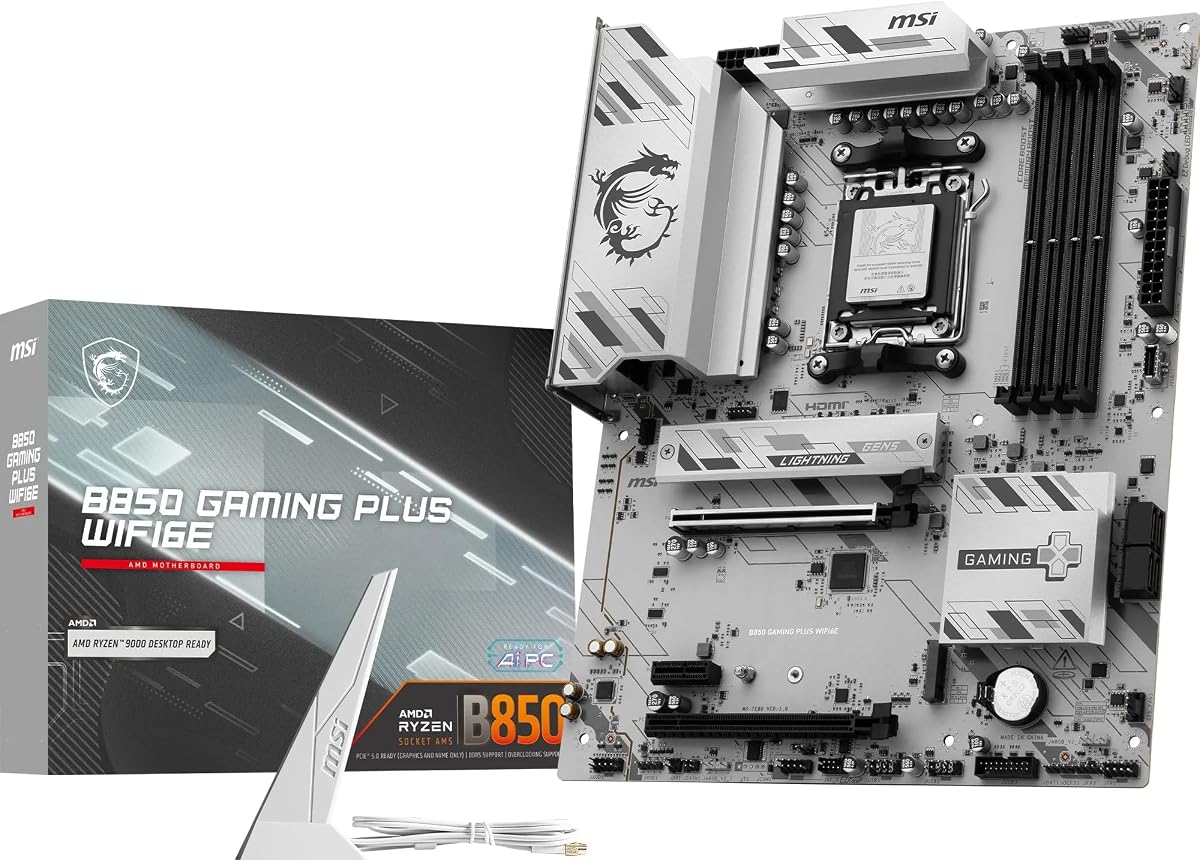
MSI’s B850 Gaming Plus WIFI6E is the pack’s clearest “spend the savings on a better GPU” ATX board, and that is not faint praise. The 12 Duet Rail Power System (P-PAK) with Core Boost architecture targets Ryzen 9000 high-performance use, and Frozr Guard’s 7W/mK MOSFET pads, choke pads, and extended heatsink show MSI expecting heat rather than hoping case airflow alone will save the VRM. For a 9600X or 9700X gaming tower that also renders the occasional Premiere timeline, this power recipe is appropriately sized—you are buying thermal pads that survive summer LAN parties, not twelve phases for a sticker.
Memory is the headline. Four DDR5 SMT DIMM slots with Memory Boost claiming 8200+ MT/s on 1DPC 1R configurations make this board interesting to builders who chase tight EXPO kits and then nudge frequency in the BIOS. AM5 still rewards good memory training more than chasing mythical GPU lane generations for today’s cards, and MSI leans into that reality. Pair a quality kit, enable EXPO, and only then experiment—the board is rated for the headroom, not obligated to hit 8200 with every random discount stick.
The honest caveat sits in the PCIe slot: this Gaming Plus uses a PCIe 4.0 x16 Steel Armor slot rated at 64GB/s, not a PCIe 5.0 x16 path. For current midrange and even many high-end GPUs, Gen4 x16 is not a frame-time crisis. It does mean you are consciously trading future GPU electrical width for a lower board tier. Storage partially offsets that trade with one M.2 Gen5 x4 at 128Gbps plus one M.2 Gen4 x4 with Shield Frozr. EZ M.2 Clip II is the small DIY win you notice when upgrading storage without removing the entire graphics card stack.
Networking is WiFi 6E with Bluetooth 5.3 and 2.5Gbps LAN—excellent if your mesh tops out at 6E, merely fine if you already bought a WiFi 7 gateway. Rear USB includes a 10Gbps Type-C port, and Audio Boost backs 7.1 HD audio for headset-centric gamers. The 4.7 pack rating suggests real-world installs are going smoothly for gamers who want AM5 now without financing a Strix shroud.
Choose this board when your priority stack is Ryzen 9000 stability, aggressive DDR5 tuning, and a sane wireless stack—and when you can live with Gen4 for the GPU and two M.2 slots. Skip it if your philosophy is “PCIe 5.0 everywhere” or if you need three or four NVMe drives without adapters. As our Best Everyday Value ATX top pick, it is the board we would put under a strong midrange GPU when the spreadsheet says the money belongs on the video card, not the PCB art.
Most games remain GPU-bound long before they saturate Gen4 x16. If you plan a multi-year keep-the-board path to a hypothetical Gen5-hungry card, prefer AORUS Elite, TUF PLUS, or Strix A. If you refresh the whole platform with the next GPU anyway, this MSI tradeoff is rational.
Start with AMD EXPO on a 6000–6400 MT/s kit for daily stability, stress with a memory tester overnight, then explore MSI’s higher Memory Boost profiles only if you enjoy BIOS time. Document working settings; AM5 training can be quirky after CMOS clears.
Same broad MSI B850 electrical story, calmer Pro cosmetics, and the pack’s highest 4.8 rating. Pick Gaming Plus for the gaming-oriented look; pick PRO if the PC lives in a living room or shared office where aggressive branding feels out of place.
We may earn a commission at no additional cost to you.
ASUS TUF Gaming B850-PLUS WiFi
ASUS positions the TUF Gaming B850-PLUS WiFi as the reinforced midrange plate for builders who treat a motherboard like a tool, not a light show. The enhanced power solution—14+2+1 80A DrMOS stages, eight-layer PCB, 8+8 pin ProCool connectors, alloy chokes, and durable capacitors—reads like a checklist written by someone who has seen cheap VRMs fold under a 16-core all-core boost. For Ryzen 9000 and still-strong 7000 chips, dual CPU power plugs and thick PCB copper are comforting.
Storage and GPU lanes stay modern. You get a PCIe 5.0 x16 slot for graphics and a storage layout with one onboard PCIe 5.0 M.2 plus two PCIe 4.0 M.2 slots, each with heatsinks. That pattern—fastest slot for the OS or a Gen5 drive, Gen4 for bulk—matches how people actually fill boards. AI Ready messaging from ASUS is marketing language for having the power and connectivity headroom local AI apps want; treat it as capacity, not a magic NPU on the PCB.
I/O is where TUF quietly outmaneuvers some cheaper B850 boards. WiFi 7 and Realtek 2.5Gb Ethernet cover wireless and wired. Rear USB 20Gbps Type-C handles fast external SSDs, while a front USB 10Gbps Type-C connector keeps case top panels useful. Thunderbolt (USB4) header support is the sleeper feature for creators who later add an add-in card—rare to see called out this clearly at B850. DisplayPort and HDMI matter if you boot with a GPU problem or triage with an APU.
BIOS Flashback remains the ASUS safety net when a CPU arrives newer than the board’s shipping microcode: flash from USB without a CPU installed, then seat the Ryzen. Combined with TUF’s durability narrative, the B850-PLUS is the board we recommend to friends building their first AM5 machine who still want PCIe 5.0 and WiFi 7 without ROG pricing. The 4.5 rating is respectable; it simply sits under MSI’s 4.7–4.8 favorites in this pack snapshot.
Tradeoffs are mostly aesthetic and slot-count based. Camo TUF styling clashes with delicate white themes—use the AORUS ICE or a Strix white-leaning board instead. Archivists who want four M.2 slots should step to the Strix B850-A. Everyone assembling a durable black or gunmetal gaming PC with a dock-heavy desk will appreciate the USB and Thunderbolt header foresight more than another unused ARGB header.
Even if you never buy a Thunderbolt add-on, the header signals ASUS left expansion room for USB4-class front panels and creator docks. That future option is harder to retrofit on boards that never exposed the header.
TUF wins on rugged midrange value and the Thunderbolt header callout; Strix A wins on four M.2 slots, Q-Antenna WiFi 7 polish, and AI Advisor software. Same chipset generation, different ownership personality.
We may earn a commission at no additional cost to you.
ASUS ROG Strix B850-A Gaming WiFi
The ASUS ROG Strix B850-A Gaming WiFi is the pack’s feature-forward gaming board: more M.2, more AI-branded helpers, and heatsink bridge work that photographs well through glass. Under the shroud, the robust power solution uses a 14+2+2 design rated for 80A per stage with an 8+8-pin ProCool connector, alloy chokes, and durable capacitors aimed at multi-core processors. That is the right electrical envelope for a 9700X gaming PC that also streams or a 9950X workstation-lite box that still wants ROG cosmetics.
Four M.2 slots change how you plan storage. Instead of compromising between game library and scratch disks, you can dedicate drives: Windows, creative cache, bulk games, and a cold archive. PCIe 5.0 support keeps the platform aligned with current and near-future SSDs and GPUs. Optimized thermal design—massive heatsinks bridged to the VRMs with high-conductivity pads plus an integrated I/O cover—addresses the reality that Gen5 SSDs and dense VRMs both dump heat into the upper board near the socket.
Networking and software are where Strix differentiates from TUF. WiFi 7 with Q-Antenna is meant to make antenna orientation less fiddly behind a desk; 2.5G LAN covers the wired side. AI Networking II and ASUS AI Advisor are ASUS’s answer to “I do not want to live in the BIOS.” AEMP helps with memory profiles. You can ignore all of it and still have a strong board, but first-time AM5 builders often appreciate a guided path when EXPO training fails on the first try.
USB 20Gbps Type-C on the rear keeps external SSD docks snappy, and the broader ROG ecosystem ties fans and strips together if you opt into Aura Sync. The 4.6 rating matches the AORUS Elite’s score in this pack, which fits: both are premium-leaning B850 boards with different brand philosophies. Strix leans software and slot count; AORUS leans warranty years and EZ-Latch simplicity.
We named this our Best Feature-Packed Gamer top pick because it is the board you buy when the PC is a hobby object as much as a tool—four drives, WiFi 7 antennas that behave, and enough power stages that a CPU upgrade in two years does not require a new motherboard. Skip it if you want a quiet Pro look, if two M.2 slots already feel like luxury, or if WiFi 6E savings fund a nicer CPU cooler. For everyone else filling a showcased mid-tower, the B850-A is the emotionally satisfying B850.
Populate the primary M.2 closest to the CPU with your hottest Gen5 drive under its heatsink, then use lower slots for cooler Gen4 library drives. Leave a little airflow between a thick triple-slot GPU and any M.2 heatsink in its shadow.
Use AI Advisor for first-boot sanity checks and driver pointers, then uninstall what you do not need. The silicon does not require ASUS cloud features to run a 1440p gaming stack well.
Pick the B850-A for full ATX cases and easier cable paths. Pick the B850-G when the case is mATX and you still want four M.2 slots via the underside trick. Same ROG software story, different chassis math.
We may earn a commission at no additional cost to you.
The MSI PRO B850-S WIFI6E is the board we would put in a home office tower that still plays Path of Exile after standup meetings. It carries the pack’s highest 4.8 rating, and the Pro series visual language—less gaming sculpture, more industrial calm—matches mixed-use PCs that sit in shared rooms. Electrically it is sibling-close to the Gaming Plus WIFI6E: a 12 Duet Rail Power System (P-PAK) VRM with Core Boost for Ryzen 9000/8000/7000, Frozr Guard thermal attention, and DDR5 SMT slots advertising 8200+ MT/s OC on favorable 1DPC 1R setups.
That memory headroom matters for content apps and Chrome-ravenous research as much as for gaming frame times. AM5’s Infinity Fabric relationships still reward clean DDR5 training, and MSI’s Memory Boost branding tells you the board was validated for enthusiasts who push kits. Day to day, enable EXPO on a proven 6000 MT/s kit and enjoy the rating; treat 8200 as a ceiling for hobby tuning, not a requirement.
Graphics connectivity is again PCIe 4.0 x16 with Steel Armor. MSI is consistent across these B850 SKUs: they prioritize VRM and memory over Gen5 GPU signaling at this price personality. Storage includes one Gen5 x4 M.2 with Shield Frozr and one Gen4 x4 M.2—enough for OS plus projects. If you edit 4K offline and keep proxies local, budget an external enclosure or accept that this is not a four-drive Strix. Networking mirrors the Gaming Plus: WiFi 6E, Bluetooth 5.3, 2.5Gbps LAN, USB 10Gbps Type-C, and Audio Boost.
Cooling details quietly favor long renders. MOSFET pads rated 7W/mK, a VRM heatsink, chipset heatsink, and M.2 Shield Frozr are the unsexy parts that keep clocks honest when the room is warm. The combo-fan header rated to 3A for pump and system duty is a small gift for AIO users who hate unreliable splitters. Together with the Pro cosmetic restraint, the board feels designed for uptime.
We made the PRO B850-S our Best Calm Workstation Pick because highest community rating plus subdued styling plus competent Ryzen 9000 power is the triad office builders actually need. Choose Gaming Plus instead if you want the louder gaming silkscreen. Choose AORUS Elite or TUF PLUS if PCIe 5.0 on the GPU slot is non-negotiable. For everyone building a Ryzen AM5 machine that must look acceptable on a video call background, start here.
Consulting desks, home offices near shared spaces, and living-room PCs benefit when the motherboard does not scream RGB through a mesh front. The PRO B850-S still games; it just does not costume as a tournament stage.
If your next GPU is a known Gen4 card and you refresh platforms every four years, accept the slot. If you proudly keep motherboards across two GPU generations and want every lane generation available, spend up within this list for PCIe 5.0 boards.
Update BIOS before first OS install if your Ryzen is new, enable EXPO, set a sane fan curve that prioritizes silence under light CPU load, and use the Gen5 M.2 for the OS so project caches on the Gen4 drive do not fight Windows updates.
We may earn a commission at no additional cost to you.
ASUS ROG Strix B850-G Gaming WiFi
Not every Ryzen 9000 build wants a full ATX tray. The ASUS ROG Strix B850-G Gaming WiFi shrinks the Strix idea into mATX while keeping a 14+2+1 80A power solution, PCIe 5.0 readiness, and—critically—four M.2 slots by parking one on the underside of the board. That underside slot is the party trick: you gain archive capacity without stretching the PCB, but you should install that drive before the board goes into the case because access evaporates once standoffs and a GPU are in play.
Power and thermals still read ROG-serious: high-quality alloy chokes, durable capacitors, 8+8 ProCool CPU power, and massive heatsinks bridged to the VRMs with high-conductivity pads plus an integrated I/O cover. In a dense mATX chassis, those heatsinks matter; airflow is often a single front intake fighting a long GPU. AI Advisor, AI Networking II, and AEMP carry over from the bigger Strix boards so software familiarity remains if you have built ROG systems before.
Audio is a quiet differentiator. Realtek ALC1220P with a Savitech SV3H712 amplifier and Dolby Atmos support is nicer than bare codecs on Eagle-class boards—helpful when a compact PC is also a headphone stand-in. Networking pairs onboard WiFi 7 with Intel 2.5Gb Ethernet. ASUS is explicit about OS support: Windows 11 24H2 or later for full WiFi 7 functions; earlier Windows 11 builds may fall back to WiFi 6E behavior, and Windows 10 is limited to WiFi 6. Plan your OS image accordingly.
DIY Q features are why first-time small-case builders stop cursing: PCIe Slot Q-Release, M.2 Q-Latch and Q-Release, Q-Antenna, Q-Dashboard, Q-LED, BIOS FlashBack, Clear CMOS, and a pre-mounted I/O shield. In a cramped mATX interior, not dropping screws onto GPU fans is worth the ROG premium alone. USB connectivity is generous for the size—20Gbps and 10Gbps Type-C, multiple 5Gbps USB-A ports, and a front-panel 10Gbps Type-C connector—plus HDMI and DisplayPort for triage boots.
Pick the B850-G when the case is the constraint and you refuse to sacrifice M.2 count or WiFi 7. Pick the B850-A when you have ATX space and want layout breathing room. Pick GIGABYTE’s B850M Eagle if you need mATX cheaper and can live with WiFi 6E, two M.2 slots, and an 8+2+2 VRM. The Strix G is the enthusiast compact choice in this pack.
Lay the board on an anti-static mat, fit the underside drive and its hardware, confirm it enumerates if you can test on a bench PSU, then move into the case. Doing that sequence backward is how people re-pull entire mATX builds.
mATX does not automatically mean short GPU clearance. Check your chassis GPU length against a thick 1440p card and confirm the PCIe SafeSlot sits where the case’s reinforcement expects it.
We may earn a commission at no additional cost to you.
GIGABYTE B850 AORUS Elite WIFI7 ICE
The GIGABYTE B850 AORUS Elite WIFI7 ICE is not a different motherboard philosophy—it is the Elite WIFI7 wearing a white tuxedo. Socket AM5 support, DDR5 with four DIMMs, 14+2+2 power design, VRM and M.2 thermal guards, PCIe 5.0, three M.2 slots, USB-C, WiFi 7, 2.5GbE, EZ-Latch, and the five-year warranty story all mirror the black board that opens this guide. You are paying for aesthetic coherence in snow-white or silver theme builds that photograph for Discord showcases.
That coherence matters more than spec sheets admit. A black heatsink forest inside an all-white case reads like a mistake in every photo. ICE finishes on the shrouds and accents fix that without forcing you down to weaker Eagle power stages. If your RAM is white, your fans are white, and your GPU shroud is pale, this board completes the triangle.
Performance expectations should match the black Elite: Ryzen 9000-ready VRM behavior, Gen5-capable lanes, and modern wireless. The slightly lower 4.4 rating versus 4.6 on the black sibling may reflect thinner review volume or normal variance—it is not a signal that ICE silently cut phases. Still, read recent owner comments for white-panel QC notes if you are sensitive to imperfect plastics; white parts show everything.
Builders should budget matching accessories. White sleeved extensions, careful cable combing, and gentle filter cleaning matter more here than on a black board that hides clutter. EZ-Latch remains the practical hero when you upgrade SSDs without scuffing white surfaces with dropped screws.
Choose ICE when the theme is non-negotiable. Choose black Elite when you want the same electrical board without the aesthetic tax. Choose Eagle WIFI7 ICE below if you want white cheaper and accept an 8+2+2 phase design and a three-year warranty. For premium white AM5 midrange builds, this AORUS ICE is the clean match.
White case, white fans, white or silver GPU accent, white DRAM: if three of four are already true, ICE makes sense. If only the case is white and everything else is black, save money on the standard Elite.
Handle the board with clean hands during install, avoid aggressive isopropyl on printed logos, and route cables so sharp PSU edges do not scuff the I/O cover. Dust shows sooner on ICE; schedule gentle filter cleaning.
We may earn a commission at no additional cost to you.
The GIGABYTE B850 Eagle WIFI7 ICE exists for builders who want a white AM5 board and current wireless without funding AORUS Elite power stages. The 8+2+2 power design is the honest downgrade: workable for Ryzen 5 and many Ryzen 7 gaming loads with decent airflow, less ideal if you plan a power-hungry 16-core chip running sustained AVX-heavy exports in a hot case. Know your CPU before you chase the white aesthetic savings.
Where Eagle does not cheap out is connectivity. PCIe 5.0, three M.2 slots, USB-C, WiFi 7, and 2.5GbE LAN mean the board still speaks 2026 I/O fluently. That combination—lighter VRM, modern lanes and radios—is deliberate GIGABYTE segmentation. DIY-friendly M.2 EZ-Latch, PCIe EZ-Latch, and Wi-Fi EZ-Plug continue the brand’s theme of fewer tiny screws and fiddly antenna jacks during the first evening build.
Warranty drops to three years versus five on the Elite ICE, which is the ownership cost of the Eagle line. For a machine you might refresh in three to four years anyway, that can be fine. For a “set and forget until AM6,” the Elite’s longer pitch is worth serious consideration. The shared 4.4 rating with Elite ICE in this pack suggests buyers are generally okay with the trade.
Thermals deserve respect on leaner VRMs. Use a case with front intake, do not smother the MOSFET area with a cooler that exhausts nowhere, and avoid sandwiching the board in a dead-air niche panel. Gaming bursts are easier on VRMs than twenty-minute all-core Blender renders; match workload to phase count.
Buy Eagle WIFI7 ICE when the build is a white 9600X/9700X gaming PC and the budget must protect the GPU. Step to AORUS Elite ICE when you want the same look with 14+2+2 phases and five-year coverage. Step to non-ICE options if you do not need white at all—never pay for ICE paint to hide it under a solid front panel.
Excellent with Ryzen 5 9600X and similar 6-core chips; fine with many 8-core gaming loads; rethink for sustained multi-threaded workstation CPUs. If your workload looks like a render farm, the Elite’s 14+2+2 is the wiser white board.
Wi-Fi EZ-Plug helps, but still route antenna cables away from GPU hot exhaust so white leads do not cook or stain. Place antennas high on the rear or case pillar for fewer body-block dropouts.
We may earn a commission at no additional cost to you.
The GIGABYTE B850M Eagle WIFI6E is the pack’s practical compact answer when Strix G feels like overkill. Micro-ATX keeps the tray short for SFF-friendly mid cases and smaller desks, while AM5 support still welcomes Ryzen 9000/8000/7000 CPUs. Four DDR5 DIMMs remain available even at this size, so you are not forced into dual-slot compromises some ITX boards impose. The 8+2+2 power design matches the ATX Eagle philosophy: enough for mainstream chips, not a brag sheet for 16-core sustained torture.
Connectivity is trimmed but not ancient. PCIe 5.0 support on the platform, two M.2 slots, USB-C, WiFi 6E, and 2.5GbE LAN form a coherent 2026 starter kit. Two M.2 drives usually mean OS plus games, which is exactly how many compact gamers live. If you need four NVMe slots in mATX, the Strix B850-G is the upgrade path—and it will cost you ROG money for the privilege.
DIY features again include M.2 EZ-Latch, PCIe EZ-Latch, and Wi-Fi EZ-Plug. In an mATX interior those latches are not luxuries; they are how you avoid scraping knuckles on a tightly nested GPU. The three-year warranty is standard Eagle. The 4.6 rating actually beats the ICE Eagle ATX’s 4.4 in this pack snapshot, which may reflect broader appeal of a cheaper non-white SKU.
Wireless is WiFi 6E rather than WiFi 7. For households whose router is still WiFi 6 or 6E, that is the correct thrift. If you already bought a WiFi 7 mesh and care about every client matching, look at the ATX Eagle WIFI7 ICE or AORUS boards instead.
This board is for dorm builds, living-room HTPC-style gaming PCs, and office SFF cases that still want a discrete GPU on AM5. It is not for media servers that hoard four NVMe drives or for creators who pin 16 cores at high power for hours. Within those lanes, the B850M Eagle WIFI6E is a refreshingly honest compact B850.
Confirm your case supports mATX mounting holes and that your PSU cables are not ATX-only length nightmares. Some “mATX” cases still prefer short GPUs—measure twice.
Stretch when you need four M.2 slots, ALC1220P-class audio, WiFi 7, and Q-release conveniences. Stay Eagle when the PC is a straightforward 1440p gaming box and two SSDs already feel like abundance.
mATX trays can place RAM and VRM closer to cooler fans. Check cooler clearance against tall EXPO heat spreaders, and prefer dual-tower coolers that feed the VRM area rather than smother it.
We may earn a commission at no additional cost to you.
MSI B850 GAMING PLUS WIFI + 32GB DDR5
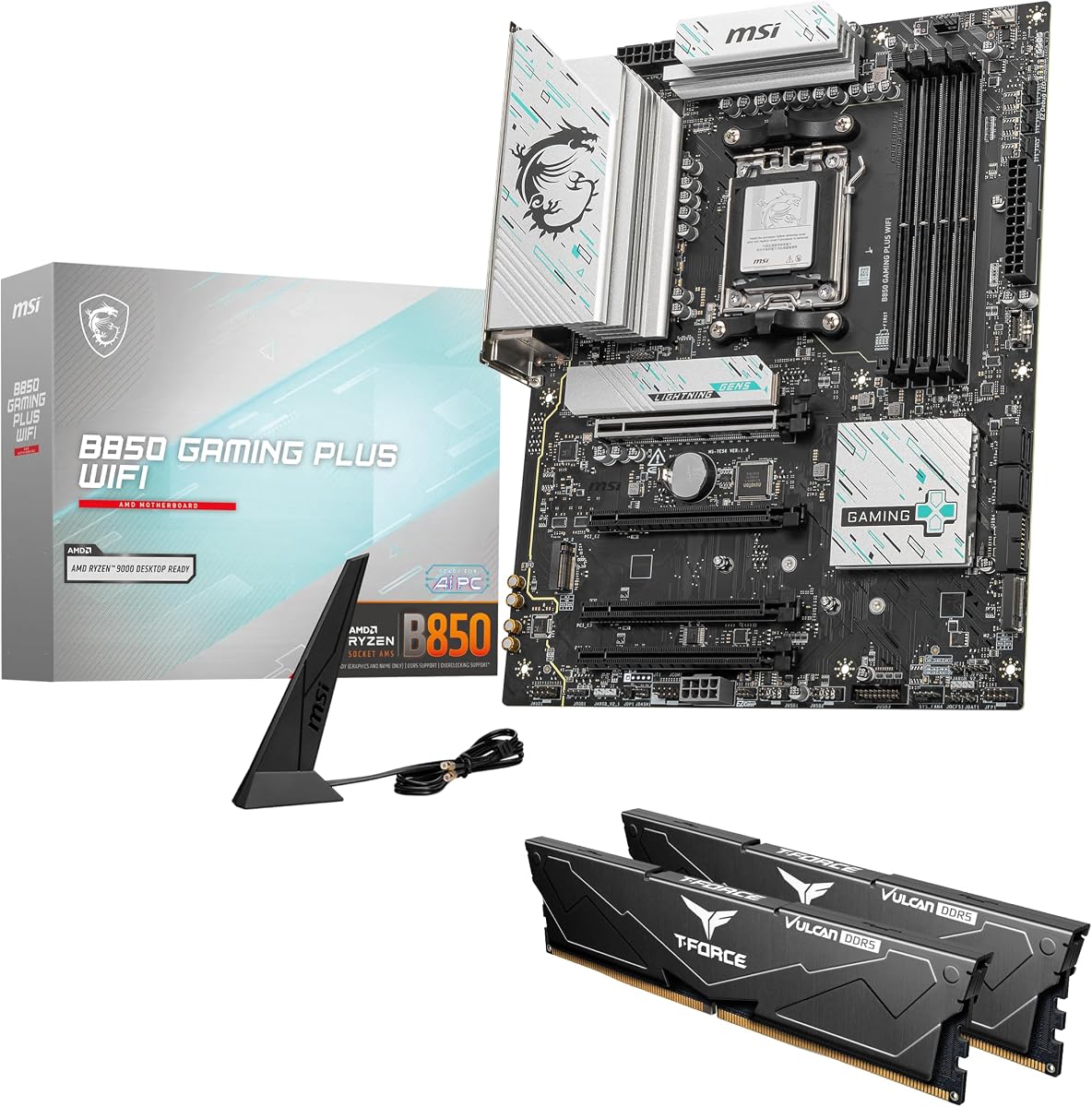
Call this out clearly: the MSI B850 GAMING PLUS WIFI + 32GB DDR5 listing is a bundle, not a bare motherboard. Per the pack about text, you get the MSI board paired with a TEAMGROUP T-Force Delta DDR5 32GB kit configured as 2x16GB. That single fact changes how you shop. If you already own EXPO RAM, buy a standalone board elsewhere in this guide. If you are starting from zero and want a known-good 32GB dual-channel kit staged for AM5, bundles like this remove the classic “will these sticks train?” anxiety.
The included memory runs at 6000MHz (PC5-48000) with CL38 timings—right in the bandwidth/latency zone AMD’s AM5 guidance has favored for Zen 4 and Zen 5 gaming PCs. Enable AMD EXPO (or XMP 3.0 where presented) in the BIOS to unlock the rated speed without manual primary timing gymnastics. For most 1440p gaming and creator multitasking builds, 32GB at 6000 CL38 is a happier daily driver than a lonely 16GB kit you planned to expand later.
The motherboard side of this SKU is a Gaming Plus WIFI flavor that the title differentiates from the WIFI6E board earlier in our list. Here you get WiFi 7, 5G LAN, M.2 Gen5, and both PCIe 5.0x16 and 4.0x16 signaling called out in the product title—more aggressive connectivity than the WIFI6E Gaming Plus that trades Gen5 GPU lanes away. Treat the two MSI Gaming Plus products as cousins, not twins: check the exact ASIN and wireless/LAN generation every time, because naming overlap is real in motherboard retail.
Bundle logistics deserve a sober paragraph. Confirm whether the seller ships board and RAM together, whether warranty claims go to MSI and TEAMGROUP separately, and what happens if the RAM arrives with a bent clip or the board fails POST. Keep both product boxes and photograph serials. If you chase RGB sync, T-Force Delta sticks usually want a 5V ARGB header plan so the RAM does not sit rainbow-disconnected from the rest of the case.
Who is this for? First AM5 builders who want WiFi 7, multi-gig LAN ambition via 5G Ethernet, PCIe 5.0 on the graphics slot, and a ready 32GB kit without opening three browser tabs of RAM compatibility lists. Who should pass? White-theme builders (Delta RGB kits are often black/RGB), people who already stocked 64GB, and anyone who preferred the quieter PRO B850-S personality. Used thoughtfully, this bundle is the “stop researching, start building” closer of the pack.
ASIN B0GYG4199J is the bundle with WiFi 7 and 5G LAN messaging plus RAM. ASIN B0FYRPBJ9S is the bare WIFI6E board with PCIe 4.0 x16 emphasis. Same family name, different shopping outcomes—verify the listing every time.
Seat the two sticks in the channel-recommended DIMM slots (usually A2/B2 on MSI diagrams), flash BIOS if your Ryzen requires it, then enable EXPO once. Run a memory stress tool before you trust a weekend of gaming with unsaved captures.
If street pricing on a bare PCIe 5.0 board plus a non-RGB 6000 kit you prefer is cleaner for your theme, split the purchase. Bundles win on convenience and matched kits, not on every aesthetic.
We may earn a commission at no additional cost to you.

B850 boards in this pack split between roughly 8+2+2 Eagle designs and 12- to 14-stage midrange designs from MSI, GIGABYTE AORUS, and ASUS TUF/ROG. A 9600X gaming PC rarely needs the heaviest VRM; a 9950X exporting video all afternoon does. Match phase count and heatsink ambition to sustained power, not to marketing adjectives. If you live in a hot climate with a meshless case, bias toward the 14+2+x boards even for eight cores.
Several excellent MSI options here still use PCIe 4.0 x16 for the GPU while offering Gen5 M.2. That is a valid 2026 trade if you prioritize memory overclocking and price. It is the wrong trade if your personal rule is maximum electrical future-proofing. Be honest: if you swap platforms when you swap GPUs, Gen4 x16 is fine. If you keep motherboards forever, prefer AORUS Elite, TUF PLUS, Strix, or the WiFi 7 Gaming Plus bundle that advertises PCIe 5.0x16.
WiFi 7 appears on AORUS Elite, TUF, Strix, Eagle WIFI7 ICE, and the MSI bundle; WiFi 6E appears on MSI Gaming Plus WIFI6E, PRO B850-S, and the B850M Eagle. Buy the radio that matches your router’s ceiling. On the wired side, 2.5GbE is common; the MSI bundle’s 5G LAN is the outlier for people with multi-gig switches.
Two M.2 slots suit most gamers; three feel comfortable for OS/cache/games; four (Strix A/G) suit creators and hoarders. mATX boards (Strix B850-G, B850M Eagle) demand case discipline—GPU length, cooler height, and PSU cable bulk become the real enemies. ATX remains the lowest-stress path for first builds.
ICE white boards only pay off in themed builds. Five-year AORUS Elite warranty pitches beat three-year Eagle coverage for long keepers. Bundles that include RAM—like the MSI Gaming Plus WIFI + T-Force Delta kit—are convenience products: fantastic when you need memory anyway, wasteful when you do not. Always verify whether a listing is bare board or board-plus-RAM before comparing street value.
B850 sits in the midrange AM5 stack with the USB, PCIe, and wireless features most gamers and creators actually use, without requiring X870E spend for every build. The boards in this guide show the chipset can deliver WiFi 7, multi-gig LAN, Gen5 storage, and solid VRMs when manufacturers choose to populate them. You are buying implementation quality—phases, heatsinks, slot counts—more than a magic chipset letter.
Usually no for today’s cards, which is why MSI’s high-rated PCIe 4.0 x16 B850 boards remain rational. Choose PCIe 5.0 if you want maximum electrical headroom, you keep motherboards across multiple GPU generations, or you simply hate feeling behind on the spec sheet. Game frame rates will not collapse on Gen4 x16 with current midrange and high-end GPUs in normal use.
Worth it when your router or mesh already supports WiFi 7 and you care about peak wireless throughput or future multi-device congestion features. If your network is WiFi 6/6E, a WiFi 6E board like the MSI PRO B850-S or Gaming Plus WIFI6E will not be the bottleneck. The OS caveat on some ASUS boards—full WiFi 7 needing Windows 11 24H2—also matters; update before you blame the antenna.
32GB (2x16) at around 6000 MT/s remains the pragmatic gaming and multitasking baseline in 2026, which is why the MSI bundle’s T-Force Delta 32GB kit is compelling. 64GB helps heavy video, VMs, and huge sample libraries. Favor dual-channel kits with EXPO support, seat them in the slots your manual recommends, and stress-test after enabling the profile.
They are different ASINs with different feature callouts. The WIFI6E board (B0FYRPBJ9S) emphasizes WiFi 6E, 2.5G LAN, and a PCIe 4.0 x16 GPU slot. The bundle (B0GYG4199J) includes TEAMGROUP T-Force Delta 32GB DDR5 and advertises WiFi 7, 5G LAN, and PCIe 5.0x16 & 4.0x16. Always compare the exact listing rather than the shared “Gaming Plus” nickname.
Pick Strix B850-A when you need four M.2 slots, WiFi 7 Q-Antenna, and PCIe 5.0 polish for a media-heavy disk layout. Pick PRO B850-S when the machine is a quiet hybrid office PC, you value the 4.8 rating and calm aesthetics, and two M.2 slots plus WiFi 6E already cover your workflow. Creators are not a monolith—storage count and noise/appearance often decide before raw VRM bragging does.
Not inherently, but clearance math gets stricter. The Strix B850-G and B850M Eagle both fit discrete GPUs when the case allows the card’s length and slot width. Problems appear with vertical mounts, front radiator stacks, and underside M.2 access after install. Measure GPU length, PSU shroud height, and side-panel thickness before assuming mATX automatically equals SFF pain.
They should. If you keep PCs a long time or hate RMA roulette, the AORUS Elite WIFI7 and Elite WIFI7 ICE five-year pitch is a tangible advantage over three-year Eagle coverage. Register the product, keep receipts, and photograph the serial. Warranty length does not fix a board that lacks the slots you need, but among equals it is a strong tie-breaker.
Often yes for cases—ATX and mATX mounting has not changed—and frequently yes for coolers if you have the AM5 bracket kit many vendors shipped or offer on request. Confirm socket clearance around tall AORUS/ROG heatsinks and that your cooler’s cold plate still makes even contact. Front-panel Type-C needs a matching motherboard header for full speed.
Most first builds should start with either the GIGABYTE B850 AORUS Elite WIFI7 for a complete PCIe 5.0/WiFi 7 ATX kit, the MSI PRO B850-S for a calm high-rated workhorse, or the MSI Gaming Plus WIFI6E if value and DDR5 tuning matter more than Gen5 GPU lanes. Add the RAM bundle only if you truly need the included T-Force 32GB. Save Strix and ICE variants for clear feature or theme needs.
The best B850 motherboard in 2026 matches your CPU’s sustained power, your case’s form factor, and your router’s wireless generation—not the loudest shroud. Across this pack, the MSI PRO B850-S WIFI6E earns top-pick status for calm reliability and the highest rating; the ASUS ROG Strix B850-A Gaming WiFi wins for four M.2 slots and gaming-centric WiFi 7 features; and the MSI B850 Gaming Plus WIFI6E remains the everyday value ATX if you accept PCIe 4.0 for graphics.
GIGABYTE’s AORUS Elite WIFI7 pair covers builders who want PCIe 5.0, WiFi 7, and a five-year warranty story; TUF B850-PLUS adds Thunderbolt-header foresight; Strix B850-G and B850M Eagle split compact-case needs between premium and essential; Eagle WIFI7 ICE keeps white themes affordable; and the MSI Gaming Plus WIFI + 32GB T-Force bundle is the convenience closer when you still need memory.
Pick your lane, verify the ASIN so WiFi generations and bundles do not surprise you, enable EXPO after a BIOS update, and spend the leftover budget where it shows on screen—usually the GPU and a competent cooler. B850 is mature enough in 2026 that careful shopping beats chipset anxiety.