Expert Review & Guide

Best 165Hz Monitors in 2026 for Smooth FHD and QHD

One hundred sixty-five hertz sits in an oddly perfect place on the refresh-rate ladder. It is a meaningful jump from the 60Hz panels still bundled with budget laptops and office PCs, yet it does not demand the GPU headroom or wallet stretch of 240Hz esports rigs. For most gamers upgrading in 2026, 165Hz is the refresh rate where motion starts to feel genuinely fluid in shooters, racers, and fast camera pans—without turning every purchase into a frame-chasing science project.

This guide compares ten current listings built around that 165Hz sweet spot, with honest caveats where the pack diverges: Samsung's newer Odyssey G51F pushes to 180Hz, KOORUI's flat and curved 24-inch models also advertise 180Hz, and Sceptre's compact 22-inch panel tops out at 144Hz—still relevant if you need a small desk footprint rather than chasing every last Hertz. We cover Full HD versus QHD pixel density, curved versus flat ergonomics, VA contrast versus IPS color, and the dorm-room budget lane versus premium Odyssey polish.

Start with our top picks if you want quick answers: the Samsung 27-inch Odyssey G5 G51F for the best overall 165Hz-class experience, the ASUS TUF VG277Q1A for trusted 27-inch FHD gaming, and the Amazon Basics 24-inch for plug-and-play value. Read the full reviews for cable requirements, honest refresh ceilings, and which panel type fits your desk depth and GPU.

Top 165Hz Monitor Picks for 2026

Best Overall 165Hz-Class Pick

Samsung 27" Odyssey G5 G51F 180Hz QHD

★★★★★9/10
Samsung 27" Odyssey G5 G51F 180Hz QHD
  • QHD 2560×1440 with 180Hz refresh and 1ms response for sharp, fast motion
  • HDR10, AMD FreeSync, Black Equalizer, and Virtual Aim Point gaming tools
  • Height-adjustable stand with tilt, pivot, and Auto Source Switch+ convenience
Check Price →
Best Trusted FHD Gaming

ASUS TUF VG277Q1A 165Hz

★★★★★9.2/10
ASUS TUF VG277Q1A 165Hz
  • 27-inch Full HD panel at 165Hz with ELMB and 1ms MPRT blur reduction
  • FreeSync Premium works with AMD and compatible NVIDIA GeForce cards
  • Shadow Boost for dark-scene detail plus HDMI and DisplayPort in the box
Check Price →
Best Budget Plug-and-Play

Amazon Basics 24" 165Hz

★★★★★9.2/10
Amazon Basics 24" 165Hz
  • 24-inch IPS at 1080P with 165Hz, 1ms response, and adaptive sync
  • VESA compatible with straightforward setup and included guidance for max refresh
  • Strong ratings for dorm and first-build desks that need reliable motion clarity
Check Price →

As an Amazon Associate we earn from qualifying purchases. We may earn a commission at no additional cost to you.

165Hz Monitors Compared

Refresh rate is the headline, but panel type, resolution, and curve radius decide how that speed actually feels. Use this table to shortlist by size and pixel count, then read the reviews for cable footnotes, honest 144Hz versus 165Hz versus 180Hz ceilings, and whether built-in speakers or VESA mounting matter for your desk.

#ProductSpecificationsScore
1
  • 23.8" FHD VA, 165Hz, 1ms VRB, FreeSync Premium
  • ZeroFrame bezels, HDR Ready, 100×100mm VESA
  • DisplayPort 1.2, dual HDMI 2.0, tilt -5° to 15°
9
2
  • 32" QHD 1000R curved VA, 165Hz, 1ms MPRT
  • HDR10, AMD Radeon FreeSync, Eye Saver Mode
  • Immersive large-format gaming with glare-reduction focus
8.8
3
  • 27" QHD flat, 180Hz, 1ms, HDR10, FreeSync
  • Height/tilt/pivot stand, Black Equalizer, Virtual Aim Point
  • Auto Source Switch+ for multi-device desks
9
4
  • 27" FHD, 165Hz (144Hz compatible), 1ms ELMB MPRT
  • FreeSync Premium, Shadow Boost, eye-care features
  • HDMI and DisplayPort cables included in box
9.2
5
  • 23.8" viewable IPS FHD, 165Hz, 1ms, adaptive sync
  • VESA mount ready, plug-and-play setup
  • Requires DP 1.4 or HDMI 2.0 for max refresh per listing
9.2
6
  • 24" FHD VA, 180Hz, 3000:1 contrast, eye-care modes
  • HDMI 2.0 and VGA, 100×100mm VESA, thin bezels
  • Dorm-friendly footprint with dual-monitor flexibility
8.8
7
  • 32" 1500R HVA curved FHD, 165Hz, 1ms MPRT
  • 122% sRGB, HDR10, Adaptive Sync, GamePlus tools
  • HDMI, DP, USB, earphone jack, VESA, tilt -5° to 15°
9
8
  • 22" FHD flat, up to 144Hz (adjacent to 165Hz class)
  • HDMI and DisplayPort, built-in speakers
  • Blue-Light Shift, minimal bezels for dual-screen setups
8.8
9
  • 27" FHD IPS, up to 165Hz, 1ms BR, FreeSync
  • 99% sRGB, built-in speakers, FPS/RTS presets
  • DisplayPort and HDMI, VESA wall-mount pattern
8.8
10
  • 24" 1500R curved FHD, 180Hz, 1ms MPRT, Adaptive Sync
  • 99% sRGB, HDR10, 3000:1 contrast, eye-care filters
  • Dual HDMI 2.0, DisplayPort 1.2, VESA, no speakers
9

1. Acer Nitro KG241Y Sbiip - Best Compact VA Value

Acer Nitro KG241Y Sbiip

Acer Nitro KG241Y Sbiip

9/10★★★★★

The Acer Nitro KG241Y Sbiip is the sort of monitor that makes 165Hz feel accessible rather than exotic. At 23.8 inches and Full HD, it targets the gamer who is stepping up from a 60Hz office screen or an old 144Hz panel that never quite felt stable. The VA panel trades a little off-angle color shift for deeper blacks and a more cinematic feel in story-driven titles—exactly the kind of contrast boost IPS budget panels sometimes wash out in dim corridors and night scenes.

  • 23.8" FHD VA panel at 165Hz with 1ms VRB response
  • AMD FreeSync Premium, ZeroFrame design, HDR Ready
  • DisplayPort 1.2, dual HDMI 2.0, 100×100mm VESA mount
Check Price →
✓ Pros
  • True 165Hz at a desk-friendly 24-inch class size
  • ZeroFrame bezels simplify clean dual-monitor arrangements
  • FreeSync Premium helps smooth frame pacing on mid-range GPUs
  • VA panel delivers stronger contrast than many budget IPS rivals
  • Included HDMI cable and VESA support reduce setup friction
✕ Cons
  • VA viewing angles trail IPS for shared-screen or color work
  • 1080P at 24 inches is sharp but not the pixel density of QHD
  • Tilt-only stand may push ergonomic buyers toward a monitor arm

Detailed review

Motion handling is where the listing earns its Nitro badge. One hundred sixty-five hertz with a 1ms VRB (Visual Response Boost) claim is Acer's way of saying the panel can keep up with fast camera pans and strafe-tracking in Apex Legends or Valorant without the smear that ruins flick shots. Pair that with AMD FreeSync Premium and you get the adaptive sync layer that matters when your GPU bounces between 120 and 165 frames depending on the map and effects load.

Physical design is practical rather than flashy. ZeroFrame bezels mean the outer plastic does not dominate the front—useful if you are building a side-by-side study-and-game desk with a second monitor for Discord or lecture slides. VESA mounting at 100×100mm is standard but not universal on the cheapest gaming listings, and Acer includes it here along with DisplayPort 1.2 and two HDMI 2.0 ports so you can route a PC on DP and a console on HDMI without a switcher.

HDR Ready is a modest label—do not expect OLED-tier highlights—but it signals the panel can accept HDR metadata for games and streaming apps that tone-map aggressively. NTSC 72% color saturation is honest mid-tier territory: fine for gaming and YouTube, not the first pick for print-accurate photo editing. Tilt from -5° to 15° covers basic ergonomics; if you need height adjustment, budget for an arm.

Who should buy this? Competitive players on a budget who want native 165Hz without jumping to 27-inch 1080P where pixels can look soft, or anyone replacing a 24-inch 144Hz panel and wants a measurable refresh bump plus FreeSync Premium stability. It is not the QHD clarity of Samsung's Odyssey G51F, but it is a grounded, no-nonsense 165Hz VA option with strong owner ratings.

Setup tip from the spec sheet: use DisplayPort when possible for the full refresh envelope, confirm Windows advanced display settings show 165Hz after install, and enable FreeSync in both the monitor OSD and your GPU control panel. Those three steps prevent the classic 'I bought a fast monitor but it feels like 60Hz' support ticket.

Best for tight desks and dual-screen students

The 24-inch footprint fits dorm desks and IKEA depth limits better than 32-inch curved giants. ZeroFrame styling pairs cleanly with a vertical second monitor for notes or chat.

Versus Amazon Basics 24-inch IPS in this pack

Acer's VA leans contrast and immersion; Amazon Basics IPS favors viewing angles and plug-and-play simplicity. Pick VA if you game alone in a darker room; pick IPS if roommates watch from the side.

Check Price on Amazon →

We may earn a commission at no additional cost to you.

2. Samsung 32" Odyssey G55C - Best Large Curved QHD

Samsung 32" Odyssey G55C

Samsung 32" Odyssey G55C

8.8/10★★★★☆

Samsung's Odyssey G55C at 32 inches is what happens when you want 165Hz to feel cinematic rather than merely fast. The 1000R curvature is tuned to hug human peripheral vision more tightly than the gentler 1500R curves on smaller budget panels. Sit at the right distance and racing games, flight sims, and third-person adventures gain a sense of depth that flat 32-inch monitors struggle to replicate—even when those flat panels share the same refresh rate.

  • 32" QHD 1000R curved VA, 165Hz, 1ms MPRT
  • HDR10, AMD Radeon FreeSync, Eye Saver and flicker reduction
  • 1.7× pixel density versus FHD for sharper in-game detail
Check Price →
✓ Pros
  • 1000R curve wraps peripheral vision for racing and adventure games
  • QHD resolution scales detail without the GPU tax of 4K
  • 165Hz with 1ms MPRT is a proven smoothness stack for AAA and shooters
  • Samsung Eye Saver Mode and anti-flicker for long sessions
  • HDR10 adds punch to supported titles and streaming content
✕ Cons
  • 32-inch QHD demands desk depth—sit too close and edges feel tall
  • 1000R curvature can feel aggressive for spreadsheet-heavy workdays
  • VA panel is not the color-proof choice for professional photo grading

Detailed review

Resolution is QHD—2560×1440—which Samsung correctly notes is roughly 1.7× the pixel density of Full HD. That matters at 32 inches: 1080P at this size can look chunky, while QHD keeps UI text and distant enemies sharper without requiring a flagship GPU to maintain triple-digit frame rates. One hundred sixty-five hertz is the sweet spot here: fast enough for competitive play, realistic enough that a mid-tier card can often feed the panel in optimized titles.

Motion credentials follow Samsung's Odyssey playbook: 1ms MPRT response time marketing, AMD Radeon FreeSync to keep the monitor and GPU in sync, and HDR10 for scenes that benefit from brighter highlights and deeper shadow anchors. FreeSync is the unsung hero on QHD panels—when frame rates dip during explosions or open-world transitions, adaptive sync prevents the tearing that makes high refresh feel pointless.

Eye care features are not afterthoughts on a 32-inch panel you might stare at for hours. Eye Saver Mode reduces blue light for late-night sessions, and flicker reduction targets the invisible PWM that fatigues some users over marathon raids. Glare-free coating messaging suggests Samsung tuned the finish for bright rooms—still use sensible desk placement, but it is a thoughtful nod to mixed-use spaces.

Tradeoffs are honest. VA contrast is excellent for moody games but off-angle color shift can annoy if you share the screen for co-op couch viewing from the side. The 1000R bend can distort straight lines in CAD or video timelines if this is your only work monitor. And desk depth matters: measure before buying; a 32-inch curve eats more real estate than a 27-inch flat.

Choose the G55C when immersion and QHD clarity matter more than compact footprint. It pairs naturally with AMD GPUs but FreeSync benefits NVIDIA users too when adaptive sync is enabled correctly. If you want Samsung polish at 27 inches with even higher refresh, compare the G51F review next—it trades curve drama for ergonomic stand flexibility and 180Hz headroom.

GPU pairing guidance

Target high settings at QHD 165Hz in your main titles, or accept medium presets in heavier AAA games. FreeSync makes frame-rate dips less painful, but stable 120+ fps still feels best.

Versus KTC 32-inch curved FHD

G55C wins on resolution and tighter 1000R immersion. KTC wins on desk budget and wider sRGB marketing for colorful FHD gaming. Pick QHD if your GPU can sustain it.

Check Price on Amazon →

We may earn a commission at no additional cost to you.

3. Samsung 27" Odyssey G5 G51F - Best Overall 165Hz-Class

Samsung 27" Odyssey G5 G51F

Samsung 27" Odyssey G5 G51F

9/10★★★★★

If 165Hz is the refresh-rate sweet spot for 2026 upgrades, the Samsung Odyssey G5 G51F is the monitor that politely raises the ceiling to 180Hz without jumping into esports-tax territory. That extra headroom matters when your GPU can deliver it—you gain smoother mouse feel in Counter-Strike and Fortnite—and when it cannot, FreeSync keeps lower frame rates presentable. For shoppers explicitly searching 'best 165Hz monitors,' this is the premium pick that still belongs in the conversation because it does everything a great 165Hz panel should, then adds Samsung's gaming OSD tools and a proper ergonomic stand.

  • 27" flat QHD, 180Hz refresh, 1ms response, HDR10
  • AMD FreeSync, Black Equalizer, Virtual Aim Point overlays
  • Height/tilt/pivot stand with Auto Source Switch+
Check Price →
✓ Pros
  • 180Hz QHD exceeds typical 165Hz class with room to grow
  • Black Equalizer lifts shadow detail without blowing highlights
  • Ergonomic stand beats tilt-only budget rivals in this pack
  • Virtual Aim Point helps training without third-party software
  • Auto Source Switch+ simplifies PC-and-console shared desks
✕ Cons
  • QHD at 180Hz needs a capable GPU for maximum benefit
  • Flat panel lacks the wrap of Samsung's 1000R Odyssey siblings
  • HDR10 is entry-level—manage expectations versus true HDR displays

Detailed review

QHD on a 27-inch flat panel is the density most enthusiasts consider ideal: sharper than 1080P without the magnification issues some users dislike at 24 inches. Pin-sharp text, cleaner minimap edges, and more room for productivity side-by-side windows make this a credible dual-purpose monitor if you refuse to own separate work and game displays. HDR10 support adds scene pop when content is mastered well; it will not replace a dedicated HDR reference monitor, but it beats SDR-only budget panels in supported games.

Samsung's gaming feature set is more than marketing fluff here. Black Equalizer adjusts gamma in dark regions so campers in shadowed corners become visible without turning midday scenes into blown-out messes. Virtual Aim Point overlays a center reticle for aim training in titles that lack built-in crosshair options—controversial in some competitive contexts, handy for practice lobbies. Auto Source Switch+ detects active inputs, which is genuinely convenient when a PlayStation and PC share the desk and you hate diving into the OSD every swap.

The stand earns its keep: height, tilt, and pivot adjustments let you align the panel with your eye line instead of stacking textbooks under the base like dorm-era hacks. That ergonomics story separates this Odyssey from many 165Hz listings that cheap out on mechanical design. Combined with 1ms response messaging and AMD FreeSync, the daily experience feels cohesive—fast, adjustable, and tuned for long sessions.

Honest caveat: listing 180Hz in a 165Hz guide is intentional. Many vendors now ship panels that exceed 165Hz natively while still marketing the category shoppers search. You are not buying obsolete tech—you are buying headroom. If your GPU tops out around 144–165 fps in QHD, you still benefit from the panel's clarity and features; enable the maximum refresh your hardware supports and call it a win.

Compared to the ASUS TUF VG277Q1A elsewhere in this pack, the G51F asks for more GPU and rewards you with QHD and Samsung's gaming toolkit. Compared to the 32-inch G55C, it trades curved immersion for desk-friendly size and higher refresh. For most readers balancing performance, ergonomics, and future-proofing, this is our best overall 165Hz-class pick.

Before you checkout: confirm DisplayPort bandwidth on your GPU, update drivers, and walk through Samsung's setup guide for FreeSync and refresh selection. The monitor is only as fast as the cable and port chain you attach to it.

Who should stretch to QHD 180Hz

Buyers with RTX 4060-class or better AMD equivalents who play a mix of competitive and AAA titles. If you are GPU-limited below 120 fps at QHD, consider the ASUS TUF FHD path instead.

Console note

Modern consoles may not output 180Hz at QHD—Auto Source Switch+ still helps, but expect 120Hz caps on some boxes. This monitor shines brightest on PC.

Check Price on Amazon →

We may earn a commission at no additional cost to you.

4. ASUS TUF VG277Q1A - Best Trusted FHD Gaming

ASUS TUF VG277Q1A

ASUS TUF VG277Q1A

9.2/10★★★★★

ASUS TUF monitors exist because gamers want a brand that feels accountable when settings get confusing. The VG277Q1A is a 27-inch Full HD panel at 165Hz (with 144Hz compatibility noted in the title) that prioritizes motion clarity and adaptive sync interoperability over flashy curves or QHD demands. Its 4.6 rating in this pack is not accidental—TUF lines tend to deliver predictable OSD behavior, included cables, and firmware that plays nicely with both AMD FreeSync Premium and NVIDIA GeForce adaptive sync on supported cards.

  • 27" FHD 165Hz with 1ms MPRT and ELMB blur reduction
  • FreeSync Premium, Shadow Boost, ASUS eye-care suite
  • HDMI and DisplayPort cables included; tilt adjustable stand
Check Price →
✓ Pros
  • Highest rating in this pack reflects reliable owner satisfaction
  • ELMB plus adaptive sync tackles blur without always sacrificing brightness
  • FreeSync Premium and G-SYNC compatible modes cover AMD and NVIDIA
  • Shadow Boost reveals dark-scene detail for tactical advantage
  • Both HDMI and DisplayPort cables ship in the box
✕ Cons
  • 1080P at 27 inches shows visible pixel structure up close
  • Tilt-only stand—no height adjustment without VESA arm
  • Adobe Creative Cloud bundle is time-limited per listing terms

Detailed review

Extreme Low Motion Blur (ELMB) is ASUS's answer to the ghosting tradeoff. Traditional motion blur reduction often dims the panel or fights with adaptive sync; ELMB is designed to work alongside adaptive sync on this model so you can reduce trailing in fast pans without turning off FreeSync entirely. Paired with 1ms MPRT messaging, the monitor targets esports players who notice micro-stutter and blur even when frame rates look high on paper.

Shadow Boost is the practical gaming feature you feel in ranked play. It brightens dark regions while trying to preserve highlights, which helps spot enemies in dim corners without cranking gamma globally and washing out the whole scene. It is not a substitute for game-specific brightness calibration, but it is a useful starting point for titles with aggressive night lighting.

The 27-inch size at 1080P is a deliberate value play. Pixel density is lower than 24-inch 1080P or any QHD option here—sit closer than two feet and you will see the grid. Sit at a typical desk distance, however, and the larger canvas helps with visibility in MOBAs and strategy games while staying easier to drive at 165Hz on modest GPUs. If your graphics card struggles at QHD, this is the responsible recommendation.

In the box, ASUS includes HDMI and DisplayPort cables plus the usual warranty and quick-start paperwork. That sounds basic, but many budget monitors force a separate cable order before you can hit advertised refresh rates. Eye-care modes round out the package for students who also write papers on the same panel.

The listing mentions complimentary Adobe Creative Cloud access with a 2026 validity window—treat it as a nice bonus if you edit, not a reason to buy a gaming monitor. For pure gaming, focus on FreeSync Premium enablement, ELMB tuning, and picking DisplayPort if your GPU supports it for the highest stable refresh.

Choose the VG277Q1A when you want the most trusted FHD 165Hz experience at 27 inches—especially on NVIDIA or AMD mid-range cards that can hold 165 fps in competitive titles but not QHD AAA loads. It is our counterweight to Samsung's QHD Odyssey: less pixel density, more frame-rate realism for many PCs.

ELMB tuning tip

Enable FreeSync first, then experiment with ELMB in offline modes. Some users prefer ELMB off for brightest image; others swear by it for Valorant flicks—personal preference wins.

Versus Sceptre 27-inch IPS in this pack

ASUS wins on brand support, ELMB, and included DP cable. Sceptre adds built-in speakers and 99% sRGB marketing—pick ASUS for pure gaming reliability, Sceptre if speakers matter.

Check Price on Amazon →

We may earn a commission at no additional cost to you.

5. Amazon Basics 24" 165Hz - Best Budget Plug-and-Play

Amazon Basics 24" 165Hz

Amazon Basics 24" 165Hz

9.2/10★★★★★

Amazon Basics entering the 165Hz category surprised some enthusiasts until the reviews piled up. This 24-inch IPS monitor does not try to be an Odyssey—it tries to be the monitor you unbox, connect, and actually run at 165Hz without a forum thread. The listing is unusually explicit about requirements: DisplayPort 1.4 or HDMI 2.0 compatible cables, GPU ports that support FHD at 165Hz, and manually selecting the maximum refresh in advanced display settings. That honesty saves returns.

  • 23.8" viewable IPS FHD, 165Hz, 1ms, adaptive sync
  • VESA compatible, plug-and-play connectivity
  • Listing requires DP 1.4 or HDMI 2.0 for maximum refresh
Check Price →
✓ Pros
  • IPS viewing angles suit shared desks and multi-purpose use
  • Strong 4.6 rating for a budget house brand gaming listing
  • Clear setup notes about achieving full 165Hz refresh
  • Compact 24-inch size fits dorms and first apartments
  • Adaptive sync helps budget GPUs feel smoother instantly
✕ Cons
  • Amazon Basics aesthetic is plain—no RGB, no gamer styling
  • Must follow cable and OS refresh steps or you may stay at 60Hz
  • Remove shipping protective film—easy to forget per listing warning

Detailed review

IPS at this size is the right panel for mixed use. Gaming benefits from adaptive sync when your frame rate wobbles, but IPS keeps colors stable when your roommate sits slightly off-center watching a cutscene. One millisecond response marketing and 165Hz refresh target the same competitive sweet spot as pricier 24-inch models—motion clarity is largely about refresh and overdrive tuning, and this panel delivers when configured correctly.

The protective film warning is worth repeating. Factory shipping film on the panel surface mimics scratches and dullness; new owners sometimes complain about image quality before peeling dated film off. Do that first, then calibrate brightness—your future self will thank you.

VESA compatibility means you can mount this on a inexpensive VESA arm and reclaim desk space in cramped dorm layouts. Plug-and-play messaging fits students who rotate between console and laptop HDMI without wanting a complicated OSD. It is not height-adjustable out of the box on the stand, but the mount path is the real ergonomics unlock.

Compared to KOORUI's 180Hz VA options later in this pack, Amazon Basics trades higher refresh marketing for IPS angles and Amazon return familiarity. Compared to Acer's Nitro VA, it trades contrast for clarity. For buyers who want the least drama getting to 165Hz, it is our budget plug-and-play pick.

Ideal buyer: first gaming PC, secondary monitor for a laptop, or parents buying a monitor that must double for homework and Minecraft. Not ideal for QHD purists or immersive 32-inch curved setups—those shoppers should scroll to Samsung entries.

First-hour setup checklist

Peel protective film, connect via DisplayPort if available, set 165Hz in Windows or macOS display settings, enable adaptive sync in GPU panel, then test in a high-fps game.

Dorm desk pairing

Pair with a VESA arm to lift the panel above textbooks and keyboards. At 24 inches, you retain desk depth for mouse pads without sacrificing refresh.

Check Price on Amazon →

We may earn a commission at no additional cost to you.

6. KOORUI 24" 180Hz FHD VA - Best Dorm VA

KOORUI 24" 180Hz FHD VA

KOORUI 24" 180Hz FHD VA

8.8/10★★★★☆

KOORUI's flat 24-inch monitor is explicitly pitched at dorm rooms, dual-screen setups, and first gaming builds—and the spec sheet backs the story. One hundred eighty hertz is the headline that pulls 165Hz shoppers upward: if you were already considering 165Hz, this panel offers a higher ceiling in the same size class, which matters for future GPU upgrades without replacing the display.

  • 24" FHD VA, 180Hz refresh, 3000:1 contrast ratio
  • Flicker-free and low blue light for long study sessions
  • HDMI 2.0, VGA, 100×100mm VESA, ultra-thin bezels
Check Price →
✓ Pros
  • 180Hz exceeds 165Hz class for shoppers who want extra headroom
  • VA contrast makes horror and RPG dark scenes more atmospheric
  • Thin bezels and compact stand fit crowded dorm desks
  • KOORUI warranty and support messaging is stronger than no-name brands
  • VGA port helps legacy office PCs in dual-use setups
✕ Cons
  • VGA cannot deliver 180Hz—use HDMI for serious gaming
  • No DisplayPort listed—check bandwidth limits for max refresh
  • VA off-angle viewing weaker than IPS Amazon Basics rival

Detailed review

The VA panel's 3000:1 static contrast ratio is the other half of the value proposition. IPS monitors in this pack can look slightly gray in black loading screens; VA holds deeper blacks that make night raids and cinematic cutscenes feel less washed out. That contrast advantage comes with the classic VA tradeoff: colors shift if someone watches from the side, so this is a single-viewer gaming desk monitor first.

Eye-care features—flicker-free backlight behavior and low blue light mode—reflect how KOORUI expects you to use it: all-day Zoom between evening ranked queues. Ultra-thin bezels help when you mount two KOORUI panels side by side for spreadsheets plus Discord, a common dorm layout.

Connectivity is pragmatic: HDMI 2.0 with included cable plus VGA for older laptops or lab machines. Note the absence of DisplayPort in the listing; HDMI 2.0 can carry 1080P at high refresh, but always verify your source and cable quality. VGA is a legacy convenience, not a gaming path.

KOORUI's service messaging—multi-year parts support and replacement windows—matters on budget panels where build variance exists. If you receive a damaged unit or missing accessory, the brand path beats anonymous white-label listings.

Who is this for? Budget gamers who prioritize contrast and 180Hz marketing over IPS angles, especially in small rooms where a 32-inch curve will not fit. Who should skip? Color-critical creators and anyone needing DisplayPort-only GPU routing without adapters.

Dual KOORUI dorm layout

Mount two 24-inch panels on a linear desk: games on the 180Hz primary, browser or notes on a cheaper secondary. Shared HDMI switches work; label cables to avoid mid-exam confusion.

180Hz versus 165Hz honesty

You may not feel a huge jump from 165 to 180 in blind tests, but buying 180Hz future-proofs slightly and keeps this guide honest about models that exceed the search keyword.

Check Price on Amazon →

We may earn a commission at no additional cost to you.

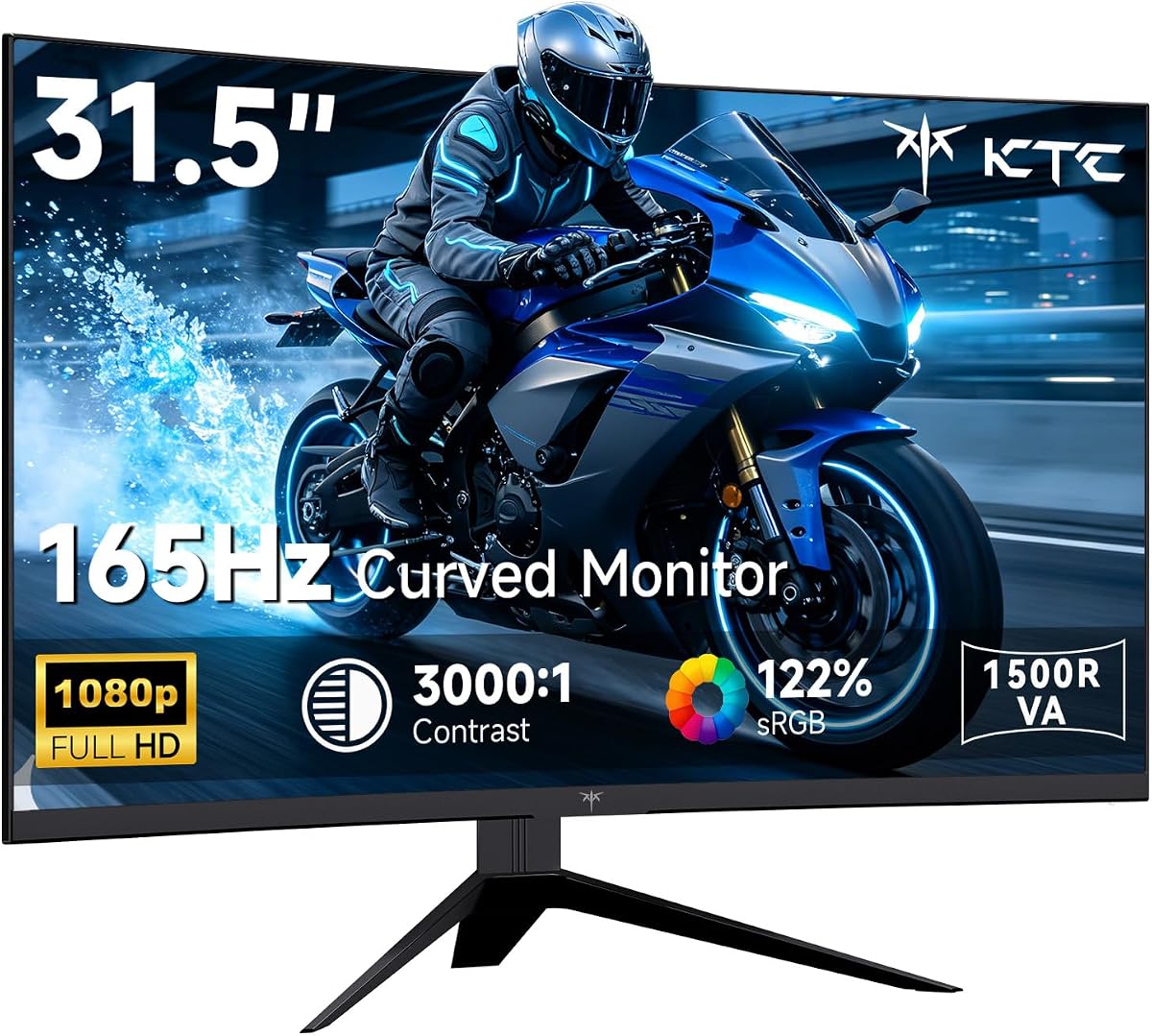
7. KTC 32" Curved 165Hz - Best Big Curved FHD

KTC 32" Curved 165Hz

KTC 32" Curved 165Hz

9/10★★★★★

KTC's 32-inch curved monitor answers a specific question: what if you want size and curve immersion without QHD GPU demands? At Full HD and 165Hz, even older mid-range cards can often sustain high frame rates in popular titles, which makes the motion benefits of 165Hz tangible instead of theoretical. The 1500R curvature sits between flat and aggressively wrapped—enough depth for racing games without the line distortion some users notice on 1000R panels when editing documents.

  • 32" 1500R HVA curved FHD, 165Hz, 1ms MPRT
  • 122% sRGB, HDR10, Adaptive Sync, GamePlus crosshair and timer
  • HDMI, DP, USB, earphone jack, VESA mount, tilt adjustment
Check Price →
✓ Pros
  • Large 32-inch curve at FHD is easier to drive at 165Hz than QHD
  • 122% sRGB and HDR10 punch above typical budget curved listings
  • GamePlus crosshair, Black eQualizer-style tools, and on-screen timer
  • Adaptive Sync compatible with FreeSync Premium and G-SYNC modes
  • Rich port selection including USB and earphone jack
✕ Cons
  • 1080P at 32 inches exposes pixel structure at normal desk distances
  • 1500R curve is milder than Samsung 1000R—less wrap, less distortion
  • HVA panel quality varies by batch like many value curved brands

Detailed review

Color marketing hits 122% sRGB with HDR10 support, which helps this value curved panel avoid the washed-out look cheaper TN-adjacent curves sometimes show. HVA is KTC's twist on VA tech—expect strong contrast with better uniformity than ancient budget VA, though still not IPS for wide viewing parties.

GamePlus features read like a checklist borrowed from premium gaming OSDs: crosshairs for FPS training, black equalizer-style shadow lifting, and an on-screen timer for speedrun or cooldown tracking. Adaptive Sync compatibility spanning FreeSync Premium and G-SYNC modes broadens GPU pairing—a relief when friends swap AMD and NVIDIA builds between visits.

Ports exceed the minimum: HDMI, DisplayPort, USB, earphone jack, and DC power. USB might be service-only or passive depending on revision—still useful for firmware or peripheral dongles. VESA mounting and -5° to 15° tilt cover basic ergonomics; at 32 inches, consider an arm for depth flexibility.

The honest downside is pixel density. 1080P stretched across 32 inches is visibly softer than 27-inch FHD or any QHD panel here. Sit farther back—living-room couch distance logic—or accept the softness trade for immersion scale. Competitive players who sit close for headshots often prefer 24–27-inch denser panels.

Buy the KTC when you want a big curved 165Hz experience on a GPU that will not happily run QHD Samsung Odyssey settings. Skip it if text clarity for homework matters as much as gaming—QHD 27-inch may serve you better.

Living-room versus desk use

This monitor makes more sense pushed back on deep desks or couch gaming setups where 32-inch FHD softness is less noticeable and curve immersion shines.

GamePlus for ranked warmups

Use crosshair overlay in training modes only—respect game terms of service for competitive queues. Timer overlays help ability cooldown practice in MOBAs.

Check Price on Amazon →

We may earn a commission at no additional cost to you.

8. Sceptre 22" Up to 144Hz - Best Small Desk

Sceptre 22" Up to 144Hz

Sceptre 22" Up to 144Hz

8.8/10★★★★☆

Honesty first: Sceptre's 22-inch monitor does not hit 165Hz. It tops out at 144Hz according to the product title, which is why we badge it as an adjacent pick in a 165Hz guide rather than pretending it belongs in the same refresh bucket. That matters for search integrity—you should know what you are buying. Still, it earns a place in this pack for buyers whose constraint is physical desk space, not Hertz bragging rights.

  • 22" FHD flat, up to 144Hz refresh (not native 165Hz)
  • Built-in speakers, HDMI and DisplayPort
  • Blue-Light Shift, minimal bezels for dual-monitor setups
Check Price →
✓ Pros
  • Smallest footprint in the pack for ultra-tight desks and LAN bags
  • Built-in speakers reduce desk clutter for casual play and calls
  • 144Hz still doubles 60Hz smoothness for esports on a budget
  • Minimal bezels suit dual-screen arrangements beside a laptop
  • 2026 model refresh suggests updated listing longevity
✕ Cons
  • 144Hz ceiling—not a true 165Hz panel despite pack context
  • 22-inch 1080P is crisp but cramped for productivity multitasking
  • Limited spec depth in listing compared to gaming-heavy rivals

Detailed review

Twenty-two inches at 1080P is pixel-dense and sharp for its size—think laptop replacement on a stand. If your dorm desk depth is measured in inches, not feet, a 32-inch curve is fantasy. This panel fits real constraints while still doubling the motion clarity of 60Hz laptop screens most students lug around.

Built-in speakers are rare in this pack. They will not replace studio monitors, but they eliminate a speaker purchase for casual Apex sessions, Zoom calls, and Nintendo Switch dock setups where audio routing is annoying. Blue-Light Shift targets long study sessions—the same audience KOORUI markets to, but with integrated audio.

Minimal bezels mirror the dual-monitor trend: pair this Sceptre beside a vertical 24-inch 165Hz panel later when budget allows, using the 22-inch as a portable secondary for travel or a tight primary until then. HDMI and DisplayPort cover modern sources; confirm refresh in OS settings like any gaming monitor.

The listing is lighter on gaming feature marketing—no FreeSync bullet parade, no HDR10 claims—which suggests a simpler panel tuned for everyday use with gaming headroom. Manage expectations: this is not Samsung Odyssey polish. It is a space-saving step up from 60Hz office panels.

Buy if size and speakers matter more than hitting 165 exactly. Skip if you are optimizing every Hertz for ranked play—144Hz is close, but the other nine monitors here justify the 165Hz search intent better.

Why include 144Hz in a 165Hz guide

Some shoppers need the smallest viable high-refresh panel, not the highest number. We include this Sceptre so you do not overspend on inches and Hertz you cannot fit or drive.

Speaker realism

Use speakers for convenience, not competitive audio. Footstep directionality still favors headphones in ranked games.

Check Price on Amazon →

We may earn a commission at no additional cost to you.

9. Sceptre 27" FHD IPS 165Hz - Best 27" FHD

Sceptre 27" FHD IPS 165Hz

Sceptre 27" FHD IPS 165Hz

8.8/10★★★★☆

Sceptre's 27-inch IPS monitor has been a budget favorite for years because it hits the numbers gamers search—165Hz, 1ms blur reduction, FreeSync—without pretending to be a premium Odyssey. IPS keeps colors stable when you lean back during cutscenes, and the 99% sRGB claim is meaningful for students who edit photos between matches, even if this is not a factory-calibrated studio display.

  • 27" FHD IPS, up to 165Hz, 1ms BR blur reduction
  • 99% sRGB, FreeSync, FPS and RTS display presets
  • Built-in speakers, DisplayPort and HDMI, VESA mount
Check Price →
✓ Pros
  • True 165Hz class at 27-inch FHD with IPS color angles
  • 99% sRGB claim helps casual creative work and vibrant games
  • FPS and RTS presets tune response and contrast per genre
  • Built-in speakers plus VESA for flexible desk layouts
  • FreeSync support for smoother frame pacing on budget GPUs
✕ Cons
  • 2022 model year—newer panels add ergonomic stands and higher refresh
  • Listing mentions 180Hz in about text but title caps at 165Hz—verify OSD
  • Gunmetal stand aesthetics are divisive versus minimalist dorm decor

Detailed review

Blur Reduction (BR) paired with high refresh targets the same pain point as ASUS ELMB: fast motion without smear. The listing's about section also references 180Hz in marketing copy while the title emphasizes up to 165Hz—typical budget monitor inconsistency. Treat 165Hz as your planning number unless the OSD proves otherwise on your unit; do not buy assuming 180Hz without verification.

Custom FPS and RTS presets adjust gamma and response curves for genre conventions—think brighter shadows for tactical shooters and slightly different tone mapping for strategy maps with lots of UI chrome. Built-in speakers again save desk space; gunmetal styling reads gamer without RGB circus.

FreeSync keeps tearing in check when frame rates dip—a common occurrence at 1080P on older GPUs that can still push high fps in esports titles. DisplayPort and HDMI cover PC and console, and VESA mounting lets you reclaim desk depth by lifting the panel on an arm.

Compared to ASUS TUF VG277Q1A, Sceptre trades brand-tier firmware polish and ELMB sophistication for speakers and aggressive sRGB marketing at a usually lower tier. Compared to Amazon Basics 24-inch, it gives you more screen area at the same resolution class—better for visibility, softer on pixel density.

Ideal buyer: all-in-one desk with speakers, 27-inch visibility, and 165Hz for mixed study and play. Less ideal if you need height-adjust stands or QHD—look at Samsung G51F instead.

Refresh rate verification

On setup, open OSD info and Windows display settings to confirm 165Hz. Ignore conflicting marketing numbers until you see the active mode yourself.

FPS preset usage

Switch presets per game genre, then fine-tune brightness. RTS preset can help MOBA ability visibility; FPS preset for tac-shooters.

Check Price on Amazon →

We may earn a commission at no additional cost to you.

10. KOORUI 24" Curved 180Hz - Best Curved 180Hz Bedroom

KOORUI 24" Curved 180Hz

KOORUI 24" Curved 180Hz

9/10★★★★★

KOORUI's curved 24-inch monitor closes this pack with a blend of trends: 180Hz refresh marketing, 1500R immersion, and dorm-bedroom aesthetics with three-sided slim bezels. For shoppers who typed 'best 165Hz monitors' but secretly wanted something faster and more stylized than flat office panels, this is the curve-and-speed compromise that still fits a small desk.

  • 24" 1500R curved FHD, 180Hz, 1ms MPRT, Adaptive Sync
  • 99% sRGB, HDR10, 3000:1 contrast, flicker-free eye care
  • Dual HDMI 2.0, DisplayPort 1.2, audio-out, VESA 100×100mm
Check Price →
✓ Pros
  • 1500R curve adds immersion without 32-inch desk depth demands
  • 180Hz refresh exceeds 165Hz search baseline for future GPU headroom
  • Dual HDMI plus DisplayPort simplifies PC and console switching
  • 99% sRGB and HDR10 for colorful games and streaming content
  • 3-sided bezel-less design looks modern in bedroom setups
✕ Cons
  • No built-in speakers—budget for headphones or external audio
  • Curved 24-inch benefit is subtle compared to larger radius panels
  • KOORUI warranty terms differ by component—read support docs

Detailed review

One hundred fifty millimeter radius curvature on a 24-inch panel is subtler than Samsung's 1000R on 32 inches—you get a hint of wrap that draws your eyes inward without bending spreadsheet columns into arcs. Adaptive Sync with 1ms MPRT messaging keeps fast shooters feeling responsive, and the 180Hz ceiling mirrors other KOORUI and Samsung listings that exceed strict 165Hz definitions.

Color and contrast specs punch up: 99% sRGB, 3000:1 contrast, 8-bit depth, HDR10 support. Night scenes in RPGs benefit from VA-style contrast behavior while sRGB coverage keeps skins and ability effects vivid. Flicker-free backlight and blue-light filtering acknowledge marathon session fatigue.

Connectivity is well thought out for multi-device bedrooms: two HDMI 2.0 ports, DisplayPort 1.2, and audio-out for headphones or a small speaker bar—note the explicit no-speakers design, unlike Sceptre rivals. Console gamers can park HDMI while PC uses DisplayPort without constant unplugging.

VESA 100×100mm mounting and tilt adjustment help position the curved panel at eye level—important because small curves look wrong when viewed from steep vertical angles. KOORUI's support window differentiates display versus accessory warranty lengths; keep receipts.

Versus the flat KOORUI 180Hz VA earlier in this list, choose curved for aesthetic immersion and dual HDMI; choose flat for VGA legacy support and ultra-thin dorm bezels. Versus Amazon Basics IPS, choose KOORUI for speed and curve; choose Amazon for simplest plug-and-play IPS clarity.

This is the bedroom/dorm pick when 165Hz is the floor, 180Hz is the bonus, and curve style matters as much as spec sheets.

Console plus PC routing

Assign HDMI 1 to console, HDMI 2 or DP to PC, route audio-out to headphones. Label inputs in the OSD to avoid wrong-source frustration.

Curved 24-inch expectations

Do not expect IMAX wrap—expect a stylish, slightly immersive upgrade over flat 24-inch panels at similar refresh tiers.

Check Price on Amazon →

We may earn a commission at no additional cost to you.

Best 165Hz Monitors in 2026 for Smooth FHD and QHD

How to Choose a 165Hz Monitor in 2026

Why 165Hz is the practical upgrade from 60Hz and 144Hz

Sixty hertz was fine when LCDs replaced CRTs for office work, but modern games render hundreds of frames per second on mid-tier hardware at 1080P. One hundred forty-four hertz was the enthusiast standard for years; 165Hz became the factory-native step many panels ship without overclock fuss. The felt difference from 144 to 165 is smaller than 60 to 144, but pricing often overlaps—buying 165Hz today avoids buying twice.

Full HD versus QHD at high refresh

Full HD at 24–27 inches maximizes frame rate per dollar—ideal for competitive titles and weaker GPUs. QHD at 27–32 inches sharpens UI and distant targets but demands more VRAM and shader power. Samsung's G51F and G55C represent QHD in this pack; ASUS TUF and most 24-inch models represent FHD. Match resolution to measurable fps, not aspiration.

Curved versus flat for 165Hz gaming

Curves at 32 inches and tighter 1000R–1500R radii add immersion for racing and exploration games. Flats excel for mixed productivity, straight-line design work, and multi-monitor alignment. Small 24-inch curves are as much style as function—fine if you like the look, not mandatory for performance.

Panel types: VA, IPS, and HVA in this pack

VA (Acer Nitro, Samsung Odyssey, KOORUI flat) favors contrast. IPS (Amazon Basics, ASUS TUF, Sceptre 27) favors viewing angles and color stability. KTC's HVA curved panel tries to blend contrast with gaming features. None magically wins every genre—pick based on room lighting and whether friends watch your screen.

When 180Hz and 144Hz listings still belong in a 165Hz guide

Retail shelves blur categories: Samsung G51F and KOORUI models advertise 180Hz, while Sceptre's 22-inch stops at 144Hz. Shoppers searching 165Hz benefit from seeing the full landscape—faster panels that exceed the keyword and smaller panels that trade last Hertz for size. We label each honestly in reviews and specs.

Cables, ports, and actually hitting advertised refresh

DisplayPort often unlocks the highest stable modes; HDMI 2.0 can work at 1080P high refresh but varies by monitor firmware. Amazon Basics explicitly warns about cable and port requirements—apply that mindset to every model. After connecting, set refresh in the OS, enable adaptive sync on GPU, and test with a frame-rate overlay.

Frequently Asked Questions

01

Is 165Hz noticeably better than 144Hz?

For many players, the jump from 144Hz to 165Hz is subtle compared to leaving 60Hz behind. The reason to buy 165Hz in 2026 is often pricing parity and native panel support rather than a night-and-day feel. Where 165Hz shines is alongside adaptive sync when your GPU outputs variable frame rates between 120 and 165—smoother than locking to 144 on a 144Hz cap.

02

Do I need a powerful GPU for a 165Hz monitor?

It depends on resolution. At 1080P, mid-range cards can often exceed 165 fps in esports titles. At QHD on monitors like the Samsung Odyssey G51F or G55C, you need more horsepower to fully use 165–180Hz in AAA games. A 165Hz monitor still benefits weaker GPUs via adaptive sync—you just will not always hit the ceiling.

03

Should I choose 1080P or QHD for 165Hz gaming?

Choose 1080P if competitive frame rate is the goal and your GPU is mid-tier or older. Choose QHD if you want sharper text and visuals at 27–32 inches and accept lower settings or fps in heavy games. This pack's Samsung QHD models and FHD ASUS/Amazon Basics models illustrate both paths clearly.

04

Are curved monitors better for 165Hz gaming?

Curves do not increase refresh rate—they change immersion. Samsung's 1000R 32-inch QHD and KTC's 1500R 32-inch FHD feel more wraparound in racing and adventure titles. Flat panels like the Odyssey G51F and ASUS TUF are easier for productivity and dual-monitor setups. Small 24-inch curves are aesthetic as much as functional.

05

Why does this guide include 180Hz and 144Hz monitors?

Product packs reflect what retailers group together. Samsung and KOORUI models exceed 165Hz, which is useful if you want headroom without a separate search. Sceptre's 22-inch model stops at 144Hz but fits desks that cannot host 27-inch panels—we label it an adjacent pick rather than a true 165Hz match.

06

HDMI or DisplayPort for 165Hz?

DisplayPort is generally the safest path to maximum refresh, especially on QHD panels. HDMI 2.0 can carry 1080P at high refresh on many models, including Amazon Basics with explicit cable guidance. Always check the monitor manual for port-specific limits and use quality cables.

07

Does FreeSync work with NVIDIA graphics cards?

Many monitors here, including ASUS TUF VG277Q1A, advertise compatibility with NVIDIA GeForce adaptive sync on supported GTX 10-series and newer cards. Enable G-SYNC compatible mode in NVIDIA Control Panel after connecting via DisplayPort. Samsung and KOORUI Adaptive Sync listings follow similar patterns—verify with your exact GPU model.

08

What size monitor is best for 165Hz in a dorm room?

Twenty-four inches is the dorm sweet spot: enough screen for games, small enough for shallow desks, and easier to hit high refresh at 1080P. Amazon Basics, Acer Nitro, and both KOORUI 24-inch models fit. Add a VESA arm to reclaim keyboard space. Avoid 32-inch curves unless you measure desk depth first.

09

Are built-in speakers good enough on gaming monitors?

Sceptre's 22-inch and 27-inch models include speakers convenient for casual play, calls, and Switch setups. They will not replace headphones for competitive audio positioning. KOORUI's curved 24-inch model omits speakers—plan headphones or a small speaker bar via audio-out.

10

Which 165Hz monitor should most people buy from this list?

Best overall 165Hz-class experience: Samsung 27-inch Odyssey G5 G51F for QHD, 180Hz, and ergonomic stand. Best trusted 1080P at 27 inches: ASUS TUF VG277Q1A. Best budget plug-and-play: Amazon Basics 24-inch IPS. Immersion seekers: Samsung 32-inch G55C QHD curved. Tight desks: Sceptre 22-inch 144Hz or Amazon Basics 24-inch depending on size versus Hertz priority.

Conclusion

One hundred sixty-five hertz remains the refresh rate where gaming monitors stop feeling like a compromise and start feeling like an upgrade you notice every session—without demanding esports-tier hardware. In this pack, Samsung's Odyssey G5 G51F is our best overall 165Hz-class pick thanks to QHD clarity, 180Hz headroom, and genuine ergonomic adjustability. ASUS TUF VG277Q1A is the FHD workhorse with ELMB and the strongest owner rating, while Amazon Basics 24-inch IPS wins plug-and-play dorm desks.

Beyond the podium, Samsung's 32-inch G55C delivers curved QHD immersion, KTC scales curve size at FHD for GPU-friendly fps, and KOORUI's flat and curved 24-inch 180Hz models stretch the category upward. Sceptre covers speaker-friendly FHD value and an honest 144Hz small-footprint alternative when inches matter more than the last twenty-one Hertz.

Match resolution to your GPU, use the right cable, enable adaptive sync, and measure your desk before chasing curve drama. Do that, and a 165Hz monitor in 2026 becomes the single most impactful upgrade below buying a new graphics card.