Best Premium Overall
Surface Laptop 7 Ultra 7 Business

- Intel Ultra 7 268V, 32GB DDR5, 1TB SSD, 48 TOPS NPU
- 15" 2.5K 120Hz touch at 600 nits with Studio Effects webcam
- Windows 11 Pro, Wi-Fi 7, USB4 dual-4K support, ~14-hour claim
Expert Review & Guide
Fifteen-inch laptops exist for people who still want a real desk in their bag. The extra diagonal over a 14-inch ultraportable is not vanity—it is spreadsheet columns, side-by-side lecture notes, and a numeric keypad that finance and nursing-charting workflows quietly depend on. In 2026 that size class also absorbs the Copilot+ generation: Snapdragon X Elite Surfaces with day-long batteries sit beside Intel N100 Pavilion builds stuffed with 32GB of RAM, while a Lenovo IdeaPad Slim 3 brings H-series i7 horsepower and a taller 16:10 FHD+ panel into the same shortlist.
Our pack spans ten Amazon listings you can actually buy: a 3.5-pound HP 15 FHD for school and office basics, an HP touch Ryzen 3 for gesture fans who accept HD resolution, the feather-minded LG gram Book with Iris Xe and dual M.2 upgrade paths, a platinum-white Pavilion that pairs an N100 with a terabyte SSD, a dale-red Renewed dual-core HP that is honest about being entry-level, three Microsoft Surface configurations (new Snapdragon, Intel Ultra 7 business, and a Renewed X Elite), plus the Luna Grey Lenovo with 24GB DDR5 and Windows 11 Pro.
We rank for how a 15-inch machine behaves across a kitchen island, a shared open office, and a weekend couch—not for synthetic charts alone. Watch for the traps that still haunt this size: 4GB Renewed leftovers, HD touch panels marketed like cinema screens, 256GB drives on premium lids, and resealed SSD upgrades with split warranties. If you want keypad comfort without a desktop tower, start with the Lenovo and the memory-heavy Pavilion. If you want AI PC polish and battery bragging rights, the Surface family is the lane. Details below, in pack order.

As an Amazon Associate we earn from qualifying purchases. We may earn a commission at no additional cost to you.
Use this table to separate keypad-friendly FHD workhorses from touch HD appliances and Copilot+ premium lids before reading the full reviews. Specs stay practical—no dollar prices.

If your mental picture of a 15-inch laptop is “too heavy to commute,” this natural-silver HP is the counterexample. At about 3.5 pounds and 0.7 inches thick, it keeps the size-class advantage—roomy FHD anti-glare panel, full keyboard, numeric keypad—without the bowling-ball chassis of older DVD-era 15-inchers. Students moving between dorm and library, and hybrid workers who still want keypad speed for expense reports, get the ergonomics they came for.
The Intel Processor N100 (four cores, up to 3.4GHz) sets a calm ceiling. Web browsing, Word, Excel, email, and streaming are the intended diet. Intel UHD graphics will decode video cleanly and stumble if you pretend this is a gaming or Premiere machine. Eight gigabytes of DDR4 is workable for disciplined multitasking; it is not the 24GB or 32GB headroom you will see later in this pack. Keep Teams plus a modest research stack, not fifty pinned tabs.
Storage is a 256GB PCIe NVMe SSD—fast boots, quick app launches, limited archive space. Office 365 for the web is included for online document editing, which pairs well with OneDrive if you refuse to fill the drive with offline media. Wi-Fi 6 and Bluetooth 5.3 keep campus and cafe networks current. Ports include USB-C with data and charge support, dual USB-A, HDMI 1.4b, and a headphone jack—enough to hit a classroom projector without a scavenger hunt.
Privacy features punch above the price lane: a camera privacy shutter and a mic mute key matter in open apartments and shared offices. Firmware TPM support covers the basic Windows security expectation. The 720p camera with dual mics is attendance-grade, not influencer-grade. Dual speakers are fine for lectures; grab headphones for late-night Netflix so roommates survive.
Against the Pavilion 32GB/1TB twin later in the list, this model trades memory and storage sprawl for a simpler everyday brief. Against the LG gram Book, it is heavier on keypad usefulness and lighter on premium thinness and Iris Xe graphics. Against any Surface here, it is the appliance you buy when AI PC branding is optional and homework is mandatory.
Buy it when you want a no-drama 15.6-inch FHD Windows laptop for school and office basics with a real keypad. Skip it when your major involves local IDEs, big photo libraries, or you already know you keep three dozen tabs open—step up to the Lenovo or the memory-heavy Pavilion instead.
High-school and undergrad generalists, office admins, and households needing a shared FHD screen for portals and streaming. Ideal if the numeric keypad is non-negotiable and the bag already holds textbooks.
Sign into OneDrive immediately, enable the privacy shutter habit, and uninstall bloat you will never use so the 256GB SSD stays breathable. A cheap USB-C hub helps if your desk monitor needs more than HDMI.
We may earn a commission at no additional cost to you.

Touch on a 15.6-inch lid changes how casual users navigate Windows: pinch to zoom a PDF, swipe through photos, tap through a learning portal when a mouse feels fussy on the couch. This HP leans into that with a micro-edge HD touchscreen. The honest tradeoff is resolution—1366×768 on a panel this large spreads pixels thin. Text is readable for single documents; multi-column research looks better on the FHD machines surrounding it in this guide.
AMD’s Ryzen 3 7320U with Radeon graphics is the performance personality. For entertainment decode, light creative taps, and everyday Office, Radeon integrated graphics often feel more fluid than the weakest Intel UHD experiences. Battery messaging around Ryzen efficiency matches how people use touch laptops—long couch sessions, fewer wall-hunting breaks. Eight gigabytes of LPDDR5 keeps the system responsive within a moderate tab budget.
The 256GB NVMe SSD is the right kind of storage for boots and apps; it is still a small attic for 4K camera dumps. Windows 11 Home provides the modern Start menu and snap layouts that make a wide 15-inch shell pleasant for side-by-side windows—even when those windows are rendered at HD density. Flicker-free marketing language helps if you are sensitive to panel PWM, though individual units vary.
Who should care: parents buying for a teen who already lives by touch phones, note-takers who mark up slides with a finger, and streaming-first households. Who should look away: accounting students who live on the number pad (confirm keypad presence on the live listing if that is mandatory), designers who need FHD or better, and anyone coming from a Retina or 2.5K Surface who will immediately notice softness.
Compared with the non-touch HP FHD 2026 model, you gain gesture convenience and Ryzen/Radeon flavor while giving up sharpness. Compared with Surface touchscreens later in the pack, you gain approachability and lose Copilot+ NPU theater and premium pixel density. The 4.5 rating says plenty of shoppers landed in the happy middle.
Choose it when touch is the feature you will use daily and HD resolution is an acceptable compromise for the budget lane. Choose an FHD HP, LG, Lenovo, or Surface when the screen itself is the workspace you stare at for eight hours.
Use a soft cloth for fingerprints—HD glossy-leaning touch layers show smudges. Disable touch in Windows settings if a toddler shares the couch and randomly taps your term paper.
Radeon helps movie playback and casual games at modest settings. It is not an RTX substitute. Stream in HD comfort; do not promise yourself esports glory.
We may earn a commission at no additional cost to you.
LG’s gram reputation was built on making large screens feel unfairly light, and the gram Book 15 continues that pitch at roughly 3.7 pounds and 0.76 inches thin. That is the entire point of choosing this machine over a chunky 15-inch consumer special: you keep the workspace of a big panel without the shoulder tax. Commuters, coffee-shop regulars, and aisle-seat travelers who refuse to gate-check a backpack should shortlist it immediately.
Intel’s 13th Gen Core i5-1334U with Iris Xe graphics is a sensible mobility CPU—more nuanced than N100 class for browser-plus-Office days, with Xe helping video and light creative filters. Eight gigabytes of DDR4 is the spec that ages least gracefully; it works, but the rest of the chassis feels like it deserves 16GB. The 512GB Gen4 NVMe SSD is a healthier baseline, and the dual M.2 slots are the long-game feature: add capacity later instead of replacing the laptop when portfolios grow.
The 15.6-inch FHD IPS panel at up to 300 nits is bright enough for most indoor offices and many daytime cafes. Dolby Atmos tuning makes movie nights on the couch more convincing than tinny ultraportable speakers usually allow. A sliding privacy shutter on the HD webcam is the physical control business travelers notice. The Copilot key matches 2026 Windows habits for drafting and research assist without hunting menus.
Connectivity includes two USB 3.2 ports, two USB-C ports, HDMI, and a headphone jack—flexible enough for monitors and phones. LG gram Link’s pitch of connecting multiple Android or iOS devices for file sharing is handy in mixed-phone households and group projects. It will not replace a full NAS, but it reduces AirDrop envy for Windows users.
Where the gram Book loses to the Lenovo Slim 3 is raw CPU horsepower and RAM count; where it loses to Surface is pixel density and Copilot+ NPU features. Where it wins is the specific joy of a light 15-inch FHD laptop that still has upgradeable storage thinking. Students who walk miles across campus will feel that difference every afternoon.
Buy the gram Book when carry weight is the primary complaint you have with other 15-inch options and you can live within 8GB by using cloud apps. Look to the Lenovo or Surface Ultra 7 when memory headroom and Pro OS features matter more than tipping the scales under four pounds.
Budget a second M.2 SSD for year two if you shoot lots of phone video. Keep the original 512GB for apps and the second drive for media so restores stay simple.
Dolby Atmos helps entertainment; for critical calls, still use a headset. The privacy shutter should become muscle memory in rideshares and airports.
We may earn a commission at no additional cost to you.

Most budget 15-inch laptops starve the CPU and the RAM together. This platinum-white Pavilion does something smarter: it keeps the efficient Intel N100 but surrounds it with 32GB of DDR4 and a 1TB PCIe NVMe SSD. That combination transforms the lived experience of Windows 11 for research-paper weeks—dozens of tabs, a call, a citation manager, and Spotify can coexist without the disk thrash that haunts 8GB/256GB twins. The CPU will not suddenly become an H-series monster; the machine simply stops fighting you on memory.
The 15.6-inch FHD anti-glare display with narrow bezels is the right panel class for long reading. Numeric keypad support is the sleeper feature for anyone in stats, accounting, or lab data entry. At about 3.64 pounds it remains bag-realistic for a full-size keyboard machine. Wi-Fi 6, Bluetooth 5.3, USB-C, dual USB-A, HDMI, and a headphone jack cover classroom and living-room docks.
Marketing calls it AI-ready; interpret that as Copilot-in-Windows familiarity and modern platform readiness, not as Snapdragon X Elite NPU parity with the Surfaces later on. Intel UHD graphics handle presentations and streaming. Photo editing of phone JPEGs is plausible; timeline editing of 4K video is a patience test. Office 365 for the web gets a household typing papers on night one.
As a shared family computer, the 1TB drive is the peace treaty—everyone’s downloads do not immediately collide. As a primary freelance machine for light SaaS work, the RAM surplus ages beautifully even if the cores are few. As a developer laptop for local Docker farms, look at the Lenovo i7 instead; cores still matter when you compile.
Compared with the lighter-spec HP FHD 2026, you are mostly paying attention for memory and storage headroom, not for a faster processor. Compared with LG gram Book, you gain RAM/SSD comfort and keypad familiarity while giving up some premium thinness and Iris Xe polish. Compared with Surface, you gain ports and capacity per dollar vibe while giving up touch pixel density and Copilot+ acceleration.
Recommend it to students and remote workers whose slowdown stories are always about tabs and files, not about Blender. Skip it if your bottleneck is multi-core CPU time—the Lenovo Slim 3 will feel more alive under load even with less RAM on paper in some tasks, though 24GB there is still excellent.
Web apps and Electron tools punish memory first. A modest N100 with 32GB often feels smoother day-to-day than a stronger chip trapped behind 8GB. Know which pain you are solving.
Create separate Windows accounts so the 1TB drive’s chaos stays organized, and keep the keypad kids away from your graded spreadsheet with a standard user profile.
We may earn a commission at no additional cost to you.

Call this what it is: a Renewed, dale-red, HD, dual-core HP with 4GB of RAM and a 128GB SSD. The “Flagship” word in the marketplace title is nostalgia, not a benchmark claim. If you need a rock-bottom secondary machine for checking portals on Ethernet in a dorm with terrible Wi-Fi, the RJ-45 jack and simple port layout (USB-C, dual USB-A, HDMI, SD) are the redeeming features. If you need a primary 15-inch laptop for 2026 coursework, keep walking.
Windows 11 will install and run. It will not enjoy modern browser reality on 4GB. Expect to close apps constantly. BrightView HD at 1366×768 across fifteen inches is serviceable for a single window, soft for design or dense sheets. Intel UHD graphics cover video decode at modest expectations.
Renewed condition means you must inspect battery health, keyboard shine, and charger inclusion inside the return window. Cosmetic wear on a red lid can still look cheerful; a tired battery will not. Bluetooth 5.0 and Realtek wireless are older than Wi-Fi 6 kits elsewhere in this pack—fine for home routers, less ideal for dense stadium networks.
We include it because the pack includes it, and honesty is part of the job. Some buyers specifically want the cheapest Windows 15-inch shell for a relative who only emails. That buyer exists. The buyer who thinks “15-inch” automatically means “powerful” should not become that relative’s tech support ticket.
Stack it against the HP FHD 2026 N100 and the gap is obvious: sharper screen, more RAM, newer wireless, better everyday manners. Stack it against Surface and the conversation is unfair. Use this unit only with eyes open.
Purchase solely as a constrained secondary or emergency spare. For any student paying for tuition with real stakes, redirect the budget toward the FHD HP, Pavilion 32GB, LG gram Book, Lenovo, or a Surface configuration that will still feel current at graduation.
Add a cheap 32GB USB stick or microSD (if adaptable) for files, use a lightweight browser profile, and prefer Ethernet when Zoom stutters on Wi-Fi.
Do not gift this as a “surprise college laptop” without explaining the 4GB limit. Set expectations or pick almost anything else in this roundup.
We may earn a commission at no additional cost to you.

Microsoft’s Snapdragon-powered Surface Laptop is the clearest “new Windows” story in the 15-inch pack: a Copilot+ PC with a 12-core X Elite, 16GB of RAM, and battery claims that flirt with twenty hours. If your days are writing, browsing, meetings, and AI-assisted drafting on the go, this platinum machine feels like the post-Intel ultraportable chapter people kept promising. The touchscreen is central to the Surface identity—bright, responsive, and uninterested in looking like a budget HD panel.
Performance marketing compares favorably with recent Apple silicon in Microsoft’s materials; real life depends on your app mix. First-party and well-supported apps fly. Older niche drivers, some antivirus suites, and specialized lab software may still need compatibility checks. Students in nursing, design, or engineering programs should verify clinical or CAD tools before standardizing on ARM Windows.
Storage at 256GB is the cold shower. On a premium laptop you will feel the squeeze after Adobe installs and offline media. Lean on OneDrive, and consider that the Renewed X Elite unit later in this pack offers 512GB if capacity matters more than buying new. Ports are classic Surface: expect dongles for legacy HDMI classrooms unless you already live on USB-C adapters.
AI features—Cocreator-style image help, Live Captions, and the broader Copilot+ set—are the differentiator versus N100 Pavilions that only gesture at “AI-ready.” The NPU is the point. If you will never touch those features, you may be overbuying polish. If you live in Copilot daily, the N100 machines will feel like last chapter.
Against the Intel Ultra 7 Surface business model, this Snapdragon configuration bets harder on battery and ARM efficiency while the Ultra 7 bets on 32GB/1TB, 2.5K 120Hz, Wi-Fi 7, and Pro manageability. Against Lenovo, you trade number-pad pragmatism and jam-packed I/O for design language and AI PC status.
Buy it when battery life and Copilot+ experiences are the brief and your software is ARM-friendly. Hesitate when your department still hands out x86-only installers or you refuse to manage a 256GB drive on a flagship body.
List your must-have apps—VPN, exam lockdown browsers, instrument software—and search each for Snapdragon / ARM64 Windows support before you commit.
Twenty-hour claims assume moderated brightness and mixed productivity, not continuous 4K streaming at full glow. Still, Snapdragon Surfaces routinely outlast thick 15-inch Intel consumer boxes on the same workday script.
We may earn a commission at no additional cost to you.
When the brief is “best 15-inch laptop” without starving any pillar—display, memory, storage, AI, cameras, wireless—this Surface Laptop 7 business configuration is the pack’s apex. Intel’s Core Ultra 7 268V with a 48 TOPS NPU, Arc graphics, 32GB of DDR5-8533, and a 1TB SSD is the rare Amazon listing that does not force an immediate compromise. The 15-inch 2.5K (2490×1664) 120Hz touchscreen at 600 nits makes every HD and even many FHD panels in this guide look like preview monitors.
Copilot+ experiences and a dedicated Copilot key sit on top of Windows 11 Pro, so freelancers and small teams get AI assist plus BitLocker-era management habits. The 1080p camera with Windows Hello and Studio Effects (blur, framing) is the first webcam in this roundup that feels like a meeting product rather than a checkbox. Up to roughly fourteen hours of battery life with fast charging support matches consulting weeks where outlets are political.
Connectivity is modern-minimal done right: dual USB-C USB4 ports that can drive two external 4K displays at 60Hz without a dock, USB-A for legacy gear, Surface Connect, and a 3.5mm jack. Wi-Fi 7 and Bluetooth 5.4 keep the wireless story ahead of the Wi-Fi 6 crowd. The backlit keyboard is Surface-smooth; if you live on a number pad for accounting, acknowledge you may still want an external keypad—this is not the Lenovo spreadsheet tank.
MIL-STD 810H durability language matters for travelers who have cracked cheaper lids in overhead bins. Arc graphics handle content review and light creative work; they are not RTX Ada workstation chips. For CAD professionals, look at true mobile workstations elsewhere on ReviewConsensus—this Surface is a premium business AI laptop, not a Precision/ThinkPad P substitute.
The disclosure that the unit may be resealed to upgrade the SSD—with a three-year warranty on the upgraded drive from Issaquah Highlands Tech and Microsoft’s warranty on remaining parts—deserves a careful read. You gain a 1TB configuration that is easy to love; you accept a split support path. Keep invoices. For many buyers the capacity jump is still worth it.
This is Best Premium Overall because it minimizes regret for hybrid professionals who present, write, call, and create lightly on the move. Choose Lenovo instead when H-series multi-core and a number pad matter more than 600-nit touch. Choose Snapdragon Surfaces when maximum ARM battery efficiency outranks Intel app familiarity.
Plug a USB4 monitor cable, sign into Windows Hello, enable Studio Effects blur for messy home backgrounds, and map Copilot as your drafting hotkey. The machine is built for that ritual.
Gamers chasing ray tracing, students who only need Word on a budget, and anyone unwilling to read reseal warranty notes. Those buyers have clearer matches elsewhere in the pack.
Ultra 7 wins on RAM/SSD in this config, display aggressiveness, Wi-Fi 7, and Pro OS. Snapdragon wins the purest unplugged endurance narrative. Pick based on app compatibility and which screen you can live with.
We may earn a commission at no additional cost to you.
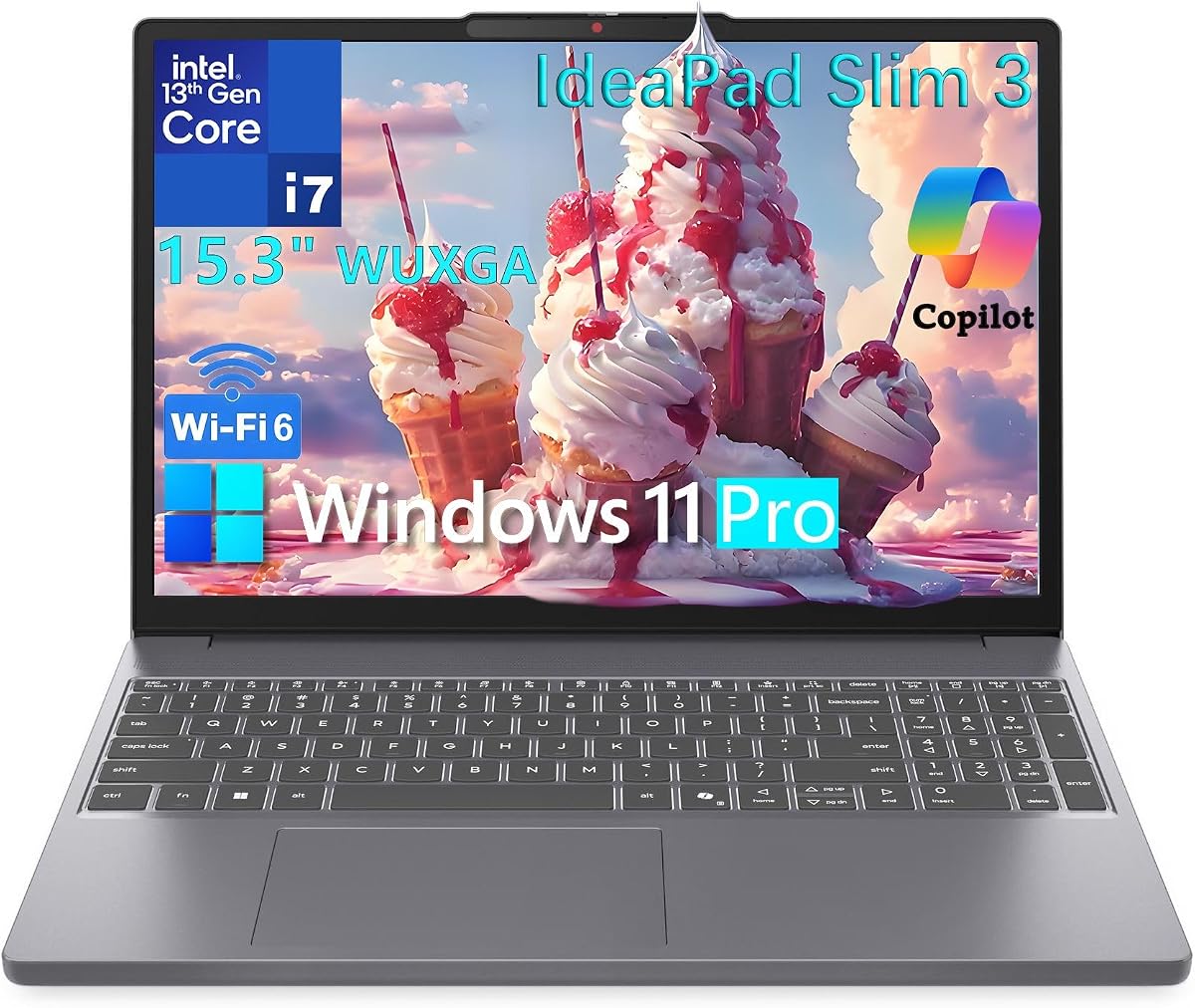
Put away the marketing poetry for a moment: a 10-core i7-13620H, 24GB of DDR5, a 1TB NVMe SSD, a 15.3-inch 1920×1200 IPS panel at 300 nits, a number pad, and Windows 11 Pro is simply a ferocious adult configuration for the money-attention this pack represents. Luna Grey IdeaPad Slim 3 energy is less “fashion object” than Surface and more “get the work done before dinner.” For analysts, CS students, and small-business owners, that is the romance.
The WUXGA 16:10 aspect ratio shows more vertical content than classic 16:9 FHD—subtle until you scroll documents and code all day, then obvious. Anti-glare coating helps under office fluorescents. Color gamut around 45% NTSC will not satisfy a photo-art major; it will satisfy anyone living in Excel, Word, browsers, and Zoom. Intel UHD graphics match that office-first brief.
Ports are thoughtfully complete for the class: dual USB-A, USB-C with Power Delivery and DisplayPort 1.2, HDMI 1.4, microSD reader, headphone jack, and dedicated power. That is a happier classroom story than dongle-dependent ultraportables. Wi-Fi 6 and Bluetooth 5.2 are proven. The 720p webcam’s privacy shutter is the physical kill switch executives quietly love.
Copilot PC positioning means you get AI assist in the Windows 11 flow without requiring you to bet on ARM compatibility. Pro edition unlocks the encryption and remote tools freelancers eventually need after the first client scare. Compared with the Pavilion’s 32GB/N100 approach, Lenovo gives you far more CPU muscle with still-generous RAM. Compared with Surface Ultra 7, you trade peak display luxury for keypad pragmatism and H-series thrust.
Thermals are the tax on H-series chips in slim bodies: under big compiles or archives, fans wake up. That is preferable to silent failure. If you want library-quiet at all costs, the LG gram Book or Snapdragon Surface will murmur less while also doing less multi-core work per minute.
Best Workhorse Value is the badge because regret is low across school, business, and home office scenarios that involve real local software. Skip it only if you need OLED color, discrete GPU gaming, or the absolute lightest 15-inch carry—then gram Book or Surface become the sharper emotional fit.
The number pad is not a gimmick if you enter data for a living. Combined with the taller panel, this Lenovo is the pack’s most convincing finance-and-ops daily driver.
Turn on BitLocker, set up Windows Hello if available on your unit, and test USB-C video to your office monitor on day one so cable surprises happen at home, not in a client lobby.
We may earn a commission at no additional cost to you.

If the new platinum Snapdragon Surface tempted you until you saw the 256GB drive, this Renewed black 7th Edition configuration is the plot twist: same X Elite Copilot+ brain, 16GB of RAM, but 512GB of SSD and a 15-inch PixelSense Flow touchscreen that can run up to about 120Hz. For AI-curious buyers willing to inspect a Renewed unit, it is often the smarter capacity math.
Copilot+ experiences—Cocreator-style generation, Recall-class search (availability depends on Microsoft’s regional feature flags and settings), Live Captions—ride on the NPU’s tens-of-TOPS acceleration. Adreno graphics cover presentations and entertainment. The HD 1080 Surface Studio Camera with framing effects helps family and class calls look intentional.
Renewed buying rules still apply: verify seller notes, test battery runtime with a local video file on loop, check for pixel issues on the bright PixelSense panel, and confirm charger presence. Black paint forgives scuffs that show on platinum. Windows 11 Home is fine for personal use; business fleets that need Pro should look at the Ultra 7 business unit or the 2025 business Snapdragon model next.
Compared with the new 256GB Snapdragon Surface, you mainly gain storage headroom and accept refurb uncertainty. Compared with the Ultra 7, you gain ARM battery character and typically save attention/budget while giving up 32GB RAM, 1TB, Wi-Fi 7, and Pro. Compared with Lenovo, you are choosing AI PC touch luxury over keypad workhorse energy.
App compatibility remains the adult conversation. Creative Cloud status, exam software, and VPN clients should be verified. If your life is browser + Microsoft 365 + streaming, Renewed Snapdragon is delightful. If your life is a stack of obscure .exe tools, an x86 Lenovo will waste less of your week.
Buy Renewed when you personally can evaluate the unit and want Copilot+ with a half-terabyte drive. Gift new instead when the recipient cannot troubleshoot ARM edge cases or return workflows.
Loop a 1080p video for 90 minutes on battery, tap across all screen edges for touch dead zones, and run Windows Update before you install your whole life onto the SSD.
Need 32GB/1TB, Pro management, Wi-Fi 7, or maximum warranty simplicity? The business Ultra 7 configuration is the cleaner premium purchase.
We may earn a commission at no additional cost to you.

Surface Laptop for Business 2025
Closing the pack is a black Surface Laptop for Business (2025) that puts Snapdragon X Elite, 16GB of RAM, 512GB of SSD, and Windows 11 Pro into a Copilot+ envelope aimed at professionals. The business angle is the Pro OS: credential protections, management hooks, and a security posture closer to what IT expects than Home editions on consumer Surfaces. Battery claims around fourteen hours fit the “fly, meet, write, repeat” week.
On-device NPU acceleration is again the AI story—unique features that make the PC feel faster at summarization, captioning, and creative assists without always punching to the cloud. For consultants drafting decks and researching clients between flights, that is tangible. For warehouse PCs running ancient barcode software, verify ARM support or stay on the Lenovo x86 workhorse.
The listing mentions a fluid kickstand adjustable to wide angles for note-taking comfort. Confirm in product images whether your specific offer is the classic Surface Laptop clamshell or a 2-in-1-style mechanism—Surface naming collisions happen in marketplace titles. Buy the geometry you actually want to type on for eight hours.
Compared with the Renewed X Elite unit, you gain Pro and (ideally) a newer business warranty path while watching the 3.9 rating for signals about seller configuration consistency. Compared with the Ultra 7 business Surface, you trade the 2.5K 120Hz / 32GB / 1TB sledgehammer for Snapdragon efficiency and a simpler 16/512 shape. Compared with HP Pavilions, you are paying for AI PC platform and design, not for numeric keypads.
Ports and docking will likely follow Surface’s USB-C-forward philosophy—plan adapters for HDMI classrooms. Wi-Fi details deserve a checkout-page glance if your office is standardizing on Wi-Fi 7 already; the Ultra 7 listing is more explicit there.
Choose this when you specifically need Pro + Copilot+ + Snapdragon on a 15-inch Surface and 512GB is enough. Choose Ultra 7 when the display and 32GB memory are the hill you die on. Choose Lenovo when keypad x86 compatibility outranks the Surface ecosystem.
Pilot one unit with your VPN, MDM, and line-of-business apps before a team rollout. Snapdragon success is binary—either your stack is ready or it is not.
A 3.9 pack rating is a prompt to read the newest reviews for configuration accuracy and QC, not an automatic reject. Surface hardware DNA is strong; marketplace execution varies.
We may earn a commission at no additional cost to you.
Fifteen-inch machines reward desk sessions: taller windows, keypads, less scrolling. If you walk two miles between classes every day, weigh the LG gram Book and slim HPs carefully—or reconsider a 14-inch. If your laptop parks on a dining table nine hours a day, lean into Lenovo and Surface displays without guilt.
Nursing chart practice, accounting homework, and lab data entry go faster with a number pad. HP and Lenovo consumer/business 15-inch layouts usually include one; Surface typing covers are elegant but pad-free. Be honest about whether you will actually use an external keypad.
Copilot+ PCs with strong NPUs (Snapdragon X Elite, Intel Ultra V-series in this pack) accelerate on-device AI features. “AI-ready” on an N100 Pavilion usually means you can use Copilot in Windows without the same NPU horsepower. Pay for the NPU only if those features are part of your week.
Snapdragon Surfaces demand a quick audit of exam browsers, clinical apps, and VPN clients. Lenovo’s i7 and Intel Ultra 7 Surface stay in the broader x86 comfort zone. Do the audit before the return window closes.
On a 15-inch laptop you will open more windows because you can see them—budget RAM accordingly. Sixteen gigabytes is the modern comfort line; 24–32GB is luxury that ages well. Prefer 512GB or 1TB internal SSDs; 256GB on a premium lid forces cloud discipline immediately; 128GB Renewed units are last-resort only.
FHD 1920×1080 is the solid consumer baseline. WUXGA 1920×1200 (Lenovo) adds vertical space for documents. Surface 2.5K 120Hz is the delight pick for eyes that live on-screen all day. HD 1366×768 touch is a compromise—buy it for gestures, not for sharpness.
It depends on weight more than diagonal. A 3.5–3.7 pound HP or LG gram Book is daily-carry realistic. Older thick 15-inch shells are not. If your backpack already holds textbooks, prioritize listed weight under about four pounds or step down to 14 inches.
If you enter numbers for more than a few minutes a day—budgets, stats, charting practice—yes, a keypad saves friction. If you mainly write prose and browse, Surface’s pad-free keyboard may feel better. External USB keypads exist, but only if you will pack them.
Copilot+ PCs include a high-TOPS NPU for on-device AI features like advanced studio effects, live translations/captions, and creative assists that run more locally. Regular laptops can still open Copilot in a browser or Windows chat, but they lack that NPU acceleration path.
Often yes for Microsoft 365, browsers, and many modern apps; sometimes no for specialized lab, VPN, or exam tools. Check each required program for Windows ARM64 support. When in doubt, the Lenovo i7 x86 configuration is the compatibility comfort blanket.
Sixteen gigabytes for mainstream primary use. Twenty-four or thirty-two gigabytes if you research with huge tab sets, run light VMs, or keep creative apps resident. Four gigabytes on the Renewed dale-red HP is only for extreme secondary duty.
The 16:10 shape shows more vertical content—extra rows in documents and code editors—without jumping to a 17-inch chassis. The Lenovo Slim 3 in this pack is the clearest WUXGA example. Casual streaming fans may not notice; writers will.
It is the main limitation on an otherwise excellent light 15-inch machine. Cloud-centric students can thrive. Heavy multitaskers should prefer the Lenovo 24GB, Pavilion 32GB, or Surface 32GB configs even if they weigh a bit more.
Yes if you will run battery and display tests immediately and keep the return option open. The Renewed X Elite with 512GB is particularly interesting versus new 256GB units. No if you need gift-level certainty or Pro OS without hunting the right SKU.
Casually—older titles, esports at modest settings on Radeon or Arc/UHD, streaming. None of the pack leaders here are RTX gaming laptops. Buy a dedicated gaming model if frames are the point.
Choose the Pavilion when your slowdowns are tab-and-file congestion and your apps are light. Choose the Lenovo when you compile, export, compress, or otherwise need multi-core CPU time. Many power users will prefer the Lenovo; many households will adore the Pavilion’s 1TB calm.
A great 15-inch laptop in 2026 earns its diagonal with pixels, keys, and stamina—not with bulk for bulk’s sake. For premium hybrid professionals, the Surface Laptop 7 with Intel Ultra 7, 32GB of DDR5, a 1TB SSD, and that 2.5K 120Hz touch panel is the pack’s clearest flagship. For workhorse value with a number pad and H-series thrust, the Lenovo IdeaPad Slim 3 with 24GB of DDR5 is the machine that makes spreadsheets and study sessions feel unfairly capable.
Travelers who refuse to shoulder a brick should put the LG gram Book on the shortlist, while memory-hungry households can stop apologizing for browser habits with the 32GB Pavilion. Snapdragon Surfaces—new or Renewed—are the AI battery play when your software stack is ready. What you should avoid is confusing a dale-red 4GB Renewed leftover with a primary academic computer.
Pick the 15-inch that matches how you sit, type numbers, and plug in—not the one with the loudest marketplace adjectives. When the screen, keypad, and memory agree with your week, the size finally makes sense.