Best Everyday Workhorse
Samsung T7 Portable SSD 1TB Titan Gray

- Up to 1050/1000 MB/s NVMe USB 3.2 Gen 2 for daily dumps
- Aluminum unibody with up to 6-foot drop protection
- Strong fit for 4K60 and iPhone 15 Pro Res workflows
Expert Review & Guide
A 1TB portable SSD has quietly become the default field companion for photographers, video creators, and travelers who refuse to tether every card dump to a laptop hard drive. One terabyte is enough for a wedding weekend of RAW stills, a short-form content trip with ProRes clips, or a month of travel journaling without constantly pruning folders. The catch in 2026 is not capacity—it is matching real host ports to the speed class you think you are buying.
This guide walks through ten pack options spanning everyday USB 3.2 Gen 2 drives around 800–1050MB/s and faster USB 3.2 Gen 2x2 models that claim up to about 2000–2100MB/s. That Gen 2 versus Gen 2x2 distinction matters: a 2000MB/s drive clipped into a normal 10Gbps USB-C port will behave like a capable Gen 2 SSD, not like the brochure peak. I call that out wherever the Extreme, Extreme PRO, T9, and X10 families show up.
You will not see dollar prices here. Instead you get honest differentiation between lookalike siblings—Samsung T7 Titan Gray versus T7 Blue, SanDisk Extreme versus Extreme PRO, Crucial X9 versus X10—and guidance aimed at people who actually carry these drives through airports, trailheads, and client lobbies.


As an Amazon Associate we earn from qualifying purchases. We may earn a commission at no additional cost to you.
Scan peak transfer claims, durability ratings, and cable/host reality before you standardize a shoot kit. Gen 2x2 peaks need matching ports; Gen 2 models are the safer default for mixed travel laptops.

SanDisk’s 1TB Portable SSD is the drive I recommend when someone wants a trustworthy offload brick without studying USB revision charts. Peak reads land at up to 800MB/s over USB-C 3.2 Gen 2, which is still dramatically faster than spinning hard drives and plenty for emptying a day’s RAW folder between locations. For creators whose laptops only expose standard 10Gbps ports, this speed class is what those machines can actually feed.
Durability is framed around up to two-meter drop protection from internal testing—not a waterproof rating, but a realistic promise for a drive that lives in a sling bag with lenses. The tough rubber hook is the underrated feature: clip it to a belt loop, backpack daisy chain, or camera strap ring and you stop fishing through zippered pockets at security. Photographers who already trust SanDisk cards often standardize on the same brand for field storage so support conversations stay simple.
Think of this SKU as lifestyle storage with professional DNA rather than a cinema ingest monster. Backing up phone photos after a city walk, mirroring a Lightroom catalog before a flight, or parking client selects for a coffee-shop review all fit the design brief. It is small enough that forgetting it at a hotel desk hurts more emotionally than physically—label it, hook it, and treat it like a second wallet.
Because it is Gen 2 rather than Gen 2x2, you avoid the disappointment loop of buying a 2000MB/s drive and watching it throttle to Gen 2 rates on a MacBook or Windows ultrabook that never grew a 20Gbps controller. Peak marketing numbers matter less than consistency across the machines you actually carry. If your kit is a mix of older ThinkPads, iPads, and mirrorless bodies tethered through hubs, the SanDisk Portable’s expectations stay honest.
I also like it as a “second copy” drive in a 3-2-1 backup rhythm while traveling: cards stay in the camera bag, this SSD holds the first mirror, and a cloud upload finishes overnight at the hotel. One terabyte leaves room for a long weekend without deleting yesterday’s keepers to make space for tonight’s reception. Just remember Windows will report roughly 931GB usable—normal binary math, not a defective unit.
Skip it only if you already live on a Gen 2x2 workstation and routinely push multi-hundred-gigabyte ProRes dumps under a deadline clock. Everyone else—travel photographers, educators collecting student media, freelancers who want one drive that just works—will find this SanDisk Portable a calm, clip-friendly starting point for 2026 kits.
Travelers and hybrid shooters who need a reliable 1TB mirror drive on ordinary USB-C ports, plus a physical hook so the SSD does not disappear into bag chaos.
Format once for your primary OS, then keep a cross-platform strategy: exFAT if you bounce between Windows and macOS daily. Test a full card dump before the trip, not in the airport lounge.
Move to a T7 or SSK if you want closer to 1050MB/s on the same Gen 2 class, or to Extreme/T9/X10 only after confirming your host can actually use Gen 2x2 bandwidth.
We may earn a commission at no additional cost to you.

SSK’s 1TB portable SSD aims straight at creators who bounce between new phones and older computers. Rated up to 1050MB/s read and 1000MB/s write on a 10Gbps USB path, it sits in the same performance neighborhood as Samsung’s T7 without assuming you only own USB-C machines. Including both USB-A and USB-C cables is a small thing that saves real shoot days when a client laptop still has A-ports and no dongle in sight.
The aluminum chassis and activity LED are practical field cues. You can glance at a bag pocket and know whether the drive is still chewing through a dump before you yank the cable—less drama than guessing from a spinning beachball. SSK also documents SMART health monitoring and TRIM support, plus an SLC caching story that reserves roughly a quarter of currently available capacity to keep transfers brisk for files under about 250GB. That is unusually transparent for this price tier of portable SSD marketing.
Compatibility messaging leans hard into modern iPhones—15, 16, and 17 Pro—and 4K HDR / ProRes language. Treat those claims as “bring the right cable and test your exact phone settings,” not as a guarantee every ProRes flavor will record forever without thermal or power caveats. Still, if your vlogging kit is phone-first, having a drive that advertises that path beats buying a mystery enclosure and hoping.
Capacity display gets its own about-bullet because Windows users routinely open Disk Management, see ~931GB, and assume they were shorted. SSK explains the 1000-versus-1024 counting difference up front. Mentally budget a little under a full terabyte for projects and you will be fine on either Windows or macOS.
I see this as the opportunistic kit drive: keep it in a second-shooter bag, hand it to an assistant for card offloads, or use it as the phone-to-edit shuttle when your main branded SSD is already full of yesterday’s selects. The LED and dual cables make it friendlier for shared kits than a silent, cable-less puck that always needs an adapter.
If brand pedigree and long-term firmware tooling matter more than included accessories, Samsung’s Magician-backed T7/T9 lane may sleep better for you. If you want Gen 2 speed, aluminum build, and fewer “forgot the cable” emergencies, SSK earns its slot in a 2026 creator shortlist.
Large single transfers under roughly 250GB are where SSK says the cache keeps 10Gbps behavior lively. For multi-terabyte overnight clones, expect any consumer portable SSD to settle into steadier NAND speeds after the cache fills.
Before trusting ProRes-to-SSD on a paid job, record a ten-minute stress test at your real resolution and codec. Confirm the phone stays powered and the drive does not disconnect mid-clip.
We may earn a commission at no additional cost to you.
Samsung T7 Portable SSD 1TB Titan Gray
The Titan Gray Samsung T7 remains my default recommendation when someone asks for one 1TB portable SSD to live in a camera backpack every day. Embedded PCIe NVMe technology pushes read/write claims up to 1050/1000 MB/s—nearly twice the older T5 class—and that maps cleanly to the USB 3.2 Gen 2 ports on most creator laptops sold in the last several years. You get snappy catalog opens and card dumps without needing a rare 20Gbps host.
Samsung positions the T7 for makers who create, explore, and store: video editing empires, photograph libraries, blog backups. That marketing fluff happens to match real use. I have seen T7 units survive years of weekly wedding dump cycles, student thesis archives, and podcast project folders. The solid aluminum unibody plus shock resistance up to six feet is the kind of durability that matters when a bag tips off a cafe chair.
Direct recording support is a differentiator versus generic enclosures. Samsung calls out Ultra High Resolution 4K 60fps recording to the drive from cameras or mobile devices, including iPhone 15 Pro Res 4K60. That does not mean every phone accessory situation is magic—use a quality cable, watch thermals, and test—but it means the T7 is designed into that conversation rather than bolted on as an afterthought.
Compatibility breadth is another quiet strength. PC or mobile phone, heavy application use or simple file saving, the T7 is framed as a team player. For travelers, that translates to fewer “this drive only works on my desktop” headaches when you borrow an editor’s Mac at a coworking space. Format thoughtfully if you cross Windows and macOS constantly.
Why Titan Gray over the Blue T7 later in this list? Functionally they are the same family story: same speed class, same aluminum ethos, same creator positioning. Gray is the stealth option that looks like pro kit instead of an accessory. If you run multiple T7s—A-roll selects on one, B-roll and audio on another—color coding with Blue becomes useful; as a single everyday drive, Gray is the classic.
Choose the T7 when reliability and Gen 2 honesty beat brochure peaks. Choose the T9 or a SanDisk Extreme/Crucial X10 only after you confirm your docking setup can feed Gen 2x2 rates for long enough to matter. For most photographers and traveling editors in 2026, Titan Gray is still the calm center of the portable SSD universe.
Shoot to cards, mirror to the T7 at lunch, keep cards sealed until hotel backup number two. The 1050MB/s class makes midday mirrors realistic instead of optional.
T9 roughly doubles the headline speed on Gen 2x2 hosts and adds thermal guard plus Magician emphasis. Stay on T7 if your ports top out at 10Gbps—you will not feel cheated.
Buy Gray for a single stealth workhorse. Buy Blue if you want visual separation in a multi-drive kit or simply prefer the color. Do not expect a performance gap between these 1TB T7 siblings.
We may earn a commission at no additional cost to you.

SANDISK Extreme Portable SSD (New Model)
SanDisk’s new-model Extreme Portable SSD is the speed-and-weather upgrade path for people who outgrew a plain 800MB/s puck but still want something that disappears into a jacket pocket. Up to 2000MB/s transfer speeds—SanDisk says nearly twice the previous generation—means a thousand high-res photos can move in under a minute in ideal conditions. That is the fantasy; the reality check is your host.
USB Type-C connectivity alone does not guarantee Gen 2x2 throughput. Many laptops label every port “USB-C” while wiring only 10Gbps USB 3.2 Gen 2 behind the plastic. On those machines the Extreme still works, often very well, but it will not magically unlock the full 2000MB/s poster number. If you edit on a desktop dock with a known 20Gbps controller, this drive’s upgrade story becomes real.
IP65 water and dust resistance plus up to three-meter drop protection are why Extreme sits in muddy festival kits and coastal shoot bags. Spills and grit happen; a sealed enclosure is calmer than a bare aluminum stick after a drink tip. Pocket sizing keeps it on your person through crowd work when leaving a laptop bag at coat check is non-negotiable.
AES-256 password protection helps when the drive holds unreleased campaigns, passport scans, or client selects you should not leave unlocked in an Uber. Encryption is only as good as your password discipline and recovery plan—store the credential in a manager, not on a sticky note in the same pouch. SanDisk also nods to AI-era content libraries: high-res clips and photo edits that balloon storage faster than old JPEG habits.
Compared with Extreme PRO in this same guide, the new Extreme is the more pocket-first sibling. PRO leans into a forged aluminum heatsink chassis, carabiner loop, and sustained-speed narrative for longer transfers. Extreme is the grab-and-go weatherproof sprinter. Neither replaces a proper backup strategy; both beat trusting a single SD card in a jacket.
Buy this when you want SanDisk Extreme durability language, modern peak speed on the right host, and a body that does not feel like a deck of cards welded to a heatsink. Verify your port generation first—then enjoy how quickly overnight dumps shrink when the link is actually wide enough.
Confirm whether your laptop or dock supports USB 3.2 Gen 2x2 (20Gbps). If it only does Gen 2 (10Gbps), prioritize T7-class drives unless you specifically want Extreme’s IP65 body.
Pick Extreme for pocket carry and IP65 speed in a smaller package. Pick Extreme PRO when forged-aluminum heatsinking, carabiner attachment, and long sustained transfers are the job.
We may earn a commission at no additional cost to you.

Crucial’s X9 is the practical bridge between “nice aluminum puck” and “I spill coffee near my gear.” Up to 1050MB/s keeps large photo libraries and game installs moving faster than hard-drive habits, while IP55 water and dust resistance plus drop resistance up to 7.5 feet (2 meters) acknowledges that portable storage lives a rough life. For students, casual gamers, and traveling editors, that balance is often more useful than chasing the last megabyte per second.
Broad compatibility is the X9’s personality. Crucial lists Windows, Mac, iPad Pro, Chromebooks, Android, Linux, PS4, PS5, and Xbox with USB-C and USB-A paths. If your week includes a campus PC, a personal MacBook, and a console that needs extra game installs, one drive language beats maintaining three different sticks. Always check console formatting rules before you wipe a library drive casually.
The software bundle—three months of Mylio Photos+ plus Acronis True Image after purchase and registration—nudges people toward actual backup habits instead of hoping folders survive forever. Trials expire, so treat them as onboarding, not the whole strategy. Still, having a photo library tool and an imaging utility in the box is more helpful than another unused sticker.
Creators should read the X9 as a Gen 2 everyday drive with weather manners, not as a cinema ingest hammer. It will feel quick on 10Gbps ports and honest about what those ports can do. If you later buy an X10, you are mostly paying for higher peak speed and tougher IP65 / 3-meter drop credentials—not relearning a brand ecosystem.
I like the X9 in mixed households and hybrid kits: one sibling dumps wedding cards to a T7, another parks Steam libraries and class projects on an X9 that can survive a backpack floor. Black, compact, and unfussy, it does not scream “steal me” the way neon accessories sometimes do.
Pick X9 when you want Micron/Crucial credibility, 1050MB/s-class transfers, and IP55 travel armor without committing to Gen 2x2 host shopping. Step to X10 when your ports and workflow justify the faster, tougher blue sibling.
External SSD support varies by console generation and tablet OS version. Format in the device when required, and keep a separate creator drive if you do not want game installs mingled with client RAW.
X9 is the versatile 1050MB/s IP55 daily driver; X10 is the faster IP65 storm kit for people who already outgrew Gen 2 ceilings.
We may earn a commission at no additional cost to you.
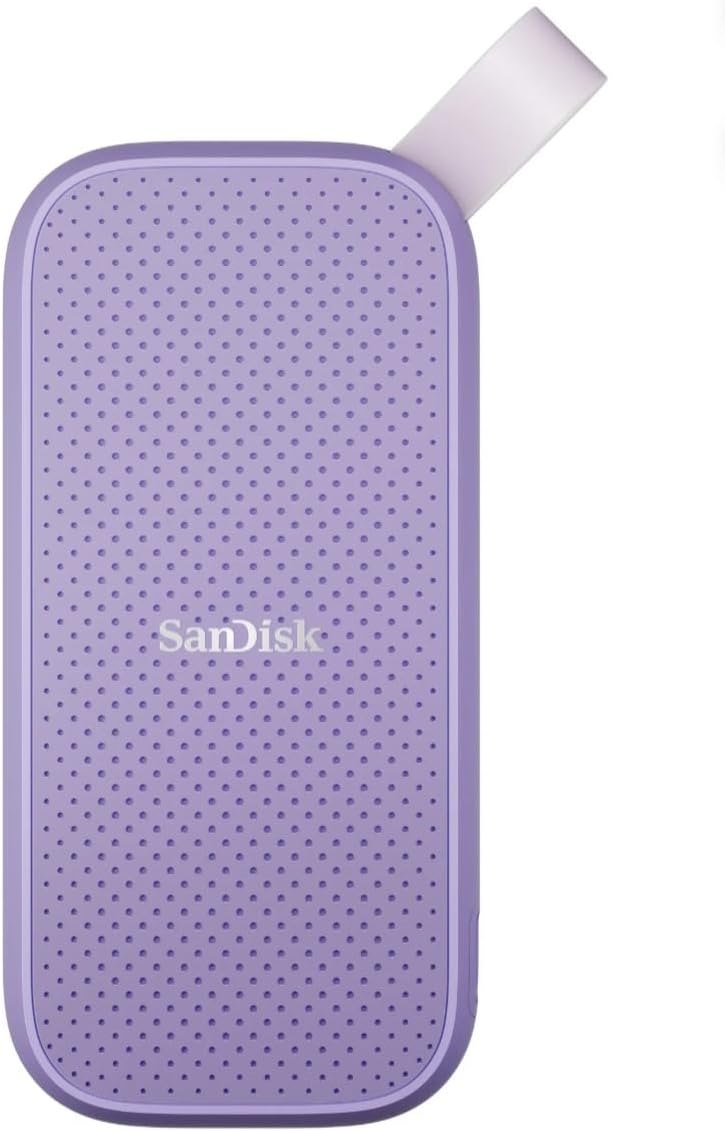
Sandisk 1TB Portable SSD Lavender
The lavender SanDisk 1TB Portable SSD is not a secret performance edition—it is an honest color variant of the rubber-hook Portable line with up to 800MB/s USB 3.2 Gen 2 reads. That sameness is the point. When you run multiple 1TB drives for different roles, a lavender shell beats a row of identical black bricks that all look like the wrong one under tent lighting.
Field workflows love visual grammar. Lavender for personal travel journals, gray Extreme for client work, blue T7 for audio stems—whatever taxonomy you invent, color reduces mis-wipes. The tough rubber hook remains, so you can hang the personal drive on a daypack while the work drive stays in a locked pouch. Drop resistance up to two meters matches the sibling’s adventure framing.
Speed expectations should stay grounded in Gen 2 reality. You are buying dependable solid-state offloads for mobile lifestyles, not a 2000MB/s ingest lance. Photographers who already trust SanDisk on assignment get the same brand story here: take it on adventures, back up memories, keep the drive attached so it does not bounce out of a cup holder.
The pack rating sits at a perfect 5.0 in our source data, which is eye-catching but should be read as a snapshot, not a forever medal. Ratings move. What does not move is the usefulness of a distinct color when your assistant is hunting for “the travel SSD” in a shared bag at 5 a.m.
I would not choose lavender expecting different NAND or firmware magic versus the standard Portable SSD. I would choose it when organization and mood matter—creators who film pastel brand content sometimes even like gear that matches the aesthetic on desk flat-lays. Function first, color second, but color is still a function when it prevents erasing the wrong volume.
If you only need one drive and prefer stealth, Titan Gray T7 or black Extreme makes more sense. If you are building a labeled multi-drive kit on a Gen 2 budget, lavender SanDisk Portable is a cheerfully practical piece of visual systems design.
Assign lavender to personal/off-duty media only. Never store unreleased client work on the fun-colored drive if you share kits with freelancers who might grab by vibes instead of labels.
Pair with ordinary USB-C Gen 2 ports and you will see the speeds this drive was designed around. No special dock required—and no Gen 2x2 premium to waste.
We may earn a commission at no additional cost to you.
The Samsung T9 is the drive I point creators toward when their bottleneck is no longer the camera card—it is waiting on the portable SSD. Sustained read and write speeds up to 2000MB/s on USB 3.2 Gen 2x2 are the headline, and Samsung emphasizes that the T9 keeps performing during longer processes rather than only looking fast on short bursts. That is the language editors notice after the first 200GB dump of the day.
Dynamic thermal guard is not marketing poetry; heat is how fast portable SSDs quietly become slow portable SSDs. Samsung’s advanced thermal solution is there to keep temperatures in a workable band during heavy use so your timeline ingest does not fall off a cliff halfway through. Pair that with Magician software for firmware updates, additional encryption options, and drive-health monitoring, and you get a maintenance story many generic drives skip.
Compatibility remains a Samsung theme: desktops, cameras, gaming consoles, and heavy application usage. iPhone support is called out for 15 Pro Res 4K60 and more, with a note that the included SSD cable is recommended. Phone-to-SSD recording is still an ecosystem of power, heat, and app behavior—test your exact phone—but T9 is clearly courted for that creator loop.
Host requirements deserve bold mental highlighting. Gen 2x2 is not the same as the Gen 2 port on most thin laptops. Plug a T9 into a 10Gbps USB-C jack and you still get a very good SSD; you do not get the full 2000MB/s experience you paid to chase. Studio docks, select motherboard rear ports, and certain higher-end workstation laptops are where T9 flexes. Read your port specs before you assume.
Versus the T7 Titan Gray, T9 is the step-up when your machine can feed it. Versus SanDisk Extreme PRO, T9 trades the forged-aluminum adventure aesthetic and carabiner loop for Samsung’s thermal-guard and Magician software culture. Versus Crucial X10, you are choosing ecosystems and fine durability differences as much as raw MB/s.
I recommend T9 for editors who shuttle ProRes or high-bitrate camera originals between a desktop bay and a laptop that actually speaks Gen 2x2, and for phone filmmakers already serious about external recording. If your world is coffee-shop Gen 2 ports, buy T7 and spend the delta on a second backup drive instead.
Install Magician when you unbox, update firmware once, and enable whatever encryption model matches your threat level. Future-you will thank present-you when a health warning appears before a failure.
Give the T9 airflow during multi-hour transfers. Do not bury it under a wool scarf in a closed backpack while writing hundreds of gigabytes—thermal guard helps, physics still exists.
Prefer T9 if Magician tooling and sustained-process focus matter more than Extreme’s pocket-first IP65 storytelling. Prefer Extreme if weather sealing and jacket-pocket carry dominate.
We may earn a commission at no additional cost to you.

SANDISK Extreme PRO Portable SSD 1TB
Extreme PRO is SanDisk’s answer when portable storage has to survive weather and long, hot transfers without becoming a paperweight. Powerful NVMe performance with up to 2000MB/s read/write sits on USB-C USB 3.2 Gen 2x2, and the forged aluminum chassis is explicitly described as a heatsink. That matters when you are dumping card after card in a sun-baked parking lot and cheaper plastic shells start thermal-throttling.
Durability numbers are assertive: up to three-meter drop protection and IP65 water and dust resistance, with SanDisk noting the line was previously qualified at milder 2-meter / IP55 levels. A handy carabiner loop turns the drive into something you can clip to a pack haul point instead of trusting a zipper alone. For trail photographers and documentary crews, attachment points are workflow, not fashion.
Security comes via password protection with 256-bit AES hardware encryption—useful when the PRO holds embargoed footage. Pair that with the SanDisk Memory Zone app for managing files and automatically freeing space (download required). Apps never replace a real backup plan, but they help keep a single field drive from becoming a junk drawer.
Honest differentiation from the new Extreme: PRO is the sustained-speed, heatsink, carabiner machine; Extreme is the pocket sprinter with similar peak MB/s marketing and IP65 weather talk in a smaller daily-carry shape. If you mostly do short bursts from a jacket pocket, Extreme may feel nicer. If you sit through hour-long ingest sessions outdoors, PRO’s aluminum philosophy is the more reassuring story.
Versus Samsung T9, you are choosing SanDisk’s adventure hardware language and Memory Zone habits against Samsung’s Magician and thermal-guard software culture. Peak speeds rhyme; ecosystems differ. Versus Crucial X10, Extreme PRO leans harder into the forged-heatsink identity while X10 counters with up to 2100MB/s marketing and a blue IP65 travel body plus software trials.
I assign Extreme PRO to muddy festival kits, overlanding creators, and anyone whose previous portable SSD died the death of heat-soak mid-transfer. Confirm Gen 2x2 on the host, update firmware as prompted, and clip it where you can see it—because a fast drive you cannot find in a backpack is still a slow workflow.
Long sustained transfers, carabiner carry, and heatsink confidence. If your dumps are short and your pockets are small, the newer Extreme body may suit you better.
Enable AES password protection for client folders, store the password in a manager, and keep an unencrypted travel journal drive separate so you are never locked out of boarding-pass PDFs at the gate.
We may earn a commission at no additional cost to you.

SAMSUNG T7 Portable SSD 1TB Blue
Samsung’s blue T7 is the twin of the Titan Gray model with a different jacket. Speeds up to 1050MB/s on USB 3.2 Gen 2, PCIe NVMe underpinnings, aluminum unibody toughness, and the same maker-focused positioning for photos, video empires, and backups. If you liked everything in the gray review, you are reading the colorway chapter, not a new architecture.
Why include both in a best-of list? Because creators rarely buy just one portable SSD forever. A blue T7 labeled “audio + B-roll” next to a gray T7 labeled “hero selects” prevents the classic disaster of reformatting the wrong volume after a fourteen-hour wedding. Color is a safety feature when you are exhausted.
All the practical T7 strengths transfer over: shock resistance up to six feet, broad PC and mobile compatibility, and support messaging around 4K60 recording including iPhone 15 Pro Res. Students and professionals get the same compact 1TB canvas for games, class projects, or client libraries. Samsung’s in-house flash brand story remains part of the trust pitch.
Where people go wrong is treating Blue as somehow newer or faster than Gray because the listing photos look fresher. It is not. Shop availability, bundle cables, and your color system—not imaginary benchmarks. If gray is out of stock and you need a T7 this week, blue is an equal teammate.
I also like blue for loaner drives. Hand a clearly colored SSD to a second shooter with a strip of tape that says “RETURN” and you will see it across a crowded reception table. Stealth gray is nicer for solo carry; blue is nicer for choreography.
Buy Blue T7 as a peer to Gray, not as an upgrade ladder toward T9. When you need the next performance rung, change the model family and confirm Gen 2x2 hosts—do not expect a paint job to shorten your ingest clock.
Gray = master selects and catalogs. Blue = overflow, proxies, and audio. Keep a tiny paper log in the bag the first month until muscle memory sticks.
Blue T7 is faster (1050 vs 800MB/s class) with Samsung’s aluminum unibody story. Lavender SanDisk wins if you specifically want the rubber-hook Portable design language at Gen 2 mid speeds.
We may earn a commission at no additional cost to you.
Crucial’s X10 is the pack’s rugged speed ceiling: up to 2100MB/s reads in a matte blue shell designed for creators, students, and PC gamers who still want weather resistance. IP65 dust and water resistance plus drop resistance up to 9.8 feet (3 metres) put it in the same outdoor conversation as SanDisk’s Extreme family, while the blue finish makes it easier to spot in a black nylon abyss.
Like every ~2000MB/s portable SSD here, the X10’s brochure number is a host-dependent privilege. On a proper high-speed USB-C link it can shrink huge photo and video transfers dramatically versus hard drives and versus slower Gen 2 sticks. On a commonplace 10Gbps port it remains a strong SSD—just not a magic 2100MB/s wand. Know your ports; then enjoy the headroom.
Compatibility stays wide: Windows, Mac, iPad Pro, Chromebooks, Android, Linux, PS4, PS5, and Xbox via USB-C and USB-A paths. That makes the X10 a candidate for households that share a drive between an editing laptop and a living-room console, provided you respect each platform’s formatting rules. Creators who hate juggling five sticks will appreciate one tough blue brick that speaks many dialects.
Software extras mirror the X9 pitch—three months of Mylio Photos+ and Acronis True Image after registration. Use the window to build a real backup ritual: local X10 mirror plus cloud or a second disk. The trials expire; your need for redundancy does not.
Compared with Extreme PRO, X10 offers a similar IP65 / 3-meter durability envelope with a Crucial-flavored speed claim that edges the marketing sheet to 2100MB/s. Extreme PRO counters with forged-aluminum heatsink identity and a carabiner loop. Compared with Samsung T9, X10 leans harder into weather sealing language while T9 leans into thermal guard and Magician. None of these is “wrong”; they optimize different anxieties.
I top-pick the X10 for travelers who already confirmed a fast host and want the drive to survive rain, dust, and a hard bag drop without stepping down to a 1050MB/s ceiling. If your laptop cannot feed it, buy an X9 or T7 and put the savings toward a second 1TB for true on-the-road redundancy.
Keep the X10 in a small padded pouch even with IP65—sealing resists weather, not crusher forces from a 70-200mm lens bouncing on top of it for eight hours.
Choose X10 for Crucial’s 2100MB/s claim, blue visibility, and familiar X-series software bundle. Choose Extreme PRO for SanDisk’s heatsink chassis and carabiner-first adventure hardware.
Fast rugged SSDs shine when ports, cables, and cooling cooperate. Buy the ecosystem that matches your dock drawer, not only the biggest number on the store page.
We may earn a commission at no additional cost to you.
USB 3.2 Gen 2 (roughly 10Gbps) is the practical ceiling on many creator laptops and tablets. Drives like the SanDisk Portable, SSK, Samsung T7, and Crucial X9 live happily there around 800–1050MB/s. USB 3.2 Gen 2x2 (roughly 20Gbps) is what Samsung T9, SanDisk Extreme/Extreme PRO, and Crucial X10 want when they advertise ~2000–2100MB/s. Same USB-C connector shape does not mean same wiring. Check your computer’s tech specs or dock manual before you chase a peak number you cannot use on the road.
Cafe editors can thrive with aluminum T7 bodies and two-meter drop ratings. Festival, beach, and overland shooters should look harder at IP55/IP65 language on Crucial X9/X10 and SanDisk Extreme models. Drop ratings (2m vs 3m / 6ft vs 9.8ft) are lab stories, not invitations to play lacrosse with your footage—but they correlate with how seriously a manufacturer sealed and structured the enclosure.
A busy wedding photographer shooting RAW + backup video can fill 1TB across a long weekend. Vertical video creators shooting ProRes to disk can do it in a day. Plan a second drive or disciplined offload-to-laptop-to-cloud chain. Windows showing ~931GB is normal. Leave free space for caches and avoid running any SSD at 99% full during active projects.
Several drives here advertise iPhone 15 Pro Res or 4K60 recording support. That is exciting and still finicky: cable quality, power draw, thermal limits, and OS versions all intervene. Before a paid shoot, record continuous minutes at your real settings. Prefer the manufacturer’s included cable when they say so—Samsung does on the T9.
AES-256 on Extreme models and Magician extras on Samsung drives help when a bag goes missing. They also create lockout risk if you invent a clever password at 2 a.m. and forget it. Software bundles like Mylio and Acronis on Crucial drives are onboarding ramps—calendar a reminder before trials end. No app replaces a second physical copy of irreplaceable cards.
T7 Gray vs T7 Blue is color and kit logistics, not speed. SanDisk Extreme vs Extreme PRO is pocket sprinter versus heatsink adventure chassis. Crucial X9 vs X10 is 1050MB/s IP55 daily driver versus ~2100MB/s IP65 storm kit. Buy the sibling that matches your ports and weather, not the one with the flashier product photo.
Not necessarily. USB-C describes the connector shape, not the speed. Many USB-C ports are USB 3.2 Gen 2 at about 10Gbps, which aligns with 800–1050MB/s drives like the SanDisk Portable, SSK, Samsung T7, and Crucial X9. Drives advertising 2000–2100MB/s typically want USB 3.2 Gen 2x2 around 20Gbps. Without that host path, a T9, Extreme, Extreme PRO, or X10 still works but will not sustain brochure peaks. Buy the faster rugged models when you have the ports—or when you specifically want their durability and encryption features regardless.
Often yes for a long weekend of mixed RAW stills and short video, and often no as your only archive for a multi-week documentary. Think of 1TB as a rolling field buffer: mirror cards daily, then offload to a laptop archive or second drive when you hit lodging Wi-Fi or a desktop. Vertical ProRes shooters fill 1TB startlingly fast. If you routinely return from trips with cards still full because dumps felt slow, a faster Gen 2 or Gen 2x2 SSD may matter as much as buying a second terabyte.
Performance and durability positioning match: both are 1TB T7 drives with up to 1050MB/s-class USB 3.2 Gen 2 NVMe performance, aluminum unibody construction, and creator-focused recording support. The meaningful difference is color for kit organization and personal preference. Choose gray for stealth single-drive carry; choose blue to color-code a second role or to match a brighter desk kit. Do not expect Blue to outrun Gray on benchmarks.
Both target high transfer speeds up to 2000MB/s with serious durability stories and AES-256 password protection. The newer Extreme emphasizes pocket size and IP65 / 3m drop resilience for grab-and-go kits. Extreme PRO emphasizes a forged aluminum heatsink chassis, carabiner loop, and sustained-speed confidence on longer transfers, also with IP65 and 3m drop ratings. If your dumps are short and pocket carry wins, take Extreme. If you sit through long outdoor ingests and want heatsink hardware plus a clip point, take PRO.
Several pack products specifically call out iPhone 15 (and newer Pro) Res support—Samsung T7, Samsung T9, and SSK among them. Success still depends on a solid cable, sufficient power behavior, thermal conditions, and the exact iOS/camera settings you use. Samsung recommends the included cable with the T9. Always run a continuous test recording longer than your typical take before trusting the setup on a paid job. Have a failure plan: record in-phone as backup when stakes are high.
Storage makers advertise terabytes using decimal math (1TB = 1000GB = 1,000,000,000,000 bytes), while Windows reports gibibytes using binary math (dividing by 1024). The result looks like roughly 931GB for a 1TB drive. SSK even prints this explanation in its about text because the support tickets never stop. It is not missing capacity in the scam sense—it is unit translation. macOS often presents numbers closer to the marketed figure depending on context.
IP65 means protection against dust and against water jets from nozzles under defined test conditions—not indefinite submersion like a dive housing. SanDisk Extreme/Extreme PRO and Crucial X10 lean on IP65 for spills, rain, and dusty trails. Crucial X9’s IP55 is a bit less stringent but still far tougher than an unsealed enclosure. Dry the connectors before plugging into expensive computers, and do not treat any of these as underwater cinema housings.
You can—Crucial and Samsung both market crossover use—but mixing huge game installs with client photo catalogs on one volume invites messy free-space emergencies. A cleaner approach is one creator SSD for work media and a second drive (even a slower one) for games and personal archives. If you must share, use separate folders and leave generous free space so game updates do not choke an edit deadline.
If the drive ever leaves your sight with unreleased client work, credential scans, or private journals, encryption is worth enabling on models that offer AES-256 or Magician-based options. The risk is twofold: theft of data, and locking yourself out. Use a password manager, keep an emergency recovery path, and consider a separate unencrypted travel drive for boarding passes and hotel PDFs you must open under stress.
Using a charge-only cable, a damaged cable, or a cheap adapter daisy chain can drop a Gen 2x2 drive down to frustrating rates. Prefer the cable in the box for first tests, keep a known-good short USB-C data cable as spare, and avoid stacking hubs unless you have verified the hub’s bandwidth. Also plug into the port directly wired to the high-speed controller—some laptop side ports are not equal.
For most photographers, creators, and travelers building a 2026 kit, a 1TB portable SSD should feel boring in the best way: clip it on, dump the cards, keep shooting. The Samsung T7 Titan Gray remains the everyday Gen 2 workhorse I trust when ports are ordinary and reliability matters more than brochure peaks. When your dock truly speaks Gen 2x2, the Samsung T9’s sustained-speed focus and Magician tooling—or SanDisk’s Extreme family—earn the upgrade.
If weather and drops haunt your shoots, Crucial’s X10 and SanDisk’s Extreme PRO bring IP65-class confidence with ~2000MB/s ambitions, while the X9 and standard SanDisk Portable cover calmer travel at honest Gen 2 rates. Color variants like T7 Blue and lavender SanDisk Portable are not gimmicks when they stop you from wiping the wrong disk at midnight.
Buy for the hosts in your bag, seal for the messiest day on the calendar, and always keep a second copy of anything you cannot reshoot. Speed specs fade; intact files are the whole job.