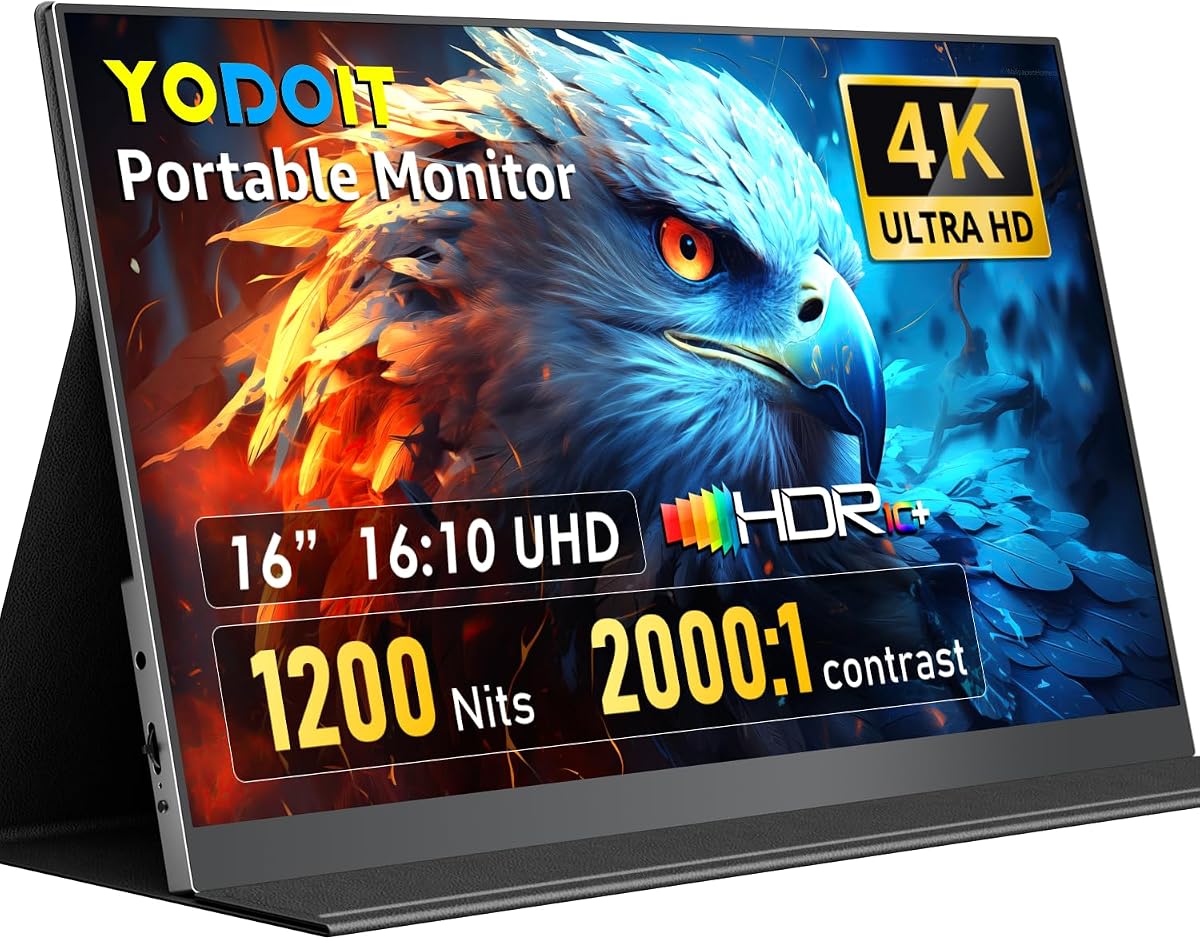
Most portable monitors wash out the moment you step near a window. The Yodoit 16-inch 4K portable display aims outdoors and at color work instead: 3840×2400 on a 16:10 IPS panel, up to 1200 nits peak brightness, 145% sRGB coverage claims, and a 2000:1 contrast story for photo and video travelers.
Connectivity is dual-path USB-C and Mini HDMI, with explicit power caveats for driving full 4K at high brightness. A magnetic folio stand, dual speakers, and a 2.2 lb metal chassis round out the travel kit claims for laptops, consoles, and camera HDMI monitoring.
This review focuses on who needs sunlight-readable 4K, how to power it correctly, and when a brighter panel matters more than another lightweight 1080p screen.
Yodoit’s pitch is blunt: if your portable monitor dies in daylight, it is not a travel monitor. Peak brightness up to 1200 nits with a matte anti-glare coat is aimed at photographers, inspectors, and nomads who actually work near windows, patios, and job sites.
The panel is 16 inches at 3840×2400 in a 16:10 aspect ratio—about 9.3 million pixels with more vertical room than a cropped 16:9 UHD screen. For Lightroom cinemagically stacked panels, Premiere timelines, or code plus docs, that extra vertical space reduces scrolling fatigue.
Color and contrast claims—145% sRGB and 2000:1—position this above bargain portable screens that barely cover basic sRGB. That helps on-location grading decisions and client previews. For final print-critical work, still verify with a known calibrated reference when you return to the studio; portable panels are tools, not magic absolutes.
Connectivity needs careful reading. USB-C hosts may not push full 4K at peak brightness on a single cable; Yodoit recommends using the included USB-C to USB-A cable plus power adapter to stabilize output. Mini HDMI carries video/audio for PS5, Xbox, Switch, cameras, and older laptops, but still needs USB-C power connected at the same time.
In the box, expect USB-C to USB-C, USB-C to USB-A, a 5V/3A power adapter, Mini HDMI to HDMI, and a USB-C to USB-A power cable per the listing. That kit matters—many portable monitors nickle-and-dime the power brick. Bring the adapter when brightness is the whole point of the purchase.
The magnetic smart cover folds into a stand from flat to wide angles and protects the panel in a camera bag. At roughly 2.2 pounds and under 0.35 inches thick with a metal unibody feel, it is travel-plausible beside a laptop. Dual front speakers cover client playback without hunting a Bluetooth speaker for casual reviews.
Use cases stack quickly: second screen for editing, HDMI field monitor for mirrorless cameras, console screen in hotels, DeX/phone productivity, or extended desktop for coding on the road. Compatible host callouts include MacBook Pro/Air, Windows laptops, desktops, PS5, Xbox Series, Samsung DeX, and iPhone 15 and newer where video output allows.
Limitations are honest. High brightness and 4K tax power and heat; expect the panel and adapter to warm in sun. Scaling on Windows/macOS needs a minute of arrangement so UI elements are not microscopic. Competitive gamers chasing ultra-high refresh should look elsewhere—this is a resolution and brightness story.
Buy the Yodoit 16-inch 4K when sunlight readability and a 16:10 editing canvas are the job. Buy a cheaper 1080p portable if you only need indoor email multitasking and want maximum battery simplicity from a single USB-C cable.
Who it's for
Outdoor photographers, field editors, digital nomads, and presenters who need a bright 4K secondary display with better vertical space. Also fits console travelers and camera HDMI monitoring when powered correctly.
Who should skip it
Skip if you only work in dim indoor offices and want the lightest single-cable 1080p panel, if your host cannot output 4K, or if you need a factory-calibrated reference with hardware LUT workflows. Competitive high-refresh gamers should choose gaming portables instead.
Sunlight editing and power planning
The niche win is reviewing photos or timelines outdoors without hiding under a jacket. Pack the power adapter whenever you need peak brightness, and test your exact laptop’s USB-C behavior before a client trip. Matte coating helps, but angle the folio to kill remaining glare.
Setup tips & verdict
Connect power first when pushing full 4K brightness, set host scaling, enable HDR only if your workflow benefits, and protect the panel with the folio in transit. Verdict: a travel-first 16:10 4K portable for people who outgrew dim indoor-only screens.
- 1200-nit brightness target makes outdoor reviewing far more realistic than 300-nit panels
- True 16:10 4K canvas helps photo timelines and tool panels versus stretched 16:9 portables
- Wide sRGB coverage claim and stronger contrast suit location editing checks
- Includes power adapter and multiple cables for mixed host gear
- Magnetic folio acts as both protection and multi-angle stand
- Full 4K at peak brightness may need the included external power path on many laptops
- Higher resolution demands GPU/USB bandwidth—older hosts may limit modes
- Not a calibrated reference monitor out of the box for print-critical studios
FAQs
Is 1200 nits usable in direct sun?
It is dramatically more usable than typical 250–400 nit portable monitors, especially with the matte anti-glare coating. Extreme noon glare can still challenge any LCD, so use the folio angle to cut reflections. For shade and bright interiors, the brightness headroom is the whole appeal.
Will one USB-C cable be enough?
Not always. Yodoit notes a single USB-C cable may not deliver enough power for 3840×2400 at peak brightness on all devices. Use the included USB-C to USB-A cable with the power adapter when you need stable full-resolution high-brightness output.
Does Mini HDMI need extra power?
Yes. Mini HDMI provides video and audio only in this setup, so a USB-C power cable must be connected at the same time for consoles, cameras, and older laptops. Budget both cable runs in your bag.
Is the resolution really 3840×2400?
That is the listed UHD 16:10 panel resolution, packing more vertical pixels than 3840×2160 16:9 displays. Confirm your host supports that mode; some devices may offer 4K-class output at a different timing or scale.
Can I use it for photo color work?
The 145% sRGB and 2000:1 contrast claims make it far more credible for location editing than bargain screens. For final print-critical decisions, verify against a calibrated studio reference when possible. Soft-proof thoughtfully rather than trusting any portable blindly.
Does it work with MacBook and PS5?
Compatibility callouts include MacBook Pro/Air and PS5 among others, using USB-C and/or HDMI pathways as appropriate. Follow the power guidance for full 4K brightness, and set the console/TV output resolution to match what the monitor accepts.
How do I carry and stand it?
The magnetic folio cover doubles as protection and a multi-angle stand adjustable across a wide range. The metal chassis is listed around 2.2 pounds and under 0.35 inches thick, so it can ride in many camera bags beside a laptop.
Are speakers included?
Yes—dual front-facing speakers are part of the design for previews and casual playback. They will not replace a studio monitor chain, but they help client reviews and hotel console sessions without packing extra audio gear.