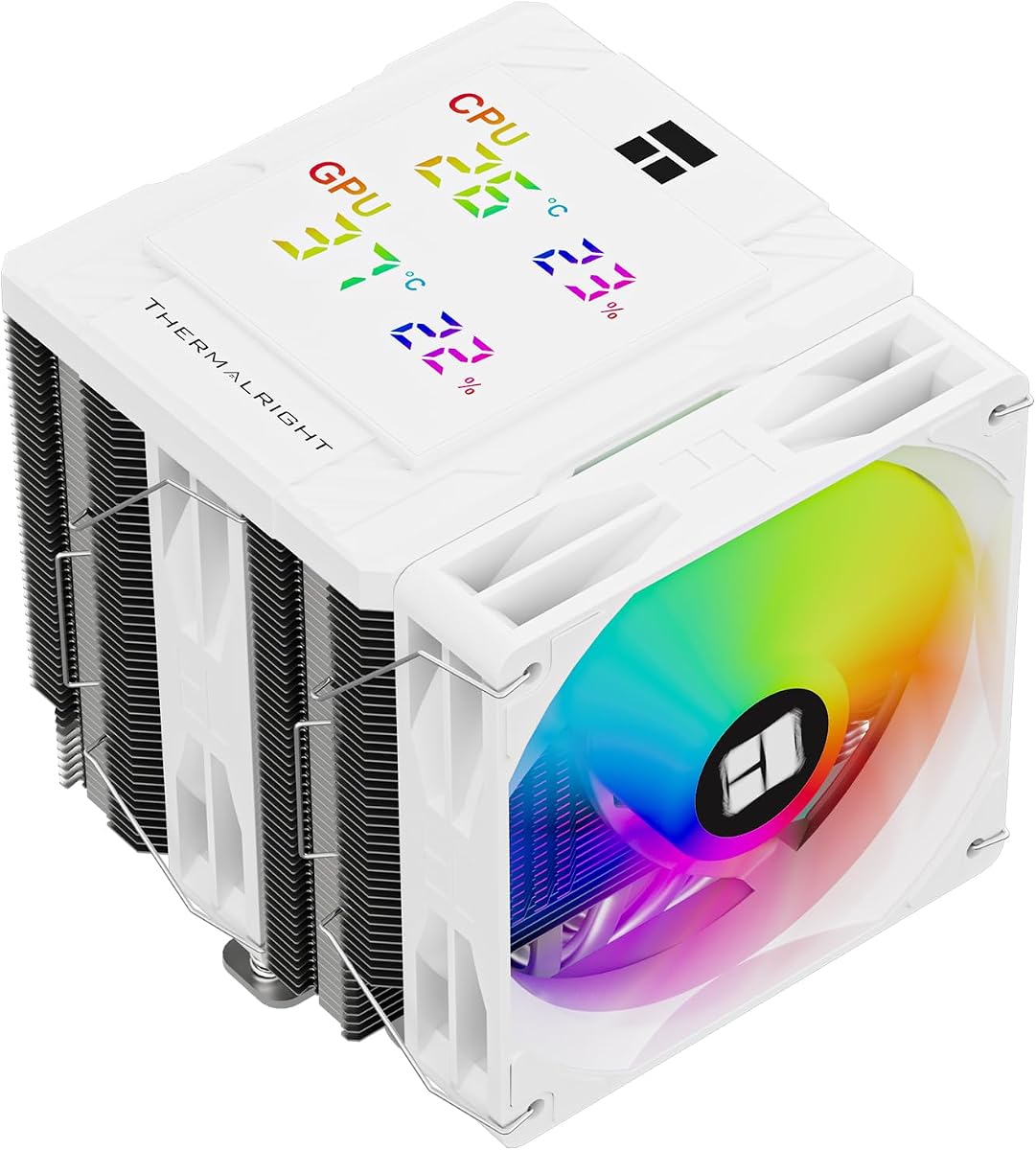
Dual-tower air coolers remain the quiet value kings for hot CPUs, and the Thermalright Peerless Assassin 120 Digital ARGB White adds a magnetic digital top cover to that formula. Six copper heatpipes, twin 120mm PWM fans, and a white ARGB presentation target showcase mid-towers on AM4/AM5 and modern Intel sockets.
At about 138×125×162mm with fans rated near 1850RPM, it aims for strong thermals without an AIO pump. TRCC software ties into the ARGB digital display board for CPU and GPU temperature/occupancy style readouts.
This review helps you decide between digital Peerless models, plain SE versions, and when 162mm height will fight your case roof.
Peerless Assassin earned its reputation as a dual-tower bargain; the Digital ARGB White edition keeps that cooling stack and layers on telemetry aesthetics. If you want white theming and a status tile without buying an LCD AIO, this is the lane.
Six pure copper heatpipes and a copper base contact the CPU, while AGHP 5.0 messaging addresses orientation penalties when towers sit in less-than-ideal gravity paths. Dual fans at roughly 1850RPM push nearly 89 CFM in Thermalright’s figures with a ≤25.6 dB(A) noise listing—strong on paper for the class.
The magnetic ARGB digital board is the daily delight. Glance at temperatures and occupancy, tweak number colors in TRCC, and keep your desktop uncluttered. Magnets make service easier than glued vanity tops when you need to remount.
Height at 162mm is the gatekeeper. Many ATX mid-towers clear it; some “compact mid” cases do not. Measure twice. The dual-tower layout is described as friendly to high-capacity memory and GPU installs relative to some bulky designs, but first-slot DIMM drama can still appear with the tallest RGB kits.
Socket support covers current AMD AM4/AM5 and Intel LGA1851/1700 plus older 115x/1200 boards. Bring the AMD stock backplate to the install party—Thermalright’s note is explicit that it is not included in the cooler box.
Acoustically, twin 28mm fans can stay civil with a good curve. If both fans pin at maximum forever, you paid for airflow and you will hear it. Use motherboard PWM control or fan software; do not assume the box dB number equals your open side panel reality.
Versus Assassin X single towers, Peerless gives more fin mass and dual-fan pressure for hotter chips. Versus Vision MAX models with large IPS screens, this Digital cover is a lighter telemetry/ARGB approach rather than a full media display.
Mount evenly, check fan cable routing between towers, and verify the top cover seating after the final torque. Then run a twenty-minute all-core load and a gaming session before celebrating. Buy this white Digital Peerless when you want dual-tower thermals, ARGB, and a magnetic status cover in a bright build. Pick a non-digital SE if you want maximum simplicity, or a Vision MAX if a large IPS face is the entire point.
If you already like Peerless thermals and only hesitated because black coolers clash with a white theme, this Digital ARGB White SKU removes that excuse. Just budget ten extra minutes for cable routing so the magnetic cover and fan lighting look intentional rather than like an afterthought nest of wires.
Who it's for
White mid-tower builders on AM5 or modern Intel who want strong air cooling with a digital ARGB top cover. Excellent for gamers and creators who prefer no AIO maintenance but still want a show window feature.
Who should skip it
Skip if your cooler clearance is under ~162mm, if you dislike TRCC/digital extras, or if you need a black stealth build. Tiny mATX cubes and ITX sandwich cases usually want low-profile coolers instead.
Dual-tower cooling with a status cover
The win is Peerless-class heatpipe cooling plus at-a-glance CPU/GPU readouts without a full LCD media pump. Keep case intake strong so the dual towers receive cool air, and let the magnetic cover handle the vanity telemetry. Builders who stream with a side-panel camera also benefit because viewers can read the cooler stats without a busy desktop overlay.
Setup tips & verdict
Confirm height clearance, retain your AMD backplate, connect PWM/ARGB/display leads cleanly, and tune dual-fan curves together. Verdict: a polished white dual-tower choice for builders who want Digital telemetry on a proven Peerless foundation.
- Dual-tower six-heatpipe layout cools hot gaming CPUs without liquid
- Magnetic digital cover shows CPU/GPU stats with TRCC color options
- White ARGB fans suit snow builds better than industrial black-only coolers
- 1850RPM fans balance airflow with a quieter listed noise ceiling than 2000RPM units
- Memory and GPU clearance-minded dual-tower design for mainstream ATX cases
- 162mm height excludes many compact cases
- Digital cover adds USB/software steps versus plain Peerless SE
- AMD mount still depends on the motherboard’s original backplate
FAQs
How tall is the Peerless Assassin 120 Digital White?
Overall size is listed around 138×125×162mm. Treat 162mm as the critical clearance number against your case specifications, including any glass roof or top fan thickness.
Do I need TRCC for the display?
Thermalright’s digital board is used with TRCC control software for temperature/occupancy readouts and color switching of the numbers. Install from a trusted official source after the hardware is connected.
Will it clear my tall RAM?
The dual-tower design is described as compatible with high-capacity memory installs in mainstream layouts, but extremely tall first-slot heat spreaders can still interfere. Check fan placement versus your DIMMs before final tightening.
Is AM5 supported?
Yes—AM4/AM5 support is listed. AMD installation requires the motherboard’s original backplate, which is not included with the cooler. Intel LGA1851/1700/115x/1200 kits are also part of the package story.
How does it compare to the non-digital Peerless SE?
Cooling intent is still dual-tower Peerless. You are mainly paying for the magnetic digital ARGB cover experience and white styling. Choose SE if you want a simpler black workhorse without the screen.
What fan speeds should I use?
Fans are rated near 1850RPM±10% with strong airflow figures. Start with a quiet curve that holds idle under low RPM and ramps under load. Matching both fans to one PWM header via a splitter can keep behavior consistent.
Can it replace a 240mm AIO?
For many CPUs, yes—dual-tower air rivals 240 AIOs while avoiding pumps. For the hottest chips in warm rooms, a thick 360 AIO may still win. Your case airflow and noise target decide the winner more than forum slogans.
Is thermal paste included?
Check the box contents for your unit. If paste is included, use a small amount and mount evenly. If not, buy a quality compound rather than reusing crusty paste from an old cooler.