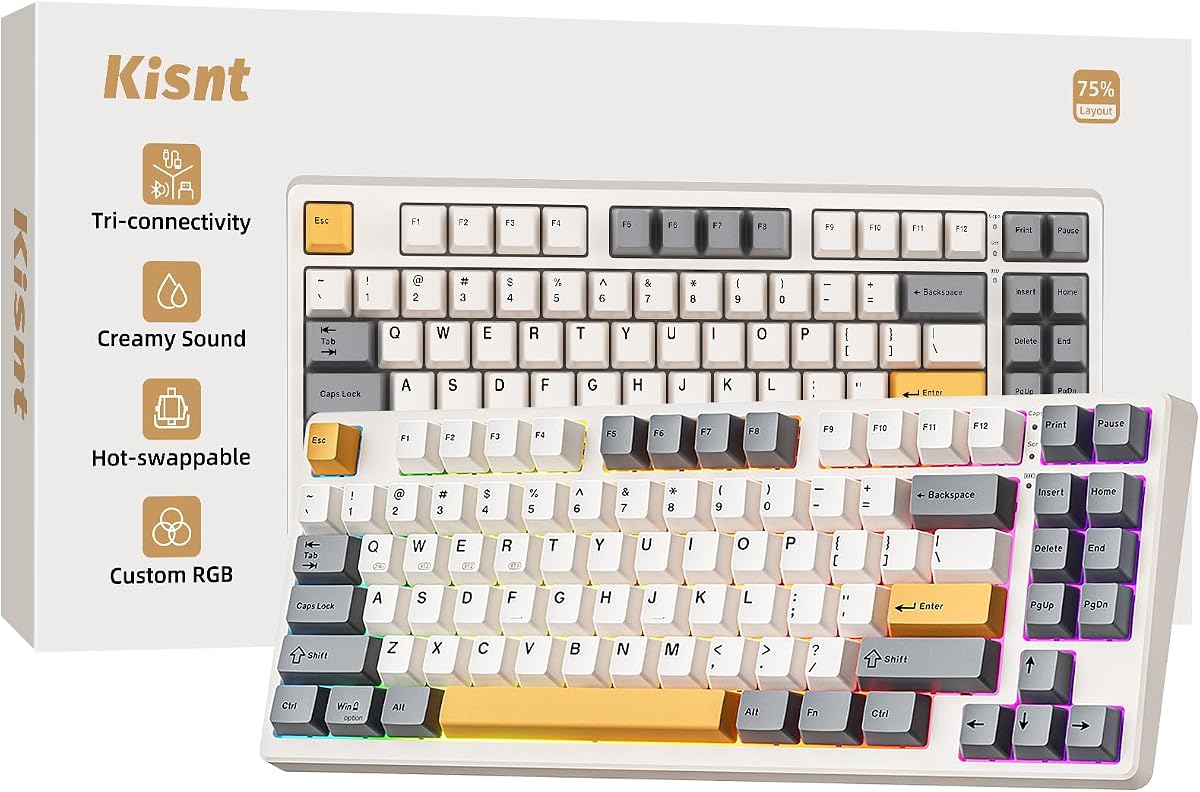
Seventy-five percent layouts are the compromise that keeps function keys and arrows while freeing mouse space. The Kisnt KN85 lands in that sweet spot with an 85-key board about 13.68×5.51×1.77 inches, retro beige styling, gasket creamy acoustics, and tri-mode wireless.
Hot-swappable Bsun linears, multilayer foam, RGB around PBT keycaps, and a 4000 mAh battery mirror the family’s premium-feel goals without the KN104’s numpad bulk. Optional separate numpads exist if you only sometimes need digits.
This review covers desk reclaim for aim trainers, Win/Mac switching, sound signature expectations, and when full-size still wins.
The KN85’s primary promise is spatial: keep essentials—F1–F12, arrows, navigation clusters in a condensed form—while deleting the number pad that blocks low-sensitivity mouse sweeps. Gamers on small desks and minimalists with laptop docks feel that reclaim immediately. If you later miss digits, Kisnt points to an MF17-style 17-key numpad rather than forcing everyone into full-size.
Tri-mode numbers match the family story: USB around 2 ms, 2.4 GHz around 5 ms, Bluetooth around 11 ms, with three Bluetooth channels and Win/Mac switching. Students can Bluetooth to a tablet for notes, dongle into a dorm desktop for games, and cable in when the battery needs a sip. The roughly 4000 mAh cell underwrites that flexibility.
RGB includes twenty dynamic presets controllable by software or shortcuts, glowing around PBT caps and edges. It is tasteful when dimmed, theatrical when maxed. As always, animated rainbows cost battery; weekday writers should learn the dim shortcut early.
Hot-swappable pre-lubed linears deliver the buttery default. Compatibility with 3/5 pin switches means you can chase tactiles for prose or heavier linears for thock without a soldering iron. That is the enthusiast on-ramp without a custom kit budget.
Gasket structure with base dampener, silicone, and five foam layers is the acoustic thesis—deeper marbly thock, less hollow clack. It will not silence a night-owl roommate situation, but it sounds intentionally tuned rather than toy-like. Pair with a desk mat to tame case ping further.
Programming via the Windows driver in wired/2.4G modes remaps keys and macros for creative apps and games. Mac users benefit from layout switching even if driver depth is Windows-first. The retro beige colorway is a design statement: warm, photogenic, and less common than black RGB slabs.
Versus the KN104, choose KN85 when mouse space and minimalism beat ten-key speed. Versus 60% boards, KN85 keeps the function row that software power users still touch constantly. Versus membrane laptop decks, you gain wireless mechanical customization with a still-compact silhouette.
Buy the KN85 for creamy compact wireless typing with a complete-feeling 75% layout. Skip it if your workflow is numpad-or-bust every hour. First-week habits matter: map Bluetooth channels, keep the 2.4 GHz dongle labeled, and decide whether a wrist rest belongs on your desk given the front height—those small choices decide whether the board feels premium or merely pretty.
One more practical note: if you share the desk with a drawing tablet or stream controller, the KN85’s shorter length often becomes the difference between a clean rectangle of mouse space and a constant collision with the keyboard’s right edge. Measure once, then enjoy the creamy wireless daily driver without bargaining away the function row.
Who it's for
Gamers, students, and minimalist typists who want a 75% wireless mechanical keyboard with gasket sound, hot-swap freedom, and retro beige character. Laptop-first creators who need more mouse runway than a full-size board allows will feel the footprint win immediately.
Who should skip it
Skip if you enter numbers constantly without a separate keypad, need silent keys, or prefer a stealth black board that hides dust in dark offices. Accountants living in Excel all day should jump to the KN104 instead.
Desk space & aim performance
Measure your mousepad after placing the KN85; many low-sens players finally get full swipe room. Keep 2.4 GHz for shooters and Bluetooth for lecture notes. If a title needs quick number entry, park a compact numpad in a drawer rather than abandoning the whole 75% idea.
Setup, tips & verdict
Charge fully with a gentle 5V 1A-class source, set Win/Mac modifiers, and dim RGB for class hours. Verdict: one of the more sensible compact creamy wireless boards if you can live without a built-in numpad—and the beige finish makes the desk feel less like a generic battlestation.
- Compact footprint frees roughly a quarter more desk for mouse movement
- Retains F-row and arrows so you are not living in awkward FN layers all day
- Creamy gasket thock feels more premium than bare plastic office boards
- Tri-mode wireless suits students and hybrid workers with many devices
- Hot-swap PCB invites switch experiments as your taste evolves
- No built-in numpad—data-heavy users may need a separate keypad
- Retro beige shows desk dust more than darker stealth boards
- Mechanical sound still may bother ultra-quiet shared rooms
FAQs
Is the KN85 a true 75% keyboard?
It is an 85-key compact board in the 75% class that keeps the function row and arrows while omitting the numpad, freeing desk space compared with full-size models.
Can I add a numpad later?
Yes. Kisnt references a separate 17-key numpad option for data entry days, which is often smarter than forcing a full-size board onto a tiny desk year-round.
What color is this review based on?
This listing highlights a retro beige finish. Functionally it follows the KN85 wireless hot-swap gasket design; aesthetics are the shopping differentiator versus darker variants.
How does battery life hold up?
The built-in roughly 4000 mAh battery supports mixed wireless use, with longer life when RGB is reduced. You can keep typing over USB-C while charging.
Are macros supported?
With the Windows driver in wired or 2.4G mode, keys can be remapped and macros edited. Check game rules before binding automation in online titles.
Is it compatible with Mac?
Yes. You can switch between Windows and Mac layouts for modifier keys, which helps mixed households and campus labs.
Will it feel creamy out of the box?
Factory pre-lubed linears plus gasket foam are intended to produce a creamier thock immediately. Individual taste still varies, which is why hot-swap exists.