Expert Review & Guide

Best Z790 Motherboards in 2026 for Intel 14th Gen Builds

Intel's Z790 chipset remains the default home for unlocked LGA 1700 CPUs in 2026. Whether you are pairing a Core i5-14600K for a balanced gaming tower, stepping up to a Core i7-14700K for streaming and creative work, or pushing a Core i9-14900K toward its power limits, Z790 boards deliver the PCIe lane flexibility, CPU multiplier control, and storage expansion that B760 cannot match. The ten products in this guide span ASUS TUF and ROG Maximus tiers, Gigabyte AORUS and Eagle lines, and MSI MAG, Gaming Plus, and MPG Carbon boards—all ATX, all DDR5, all with PCIe 5.0 on the primary graphics slot.

Choosing among them is less about finding a board that boots and more about matching voltage regulation to your CPU tier, counting M.2 slots against your storage roadmap, and deciding whether Wi-Fi 6, Wi-Fi 6E, or Wi-Fi 7 matters on your desk. We also include the renewed ASUS TUF Z790-Plus listing for budget-conscious builders who accept Amazon Renewed warranty terms. Ratings come from Amazon feedback at research time. We omit dollar prices because deals move daily; every affiliate URL keeps tag=reviewconsens-20.

Start with our three top picks for the fastest shortlist, scan the comparison table for phase counts and wireless generation, then read each review for tradeoffs that spec sheets hide—Thunderbolt header placement, dual 8-pin CPU power requirements, BIOS flash workflows, and thermal behavior under sustained all-core loads. Z790 is a mature platform, which means the best board for you is the one that fits your CPU, cooler, case airflow, and networking reality—not the flashiest box art.

Our Top Z790 Motherboard Picks

Best Overall

ASUS TUF Gaming Z790-Plus WiFi

★★★★★9.2/10
ASUS TUF Gaming Z790-Plus WiFi
  • 16+1 DrMOS power with military-grade TUF components and comprehensive VRM cooling
  • Four M.2 slots, PCIe 5.0, Thunderbolt 4 header, Wi-Fi 6, and 2.5Gb LAN
  • Strong 4.6 rating—the highest in this Z790 pack for balanced durability and I/O
Check Price →
Best Flagship

ASUS ROG Maximus Z790 Hero WiFi6E

★★★★☆8.6/10
ASUS ROG Maximus Z790 Hero WiFi6E
  • 20+1 teamed power stages rated for 90A with ROG water-cooling zone support
  • Five M.2 slots, dual onboard Thunderbolt 4 ports, Wi-Fi 6E, and AI tuning suite
  • Premium thermal design with integrated I/O cover and triple M.2 heatsinks
Check Price →
Best Value

GIGABYTE Z790 Eagle AX

★★★★★9/10
GIGABYTE Z790 Eagle AX
  • 12+1+1 VRM with PCIe 5.0, three M.2 slots, and Wi-Fi 6E at a mid-tier footprint
  • 4.5 pack rating—strong feedback for a budget-minded Z790 ATX option
  • EZ-Latch and Q-Flash convenience without flagship pricing
Check Price →

As an Amazon Associate we earn from qualifying purchases. We may earn a commission at no additional cost to you.

Z790 Motherboard Comparison

Every row below matches our product pack in order. Specs emphasize socket, power delivery, storage layout, and wireless generation—not marketing slogans. The renewed TUF listing shares hardware with the new TUF Z790-Plus but carries different warranty expectations; read that review before assuming identical purchase terms.

#ProductSpecificationsScore
1
  • LGA 1700 Z790 ATX, DDR5, 16+1+2 VRM
  • Four M.2, Wi-Fi 6E, 2.5GbE
  • PCIe 5.0, USB 3.2 Gen 2x2 Type-C
8.8
2
  • LGA 1700 Z790 ATX, DDR5, 16+1 DrMOS
  • Four M.2, Wi-Fi 6, 2.5Gb LAN
  • PCIe 5.0 + Thunderbolt 4 header
9.2
3
  • LGA 1700 Z790 ATX, DDR5, 12+1 DrMOS
  • Three M.2, Wi-Fi 6, 2.5Gb LAN
  • USB 10Gbps Type-C, Thunderbolt header
8.8
4
  • LGA 1700 Z790, DDR5, 12+1+1 VRM
  • Three M.2, Wi-Fi 6E, 2.5GbE
  • PCIe 5.0, USB 3.2 Gen 2x2 Type-C
9
5
  • LGA 1700 Z790 ATX, DDR5, 14+1+1
  • Wi-Fi 6E, 2.5Gb LAN, dual 8-pin CPU
  • PCIe 5.0, Lightning Gen 4 M.2
8.2
6
  • LGA 1700 Z790 ATX, DDR5 OC focus
  • 16+1+1 VRM, dual 8-pin CPU power
  • Wi-Fi 6E, PCIe 5.0, Shield Frozr
8.2
7
  • Same hardware as new TUF Z790-Plus
  • Amazon Renewed warranty terms
  • 16+1 DrMOS, four M.2, Wi-Fi 6
8
8
  • LGA 1700 Z790, DDR5, 14+1 DrMOS
  • Wi-Fi 7, three M.2, PCIe 5.0
  • USB 20Gbps Type-C, Thunderbolt header
8.8
9
  • LGA 1700 Z790, 20+1 power stages
  • Five M.2, dual Thunderbolt 4 ports
  • Wi-Fi 6E, 2.5Gb LAN, AI tuning
8.6
10
  • LGA 1700 Z790, 19+1+1 direct power
  • Wi-Fi 7, Lightning Gen 5 M.2
  • PCIe 5.0, DDR5 up to high OC speeds
8.4

1. GIGABYTE AORUS Elite AX - Best Gigabyte All-Rounder

GIGABYTE Z790 AORUS Elite AX

GIGABYTE Z790 AORUS Elite AX

8.8/10★★★★☆

Gigabyte's Z790 AORUS Elite AX sits in the sweet spot between budget Eagle boards and flagship AORUS Master tiers. The twin 16+1+2 phase digital VRM with 70A power stages is genuinely capable for Core i7 and Core i9 K-SKUs when you pair sensible BIOS power limits with a strong CPU cooler and case intake across the VRM zone. This is not a board you buy because the box art looks aggressive—it is a board you buy when you want four M.2 slots, Wi-Fi 6E, and PCIe 5.0 on the primary x16 slot without crossing into ROG pricing.

  • LGA 1700 Z790 ATX, DDR5, 16+1+2 VRM
  • Four M.2, Wi-Fi 6E, 2.5GbE
  • PCIe 5.0, USB 3.2 Gen 2x2 Type-C
Check Price →
✓ Pros
  • Twin 16+1+2 phase VRM with 70A power stages for 14th Gen K-SKUs
  • Four PCIe 4.0 x4 M.2 slots with M.2 Thermal Guard III coverage
  • Wi-Fi 6E and 2.5GbE with EZ-Latch and Q-Flash BIOS convenience
  • Fully covered MOSFET heatsinks and six-layer PCB for sustained loads
  • Strong 4.4 rating with broad 12th through 14th Gen support
✕ Cons
  • No onboard Thunderbolt 4 ports—header support only via add-in cards
  • AORUS software suite can feel heavier than TUF or MAG utilities
  • Four M.2 slots may share lanes with SATA ports—plan drive layout early

Detailed review

Memory support follows modern Z790 expectations: four SMD DIMM slots with DDR5 and XMP 3.0 profiles. Gigabyte's memory training has improved across recent BIOS revisions, but we still recommend a clean POST at JEDEC defaults before enabling XMP, especially on 14th Gen CPUs where firmware maturity matters. Two sticks in the recommended slots usually train more reliably than four when you chase high MT/s kits.

Storage layout is a headline feature. Four PCIe 4.0 x4 M.2 connectors give creators room for a boot drive, a game library, a scratch NVMe, and a cold archive without SATA clutter. M.2 Thermal Guard III shields help Gen4 drives sustain writes during long exports. Check the manual for lane sharing: populating every slot can disable certain SATA ports, which is normal on dense Z790 PCBs but surprises builders who assumed all six SATA headers stay live.

Connectivity covers what most desks need in 2026. Rear I/O includes USB 3.2 Gen 2x2 Type-C at 20Gbps, multiple Type-A ports, 2.5Gb Ethernet, and Wi-Fi 6E with Bluetooth. That wireless tier is adequate for most apartments and home offices; you do not need Wi-Fi 7 unless your router and Windows build already support it. Q-Flash lets you update BIOS from USB without a CPU installed—a lifesaver when you buy a 14th Gen chip and the board shipped with older firmware.

Thermals are addressed seriously. Fully covered MOSFET heatsinks, PCIe Ultra Durable armor on the primary slot, and a six-layer PCB reduce hot spots during sustained compiles or streaming sessions. EZ-Latch on the graphics and M.2 slots makes maintenance less frustrating when you swap GPUs or SSDs often. RGB Fusion is present if you care; ignore it if you do not.

Versus the Z790 Eagle AX in this same pack, the AORUS Elite AX steps up VRM phases, adds a fourth M.2 slot, and improves thermal guards. Versus ASUS TUF Z790-Plus WiFi, Gigabyte wins on Wi-Fi 6E versus Wi-Fi 6 and matches storage expansion, while TUF carries a higher pack rating and Thunderbolt 4 header support that some creators prefer. Choose AORUS Elite when Gigabyte ecosystem tools and four M.2 slots align with your build.

This board fits builders who want a durable Gigabyte Z790 with strong power delivery, modern wireless, and storage headroom for the next few years. Pair it with a quality 240 mm or 360 mm AIO or elite air cooler, dual EPS cables from a reputable PSU, and front case fans that feed the VRM heatsinks—not just the CPU socket.

Who it fits best

Core i7-14700K and Core i9-14900K owners who want four NVMe slots and Wi-Fi 6E without flagship ROG or MPG Carbon pricing.

BIOS and setup notes

Flash to the latest BIOS before first boot with a 14th Gen CPU. Enable XMP only after stable JEDEC POST. Use Q-Flash from USB if the board arrives without native 14th Gen support.

Versus TUF Z790-Plus

TUF wins on Amazon rating and Thunderbolt 4 header branding. AORUS Elite wins on Wi-Fi 6E and matches M.2 count with strong Gigabyte thermal guards.

Check Price on Amazon →

We may earn a commission at no additional cost to you.

2. ASUS TUF Z790-Plus WiFi - Best Overall

ASUS TUF Gaming Z790-Plus WiFi

ASUS TUF Gaming Z790-Plus WiFi

9.2/10★★★★★

ASUS TUF Gaming Z790-Plus WiFi is the pack's clearest default recommendation for most Intel Z790 builds in 2026. Its 4.6 rating tops every other board here, and that feedback aligns with what we see in long-term ownership: stable POST behavior, sensible BIOS defaults, and power delivery that stays composed when Core i7 and Core i9 chips spike during gaming, compiling, and streaming simultaneously.

  • LGA 1700 Z790 ATX, DDR5, 16+1 DrMOS
  • Four M.2, Wi-Fi 6, 2.5Gb LAN
  • PCIe 5.0 + Thunderbolt 4 header
Check Price →
✓ Pros
  • Highest 4.6 rating in this Z790 pack for balanced reliability feedback
  • 16+1 DrMOS with ProCool sockets and military-grade TUF components
  • Four M.2 slots, PCIe 5.0, Thunderbolt 4 header, and Fan Xpert 4 cooling
  • Comprehensive VRM, PCH, and M.2 heatsinks for long gaming sessions
  • Windows 11 ready with mature ASUS BIOS support for 12th through 14th Gen
✕ Cons
  • Wi-Fi 6 rather than 6E or 7—adequate but not future-forward wireless
  • Aura RGB ecosystem is optional clutter if you prefer a clean utility stack
  • Dense M.2 population can complicate SATA and lane sharing like any four-slot Z790

Detailed review

The enhanced power solution combines 16+1 DrMOS stages with ProCool power connectors and military-grade TUF capacitors and chokes. Digi+ VRM tuning gives you granular control without forcing you into ROG software complexity. Dual 8-pin EPS inputs are supported—use both from a quality PSU when you run high power limits on K-SKUs. VRM heatsinks, a fanless PCH heatsink, dedicated M.2 heatsinks, and hybrid fan headers work with Fan Xpert 4 to keep thermals predictable inside closed cases.

Storage and expansion hit the marks creators and gamers both care about. Four M.2 NVMe slots, a PCIe 5.0 x16 SafeSlot for graphics, and DDR5 with official 12th through 14th Gen support make this a complete platform host. Front panel USB 3.2 Gen 2 Type-C and a Thunderbolt 4 USB4 header cover modern case I/O and dock workflows. You do not get dual onboard Thunderbolt ports like the ROG Maximus Hero—that is the intentional tier split—but the header is enough for many Thunderbolt expansion cards and certified cases.

Networking combines Intel Wi-Fi 6 AX201 with Intel I225-V 2.5Gb LAN, TUF LANGuard surge protection, and TurboLAN QoS tuning. For latency-sensitive gaming, wired Ethernet remains the lowest-friction path when you can run a cable. Wi-Fi 6 is still fine for Steam downloads, browser work, and casual multiplayer in typical home layouts. Upgrade to Z790 MAX WIFI7 or MPG Carbon WiFi II in this pack only when your router and OS already justify Wi-Fi 7.

BIOS experience is a major reason we rank this board first. ASUS has shipped numerous updates for 14th Gen compatibility, memory training improvements, and security mitigations. Flash current firmware before heavy tuning. Load optimized defaults, confirm POST, then enable XMP 3.0 for your kit. TUF boards reward patience at setup more than exotic manual tweaking on day one.

Build quality touches matter over a three-to-five-year ownership window. Reinforced PCIe slots, clearly labeled headers, and Q-LED diagnostics reduce first-build anxiety. TUF branding signals durability focus rather than maximalist RGB—though Aura Sync remains available if your case glass demands it.

Choose TUF Z790-Plus when you want one board that handles Core i5 through Core i9 K-SKUs, four NVMe drives, creator USB needs, and gaming networking without flagship pricing. Skip it only if you specifically need onboard Wi-Fi 7 or dual rear Thunderbolt ports—then read our ROG Hero and Z790 MAX reviews below.

Ideal CPU pairings

Core i5-14600K through Core i9-14900K on LGA 1700. The VRM is strong enough for i9 workloads when cooling and power limits are realistic.

Case and airflow

Ensure front intake feeds the VRM heatsink zone. TUF cooling is effective but not magic inside ovens with no directional airflow.

Versus renewed TUF listing

Same PCB and features. Buy new for full manufacturer warranty predictability; consider renewed only after reading review seven in this guide.

Check Price on Amazon →

We may earn a commission at no additional cost to you.

3. ASUS Z790-AYW WiFi W II - Best ASUS Value

ASUS Z790-AYW WiFi W II

ASUS Z790-AYW WiFi W II

8.8/10★★★★☆

The ASUS Z790-AYW WiFi W II represents ASUS's effort to deliver genuine Z790 capabilities—PCIe 5.0, DDR5, unlocked multiplier support, Thunderbolt header—in a package that undercuts TUF and ROG tiers. AYW boards have gained traction with builders who want ASUS BIOS reliability and memory tools without paying for military-grade marketing layers they will never use.

  • LGA 1700 Z790 ATX, DDR5, 12+1 DrMOS
  • Three M.2, Wi-Fi 6, 2.5Gb LAN
  • USB 10Gbps Type-C, Thunderbolt header
Check Price →
✓ Pros
  • AYW series targets value while keeping true Z790 chipset features
  • USB 10Gbps Type-C on rear and front with Thunderbolt USB4 header
  • ASUS Enhanced Memory Profile II and OptiMem II for DDR5 tuning
  • Fan Xpert 4 with AI Cooling II for set-and-forget fan curves
  • White PCB aesthetic option for clean themed builds
✕ Cons
  • 12+1 DrMOS is lighter than TUF or AORUS Elite for sustained i9 loads
  • Three M.2 slots instead of four—plan storage accordingly
  • Wi-Fi 6 only; no 6E or 7 on this SKU

Detailed review

Power delivery uses 12+1 DrMOS stages on a six-layer PCB with ProCool connectors, alloy chokes, and durable capacitors. That is sufficient for Core i5 and Core i7 K-SKUs at stock and moderate turbo behavior. Core i9-14900K owners can use this board, but we recommend conservative PL1 and PL2 settings, excellent cooling, and honest expectations about VRM temperature during all-core renders. For i9-class sustained workloads, step up to TUF Z790-Plus or AORUS Elite AX.

Connectivity is surprisingly modern for a value line. Rear USB 10Gbps Type-C, additional high-speed Type-A ports, front panel USB 10Gbps Type-C, and Thunderbolt USB4 header support cover docks, fast external SSDs, and modern case front I/O. HDMI output helps troubleshooting before you install a discrete GPU. Wi-Fi 6 and 2.5Gb LAN mirror TUF wireless and wired tiers.

Three PCIe 4.0 M.2 slots satisfy most gaming builds: one OS drive, one game library, one optional scratch or backup SSD. Creators who need four or five NVMe devices without USB adapters should prefer TUF Z790-Plus or ROG Maximus Hero. Memory tuning benefits from ASUS Enhanced Memory Profile II and OptiMem II—enable profiles only after baseline stability testing.

Cooling hardware includes large VRM heatsinks, M.2 heatsinks, PCH heatsink, and hybrid fan headers managed through Fan Xpert 4 with AI Cooling II. The white PCB and heatsink styling appeal to themed builds where AYW branding reads cleaner than aggressive gaming livery.

BIOS support covers 12th through 14th Gen Intel Core, Pentium Gold, and Celeron LGA 1700 processors. Flash firmware before first boot with newest chips. The AYW line receives updates on a slightly slower cadence than ROG in some regions—check ASUS support pages if you buy months after launch.

Pick AYW WiFi W II when you want ASUS Z790 with strong USB speeds and Thunderbolt header support at a lower tier than TUF, and when three M.2 slots are enough. Skip it when you need four NVMe slots, Wi-Fi 6E, or maximum VRM headroom for i9 overclocking experiments.

Best for

Core i5-14600K and Core i7-14700K gaming and productivity towers with three NVMe drives and modern USB-C peripherals.

Memory tips

Use two matched DDR5 sticks first. AEMP II profiles can accelerate tuning but validate with MemTest or long gaming sessions before declaring victory.

Versus TUF Z790-Plus

TUF adds a fourth M.2, stronger VRM, and higher pack rating. AYW wins on upfront savings and USB 10Gbps prominence for dock-heavy desks.

Check Price on Amazon →

We may earn a commission at no additional cost to you.

4. GIGABYTE Eagle AX - Best Budget Z790

GIGABYTE Z790 Eagle AX

GIGABYTE Z790 Eagle AX

9/10★★★★★

Gigabyte's Z790 Eagle AX proves you do not have to buy flagship hardware to get a legitimate Z790 experience in 2026. Its 4.5 pack rating is second only to ASUS TUF Z790-Plus WiFi here, which tells you buyers are happy with stability, feature balance, and value—not just the lowest checkout line.

  • LGA 1700 Z790, DDR5, 12+1+1 VRM
  • Three M.2, Wi-Fi 6E, 2.5GbE
  • PCIe 5.0, USB 3.2 Gen 2x2 Type-C
Check Price →
✓ Pros
  • Strong 4.5 rating—excellent feedback for a budget Z790 tier
  • Wi-Fi 6E and 2.5GbE at a lower footprint than AORUS Elite
  • 12+1+1 VRM adequate for i5 and i7 K-SKUs with sensible limits
  • EZ-Latch, Q-Flash, and enlarged MOSFET heatsinks included
  • PCIe 5.0 graphics slot and USB 3.2 Gen 2x2 Type-C rear I/O
✕ Cons
  • Three M.2 slots only—creators needing four should step up to AORUS Elite
  • VRM not ideal for aggressive i9 all-core overclocks
  • Eagle styling is plain compared to AORUS or ROG aesthetics

Detailed review

The 12+1+1 phase digital VRM handles Core i5-14600K and Core i7-14700K builds comfortably when you respect thermal reality. Enlarged MOSFET heatsinks and M.2 Thermal Guard coverage keep hot spots reasonable during gaming and moderate productivity. Push a Core i9-14900K with unlimited power limits and you will want more phases—choose AORUS Elite or TUF instead—but many i9 owners run capped PL2 anyway for noise and heat reasons.

Storage offers three NVMe M.2 connectors with PCIe 4.0 x4 bandwidth—enough for OS, games, and one project drive. Dual-channel DDR5 across four DIMM slots supports XMP kits when BIOS is current. PCIe 5.0 on the primary x16 slot future-proofs graphics even if today's GPUs rarely saturate Gen5.

Wireless is a standout at this tier: Wi-Fi 6E with 2.5Gb Ethernet beats the Wi-Fi 6-only TUF and AYW boards for buyers whose routers already broadcast 6 GHz. USB 3.2 Gen 2x2 Type-C at 20Gbps on the rear panel handles fast transfers to compatible external enclosures.

Gigabyte convenience features carry over from higher tiers. EZ-Latch simplifies GPU and M.2 installation. Q-Flash enables BIOS updates from USB without a CPU. RGB Fusion exists for those who want it; disable it if you prefer a stealth build.

Compared to Z790 AORUS Elite AX, Eagle gives up one M.2 slot and VRM headroom while keeping Wi-Fi 6E. Compared to MSI Gaming Plus WiFi, Eagle's rating is higher and Wi-Fi 6E matches, though MSI offers dual 8-pin CPU power as standard—verify your PSU cabling either way.

Choose Eagle AX when you want the most rating-backed value Z790 in this pack with Wi-Fi 6E and true overclocking support. It is our Best Value top pick because it balances feedback, features, and sensible power delivery for mainstream K-SKU builds.

Sweet spot CPUs

Core i5-14600K and Core i7-14700K are ideal. i9 works with conservative power limits and strong cooling.

Storage planning

Three M.2 slots cover most gamers. Add a SATA SSD or USB storage if you outgrow them—do not assume a fourth slot appears later.

Versus AORUS Elite

Pay up for Elite when you need four M.2 slots and 16+1+2 VRM. Stay on Eagle when three NVMe drives and 12+1+1 power are sufficient.

Check Price on Amazon →

We may earn a commission at no additional cost to you.

5. MSI Gaming Plus WiFi - Best Entry MSI

MSI Z790 Gaming Plus WiFi

MSI Z790 Gaming Plus WiFi

8.2/10★★★★☆

MSI Z790 Gaming Plus WiFi targets buyers who want MSI's gaming firmware aesthetic and Core Boost memory tools on a Z790 platform without jumping to MAG Tomahawk or MPG Carbon pricing. The 14+1+1 Duet Rail power system with DrMOS and dual 8-pin CPU power connectors is a meaningful step up from bare minimum Z790 boards—you can feed a Core i7-14700K responsibly if cooling keeps pace.

  • LGA 1700 Z790 ATX, DDR5, 14+1+1
  • Wi-Fi 6E, 2.5Gb LAN, dual 8-pin CPU
  • PCIe 5.0, Lightning Gen 4 M.2
Check Price →
✓ Pros
  • 14+1+1 Duet Rail power with dual 8-pin CPU connectors
  • Wi-Fi 6E and Bluetooth 5.3 with 2.5Gbps LAN
  • Lightning Gen 4 M.2 with M.2 Shield Frozr thermal protection
  • DDR5 support advertised up to 7200+ MT/s OC
  • Extended heatsink and 7W/mK MOSFET pads for gaming sessions
✕ Cons
  • 4.1 rating—lowest tier alongside MAG Tomahawk in this pack
  • MSI Click BIOS can overwhelm first-time Intel builders
  • Fewer premium creator ports than TUF or AORUS Elite rivals

Detailed review

DDR5 dual-channel support with advertised 7200+ MT/s overclocking headroom appeals to enthusiasts who enjoy manual tuning. Memory Boost circuitry helps stability when you enable XMP, though we still recommend validating with real workloads—not just a CPU-Z screenshot. Lightning Gen 4 x4 M.2 with Shield Frozr reduces thermal throttling on high-end NVMe drives during long game installs or shader compiles.

Networking includes Wi-Fi 6E and Bluetooth 5.3 plus 2.5Gbps Ethernet—competitive with Eagle AX and ahead of Wi-Fi 6-only ASUS value boards. USB 3.2 Gen 2x2 at 20Gbps covers fast external storage. PCIe 5.0 on the graphics slot aligns with other boards in this roundup.

Thermal design uses extended heatsinks, 7W/mK MOSFET thermal pads, and additional choke pads MSI markets for non-stop gaming. That language is marketing, but the hardware is real: budget boards that skip pad quality show VRM throttling sooner in warm rooms. Pair this board with case fans that move air across the top edge of the PCB.

The 4.1 rating suggests more mixed feedback than TUF or Eagle. Common complaints in owner threads involve BIOS learning curves and memory training quirks—not necessarily hardware failure, but enough friction that patient setup matters. Flash the latest BIOS, run optimized defaults, then tune.

Versus MAG Z790 Tomahawk WiFi, Gaming Plus sits slightly lower in MSI's stack with similar ratings but different styling and feature emphasis. Tomahawk adds branding prestige; Gaming Plus is the plainer entry. Versus ASUS TUF, MSI competes on Wi-Fi 6E and dual 8-pin power but loses on aggregate rating and Thunderbolt header prominence.

Choose Gaming Plus when you prefer MSI ecosystem tools and want Wi-Fi 6E with solid power connectors at an entry Z790 tier. Choose TUF or Eagle when Amazon ratings and creator I/O weigh heavier in your decision.

MSI BIOS tip

Use M-FLASH for updates. Load optimized defaults after major BIOS jumps before reapplying XMP or custom power limits.

Cooling pairing

Budget for a 240 mm AIO or strong air cooler on i7 and i9 chips. Gaming Plus VRMs are decent but not MPG Carbon class.

Versus MAG Tomahawk

Similar ratings and specs class. Tomahawk targets MAG aesthetics and slightly different heatsink shaping—compare current availability rather than theoretical differences.

Check Price on Amazon →

We may earn a commission at no additional cost to you.

6. MAG Tomahawk WiFi - Best MSI Mid-Tier

MSI MAG Z790 Tomahawk WiFi

MSI MAG Z790 Tomahawk WiFi

8.2/10★★★★☆

MSI MAG Z790 Tomahawk WiFi occupies the familiar Tomahawk niche: gaming-first aesthetics, sensible power delivery, and features that matter in daily use without MPG flagship pricing. The 16+1+1 Duet Rail system with dual 8-pin CPU connectors and DrMOS stages is appropriate for Core i7-14700K builds and restrained Core i9-14900K tuning when paired with strong cooling.

  • LGA 1700 Z790 ATX, DDR5 OC focus
  • 16+1+1 VRM, dual 8-pin CPU power
  • Wi-Fi 6E, PCIe 5.0, Shield Frozr
Check Price →
✓ Pros
  • 16+1+1 Duet Rail power—stronger than Gaming Plus for i7 and i9 loads
  • MAG Tomahawk lineage known for balanced gaming boards
  • Wi-Fi 6E, Bluetooth 5.3, and 2.5Gbps LAN
  • Extended heatsink design and M.2 Shield Frozr
  • HDMI and DisplayPort for iGPU troubleshooting
✕ Cons
  • 4.1 pack rating mirrors Gaming Plus—not rating-leading
  • M.2 count and USB layout trail four-slot TUF and AORUS Elite
  • No Wi-Fi 7—MPG Carbon WiFi II owns MSI's wireless premium here

Detailed review

Tomahawk boards have earned reputations as reliable workhorses on prior Intel and AMD generations. On Z790, that translates to extended heatsink coverage over VRMs and M.2 zones, Lightning Gen 4 storage, PCIe 5.0 graphics, and DDR5 with advertised 7200+ MT/s OC capability. Core Boost and Memory Boost firmware features help extract stable performance without mandatory expert BIOS diving.

Display outputs—HDMI and DisplayPort—matter more than enthusiasts admit. They let you POST and update Windows using integrated graphics when a GPU is absent, dead, or RMA'd. That saves hours in troubleshooting scenarios.

Wireless and wired networking match Gaming Plus: Wi-Fi 6E, Bluetooth 5.3, 2.5Gbps LAN. USB 3.2 Gen 2x2 supports fast peripherals. The board does not advertise Thunderbolt headers as prominently as ASUS TUF or AYW—dock-heavy creators should verify header needs against the manual before buying.

The shared 4.1 rating with Gaming Plus indicates MSI's mid Z790 tier satisfies many owners while others hit BIOS or memory training friction. Neither MSI board leads the pack on Amazon feedback, but hardware capability is real. Update BIOS, validate RAM, then stress test.

Versus MPG Z790 Carbon WiFi II, Tomahawk lacks Wi-Fi 7, Gen 5 M.2, and the direct 19+1+1 power design. Versus ASUS TUF Z790-Plus, Tomahawk competes on VRM class and Wi-Fi 6E but trails on rating and fourth M.2 slot. Pick Tomahawk when you want MAG styling and MSI tools at a true mid-tier Z790 price.

This is the MSI board we recommend before Carbon II unless you specifically need Wi-Fi 7 or Gen 5 M.2 for a high-end creative workstation.

Gaming focus

Ideal for high-refresh 1440p gaming rigs with Core i5 and Core i7 K-SKUs, fast Gen4 NVMe, and optional mild overclocking.

iGPU troubleshooting

Keep HDMI or DP connected during initial build validation even if you plan to run a discrete GPU exclusively later.

Versus MPG Carbon II

Carbon II adds Wi-Fi 7, Gen 5 M.2, and stronger VRM. Tomahawk wins on simplicity and cost for mainstream gamers.

Check Price on Amazon →

We may earn a commission at no additional cost to you.

7. TUF Z790-Plus Renewed - Best Renewed Option

ASUS TUF Z790-Plus WiFi (Renewed)

ASUS TUF Z790-Plus WiFi (Renewed)

8/10★★★★☆

This listing is the same ASUS TUF Gaming Z790-Plus WiFi motherboard reviewed as our Best Overall pick—same 16+1 DrMOS power design, four M.2 slots, PCIe 5.0, Wi-Fi 6, 2.5Gb LAN, and Thunderbolt 4 USB4 header support. The difference is the Amazon Renewed program: previously opened or returned units inspected and repackaged for resale, often at lower cost than new inventory.

  • Same hardware as new TUF Z790-Plus
  • Amazon Renewed warranty terms
  • 16+1 DrMOS, four M.2, Wi-Fi 6
Check Price →
✓ Pros
  • Identical TUF Z790-Plus hardware as our Best Overall pick
  • Potential savings versus new-in-box when availability aligns
  • Four M.2, PCIe 5.0, Thunderbolt 4 header, 16+1 DrMOS intact
  • Amazon Renewed return policy when purchased from authorized renew sellers
  • Full feature set for LGA 1700 12th through 14th Gen builds
✕ Cons
  • 4.0 rating—lowest in pack; renewed condition varies by unit
  • Warranty and RMA path differ from new retail ASUS coverage
  • May ship without full accessory bundle or cosmetic wear on arrival

Detailed review

Renewed purchases demand different expectations. The 4.0 rating reflects condition variability, accessory completeness, and buyer comfort with non-new warranty terms—not necessarily a hardware defect rate. Some units arrive indistinguishable from new; others show box wear, missing cables, or bent pins if inspection failed. Inspect the socket, M.2 standoffs, and I/O shield immediately on delivery and initiate returns at the first sign of damage.

Warranty coverage through Amazon Renewed is not identical to buying new from ASUS authorized retailers. Read the renewed guarantee linked on the product page before assuming three-year manufacturer coverage applies. For builders who treat motherboards as long-term infrastructure, new TUF Z790-Plus (review two) is the safer default.

When renewed makes sense: secondary test benches, budget rebuilds where every dollar counts, or experienced builders comfortable RMAing quickly if a unit fails POST. When it does not: primary production workstations, first PC builds where support friction hurts most, or gifts where unboxing experience matters.

Functionally, successful renewed TUF boards behave like new ones. Flash latest BIOS, validate memory, stress VRMs with your intended power limits, and proceed. Do not skip validation because the board is cheaper—renewed savings disappear if you lose a weekend to instability.

Versus new TUF at ASIN B0BQD58D96, renewed trades peace of mind for potential savings. Versus other budget Z790 boards like Eagle AX, renewed TUF offers four M.2 slots and stronger VRM if the unit condition is good— but Eagle new carries predictable warranty and a higher rating.

We include this SKU honestly: it can be a smart deal for informed buyers and a headache for others. Treat renewed as a conditional recommendation, not a universal Best Overall substitute.

Inspection checklist

Photograph the CPU socket pins, test all M.2 slots and RAM slots, verify Wi-Fi antenna parts, and confirm I/O shield fit before the return window closes.

Who should buy renewed

Experienced builders with spare parts for troubleshooting who accept Amazon Renewed warranty terms in exchange for lower upfront cost.

Who should buy new instead

First-time builders, primary work machines, and anyone who values full manufacturer warranty without renewed ambiguity.

Check Price on Amazon →

We may earn a commission at no additional cost to you.

8. Z790 MAX WIFI7 - Best Wi-Fi 7 Value

ASUS Z790 MAX Gaming WIFI7

ASUS Z790 MAX Gaming WIFI7

8.8/10★★★★☆

ASUS Z790 MAX Gaming WIFI7 brings 802.11be wireless to a mid-upper Z790 tier without requiring a ROG Maximus budget. For desks that already run Wi-Fi 7 routers and Windows 11 24H2—or plan to upgrade both—this board future-proofs wireless while keeping PCIe 5.0, DDR5, and Thunderbolt header support intact.

  • LGA 1700 Z790, DDR5, 14+1 DrMOS
  • Wi-Fi 7, three M.2, PCIe 5.0
  • USB 20Gbps Type-C, Thunderbolt header
Check Price →
✓ Pros
  • Wi-Fi 7 at a lower tier than ROG Maximus flagship pricing
  • USB 20Gbps Type-C rear and front with Thunderbolt USB4 header
  • 14+1 DrMOS with ASUS Enhanced Memory Profile II
  • Fan Xpert 4 and AI Cooling II for automated thermal tuning
  • 4.4 rating with modern connectivity headline features
✕ Cons
  • Realtek 1Gb LAN—not 2.5Gb like most rivals in this pack
  • Wi-Fi 7 on Windows requires 24H2 for full functions per ASUS note
  • Three M.2 slots; no Windows 10 Wi-Fi 7 driver from ASUS

Detailed review

ASUS documents important OS caveats on the listing: Wi-Fi 7 full functionality needs Windows 11 24H2 or later; earlier Windows 11 builds fall back to Wi-Fi 6E behavior. Windows 10 has no ASUS-provided Wi-Fi 7 driver—plan accordingly if you refuse to leave Windows 10. These are not footnotes; they define whether you actually use the headline feature.

Power delivery uses 14+1 DrMOS with ProCool connectors on a six-layer PCB—stronger than AYW, lighter than TUF's 16+1 for sustained i9 abuse. Core i7 K-SKU gaming and creative workloads fit comfortably. Memory tuning uses Enhanced Memory Profile II and OptiMem II similar to other modern ASUS boards.

USB connectivity impresses: rear USB 20Gbps Type-C, front USB 5Gbps Type-C, and Thunderbolt USB4 header support for docks and fast external NVMe enclosures. HDMI remains for iGPU diagnostics. Three PCIe 4.0 M.2 slots cover typical storage needs.

The wired networking downgrade to Realtek 1Gb LAN is the tradeoff ASUS made to price Wi-Fi 7 into this tier. If your desk sits next to a router with gigabit fiber, wired gaming still works fine at 1Gb. If you need 2.5Gb wired for NAS transfers or multi-gig ISP plans, TUF Z790-Plus or AORUS Elite AX are better fits unless you add a PCIe NIC.

Versus MSI MPG Z790 Carbon WiFi II, MAX Gaming WIFI7 competes on Wi-Fi 7 but Carbon adds 2.5Gb LAN, Gen 5 M.2, and 19+1+1 power. Versus ROG Maximus Hero, MAX lacks dual onboard Thunderbolt 4 ports and five M.2 slots but costs far less conceptually—compare features, not prestige.

Choose Z790 MAX WIFI7 when wireless upgrade path matters more than 2.5Gb Ethernet and when you accept Windows 11 24H2. Skip it when wired multi-gig LAN or four M.2 slots are non-negotiable.

Windows requirements

Plan Windows 11 24H2 before expecting full Wi-Fi 7 features. Verify router firmware supports 802.11be on your bands.

Wired networking workaround

Add a PCIe 2.5Gb or 10Gb NIC if NAS or ISP speeds exceed 1Gb wired on this board.

Versus MPG Carbon WiFi II

Carbon II wins on LAN speed, VRM, and Gen 5 M.2. MAX wins as ASUS Wi-Fi 7 option below ROG pricing.

Check Price on Amazon →

We may earn a commission at no additional cost to you.

9. ROG Maximus Hero - Best Flagship

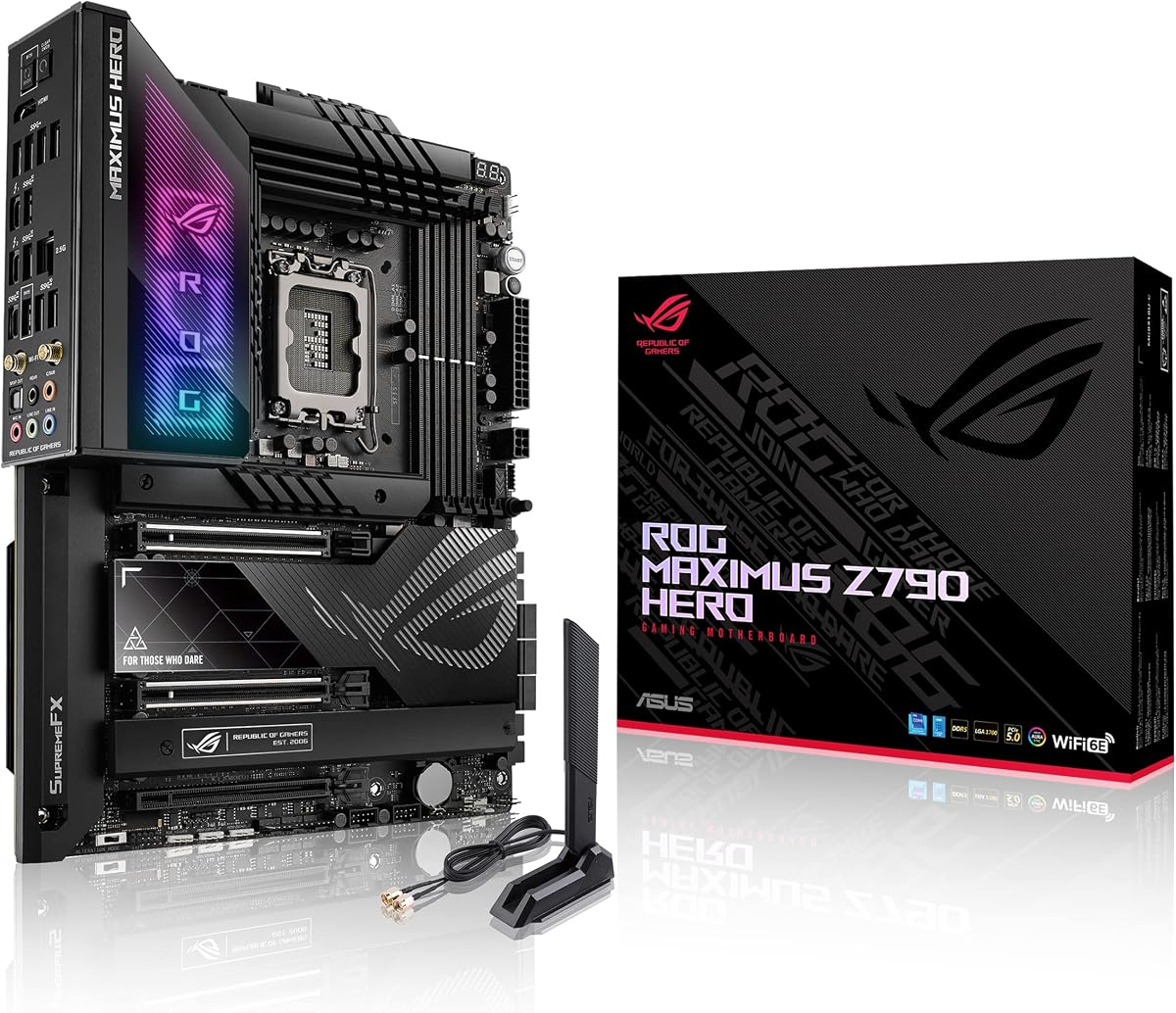
ASUS ROG Maximus Z790 Hero WiFi6E

ASUS ROG Maximus Z790 Hero WiFi6E

8.6/10★★★★☆

ASUS ROG Maximus Z790 Hero WiFi6E is the no-compromise Intel Z790 option in this pack for builders who want maximum power delivery, storage density, and creator I/O without apology. Twenty-plus-one teamed power stages rated for 90A each, ProCool II connectors, MicroFine alloy chokes, and premium metallic capacitors define a VRM built for Core i9-14900K overclocking experiments—not just stock turbo tables.

  • LGA 1700 Z790, 20+1 power stages
  • Five M.2, dual Thunderbolt 4 ports
  • Wi-Fi 6E, 2.5Gb LAN, AI tuning
Check Price →
✓ Pros
  • 20+1 teamed power stages rated 90A for Core i9 overclocking headroom
  • Five M.2 slots with triple heatsinks and embedded backplates
  • Dual onboard Thunderbolt 4 USB4 ports—no header card required
  • AI Overclocking, AI Cooling II, AI Networking, and noise cancellation suite
  • ROG Water-Cooling Zone and premium integrated I/O cover thermals
✕ Cons
  • Flagship pricing—overkill for Core i5 builds and modest budgets
  • Wi-Fi 6E rather than Wi-Fi 7 on this Hero SKU
  • Complex feature set can overwhelm builders who only need TUF simplicity

Detailed review

Storage scalability separates Hero from every other board here except none match five M.2 slots. Triple M.2 heatsinks with embedded backplates keep high-end Gen4 and Gen5 drives cooler during sustained writes. Creators running OS, scratch, cache, sample libraries, and archive volumes simultaneously finally have onboard headroom without USB NVMe dongles cluttering the desk.

Dual onboard Thunderbolt 4 ports are the creator headline. Connect ultrawide monitors, RAID enclosures, and audio interfaces on a single cable tree without buying a Thunderbolt add-in card. TUF and Gigabyte boards offer headers; Hero integrates the ports—pay for it only if you use them.

ROG intelligent control tools—AI Overclocking, AI Cooling II, AI Networking with GameFirst VI, Two-Way AI Noise Cancelation—automate tuning for owners who want performance without manual BIOS camping. Skeptics can ignore AI features and still benefit from raw hardware headroom. Thermals combine VRM heatsinks, an integrated aluminum I/O cover, high-conductivity pads, and a ROG Water-Cooling Zone for custom loop temperature probes.

Networking includes Wi-Fi 6E, Bluetooth 5.2, Intel 2.5Gb Ethernet, and LANGuard protection. Wi-Fi 6E is mature and sufficient for most homes; Wi-Fi 7 seekers should read Z790 MAX or MPG Carbon II reviews. For wired gaming and large LAN transfers, 2.5Gb Ethernet delivers.

The 4.3 rating is slightly below TUF and Eagle—not because Hero hardware is weak, but because flagship buyers have higher expectations and louder complaints when any feature misfires. RMA rates are not alarming; expectations are elevated.

Buy ROG Maximus Z790 Hero when you run Core i9 K-SKUs hard, need five NVMe slots and dual Thunderbolt 4, and value ASUS ROG support ecosystem. Skip it for Core i5 gaming rigs, budget builds, or desks that never use Thunderbolt—TUF Z790-Plus delivers most practical value.

Overclocking reality

Hero VRMs remove board power as the bottleneck; CPU cooling and silicon lottery still cap results. Budget elite coolers before expecting Hero to magic extra GHz.

Thunderbolt workflow

Ideal for video editors and music producers with TB4 docks, UAD interfaces, or fast external RAID. Gamers with one monitor and USB peripherals rarely need dual TB4.

Versus MPG Carbon WiFi II

Hero wins on M.2 count and dual TB4. Carbon II wins on Wi-Fi 7 and Gen 5 M.2. Choose based on wireless generation versus creator port needs.

Check Price on Amazon →

We may earn a commission at no additional cost to you.

10. MPG Carbon WiFi II - Best Performance MSI

MSI MPG Z790 Carbon WiFi II

MSI MPG Z790 Carbon WiFi II

8.4/10★★★★☆

MSI MPG Z790 Carbon WiFi II is the performance-oriented MSI counterpoint to ASUS ROG Maximus Hero—different tradeoffs, similar ambition. Direct 19+1+1 phase power delivery with Core Boost and Memory Boost targets enthusiasts who push Core i7 and Core i9 K-SKUs with aggressive power limits and high-speed DDR5 kits advertised beyond 7800 MT/s.

  • LGA 1700 Z790, 19+1+1 direct power
  • Wi-Fi 7, Lightning Gen 5 M.2
  • PCIe 5.0, DDR5 up to high OC speeds
Check Price →
✓ Pros
  • Direct 19+1+1 phase power with Core Boost and Memory Boost
  • Wi-Fi 7 and Bluetooth 5.4 with 2.5Gbps LAN
  • Lightning Gen 5 x4 M.2—fastest storage class in this pack
  • DDR5 advertised up to 7800+ MT/s OC capability
  • Carbon aesthetics with MPG-tier heatsinks and stealth styling
✕ Cons
  • 4.2 rating—good but not class-leading versus TUF or Eagle
  • Premium MSI pricing without ROG dual Thunderbolt 4 integration
  • Wi-Fi 7 requires compatible OS and router to deliver full benefits

Detailed review

Lightning Gen 5 x4 M.2 is the storage differentiator in this entire roundup. While most boards here stop at Gen4 M.2 connectors, Carbon II exposes PCIe 5.0 x4 NVMe bandwidth for early Gen5 drives and future upgrades. Practical benefit today depends on available Gen5 SSDs and workloads that saturate Gen4—creators moving huge assets see gains sooner than competitive gamers.

Wireless moves to Wi-Fi 7 with Bluetooth 5.4, paired with 2.5Gbps wired LAN—a more balanced networking stack than Z790 MAX WIFI7's 1Gb wired downgrade. Ensure your OS and router support 802.11be before paying for Wi-Fi 7; otherwise you are buying headroom you cannot activate yet.

PCIe 5.0 on the graphics slot aligns with other Z790 boards. USB 3.2 Gen 2x2 covers fast external devices. Carbon II styling targets stealth high-end gaming builds where MPG branding reads cleaner than rainbow RGB excess.

The 4.2 rating indicates solid but mixed long-term feedback—common for complex premium boards where BIOS updates and memory QVL mismatches generate one-star reviews from fixable issues. Treat early setup seriously: flash BIOS, run MemTest, validate thermals under combined CPU and GPU load.

Versus MAG Tomahawk, Carbon II is a clear step up in VRM, Wi-Fi generation, and M.2 speed class. Versus ROG Hero, Carbon II wins Wi-Fi 7 and Gen 5 M.2; Hero wins five M.2 slots and dual onboard Thunderbolt 4. They serve different premium niches rather than direct substitutes.

Choose MPG Z790 Carbon WiFi II when you want MSI's top Z790 feature mix—Wi-Fi 7, 2.5Gb LAN, Gen 5 M.2, and 19+1+1 power—for a high-end gaming or creative tower without jumping to ROG Hero pricing. Pair with elite cooling and a PSU that respects dual CPU power draw.

Gen 5 M.2 reality

Gen5 NVMe helps large sequential transfers today; many games and apps still show minimal difference versus Gen4. Buy Carbon II for the full platform story, not one benchmark.

MSI vs ASUS premium

Pick Carbon for Wi-Fi 7 plus Gen 5 M.2 plus 2.5Gb LAN balance. Pick Hero for Thunderbolt-centric creators needing five M.2 slots.

Cooling reminder

19+1+1 phases help the board, not the CPU heat spreader. A 360 mm AIO or equivalent air tower remains mandatory for i9-class loads.

Check Price on Amazon →

We may earn a commission at no additional cost to you.

Best Z790 Motherboards in 2026 for Intel 14th Gen Builds

How to Choose the Best Z790 Motherboard

Why Z790 still matters in 2026

Intel's 700-series Z790 chipset remains the unlocked choice for LGA 1700 builds when you want CPU multiplier control, richer PCIe bifurcation, and more M.2 lanes than B760 offers. All ten boards in this pack are true Z790 ATX models with DDR5 and PCIe 5.0 on the primary graphics slot. They support 12th, 13th, and 14th Gen Core processors when BIOS is current. If you already own a capable B760 board and never overclock, upgrading to Z790 is optional—not mandatory. If you are building fresh with a K-SKU and multiple NVMe drives, Z790 is the rational default.

Match VRM strength to your CPU tier

Phase counts on the box are marketing shorthand. What matters is quality power stages, heatsink coverage, CPU power connector implementation, and how the board behaves when P-cores and E-cores boost together under a real cooler. Core i5-14600K builds tolerate 12+1 tier boards like Eagle AX and AYW when airflow is decent. Core i7-14700K builds benefit from 14+1 or 16+1 designs like TUF, AORUS Elite, Tomahawk, and Gaming Plus. Core i9-14900K sustained workloads reward 16+1+ or 19+1+ and 20+1 tiers—MPG Carbon II and ROG Maximus Hero—plus elite cooling and dual EPS cables from the PSU.

Count M.2 slots before you buy

Storage creep is real. One NVMe for OS, one for games, one for projects, and suddenly three slots are full. TUF Z790-Plus and AORUS Elite AX offer four M.2 connectors—best for creators who hate USB NVMe adapters. Eagle, AYW, Gaming Plus, Tomahawk, and Z790 MAX stop at three, which suffices for many gamers. ROG Maximus Hero leads with five. Check lane sharing in each manual: populating every slot may disable SATA ports or reduce PCIe x16 bandwidth on some boards—normal Z790 behavior, not defects.

Wi-Fi 6, 6E, and 7 on desktop

Most homes still run fine on Wi-Fi 6 or 6E. TUF and AYW ship Wi-Fi 6; Eagle, Gaming Plus, Tomahawk, AORUS Elite, and ROG Hero add 6E for 6 GHz band access when routers support it. Z790 MAX WIFI7 and MPG Carbon WiFi II add 802.11be— worthwhile when you run Windows 11 24H2 and a Wi-Fi 7 router. Wired 2.5Gb Ethernet on most boards here still beats wireless for competitive latency when you can cable the desk. Note Z790 MAX uses 1Gb wired LAN—a deliberate tradeoff.

Creator I/O: Thunderbolt and USB-C speed tiers

Video editors and audio producers should rank Thunderbolt and high-speed USB-C before RGB. ROG Maximus Hero integrates dual Thunderbolt 4 ports. TUF, AYW, and Z790 MAX offer Thunderbolt USB4 headers for compatible cases or add-in cards. USB 3.2 Gen 2x2 at 20Gbps appears on several Gigabyte and MSI boards. USB 10Gbps and 20Gbps Type-C on newer ASUS SKUs cover fast external SSDs. Map your dock and enclosure requirements to the board before checkout.

New versus renewed listings

The renewed TUF Z790-Plus in this pack is hardware-identical to our Best Overall new unit but carries Amazon Renewed warranty terms and a lower 4.0 rating reflecting condition variability. Buy new when peace of mind matters; consider renewed only with immediate inspection discipline and comfort with renewed RMA paths.

Frequently Asked Questions

01

What is the best Z790 motherboard overall in this guide?

ASUS TUF Gaming Z790-Plus WiFi is our Best Overall pick. It combines a class-leading 4.6 pack rating, 16+1 DrMOS power with TUF-grade components, four M.2 slots, PCIe 5.0, Thunderbolt 4 header support, Wi-Fi 6, and 2.5Gb LAN. It is the most balanced default for Core i5 through Core i9 K-SKU builds when you want durability and I/O without ROG flagship pricing.

02

Do I need Z790 or is B760 enough?

B760 can run the same LGA 1700 CPUs but locks CPU multiplier overclocking and typically offers fewer PCIe and M.2 options. If you bought a K-SKU specifically to tune turbo behavior, Z790 is the correct chipset. All boards in this guide are Z790 for that reason. B760 remains valid for locked chips or buyers who prioritize board savings over overclocking and storage expansion.

03

Which Z790 board is best for Core i9-14900K?

For sustained all-core workloads, prefer ASUS ROG Maximus Z790 Hero WiFi6E with its 20+1 90A power stages and premium cooling, or MSI MPG Z790 Carbon WiFi II with direct 19+1+1 phases and Wi-Fi 7. ASUS TUF Z790-Plus and GIGABYTE AORUS Elite AX also handle i9 chips when power limits and cooling are realistic. Avoid expecting maximum i9 overclocks on 12+1 value boards like Eagle AX or AYW without throttling.

04

How many M.2 slots do I need on Z790?

Most gamers are satisfied with three: OS, games, and one spare. Creators with large media libraries should prefer four M.2 boards—TUF Z790-Plus and AORUS Elite AX—or five on ROG Maximus Hero. Remember lane sharing may disable SATA ports when slots are fully populated; read the manual storage diagram before buying drives.

05

Is Wi-Fi 7 worth it on a Z790 motherboard?

Only if your router supports 802.11be and you run an OS that exposes full Wi-Fi 7 features—Windows 11 24H2 for ASUS MAX boards per manufacturer notes. MSI MPG Carbon WiFi II also ships Wi-Fi 7 with 2.5Gb wired LAN. Most buyers are still well served by Wi-Fi 6E on Eagle AX, Gaming Plus, Tomahawk, AORUS Elite, and ROG Hero. Wired Ethernet remains best for competitive gaming latency.

06

Should I buy the renewed TUF Z790-Plus?

Consider renewed only if you accept Amazon Renewed warranty terms, inspect the board immediately on arrival, and are an experienced builder comfortable with potential RMA friction. Hardware matches new TUF Z790-Plus, but the 4.0 rating reflects condition variability. First-time builders and primary workstations should buy the new listing at ASIN B0BQD58D96 instead.

07

Does PCIe 5.0 on Z790 matter for gaming?

Current graphics cards rarely show meaningful gaming differences between PCIe 4.0 and 5.0 at 1440p and 4K. PCIe 5.0 on the x16 slot is future insurance included on every board here. MSI MPG Carbon WiFi II additionally offers Lightning Gen 5 M.2 for storage bandwidth—more relevant to creators moving huge files than to typical gamers.

08

Gigabyte AORUS Elite AX versus Eagle AX—which should I pick?

Choose AORUS Elite AX when you want four M.2 slots and a 16+1+2 VRM for heavier CPU loads. Choose Eagle AX when three M.2 slots suffice and you want the strongest value rating in the pack at 4.5 stars with Wi-Fi 6E. Both are solid Gigabyte Z790 options; the decision is storage count and VRM headroom, not chipset differences.

09

ASUS TUF versus MSI MAG Tomahawk for gaming?

TUF wins on Amazon rating, four M.2 slots, and Thunderbolt 4 header support. Tomahawk competes with 16+1+1 power, Wi-Fi 6E, and MAG gaming aesthetics at a similar mid-tier price class but shares a 4.1 rating with Gaming Plus. Pick TUF for the safest default; pick Tomahawk when you prefer MSI Click BIOS and MAG styling.

10

How do I update BIOS for 14th Gen Intel on Z790?

Check the motherboard vendor CPU support page for your exact board revision. Download the latest BIOS to a FAT32 USB stick. Use USB BIOS Flashback if available—Gigabyte Q-Flash Plus or ASUS FlashBack—when the board lacks native 14th Gen support out of box. After updating, load optimized defaults, confirm POST with memory at JEDEC speed, then enable XMP 3.0. Only then adjust CPU power limits or overclocking on Z790.

Conclusion

Z790 in 2026 is a mature, confident platform for Intel LGA 1700 builds, and this pack shows the full spread—from value Eagle AX and AYW boards through TUF durability, MSI MAG and MPG performance tiers, Wi-Fi 7 options on Z790 MAX and Carbon II, and ROG Maximus Hero flagship creator I/O. ASUS TUF Gaming Z790-Plus WiFi remains our Best Overall recommendation for the highest rating and the most complete balance of power, storage, and networking. GIGABYTE Z790 Eagle AX is the value pick with 4.5-star feedback and Wi-Fi 6E. ROG Maximus Z790 Hero is the flagship when five M.2 slots and dual Thunderbolt 4 justify the spend.

Avoid buying on phase count alone. Pair any board here with a cooler matched to your CPU, case airflow that feeds VRM heatsinks, and a PSU with proper EPS connectors. Flash BIOS before heavy tuning. Treat renewed TUF listings as conditional savings, not automatic Best Overall substitutes.

Lock your CPU tier and storage count first, wireless and Thunderbolt needs second, and aesthetics third. Do that, and one of these Z790 boards will host your Intel build for years without becoming the bottleneck you feared.