Expert Review & Guide

Best Wireless Mechanical Keyboards 2026: Tri-Mode Boards Ranked

Wireless mechanical keyboards in 2026 are no longer a compromise category. Tri-mode boards that hop between Bluetooth, a 2.4GHz dongle, and USB-C now ship with gasket-style dampening, hot-swap sockets, and batteries large enough that you stop thinking about the charger for days. The hard part is matching layout and switch character to how you actually work: a creamy 75% board that frees mouse space for FPS sessions is a different tool from a quiet low-profile MX board on a meeting-heavy desk, and neither replaces a full-size board if you live in spreadsheets.

This roundup ranks ten Amazon wireless mechanical keyboards drawn only from our product pack. We weigh connection modes, claimed battery capacity, switch type and hot-swap support, dampening and sound character, layout size from 75% through full-size, and whether a listing is truly wireless or wired-only despite sitting in a wireless pack. Ratings reflect Amazon listings at the time of writing. We do not print dollar prices because promotions move constantly.

Start with the top picks if you already know you want a high-rated creamy 75% daily driver, a premium ROG gaming board with long wireless endurance, or a quiet office mechanical for multi-OS workflows. Use the comparison table to separate compact gaming layouts from numpad-friendly boards and rechargeable tri-mode builds from the one wired gasket board in the set. Then read each review for who should buy, who should skip, and which tradeoff shows up after a week of real typing and gaming.

Our Top Wireless Mechanical Keyboard Picks for 2026

Best Overall Creamy 75%

AULA F75 75% Wireless Mechanical Keyboard

★★★★★9.4/10
AULA F75 75% Wireless Mechanical Keyboard
  • Tri-mode BT5.0, 2.4GHz, and USB-C with multi-device switching and a 4000mAh rechargeable battery
  • Hot-swappable PCB with pre-lubed linear switches, gasket-style dampening, and creamy thocky typing
  • 81-key 75% layout with media knob, RGB effects, and room for arrow keys without a full numpad footprint
Check Price →
Best Premium Gaming Wireless

ASUS ROG Strix Scope II 96 Wireless

★★★★★9.2/10
ASUS ROG Strix Scope II 96 Wireless
  • ROG SpeedNova 2.4GHz plus Bluetooth and USB with claimed endurance up to about 1,500 hours wireless
  • Hot-swappable pre-lubed ROG NX Snow linear switches, sound dampening, and per-key RGB
  • 96% layout with numpad, multi-function wheel, detachable wrist rest, and PC/Mac support
Check Price →
Best Quiet Office Mechanical

Logitech MX Mechanical Wireless Illuminated

★★★★☆8.4/10
Logitech MX Mechanical Wireless Illuminated
  • Tactile Quiet low-profile switches give a clear bump without loud gaming click for shared offices
  • Bluetooth or Logi Bolt multi-device pairing across Windows, macOS, Linux, iOS, and Android
  • Smart backlighting, USB-C charging, metal construction, and Logi Options+ workflow customization
Check Price →

As an Amazon Associate we earn from qualifying purchases. We may earn a commission at no additional cost to you.

Wireless Mechanical Keyboard Comparison: Layout, Modes, and Feel

Scan layout size and connection type before you chase RGB screenshots. Specs below highlight wireless method or wired-only design, switch and customization approach, and the form-factor detail that decides desk fit. No prices—open the live listing for the current offer.

#ProductSpecificationsScore
1
  • Tri-mode BT/2.4G/USB-C, 4000mAh
  • Hot-swap Reaper switches + knob
  • 75% 81-key gasket-style dampening
9.2
2
  • BT5.0 / 2.4G / USB-C tri-mode
  • Smart display + volume/RGB knob
  • 96% top-mount, 5-layer dampening
8.8
3
  • Bluetooth LE or Logi Bolt receiver
  • Low-profile Tactile Quiet switches
  • Full-size, smart illumination, USB-C
8.4
4
  • Tri-mode, 4000mAh, Win/Mac switch
  • Hot-swap pre-lubed Bsun linear
  • 75% gasket creamy thock, Retro Beige
9.2
5
  • Tri-mode to five devices, hot-swap
  • 96% layout keeps numpad + arrows
  • 8000mAh battery, double-shot PBT
9
6
  • Tri-mode BT/2.4G/USB-C, 4000mAh
  • Blue clicky switches, round keycaps
  • Metal panel full-size anti-ghosting
9.2
7
  • Tri-mode, 4000mAh, multi-device
  • Hot-swap pre-lubed linear + knob
  • 75% creamy gasket-style structure
9.4
8
  • TFT smart display + multi-function knob
  • Tri-mode, 8000mAh, hot-swap creamy
  • Full-size 104-key layout with RGB
9
9
  • Wired only—not a wireless board
  • 96% gasket, cream linear, hot-swap
  • MDA PBT keycaps + detachable knob
9.2
10
  • SpeedNova 2.4G + BT + USB tri-mode
  • Hot-swap ROG NX Snow, dampening
  • 96% with wrist rest and media wheel
9.2

1. AULA F75 Pro - Best Knobbed 75% Upgrade

AULA F75 Pro Wireless Mechanical Keyboard

AULA F75 Pro Wireless Mechanical Keyboard

9.2/10★★★★★

The AULA F75 Pro sits in the sweet spot many buyers actually want from a wireless mechanical keyboard in 2026: a compact 75% shell, a usable stock switch, a real knob, and tri-mode radios that do not force you to pick either gaming or laptop hopping. On Amazon it lands at a 4.6 rating, which matches how it behaves as a daily driver rather than a niche showpiece. You get Bluetooth 5.0 for tablets and phones, a 2.4GHz dongle when you care about lower latency, and USB-C when you want zero wireless variables or need to top up the 4000mAh pack.

  • Tri-mode Bluetooth 5.0, 2.4GHz, USB-C
  • Hot-swap LEOBOG Reaper switches + knob
  • 75% layout, 4000mAh, side-printed PBT
Check Price →
✓ Pros
  • Tri-mode connectivity covers gaming dongle latency, Bluetooth multi-device hopping, and wired charging without a separate board
  • Hot-swap sockets and pre-lubed Reaper switches make the stock creamy feel usable on day one while leaving room to experiment
  • Media and lighting knob removes awkward FN combos for volume and RGB during long sessions
  • Gasket-style structure with multi-layer silencing targets thocky sound instead of hollow plastic ping
  • 81-key 75% footprint keeps arrows and function row while freeing desk space for a wide mouse sweep
✕ Cons
  • Side-printed legends can be harder to read in dim light than south-facing doubleshot legends
  • RGB and music-rhythm effects depend on driver support that is strongest on Windows
  • Battery life still shrinks when bright lighting runs all evening, even with a 4000mAh cell

Detailed review

Hot-swap is the practical upgrade that keeps this board from feeling locked in. The listing supports 3-pin and 5-pin replacements, so beginners can change feel without soldering, and the included LEOBOG Reaper switches arrive pre-lubed for a smoother first week than dry budget stems. Stabilizers are also described as pre-lubricated, which matters more than RGB screenshots for whether large keys sound clean. Combined with PCB single-key slotting and five layers of silencing material, the design goal is a denser thock and less plate ping than older tray-mount plastic boards.

Layout discipline is where the F75 Pro earns desk space. An 81-key 75% arrangement keeps arrow keys and a function row for gaming and editing while dropping the number pad that many FPS and coding desks never use. The multi-function knob covers backlight brightness, speed, and media control so you are not memorizing FN layers for every small adjustment. Side-printed PBT keycaps resist shine better than thin ABS sets, though the side legends are a look-and-read compromise if you hunt-and-peck in the dark without RGB.

For gaming, the board leans on N-key rollover, Win-key lock, and macro programming through the F75 driver. That software path is most useful when you stay in 2.4GHz or wired mode and want per-key lighting or remaps. Bluetooth remains the better choice for hopping among a PC, tablet, and phone, but competitive players should treat the dongle as the primary path. Compatibility claims cover PC, laptops, tablets, phones, and even console environments, which is realistic for typing and menus more than for every console-native control scheme.

Who should buy it: hybrid users who want one wireless mechanical for Discord nights, document work, and a second laptop without dragging a cable across the desk. Who should skip it: people who need a dedicated numpad every hour, or office workers who need quiet tactile feedback more than creamy gaming RGB. Compared with the non-Pro AULA F75 in this same roundup, the Pro leans harder into Reaper switches and the polished knobbed custom vibe; compared with the Kisnt KN85, it feels more feature-dense around lighting control and switch branding.

Setup is straightforward if you pick a primary mode and stick with it for the first day. Pair Bluetooth devices with the side button or shortcut workflow, park the 2.4GHz receiver on a front USB port or extender if your case is RF-hostile, and leave USB-C plugged in only when you want to charge while typing. Turn lighting down or off when you leave the desk for the night—wireless mechanicals lose endurance to LEDs faster than to keystrokes. If the stock sound is slightly sharp for your taste, a switch swap or aftermarket keycap set is an easier next step than buying an entirely new board.

Who the F75 Pro fits best

Choose the F75 Pro if your desk is mouse-movement heavy and you still want arrows, F-keys, and a knob without a 100% footprint. It fits gamers who also write, students who bounce between a dorm PC and a tablet, and custom-curious buyers who want hot-swap without assembling a kit from scratch. Skip it if you invoice in Excel all day and refuse to use a separate numpad.

Wireless setup notes

Name your Bluetooth profiles clearly on each host so FN device switching does not become guesswork. Keep the 2.4GHz dongle dedicated to the gaming PC. If latency feels soft, confirm you are not accidentally in Bluetooth, and reduce nearby 2.4GHz congestion from crowded USB 3 hubs when possible.

F75 Pro vs F75 in this roundup

Both share the 75% tri-mode formula and dampened structure. The Pro listing emphasizes Reaper switches and a more custom-forward presentation, while the standard F75 currently carries the higher 4.7 rating and a simpler linear story. Pick Pro for the switch identity and knobbed polish; pick the standard F75 if you want the highest-rated creamy daily driver in the pack.

Check Price on Amazon →

We may earn a commission at no additional cost to you.

2. RK ROYAL KLUDGE S98 - Best Smart Display Compact

RK ROYAL KLUDGE S98 Wireless Mechanical Keyboard

RK ROYAL KLUDGE S98 Wireless Mechanical Keyboard

8.8/10★★★★☆

The RK ROYAL KLUDGE S98 is the pack’s gadget-forward wireless pick: a 96% board that keeps a number pad while adding a small smart display and a control knob. At a 4.4 rating it is slightly more polarizing than the creamier AULA 75% options, which makes sense—buyers either love the status screen or treat it as clutter. If you actually use on-keyboard feedback for battery, Win/Mac layout, and connection mode, the display earns its footprint; if not, you are paying attention budget for a feature you will ignore after a week.

  • Smart display for GIF, battery, mode
  • Tri-mode BT5.0 / 2.4G / USB-C + knob
  • 96% top-mount, hot-swap, double-shot PBT
Check Price →
✓ Pros
  • Onboard smart display shows connection mode, battery, layout hints, and custom GIFs without opening software every time
  • Knob control for volume, RGB, and mode switching keeps everyday adjustments tactile and fast
  • Five-layer dampening package aims at creamy sound with less hollow case noise than bare plastic boards
  • Hot-swap PCB and double-shot PBT keycaps support longer ownership and cleaner legends
✕ Cons
  • Top-mount feel is firmer than soft gasket boards if you prefer deep flex
  • Display customization is a novelty tax if you only care about typing and never look at GIFs
  • 96% density can feel cramped if you are coming from a spacious full-size office keyboard

Detailed review

Connectivity is properly modern. Bluetooth 5.0, a 2.4GHz dongle, and USB-C cover the same tri-mode triangle as most boards in this guide. The knob can twist through volume, lighting brightness and speed, RGB modes, and connection-related controls, which is more pleasant than memorizing every FN chord. For desk workflows that jump between a Windows tower and a MacBook, the ability to glance at layout and battery status is more useful than animated GIFs, even though the listing leans hard into custom image fun.

Typing character comes from a gaming-friendly top-mount design with pre-lubed switches and a multi-layer foam stack: IXPE switch dampening, thicker absorbing foams, and a silicone pad. Royal Kludge claims meaningful reductions in hollow noise, and the marketing language targets creamy or thocky feedback rather than sharp click. That is a different personality from the Logitech MX Mechanical’s quiet office bump, and closer to the AULA and Kisnt creamy boards—just with a firmer top-mount platform instead of a softer gasket sandwich.

Hot-swap support for 3-pin and 5-pin switches keeps the S98 from being a dead end if the stock stem is not your forever feel. Double-shot PBT keycaps help legends survive oil and abrasion better than cheap ABS. RGB remains fully in play for gaming desks, but the smarter long-term story is the combination of numpad retention and wireless modes in a footprint narrower than classic 104-key boards.

Who should buy it: streamers, tinkering enthusiasts, and hybrid workers who want a compact numpad board with status visibility and knob control. Who should skip it: minimalists who want a clean slab with no screen, and anyone who needs the softest gasket flex possible. Versus the AULA F108 Pro, the S98 is the smaller 96% smart-display sibling; versus the ASUS ROG Scope II 96, it trades brand ecosystem polish and claimed ultra-long wireless endurance for a flashier onboard screen at a more enthusiast-budget positioning.

Practical advice: set the display to battery and mode first, then decide whether GIFs are worth the distraction. Use 2.4GHz for games, Bluetooth for laptop hopping, and wired when updating firmware or forcing a rock-solid link. If the top-mount feels stiff, a switch swap or aftermarket keycaps change character faster than expecting the mount style itself to soften into gasket territory.

Is the smart display worth it?

Yes if you change hosts often and hate guessing battery percentage from vague RGB indicators. No if you find animated screens visually noisy during deep work. Treat GIFs as optional seasoning, not the reason to buy, unless desk aesthetics are half the purchase for you.

Top-mount vs gasket expectations

Top-mount boards often feel more direct and consistent under rapid gaming inputs. Gasket boards usually flex more and sound deeper. If your priority is soft creamy bottom-out, compare the S98 in person against gasket options like the Kisnt KN85 or AULA F99 before committing.

Check Price on Amazon →

We may earn a commission at no additional cost to you.

3. Logitech MX Mechanical - Best Quiet Office Mechanical

Logitech MX Mechanical Wireless Illuminated

Logitech MX Mechanical Wireless Illuminated

8.4/10★★★★☆

Logitech’s MX Mechanical is the office counterweight in a pack full of creamy RGB gamers. The Tactile Quiet switches are mechanical, but they are tuned for a precise bump and lower noise rather than shouty click or deep thock. That makes this the board to shortlist when you share a room, join back-to-back calls, and still want more feedback than a membrane office keyboard. The 4.2 rating is the lowest in the pack, which is useful signal: enthusiasts chasing custom sound often bounce off low-profile MX boards, while productivity buyers tend to keep them.

  • Tactile Quiet low-profile mechanical switches
  • Bluetooth or Logi Bolt, multi-device OS support
  • Smart backlighting, USB-C, metal construction
Check Price →
✓ Pros
  • Tactile Quiet switches deliver mechanical feedback without the loud click that bothers open offices
  • Low-profile full-size layout feels closer to modern laptop ergonomics than tall gaming boards
  • Logi Options+ unlocks Flow, remaps, and multi-computer control that enthusiast boards rarely match
  • Smart illumination and long claimed charge life with lighting off make it practical for all-day knowledge work
  • Metal construction and recycled plastic content signal a more polished office product than RGB-first plastics
✕ Cons
  • Not hot-swappable, so switch feel is fixed compared with AULA, Kisnt, RK, and ROG options here
  • Lower Amazon rating than the creamy gaming boards reflects mixed tastes around low-profile travel and price positioning
  • RGB gaming macro culture and deep thock aesthetics are simply not this product’s job

Detailed review

Form factor is full-size with low-profile keys, so you keep a number pad and familiar spacing while sitting closer to laptop-like finger travel. Smart illumination lights keys as hands approach and adapts to ambient conditions, which is more professional than rainbow wave modes in a glass-walled office. USB-C charging and strong claimed endurance—especially with backlighting off—fit the MX family’s multi-month wireless habit better than bright gaming boards that want a charge every few nights of RGB.

Where Logitech still wins product ecosystems is software and multi-device behavior. Pair up to three hosts over Bluetooth Low Energy or the Logi Bolt receiver, move across Windows, macOS, Linux, iOS, and Android, and use Logi Options+ for Fn customization, lighting control, and Flow-style cross-computer clipboard and cursor tricks when your desk runs two machines. That workflow depth is why MX remains relevant even when enthusiast boards outscore it on Amazon star averages.

Build presentation is deliberately non-gamer: metal construction, graphite finish, and post-consumer recycled plastic content in the Graphite version. There is no hot-swap PCB, no gasket foam marketing stack, and no side-printed artisan-keycap story. If those are mandatory, look at the AULA or Kisnt picks instead. If your priority is quiet confidence in meetings plus reliable pairing, the MX Mechanical is the more honest tool.

Who should buy it: writers, analysts, managers, and dual-OS professionals who want a wireless mechanical that disappears socially. Who should skip it: gamers who want hot-swap experiments, creamy thock recordings, or aggressive RGB. Versus the ASUS ROG Scope II 96, MX is quieter and more office-native; versus the AULA F75, MX keeps the numpad and low-profile comfort while giving up DIY switch culture entirely.

Setup tip: install Logi Options+ early, name your three channels after real machines, and decide whether Bolt or Bluetooth is your primary link on the work PC. Turn auto-lighting to a modest brightness for battery. If you expected a tall MX-style typing angle with deep flex, recalibrate—this is a low-profile mechanical, and that travel difference is the main reason some reviewers never bond with it.

Office and open-plan fit

MX Mechanical is one of the few boards here you can use on a silent floor without apologizing. The tactile bump still confirms actuation for fast typists, but the acoustic profile is far closer to premium office gear than to clicky blue-switch gaming boards like the Redragon typewriter model.

When to choose Bolt vs Bluetooth

Use Logi Bolt on a primary Windows workstation when you want a dedicated receiver and stable desktop behavior. Use Bluetooth when you hop among a laptop, tablet, and phone and refuse to carry dongles. Mixed setups work; just keep channel habits consistent so Easy-Switch style hopping stays muscle memory.

MX Mechanical vs creamy gaming boards

Creamy gasket boards optimize sound and customization. MX optimizes quiet feedback, multi-OS software, and professional presence. If your desk is half Excel and half Zoom, MX usually wins. If your desk is half Valorant and half custom keycap photos, it usually does not.

Check Price on Amazon →

We may earn a commission at no additional cost to you.

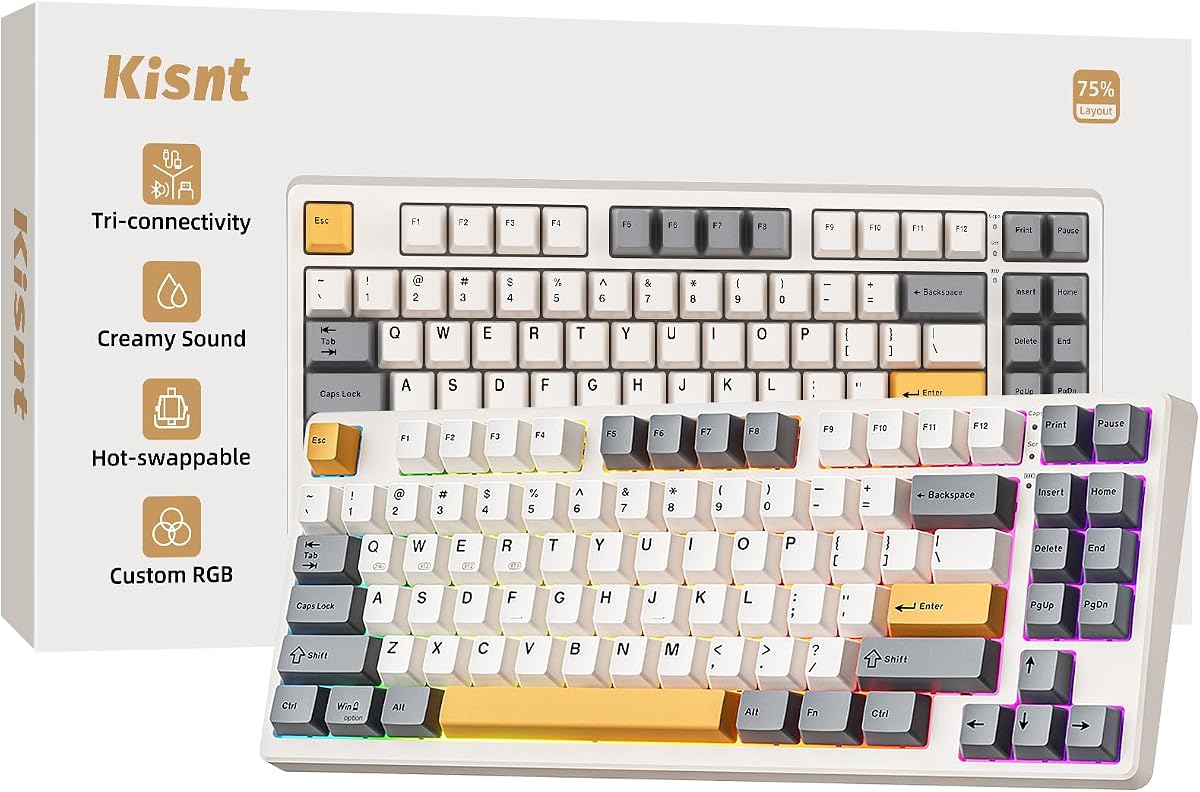
4. Kisnt KN85 - Best Budget Creamy 75%

Kisnt KN85 Wireless Mechanical Keyboard

Kisnt KN85 Wireless Mechanical Keyboard

9.2/10★★★★★

Kisnt’s KN85 is the value creamy wireless pick for people who want gasket-style sound without assembling a custom kit. The 85-key 75% layout is compact enough to reclaim mouse space, yet it keeps F-keys and arrows that many 60% boards discard. Retro Beige gives it a distinct desk identity next to black gaming slabs, and the 4.6 rating puts it in the same trust band as several pricier-feeling options in this pack.

  • 75% 85-key, Retro Beige, gasket dampening
  • Tri-mode with claimed low wireless latency
  • Hot-swap Bsun linear, 4000mAh battery
Check Price →
✓ Pros
  • Gasket-mounted creamy thock tuning at a budget-friendly position in the wireless mechanical market
  • Tri-mode links with practical latency claims and a 4000mAh cell for all-day wireless use
  • Hot-swap pre-lubed linears invite beginners into switch swapping without a soldering iron
  • Retro beige styling stands apart from black RGB clones while keeping PBT keycap glow aesthetics
  • Two-year warranty framing and support messaging reduce the usual no-name accessory anxiety
✕ Cons
  • Full per-key programming via KN85 driver is Windows-oriented and strongest in wired or 2.4G modes
  • No dedicated numpad—data-entry heavy users need a separate pad or a 96%/full-size board
  • Creamy linear stock feel may bore fans of sharp tactile or clicky feedback

Detailed review

Tri-mode connectivity covers USB-C, 2.4GHz, and Bluetooth 5.0 with multiple Bluetooth channels. Kisnt publishes latency figures that position wired as fastest, 2.4G as the wireless gaming lane, and Bluetooth as the convenience lane—exactly how you should assign modes in practice. The 4000mAh battery supports long wireless stretches, and wired mode remains available when the cell runs low so you are not stranded mid-project.

The typing story is gasket mount plus layered foam and silicone dampening for a deeper marbly thock. Pre-lubed Bsun linear switches in a light 45–50gf window favor smooth travel for gaming and long writing sessions. Hot-swap sockets accept 3-pin and 5-pin switches, so you can move into tactiles later without buying a new keyboard. RGB offers a wide preset list controllable on-board or through software, with edge glow around the keycaps for the popular shine-through look.

Programmability exists, but expectations should stay realistic: the KN85 driver is called out for Windows and for wired or 2.4G operation. Mac users can still type and switch OS layouts, yet deep remaps are not the cross-platform MX experience. That is an acceptable trade if your priority is sound and wireless convenience rather than enterprise software polish.

Who should buy it: students, first mechanical buyers, and gamers who want creamy wireless feel without climbing into premium ROG pricing. Who should skip it: accountants living on the numpad, click lovers, and anyone who needs Logitech-grade multi-computer Flow features. Versus the AULA F75, Kisnt leans into beige aesthetics and explicit gasket creamy marketing; versus the F75 Pro, it is the simpler budget creamy path if you do not need Reaper branding.

Desk fit tip: measure width if you are coming from a full-size board—the KN85’s roughly 13.7-inch span changes muscle memory for mouse starts. If you occasionally need numbers, Kisnt mentions companion numpad options in the listing ecosystem; that modular approach is smarter than forcing a 75% buyer into a permanent 104-key purchase.

Best first wireless mechanical?

For many people, yes. Hot-swap, tri-mode, and gasket dampening teach the modern checklist without requiring lube stations and foam cutting. Start with stock linears for a week before swapping switches so you learn what you actually dislike.

Sound expectations

Creamy thock depends on desk surface, keycaps, and filming. A hollow desk can still make any board louder than marketing clips. Use a desk mat if you want the softer internet sound, and lower RGB if nighttime battery anxiety is your real enemy.

Check Price on Amazon →

We may earn a commission at no additional cost to you.

5. AULA F99 - Best Long-Battery 96%

AULA F99 Wireless Mechanical Keyboard

AULA F99 Wireless Mechanical Keyboard

9/10★★★★★

The AULA F99 is the pack’s practical answer when you refuse to give up a numpad but still want wireless mechanical convenience. Its 99-key 96% layout compresses the classic full-size idea into a tighter rectangle, keeping number keys for spreadsheets, Discord volume math, and shop SKUs while reclaiming some desk width versus a 104-key slab. A 4.5 rating and familiar AULA dampening recipe place it as a safer all-rounder than flashier display boards.

  • 96% 99-key layout with numpad retained
  • Tri-mode to five devices, hot-swap linears
  • 8000mAh battery, double-shot PBT, RGB
Check Price →
✓ Pros
  • 8000mAh battery class is a clear endurance advantage over many 4000mAh compact boards
  • 96% layout keeps number pad and arrows in a tighter shell than classic full-size boards
  • Hot-swap pre-lubed linears and gasket-style dampening deliver modern creamy stock typing
  • Multi-device tri-mode switching supports work-and-play desks without constant re-pairing rituals
✕ Cons
  • Larger than a 75% board, so FPS mouse space shrinks compared with F75 models
  • Macro and lighting software depth still skews toward Windows-centric enthusiast workflows
  • Less distinctive than smart-display siblings if you want on-board screens and knobs

Detailed review

Battery is the headline differentiator. The listed 8000mAh cell roughly doubles the capacity story of the 4000mAh 75% AULA and Kisnt boards, which matters if you run RGB and hate midweek charging. Tri-mode Bluetooth 5.0, 2.4GHz, and USB-C can remember multiple devices, so a work laptop, home PC, and tablet can share one keyboard with FN switching instead of cable swapping.

Feel-wise, the F99 follows AULA’s advanced structure pitch: extended silicone padding, PCB slotting, and five-layer silencing to reduce cavity noise and soften bottom-out. Pre-lubed linear switches favor smooth gaming and long typing. Hot-swap sockets plus included pullers make the board a customization starter kit rather than a sealed consumer appliance. Double-shot PBT keycaps help legends survive longer than painted ABS.

RGB and macro support are present for users who want music-reactive lighting or remaps through the driver. N-key rollover covers dense game inputs. None of that replaces choosing the correct wireless mode: dongle for competitive play, Bluetooth for couch tablet typing, wired when charging or troubleshooting. Console compatibility claims are best read as flexible connectivity rather than a promise that every console UI is perfectly mapped.

Who should buy it: hybrid workers who game after hours and still touch a numpad daily. Who should skip it: minimal desk setups that benefit more from a 75% board, and quiet-office buyers who should be looking at the MX Mechanical instead. Versus the RK S98, the F99 trades the smart display for a bigger battery narrative; versus the ROG Scope II 96, it offers a more budget-custom path with less premium ecosystem packaging.

Buying tip: if your week is spreadsheet-heavy, prioritize F99 or F108 Pro over any 75%. If your week is aim-trainer-heavy, the F75 family will feel freer. The F99 is the middle lane—wireless, creamy, and numerically complete without going full 104-key width.

Who needs 96% instead of 75%

You do, if number-pad absence slows real work more than mouse space helps games. Many people think they will adapt to 75%; some never do. The F99 is the safer wireless mechanical compromise for mixed jobs.

Battery habits that actually matter

Dim or disable RGB overnight, prefer 2.4G or Bluetooth sleep behavior over leaving the board awake with animated lighting, and use USB-C opportunistically during lunch. An 8000mAh cell only feels huge if you stop treating the keyboard like a light show appliance.

F99 vs F108 Pro

Pick F99 for a cleaner 96% wireless board focused on battery and layout. Pick F108 Pro if you want a full-size board with a TFT screen and knob theater. Both share AULA’s hot-swap creamy language; the form factor and screen are the real fork.

Check Price on Amazon →

We may earn a commission at no additional cost to you.

6. Redragon Typewriter - Best Clicky Typewriter Style

Redragon Wireless Typewriter Style Mechanical

Redragon Wireless Typewriter Style Mechanical

9.2/10★★★★★

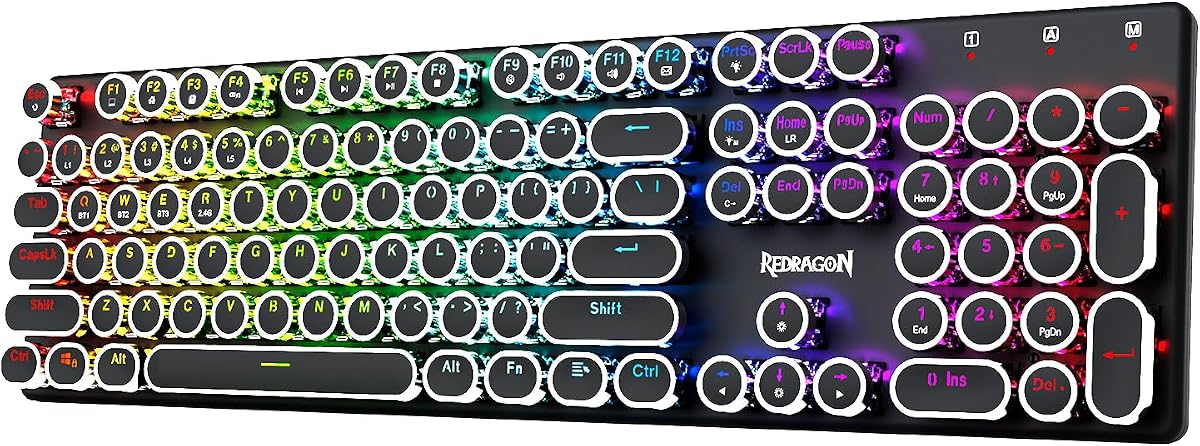
Redragon’s wireless typewriter-style board is the personality hire of this roundup. Round keycaps, a solid metal panel, and blue clicky switches recreate steampunk-adjacent desk theater while still offering Bluetooth, 2.4GHz, and USB-C. The 4.6 rating suggests buyers who want this look are generally satisfied—especially if they understood they were purchasing a clicky instrument, not a silent office tool.

  • Retro round keycaps, metal panel full-size
  • Blue clicky switches, tri-mode, 4000mAh
  • RGB presets, software macros, anti-ghosting
Check Price →
✓ Pros
  • Typewriter round keycaps and metal panel create a distinctive desk look without a custom artisan budget
  • Blue clicky switches give clear audible and tactile feedback for typists who want ceremony in every keystroke
  • Tri-mode wireless plus a 4000mAh pack modernizes a retro aesthetic that used to mean cables only
  • Full-size layout and 104-key anti-ghosting keep gaming and numeric entry straightforward
✕ Cons
  • Clicky blues are a poor fit for shared offices, libraries, and late-night apartments with thin walls
  • Retro profile and round caps can feel unfamiliar if you are trained on modern sculpted OEM/Cherry profiles
  • Less gasket-creamy than AULA/Kisnt options if thock culture is your actual goal

Detailed review

Switch feel is the make-or-break trait. Medium-resistance blue switches provide an audible click and tactile event that some writers love and some households hate. If you already know you enjoy clicky boards, this is a rare wireless package that does not force you into linear creamy defaults. If you are unsure, do not buy based on photos alone; click fatigue is real in small rooms.

Connectivity shortcuts are clearly documented: FN combinations for Bluetooth device slots and 2.4G mode keep multi-host life usable. RGB includes numerous presets and solid colors, with software on Redragon’s site for deeper effects and macros when you want more than onboard controls. Full-size anti-ghosting support helps chord-heavy games and shortcuts behave predictably.

Build emphasis sits on the metal panel’s rigidity and visual weight. That steadies the board during hard typing and supports the premium-retro pitch. It does not magically create the soft gasket thock marketed by Kisnt and AULA. Expect a firmer, clickier soundtrack with typewriter cosmetics rather than marbly linear creaminess.

Who should buy it: enthusiasts decorating a content-creation desk, fans of audible feedback, and anyone who wants full-size wireless without another black rectangular clone. Who should skip it: office sharers, creamy-sound chasers, and low-profile ergonomic shoppers who belong on the MX Mechanical. Versus the AULA F108 Pro, Redragon wins on retro identity and click; AULA wins on creamy hot-swap dampening and smart-display utility.

Living-with-it advice: use Bluetooth for casual laptop work, 2.4G for games, and keep a USB-C cable nearby because clicky RGB boards invite longer evening sessions than you estimate. Download the K710 software from Redragon’s official keyboard software page when you are ready for macros. If housemates flinch on day one, this is not a burn-in problem—it is the switch type doing its job.

Clicky etiquette check

Ask the people who share your walls before you commit. A satisfying click on a marketing video can be a relationship problem at midnight. If silence is required even occasionally, choose MX Mechanical or a muted linear gasket board instead.

Retro look vs modern typing profiles

Round typewriter caps change finger placement and sound. Give yourself a few days before judging accuracy. Gamers who rely on precise WASD sculpting sometimes prefer conventional profiles even when they like the aesthetic in photos.

Check Price on Amazon →

We may earn a commission at no additional cost to you.

7. AULA F75 - Best Overall Creamy 75%

AULA F75 75% Wireless Mechanical Keyboard

AULA F75 75% Wireless Mechanical Keyboard

9.4/10★★★★★

If this guide needs a default recommendation for most people shopping the wireless mechanical category in 2026, the AULA F75 is it. The 4.7 rating leads the pack, and the feature mix matches what buyers repeatedly ask for: creamy linear feel, hot-swap sockets, tri-mode radios, a 75% layout, and a knob for the small controls you touch constantly. It is less flashy than the smart-display boards and less office-specific than the MX Mechanical, which is exactly why it works as a mainstream pick.

  • Highest-rated board in this pack at 4.7
  • Tri-mode wireless, 4000mAh, media knob
  • Hot-swap pre-lubed linears, 75% creamy structure
Check Price →
✓ Pros
  • 4.7 Amazon rating is the strongest social-proof signal among the ten pack products
  • Creamy pre-lubed linear stock experience hits the current wireless mechanical meta without immediate mods
  • Tri-mode multi-device support and a control knob cover both gaming and everyday volume/RGB adjustments
  • 75% layout balances function keys with a smaller footprint for mouse-heavy desks
  • Hot-swap PCB keeps the board upgradeable when your taste shifts from linear to tactile
✕ Cons
  • No numpad, so spreadsheet-centric users still need a separate pad or a 96%/full-size alternative
  • White-and-brown theme is distinctive but not universal if you wanted stark black esports styling
  • Bright RGB habits will still drain the 4000mAh pack faster than muted lighting profiles

Detailed review

Connection flexibility follows the AULA pattern—Bluetooth 5.0, 2.4GHz wireless, and USB-C, with multi-device switching for mixed PC and mobile desks. The 4000mAh battery is adequate when lighting is managed, and wired mode remains a reliable fallback. For competitive sessions, prefer the dongle; for class notes on a tablet, prefer Bluetooth; for firmware and charging, prefer USB-C.

The internal recipe again emphasizes an advanced dampened structure, integrated silicone, PCB slotting, and multi-layer silencing to push thocky creaminess over rattly hollowness. Pre-lubed linear switches and lubricated stabilizers aim to make the out-of-box week enjoyable. Hot-swap support means you are not trapped if you later want heavier linears or tactiles. RGB brings a full effect list plus music-rhythm options through the driver, while the knob shortens the path to brightness and media changes.

Macro programmability, N-key rollover, and Win-key lock cover the gaming checklist without turning the board into a software hostage for basic typing. Driver downloads are referenced for deeper customization, with the usual caveat that Windows wired or dongle modes are where enthusiast tooling is happiest. Side aesthetics in white and brown give it a softer enthusiast look than pure black esports plastics.

Who should buy it: nearly anyone who wants one wireless mechanical for games and writing and does not need a numpad. Who should skip it: quiet-office professionals and heavy numeric users. Versus the F75 Pro, this standard F75 currently carries stronger rating momentum and a cleaner “just buy this” story; versus Kisnt KN85, both chase creamy 75% wireless value, so finish preference and listing details may decide the tie.

Recommendation in practice: make the F75 your baseline, then upgrade only if a specific gap appears—ROG for premium wireless endurance and wrist-rest packaging, MX for silent office tactility, F99/F108 for numpad retention, Redragon for clicky retro flair. That is how this roundup is meant to be used, not as ten equal winners.

Why it is our best overall

Best overall here means the fewest serious compromises for the largest group of buyers: sound, wireless modes, upgrade path, and layout utility. It is not the premium ROG experience and not the quietest office board, but it is the most broadly correct wireless mechanical in the pack.

First-week setup checklist

Charge fully, pair your main PC on 2.4GHz, add a laptop on Bluetooth, set Win or Mac layout, lower default RGB, and test stabilizer sound on Enter and Shift. If a large key ticks, reseat the keycap before assuming you need mods.

F75 vs KN85 quick call

Choose F75 for the higher rating, knob-centric AULA ecosystem, and white/brown creamy gaming look. Choose KN85 for retro beige styling and Kisnt’s gasket creamy budget framing. Both are legitimate 75% wireless answers.

Check Price on Amazon →

We may earn a commission at no additional cost to you.

8. AULA F108 PRO - Best Full-Size Screen Board

AULA F108 PRO Wireless Screen & Knob

AULA F108 PRO Wireless Screen & Knob

9/10★★★★★

The AULA F108 PRO is what happens when the smart-display idea graduates from 96% boards to a true full-size wireless mechanical. You get a TFT color screen for GIFs, time, battery, connection mode, and related status, plus a multi-function knob for volume and lighting. At 4.5 stars it reads as a delighted-enthusiast product: loved when you want the theater, less compelling when you only needed keys to work.

  • TFT smart display + multi-function knob
  • Full-size 104-key, tri-mode, 8000mAh
  • Hot-swap creamy structure, side-printed PBT
Check Price →
✓ Pros
  • Full-size layout plus smart display status makes a feature-rich wireless command center for big desks
  • 8000mAh battery pairs well with a larger board that people leave powered for long sessions
  • Hot-swap pre-lubed switches and five-layer dampening keep the typing story modern and creamy
  • Knob plus screen reduce menu diving for volume, modes, battery, and lighting
✕ Cons
  • Full-size footprint consumes mouse space that 75% buyers intentionally reclaim
  • GIF and screen configuration wants Windows software in wired mode, which is fiddly for Mac-first users
  • Side-printed legends remain harder to sight-read than conventional top legends in low light

Detailed review

Tri-mode connectivity stores multiple devices and supports Bluetooth hopping across PCs, Macs, and tablets, while 2.4GHz and USB-C cover high-stability desktop use with a claimed 1000Hz polling path in those modes. System switching via the knob helps mixed OS households. AULA notes that some Linux F-zone quirks can appear with incompatible driver expectations—useful honesty if your main machine is Linux.

Typing construction mirrors the family’s creamy playbook: hot-swap sockets, pre-lubricated stabilizers and switches, PCB slotting, and multi-layer silencing. The 104-key layout is the point for users who refuse denser rearrangements. Side-printed PBT keycaps support the custom look, and RGB remains available for people who want the board to visually match a gaming PC.

The screen workflow has a real operational caveat. Custom images, GIF updates, and date/time calibration are described as Windows software tasks performed in wired mode. That is fine for a weekend setup session and annoying if you expected phone-like wireless configuration forever. Peel the protective film off the screen after unboxing so you are not judging clarity through plastic.

Who should buy it: full-size loyalists who want wireless mechanical creaminess and enjoy onboard status gadgets. Who should skip it: compact-desk gamers and anyone annoyed by screens on peripherals. Versus the RK S98, F108 PRO is larger and more battery-heavy; versus the wired RK R98 Pro, F108 PRO is the wireless full-feature alternative if you need untethered use.

Practical verdict: buy the F108 PRO because you want the screen-and-numpad combination, not because a screen magically improves WPM. If your shopping notes only say “wireless mechanical, creamy, good battery,” the F99 or F75 may satisfy you with less visual noise.

Screen setup without frustration

Do the Windows wired configuration once: set time, load a simple battery-and-mode display theme, and only then experiment with GIFs. A calm status screen ages better than a looping animation during deep work.

Full-size wireless tradeoffs

You gain numeric throughput and familiar key geography. You lose some mouse real estate and bag portability. If the board never leaves the desk, full-size is easy to justify; if it shares a tiny table with a wide mousepad, measure twice.

Check Price on Amazon →

We may earn a commission at no additional cost to you.

9. RK R98 Pro - Best Wired Gasket Detour

RK ROYAL KLUDGE R98 Pro Wired Gasket

RK ROYAL KLUDGE R98 Pro Wired Gasket

9.2/10★★★★★

Honesty first: the RK ROYAL KLUDGE R98 Pro is a wired mechanical keyboard. It remains in this pack, so we review it, but it should not be your pick if untethered typing is non-negotiable. Judged as a gasket 96% creamy board, it is compelling—hot-swap cream linears, MDA-profile PBT keycaps, layered sound absorption, and a detachable aluminum knob. Judged as a wireless recommendation, it is a category miss.

  • Wired-only 96% gasket mount board
  • Hot-swap cream linear, MDA PBT keycaps
  • Detachable metal volume knob, online driver
Check Price →
✓ Pros
  • True gasket-mount creamy tuning with five-layer foam for people who prioritize feel over wireless convenience
  • 96% layout keeps numpad utility in a tighter footprint than 104-key boards
  • Hot-swap cream linears and MDA-profile double-shot PBT deliver enthusiast-leaning stock parts
  • Detachable CNC metal knob and clear indicator lights make daily status and volume control simple
✕ Cons
  • It is wired only—despite appearing in a wireless mechanical pack—so it fails the core cable-free brief
  • No Bluetooth or 2.4G hopping for multi-device laptop desks
  • If wireless was your only requirement, any tri-mode board above is the more honest match

Detailed review

The 98-key arrangement preserves numpad and arrows while trimming classic full-size bulk, which is ideal for gaming-plus-Excel desks that still accept a cable. Gasket mounting and five-layer foam target the thocky creamy sound people chase in videos. Pre-lubed linear cream switches are stock-tuned for smooth travel, and hot-swap sockets invite later experimentation.

MDA profile keycaps are a real differentiator versus flat OEM-ish sets on cheaper boards. The sculpt can feel more finger-wrapping once you adapt, and double-shot PBT helps with longevity and texture. RGB modes are plentiful for gaming setups, and RK’s online driver supports remaps, macros, and lighting on Windows and Mac—useful because you are already committed to a wired link.

The detachable metal knob is both practical and symbolic: volume control stays physical, and the CNC presentation elevates the board beyond disposable plastics. Indicator lights for Num Lock, Caps Lock, Win Lock, and Mac mode reduce guesswork. None of these features invent wireless capability, so multi-device couch typing still wants the S98, F99, or ROG Scope II instead.

Who should buy it: shoppers who realized they care more about gasket creaminess and numpad layout than about cutting the cable, and who are fine with a desk-bound board. Who should skip it: anyone who opened this guide specifically for Bluetooth or 2.4GHz mechanicals. Versus the wireless RK S98, the R98 Pro is the purist typing-focused sibling without the smart display or radios.

How to use this entry: treat it as a caution and a comparison anchor. If a deal tempts you, confirm the wired limitation in the title before checkout. If your shortlist is otherwise all tri-mode boards, keep R98 Pro as the feel benchmark—then buy a wireless gasket-style option like the KN85 or AULA F99 unless cable freedom truly does not matter.

Why a wired board appears here

Product packs sometimes include adjacent models that share brand lines or layout goals. We keep the review honest instead of pretending the R98 Pro is wireless. That protects buyers more than silently omitting the SKU.

When wired is actually fine

Single-PC desks with messy wireless RF environments, tournament-style stability preferences, or users who never move the keyboard can prefer wired. In those cases, gasket feel may outrank radios. Just do not call that a wireless win.

Closest wireless substitutes in this guide

Want 96% wireless with gadgets? RK S98. Want 96% wireless with big battery? AULA F99. Want premium wireless 96% gaming? ASUS ROG Scope II 96. Those three preserve the untethered brief this article promises.

Check Price on Amazon →

We may earn a commission at no additional cost to you.

10. ASUS ROG Scope II 96 - Best Premium Gaming

ASUS ROG Strix Scope II 96 Wireless

ASUS ROG Strix Scope II 96 Wireless

9.2/10★★★★★

The ASUS ROG Strix Scope II 96 Wireless is the premium gaming answer in this pack: a 96% board with tri-mode connectivity, hot-swap ROG switches, acoustic dampening, and a battery claim that makes typical 4000mAh RGB boards look restless. A 4.6 rating supports it as a refined product rather than launch-day novelty. If you want wireless mechanical confidence for long campaigns, this is the board that feels engineered around that promise.

  • ROG SpeedNova 2.4G + Bluetooth + USB
  • Hot-swap pre-lubed ROG NX Snow linears
  • 96% with wrist rest, wheel, long battery claim
Check Price →
✓ Pros
  • ROG SpeedNova wireless stack plus Bluetooth and USB covers serious gaming and multi-device convenience
  • Claimed wireless endurance up to about 1,500 hours in 2.4GHz mode is in another league versus typical RGB boards
  • Hot-swappable pre-lubed ROG NX Snow switches, dampening foams, and PBT keycaps feel premium out of the box
  • Detachable wrist rest, media wheel, puller tools, and USB extender show a complete accessory package
  • 96% layout retains numpad functions in a shell only slightly wider than many TKL boards
✕ Cons
  • Premium brand positioning usually means paying more than AULA/Kisnt creamy alternatives for similar core specs on paper
  • ROG aesthetic is unmistakably gamer, which may clash on a minimal professional desk
  • Players who want clicky NX Storm character must confirm switch variant rather than assuming Snow linears

Detailed review

Connectivity is the headline. Bluetooth supports multiple devices, USB covers wired play and charging, and ROG SpeedNova 2.4GHz targets low-latency wireless gaming. The listing’s endurance figure—up to roughly 1,500 hours in 2.4GHz mode—assumes restrained lighting habits, but even discounted heavily it suggests you will think about recharge cycles far less often than on bright budget boards. A USB extender helps place the receiver for cleaner RF when a PC case is hostile.

Switch and sound work is more deliberate than RGB-first budget gear. Pre-lubed ROG NX Snow linear switches aim for smooth thocky keystrokes, with foam and switch dampening to cut ping and echo. Hot-swap support means you can move to other compatible stems later, including clickier ROG options if you buy that route. PBT keycaps and per-key RGB keep the board in mainstream enthusiast territory without requiring an immediate keycap replacement.

Ergonomics and extras matter during four-hour sessions. Three tilt angles and a detachable wrist rest reduce wrist fatigue compared with flat budget boards. The multi-function wheel handles media and lighting. Pre-programmed Game Bar and recording hotkeys help streamers and Xbox-adjacent PC players. Full macro programmability covers the rest through Armoury Crate style workflows typical of ROG peripherals.

Who should buy it: serious wireless gamers who want numpad retention, brand support, and long untethered endurance. Who should skip it: buyers hunting maximum value creamy boards, and quiet office typists better served by MX Mechanical. Versus AULA F99, ROG offers a more premium wireless stack and accessory kit; versus AULA F75, ROG keeps the numpad and wrist rest while giving up the smaller 75% mouse freeway.

Final buying note: if your budget can stretch and gaming wireless reliability is the actual pain point you are solving, choose the Scope II 96 before stacking uncertain mods onto a cheaper board. If you mainly want creamy typing TikTok sound on a student desk, the F75 or KN85 will satisfy the fantasy for less complexity.

Premium wireless vs value creamy

Pay the ROG premium for receiver ecosystem maturity, endurance claims, wrist-rest packaging, and switch quality control. Choose AULA/Kisnt when you want hot-swap creamy fun and are willing to manage batteries and software more hands-on.

PC and Mac dual use

Scope II 96 supports PC and Mac, which helps mixed households. Still verify shortcut expectations on macOS, and keep the 2.4GHz receiver on the gaming PC if that machine is your competitive home.

Included kit checklist

Confirm the box mindset: wrist rest, keycap/switch puller, receiver, USB extender, cable, and ROG extras are part of the value story. A lower sticker on a bare-bones board is not always cheaper once you buy those pieces separately.

Check Price on Amazon →

We may earn a commission at no additional cost to you.

Best Wireless Mechanical Keyboards 2026: Tri-Mode Boards Ranked

Wireless Mechanical Keyboard Buying Guide

Start with layout, not RGB

Most buyer remorse in this category comes from layout, not switch marketing names. A 75% board frees mouse space and still keeps arrows and F-keys. A 96% board keeps a numpad in a tighter shell. Full-size stays familiar for numeric work and classic key geography. Pick the layout that matches your weekly keystrokes before you fall for a GIF screen or a beige case photo.

In this pack, AULA F75, F75 Pro, and Kisnt KN85 cover the compact gaming-and-typing lane. RK S98, AULA F99, ASUS ROG Scope II 96, and the wired R98 Pro cover numpad-compact territory. Redragon and AULA F108 PRO stay full-size. Logitech MX Mechanical is full-size but low-profile, which is a different ergonomic family entirely.

Tri-mode roles: Bluetooth vs 2.4GHz vs USB-C

Use 2.4GHz when latency and stability matter for games. Use Bluetooth when you hop among a laptop, tablet, and phone and refuse extra dongles. Use USB-C when charging, configuring screens, or eliminating wireless variables. Boards that claim five-device memory are only helpful if you actually label and practice the switching shortcuts.

Premium stacks like ROG SpeedNova exist because not all 2.4GHz implementations feel equal. Budget tri-mode boards can still be excellent for the money, but place the receiver thoughtfully and do not expect miracles through a dense USB 3.0 port cluster without an extender.

Switch feel and hot-swap insurance

Linear creamy switches dominate this pack because that is the current wireless mechanical fashion: smooth travel, deeper thock, less scream than classic blues. Tactile Quiet on the MX Mechanical is the office exception. Blue clickies on the Redragon typewriter board are the audible exception. Hot-swap sockets on AULA, Kisnt, RK, and ROG models are insurance—buy for stock feel, keep the escape hatch.

If you cannot sample switches locally, choose based on environment. Shared rooms favor MX-style quiet tactility or muted linears with lighting off. Solo rooms can enjoy clickies. Content creators chasing creamy samples should prioritize gasket dampening language and PBT keycaps over raw switch peak force numbers.

Battery reality checks

Capacity numbers are not the whole story. A 4000mAh board with RGB storms can empty faster than an 8000mAh board on modest lighting, and ROG’s multi-hundred-hour claims assume restrained illumination. Treat lighting as a battery setting, not only an aesthetic. Prefer boards with easy USB-C top-ups if you hate planning charge days.

Also separate rechargeable lithium packs from older AAA office keyboards—every product here that is truly wireless in the gaming sense expects USB-C charging habits. The wired R98 Pro dodges battery anxiety by refusing radios altogether.

Software, OS, and ecosystem fit

Enthusiast drivers for macros, GIFs, and per-key RGB are usually happiest on Windows in wired or 2.4G modes. Logitech Options+ remains the productivity outlier for multi-OS remaps and Flow. ROG buyers should expect Armoury Crate style tooling. Mac users can type on nearly everything here, but deep customization varies wildly—verify that before you buy for a Mac-primary desk.

Finally, match brand tolerance. Some people want ASUS packaging and long support expectations. Others want AULA or Kisnt value and will self-serve with hot-swap parts. Neither approach is wrong; pretending they are the same product at different prices is.

Frequently Asked Questions

01

What makes a wireless mechanical keyboard different from a normal wireless keyboard?

A mechanical board uses individual switches under each key instead of a membrane dome sheet. That usually means clearer actuation feedback, more customization, and a more pronounced sound signature. Wireless mechanicals add batteries and radios on top, so you also choose among Bluetooth convenience, 2.4GHz performance, and USB-C fallback. In this guide, most options are hot-swap creamy gaming boards, with the Logitech MX Mechanical representing a quieter low-profile office interpretation of the same idea.

02

Is Bluetooth good enough for gaming, or do I need a 2.4GHz dongle?

For competitive play, prefer the 2.4GHz dongle on every tri-mode board in this roundup. Bluetooth is excellent for typing, classes, travel, and multi-device hopping, but it is the wrong default for aim-sensitive games when a dongle mode exists. Boards like the ASUS ROG Scope II 96 specifically market high-performance wireless for that reason. Casual games and single-player titles are more forgiving if you insist on Bluetooth.

03

Which layout should I buy: 75%, 96%, or full-size?

Choose 75% (AULA F75/F75 Pro, Kisnt KN85) if you want arrows and F-keys with maximum mouse space. Choose 96% (RK S98, AULA F99, ROG Scope II 96, wired R98 Pro) if you need a numpad without a huge 104-key footprint. Choose full-size (Redragon typewriter, AULA F108 PRO, MX Mechanical) if familiarity and numeric throughput matter more than desk minimalism. Layout regret is more common than switch regret.

04

Do hot-swappable wireless keyboards really matter for beginners?

Yes, as insurance. You can enjoy the stock pre-lubed switches for months, then change feel without soldering if your taste shifts. That is a major reason to prefer AULA, Kisnt, RK, and ROG models over sealed boards. Beginners should not hot-swap on day one just to tinker—learn the stock typing first so you know what problem a new switch is solving.

05

What is the quietest wireless mechanical keyboard in this roundup?

The Logitech MX Mechanical with Tactile Quiet switches is the clear office-friendly choice. Creamy linear gasket boards are often less sharp than clickies, but they are still mechanical and can be lively on a hollow desk. The Redragon blue-switch typewriter board is the loudest personality here and a poor shared-space pick. If silence is mandatory, also lower or disable RGB clicky distractions and use a desk mat.

06

Why is the RK Royal Kludge R98 Pro included if it is wired?

Because it is in the product pack, and the honest editorial job is to say so plainly. It is a strong gasket 96% creamy board with hot-swap switches and a metal knob, but it does not meet a wireless requirement. Use it as a feel reference or a wired alternative; for actual wireless shopping, jump to the S98, F99, F108 PRO, or ROG Scope II 96 instead.

07

How long do wireless mechanical keyboard batteries usually last?

It depends on capacity, lighting, and sleep behavior. Pack examples range from 4000mAh compact boards to 8000mAh AULA models and ROG’s very high claimed 2.4GHz endurance with restrained lighting. Bright RGB can crush real-world runtime. Practical habit: dim lights, enable sleep, charge during a lunch break over USB-C, and never wait for a hard zero before plugging in.

08

Can I use these keyboards with a Mac?

Most tri-mode boards here can connect to Macs over Bluetooth and offer Win/Mac layout switching at some level. Deep macro and lighting software is often Windows-first. Logitech MX Mechanical is the most polished multi-OS productivity citizen via Logi Options+. ROG and AULA boards can work well for typing; just verify shortcut keys and function-row behavior after pairing.

09

Are creamy pre-lubed switches better than classic blue clicky switches?

Better for whom? Creamy linears are better for shared rooms, modern thock aesthetics, and smooth gaming inputs. Blue clickies are better if you want audible confirmation and typewriter energy, as on the Redragon board. Neither is objectively superior. Your environment and taste decide, which is why hot-swap boards are valuable—you can change your mind later.

10

What should I buy if I only want one wireless mechanical keyboard for everything?

Most people should start with the AULA F75 for creamy 75% versatility and the pack’s best rating. Choose the ASUS ROG Scope II 96 if gaming wireless endurance and a numpad matter more than value. Choose the Logitech MX Mechanical if your day is meetings and documents in shared space. Everyone else can specialize from there after those three forks.

Conclusion

The best wireless mechanical keyboard in 2026 is the one that matches your layout needs, noise tolerance, and radio habits—not the one with the busiest product photo. From this pack, the AULA F75 is the broadest recommendation for creamy tri-mode daily use, the ASUS ROG Strix Scope II 96 is the premium gaming wireless pick with serious endurance and accessories, and the Logitech MX Mechanical is the quiet professional alternative when hot-swap RGB culture would be a liability.

If you need a numpad, move to the AULA F99, RK S98, F108 PRO, or ROG 96% options. If you want budget beige creaminess, take the Kisnt KN85. If you want audible retro theater, take the Redragon typewriter board. Keep the wired RK R98 Pro in mind only when cable freedom truly does not matter.

Re-check live Amazon listings for the exact switch variant and finish before you buy, manage RGB to protect battery life, and assign 2.4GHz to your gaming PC from day one. Do that, and a wireless mechanical stops feeling like a compromise and starts feeling like the obvious desk default.