Expert Review & Guide

Best USB Flash Drives in 2026 for Speed, Capacity, and

USB flash drives still matter in 2026 even as cloud sync and portable SSDs dominate headlines. A thumb drive remains the fastest way to hand a contractor a folder of CAD files, boot a recovery image on a machine with no internet, stash encrypted backups on a keyring, or move a wedding gallery from a laptop to a venue PC without negotiating Wi-Fi passwords. This guide ranks every product in our best-usb-flash-drives pack—Samsung BAR Plus, SanDisk Ultra and Ultra Flair capacities, PNY Turbo Attaché multi-packs, Amazon Basics dual-port sticks, and a budget USB 2.0 pair—so you can match interface generation, read speed, capacity tier, and bulk quantity to how you actually swap data.

Three traps still catch buyers. First, advertised megabytes per second assume a USB 3.0 or USB 3.1 host port and a quality cable path; plug a fast stick into a front-panel hub or a USB 2.0 socket and every drive here will crawl. Second, multi-pack listings are not interchangeable with single premium sticks—a five-pack of 64 GB PNY drives solves office gifting, not 4K video offload. Third, dual-port USB-C and USB-A designs like the Amazon Basics 256 GB model solve phone-to-laptop handoffs that classic Type-A-only sticks cannot. We keep those use cases separate so you do not overpay for speed you will never see or underbuy capacity for a growing media library.

Start with our three top picks if you want a clear default: the Samsung BAR Plus 128 GB for peak USB 3.1 read speeds and rugged metal protection, the SanDisk 512 GB Ultra for maximum capacity in a familiar Ultra shell, and the Amazon Basics 256 GB dual-port drive for modern phones, tablets, and mixed USB-C desks. Scan the comparison table for a quick read on every capacity and pack size, then dive into individual reviews for honest pros, cons, and who each drive fits best. We omit dollar prices because flash deals move weekly, and all links retain tag=reviewconsens-20.

Our Top USB Flash Drive Picks for 2026

Best Overall

SAMSUNG BAR Plus 3.1 USB Flash Drive

★★★★★9.4/10
SAMSUNG BAR Plus 3.1 USB Flash Drive
  • USB 3.1 reads up to 300 MB/s in a rugged metal BAR Plus body
  • Waterproof, shock-proof, and temperature-proof with five-year warranty
  • Integrated keyring loop prevents the most common flash drive failure—loss
Check Price →
Best Dual-Port Design

Amazon Basics 256GB USB Flash Drive

★★★★★9.2/10
Amazon Basics 256GB USB Flash Drive
  • 256 GB with rotating USB-C and USB-A ports for phones and legacy PCs
  • Metal casing with exFAT default format for cross-platform handoffs
  • Over 230 GB usable space for large phone backups and project folders
Check Price →

As an Amazon Associate we earn from qualifying purchases. We may earn a commission at no additional cost to you.

USB Flash Drive Comparison: Speed, Capacity, and Pack Size

Every drive below comes from our USB flash drive product pack. Compare USB generation, rated read speed, capacity tier, and whether you need a single premium stick or a multi-pack for teams and events. Check live retail pages for current availability; we intentionally skip street pricing.

#ProductSpecificationsScore
1
  • 128 GB; USB 3.1 reads up to 300 MB/s
  • Rugged metal body; waterproof and shock-proof
  • Keyring loop; five-year limited warranty
9.4
2
  • 512 GB; up to 130 MB/s USB 3.0 read speed
  • SecureAccess password protection and encryption
  • Backward compatible with USB 2.0 hosts
9.2
3
  • 256 GB dual USB-C and USB-A rotating ports
  • Metal exterior; exFAT default format
  • Over 230 GB usable capacity per listing
9.2
4
  • 128 GB; up to 150 MB/s USB 3.0 read speed
  • Sleek durable metal casing
  • 128-bit AES SecureAccess password protection
9.2
5
  • 256 GB; up to 130 MB/s USB 3.0 read speed
  • SecureAccess encryption and password protection
  • USB 2.0 backward compatibility
9.2
6
  • Five-pack of 64 GB USB 3.0 drives
  • Cap-less sliding collar design
  • Up to 10x faster than USB 2.0 class sticks
9.4
7
  • Five-pack of 128 GB; up to 100 MB/s reads
  • Lightweight cap-less sliding collar
  • USB 3.0 with USB 2.0 backward compatibility
9.2
8
  • Two-pack of 128 GB Turbo Attaché 3 drives
  • Cap-less sliding collar protects connector
  • USB 3.0 PC and Mac compatibility
9.2
9
  • Two 64 GB SanDisk Ultra USB 3.0 drives
  • Up to 130 MB/s read; SecureAccess encryption
  • USB 2.0 backward compatible
9.2
10
  • Two 64 GB USB 2.0 swivel-cap drives
  • 360° metal cap with keyring attachment
  • Plug-and-play; broad OS compatibility
9

1. Samsung BAR Plus - Best Overall

SAMSUNG BAR Plus 3.1 USB Flash Drive

SAMSUNG BAR Plus 3.1 USB Flash Drive

9.4/10★★★★★

The Samsung BAR Plus 3.1 USB Flash Drive earns our Best Overall badge because it delivers the fastest practical read speeds in this roundup while wrapping flash memory in a body that actually survives keyring abuse. Samsung advertises reads up to 300 MB/s with USB 3.1—enough to move a multi-gigabyte 4K clip in seconds rather than minutes when your host port cooperates. That bandwidth gap versus the 130 MB/s SanDisk Ultra class is noticeable when you are shuttling photo batches between a studio iMac and a client's Windows tower before a deadline.

  • 128 GB; USB 3.1 reads up to 300 MB/s
  • Rugged metal body; waterproof and shock-proof
  • Keyring loop; five-year limited warranty
Check Price →
✓ Pros
  • Fastest read performance in this pack on capable USB 3.1 ports
  • Rugged metal BAR design resists drops, water, magnets, and temperature swings
  • Integrated keyring hole reduces loss—the most common flash drive failure mode
  • Five-year limited warranty backed by Samsung in-house NAND and firmware
  • Highest 4.7 rating here reflects strong long-term reliability reports
✕ Cons
  • 128 GB capacity may feel tight if you archive entire video seasons on one stick
  • Write speeds trail reads; large folder copies still take patience
  • Premium tier—overkill for occasional PDF handoffs on old USB 2.0 PCs

Detailed review

Durability is not marketing fluff on the BAR Plus. Samsung describes a waterproof, shock-proof, temperature-proof, magnet-proof, and X-ray-proof metal enclosure backed by a five-year limited warranty. For IT kits, field engineers, and photographers who clip storage to a bag strap, those claims matter more than another ten megabytes per second. The integrated keyring loop solves the problem that kills more flash drives than controller failure: disappearing into a drawer or falling off a lanyard unnoticed.

Samsung produces its own NAND and DRAM components in-house, which feeds into consistent firmware behavior and fewer surprise compatibility quirks than anonymous white-label sticks. The BAR Plus has been a staple since the USB 3.1 transition, and buyer feedback at 4.7 stars reflects fewer DOA reports and smoother macOS and Windows handoffs than bargain alternatives. If you already trust Samsung SSDs on internal storage, the BAR Plus feels like the same engineering philosophy shrunk onto a keychain.

Real-world setup is plug-and-play: format exFAT if you split time between Mac and Windows, stick with NTFS if the drive lives on one PC, and avoid cheap extension cables that collapse USB 3.1 signaling. The BAR Plus is Type-A only—no built-in USB-C—so phone-first users should look at the Amazon Basics dual-port drive instead. For desktops, laptops, car stereos with USB media ports, and legacy projectors, Type-A remains the lingua franca.

Capacity at 128 GB fits a working project folder, a season of compressed audio masters, or a mirror of essential documents—not an entire 4K feature archive. Creators who need half a terabyte on one stick should jump to the SanDisk 512 GB Ultra in this pack. Within 128 GB, though, the BAR Plus is the performance and durability ceiling.

Who should buy: professionals and power users who move large files weekly and want the fastest, toughest single Type-A stick in the pack. Who should skip: budget buyers handing out promo PDFs at a trade show, anyone who needs USB-C without an adapter, and archivists who want 256 GB or 512 GB on one keyring without juggling multiple drives.

BAR Plus vs SanDisk Ultra Flair

Choose BAR Plus when read speed and rugged metal protection matter more than the Flair's slightly higher advertised 150 MB/s peak on paper.

Choose Ultra Flair when you prefer SanDisk SecureAccess workflows and a slimmer metal cap design at a lower tier.

Both beat USB 2.0 sticks dramatically; neither replaces a portable SSD for sustained video editing.

Speed tips

Plug directly into a blue or marked SS USB 3.x port on the rear I/O panel when possible.

Copy fewer giant files rather than thousands of tiny documents if you want to feel peak sequential speed.

Label the drive in your OS so it is not accidentally quick-formatted on a shared machine.

Check Price on Amazon →

We may earn a commission at no additional cost to you.

2. SanDisk 512GB Ultra - Best High Capacity

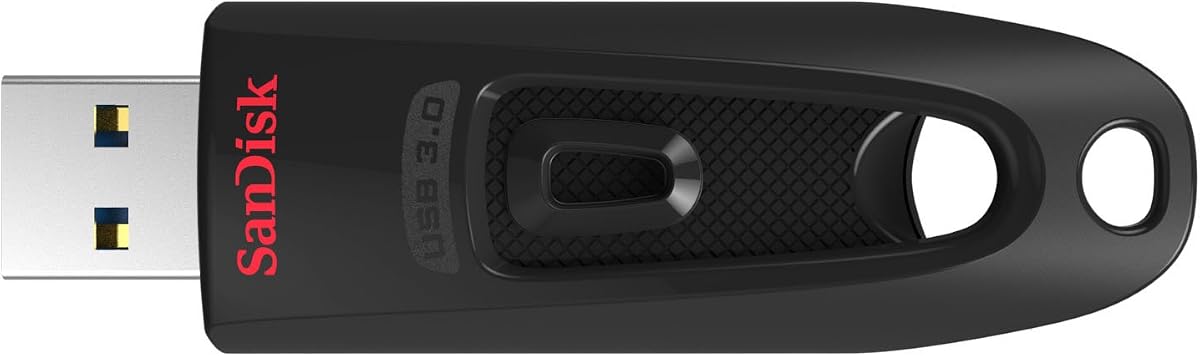
SANDISK 512GB Ultra USB 3.0 Flash Drive - SDCZ48-512G-G46

SANDISK 512GB Ultra USB 3.0 Flash Drive - SDCZ48-512G-G46

9.2/10★★★★★

When capacity beats peak speed, the SanDisk 512 GB Ultra USB 3.0 Flash Drive is the vault stick in this pack. Half a terabyte on a thumb drive still feels improbable if you remember 512 MB promotional sticks from trade shows, yet the SDCZ48-512G-G46 listing delivers a single Type-A solution for photo archives, offline game installers, video project backups, and legal document repositories that must travel air-gapped.

  • 512 GB; up to 130 MB/s USB 3.0 read speed
  • SecureAccess encryption and password protection
  • USB 2.0 backward compatibility
Check Price →
✓ Pros
  • 512 GB on one stick reduces multi-drive juggling for large libraries
  • Familiar SanDisk Ultra shell with strong brand trust and wide compatibility
  • SecureAccess password protection for private folders on shared machines
  • Up to 130 MB/s reads—solid USB 3.0 tier for bulk media moves
  • Backward USB 2.0 support for older car and kiosk hosts
✕ Cons
  • Write speeds are modest; filling half a terabyte takes real time
  • Plastic Ultra body lacks BAR Plus ruggedness for keyring outdoor abuse
  • Slower reads than Samsung BAR Plus or Ultra Flair on identical ports

Detailed review

Read speeds up to 130 MB/s place the 512 GB Ultra in the mainstream USB 3.0 tier—not the BAR Plus stratosphere, but roughly ten times faster than USB 2.0 class sticks when host hardware cooperates. That means a full-length movie transfer completes in under a minute per SanDisk's marketing examples, and multi-gigabyte Lightroom catalog backups finish over lunch rather than overnight. Writes are slower, as with most flash drives; plan bulk ingests when you are not rushing out the door.

SanDisk SecureAccess software adds password protection and 128-bit AES encryption for sensitive folders—a meaningful layer when the drive shuttles between office desktops and home PCs. Enable it before loading client contracts, payroll exports, or personal medical records. macOS users should note SecureAccess requires a software download from SanDisk's support pages rather than native Finder encryption alone.

The black Ultra plastic shell is the familiar SanDisk industrial design: retractable or capped depending on generation cues in photos, lightweight, and easy to label with a Sharpie for IT asset tags. It is not waterproof like the BAR Plus, so treat it as desk-to-briefcase storage rather than cliffside B-roll insurance. For pure capacity per physical device, this is the top tier in our pack.

Compatibility spans Windows, macOS, and Linux hosts with USB 3.0 or 2.0 ports. Game consoles, smart TVs, and car head units vary in maximum supported volume and filesystem—verify exFAT support before dumping a 400 GB music library into a vehicle. Some older hosts cap readable size below 512 GB; test on your slowest device before committing irreplaceable data.

Who should buy: archivists, photographers, small-business owners, and students who want one drive to hold years of files without NAS complexity. Who should skip: users who need rugged outdoor sealing, USB-C native phones without adapters, or BAR Plus read speeds for daily large-file churn.

512 GB vs 256 GB Ultra in this pack

Choose 512 GB when one-stick simplicity beats carrying two 256 GB twins.

Choose 256 GB when your library fits comfortably under 200 GB and you want a smaller financial step.

Both share 130 MB/s read class and SecureAccess; only capacity differs.

Formatting advice

Use exFAT for mixed Mac and Windows environments on large volumes.

Avoid FAT32 unless a legacy device demands it—you will hit 4 GB file limits quickly.

Keep a second backup; one flash drive is never a disaster-recovery strategy alone.

Check Price on Amazon →

We may earn a commission at no additional cost to you.

3. Amazon Basics 256GB - Best Dual-Port Design

Amazon Basics 256GB USB Flash Drive

Amazon Basics 256GB USB Flash Drive

9.2/10★★★★★

The Amazon Basics 256 GB USB Flash Drive solves a 2026 problem classic Type-A sticks ignore: your phone, tablet, and laptop no longer share one port shape. A rotating dual-port design exposes USB-C for modern Android phones, iPad Pro models, and thin laptops, then flips to USB-A for office desktops, hotel business centers, and rental car media systems. That flexibility earns our Best Dual-Port Design badge even though Amazon focuses on compatibility and construction more than benchmark bragging rights.

  • 256 GB dual USB-C and USB-A rotating ports
  • Metal exterior; exFAT default format
  • Over 230 GB usable capacity per listing
Check Price →
✓ Pros
  • Rotating USB-C and USB-A ports cover modern phones and legacy PCs without adapters
  • 256 GB tier with over 230 GB usable space for phone backups and media
  • Metal casing and swivel design feel more premium than basic plastic sticks
  • exFAT default simplifies cross-platform handoffs out of the box
  • Strong choice for travelers moving files between Android, iPad, and laptop
✕ Cons
  • Amazon does not publish headline sequential speed figures—expect mainstream not BAR Plus tier
  • Incompatible with Lightning-port iPhones per listing; USB-C phones only
  • Nominal 256 GB vs usable capacity gap confuses first-time buyers

Detailed review

Capacity lands in a practical middle ground. The listing notes nominal 256 GB storage with over 230 GB available after formatting overhead—honest language that helps you plan phone photo offloads and PDF project archives without hitting surprise full-drive warnings on day one. Two hundred thirty gigabytes holds substantial 4K phone video, large Lightroom mobile exports, or a semester of engineering CAD files without immediately jumping to the 512 GB SanDisk tier.

Amazon ships the drive exFAT by default, which is the correct default for mixed Windows, macOS, and mobile handoffs. Lower power consumption and broad device compatibility are emphasized in the product copy—useful when you are moving clips from a phone that may not supply full USB 3.0 bus power. Speed disclaimers apply: internal test read and write figures vary by host, file size, and type, so treat performance as reliable everyday tier rather than spec-sheet racing.

Build quality exceeds generic no-name dual sticks. A metal exterior casing, rotating open and close mechanism, and hanging hole for a lanyard make the Champagne Silver finish presentable in client meetings—not just school backpack duty. The design resembles third-party dual-port drives that cost more with weaker return policies; Amazon's retail channel simplifies replacements if a port feels loose after heavy rotation.

Limitations are explicit. Lightning-port iPhones cannot use this drive natively—you need USB-C iPhone models or a different workflow entirely. Speed is not marketed at 300 MB/s BAR Plus levels, so video editors doing hourly multi-hundred-gigabyte ingests should still prefer portable SSDs or the Samsung BAR Plus on a proper USB-A port. For phone-to-laptop shuttles, conference handoffs, and travel backups, though, dual-port convenience often beats raw megabytes per second.

Who should buy: Android and USB-C iPad users, hybrid remote workers, and students who bounce between campus lab PCs and personal laptops. Who should skip: users with only Type-A hardware and no phones to serve, speed demons who benchmark everything, and iPhone users on Lightning without adapters.

Phone workflow basics

Confirm your phone supports USB OTG or Files-style external storage before buying.

Copy camera rolls in batches rather than one giant folder if the phone UI slows down.

Eject through the OS before unplugging to avoid corrupted indexes on either port.

vs single-port SanDisk 256 GB Ultra

Choose Amazon Basics when USB-C phones and tablets are part of your daily rotation.

Choose SanDisk 256 GB Ultra when every host is Type-A and you want SecureAccess encryption.

Both offer similar capacity; port layout decides the winner.

Check Price on Amazon →

We may earn a commission at no additional cost to you.

4. SanDisk Ultra Flair 128GB - Best Metal Everyday

SANDISK 128GB Ultra Flair USB 3.0 Flash Drive

SANDISK 128GB Ultra Flair USB 3.0 Flash Drive

9.2/10★★★★★

The SanDisk 128 GB Ultra Flair USB 3.0 Flash Drive targets users who want a metal everyday carry stick without jumping to Samsung BAR Plus pricing. SanDisk rates reads up to 150 MB/s—higher on paper than the 130 MB/s Ultra SDCZ48 line also in this pack—so photo batches, installer ISOs, and presentation decks move noticeably faster when plugged into a proper USB 3.0 port on the rear of a desktop or a direct laptop socket.

  • 128 GB; up to 150 MB/s USB 3.0 read speed
  • Sleek durable metal casing
  • 128-bit AES SecureAccess password protection
Check Price →
✓ Pros
  • 150 MB/s advertised read peak leads standard Ultra drives in this pack
  • Metal casing dissipates heat and survives pocket carry better than thin plastic
  • SecureAccess encryption for private files on shared workstations
  • Compact profile fits tight USB port clusters on laptops
  • Strong SanDisk ecosystem with decades of flash memory reputation
✕ Cons
  • Metal shell can scratch other items in a pocket without a sleeve
  • Write speeds remain flash-drive modest despite fast reads
  • No USB-C or rugged IP rating for outdoor abuse

Detailed review

The Flair's metal casing is both aesthetic and practical. It resists flex better than all-plastic bargain sticks, sheds heat during long copy jobs, and slides into pockets without the bulk of ruggedized rubber armor. The tradeoff is scratch potential against phones and keys— an inexpensive neoprene sleeve solves that if you care about finish.

SecureAccess password protection uses 128-bit AES encryption and supports Windows 7 through 10 and macOS 10.9 plus with a required Mac software download. Enable it before storing tax documents, HR onboarding packets, or personal records on a drive that visits multiple machines. It is not hardware FIPS-grade encryption, but it beats plaintext folders on a stick left in a conference room.

SanDisk claims transfer to drive up to fifteen times faster than standard USB 2.0 drives based on 4 MB/s baseline comparisons—a useful reminder that even mid-tier USB 3.0 sticks feel transformational if you are upgrading from a dusty 2010 promotional 2.0 drive in a drawer. Backward compatibility with USB 2.0 means old car stereos and print-shop kiosks still read the volume, just slowly.

At 128 GB, the Flair fits a generous working set: raw photo shoots from a weekend trip, several HD film rips for offline flights, or a curated tool kit of portable apps for IT support. It is not the capacity champion—that is the 512 GB Ultra—but for single-stick daily carry the Flair balances speed and build quality elegantly.

Who should buy: students, office workers, and photographers who want metal durability and 150 MB/s class reads in a 128 GB package. Who should skip: users needing USB-C native connectivity, half-terabyte archives, or BAR Plus ruggedness and warranty depth.

Flair vs BAR Plus

Flair wins on SanDisk SecureAccess familiarity and slightly different industrial design preferences.

BAR Plus wins on rugged environmental ratings and higher USB 3.1 read ceiling.

Both are 128 GB; choose based on ecosystem and toughness requirements.

Everyday carry tip

Attach to a keyring only if the port cover is secure—metal keys can dent thin caps.

Keep a cloud sync of critical files; flash drives fail or get lost despite metal shells.

Check Price on Amazon →

We may earn a commission at no additional cost to you.

5. SanDisk 256GB Ultra - Best Balanced Capacity

SANDISK 256GB Ultra USB 3.0 Flash Drive - SDCZ48-256G-GAM46

SANDISK 256GB Ultra USB 3.0 Flash Drive - SDCZ48-256G-GAM46

9.2/10★★★★★

The SanDisk 256 GB Ultra USB 3.0 Flash Drive is the balanced capacity pick for buyers who know 128 GB will feel tight within a year but do not yet need half a terabyte on one keychain. Two hundred fifty-six gigabytes holds a substantial Steam library slice offline, a multi-year photo archive for personal use, or a contractor's full set of blueprints and compliance PDFs without NAS administration.

  • 256 GB; up to 130 MB/s USB 3.0 read speed
  • SecureAccess encryption and password protection
  • USB 2.0 backward compatibility
Check Price →
✓ Pros
  • 256 GB sweet spot for games, photo libraries, and project working sets
  • Trusted SanDisk Ultra platform with SecureAccess encryption
  • 130 MB/s USB 3.0 reads with broad host compatibility
  • Single Type-A stick avoids dual-port complexity if you live on desktops
  • Stepping stone before 512 GB for users unsure of capacity needs
✕ Cons
  • Plastic Ultra shell less premium than Flair metal or BAR Plus rugged body
  • No USB-C without separate adapter on modern thin laptops
  • Write performance typical of consumer flash—not SSD class

Detailed review

Performance matches the 512 GB Ultra sibling: up to 130 MB/s read speed on USB 3.0 with backward compatibility to USB 2.0. That consistency simplifies IT purchasing—you can standardize on the Ultra line across capacity tiers knowing behavior stays familiar. SecureAccess encryption carries over, so HR can deploy 256 GB sticks to remote staff with a baseline privacy tool included.

The black plastic Ultra design prioritizes function over flair. It is lighter than metal competitors, costs less than the Flair at similar capacity tiers in many retail cycles, and fits side-by-side in crowded hub layouts. Durability is office-grade, not expedition-grade; do not clip it unprotected to a motorcycle keyring and expect BAR Plus survival stories.

For gamers, 256 GB is enough to mirror a handful of AAA titles for LAN parties or slow internet weekends. For photographers, it ingests several RAW-heavy shoots before you rotate to a desktop vault. For students, it stores VMs, MATLAB installs, and video project assets for a full degree track if curated—not every 4K clip you ever shot.

Comparison shopping within this pack: choose 256 GB Ultra over 128 GB Flair when capacity matters more than the Flair's 150 MB/s read headline. Choose 512 GB Ultra when you hate deleting old folders. Choose Amazon Basics 256 GB when USB-C phones participate in your workflow.

Who should buy: generalists who want one SanDisk Type-A drive for mixed media and documents at 256 GB. Who should skip: phone-first USB-C users, rugged outdoor creators, and speed seekers who should prioritize Samsung BAR Plus instead.

Capacity planning

Audit your largest folders—games, RAW photos, video—to see if 256 GB covers 80% with headroom.

If you are above 200 GB today, consider jumping directly to the 512 GB Ultra.

Leave 10–15% free for flash wear leveling and future sudden drops.

Check Price on Amazon →

We may earn a commission at no additional cost to you.

6. PNY 64GB 5-Pack - Best Small Multi-Pack

PNY 64GB Turbo Attaché 3 USB 3.0 Flash Drive

PNY 64GB Turbo Attaché 3 USB 3.0 Flash Drive

9.4/10★★★★★

The PNY 64 GB Turbo Attaché 3 USB 3.0 Flash Drive five-pack earns our Best Small Multi-Pack badge with a 4.7-star aggregate that rivals Samsung's BAR Plus—evidence that buyers value reliable bulk USB 3.0 sticks for distribution, not just solo power-user speed. Each drive carries 64 GB, enough for course syllabi, onboarding document kits, promotional media, or partitioned backup tiers across a small office without provisioning a NAS.

  • Five-pack of 64 GB USB 3.0 drives
  • Cap-less sliding collar design
  • Up to 10x faster than USB 2.0 class sticks
Check Price →
✓ Pros
  • Highest 4.7 rating among PNY listings in this pack
  • Five drives solve team gifting, classroom handouts, and event swag efficiently
  • Cap-less sliding collar protects connectors without loose caps to lose
  • USB 3.0 with USB 2.0 fallback on older hosts
  • Lightweight Attaché design suits lanyards and badge clips
✕ Cons
  • 64 GB per drive—not for large video archives or game libraries
  • PNY does not publish a 150 MB/s headline like SanDisk Flair
  • Bulk packs encourage treating drives as disposable—back up important data elsewhere

Detailed review

PNY's cap-less sliding collar design solves a classic failure mode: lost caps exposing connectors in backpacks. Slide the collar forward to plug in, retract to protect, repeat thousands of times without hunting a tiny plastic lid under a desk. The Attaché line emphasizes lightweight durability for mobile storage—a phrase that maps cleanly onto conference badges, classroom loaners, and trade-show lanyards.

Transfer speeds up to ten times faster than standard USB 2.0 drives place these in the USB 3.0 practical tier. PNY does not chase Samsung's 300 MB/s marketing, but moving a gigabyte MPEG-4 test file on a USB 3.0 host still finishes dramatically faster than vintage 2.0 sticks bundled with cheap printers. Backward compatibility means legacy kiosks and car USB ports remain usable at reduced bandwidth.

Buying five at once changes how you think about storage economics. IT departments image one drive and clone workflows to siblings. Wedding photographers gift clients a pre-loaded highlight reel on branded sticks. Nonprofits distribute educational PDFs in multiple languages on separate drives for different regions. The per-drive cost in multi-pack listings typically undercuts buying five singles—check live Amazon pages for current pack math.

Honest limitations: 64 GB is wrong for 4K video editors or gamers mirroring modern AAA titles. Treat these as handoff and distribution tools, not primary archives. PNY lacks SanDisk SecureAccess in the listing copy—encrypt sensitive folders with OS tools or VeraCrypt if compliance demands it.

Who should buy: teachers, event coordinators, IT admins, and small businesses distributing standardized file sets. Who should skip: solo creators needing 256 GB or faster BAR Plus reads on one premium stick.

Bulk deployment tip

Label each drive with asset tags on the collar, not the connector.

Pre-load content with a USB 3.0 hub and imaging script to save hours.

Keep one spare from the pack unopened as a replacement pool.

vs SanDisk 64 GB 2-Pack

Choose PNY five-pack when you need more units for teams or events.

Choose SanDisk two-pack when you want SecureAccess and SanDisk brand on fewer drives.

Both sit in the 64 GB USB 3.0 tier; quantity and ecosystem decide.

Check Price on Amazon →

We may earn a commission at no additional cost to you.

7. PNY 128GB 5-Pack - Best Office Bulk

PNY 128GB Turbo Attaché 3 USB 3.0 Flash Drive 5-Pack – Grey

PNY 128GB Turbo Attaché 3 USB 3.0 Flash Drive 5-Pack – Grey

9.2/10★★★★★

When 64 GB feels tight but you still need volume pricing, the PNY 128 GB Turbo Attaché 3 USB 3.0 five-pack in grey steps up per-drive capacity while keeping the bulk-buy economics that IT and education buyers prefer. One hundred twenty-eight gigabytes per stick holds full marketing asset kits, localized software installers, video training modules, and multi-year PDF archives for a regional sales team—without jumping to individual 512 GB premiums.

  • Five-pack of 128 GB; up to 100 MB/s reads
  • Lightweight cap-less sliding collar
  • USB 3.0 with USB 2.0 backward compatibility
Check Price →
✓ Pros
  • Five 128 GB drives outfit an entire department or class cohort
  • 100 MB/s read class adequate for large document and media handoffs
  • Grey Attaché styling looks neutral in corporate environments
  • Cap-less design protects connectors during drawer storage
  • Doubles 64 GB pack capacity per stick for heavier project folders
✕ Cons
  • 100 MB/s read spec trails SanDisk 130–150 MB/s singles
  • Five-pack upfront cost exceeds one premium BAR Plus stick
  • No bundled encryption suite like SanDisk SecureAccess

Detailed review

PNY advertises read speeds up to 100 MB/s and transfers up to ten times faster than USB 2.0 baselines. That is slightly below SanDisk Ultra headline figures in this pack, but still transformative for offices migrating off promotional 2.0 drives from a decade ago. The grey Attaché finish reads professional on a desk beside monitors and docking stations rather than flashy gamer RGB.

The cap-less sliding collar returns here—PNY's consistent industrial design across Attaché tiers simplifies training: every employee already knows how to extend and retract the connector. Lightweight plastic construction keeps five drives from adding noticeable weight to a shipping box when you mail kits to remote hires.

Use cases multiply at 128 GB: law firms load closed-case document sets per client stick; architects distribute revision-controlled drawing packages; churches hand volunteers sermon media and sheet music; makerspaces preload CNC toolpath libraries. Five drives let you segment departments or projects physically—a low-tech air gap that cloud sync sometimes complicates.

Tradeoffs mirror other bulk packs: you are not getting Samsung ruggedness or SanDisk SecureAccess out of the box. Standardize a formatting policy—exFAT for mixed Mac and PC offices—and document encryption expectations if HIPAA or client NDAs apply. For sensitive data, consider hardware-encrypted enterprise sticks outside this consumer pack.

Who should buy: office managers, training departments, and educators provisioning identical 128 GB tools to groups. Who should skip: individuals wanting one fastest possible stick—choose BAR Plus or Ultra Flair instead.

Five-pack vs two-pack PNY 128 GB

Choose five-pack when outfitting teams or running recurring workshops.

Choose two-pack when you need a personal primary plus spare for home and office.

Same Attaché design; only quantity and per-drive economics differ.

Check Price on Amazon →

We may earn a commission at no additional cost to you.

8. PNY 128GB 2-Pack - Best Duo Pack

PNY 128GB Turbo Attaché 3 USB 3.0 Flash Drive

PNY 128GB Turbo Attaché 3 USB 3.0 Flash Drive

9.2/10★★★★★

The PNY 128 GB Turbo Attaché 3 two-pack targets buyers who want a sensible pair—one drive on the desk, one in the bag—without committing to five units or paying for a single premium SanDisk metal stick. Two identical 128 GB drives simplify rotation: copy project milestones to the backup stick weekly, or keep work files on one and personal media on the other to reduce accidental cross-contamination on shared home PCs.

  • Two-pack of 128 GB Turbo Attaché 3 drives
  • Cap-less sliding collar protects connector
  • USB 3.0 PC and Mac compatibility
Check Price →
✓ Pros
  • Two 128 GB drives cover home-and-office or primary-and-backup workflows
  • Silver Attaché styling distinct from the grey five-pack variant
  • Cap-less collar design without loose parts
  • USB 3.0 speeds with USB 2.0 fallback for legacy hosts
  • Simpler quantity than five-pack for couples and small studios
✕ Cons
  • No published 100 MB/s or 130 MB/s headline on this specific listing
  • Two drives still lack SanDisk SecureAccess encryption tools
  • Premium singles may feel faster for large sequential copies

Detailed review

PNY emphasizes durable lightweight design and large-file transfer suitability—movies, videos, photos, music, and documents appear explicitly in the marketing copy. That breadth matches how most households actually use flash drives in 2026: not benchmark contests, but reliable shuttles for tax PDFs, vacation videos, and school presentations.

The cap-less sliding collar remains the signature Attaché interaction. Silver finish differentiates this SKU visually from the grey five-pack in the same product family, helpful when you own both and need to grab the right batch from a drawer. Compatibility spans USB 3.0 and 2.0 on PC and Mac laptops and desktops—standard fare without USB-C, so thin laptop owners should budget a Type-A adapter or consider Amazon Basics dual-port.

Compared to the SanDisk 64 GB two-pack elsewhere in this guide, the PNY 128 GB duo doubles per-stick capacity for users whose folders outgrew sixty-four gigabytes years ago. Compared to the PNY 128 GB five-pack, the duo costs less upfront and avoids surplus drives collecting dust if you only needed one spare.

Speed expectations should stay realistic: PNY markets USB 3.0 ten-times-USB-2.0 class improvement without BAR Plus numbers. For document-heavy workflows and moderate media libraries, that is sufficient. For hourly 50 GB video dumps, upgrade to portable SSDs or Samsung BAR Plus.

Who should buy: professionals wanting matched 128 GB pairs for primary and backup, couples sharing household files, and small studios standardizing on two identical sticks. Who should skip: large team bulk buyers who should get the five-pack, and speed-focused users who should choose Ultra Flair or BAR Plus.

Simple backup rotation

Use drive A as working copy and drive B as weekly snapshot—label them physically.

Store drive B off-site or in a fireproof pouch; two sticks in one bag is not redundancy.

Verify random files monthly; flash memory can degrade silently over years.

Check Price on Amazon →

We may earn a commission at no additional cost to you.

9. SanDisk 64GB 2-Pack - Best SanDisk Pair

SANDISK 64GB 2-Pack Ultra USB 3.0 Flash Drive (2x64GB) - SDCZ48-064G-GAM462

SANDISK 64GB 2-Pack Ultra USB 3.0 Flash Drive (2x64GB) - SDCZ48-064G-GAM462

9.2/10★★★★★

The SanDisk 64 GB Ultra USB 3.0 two-pack packages the familiar SDCZ48 Ultra platform in a quantity that makes sense for households and freelancers: keep one drive on your desk, leave one in the glove box, or mirror essential documents between them without mixing brands or speed classes. Up to 130 MB/s read speed and SecureAccess encryption apply to both units—SanDisk's ecosystem advantage over anonymous two-packs.

  • Two 64 GB SanDisk Ultra USB 3.0 drives
  • Up to 130 MB/s read; SecureAccess encryption
  • USB 2.0 backward compatible
Check Price →
✓ Pros
  • SanDisk brand trust with SecureAccess on both drives
  • 130 MB/s read class faster than PNY bulk on paper
  • Two-pack covers personal plus loaner or car plus desk setups
  • USB 2.0 backward compatibility for older hosts
  • Compact Ultra plastic design fits tight port layouts
✕ Cons
  • 64 GB per drive limits modern game and video libraries
  • Plastic shell less premium than Ultra Flair metal
  • Two-pack per-unit cost exceeds PNY five-pack economies at scale

Detailed review

Sixty-four gigabytes per stick remains adequate for document archives, MP3 collections, compressed photo sets, and utility boot media. It is tight for 4K video projects or modern game installs, so treat this pair as agile shuttles rather than primary vaults. When you outgrow 64 GB, the 256 GB and 512 GB Ultra siblings in this same pack offer a clear upgrade path without relearning software.

SecureAccess on both drives lets you encrypt sensitive folders consistently—useful when one stick stays at home and one travels. Windows users get straightforward setup; Mac users download SanDisk's Mac support package. Neither drive includes USB-C, preserving the Type-A focus of the Ultra line.

Versus the PNY 64 GB five-pack: SanDisk wins on encryption tooling and 130 MB/s marketing for users who need two quality drives, not five budget distributors. Versus single 128 GB options: the two-pack costs less total capacity but doubles physical redundancy—handy when one port fails or one stick gets lost.

Build quality is standard SanDisk Ultra plastic—proven, lightweight, not ruggedized. Label them clearly; black Ultra sticks look identical and are easy to swap accidentally. The 4.6 rating reflects satisfied buyers using them exactly as intended: faster-than-2.0 everyday carry at modest capacity.

Who should buy: users wanting a matched SanDisk pair with encryption for home and travel splits. Who should skip: offices needing five or more units—choose PNY bulk—or anyone needing 128 GB plus on one stick.

Car plus desk split

Load music and offline maps on the car stick; keep documents on the desk stick.

Refresh car content seasonally; heat cycles age flash faster in vehicles.

Use SecureAccess on the desk drive if it visits shared office machines.

Check Price on Amazon →

We may earn a commission at no additional cost to you.

10. USB 2.0 64GB 2-Pack - Best Budget Basic

2 Pack 64GB USB Flash Drive USB 2.0 Thumb Drives Jump Drive Fold Storage Memory

2 Pack 64GB USB Flash Drive USB 2.0 Thumb Drives Jump Drive Fold Storage Memory

9/10★★★★★

The two-pack 64 GB USB 2.0 thumb drives with swivel design occupy the honest budget floor of this roundup. When you need storage that works everywhere—including ancient conference room PCs, cash-register back offices, and car stereos that choke on exotic formats—USB 2.0 compatibility and plug-and-play simplicity still win. These drives will not impress anyone on sequential benchmarks, but they move Word documents, CSV exports, JPEG galleries, and MP3 playlists without fuss.

  • Two 64 GB USB 2.0 swivel-cap drives
  • 360° metal cap with keyring attachment
  • Plug-and-play; broad OS compatibility
Check Price →
✓ Pros
  • Lowest tier in the pack for basic plug-and-play storage needs
  • Swivel cap protects connector and attaches to keyrings easily
  • Broad OS support including older Windows and Linux variants
  • Two drives useful for loaners you will not cry over losing
  • 12-month warranty and lifetime friendly customer service per listing
✕ Cons
  • USB 2.0 speeds feel slow next to every USB 3.0 drive here
  • No encryption suite or rugged ratings in product copy
  • Anonymous-brand feel versus SanDisk and Samsung reliability depth

Detailed review

The 360-degree metal swivel cap protects the USB-A connector and integrates a ring for keychains or lanyards—a thoughtful touch at this tier. Matt surface styling resists visible fingerprints better than glossy plastic promotional sticks. Plug-and-play operation means no driver installs on Windows 7 through 10, Vista, XP, Unix, Linux, and Mac OS per the listing—valuable when you support heterogeneous environments and cannot assume admin rights for encryption software.

Sixty-four gigabytes per drive aligns with the SanDisk and PNY 64 GB packs but at USB 2.0 speeds roughly an order of magnitude slower than USB 3.0 options when copying large files. Plan time accordingly: a multi-gigabyte video transfer that takes a minute on SanDisk Ultra may take ten on USB 2.0. For small documents the difference disappears—choose based on file sizes you actually move.

Brand-yourself marketing in the product copy highlights corporate gifting: preload company overview PDFs for new hires or customer onboarding. That use case fits perfectly—low cost per unit, acceptable capacity, and no performance pressure. Schools issuing drives for essay submissions or lab data collection get similar value.

Limitations are straightforward: no SecureAccess, no waterproof BAR Plus body, no USB-C, and a 4.5 rating slightly below name-brand peers—often reflecting speed complaints from buyers who expected USB 3.0 performance at USB 2.0 prices. Read the interface before buying; the title states USB 2.0 explicitly.

Who should buy: budget buyers, IT loaner pools, promotional giveaways, and legacy hardware environments where USB 3.0 speed is wasted. Who should skip: anyone regularly moving gigabytes—spend up to SanDisk Ultra or PNY Attaché USB 3.0 tiers in this same pack.

When USB 2.0 still makes sense

Hosts that only expose USB 2.0 ports or reject USB 3.0 power draw.

Small document handoffs where transfer time is measured in seconds regardless.

Giveaways where unit cost matters more than read megabytes per second.

Upgrade path

If copies exceed a gigabyte regularly, move to SanDisk 64 GB Ultra 2-pack in this guide.

If you need five units, choose PNY 64 GB Attaché five-pack for USB 3.0 bulk.

Keep one 2.0 stick for the oldest machine in the building as a compatibility spare.

Check Price on Amazon →

We may earn a commission at no additional cost to you.

Best USB Flash Drives in 2026 for Speed, Capacity, and

How to Choose the Right USB Flash Drive in 2026

USB generation and real-world speed

USB 3.0 and USB 3.1 drives in this pack advertise read speeds from about 100 MB/s to 300 MB/s under ideal conditions. Those numbers require matching host ports, direct connections instead of unpowered hubs, and realistically sized test files. USB 2.0 sticks cap near tens of megabytes per second—fine for kilobyte spreadsheets, painful for gigabyte video.

If your workflow includes daily multi-gigabyte transfers, prioritize Samsung BAR Plus or SanDisk Ultra Flair. If you copy documents weekly and occasionally move photo folders, PNY Attaché USB 3.0 or SanDisk Ultra 130 MB/s class drives are enough. Benchmark once with a timed copy on your actual machine before rebuying across the whole office.

Capacity tiers that match the job

64 GB suits document kits, music libraries, and utility boot media. 128 GB fits working photo sets and moderate media collections. 256 GB covers large project folders and partial game libraries. 512 GB on the SanDisk Ultra in this pack serves archives when you refuse to juggle multiple sticks.

Multi-packs change the math: five 64 GB PNY drives may beat one 512 GB stick for events even if total raw capacity matches. Buy capacity per task, not per spec-sheet maximum.

Single premium vs multi-pack economics

Single sticks like BAR Plus, Ultra Flair, and 512 GB Ultra optimize for speed, durability, or capacity on one keyring. Multi-packs from PNY and SanDisk optimize for identical deployments across people or locations.

Do not buy a five-pack because the per-drive math looks clever if you only need one fast stick—surplus drives become junk drawers. Conversely, do not hand out BAR Plus drives as conference swag when Attaché bulk packs suffice.

USB-C, dual-port, and adapter clutter

Most drives here are Type-A native. The Amazon Basics 256 GB dual-port model is the exception, with rotating USB-C and USB-A for phones and mixed desks. Thin laptops with only USB-C need either that dual-port stick or a quality adapter—not a forced fit that wobbles and drops connection mid-copy.

Confirm phone OTG or Files support before assuming mobile transfers work. iPhone Lightning users cannot use the Amazon Basics dual-port drive per its incompatible with lighting port note.

Encryption and shared machines

SanDisk SecureAccess on Ultra and Flair drives provides folder-level password protection suitable for casual privacy—not regulated healthcare or finance on its own. For compliance-heavy data, use OS BitLocker-to-go, VeraCrypt, or enterprise hardware-encrypted drives outside this consumer pack.

Always eject through the operating system before unplugging, especially on Macs and Linux boxes where lazy removal corrupts indexes.

Durability expectations

Samsung BAR Plus leads rugged claims: waterproof, shock-proof, temperature-proof, magnet-proof, X-ray-proof, metal body, five-year warranty. SanDisk Ultra plastic and PNY Attaché plastic suit office and backpack duty, not cliffside soaking.

Flash memory wears with rewrite cycles. Rotate archival data to fresh media every few years and maintain a second backup on cloud or NAS systems regardless of stick brand.

Frequently Asked Questions

01

Are USB flash drives still worth buying in 2026 with cloud storage everywhere?

Yes for air-gapped handoffs, boot media, venues with poor Wi-Fi, and situations where you cannot create cloud accounts for recipients. Cloud sync excels at continuous backup; flash drives excel at instant physical delivery and offline archives. Many professionals carry both.

02

Why do my USB 3.0 flash drives feel slow on my laptop?

Common causes include plugging into a USB 2.0 port or an unpowered hub, copying thousands of tiny files instead of fewer large ones, or thermal throttling during long writes. Test with a direct rear-panel USB 3.0 connection and a multi-gigabyte single file before blaming the drive.

03

What is the difference between SanDisk Ultra and Ultra Flair in this pack?

Ultra Flair adds a metal casing and advertises up to 150 MB/s reads on the 128 GB model. Standard Ultra SDCZ48 drives including 256 GB and 512 GB tiers advertise up to 130 MB/s with plastic shells. Both support SecureAccess encryption; choose Flair for metal feel and slightly higher marketed read speed, Ultra for higher capacity steps.

04

Can I use the Amazon Basics dual-port drive with my iPhone?

Only USB-C iPhone models work; the listing explicitly states incompatibility with the Lightning port. Android phones with USB OTG or Files support and USB-C iPads are the intended mobile partners. Always verify your specific phone OS version supports external storage apps.

05

How much usable space will I get on a 256 GB or 512 GB flash drive?

Manufacturers measure gigabytes differently than operating systems report binary gigabytes. Expect less than the printed capacity after formatting overhead. The Amazon Basics 256 GB listing notes over 230 GB available—a helpful example of honest usable-space language. Leave ten to fifteen percent free for flash wear leveling.

06

Should I buy the Samsung BAR Plus or the SanDisk 512 GB Ultra?

Choose BAR Plus when read speed and rugged protection on a 128 GB daily driver matter most. Choose 512 GB Ultra when you need half a terabyte on one Type-A stick and can accept 130 MB/s class reads with plastic construction. They solve different problems; capacity versus toughness and speed is the tradeoff.

07

Are PNY Turbo Attaché five-packs good for business deployment?

Yes when you need identical USB 3.0 drives for teams, classes, or events and 64 GB or 128 GB per user suffices. Standardize formatting, label collars, and pre-load content from a powered hub. For regulated sensitive data, add OS-level or enterprise encryption beyond consumer Attaché listings.

08

Is USB 2.0 ever the right choice in this roundup?

Only for legacy hosts, extremely budget-sensitive giveaways, or loaner pools where large file transfers never happen. The two-pack USB 2.0 drives here explicitly target that niche. Anyone moving gigabytes should step up to USB 3.0 SanDisk Ultra or PNY Attaché options in the same pack.

09

Do I need special software to use SanDisk SecureAccess?

Yes—SecureAccess installs on Windows and requires a download for Mac support per SanDisk documentation. Set up password-protected vaults before copying sensitive folders. SecureAccess is folder-level convenience encryption, not a replacement for full-disk enterprise compliance tools.

10

How long do USB flash drives last?

Consumer flash drives typically survive years of moderate use, but rewrite cycles and physical loss remain real risks. Samsung backs BAR Plus with a five-year limited warranty; budget sticks may offer shorter support. Rotate critical archives to fresh media periodically and keep secondary backups regardless of brand.

Conclusion

USB flash drives in 2026 are not obsolete—they are specialized tools for speed-limited hosts, physical handoffs, and offline pockets of data that cloud sync cannot always reach. This pack spans the full spread: Samsung BAR Plus for peak USB 3.1 reads and rugged metal duty, SanDisk Ultra and Flair capacities from 128 GB through 512 GB, PNY Turbo Attaché multi-packs for teams, Amazon Basics dual-port flexibility for USB-C phones and mixed desks, and honest USB 2.0 basics when only compatibility and cost matter.

Start with our three top picks if decision fatigue hits: BAR Plus for best overall performance and durability, SanDisk 512 GB Ultra for maximum single-stick capacity, and Amazon Basics 256 GB dual-port for modern port layouts. Everyone else should match capacity tier and pack quantity to the comparison table, then read the individual review that mirrors your host hardware and file sizes.

Test every new drive with a large sample copy on your slowest machine, enable encryption before loading private data, and keep a second backup off the stick. Flash deals shift weekly—we skip dollar prices here—so check live Amazon listings via our tag=reviewconsens-20 links for current availability before you checkout.