Expert Review & Guide

Best TKL Keyboards in 2026: Tenkeyless Gaming and Typing Picks

Tenkeyless keyboards remove the number pad most gamers never touch during matches, reclaiming horizontal desk space for low-DPI mouse sweeps, angled keyboard placement, and cleaner cable routing. The best TKL keyboards in 2026 span whisper-quiet membrane boards for shared apartments, analog magnetic switches with Rapid Trigger for ranked FPS grinders, tri-mode wireless mechanical builds for couch-and-desk hybrids, and German-engineered scissor switches for typists who want compact ergonomics without RGB fireworks. TKL is not one product category—it is a footprint decision that unlocks different switch platforms, connection types, and price tiers once the numpad disappears.

This ReviewConsensus guide covers all ten products from our TKL keyboard pack only: SteelSeries Apex 3 TKL and Apex Pro TKL Gen 3 for quiet and analog competitive gaming; Logitech G413 TKL SE and G515 Lightspeed TKL for wired mechanical value and wireless low-profile play; Corsair K55 CORE TKL for budget 1000Hz polling; RK ROYAL KLUDGE R87 Pro and AULA F87 Pro for hot-swap enthusiast customization; Razer Huntsman V3 Pro TKL and Ornata V3 TKL for esports analog and mecha-membrane hybrid comfort; and Cherry Stream TKL for office-first whisper typing. Ratings reflect Amazon listing scores at research time. We omit dollar prices because promotions swing weekly—check each link for the current offer.

Start with our three top picks if you want a fast shortlist: SteelSeries Apex Pro TKL Gen 3 for analog competitive supremacy, AULA F87 Pro for tri-mode wireless enthusiast value, and Corsair K55 CORE TKL for budget TKL ergonomics with 1000Hz polling. Otherwise scan the comparison table for switch type and connection mode, then read every review for honest tradeoffs about 75% versus strict TKL layouts, Snap Tap firmware requirements, wireless battery realism, and whether membrane quiet beats mechanical tactility for your daily mix of gaming and typing.

Top TKL Keyboards for 2026

Best Overall TKL

SteelSeries Apex Pro TKL Gen 3 Gaming Keyboard - OmniPoint 3.0 Analog Magnetic Switches, Quickset Auto-Presets (Rapid Trigger, Rapid Tap/SOCD, Protection Mode), OLED, RGB, PBT Keycaps, USB-C, Black

★★★★★9.4/10
SteelSeries Apex Pro TKL Gen 3 Gaming Keyboard - OmniPoint 3.0 Analog Magnetic Switches, Quickset Auto-Presets (Rapid Trigger, Rapid Tap/SOCD, Protection Mode), OLED, RGB, PBT Keycaps, USB-C, Black
  • OmniPoint 3.0 magnetic switches with 40 levels of adjustable actuation from 0.1mm to 4.0mm
  • Quickset auto-presets activate Rapid Trigger, Rapid Tap, and Protection Mode per game in seconds
  • OLED smart display, PBT keycaps, and USB-C wired connection for tournament-ready configs
Check Price →
Best Tri-Mode Enthusiast

AULA F87 Pro Wireless Mechanical Keyboard,Tri-Mode BT5.0/2.4GHz/USB-C Hot Swappable Custom Keyboard,Pre-lubed Switches,Side Printed PBT Keycaps,75% TKL RGB Backlit Gaming Keyboards

★★★★★9.4/10
AULA F87 Pro Wireless Mechanical Keyboard,Tri-Mode BT5.0/2.4GHz/USB-C Hot Swappable Custom Keyboard,Pre-lubed Switches,Side Printed PBT Keycaps,75% TKL RGB Backlit Gaming Keyboards
  • Tri-mode Bluetooth 5.0, 2.4GHz, and USB-C with five-device switching and 4000mAh battery
  • Hot-swappable gasket-mounted build with pre-lubed stabilizers and five-layer silencer stack
  • Side-print PBT keycaps, macro programming, and 75% layout retaining dedicated arrow keys
Check Price →

As an Amazon Associate we earn from qualifying purchases. We may earn a commission at no additional cost to you.

TKL Keyboard Comparison: Switch Type, Connection, and Layout

Filter this table by what actually changes your daily experience—membrane quiet versus mechanical tactility versus analog magnetic switches, wired latency versus tri-mode wireless freedom, strict eighty-seven-key TKL versus seventy-five-percent compact layouts, and whether office whisper typing or esports Rapid Trigger matters more than RGB aesthetics. Specs skip prices; check live listings for current offers.

#ProductSpecificationsScore
2
  • OmniPoint 3.0 magnetic switches, 0.1–4.0mm actuation
  • Rapid Trigger, Rapid Tap, Protection Mode presets
  • OLED display, PBT keycaps, USB-C wired
9.4
3
  • Tactile mechanical switches, PBT keycaps
  • Brushed aluminum-magnesium top plate
  • 6-key rollover, FN media controls, white LED
9.2
4
  • Quiet membrane keys, 8-zone RGB backlight
  • 300mL spill resistance, dedicated media keys
  • 1000Hz polling, 12-key rollover
9.4
8
  • CHERRY SX scissor switches, GS certified
  • Slim TKL wired, abrasion-resistant legends
  • 6 multimedia keys, metal plate stability
8.6

1. SteelSeries Apex 3 TKL - Best Quiet TKL Gaming

SteelSeries Apex 3 TKL

SteelSeries Apex 3 TKL

9.2/10★★★★★

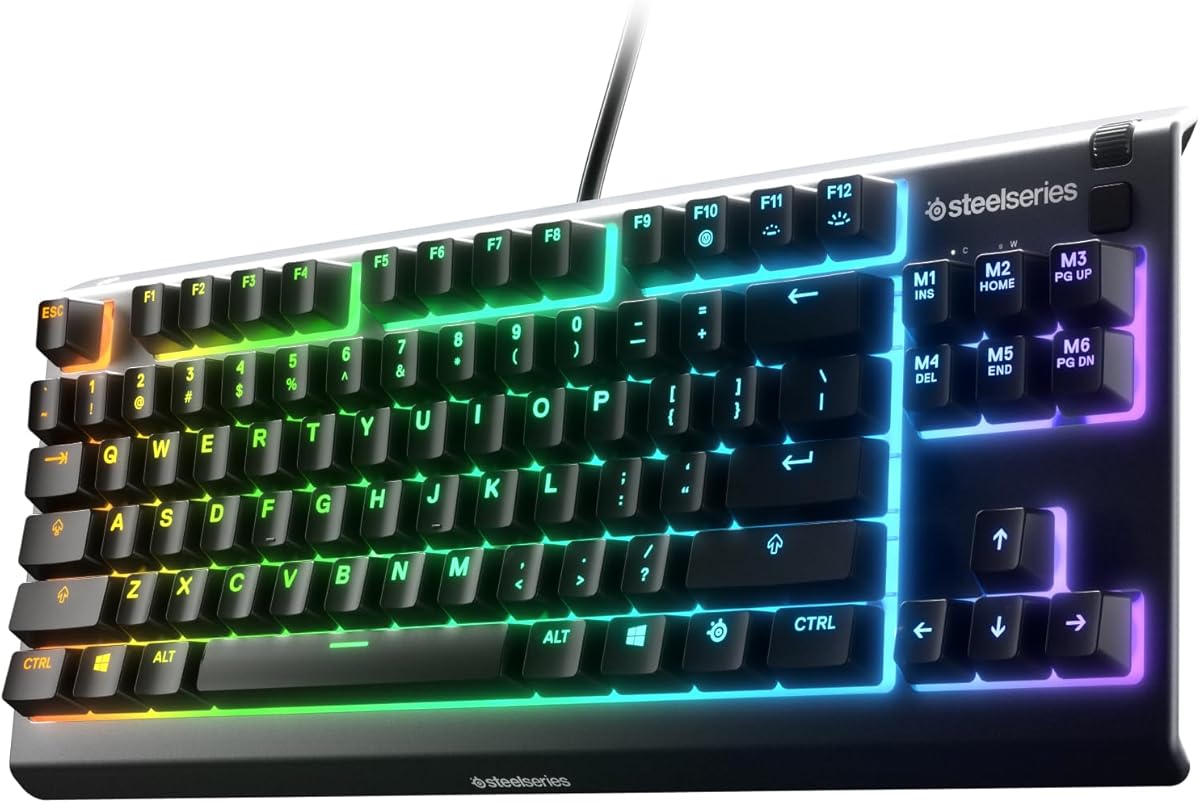
The SteelSeries Apex 3 TKL strips the number pad without stripping the features that made the full-size Apex 3 a quiet-gaming staple. Tenkeyless layout is the form factor most competitive players already prefer: your mouse sits closer to shoulder width, wide flick shots require less arm travel, and desk real estate opens for notepads, stream decks, or second monitors. Apex 3 TKL keeps whisper quiet gaming switches rated beyond twenty million keypresses, so you get gaming-grade anti-ghosting without the acoustic signature of clicky mechanical alternatives echoing through thin apartment walls.

  • Whisper quiet gaming switches, 20M keypresses
  • IP32 water and dust resistant, 8-zone RGB
  • Dedicated media roller and gaming anti-ghosting
Check Price →
✓ Pros
  • Whisper quiet gaming switches keep TKL sessions neighbor-friendly without sacrificing anti-ghosting accuracy
  • IP32 water and dust resistance survives desk-side spills better than most membrane competitors
  • Eight-zone RGB with PrismSync effects plus a clickable volume roller for in-game audio control
  • Compact tenkeyless footprint frees mouse space for low-DPI sweepers and angled keyboard placement
  • Cross-platform compatibility spans Windows, macOS, Xbox Series, and PlayStation consoles
✕ Cons
  • Membrane whisper switches lack the tactile feedback mechanical enthusiasts expect from a gaming board
  • Wired USB only—no wireless option for couch gaming or cable-minimal desk aesthetics
  • No included wrist rest unlike the full-size Apex 3, which may matter for marathon typing blocks

Detailed review

IP32 water and dust resistance addresses real desk physics. Condensation rings, knocked-over water bottles, and crumb dust between keys happen regardless of how careful you are. Splash protection will not survive a full dunk, but it buys seconds to wipe down before electronics fail—a practical advantage over bare membrane boards that treat spills as instant death sentences. Combined with durable low-friction switch material, Apex 3 TKL targets hybrid desks where the same board rotates between evening ranked queues and daytime spreadsheet work.

Eight-zone PrismSync RGB is more functional than vanity lighting. Zone separation helps identify movement clusters, ability rows, and modifier keys during dim sessions without hunting keycaps. Dedicated multimedia controls include a clickable volume roller and media keys for brightness, rewind, skip, and pause—adjustments that keep you in-game instead of alt-tabbing through Windows mixer layers. Compatibility spans Windows, macOS, Xbox Series S and X, PS4, and PS5, useful when one keyboard serves a gaming PC and a living-room console setup.

Honest tradeoffs keep expectations aligned. These are not hot-swappable mechanical switches; modders seeking gasket-mounted creamy thock should look at RK R87 Pro or AULA F87 Pro in this pack. Apex 3 TKL is wired only, so cable routing and USB port placement matter for aesthetic-focused battlestations. SteelSeries software unlocks deeper lighting profiles but adds an install step some corporate laptops block—plan for plug-and-play defaults if IT restrictions apply.

Compared with Corsair K55 CORE TKL, Apex 3 TKL trades 1000Hz polling bragging rights for IP32 certification and SteelSeries' quieter switch tuning. Compared with Cherry Stream TKL, Apex 3 TKL is louder in absolute terms but dramatically quieter than typical mechanical gaming boards while offering RGB and gaming-oriented controls Stream deliberately omits for office civility.

Ranked fourth overall, Apex 3 TKL earns Best Quiet TKL Gaming because it respects shared-space acoustics without abandoning gaming identity in a compact footprint. Buy it when you game nightly in apartments, dorm rooms, or home offices where partners sleep nearby and you refuse a full-size board eating desk width. Skip it when you need wireless tri-mode, analog Rapid Trigger, or true mechanical tactility—other picks in this guide cover those lanes.

Setup tip: position the TKL centered to your monitor with the mouse at a comfortable 45-degree angle; the reclaimed numpad space is the entire point, so do not leave a full-size mouse pad forcing the board off-axis.

Who should buy the Apex 3 TKL

Apartment gamers, hybrid work-from-home players, and console-plus-PC households who want quiet membrane gaming with spill protection in a compact layout. Strong when RGB and media controls matter but mechanical volume does not.

TKL desk setup notes

Route USB through a desk grommet to reduce connector strain, create a low-brightness RGB profile for daytime work hours, and pair with a low-profile mouse pad so the reclaimed horizontal space actually improves aim comfort.

Apex 3 TKL vs Corsair K55 CORE TKL

K55 CORE wins on 1000Hz polling and spill volume rating at a friendlier tier. Apex 3 TKL wins on IP32 dust rating, PrismSync zone effects, and slightly higher owner satisfaction. Choose K55 for budget responsiveness; Apex 3 for quieter switches and cross-platform console support.

Check Price on Amazon →

We may earn a commission at no additional cost to you.

2. SteelSeries Apex Pro TKL Gen 3 - Best Overall TKL

SteelSeries Apex Pro TKL Gen 3

SteelSeries Apex Pro TKL Gen 3

9.4/10★★★★★

SteelSeries Apex Pro TKL Gen 3 is the keyboard this entire guide orbitss around when competitive FPS movement is the priority. OmniPoint 3.0 analog magnetic switches replace traditional mechanical contact points with Hall-effect sensing, enabling forty levels of adjustable actuation between 0.1mm and 4.0mm with 45g bottom-out force. That range is not marketing trivia—it changes how quickly you stop strafing, how lightly you can tap counter-strafe inputs, and how aggressively you can tune WASD for Valorant versus Apex Legends versus Counter-Strike.

  • OmniPoint 3.0 magnetic switches, 0.1–4.0mm actuation
  • Rapid Trigger, Rapid Tap, Protection Mode presets
  • OLED display, PBT keycaps, USB-C wired
Check Price →
✓ Pros
  • OmniPoint 3.0 magnetic switches deliver 40 levels of adjustable actuation from 0.1mm to 4.0mm
  • Quickset auto-presets activate Rapid Trigger, Rapid Tap, and Protection Mode per game in seconds
  • OLED smart display changes settings onboard without alt-tabbing or leaving matches
  • PBT keycaps and USB-C connection suit premium competitive setups that punish wear
  • Protection Mode reduces accidental adjacent keypresses during frantic ability clusters
✕ Cons
  • Premium tier pricing puts it out of reach for casual players who never touch actuation tuning
  • Wired USB-C only—wireless freedom requires Logitech G515 elsewhere in this pack
  • Feature depth demands firmware literacy; defaults help but competitive edge needs configuration time

Detailed review

Quickset auto-presets are the Gen 3 headline beyond raw switch hardware. Rapid Trigger resets keys the moment you release, letting you start the next movement input faster than fixed-actuation boards allow. Rapid Tap snaps to your latest key press for strafe-and-dodge patterns that feel sluggish on conventional mechanical switches. Protection Mode—patent pending—reduces accidental presses on nearby keys, addressing the real problem of fat-fingered ults during chaotic team fights. These three features activate for your game in seconds rather than demanding manual profile hunting.

The OLED smart display is genuinely useful, not cosmetic. Change actuation, toggle Rapid Trigger sensitivity, and confirm configs stay saved onboard without leaving your match or wrestling with overlay software mid-round. PBT keycaps resist shine from oily WASD clusters, and USB-C wired connection delivers consistent latency without wireless compromise. Tenkeyless layout keeps mouse space generous for low-sensitivity sweepers who treat desk real estate as a competitive variable.

Honest limitations matter at this tier. Apex Pro TKL Gen 3 is wired only—if cable-free desk aesthetics or couch gaming matter, Logitech G515 Lightspeed TKL in this pack covers wireless mechanical TKL instead. The feature stack rewards players who invest setup time; casual gamers who never adjust actuation may find simpler boards like G413 TKL SE deliver ninety percent of daily satisfaction at a fraction of complexity.

Compared with Razer Huntsman V3 Pro TKL, both boards fight for esports analog supremacy with Rapid Trigger and adjustable actuation. Apex Pro Gen 3 leans Quickset automation and Protection Mode; Huntsman counters with Snap Tap and onboard LED actuation tuning without software. Owner ratings slightly favor SteelSeries here, but firmware updates on both sides shift the balance—verify latest features before buying either flagship.

Ranked first overall, Apex Pro TKL Gen 3 earns Best Overall TKL because it combines the most advanced switch platform in this pack with TKL ergonomics competitive players already standardize on. Buy it when ranked FPS performance is non-negotiable and you will invest ten minutes learning Quickset presets. Skip it when budget, wireless, or office-quiet typing dominate your priorities.

Setup tip: start with Quickset auto-presets for your primary game before manual actuation tweaking—SteelSeries designed the presets to beat most hand-tuned profiles for average competitive players.

Who should buy Apex Pro TKL Gen 3

Ranked FPS players, aspiring esports grinders, and movement-tech enthusiasts who treat actuation tuning as part of practice—not optional gear vanity.

Quickset configuration workflow

Install SteelSeries GG, launch your primary title, let Quickset detect and apply presets, then test Rapid Trigger in a private range before ranked. Save OLED-tweaked profiles onboard so tournament PCs inherit your settings.

Apex Pro Gen 3 vs Huntsman V3 Pro TKL

Huntsman wins Snap Tap and Razer ecosystem integration with doubleshot PBT plus included wrist rest. Apex Pro wins Quickset automation, Protection Mode, and slightly higher listing rating. Both demand wired connections and premium budgets—choose based on which software ecosystem you already own.

Check Price on Amazon →

We may earn a commission at no additional cost to you.

3. Logitech G413 TKL SE - Best Value Mechanical TKL

Logitech G413 TKL SE

Logitech G413 TKL SE

9.2/10★★★★★

Logitech G413 TKL SE is the mechanical TKL for buyers who want real switch feedback without OLED displays, Rapid Trigger firmware, or tri-mode wireless rabbit holes. Tactile mechanical switches provide discernible bump feedback on each actuation—enough confirmation for touch typists and gamers who miss the mush of pure membrane without inviting the clicky acoustics that annoy roommates. PBT keycaps resist heat and wear better than ABS alternatives, a meaningful durability upgrade at a tier where many competitors still ship shine-prone caps.

  • Tactile mechanical switches, PBT keycaps
  • Brushed aluminum-magnesium top plate
  • 6-key rollover, FN media controls, white LED
Check Price →
✓ Pros
  • Tactile mechanical switches deliver unmistakable feedback without analog tuning complexity
  • PBT keycaps resist shine and wear from marathon gaming and typing sessions
  • Brushed aluminum-magnesium alloy top plate minimizes flex under aggressive key presses
  • Compact TKL layout frees mouse space while retaining function row and arrows
  • FN media controls cover volume, playback, lighting toggle, and Windows lock
✕ Cons
  • 6-key rollover falls short of full N-key rollover on enthusiast boards in this pack
  • White LED backlight only—no per-key RGB for aesthetic-focused battlestations
  • Wired USB with no wireless option limits couch gaming and minimalist cable setups

Detailed review

The brushed aluminum-magnesium alloy top case serves as structural backbone, minimizing flex when you bottom out keys during intense fights. That rigidity matters on TKL boards that travel between LAN events and daily desks—plastic shells that creak under pressure feel cheap fast. White LED backlighting is restrained compared with RGB fireworks elsewhere in this pack, which helps G413 TKL blend into hybrid work setups where rainbow waves would embarrass you on camera.

Six-key rollover anti-ghosting handles typical gaming input clusters reliably, though full N-key rollover enthusiasts running complex macro chords may notice limits compared with RK R87 Pro or AULA F87 Pro. Twelve FN media keys control volume, play and pause, skip track, mute, lighting toggle, and Windows lock—practical daily controls without dedicated macro software dependency.

Honest tradeoffs keep expectations aligned. No per-key RGB means aesthetic-focused streamers may prefer Corsair K55 CORE TKL or Razer Ornata V3 TKL for lighting flexibility. Wired-only connection is standard at this tier but rules out wireless couch gaming covered by Logitech G515. Switch type is fixed—not hot-swappable—so modders should look at RK or AULA entries instead.

Compared with Cherry Stream TKL, G413 TKL SE trades whisper-quiet scissor acoustics for mechanical tactility and gaming durability. Compared with Apex Pro TKL Gen 3, G413 delivers straightforward plug-and-play reliability without actuation tuning learning curves—ideal when you want mechanical feel without esports firmware homework.

Ranked third overall, G413 TKL SE earns Best Value Mechanical TKL because it delivers PBT caps, aluminum plate rigidity, and tactile switches in a compact layout without flagship pricing complexity. Buy it when mechanical feedback matters but analog features do not. Skip it when RGB customization, hot-swap, or wireless connectivity are hard requirements.

Setup tip: enable Windows lock via FN shortcut before competitive sessions to prevent accidental alt-tab deaths—a small G413 feature that saves ranked games more often than owners admit.

Who should buy G413 TKL SE

Gamers graduating from membrane who want tactile mechanical feedback, students needing durable PBT caps, and hybrid desks where white LED looks professional on video calls.

Mechanical TKL without software bloat

G413 TKL SE works plug-and-play on Windows and macOS without mandatory Logitech G HUB installs for basic function—ideal for work laptops with restricted software policies.

G413 TKL SE vs Apex 3 TKL

Apex 3 wins quiet membrane acoustics, RGB zones, and spill IP32 rating. G413 wins mechanical tactility, PBT durability, and aluminum plate rigidity. Choose Apex 3 for silence; G413 for switch feel.

Check Price on Amazon →

We may earn a commission at no additional cost to you.

4. Corsair K55 CORE TKL - Best Budget TKL

Corsair K55 CORE TKL

Corsair K55 CORE TKL

9.4/10★★★★★

Corsair K55 CORE TKL targets the budget-conscious gamer who still wants TKL ergonomics, RGB personality, and polling rates that meme boards ignore. Compact tenkeyless layout reclaims horizontal desk space for sweeping mouse movements—the same reason pros migrated off full-size boards decades ago. At 1000Hz polling with 12-key rollover, K55 CORE TKL punches above typical office membrane responsiveness without demanding analog switch literacy or premium flagship budgets.

  • Quiet membrane keys, 8-zone RGB backlight
  • 300mL spill resistance, dedicated media keys
  • 1000Hz polling, 12-key rollover
Check Price →
✓ Pros
  • Compact TKL layout maximizes mouse sweep room for low-DPI competitive players
  • 1000Hz polling with 12-key rollover delivers responsive input at a budget-friendly tier
  • 300mL spill resistance protects against desk-side beverage accidents during long sessions
  • Eight-zone RGB creates personalized lighting without per-key software complexity
  • Dedicated media buttons control volume, playback, Win lock, and brightness instantly
✕ Cons
  • Quiet membrane keys lack mechanical tactility that G413 TKL SE owners appreciate
  • Corsair iCUE software adds setup overhead for deep lighting customization
  • Wired only with no wrist rest included for extended typing comfort

Detailed review

Three hundred milliliters of spill resistance acknowledges desk reality. Gaming sessions stretch hours; beverages sit within knock-over radius. K55 CORE TKL will not survive a full pitcher dump, but the membrane tray and frame design buy cleanup time before permanent damage—more protection than bare-bones office TKL boards offer. Eight-zone RGB backlighting creates zone-based color separation useful for identifying movement keys during dim play without requiring per-key addressable complexity.

Dedicated media buttons for volume, playback, Windows lock, and brightness sit where muscle memory expects them—adjustments that keep focus during ranked queues instead of hunting OS mixer settings. Quiet membrane keys suit shared spaces better than clicky mechanical alternatives, though they cannot match Cherry Stream TKL whisper levels or Apex 3's tuned gaming silence.

Honest limitations: membrane feel is membrane feel. Players upgrading from Logitech G413 TKL SE will miss tactile bump feedback immediately. Corsair iCUE unlocks deeper lighting but adds install friction on locked-down work machines. No wrist rest ships in box—budget for an aftermarket pad if marathon typing follows gaming sessions.

Compared with SteelSeries Apex 3 TKL, K55 CORE wins polling rate and spill volume rating at a typically lower tier. Apex 3 wins IP32 dust certification, PrismSync effects, and cross-platform console compatibility. Both serve quiet membrane TKL gaming—choose based on ecosystem preference and current listing promotions.

Ranked fifth overall, K55 CORE TKL earns Best Budget TKL because it delivers TKL ergonomics, 1000Hz polling, spill protection, and RGB at the most accessible tier in this pack. Buy it when desk space and responsiveness matter more than mechanical switches. Skip it when tactile feedback or hot-swap customization are non-negotiable.

Setup tip: create a solid-color low-brightness iCUE profile for daytime work-from-home blocks—K55 CORE TKL can pass as a generic office board when RGB stays restrained.

Who should buy K55 CORE TKL

Budget gamers, first TKL buyers, and students who want RGB and 1000Hz polling without mechanical switch premiums or wireless charging rituals.

Budget TKL desk pairing

Pair with a large cloth mouse pad to exploit reclaimed numpad space, enable Win lock before ranked, and keep iCUE updated so polling rate defaults stay at 1000Hz after firmware patches.

K55 CORE vs Razer Ornata V3 TKL

Ornata V3 adds mecha-membrane click satisfaction, UV-coated caps, and magnetic wrist rest at higher tier. K55 CORE wins simpler membrane quietness and 1000Hz polling bragging rights. Choose Ornata for wrist rest and low-profile feel; K55 for budget polling.

Check Price on Amazon →

We may earn a commission at no additional cost to you.

5. RK ROYAL KLUDGE R87 Pro - Best Enthusiast Wired

RK ROYAL KLUDGE R87 Pro

RK ROYAL KLUDGE R87 Pro

9/10★★★★★

RK ROYAL KLUDGE R87 Pro represents the enthusiast mechanical TKL-adjacent lane: gasket-mounted construction, hot-swappable switches, QMK/VIA programmability, and a CNC metal knob that rotates for volume or presses for mute. The 75% layout—eighty-eight keys—saves even more horizontal space than classic eighty-seven-key TKL by compressing gaps while retaining dedicated arrow keys essential for gaming and spreadsheet navigation. For buyers who treat keyboards as mod platforms rather than sealed appliances, R87 Pro delivers more customization per dollar than Logitech or Razer wired options in this pack.

  • 75% gasket-mounted, hot-swappable 3/5-pin
  • CNC programmable knob, QMK/VIA support
  • Linear creamy switches, RGB backlit
Check Price →
✓ Pros
  • Gasket-mounted 75% layout retains arrow cluster while saving more desk space than classic TKL
  • Hot-swappable 3-pin and 5-pin sockets enable switch swaps without soldering skills
  • QMK and VIA support unlock open-source remapping beyond manufacturer software limits
  • CNC metal knob is hot-swappable and programmable for volume, mute, or custom macros
  • Linear creamy switches with pre-lubed stabilizers deliver smooth out-of-box typing feel
✕ Cons
  • Wired USB only—no Bluetooth or 2.4GHz unlike AULA F87 Pro at similar enthusiast tier
  • 75% layout omits dedicated function row spacing some TKL purists prefer
  • Brand ecosystem and documentation lag premium names like Logitech or Razer for beginners

Detailed review

Hot-swappable base supports three-pin and five-pin switch replacement without soldering—keyboard beginners can DIY swap linear, tactile, or silent switches following community guides. Pre-lubed stabilizers and linear creamy switches ship tuned for smooth keystrokes and pleasant acoustic character out of box, though enthusiast forums debate consistency batch to batch. QMK and VIA compatibility mean remapping, layer definitions, and macro programming escape manufacturer software walled gardens—a meaningful advantage for Linux users and custom layout obsessives.

The programmable CNC metal knob adds daily utility beyond gaming: volume control during voice chat, mute during meetings, or custom macros for streaming scene changes. Hot-swappable knob socket means even that component accepts community alternatives. RGB backlighting covers the compact layout with effects typical of custom board aesthetics at mass-market pricing.

Honest tradeoffs: wired USB only rules out the tri-mode flexibility AULA F87 Pro offers in this same pack. Seventy-five-percent layout confuses buyers expecting strict TKL—function keys sit tighter, and muscle memory from full TKL boards needs adjustment days. RK documentation and support channels feel thinner than Logitech's—plan to lean on Reddit and YouTube for advanced QMK questions.

Compared with AULA F87 Pro, R87 Pro wins open-source QMK/VIA and wired latency consistency; AULA wins tri-mode wireless, 4000mAh battery, and gasket foam stack depth. Compared with G413 TKL SE, R87 Pro trades plug-and-play simplicity for hot-swap and gasket feel at similar mechanical authenticity.

Ranked seventh overall, R87 Pro earns Best Enthusiast Wired Custom for buyers who prioritize moddability and gasket typing feel over brand prestige. Buy it when you plan to swap switches within six months. Skip it when wireless tri-mode or analog Rapid Trigger competitive features matter more.

Setup tip: flash VIA firmware immediately and map the knob to mute-plus-mic-toggle if you stream—one of the fastest quality-of-life wins on this board.

Who should buy RK R87 Pro

Mechanical keyboard hobbyists, Linux gamers needing QMK/VIA, and compact-desk owners who want arrow keys without full TKL width.

First hot-swap workflow

Use a switch puller, replace one key at a time to learn socket tension, test VIA remaps before desoldering habits form, and photograph default wiring if you ever revert stock switches.

R87 Pro vs AULA F87 Pro

AULA adds tri-mode wireless, larger battery, and deeper foam stack at similar price tier. R87 Pro adds QMK/VIA openness and wired-only latency purity. Choose AULA for wireless enthusiast; R87 for open-source wired custom.

Check Price on Amazon →

We may earn a commission at no additional cost to you.

6. Razer Huntsman V3 Pro TKL - Best Esports Analog

Razer Huntsman V3 Pro TKL

Razer Huntsman V3 Pro TKL

8.8/10★★★★☆

Razer Huntsman V3 Pro TKL is Razer's answer to SteelSeries Apex Pro TKL Gen 3 in the analog esports arms race. Analog optical switches Gen-2 max precision with ultra-fast repeated inputs, adjustable actuation between 0.1mm and 4.0mm, and a hundred-million-keystroke lifespan rating that matters when you treat WASD as consumable equipment. Rapid Trigger resets keys at the slightest finger lift—movement tech that feels sluggish on fixed-actuation mechanical boards suddenly becomes viable.

  • Analog optical Gen-2, adjustable actuation
  • Snap Tap, Rapid Trigger, onboard LED tuning
  • Doubleshot PBT caps, magnetic wrist rest
Check Price →
✓ Pros
  • Analog optical Gen-2 switches offer 0.1–4.0mm adjustable actuation with 100M keystroke lifespan
  • Rapid Trigger and Snap Tap deliver esports movement advantages in competitive FPS titles
  • Onboard LED array enables actuation tuning without software during tournaments or LAN events
  • Doubleshot PBT keycaps withstand competitive wear better than ABS alternatives
  • Magnetic leatherette wrist rest snaps on for ergonomic support during marathon sessions
✕ Cons
  • Lowest owner rating in this pack reflects premium price sensitivity and firmware learning curve
  • Snap Tap requires latest firmware update—verify before assuming out-of-box functionality
  • Wired only with Razer Synapse dependency for deepest Snap Tap and lighting customization

Detailed review

Snap Tap prioritizes the latest input between two selected keys without releasing the previous one—near-instant directional changes that Counter-Strike and Valorant movement grinders chase obsessively. Note Snap Tap ships off by default and requires latest firmware plus Razer Synapse toggling; verify your unit before assuming competitive advantage out of box. Onboard LED array lets you adjust actuation height and Rapid Trigger sensitivity visually, saving settings to keyboard memory without alt-tabbing mid-match—a tournament-friendly workflow SteelSeries OLED competes with differently.

Doubleshot PBT keycaps resist shine from oily competitive clusters, and magnetic leatherette wrist rest provides ergonomic support that full-size wrist-rests-on-desk setups often miss. Multi-function digital dial and dedicated control buttons manage volume and analog settings alongside media shortcuts. TKL footprint preserves mouse space for low-sensitivity sweepers.

Honest limitations: 4.4 rating trails other pack members—not necessarily hardware failure, but premium expectations meeting firmware complexity and price pushback. Synapse dependency frustrates minimalists who want pure plug-and-play. Wired-only design sends wireless seekers to Logitech G515.

Compared with Apex Pro TKL Gen 3, Huntsman wins Snap Tap and included wrist rest; Apex Pro wins Quickset auto-presets, Protection Mode, and higher owner satisfaction. Both demand competitive investment—choose based on existing Razer mouse ecosystem synergy or SteelSeries GG familiarity.

Ranked second overall, Huntsman V3 Pro TKL earns Best Esports Analog TKL for Razer ecosystem owners chasing Snap Tap and optical analog precision. Buy it when movement tech practice is already part of your routine. Skip it when budget, simplicity, or wireless dominate.

Setup tip: update firmware before first ranked session, enable Snap Tap in Synapse, and save actuation profiles onboard so LAN PCs inherit your tuning without cloud login.

Who should buy Huntsman V3 Pro TKL

Razer ecosystem owners, FPS movement-tech practitioners, and LAN competitors who need onboard actuation tuning without software mid-tournament.

Snap Tap enablement checklist

Install Synapse 4, run firmware updater, assign Snap Tap key pair, test in private range, save profile onboard, disable Synapse auto-start if tournament rules require pure onboard configs.

Huntsman V3 Pro vs Apex Pro Gen 3

SteelSeries wins Quickset automation and Protection Mode with OLED workflow. Razer wins Snap Tap integration and bundled wrist rest. Ratings slightly favor SteelSeries—pick ecosystem loyalty if features tie.

Check Price on Amazon →

We may earn a commission at no additional cost to you.

7. Logitech G515 Lightspeed TKL - Best Wireless TKL

Logitech G515 Lightspeed TKL

Logitech G515 Lightspeed TKL

9/10★★★★★

Logitech G515 Lightspeed TKL solves the wireless mechanical TKL problem major brands ignored for years: tri-mode connectivity via LIGHTSPEED wireless, Bluetooth, and wired USB in a slim tenkeyless footprint with genuine low-profile GL Brown tactile switches—not membrane pretenders. Factory-lubed GL switches deliver discernible tactile feedback with faster actuation than standard-height boards, though fingers accustomed to chunky MX-style caps need several days of muscle memory recalibration.

  • Tri-mode LIGHTSPEED, BT, wired USB
  • GL Brown tactile low-profile switches
  • 36-hour wireless battery, PBT keycaps
Check Price →
✓ Pros
  • Tri-mode LIGHTSPEED wireless, Bluetooth, and wired USB covers desk, couch, and travel scenarios
  • GL Brown tactile low-profile switches factory-lubed for smooth feel and fast actuation
  • Up to 36 hours wireless play keeps marathon sessions off the charging cable
  • KEYCONTROL programs up to 15 functions per key for deep customization
  • PBT double-shot keycaps and thin TKL profile suit minimalist battlestations
✕ Cons
  • 36-hour battery varies heavily with RGB brightness and polling settings
  • Low-profile GL switches feel different from standard-height mechanical boards—adjustment period required
  • Premium wireless tier pricing without analog Rapid Trigger features of wired esports boards

Detailed review

LIGHTSPEED wireless targets one-millisecond report rate when paired with compatible Logitech G wireless mice on a single USB receiver—a desk-cable reduction that aesthetic-focused setups appreciate. Bluetooth handles multi-device hopping between PC and tablet; wired USB saves battery during tournament prep or firmware updates. Up to thirty-six hours of continuous wireless play keeps weekend sessions off charging cables, though RGB brightness and polling settings swing that number wildly—plan mid-week USB top-offs if you run full rainbow profiles.

KEYCONTROL enables up to fifteen functions per key—deeper than basic FN layers though short of full QMK open-source freedom. PBT double-shot keycaps resist shine, and three hotkeys toggle LIGHTSPEED, Bluetooth, and Game Mode without menu diving. LIGHTSYNC RGB syncs with other Logitech G gear through G HUB for unified desk themes.

Honest tradeoffs: no analog Rapid Trigger or Snap Tap—competitive FPS grinders chasing movement tech should wire up Apex Pro or Huntsman instead. Low-profile switch height divides opinions; typists who love deep travel may never adapt. Battery marketing assumes conservative lighting—RGB enthusiasts see shorter runtime.

Compared with AULA F87 Pro, G515 wins Logitech ecosystem polish, LIGHTSPEED latency reputation, and low-profile portability; AULA wins hot-swap, gasket thock aesthetics, and typically lower tier pricing. Compared with Cherry Stream TKL, G515 trades office whisper silence for mechanical wireless gaming versatility.

Ranked sixth overall, G515 Lightspeed TKL earns Best Wireless TKL for buyers who refuse membrane wireless and demand brand-name firmware support. Buy it when cable-free desk aesthetics and couch gaming matter. Skip it when analog esports features or budget tri-mode enthusiast boards fit better.

Setup tip: pair G515 with a Logitech G wireless mouse on one LIGHTSPEED receiver to reclaim a USB port and verify one-millisecond mode in G HUB before assuming default wireless polling.

Who should buy G515 Lightspeed TKL

Minimalist desk owners, couch PC gamers, and Logitech G ecosystem users who want mechanical wireless TKL without custom board learning curves.

Wireless battery realism

Create a low-RGB profile for daily use, reserve bright LIGHTSYNC for evenings, keep USB-C cable at desk for top-offs, and disable Bluetooth when LIGHTSPEED dongle is connected to avoid dual-radio drain.

G515 vs AULA F87 Pro wireless

G515 wins brand support, low-profile portability, and LIGHTSPEED pairing with Logitech mice. AULA wins hot-swap, gasket feel, and five-device Bluetooth switching. Choose G515 for polish; AULA for enthusiast value.

Check Price on Amazon →

We may earn a commission at no additional cost to you.

8. Cherry Stream TKL - Best Office TKL

Cherry Stream TKL

Cherry Stream TKL

8.6/10★★★★☆

Cherry Stream TKL is the anti-gaming keyboard in a pack full of RGB and Rapid Trigger—and that is precisely its strength. CHERRY SX scissor technology delivers a precise pressure point and whisper-quiet actuation certified under the globally recognized GS mark for tested safety. Without the number pad, mouse and keyboard sit closer together, automatically encouraging a more natural ergonomic shoulder position that full-size office boards sabotage with excessive reach.

  • CHERRY SX scissor switches, GS certified
  • Slim TKL wired, abrasion-resistant legends
  • 6 multimedia keys, metal plate stability
Check Price →
✓ Pros
  • CHERRY SX scissor switches deliver GS-certified whisper-quiet keystrokes for shared workspaces
  • Slim TKL layout brings mouse closer for ergonomic shoulder alignment without numpad bulk
  • Abrasion-resistant lettering stays legible after years of daily office pounding
  • Integrated metal plate and rubberized feet prevent sliding on laminate desks
  • Six dedicated multimedia keys cover practical daily shortcuts without software installs
✕ Cons
  • No backlight limits dim-room visibility and aesthetic-focused desk setups
  • Wired USB-A only with zero gaming features like RGB or anti-ghosting marketing
  • Lowest gaming-oriented rating in pack—office typists benefit more than FPS players

Detailed review

Flat, reliable, and deliberately boring in the best sense: Cherry Stream TKL targets frequent typists, finance analysts, writers, and remote workers who type eight hours daily and need zero firmware homework. Abrasion-resistant key lettering survives years of contact without legends fading to unreadable ghosts—a durability detail cheap membrane boards fail within months. Two red status LEDs for Caps Lock and Scroll Lock provide visual confirmation without rainbow distraction on client video calls.

Integrated metal plate and rubberized fold-out feet deliver stability that prevents the keyboard from skating across laminate during aggressive spreadsheet sprints. Six multimedia keys handle practical shortcuts without bloated gaming software. Non-slip design sounds minor until you have fought a lightweight board migrating south during data entry marathons.

Honest tradeoffs: no backlight means dim hotel rooms and late-night sessions suffer unless you touch-type confidently. No gaming anti-ghosting marketing or polling rate bragging—competitive gamers should look elsewhere in this pack immediately. Wired USB-A connection only; USB-C-only laptop owners need adapters.

Compared with Logitech G413 TKL SE, Stream wins silence and office civility; G413 wins mechanical tactility and gaming durability. Compared with Apex 3 TKL, Stream is quieter still but sacrifices RGB, spill gaming ratings, and multimedia roller convenience.

Ranked tenth for gaming but first for office TKL typing, Cherry Stream TKL earns Best Office TKL in this guide. Buy it when whisper quiet and typing reliability dominate. Skip it when RGB, mechanical feel, or wireless are hard requirements.

Setup tip: fold out both rear feet for neutral wrist angle and pair with a low-profile mouse to exploit the TKL ergonomic reach advantage Stream markets explicitly.

Who should buy Cherry Stream TKL

Remote workers on open-plan calls, writers and editors typing manuscripts, and anyone who needs TKL desk space without gaming aesthetics or noise.

Office TKL ergonomics

Center the board to monitor, keep mouse within elbow width, use Stream's compact footprint to reduce shoulder abduction—a subtle ergonomic win over full-size numpad boards.

Stream TKL vs G413 TKL SE

Stream wins silence, GS certification, and office credibility. G413 wins mechanical tactility and gaming build. Hybrid workers gaming after hours should lean G413; call-heavy typists lean Stream.

Check Price on Amazon →

We may earn a commission at no additional cost to you.

9. AULA F87 Pro - Best Tri-Mode Enthusiast

AULA F87 Pro

AULA F87 Pro

9.4/10★★★★★

AULA F87 Pro delivers enthusiast mechanical keyboard features—tri-mode wireless, hot-swap sockets, gasket-mounted structure, pre-lubed stabilizers, side-print PBT keycaps—at a tier that undercuts Logitech G515 and obliterates custom group-buy wait times. Bluetooth 5.0, 2.4GHz wireless, and USB-C wired coexist with shortcuts switching among up to five paired devices covering PC, laptop, tablet, phone, and console scenarios without cable swapping rituals.

  • Tri-mode BT 5.0, 2.4GHz, USB-C wired
  • Hot-swap, pre-lubed stabilizers, 4000mAh
  • 75% layout, side-print PBT, gasket structure
Check Price →
✓ Pros
  • Tri-mode Bluetooth 5.0, 2.4GHz, and USB-C wired connects up to five devices simultaneously
  • Hot-swappable 3-pin and 5-pin base with pre-lubed stabilizers and linear switches out of box
  • 4000mAh battery delivers long wireless endurance for multi-day desk use
  • Gasket structure with five-layer silencer stack optimizes thocky acoustic character
  • Side-print PBT keycaps and 75% layout retain arrows while maximizing mouse space
✕ Cons
  • AULA driver software feels less polished than Logitech G HUB or Razer Synapse
  • 75% layout compresses function row versus strict eighty-seven-key TKL expectations
  • Wireless latency purists may still prefer wired Apex Pro for ranked FPS edge cases

Detailed review

Hot-swappable base accepts three-pin and five-pin switches without soldering—beginners can chase linear, tactile, or silent swaps following community guides. Pre-lubed stabilizers and LEOBOG space gold linear switches ship tuned for creamy acoustic character, while five-layer silencer fills between PCB, plate, and shaft dampen cavity ping. Extended integrated silicone pad and PCB single-key slotting optimize resilience for softer, more elastic bottom-out feel than bare-budget mechanical boards.

Four-thousand-mAh rechargeable battery supports multi-day wireless for typical office-gaming hybrid schedules, though RGB music-reactive effects drain faster than conservative profiles. Sixteen preset lighting effects plus ten music rhythm modes via driver satisfy aesthetic demands G413 cannot touch. Macro programming through F87 driver adds gaming utility beyond basic FN layers.

Honest tradeoffs: AULA software lacks Logitech polish—expect forum troubleshooting for advanced macros. Seventy-five-percent layout differs from purist TKL—budget time for function-row muscle memory adjustment. Wireless ranked FPS purists may still wire up for latency peace of mind despite competitive 2.4GHz performance.

Compared with RK R87 Pro, AULA wins tri-mode wireless and deeper foam stack; RK wins QMK/VIA open-source remapping. Compared with G515 Lightspeed, AULA wins hot-swap and gasket acoustics; G515 wins brand ecosystem and low-profile portability.

Ranked eighth overall by gaming feature density but tied for highest owner rating, AULA F87 Pro earns Best Tri-Mode Enthusiast for value-focused modders who refuse wireless compromise. Buy it when customization and tri-mode flexibility matter. Skip it when plug-and-play brand support or analog esports features dominate.

Setup tip: bind side-button mode switch to your most-used device pairings and create a wired-only profile for ranked nights if wireless latency anxiety persists psychologically.

Who should buy AULA F87 Pro

Enthusiast buyers on budget, multi-device desk owners, and gamers who want hot-swap wireless without flagship Logitech or Razer pricing.

Tri-mode daily workflow

Pair 2.4GHz dongle to gaming PC, Bluetooth to work laptop, keep USB-C at desk for charging and wired ranked sessions, map FN shortcuts for instant source switching during work-to-play transitions.

AULA F87 Pro vs Logitech G515

AULA wins hot-swap, gasket acoustics, five-device switching, and value. G515 wins LIGHTSPEED ecosystem, low-profile portability, and corporate-friendly brand recognition. Choose AULA for mod platforms; G515 for polished wireless minimalism.

Check Price on Amazon →

We may earn a commission at no additional cost to you.

10. Razer Ornata V3 TKL - Best Low-Profile Hybrid

Razer Ornata V3 TKL

Razer Ornata V3 TKL

9.4/10★★★★★

Razer Ornata V3 TKL occupies a hybrid lane: mecha-membrane switches fuse snappy mechanical-style feedback with membrane dampening, low-profile keycaps shorten travel distance for natural hand positioning, and eight-zone Chroma RGB delivers Razer ecosystem lighting without full-size desk footprint. Magnetic soft-touch wrist rest snaps flush for wrist support that TKL boards often omit—meaningful comfort during multi-hour sessions whether gaming or typing.

  • Mecha-membrane low-profile switches
  • UV-coated keycaps, 8-zone Chroma RGB
  • Spill-resistant, magnetic soft wrist rest
Check Price →
✓ Pros
  • Mecha-membrane switches blend mechanical click satisfaction with membrane dampened acoustics
  • Low-profile keycaps and shorter switches reduce wrist extension during long sessions
  • UV-coated keycaps resist fade and wear better than standard ABS legends
  • Magnetic soft-touch wrist rest snaps on for comfort during marathon gaming or typing
  • Snap Tap via Synapse 4 adds movement-tech advantage rare at this non-analog tier
✕ Cons
  • Mecha-membrane feel divides opinions—neither pure mechanical nor whisper-quiet membrane
  • Snap Tap off by default and requires Synapse—verify firmware before competitive assumptions
  • Wired only without hot-swap or analog actuation tuning of flagship Huntsman V3 Pro

Detailed review

UV-coated keycaps resist fade and wear from aggressive daily use better than untreated ABS alternatives—a durability detail streamers who hammer the same keys notice within months. Backlit dedicated media keys configure pause, play, skip, and brightness without hunting function layers. Spill-resistant design adds desk-side beverage tolerance though not immersion-proof protection.

Snap Tap via Razer Synapse 4 brings movement-tech features down from Huntsman V3 Pro flagship pricing—prioritizing latest input between assigned key pairs for responsive FPS strafing. Critical caveat: Snap Tap ships off by default and requires Synapse toggling plus firmware awareness; treat it as bonus capability rather than guaranteed out-of-box esports edge.

Honest tradeoffs: mecha-membrane feel satisfies neither mechanical purists nor whisper-quiet office seekers—know which camp you belong to before buying. Wired-only design sends wireless buyers to G515 or AULA. No hot-swap or analog actuation means modders and ranked grinders chasing Rapid Trigger should wire up Apex Pro or Huntsman V3 Pro instead.

Compared with Corsair K55 CORE TKL, Ornata V3 adds wrist rest, low-profile ergonomics, and Snap Tap potential at higher tier. K55 wins 1000Hz polling simplicity and quieter pure membrane acoustics. Compared with Apex 3 TKL, Ornata trades whisper quiet for snappier mecha feedback and included wrist rest.

Ranked ninth overall, Ornata V3 TKL earns Best Low-Profile Hybrid for Razer fans wanting wrist rest comfort and Snap Tap experimentation without Huntsman flagship budgets. Buy it when low-profile feel and hybrid switch character appeal. Skip it when true mechanical, analog esports, or office silence dominate.

Setup tip: install Synapse, enable Snap Tap on your movement key pair, and test in private range before ranked—Ornata's hybrid switches feel different enough from pure mechanical that adjustment days are normal.

Who should buy Ornata V3 TKL

Razer ecosystem fans, low-profile comfort seekers, and hybrid gamers who want wrist rest and Snap Tap without analog flagship pricing.

Mecha-membrane adjustment period

Expect three to seven days for finger travel adaptation coming from full-height mechanical or pure membrane boards—the clicky-meets-soft character is intentional, not defective.

Ornata V3 vs Huntsman V3 Pro TKL

Huntsman wins analog optical switches, Rapid Trigger, and onboard actuation LED tuning. Ornata wins lower tier accessibility, mecha-membrane comfort, and still offers Snap Tap via Synapse. Competitive grinders lean Huntsman; hybrid comfort seekers lean Ornata.

Check Price on Amazon →

We may earn a commission at no additional cost to you.

Best TKL Keyboards in 2026: Tenkeyless Gaming and Typing Picks

How to Choose the Best TKL Keyboard

Why tenkeyless matters for gaming and ergonomics

Removing the number pad shifts your mouse closer to centerline, reducing shoulder abduction during wide flick shots and letting low-DPI players maintain larger pad coverage without keyboard collision. Esports pros standardized TKL decades ago not because numpads are useless—they are essential for accountants—but because competitive FPS input clusters live on the left two-thirds of the board. Office typists benefit too: Cherry Stream TKL explicitly markets closer mouse-keyboard pairing for ergonomic shoulder alignment. Before buying, measure your desk depth and mouse pad width; TKL only helps if you actually reposition the mouse into reclaimed space instead of leaving a dead zone.

Switch platforms: membrane, mechanical, mecha-membrane, and analog magnetic

Membrane TKL boards like Corsair K55 CORE TKL and SteelSeries Apex 3 TKL prioritize quiet acoustics and spill tolerance over tactile bump feedback. Traditional mechanical boards like Logitech G413 TKL SE deliver PBT caps and aluminum rigidity with fixed tactile switches—simple, durable, no firmware homework. Mecha-membrane hybrids like Razer Ornata V3 TKL blend clicky satisfaction with dampened bottoms, dividing opinions but including wrist rests rare at their tier. Analog magnetic and optical boards—SteelSeries Apex Pro TKL Gen 3 and Razer Huntsman V3 Pro TKL—replace fixed actuation with adjustable travel and Rapid Trigger movement tech that competitive FPS players chase. Enthusiast gasket-mounted hot-swap boards like RK R87 Pro and AULA F87 Pro target modders who plan switch swaps within months. Match switch category to your actual behavior: ranked grinders need analog; office typists need Cherry Stream scissor quiet; budget gamers need responsive membrane polling.

Wired versus tri-mode wireless on TKL layouts

Wired TKL boards eliminate battery anxiety and minimize latency variables—default choice for tournament prep and ranked nights when psychological edge matters. Logitech G515 Lightspeed TKL and AULA F87 Pro add tri-mode flexibility: LIGHTSPEED or 2.4GHz dongles for gaming PCs, Bluetooth for laptops and tablets, USB-C for wired charging and firmware. Wireless battery claims assume conservative RGB—plan mid-week top-offs if you run bright profiles daily. Multi-device switching shines on hybrid work-play desks; pure gaming battlestations may never use Bluetooth and should not pay for unused radios unless hot-swap value justifies AULA anyway.

Strict TKL versus 75% compact layouts

Classic TKL retains eighty-seven keys with familiar function row spacing. Seventy-five-percent boards like RK R87 Pro and AULA F87 Pro compress gaps while keeping arrow keys—saving additional horizontal space but requiring muscle memory adjustment from TKL purists. Gaming without arrows is painful; both enthusiast picks retain arrows deliberately. If you touch-type function keys blindly, test 75% spacing before committing; if you mostly game and mouse-heavy FPS, 75% may outperform strict TKL ergonomically.

Features worth paying for—and marketing to ignore

Pay for: PBT keycaps on boards you hammer daily, spill resistance if beverages live desk-adjacent, hot-swap if you already browse switch reviews, analog Rapid Trigger only if you practice movement tech, tri-mode wireless only if you actually switch devices weekly. Ignore: RGB zone counts beyond basic movement-key identification unless streaming aesthetics pay your bills, software feature lists you will never configure, and polling rates above 1000Hz on membrane boards where switch physics bottleneck before USB reporting. Read owner ratings alongside professional hype—this pack spans 4.3 to 4.7 for a reason, and the lowest rated flagship analog boards reflect price sensitivity more than broken hardware.

Frequently Asked Questions

01

What does TKL mean on a keyboard?

TKL stands for tenkeyless—a layout that removes the number pad while keeping the main alphanumeric block, function row, and arrow cluster. The result is typically eighty-seven keys instead of one hundred four on full-size boards. Gamers favor TKL because the compact footprint lets you place your mouse closer to centerline for wider pad coverage and lower shoulder strain. Office typists also benefit when desk depth is limited, though you lose built-in numpad access for heavy data entry unless you buy a standalone USB numpad.

02

Is a TKL keyboard better for gaming than full-size?

For FPS and most action titles, TKL is generally better because it reclaims horizontal space for mouse movement without removing keys you use in-game. MOBA and MMO players who rely heavily on numpad binds are the main exception—some prefer full-size or programmable macropads. Within this pack, every pick assumes you already accept TKL ergonomics; the comparison is membrane versus mechanical versus analog, not TKL versus full-size. If you occasionally need numpad entry, a separate numpad on a slide-out tray preserves TKL mouse benefits.

03

Are wireless TKL mechanical keyboards good for competitive gaming?

Modern 2.4GHz and LIGHTSPEED wireless TKL boards like Logitech G515 Lightspeed TKL and AULA F87 Pro deliver latency competitive with wired for most players when dongles stay close and interference stays low. Analog esports boards with Rapid Trigger—SteelSeries Apex Pro TKL Gen 3 and Razer Huntsman V3 Pro TKL—remain wired only in this pack because competitive firmware features evolved on wired platforms first. Ranked grinders chasing movement-tech margins should wire up; hybrid desk owners who value cable-free aesthetics can wireless confidently for casual and mid-tier competitive play if battery and RGB habits stay realistic.

04

What is Rapid Trigger and do I need it on a TKL keyboard?

Rapid Trigger resets a key the moment you release it rather than waiting for a fixed travel distance, letting you start the next strafe or counter-strafe input faster. It matters most in tactical FPS titles where movement tech separates ranks. SteelSeries Apex Pro TKL Gen 3 and Razer Huntsman V3 Pro TKL include Rapid Trigger via analog magnetic or optical switches; Razer Ornata V3 TKL offers Snap Tap via Synapse but not full analog Rapid Trigger. Casual gamers who never practice movement tech will not feel enough difference to justify premium tiers—Logitech G413 TKL SE or Corsair K55 CORE TKL cover simpler needs.

05

How quiet are TKL gaming keyboards compared to office boards?

Quietest in this pack is Cherry Stream TKL with GS-certified CHERRY SX scissor switches designed for whisper office typing. SteelSeries Apex 3 TKL and Corsair K55 CORE TKL tune membrane gaming switches quieter than clicky mechanical alternatives but louder than Stream. Mechanical boards like Logitech G413 TKL SE add tactile bump acoustics that roommates notice during late sessions. Analog and enthusiast boards prioritize performance over silence. For shared spaces, prioritize Stream or Apex 3 TKL; for mechanical feel with moderate noise, test low-profile GL switches on G515 before committing.

06

What is the difference between 75% and TKL keyboards?

Both omit the numpad, but 75% layouts like RK R87 Pro and AULA F87 Pro compress key spacing and sometimes fuse function rows tighter than classic eighty-seven-key TKL boards. They retain arrow keys—critical for gaming and navigation—while saving additional horizontal desk space. Strict TKL preserves familiar function key positions that touch typists prefer. Neither layout includes a numpad; choose 75% when maximum mouse space matters and you accept relearning function reach, choose strict TKL when muscle memory from previous boards should transfer cleanly.

07

Do I need hot-swappable switches on a TKL keyboard?

Hot-swap matters if you plan to change switch types—linear for gaming, tactile for typing, silent for shared rooms—without soldering. RK R87 Pro and AULA F87 Pro in this pack support three-pin and five-pin hot-swap sockets with QMK/VIA on RK and driver macros on AULA. Fixed-switch boards like Logitech G413 TKL SE and SteelSeries Apex Pro TKL Gen 3 seal switches permanently—fine if you already know your preference. Hot-swap adds value for enthusiasts exploring mechanical keyboards; unnecessary complexity for buyers who want plug-and-play reliability.

08

Which TKL keyboard is best for office work and gaming?

Hybrid desks split three ways in this pack. Cherry Stream TKL wins office whisper typing but lacks gaming RGB and anti-ghosting focus. Logitech G413 TKL SE balances mechanical tactility with restrained white LED for video calls. SteelSeries Apex 3 TKL adds quiet gaming features and spill resistance for after-hours ranked sessions. Logitech G515 Lightspeed TKL and AULA F87 Pro cover wireless mechanical hybrid scenarios. Pick office-first if calls dominate; pick G413 or Apex 3 if evening gaming hours exceed typing hours; pick G515 or AULA if device switching between work laptop and gaming PC happens daily.

09

Are Razer and SteelSeries TKL keyboards worth the premium?

Premium justified when you use flagship features: Quickset presets and Protection Mode on Apex Pro TKL Gen 3, Snap Tap and analog tuning on Huntsman V3 Pro TKL, or ecosystem synergy if you already own matching mice and software profiles. Ornata V3 TKL and Apex 3 TKL deliver Razer and SteelSeries branding at lower tiers without full analog stacks—evaluate whether wrist rests, spill ratings, or quiet switches justify cost versus Corsair K55 CORE TKL or Logitech G413 TKL SE. Enthusiast value hunters often prefer AULA F87 Pro feature density over brand premium; competitive grinders invest in analog wired flagships when movement tech is practice, not novelty.

10

How long do TKL mechanical keyboards last?

Quality mechanical TKL boards rate switches between twenty million and one hundred million keystrokes depending on platform—Logitech G413 TKL SE and analog optical boards cite high durability with PBT caps resisting shine longer than ABS. Membrane TKL boards like Apex 3 TKL and K55 CORE TKL also cite twenty-million-press ratings on gaming switches despite different technology. Cherry Stream TKL emphasizes abrasion-resistant legends and metal plate stability for office years rather than gaming press counts. Actual lifespan depends on spill accidents, switch quality batches, and whether hot-swap owners treat sockets gently—RK and AULA hot-swap extends functional life by enabling switch replacement without discarding entire boards.

Conclusion

The best TKL keyboard in 2026 is not a universal answer—it is the board that matches your switch philosophy, connection habits, and how seriously you take ranked movement tech once the numpad is gone. SteelSeries Apex Pro TKL Gen 3 leads this pack for competitive analog supremacy with Quickset automation; AULA F87 Pro delivers astonishing tri-mode hot-swap value for enthusiast modders; Corsair K55 CORE TKL proves TKL ergonomics and 1000Hz polling need not break budgets; Cherry Stream TKL keeps office typists civil on calls; and Logitech G515 Lightspeed TKL finally wires-free mechanical TKL for minimalist desks.

Read the full comparison table and ten reviews before deciding—75% layouts confuse TKL purists, Snap Tap demands firmware homework, wireless battery claims assume dim RGB, and membrane quiet beats mechanical tactility for shared walls even when gaming marketing insists otherwise. We omit prices because Amazon promotions swing weekly; every link keeps tag=reviewconsens-20 and points to the exact pack product we reviewed.

Whichever TKL you choose, reposition your mouse into reclaimed space, enable Windows lock before ranked if your board supports it, and treat analog features as tools that reward practice—not magic rank boosts on install day. That is how tenkeyless layouts earn their permanent desk spot between full-size office boards and ultra-compact sixty-percent experiments.