Expert Review & Guide

Best Studio Monitor Speakers in 2026 for Music Production

Studio monitor speakers are not regular computer speakers with a marketing badge. They are near-field listening tools built to reveal what your mix actually contains: masked vocals, boomy low end, harsh sibilance, and stereo imaging that collapses on headphones but falls apart on real drivers. In 2026 the category spans honest entry pairs for bedroom producers, mid-size reference boxes trusted in project studios, and feature-rich active monitors that blend Bluetooth convenience with balanced TRS inputs. The wrong choice is usually a size mismatch—five-inch monitors in an untreated loft, or three-and-a-half-inch cabinets pushed to party volume—rather than a mysterious brand war.

This ReviewConsensus guide evaluates only the ten studio monitor products in our pack. We translated listing specs, ratings, and feature claims into decisions that matter at a desk: driver size versus room size, wired latency-free monitoring versus Bluetooth flexibility, onboard room EQ versus external correction, and whether a tone knob or Music mode makes a pair better for daily listening without ruining mix translation. You will see straight talk about tradeoffs, including when a Yamaha HS or JBL 305P earns its footprint and when a compact PreSonus Eris or Edifier MR3 is the smarter first step.

Start with the three top picks if you want a fast shortlist, then use the comparison table and full reviews to match your workflow—beat making, podcast editing, guitar recording, or hybrid desk use where the same pair must monitor sessions and stream playlists. No dollar prices here; focus on fit, accuracy, and the inputs you actually use when the DAW is open.

Our Top Studio Monitor Picks for 2026

Best Mid-Size Monitor

Yamaha HS4 Powered Studio Monitor in Black

★★★★★9.4/10
Yamaha HS4 Powered Studio Monitor in Black
  • 4.5-inch woofer and 1-inch dome tweeter with 60 Hz–22 kHz response
  • Room control and high trim switches for quick desk tuning
  • XLR/TRS combo, RCA, and stereo mini inputs with cables included
Check Price →
Best Connected Desk Monitor

Edifier MR3 Powered Studio Monitor Speakers

★★★★★9.2/10
Edifier MR3 Powered Studio Monitor Speakers
  • Hi-Res Audio certified with Music, Monitor, and Custom app EQ modes
  • Balanced TRS, RCA, AUX, headphone out, and Bluetooth 5.4 multipoint
  • Compact 3.5-inch drivers with MDF cabinets for small production desks
Check Price →

As an Amazon Associate we earn from qualifying purchases. We may earn a commission at no additional cost to you.

Studio Monitor Speakers Compared

Scan driver size, frequency response claims, and input types before reading the full reviews. Specs highlight near-field behavior—room EQ, balanced I/O, Bluetooth convenience, and bundled software—not peak wattage alone. Ratings reflect listed customer scores at research time.

#ProductSpecificationsScore
1
  • Hi-Res certified 3.5" + 1" active pair
  • 52 Hz–40 kHz claimed response, 18W x 2 RMS
  • TRS, RCA, AUX, headphone, Bluetooth 5.4
9.2
2
  • 3.5" woven-composite woofer, 1" silk dome tweeter
  • 50W built-in amplification, 80 Hz–20 kHz response
  • TRS, RCA, front aux, headphone jack
9
3
  • 3.5" Kevlar woofers with silk dome tweeters
  • Bi-amplified wired pair with zero-latency monitoring
  • Quarter-inch, RCA, aux inputs; MPC Beats included
9
4
  • 5" woofer with Image Control Waveguide
  • Dual 41W Class-D amps, Boundary EQ, HF Trim
  • XLR/TRS combo inputs, MDF enclosure
9.4
5
  • 30W x 2 active bookshelf-style pair
  • Bluetooth 5.3 with AUX, RCA, USB inputs
  • MDF cabinets with rear bass port
9
6
  • 3.5" cone woofer, 0.75" dome tweeter
  • 70 Hz–22 kHz response, 26W+ per side
  • XLR/TRS combo, RCA, stereo mini inputs
9.4
7
  • White-finish Hi-Res certified monitor pair
  • Same MR3 driver and app EQ platform as black
  • TRS, RCA, AUX, headphone, Bluetooth 5.4
9.2
8
  • 4.5" cone woofer, 1" dome tweeter
  • 60 Hz–22 kHz response, 26W+ per side
  • Room control, high trim, combo/XLR/RCA/mini
9.4
9
  • 3.5" woven woofer with silk dome tweeter
  • Tone knob and desktop/bookshelf location switch
  • TRS, RCA, 3.5 mm input, headphone output
9.2
10
  • 4" composite woofer, 1" silk dome tweeter
  • Monitor and Music dual-mode switching
  • Balanced TRS, RCA, AUX, headphone out
9.2

1. Edifier MR3 - Best Connected Desk Monitor

Edifier MR3 Powered Studio Monitor Speakers

Edifier MR3 Powered Studio Monitor Speakers

9.2/10★★★★★

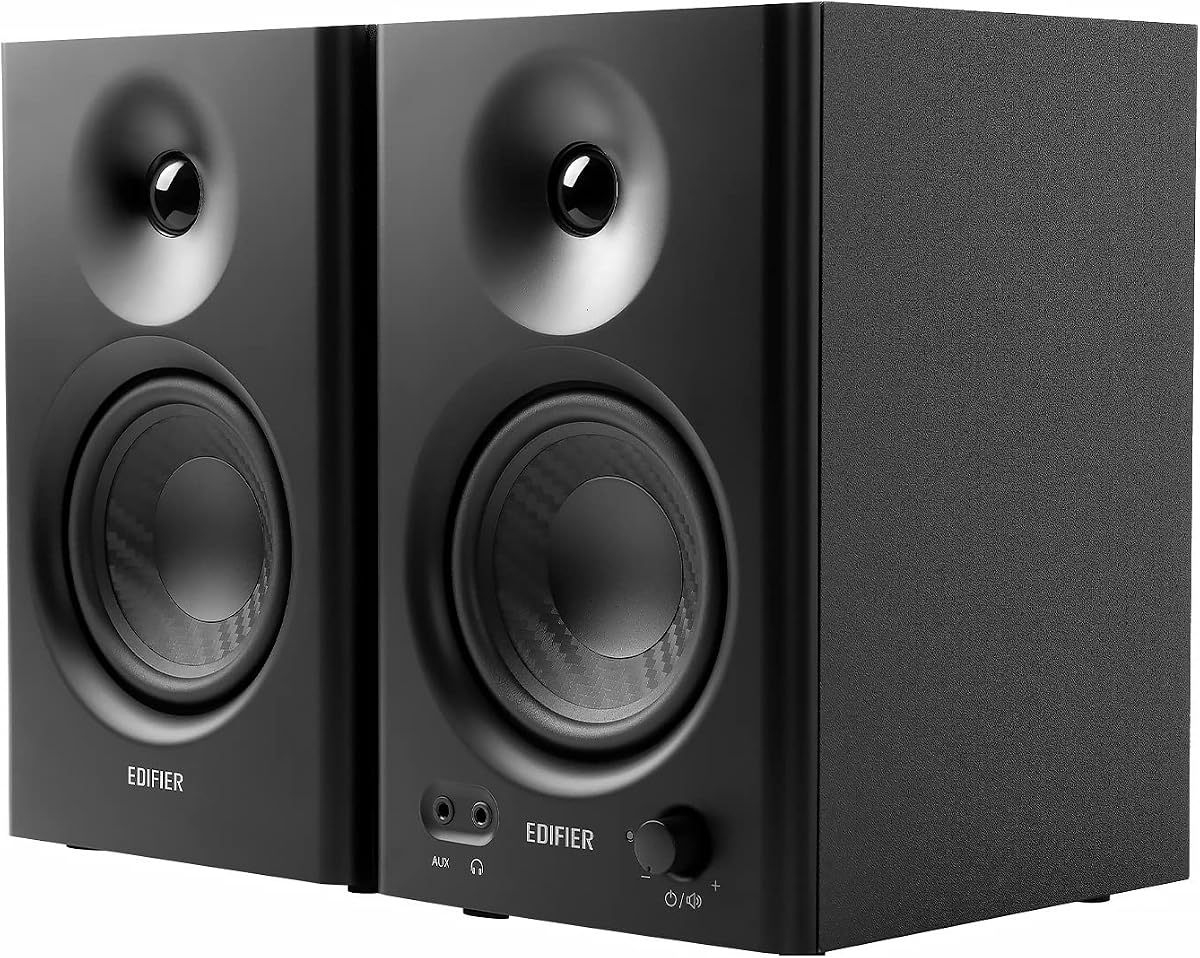
The Edifier MR3 in black is the connected desk monitor in this pack—the pair that tries hardest to be a creator tool and a daily speaker at once. Hi-Res Audio certification, a claimed flat response from 52 Hz to 40 kHz, and dedicated Music, Monitor, and Custom modes signal a product aimed at accurate playback rather than exaggerated consumer bass. For video editors, hobby producers, guitarists practicing through a simple interface, or anyone upgrading from laptop drivers, that restraint is exactly the point.

  • Hi-Res certified with 52 Hz–40 kHz claimed response
  • 18W x 2 RMS, 3.5" mid-low drivers and 1" tweeters
  • TRS, RCA, AUX, headphone out, Bluetooth 5.4 multipoint
Check Price →
✓ Pros
  • Hi-Res certification and Monitor mode favor honest near-field listening
  • Balanced TRS plus RCA/AUX cover interfaces and everyday PC sources
  • Bluetooth multipoint and headphone output add real desk flexibility
  • EDIFIER ConneX app enables Music, Monitor, and Custom EQ profiles
  • MDF cabinets help control resonance in compact bedroom setups
✕ Cons
  • Smaller drivers limit deep sub-bass without a separate subwoofer
  • Bluetooth is convenient but wired remains better for latency-sensitive work
  • Monitor voicing can feel restrained compared with hyped multimedia pairs

Detailed review

Input flexibility is unusually strong for a compact active pair. Balanced TRS, RCA, and AUX cover audio interfaces and motherboards, while a front headphone output lets you switch to private listening without tearing down the monitor chain. Bluetooth 5.4 with multipoint support means a phone and laptop can stay associated, which is useful when you bounce between reference tracks on mobile and project work in a DAW. Simultaneous RCA and AUX connections also help when more than one wired source needs to stay attached to a busy desk.

Power is rated at 18W x 2 RMS with a peak SPL around 92.5 dB, driven by 3.5-inch mid-low drivers and one-inch tweeters in MDF cabinets. That is not the loudest system here—the JBL 305P MkII will fill more air—but near-field monitoring rarely needs living-room volume. What matters more is distortion control, imaging, and whether midrange vocals stay intelligible when you raise level for detail work. The MR3's design language points at that use case rather than party playback.

The EDIFIER ConneX app extends the hardware modes with deeper EQ control. That is valuable in imperfect rooms where a desk sits against a wall or under a shelf. Start in Monitor mode when you want honesty, then use Custom if a particular playlist or game soundtrack needs a small personal tilt. Music mode can add enjoyment without forcing you to abandon the monitor identity entirely. The important habit is to avoid endless EQ chasing; make small changes, listen for a day, then refine.

Against the Yamaha HS3 and HS4, the MR3 trades legendary studio lineage for modern connectivity and app tuning. Against the PreSonus Eris 3.5, it adds Bluetooth and Hi-Res branding with a similar compact footprint. Against the JBL 305P MkII, it will not deliver the same five-inch low-end authority or waveguide imaging width. Buy the MR3 when your priorities include editing confidence, reference listening, and professional-ish connectivity on a small desk more than maximum driver size.

Placement still matters. Keep the tweeters near ear height, form a triangle with your chair, and avoid stuffing the cabinets against a wall if the low end thickens. Use balanced TRS from an interface when available; fall back to RCA or AUX from a motherboard or DAC. Bluetooth is excellent for convenience checks, but wired remains preferable for latency-sensitive recording and monitoring. With those habits, the MR3 becomes a serious compact monitor pair that still behaves politely as everyday desk speakers.

Who should buy the MR3

Creators, streamers who care about mix translation, and listeners who dislike hyped consumer voicing will get the most from this pair. It also suits guitarists and hobby producers who need TRS and headphone out on the same desk stack without stepping up to five-inch cabinets.

Skip it if you need deep sub-bass extension or the widest imaging sweet spot in the room—the JBL 305P MkII or Yamaha HS4 are better fits for that brief.

Monitor mode versus Music mode

Use Monitor mode for editing, mixing checks, and critical listening. Switch to Music or a mild Custom curve when you want longer recreational sessions without changing hardware.

If app EQ becomes a rabbit hole, return to a neutral starting point and adjust with placement first—toe-in, height, and distance often fix more than a dramatic treble boost.

Check Price on Amazon →

We may earn a commission at no additional cost to you.

2. PreSonus Eris 3.5 - Best Entry Studio Pair

PreSonus Eris 3.5 Powered Studio Monitors

PreSonus Eris 3.5 Powered Studio Monitors

9/10★★★★★

The PreSonus Eris 3.5 is the familiar entry ramp into studio monitors—a pair many first-time producers encounter when they outgrow headphones but are not ready for five-inch cabinets and standalone power bricks on the floor. PreSonus built its reputation on accessible monitoring, and the Eris line carries that DNA: woven-composite woofers, silk-dome tweeters, and onboard acoustic tuning switches that acknowledge real desks are rarely treated like control rooms.

  • 3.5" woven-composite woofer and 1" silk-dome tweeter
  • 50W built-in amplification, 80 Hz–20 kHz response
  • TRS, RCA, front aux, and front headphone jack
Check Price →
✓ Pros
  • Trusted PreSonus studio lineage in a compact desktop footprint
  • Built-in HF and LF acoustic tuning controls for quick room correction
  • Front-panel aux and headphone jack simplify everyday desk workflows
  • 50W amplification delivers clean headroom for near-field listening
  • Strong value entry point for first-time monitor buyers
✕ Cons
  • No Bluetooth or app EQ compared with the Edifier MR3
  • Smaller woofer limits sub-bass compared with HS4 or 305P MkII
  • Consumer-friendly marketing may oversell hi-fi use versus strict monitoring

Detailed review

Fifty watts of built-in amplification is meaningful at this size. The listing emphasizes distortion-free sound at practical volumes, which is what bedroom beat makers and podcast editors actually need. An 80 Hz to 20 kHz claimed response tells you this is a near-field tool, not a subwoofer replacement. Expect honest mids and highs with bass that rolls off sooner than larger HS4 or JBL pairs. That is normal; the mistake is buying small monitors and then blaming them for not moving couch-level air.

Connectivity covers the essentials. Balanced TRS and RCA on the rear accept interfaces, mixers, and consumer line outputs. A front-panel aux input and headphone jack address the daily reality of quick phone checks and silent editing. There is no Bluetooth, which purists may prefer for monitoring integrity and which convenience seekers may miss compared with the MR3. For a DAW-centric desk that stays wired, the Eris layout is straightforward.

The high- and low-frequency acoustic tuning controls are the quiet hero feature. When a desk sits against a wall, low end often blooms; when tweeters aim slightly above your ears, highs can feel brittle. Small cuts or boosts on the rear panel often improve comfort faster than software EQ on an uncalibrated room. PreSonus markets this as getting clear, balanced audio anywhere; realistically, it is a helpful first correction layer before you invest in panels or measurement mics.

Compared with the M-Audio BX3, the Eris 3.5 feels more studio-native and less bundled-software oriented. Compared with the Yamaha HS3, both are compact three-and-a-half-inch class monitors, but Yamaha leans into the white-cone studio aesthetic and combo XLR inputs while Eris emphasizes woven drivers and front aux convenience. Compared with the Mackie CR3.5, Eris is less about a party tone knob and more about acoustic trim switches—a subtle personality split.

Buy the Eris 3.5 when you want a credible first monitor pair from a pro-audio brand without jumping to four-and-a-half-inch or five-inch sizes. Skip it if Bluetooth phone streaming or app EQ is central to your workflow, or if you already know your mixes need deeper bass extension that only larger drivers provide. Placement fundamentals still apply: triangle listening position, tweeters at ear height, and a few inches of rear clearance for the ports.

Ideal Eris 3.5 setups

Bedroom producers, student editors, and gaming desks that double as music stations are the sweet spot. The compact cabinets fit monitor risers and shallow shelves better than five-inch boxes.

Pair with a subwoofer only if you accept crossover and level matching work—these are happiest as a complete small stereo solution.

Tuning the acoustic controls

Start with both switches flat, listen to familiar tracks, then adjust LF if bass feels boomy against a wall and HF if sibilance fatigues during long sessions.

Make one change at a time and note settings so you can revert when moving the desk.

Check Price on Amazon →

We may earn a commission at no additional cost to you.

3. M-Audio BX3 - Best Wired Starter Kit

M-AUDIO BX3 Pair 3.5" Wired Studio Monitors and PC Speakers for Recording and Mu

M-AUDIO BX3 Pair 3.5" Wired Studio Monitors and PC Speakers for Recording and Mu

9/10★★★★★

The M-Audio BX3 pair occupies the wired starter lane—a monitor set explicitly marketed for zero-latency monitoring during live streaming, gaming, podcasting, and recording. That matters when Bluetooth or heavy DSP processing would introduce delay between what you play and what you hear in headphones or live monitors. For beginners learning to track vocals or guitar over a backing beat, predictable wired behavior is less glamorous than app EQ but more trustworthy.

  • 3.5" Kevlar woofers with natural silk dome tweeters
  • Bi-amplified wired design for zero-latency monitoring
  • Quarter-inch, RCA, and aux inputs; MPC Beats software included
Check Price →
✓ Pros
  • Latency-free wired monitoring suits live input and streaming workflows
  • Kevlar woofers and silk tweeters target punchy, detailed near-field sound
  • Rear HF/LF EQ dials plus left-right active speaker position switch
  • Generous cable bundle and Akai MPC Beats software add starter value
  • MDF cabinets with bass reflex design beat hollow plastic multimedia boxes
✕ Cons
  • No Bluetooth or digital inputs for casual wireless listening
  • Passive-plus-active layout requires correct speaker placement and cabling
  • Three-and-a-half-inch size still limits deep bass without a sub

Detailed review

Driver choices tell the story M-Audio wants to tell. Three-and-a-half-inch Kevlar low-frequency drivers aim for smooth, punchy bass in a compact cabinet, while natural silk dome tweeters handle precise stereo imaging and airy highs. Bi-amplified power means woofer and tweeter get their own amplification paths, a step up from many cheap multimedia speakers that share a single full-range driver. MDF construction and a bass reflex port further separate the BX3 from hollow plastic PC boxes that rattle when you push volume.

Rear-panel connectivity is practical for a first studio: quarter-inch, RCA, and aux inputs cover interfaces, DJ controllers, and laptop outs. A front headphone jack supports late-night sessions. High and low EQ dials on the rear let you trim room issues, and a left-right active speaker position switch helps when cable routing forces a non-traditional layout. Foam feet, interconnect cables, aux and RCA adapters, and Akai MPC Beats software round out a starter kit feel that appeals to buyers who want everything in one box.

Against the PreSonus Eris 3.5, the BX3 emphasizes wired latency-free use and bundled production software rather than PreSonus's acoustic tuning switches and front aux prominence. Against the Edifier MR3, it skips Bluetooth and Hi-Res branding entirely—choose BX3 when you distrust wireless on a recording desk. Against Yamaha HS3, the BX3 is less iconically studio but includes more cables and DAW software out of the box.

Honest expectations: the BX3 will not replace five-inch reference monitors for critical mixing in larger rooms. It will upgrade a multimedia desk to something that respects transients, stereo placement, and low-end punch within its size class. Producers who already know they need four-inch or five-inch drivers should skip straight to the Edifier MR4, Yamaha HS4, or JBL 305P MkII. Everyone else gets a credible wired on-ramp.

Setup is traditional active/passive monitor wiring: connect the included speaker cable between cabinets, route your interface output to the active side, and place tweeters at ear height. Use the EQ dials sparingly, prefer TRS or RCA from a clean output, and keep rear ports breathing. If you later upgrade, the BX3 still works as a secondary cue system or mobile podcast kit—compact wired pairs never go obsolete, they just change roles.

Who the BX3 fits best

First-time recordists, streamers who monitor live inputs, and beat makers who want MPC Beats in the same shipment as the speakers.

Not ideal for phone-first listeners who expect Bluetooth multipoint from their main desk pair.

Using the included software

MPC Beats gives you a DAW path on day one—useful if you bought monitors before choosing software. Treat it as a learning tool, not a lifetime platform lock-in.

Focus on gain staging from interface to speakers; software cannot fix clipping at the input.

Check Price on Amazon →

We may earn a commission at no additional cost to you.

4. JBL 305P MkII - Best Overall

(2) JBL 305P MkII 5" 2-Way Active Powered Studio Reference Monitors Speakers

(2) JBL 305P MkII 5" 2-Way Active Powered Studio Reference Monitors Speakers

9.4/10★★★★★

The JBL 305P MkII is the reference anchor in this pack—the pair most likely to still be on your desk after you have outgrown entry-level three-and-a-half-inch monitors. Five-inch woofers, dual 41-watt Class-D amplifiers, and JBL's Image Control Waveguide combine to deliver precise imaging, controlled low end, and a wider sweet spot than typical small cabinets. For music production, podcast mastering checks, cinematic sound design, and any workflow where translation matters, that combination earns the best overall badge.

  • 5" woofer with patented Image Control Waveguide
  • Dual 41W Class-D amplification per cabinet
  • Boundary EQ, HF Trim, XLR/TRS combo inputs
Check Price →
✓ Pros
  • Five-inch drivers deliver the deepest usable bass in this pack
  • Image Control Waveguide widens the listening sweet spot for editing
  • Boundary EQ and HF Trim help tame desk and wall interactions
  • Dual Class-D amps preserve dynamic range at moderate near-field levels
  • Highest listed rating alongside Yamaha pairs signals strong buyer satisfaction
✕ Cons
  • Larger footprint may not fit shallow monitor stands or tiny desks
  • No Bluetooth, RCA, or consumer-friendly front aux on the listing
  • Reference voicing reveals mix flaws—unforgiving for casual music enjoyment

Detailed review

Image Control Waveguide is not marketing fluff in a treated near-field setup. It shapes high-frequency dispersion so stereo cues remain stable when you shift slightly while editing—a common reality during long sessions. The 305P MkII also uses a Slip Stream port design to extend bass without the sloppy boom cheap ported boxes suffer. You still will not get subwoofer depth, but you get meaningful low-mid information that smaller Eris or MR3 pairs simply cannot reproduce at the same authority.

Room adaptation features keep the 305P MkII practical in bedrooms. Boundary EQ adjusts low frequencies when speakers sit near walls, and HF Trim tames overly bright reflections from hard desks or untreated corners. These switches are not a substitute for acoustic treatment, but they reduce the worst desk-placement sins before you invest in panels. That is especially valuable for vloggers and producers working in multipurpose rooms.

Inputs are pro-focused: XLR/TRS combo jacks accept balanced outputs from interfaces and mixers. There is no Bluetooth, no front headphone jack, and no RCA convenience—this is a monitor pair that assumes you already route audio deliberately. If your desk is half gaming PC and half DAW, you may prefer the Edifier MR3's hybrid connectivity. If your desk is a production station first, the 305P's signal path is cleaner.

Build quality reflects JBL's long studio history. MDF enclosures, rigorous reliability testing claims, and a sleek industrial look signal gear meant to stay powered for hours. Compared with the Yamaha HS4, both are serious mid-field tools; JBL emphasizes waveguide imaging and five-inch scale, while Yamaha offers slightly broader input types and the iconic white woofer aesthetic. Compared with compact pairs, the 305P MkII asks for more space and rewards you with mix confidence.

Buy the 305P MkII when you are ready to treat monitors as instruments, not accessories. Measure desk depth, plan isolation pads or stands, and commit to wired monitoring during recording. Skip it if your workspace cannot physically accommodate five-inch cabinets or if you primarily want Bluetooth entertainment with occasional editing—the MR3 or Mackie CR3.5 serve that hybrid life better.

305P MkII placement tips

Allow at least a few inches behind the ports, angle tweeters toward your ears, and use Boundary EQ when the rear wall is closer than a foot.

If imaging feels narrow, check that both speakers sit equidistant from your head and that the desk surface is not reflecting highs into the waveguide.

Versus Yamaha HS4

Choose JBL when five-inch scale and waveguide imaging are the priority. Choose HS4 when you want Yamaha's room switches, broader RCA/mini connectivity, and a slightly smaller four-and-a-half-inch footprint.

Check Price on Amazon →

We may earn a commission at no additional cost to you.

5. OHAYO 60W - Best Multimedia Desk Pair

OHAYO 60W Computer Speakers for Music and Gaming

OHAYO 60W Computer Speakers for Music and Gaming

9/10★★★★★

The OHAYO 60W pair sits at the edge of this pack—a computer speaker system that appears because shoppers often cross-shop multimedia bookshelf pairs alongside studio monitors. Understanding where it fits prevents a category mistake. OHAYO emphasizes powerful 30W x 2 sound, carbon-fiber tweeters and full-range drivers, rear bass ports, and Bluetooth 5.3 for gaming and music desks. That is a legitimate upgrade path from built-in laptop audio, but it is not the same purchase as a Yamaha HS or JBL reference box.

  • 30W x 2 active stereo with carbon-fiber drivers
  • Bluetooth 5.3 plus AUX, RCA, and USB inputs
  • MDF wooden enclosures with rear bass port
Check Price →
✓ Pros
  • Strong powered output and bookshelf styling for mixed desk entertainment
  • Bluetooth 5.3 covers phones, laptops, and TVs without extra adapters
  • Front volume knob keeps adjustments fast during games and streams
  • MDF cabinets reduce box resonance compared with plastic multimedia sets
  • Flexible RCA/AUX/USB connectivity suits hybrid PC and living-room sources
✕ Cons
  • Not a true studio monitor—voicing favors enjoyment over flat translation
  • Lacks balanced TRS and room correction switches found on pro pairs
  • Marketing language around studio quality oversells mixing use cases

Detailed review

For gamers and streamers who want louder, fuller desk audio with minimal setup, OHAYO delivers practical value. Multiple inputs—Bluetooth, RCA, AUX, USB—mean the same pair can serve a PC, turntable with preamp, TV, or phone without a mixer. MDF enclosures and a front volume knob show thoughtful industrial design for daily use. If your studio ambitions are casual—occasionally dropping beats into a TikTok edit rather than mastering an EP—this pair may feel good enough while looking less industrial than white-cone monitors.

The tradeoff is monitoring honesty. Listing copy mentions stream studio-quality sound, but there is no Monitor mode, no balanced input, no Boundary EQ, and no heritage of mix translation tests. Bass ports and consumer tuning often exaggerate low end that hides masking problems in a mix. Producers who need reliable reference should prioritize Edifier MR3, PreSonus Eris, or Yamaha HS models instead. OHAYO belongs in the conversation when entertainment volume and Bluetooth convenience rank above critical listening.

Compared with the Edifier MR3, OHAYO skips Hi-Res certification and TRS balanced inputs but matches the entertainment-friendly Bluetooth story. Compared with the Mackie CR3.5, both offer tone shaping for fun listening, but Mackie explicitly targets creative reference with a location switch. Compared with compact studio pairs, OHAYO may sound bigger and more exciting at first listen—which can be exactly what a gaming desk wants and exactly what a mixing desk should avoid.

If you already own true monitors, OHAYO can still serve as a secondary Bluetooth system for a living room PC or a kid's gaming station. If you are buying your only desk speakers and plan serious production within a year, skip OHAYO and invest in Eris, MR4, or HS3 instead. The rating is solid for multimedia use; the badge reflects category fit, not absolute quality.

Setup is straightforward consumer audio: space the cabinets symmetrically, give the rear port room, and prefer wired USB or AUX for gaming latency. Use Bluetooth for music discovery, not for tracking instruments. Accept the cons deliberately and OHAYO performs its intended role well.

When OHAYO makes sense

Mixed entertainment desks, dorm gaming setups, and users who want wooden bookshelf aesthetics without studio-monitor austerity.

Skip when balanced monitoring, mix translation, or interface-centric wiring defines the purchase.

Check Price on Amazon →

We may earn a commission at no additional cost to you.

6. Yamaha HS3 - Best Compact Yamaha Monitor

Yamaha HS3 Powered Studio Monitor in Black

Yamaha HS3 Powered Studio Monitor in Black

9.4/10★★★★★

The Yamaha HS3 pair brings the HS monitor identity to the tightest desks in this guide. A three-and-a-half-inch cone woofer, zero-point-seven-five-inch dome tweeter, and two-way bass-reflex cabinet deliver the familiar Yamaha studio presentation in a package that fits shallow shelves and small interface stacks. For producers who trust the HS name but cannot accommodate HS4 or five-inch rivals, HS3 is the compact answer.

  • 3.5" cone woofer and 0.75" dome tweeter
  • 70 Hz–22 kHz response, 26W+ amplification per side
  • XLR/TRS combo, RCA, and stereo mini inputs
Check Price →
✓ Pros
  • Yamaha HS lineage in the smallest footprint of the HS series here
  • Room control and high trim switches tailor response to desk placement
  • Combo XLR/TRS plus RCA and mini jack cover pro and consumer sources
  • Included stereo mini-to-RCA cable, speaker wire, and anti-slip pads
  • High 4.7 rating reflects strong satisfaction for compact studio use
✕ Cons
  • Smaller woofer and tweeter limit SPL and bass versus HS4 or 305P MkII
  • No Bluetooth or app EQ for casual wireless listening
  • White-cone aesthetic is divisive on non-studio desks

Detailed review

Frequency response is listed at 70 Hz to 22 kHz at minus ten decibels—a honest spec that tells you low end starts higher than larger models. That is acceptable for near-field vocal editing, guitar DI monitoring, and electronic music sketching where sub information is checked separately on headphones. It is less ideal for acoustic bass-heavy genres if HS3 is your only playback system. Room control and high trim switches mitigate boundary boost and harsh reflections, echoing the larger HS4 feature set in miniature.

Connectivity is a standout at this size. XLR/TRS combo jacks accept balanced interface outputs, RCA handles consumer gear, and a stereo mini input accepts laptops and portable recorders without adapter hunting. Included cables and anti-slip pads reduce friction on day one—a small but real advantage over bare-bones competitors. There is no Bluetooth; Yamaha assumes you are buying monitors, not a lifestyle speaker.

Against the PreSonus Eris 3.5, HS3 offers combo XLR inputs and Yamaha's room switches versus Eris's front aux and headphone convenience. Against the Edifier MR3, HS3 skips wireless and app control but feels more traditionally studio in voicing and industrial design. Against the HS4, HS3 trades driver scale for desk footprint—choose HS3 when space is the hard constraint, HS4 when you can spare the depth.

The HS3 badge—best compact Yamaha monitor—signals a specific buyer: someone who wants white-cone credibility, balanced inputs, and room trims without upsizing to four-and-a-half-inch drivers. Podcasters, film students, and apartment producers often land here. If you already know your room needs deeper bass, step up within this same pack rather than hoping EQ will invent missing driver area.

Placement follows Yamaha norms: tweeters at ear height, equilateral triangle listening, room control engaged when rear walls are close. Use balanced TRS whenever possible. Reference on headphones for sub-bass decisions. With realistic expectations, HS3 delivers Yamaha monitoring discipline in a genuinely small cabinet.

HS3 versus Edifier MR3

Pick HS3 for traditional studio I/O and Yamaha room switches without apps. Pick MR3 for Bluetooth multipoint, Hi-Res branding, and hybrid entertainment workflows.

Included accessories

Use the bundled speaker cable and anti-slip pads—they improve stability on glass desks and reduce micro-vibrations that smear imaging.

Check Price on Amazon →

We may earn a commission at no additional cost to you.

7. Edifier MR3 White - Best White Finish Monitor

Edifier MR3 Powered Studio Monitor Speakers

Edifier MR3 Powered Studio Monitor Speakers

9.2/10★★★★★

The white Edifier MR3 is not a different monitor—it is the same Hi-Res certified, Bluetooth-equipped compact studio pair as the black unit, repackaged for desks where aesthetics matter. Every technical argument from the black MR3 review applies: Music, Monitor, and Custom modes via the EDIFIER ConneX app; balanced TRS, RCA, and AUX; headphone output; MDF cabinets; 18W x 2 RMS power; and 3.5-inch mid-low drivers with one-inch tweeters. Buy white when the room demands it, not because you expect a sonic upgrade.

  • White-finish MR3 with identical driver platform to black
  • Hi-Res certified 52 Hz–40 kHz claimed response
  • TRS, RCA, AUX, headphone, Bluetooth 5.4 multipoint
Check Price →
✓ Pros
  • Same MR3 monitoring features and app EQ as the black version
  • White cabinets suit bright desks, Mac setups, and minimalist rooms
  • Hi-Res certification and Monitor mode support creator workflows
  • Balanced TRS and multiple wired inputs cover interfaces and PCs
  • Bluetooth multipoint adds everyday convenience without extra hardware
✕ Cons
  • White finish shows scuffs and dust more than black cabinets
  • Functionally duplicate of black MR3 aside from cosmetics
  • Still limited by three-and-a-half-inch drivers for deep sub-bass

Detailed review

Finish choice is underrated in studio gear. Bright home offices, Scandinavian furniture, and Apple-centric setups often clash with black boxes and yellow woofer cones. White MR3 cabinets integrate visually while still offering creator-oriented I/O. Content creators who film desk tours may prefer the cleaner on-camera look even if audio performance is identical to the black pair.

From a monitoring perspective, the same strengths and limits apply. The MR3 platform excels at hybrid desks—DAW work by day, Spotify and YouTube by night—thanks to mode switching and Bluetooth multipoint. It does not replace five-inch references for bass-heavy mastering. White owners should be mindful of maintenance: light cabinets show marks from interface cables and coffee rings faster than black textured vinyl.

Compared with white or light multimedia pairs elsewhere in the market, MR3 white still carries TRS and Monitor mode credibility that pure consumer speakers lack. Compared with the black MR3 in this same pack, choose purely on color unless one ASIN has better availability. Compared with Yamaha HS3 white cone aesthetic, Edifier offers modern minimalism versus classic studio iconography.

If you are shopping both MR3 colors, pick one listing and ignore the other in rankings—they are tied products. Our separate review exists because shoppers filter by finish and because the pack includes both ASINs for completeness. Rank nine reflects that duplication, not inferiority.

Setup, placement, and mode guidance mirror the black MR3: wired for recording, Bluetooth for casual listening, Monitor mode for edits, small EQ moves in the app only after physical placement is optimized.

Black versus white MR3

Choose black for traditional studio vibes and easier hiding of scuffs. Choose white for bright rooms and visual consistency with light peripherals.

Audio performance should be treated as identical—allocate budget to stands or interfaces instead of buying both colors.

Check Price on Amazon →

We may earn a commission at no additional cost to you.

8. Yamaha HS4 - Best Mid-Size Monitor

Yamaha HS4 Powered Studio Monitor in Black

Yamaha HS4 Powered Studio Monitor in Black

9.4/10★★★★★

The Yamaha HS4 is the mid-size sweet spot in this pack—large enough to reveal low-mid mix problems smaller three-and-a-half-inch pairs gloss over, yet more desk-friendly than full five-inch JBL 305P MkII cabinets. A four-and-a-half-inch cone woofer paired with a one-inch dome tweeter, bass-reflex tuning, and 26W-plus amplification per side delivers the HS series punch in a footprint many apartment producers can accept.

  • 4.5" cone woofer and 1" dome tweeter
  • 60 Hz–22 kHz response, 26W+ per side
  • Room control, high trim, combo/XLR/RCA/mini inputs
Check Price →
✓ Pros
  • Four-and-a-half-inch woofer bridges compact and five-inch reference classes
  • Yamaha room control and high trim tame typical bedroom desk issues
  • Broad inputs including combo XLR/TRS and stereo mini
  • Included cables and pads simplify first-time studio wiring
  • Shares top 4.7 rating with HS3 and JBL 305P MkII in this pack
✕ Cons
  • Still not a subwoofer—electronic producers need headphone bass checks
  • Larger than HS3/Eris—measure desk depth before ordering
  • No wireless connectivity for casual secondary-device streaming

Detailed review

Sixty Hz to 22 kHz response at minus ten decibels is a meaningful step down from seventy Hz on the HS3. That extra low reach helps kick drums, bass guitars, and synth subs translate better without immediately reaching for headphones. You still should verify sub content separately, but HS4 reduces the gap between small desktop monitors and true mid-field systems.

Room control and high trim switches carry over from HS3, preserving Yamaha's philosophy that real rooms need quick mechanical fixes, not only software plugins. Combo XLR/TRS inputs accept balanced interface outputs; RCA and stereo mini cover consumer devices. Bundled stereo mini-to-RCA cable, speaker wire, and anti-slip pads keep setup friction low—important when upgrading from all-in-one computer speakers.

Versus the JBL 305P MkII, HS4 trades five-inch scale and Image Control Waveguide for Yamaha's broader input set and slightly smaller cabinet. Many buyers will audition both mentally by desk space: if five-inch depth fits, JBL may win on imaging; if not, HS4 is the professional choice. Versus the Edifier MR4, HS4 feels more traditionally studio—no Music mode knob, no Bluetooth—while MR4 targets dual-mode creators.

The best mid-size monitor badge reflects HS4's balance of translation, footprint, and brand trust. Film editors, beat makers stepping up from Eris 3.5, and podcast networks standardizing on one monitor model often land here. It is the pair we recommend when someone says they are serious about production but cannot commit to five-inch depth.

Run room control when speakers sit near walls, keep tweeters at ear level, and use isolation pads if the desk transmits rumble. HS4 rewards deliberate setup with stable imaging and low fatigue during long sessions—exactly what mid-size monitoring should deliver.

Who should choose HS4 over HS3

Pick HS4 when desk depth allows four-and-a-half-inch drivers and you mix material with meaningful bass content. Stay with HS3 only when space is truly constrained.

HS4 versus JBL 305P MkII

Choose HS4 for Yamaha room switches, wider consumer inputs, and a slightly smaller cabinet. Choose JBL when five-inch drivers and waveguide imaging are the priority and space allows.

Check Price on Amazon →

We may earn a commission at no additional cost to you.

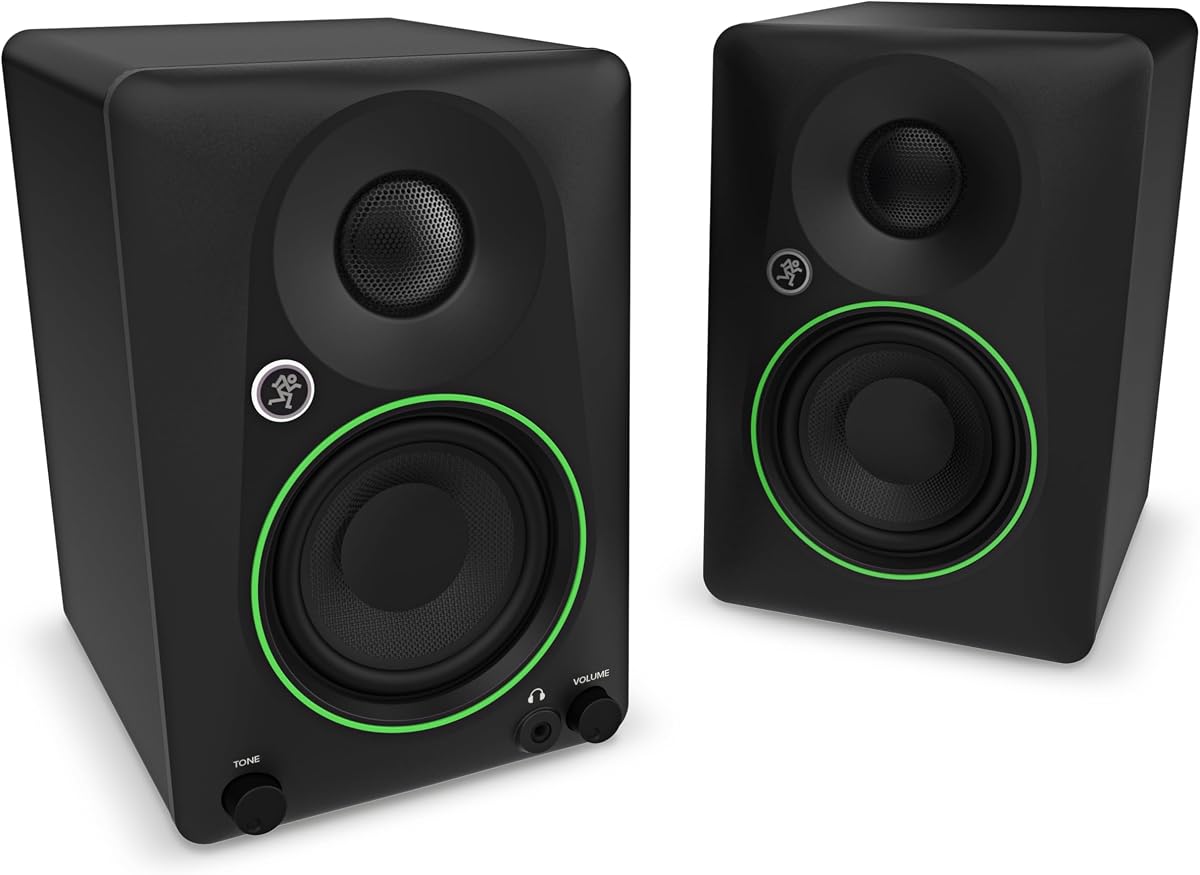
9. Mackie CR3.5 - Best Hybrid Creative Monitor

Mackie CR3.5 3.5" Creative Reference Powered Studio Monitors with Tone Knob and

Mackie CR3.5 3.5" Creative Reference Powered Studio Monitors with Tone Knob and

9.2/10★★★★★

The Mackie CR3.5 occupies the hybrid creative lane—monitors that admit most desks also play games, stream shows, and host friends on Friday nights. Mackie combines a three-and-a-half-inch woven woofer and silk dome tweeter with a tone knob that starts transparent and gradually adds bass and high-end sparkle. That single control is the personality feature: studio accuracy when centered, entertainment punch when rotated.

  • 3.5" woven woofer with silk dome tweeter
  • Tone knob plus desktop/bookshelf location switch
  • TRS, RCA, 3.5 mm input, headphone output
Check Price →
✓ Pros
  • Tone knob morphs from flat reference toward fun bass and sparkle
  • Desktop versus bookshelf location switch optimizes EQ for placement
  • TRS and RCA cover interfaces; 3.5 mm handles PCs and consoles
  • Headphone output supports silent editing sessions
  • Optional CR8SBT subwoofer path for later bass upgrades
✕ Cons
  • Tone knob temptation can undermine mix translation if left boosted
  • Compact drivers limit maximum SPL in larger rooms
  • Creative Reference branding signals hybrid use—not strict mastering tools

Detailed review

The location switch is equally thoughtful. Desktop mode optimizes response for near-field listening inches from your ears—typical studio posture. Bookshelf mode adjusts voicing when speakers sit farther away, like on a shelf across a small room. Many monitors ignore placement physics; Mackie acknowledges them with hardware instead of expecting users to memorize EQ curves.

Inputs cover TRS, RCA, and a 3.5 mm jack, plus a headphone output on the front panel. There is no Bluetooth, aligning CR3.5 closer to wired creative workflows than Edifier MR3. Mackie also advertises compatibility with the CR8SBT subwoofer for owners who want more low end later—a modular path rare among compact pairs in this pack.

The risk is misuse of the tone knob. Boosted bass hides masking problems and makes mixes translate poorly to car speakers and earbuds. Discipline matters: mix with the knob neutral, then add fun for recreational listening. The Creative Reference name is honest warning— these are references that tolerate party mode, not strict mastering tools like the JBL 305P MkII.

Compared with PreSonus Eris 3.5, Mackie offers tone and location switching versus acoustic HF/LF trims. Compared with Edifier MR4, Mackie lacks a dedicated Monitor/Music button but adds location profiles. Compared with OHAYO, Mackie is more studio-credible with TRS and less exaggerated consumer bass.

Buy CR3.5 when one pair must serve production, gaming, and casual hi-fi without Bluetooth complexity. Skip it if you want maximum translation purity or five-inch scale—look at HS4 or JBL instead. Used responsibly, CR3.5 is one of the most flexible small desks in the pack.

Using the tone knob responsibly

Mark the neutral position with tape or a photo so you can return after recreational listening. Mixing with boosted bass is the fastest way to weak translations.

Adding the CR8SBT sub later

If you choose Mackie partly for upgrade path, plan crossover settings and level matching when the sub arrives—subs help entertainment more than they fix poor main speaker placement.

Check Price on Amazon →

We may earn a commission at no additional cost to you.

10. Edifier MR4 - Best Four-Inch Edifier Monitor

Edifier MR4 Powered Studio Monitors

Edifier MR4 Powered Studio Monitors

9.2/10★★★★★

The Edifier MR4 is the four-inch anchor of Edifier's monitor line in this pack—built for artists who outgrew three-and-a-half-inch drivers but do not want five-inch depth. A four-inch composite woofer and one-inch silk dome tweeter in MDF cabinets deliver clearer low-mids and fuller body than MR3 while staying compact enough for typical IKEA desk depths. Monitor mode targets a responsive, almost flat curve; Music mode relaxes the presentation for daily listening.

  • 4" composite woofer and 1" silk dome tweeter
  • Monitor and Music dual-mode front-panel switching
  • Balanced TRS, RCA, AUX, and headphone output
Check Price →
✓ Pros
  • Four-inch woofer step-up over MR3 without five-inch desk depth
  • Monitor and Music modes separate work and casual listening
  • Balanced TRS and multiple unbalanced inputs for hybrid desks
  • MDF texture cabinets reduce resonance during long sessions
  • Front-panel HF/LF knobs plus mode button keep controls accessible
✕ Cons
  • No Bluetooth or app EQ compared with MR3
  • Four-inch scale still trails HS4 and 305P MkII for deep bass
  • Dual-mode design requires discipline to avoid mixing in Music mode

Detailed review

That dual-mode philosophy mirrors how real home studios operate. You cannot always swap speakers when switching from mixing a vocal to watching a tutorial. A front-panel mode button plus separate high and low frequency knobs let you commit to honesty during export checks, then soften the curve for recreational playback without rebooting hardware. The discipline is identical to Mackie's tone knob: mix in Monitor mode, entertain in Music mode.

Connectivity stays creator-focused: quarter-inch balanced TRS, RCA, AUX, and a front headphone jack. There is no Bluetooth—MR4 assumes you prioritize wired integrity over phone streaming. For interface-centric desks, that is a feature. For hybrid entertainment desks, MR3 remains the better Edifier.

Against the Yamaha HS4, MR4 offers mode switching and front EQ knobs versus Yamaha's room control switches and combo XLR prominence. Imaging and low-end extension may favor HS4 in larger rooms; MR4 wins on approachable controls and slightly smaller visual footprint. Against MR3, MR4 trades wireless convenience for driver scale—choose MR4 when four-inch bass matters more than Bluetooth.

The MR4 badge reflects Edifier's best four-inch monitor in this list—a strong pick for music creators, video editors, and streamers who want reference behavior without JBL-sized cabinets. Pair with headphones for sub verification, keep tweeters at ear height, and resist the urge to mix in Music mode.

If your budget allows only one Edifier monitor, decide between MR3 connectivity and MR4 driver size. Many producers who never use Bluetooth should pick MR4; phone-first desks should pick MR3. Either way, Edifier's MDF build and mode thinking beat generic multimedia speakers for creative work.

MR4 versus MR3

Choose MR4 for four-inch low-mid authority and wired focus. Choose MR3 for Hi-Res branding, app EQ, and Bluetooth multipoint on the same desk.

Front-panel workflow

Use HF/LF trims for room fixes, not creative EQ. Let Monitor mode handle translation; use Music mode only after bounce checks are done.

Check Price on Amazon →

We may earn a commission at no additional cost to you.

Best Studio Monitor Speakers in 2026 for Music Production

How to Choose Studio Monitor Speakers

Driver size is room size

Three-and-a-half-inch monitors like the PreSonus Eris 3.5, Yamaha HS3, Edifier MR3, Mackie CR3.5, and M-Audio BX3 excel in bedrooms and dorm desks where listening distance stays under three feet. Four-inch pairs such as the Edifier MR4 and four-and-a-half-inch Yamaha HS4 add low-mid weight for small studios that mix bass-heavy genres. Five-inch JBL 305P MkII cabinets belong where you have depth, stand height, and willingness to manage bass buildup.

Buying oversized monitors for a tiny desk creates more problems than it solves: boundary boost, early reflection chaos, and the temptation to listen too loud. Measure depth, height, and side clearance before choosing. A well-placed HS3 beats a cramped 305P MkII every time.

Active monitors and signal path

Every product in this pack is powered—amplification is inside the cabinet. That simplifies wiring versus passive speakers plus a separate amp. Your job is to feed clean line-level signal from an audio interface, mixer, or quality DAC. Balanced TRS or XLR outputs reduce noise on longer cable runs; RCA and mini jacks work for short desktop paths.

Avoid stacking Bluetooth on top of wireless mouse dongles and Wi-Fi routers when latency matters. Wired monitoring during recording is still the professional default even when pairs like the Edifier MR3 offer excellent Bluetooth for playback.

Room correction without mythology

Onboard switches—Yamaha room control and high trim, JBL Boundary EQ and HF Trim, PreSonus acoustic tuning, rear EQ on M-Audio and Edifier—fix first-order placement problems. They do not replace acoustic treatment or calibration software, but they reduce harshness faster than endless plugin EQ.

Start flat, listen to reference tracks you know, then adjust one control at a time. If problems persist after switching placement from wall to stand, consider absorption at first reflection points before buying a second pair of monitors.

Studio versus multimedia cross-shopping

Products like the OHAYO 60W pair prove how blurry retail categories have become. Multimedia speakers emphasize Bluetooth, volume, and aesthetic enjoyment. Studio monitors emphasize translation, balanced inputs, and honest midrange even when bass feels lighter.

If production is the main job, prioritize Eris, HS, MR, Mackie CR, M-Audio, or JBL entries in this pack. If gaming and music dominate with occasional edits, hybrid pairs—MR3, CR3.5—balance both worlds. Pure entertainment desks may be happier with OHAYO, but should not expect mix reliability.

Subwoofers and headphones complete the picture

No monitor in this pack replaces a dedicated sub for sub-bass verification. Headphones remain essential for low-end detail in untreated rooms. Some owners add a sub later—Mackie even documents CR8SBT compatibility— but crossover settings and level matching take learning.

A practical workflow: mix mids and highs on monitors, check subs and spatial effects on headphones, test final bounces on car speakers or earbuds. Monitors are one lens, not the entire vision.

Frequently Asked Questions

01

What are the best studio monitor speakers overall in this guide?

The JBL 305P MkII is the best overall pick for producers who can fit five-inch reference monitors and want waveguide imaging, Boundary EQ, and serious mix translation. The Yamaha HS4 is the best mid-size alternative with four-and-a-half-inch drivers, room control switches, and broad inputs in a slightly smaller footprint. The Edifier MR3 is the best connected desk monitor when Bluetooth, app EQ, and balanced TRS must coexist on a compact desk. Match the badge to your space and workflow rather than assuming one size fits all rooms.

02

Do I need five-inch monitors or are 3.5-inch pairs enough?

Three-and-a-half-inch monitors like the PreSonus Eris 3.5, Yamaha HS3, and Edifier MR3 are enough for near-field editing, podcast work, and sketching beats when space is tight and you verify low end on headphones. Five-inch JBL 305P MkII pairs add low-mid authority and imaging width that matter for serious music production in small treated rooms. Four-inch Edifier MR4 and four-and-a-half-inch Yamaha HS4 split the difference. Buy the largest pair your desk and room can support without cramming cabinets against walls.

03

Are studio monitors good for gaming and everyday music?

They can be, but voicing differs. Hybrid models like the Edifier MR3, Mackie CR3.5, and Edifier MR4 include Music modes or tone controls for enjoyable casual listening. Strict references like the JBL 305P MkII and Yamaha HS series sound less exciting for explosions and EDM unless you add EQ. The OHAYO pair targets gaming and music first and monitoring second. Decide which direction you lean most of the time and choose accordingly.

04

What inputs should I look for with an audio interface?

Balanced TRS or XLR combo jacks are ideal—found on the JBL 305P MkII, Yamaha HS3 and HS4, Edifier MR3 and MR4, PreSonus Eris 3.5, Mackie CR3.5, and M-Audio BX3. Run balanced outputs from your interface when available to reduce hum on desktop cable runs. RCA and mini inputs still help for secondary devices. Bluetooth on the MR3 is convenient but should not replace wired monitoring during recording.

05

How do Yamaha HS3 and HS4 compare?

Both share Yamaha room control, high trim, combo XLR/TRS inputs, RCA, stereo mini jacks, and included cables. HS3 uses a three-and-a-half-inch woofer and zero-point-seven-five-inch tweeter with seventy Hz low-end extension—better for very tight desks. HS4 upgrades to four-and-a-half-inch and one-inch drivers with sixty Hz extension for fuller bass in small studios. Choose HS3 when space is the limiting factor; choose HS4 when you can accommodate slightly larger cabinets and mix bass-heavy material.

06

Is the Edifier MR3 or MR4 better for music production?

The MR4 is better for production-first desks because its four-inch woofer reveals more low-mid information and it offers a dedicated Monitor mode without Bluetooth distractions. The MR3 is better for hybrid desks that need Hi-Res certification, app EQ, and Bluetooth multipoint for phones and laptops alongside TRS interface connections. Many creators who never use wireless should prefer MR4; phone-heavy workflows should prefer MR3.

07

Do I need acoustic treatment with these monitors?

Treatment helps any monitor, but onboard room switches on Yamaha, JBL, PreSonus, and rear EQ on others reduce the worst desk-wall interactions. Start with proper placement—triangle listening position, tweeter height, decoupling pads—then add absorption at first reflection points if imaging stays smeared. No compact monitor in this pack replaces treatment in a square, reflective bedroom, but correct setup gets you surprisingly far before spending on panels.

08

Can I use Bluetooth studio monitors while recording?

You can for playback, but wired monitoring is safer while tracking live inputs because Bluetooth introduces latency and potential dropouts. The Edifier MR3 supports multipoint Bluetooth for convenience between sessions. When recording vocals, guitar, or MIDI with live monitoring, use TRS, RCA, or AUX wired paths and keep Bluetooth disabled until tracking is done.

09

What is the difference between studio monitors and the OHAYO computer speakers?

Studio monitors in this pack prioritize flat-ish response, balanced inputs, and mix translation tools like room switches or Monitor modes. The OHAYO 60W pair is a powered multimedia bookshelf system emphasizing Bluetooth, gaming-friendly volume, and enjoyable bass tuning. OHAYO can upgrade a PC entertainment setup but should not be your only tool for serious mixing. If production is the goal, start with Eris, HS, MR, Mackie, M-Audio, or JBL options instead.

10

Should I buy monitor stands or pads?

Yes, whenever possible. Desk surfaces transmit vibrations that smear low mids and stereo imaging. Foam pads help; stands that lift tweeters closer to ear height help more. Compact pairs like HS3 and MR3 especially benefit because they sit low by default. Budget for stands or pads alongside the speakers— they improve every model in this guide more reliably than a blind upgrade to larger drivers without fixing placement.

Conclusion

The best studio monitor speakers for 2026 depend on desk space, input types, and how strictly you need mixes to translate. In this pack, the JBL 305P MkII leads for five-inch reference work, the Yamaha HS4 balances mid-size authority with room switches, and the Edifier MR3 wins compact hybrid desks with Bluetooth and app EQ. Around those anchors, PreSonus Eris 3.5 and M-Audio BX3 offer wired entry paths, Yamaha HS3 and Edifier MR4 cover smaller and four-inch niches, Mackie CR3.5 blends creative fun with reference knobs, and OHAYO serves multimedia-first buyers who should not expect mastering-grade honesty.

Choose with placement and signal path before brand prestige. A balanced TRS run from an interface to properly positioned HS4 monitors will outperform a flashy pair crammed against a wall on noisy RCA adapters. Use room switches and Monitor modes as intended, verify sub-bass on headphones, and accept tradeoffs each product lists in its cons.

If you want one default recommendation for serious production in a room that fits five-inch cabinets, start with the JBL 305P MkII. If depth is tight but you still mix bass content, start with the Yamaha HS4. If connectivity and compact size matter most, start with the Edifier MR3. The rest of the pack exists so narrower constraints—wired starter kits, white finishes, tone-knob flexibility, or pure desk entertainment—still have an honest answer without leaving this product list.