Best Overall Silent Mouse
WL300 Bluetooth Silent Mouse

- Sculpted ergonomic grip with silent left, right, and scroll clicks
- Bluetooth 5.0 with Swift Pair plus three DPI steps to 1600
- Up to 24-month AA battery life with forward/back browsing buttons
Expert Review & Guide
The best silent mice in 2026 solve a problem that standard wireless pointers ignore: your clicks travel. In open offices, shared dorm rooms, library study halls, and late-night home sessions, a loud switch can interrupt a colleague's focus call, wake a sleeping partner, or draw glances from the person at the next desk. Silent mice dampen left-click, right-click, and often scroll-wheel actuation without sacrificing the precision you need for spreadsheets, design tools, and everyday browsing.
Quiet clicking is not one technology. Some brands use dampened mechanical switches, others market ninety-percent noise reduction, and budget models simply soften the audible snap enough for courtesy in shared spaces. Connection style matters too—Bluetooth frees USB ports on modern laptops, 2.4 GHz dongles stay reliable on locked-down corporate PCs, and wired silent mice eliminate battery anxiety entirely. We ranked ten silent and near-silent mice drawn exclusively from our product pack, comparing ergonomics, DPI flexibility, battery approach, and honest macOS caveats where side buttons fail.
Use the comparison table to shortlist by connection and defining trait, then read each review for fit and tradeoffs. Our top three badges highlight the best overall Bluetooth silent pick, the strongest brand-name travel mouse with verified noise reduction, and the top dual-device rechargeable option for hybrid desks. We omit dollar prices because promotions shift weekly—follow each product link for current offers. Every URL keeps our standard affiliate tag without changing your checkout cost.


As an Amazon Associate we earn from qualifying purchases. We may earn a commission at no additional cost to you.
Match connection style, battery approach, and the trait that defines each pick before you commit to a shell shape. Specs stay price-free so you can focus on silence and workflow fit rather than promo tags.
Silence is the headline, but the WL300 Bluetooth silent mouse earns our Best Overall badge because it balances quiet operation with the ergonomics and connection simplicity that shared-space workers actually need. Left, right, and scroll-wheel buttons all use dampened switches, which matters when you scroll through long PDFs or spreadsheet rows in a library where every mechanical tick echoes. Many budget silent mice only soften the primary clicks and leave the wheel loud—WL300 treats the whole top surface as a courtesy feature.
The sculpted grip follows natural hand contours rather than forcing a flat travel slab. That contour pays off during three-hour reporting blocks or back-to-back video calls when you forget to stretch your wrist. Bluetooth 5.0 pairing is straightforward on Windows 10 and 11 with Microsoft Swift Pair, and macOS 10.10 or later handles the connection without a dongle cluttering your USB-C hub. For ultrabook users who live dongle-free, that single-radio simplicity is a genuine quality-of-life win.
Six buttons include dedicated forward and back controls on the thumb side, which accelerate research workflows when you bounce between documentation tabs. Windows recognizes them immediately. macOS users should note the manufacturer warning: those side buttons may not register, so plan on keyboard shortcuts or trackpad gestures if you are Mac-primary. DPI caps at 1600 across three steps—800, 1200, and 1600—which is modest compared with gaming mice but perfectly adequate for office pointer speeds on 1080p and 1440p displays.
Battery life is a standout spec. WL300 is rated for up to 24 months from a single AA cell, with sleep mode engaging after thirty seconds of idle time and wake-on-movement when you return. That beats monthly USB-C charging rituals for workers who want set-and-forget power. You supply the AA battery yourself, so budget one cell at setup. Durability claims—three million clicks on primaries and three hundred thousand scroll cycles—suggest the switches are engineered for daily abuse rather than disposable travel duty.
Surface tracking handles wood, leather, fabric, paper, and resin according to the listing, which covers typical desk mats, hotel tables, and couch cushions during remote work. You will still want a pad on glossy glass, as with most optical mice in this tier. Compatibility spans Windows 8 and later, macOS 10.10+, Chrome OS 11+, and Android 5.0+, making WL300 a flexible pick for mixed-ecosystem households.
Compared with slim silent travel mice, WL300 is fuller and more ergonomic. Compared with TECKNET multi-device models, it trades DPI tiers and dual-radio switching for longer AA stamina and a quieter scroll wheel. Choose WL300 when Bluetooth simplicity, scroll silence, and sculpted comfort define your shared-space workflow. Skip it if you need macOS side buttons, 4800 DPI sweeps, or three-device switching without reaching for another model in this guide.
Hybrid workers and students who need quiet clicks in open offices, dorm common areas, or late-night home desks—and who prefer Bluetooth without a USB receiver.
Use a quality alkaline or lithium AA for best longevity. Enable sleep mode and avoid storing the mouse powered on in a hot bag, which can drain cells faster than desk use.
M340 wins on brand-verified ninety-percent noise reduction and included battery in a smaller travel shell. WL300 counters with Bluetooth dongle-free pairing, six buttons including forward/back on Windows, and scroll-wheel silence.
We may earn a commission at no additional cost to you.
When silence needs a brand name behind it, the Logitech M340 compact silent wireless mouse is the clearest answer in this pack. Logitech's Silent Touch Technology targets roughly ninety percent click noise reduction compared with standard switches—a spec you can actually explain to a roommate or manager when they ask why your desk sounds different. That matters in video calls where your microphone sits inches from the mouse and every sharp click becomes part of the recording.
The M340 shell is deliberately small. Logitech positions it as a travel mouse that slips into laptop bags and messenger pockets without bulging zippers. Ambidextrous symmetry means left-handed students and contractors get equal footing, which is rarer among ergonomic silent models that assume right-hand thumb rests. The Floral Leaves finish in this listing adds personality without sacrificing the minimalist silhouette—though if patterns are not your style, the silent mechanics remain the reason to buy.
Connection is classic 2.4 GHz through an included USB-A nano receiver. Range reaches about ten meters in open conditions, and pairing is instant once the dongle occupies a port. There is no Bluetooth, so MacBook-only USB-C users need a hub or adapter. Corporate desktops with traditional USB-A ports are the natural habitat. IT departments like M340 because it avoids driver installs and rechargeable lithium failures mid-quarter.
Button count stays at three with no customization software path. That is a feature for simplicity seekers and a limitation for analysts who remap back and forward controls. Scrolling is line-by-line rather than free-spinning, which suits email, LMS portals, and document review more than massive datasets. If your silent-mouse priority is courtesy rather than spreadsheet horsepower, the tradeoff is acceptable.
Battery life is rated up to eighteen months from the included AA cell, with auto-sleep conserving power when idle. Logitech's mass-market track record here is strong—M340 is the mouse you buy once for a semester abroad and forget about until the low-battery indicator nudges you toward a spare cell. Plastic parts include a minimum of forty-two percent certified post-consumer recycled content, which is a meaningful sustainability note for campus procurement.
Noise aside, tracking is standard Logitech optical fare on typical desk surfaces. DPI is not marketed in gaming tiers because M340 targets reliable cursor control for everyday productivity. Multi-monitor setups at default Windows or macOS pointer speeds feel natural, and Chrome OS compatibility adds flexibility for schools on Chromebooks.
Choose M340 when you want verified silent-click engineering from a major brand in a travel-friendly, ambidextrous package with long AA stamina. Skip it when you need Bluetooth, six-button layouts, horizontal scroll, or a full-size palm shell for eight-hour ergonomic support.
Students, commuters, and hot-desk workers who prioritize proven silent-click technology and plug-and-play reliability over multi-device radios.
Store the nano receiver inside the mouse compartment or tape it to the laptop bag interior. M340's compact size is worthless if the dongle disappears in a dorm laundry cycle.
VssoPlor competes on budget slim design with whisper clicks. M340 wins on Logitech Silent Touch verification, included battery, recycled plastic content, and stronger brand warranty history.
We may earn a commission at no additional cost to you.
TECKNET Dual-Mode Rechargeable
Hybrid desks in 2026 rarely stop at one machine. You might draft on a company laptop over Bluetooth, then slide a switch and control a personal desktop through the 2.4 GHz dongle—all without swapping mice or rebooting pairing menus. The TECKNET dual-mode rechargeable silent mouse exists for that workflow, and it earns our Best Dual-Device Silent Pick because quiet clicks come bundled with genuine two-host flexibility rather than single-receiver compromise.
Bluetooth 5.0 and 3.0 support covers modern and slightly older laptops, while the USB-A nano receiver handles PCs that block Bluetooth peripherals or simply offer better latency on 2.4 GHz. A physical slide switch moves between connected devices, which feels more reliable than software-only switching when you are mid-presentation and cannot open settings. TECKNET notes the shell fits small-to-medium hands best; large-handed users may feel cramped despite the ergonomic contour—try the tri-mode side-scroll TECKNET later in this guide if you need more buttons instead.
Six adjustable DPI levels—800 through 4800—let you drop sensitivity for pixel work or raise it for ultrawide monitor sweeps. Silent operation applies to the primary switches, making this mouse appropriate for dorm study sessions and open-plan rows where click echo travels. Side buttons add browser navigation on Windows but fall inactive on macOS, a recurring pattern across value silent mice that Mac-primary buyers must internalize before purchase.
The rechargeable lithium pack tops up in roughly ninety minutes to two hours and is rated for about three months at two hours of daily use. That beats buying AA cells quarterly for heavy users, though TECKNET warns that connectivity can wobble when the battery is nearly dead—treat that as a fair recharge reminder rather than a defect. A included USB cable handles topping up; keep it in your backpack if you travel weekly.
Build quality reflects TECKNET's volume category: predictable click feel, decent shell rigidity, and wide OS support spanning Windows, macOS, Chrome, and Linux. Auto-sleep preserves charge during idle stretches. For students who split time between a Bluetooth-only ultrabook and a gaming desktop with the dongle plugged in permanently, this dual-mode approach removes an entire category of desk friction.
Compare against WL300 Bluetooth-only silence: TECKNET adds 2.4 GHz fallback and higher DPI but trades AA longevity for USB recharge discipline. Compare against the tri-mode TECKNET with side scroll: this model is simpler and smaller, better for two-device users who do not navigate wide spreadsheets horizontally. Choose this TECKNET when dual-host silent control and six DPI steps define your day. Skip it if you need three-device switching, large-hand ergonomics, or guaranteed macOS side-button mapping.
Hybrid workers and students with a work laptop plus home PC who want silent clicks and a hardware device switch without flagship pricing.
Pair Bluetooth to your daily carry laptop and leave 2.4 GHz dongle in the desktop that never moves. Label the slide positions until muscle memory forms.
WL310 offers Bluetooth-only simplicity from a major PC brand. TECKNET counters with dual-radio flexibility, six DPI tiers, recharge instead of disposable cells, and forward/back buttons on Windows.
We may earn a commission at no additional cost to you.

Not every silent-mouse buyer needs six DPI tiers and tri-mode Bluetooth. Sometimes the goal is a quiet pointer that disappears into a backpack, pairs in seconds, and costs less than a textbook supplement. The VssoPlor slim silent mouse targets that lane with a low-profile shell, whisper-sensitive clicking, and straightforward 2.4 GHz wireless through a nano receiver that stows inside the body when you travel.
Silence here is described as whisper clicking with a smooth frosted surface—a softer tactile experience than loud mechanical snaps, though not necessarily the same ninety-percent reduction Logitech markets on M340. In practice, users report clicks quiet enough for dorm rooms, shared apartments, and library tables where you want to stay focused without announcing every double-click. Manage expectations: this is courtesy-level dampening at a budget tier, not laboratory-certified acoustics.
The slim ergonomic-and-compact design prioritizes portability over palm cradling. That is ideal for café sessions and lecture hall note-taking where you use the mouse intermittently. Full-time desk workers with medium or large hands may prefer WL300 or TECKNET full-size shells for longer sessions. VssoPlor shines when weight and thickness matter more than all-day contour.
Wireless performance uses 2.4 GHz with anti-interference tuning and up to ten meters of range—ample for classroom podium setups and hotel desks. Plug-and-play means no driver hunts on locked-down school laptops. Compatibility covers Windows 7 through 10, XP, Vista, and Mac OS X 10.4 onward according to the listing, which is broad enough for hand-me-down hardware in budget-conscious households.
Power management enters auto sleep after five minutes of idle time; a click wakes the pointer again. That stretches AA battery life for students who forget to toggle power switches between classes. High DPI tracking helps the cursor move smoothly across varied surfaces, though without on-the-fly DPI buttons you adjust sensitivity only through operating system settings.
The black-and-gold finish stands out visually compared with anonymous grey office mice. If your setup is minimalist monochrome, aesthetics may clash. Functionally, VssoPlor is the silent travel mouse you throw in a bag as a backup or primary for light workloads. Pair it with a desk mat if you want to dampen any remaining click transmission through hard tables.
Buy VssoPlor when budget, slim portability, and whisper clicks matter more than multi-device radios or ergonomic thumb rests. Skip it when you need Bluetooth, adjustable DPI hardware, side navigation buttons, or verified brand silent-touch certification.
Budget-conscious students and travelers who need a spare silent mouse for libraries, cafés, and dorm desks without feature overload.
Click the nano receiver into the underside compartment every time you pack. Slim mice get lost in bags; lost receivers brick wireless functionality until you find a replacement dongle.
The wired model in this guide never needs batteries but tethers you to the PC. VssoPlor wins on wireless freedom and travel size; wired wins on zero latency anxiety and unlimited power.
We may earn a commission at no additional cost to you.

Lenovo's WL310 Bluetooth silent mouse brings PC-brand reliability to the quiet-click category without demanding a USB receiver. For Chromebook classrooms, MacBook Air setups, and ThinkPad docks where ports are scarce, Bluetooth 5.0 pairing keeps the desk clean while silent switches keep the room calm. It is our Best Bluetooth Brand Silent Pick because Lenovo's ergonomic tuning and cross-platform messaging feel more consistent than anonymous white-label shells at similar ratings.
The ergonomic wireless shape fits the hand with reduced wrist strain according to Lenovo's positioning—reasonable for a mouse that targets professionals and students on laptops rather than tower PCs. Silent clicks address open offices, roommate situations, and library etiquette without requiring a separate 'quiet zone' mouse for travel. Grey styling aligns with Lenovo laptop lines, which matters if visual cohesion affects your purchase.
DPI switching covers 1000, 1200, and 1600 steps—enough for standard productivity on single and dual monitors but not for high-speed gaming sweeps. Three buttons keep the layout simple: left, right, and middle click via the scroll wheel. Power users who depend on thumb back and forward controls should look at WL300 or TECKNET six-button models instead.
Bluetooth 5.0 delivers stable, lag-free wireless for Windows PCs, MacBooks, Chromebooks, and Lenovo laptops per the listing. No receiver means one less part to lose in a backpack, but also no fallback when IT disables Bluetooth peripherals on managed machines. Know your environment before committing to radio-only connectivity.
Portability is explicit: compact and lightweight enough for laptop bags and student commutes. WL310 is not as tiny as M340, but it offers more palm contact for longer typing-and-pointing days. Silent operation pairs naturally with video calls where you annotate slides or click through demos without percussion backing track.
Compared with WL300, Lenovo trades forward/back buttons and twenty-four-month AA stamina for brand ecosystem fit and a slightly different ergonomic contour. Compared with Logitech M340, WL310 adds Bluetooth but loses verified Silent Touch marketing and included battery transparency. Choose WL310 when you want Lenovo-grade Bluetooth silence on a modern laptop-first desk. Skip it when you need dongle backup, side buttons, or DPI above 1600.
ThinkPad and Chromebook users who want dongle-free Bluetooth silent pointing with recognizable brand support.
Use Settings > Bluetooth & devices > Add device. WL310 should appear within seconds. Remove old mouse pairings if the cursor stutters after sleep—stale BT profiles cause more issues than the hardware itself.
WL300 adds forward/back buttons and longer AA life with scroll-wheel silence. WL310 wins on Lenovo brand trust and a slightly roomier ergonomic shell for some hands.
We may earn a commission at no additional cost to you.

INPHIC Rechargeable Silent Mouse
Rechargeable silent mice solve click noise but introduce a new anxiety: will the battery die mid-presentation? INPHIC's rechargeable silent mouse attacks that worry with a visible battery indicator on top of the shell—glance down and know whether you have hours or need a USB cable before the afternoon workshop. That transparency earns our Best Battery-Visible Silent Mouse badge in a pack where most models hide power state behind LED blinks or sudden disconnects.
The upgraded wider thumb rest spreads support across palm and fingers, reducing tension during long spreadsheet or CAD sessions compared with flat travel mice. INPHIC positions the design for right-handed users seeking better hand feeling; left-handed buyers should consider ambidextrous M340 or symmetrical slim options instead. Silent left and right buttons keep public-space courtesy intact, with minimal blue light during charging that turns off when full.
Six buttons and four adjustable DPI levels—800, 1200, 1600, and 2400—cover mainstream productivity without gaming-mouse excess. Dual connectivity means 2.4 GHz USB for plug-and-play desktops and Bluetooth 5.0 for port-starved ultrabooks, though note the listing's split compatibility: Bluetooth 5.0 works on Windows 8 and 10 but not Windows 7 or XP, while 2.4 GHz mode supports broader legacy systems.
The built-in 400 mAh rechargeable battery recharges whenever you want, with auto sleep after five minutes of idle and click-to-wake behavior. INPHIC recommends an initial one-hour charge on first use—a common lithium break-in step worth following to avoid early capacity surprises. For dorm users who forget cables, the visible indicator is genuinely more useful than abstract percentage guesses.
Rating at 4.3 is the lowest in this silent-mouse pack, which warrants reading recent Amazon reviews for quality-control patterns before you buy. INPHIC competes aggressively on features per dollar; when the unit arrives well assembled, the battery display and thumb rest differentiate it from generic silent shells. When quality varies, warranty and return policies matter—document your purchase date.
Silent operation plus ergonomic thumb support makes INPHIC a strong pick for right-handed office workers who recharge weekly rather than buying AA cells. Compare with TECKNET rechargeables: INPHIC wins on visible battery UI and thumb rest width; TECKNET wins on higher peak ratings, six DPI steps, and longer warranty registration programs. Choose INPHIC when battery visibility and palm support rank above brand prestige. Skip it if you need left-hand symmetry or maximum Amazon rating confidence.
Right-handed desk workers who recharge often and want a silent mouse that shows remaining power without opening software.
Plug in for one hour before first use as INPHIC recommends. Watch the indicator during charging and note how many bars correspond to a full workday so future low-power moments never surprise you.
TECKNET offers six DPI tiers and registered 36-month warranty on several SKUs. INPHIC counters with the top battery display and wider thumb rest at a feature-rich tier.
We may earn a commission at no additional cost to you.

Silent clicks solve social friction, but spreadsheet work introduces mechanical friction—horizontal scrolling without a dedicated wheel forces awkward Shift-scroll keyboard yoga. The TECKNET tri-mode side scroll mouse combines quiet primary switches with a thumb-mounted horizontal scroll wheel, making it our Best Silent Spreadsheet Mouse for analysts, coordinators, and students who live inside wide datasets while sharing quiet space with others.
Connectivity spans two Bluetooth slots—5.3 and 5.0 generations—and a 2.4 GHz USB-A receiver for three devices total. Cycle with one button when you jump from docked desktop to Bluetooth laptop to tablet notes. That flexibility mirrors modern hybrid desks without sacrificing silent-click courtesy during Zoom-heavy afternoons. None of the buttons are programmable, so macro addicts should look elsewhere; most office staff only need reliable switching and subdued clicks.
The precision metal scroll wheel on top delivers a cooler, smoother tactile feel than plastic wheels on budget mice—a small premium touch that survives daily flings through long PDFs and web pages. Six DPI settings from 800 to 4800 adapt to pixel work or fast ultrawide sweeps, with LED blink patterns confirming the active step without software installs. Side horizontal scroll becomes the hero feature when navigating timelines, finance models, and design canvases.
Silent click switches keep left and right actuation subdued for libraries, dorm common rooms, and open-plan rows where microphones stay hot. The tradeoff is slightly softer tactile feedback versus loud mechanical switches—a compromise most courtesy-focused buyers accept once they hear the decibel difference on a desk mat.
Rechargeable power tops up in ninety minutes to two hours for roughly three months at two hours of daily use. Auto-sleep after ten minutes preserves charge, and low-battery LED blinks give fair warning. Compatibility includes Windows, macOS, Chrome OS, and Linux with the usual caveat that side buttons may not register on Mac.
Choose this TECKNET when silent operation and horizontal navigation define the same workday. It is the most feature-dense silent mouse in the pack for Excel-heavy roles. Skip it if you need large-hand ergonomics, deep software customization, or guaranteed macOS side-button support.
Hybrid workers and analysts who need quiet clicks plus horizontal scroll across spreadsheets, design tools, and triple-device desks.
Map mentally: main wheel for vertical rows, side wheel for columns. One week of deliberate practice replaces Shift-scroll habit and reduces wrist twist during month-end closes.
Dual-mode TECKNET is smaller and simpler with two-device switching. Tri-mode adds side scroll, metal main wheel, and a third radio slot for tablet-heavy setups.
We may earn a commission at no additional cost to you.

Wireless silent mice dominate marketing, yet wired pointers still win when batteries die before finals week or when IT bans 2.4 GHz dongles on secure terminals. This wired silent USB mouse offers near-silent clicking with unlimited USB power—no lithium, no AA, no sleep-mode surprises. It earns our Best Wired Silent Mouse badge for buyers who prioritize reliability and quiet over cable-free aesthetics.
The near-silent click design targets roommates, families, and open-office neighbors who hear every standard switch. Left and right actuation stays subdued while the 3D grille scroll wheel uses non-slip rubber with scale-step texture for silent, smooth vertical navigation. That combination suits document review, LMS browsing, and light creative work where horizontal scroll is secondary.
Ergonomic shaping follows palm and finger structure with wide tail and flanking rests that reduce finger pressure during long sessions. It is not a vertical mouse, but it beats flat OEM laptop mice for comfort during evening study blocks. Three-button simplicity—left, right, scroll click—matches locked-down environments where extra side buttons would go unused anyway.
Plug-and-play USB connection requires no driver installs on Windows 10, 8, 7, Vista, and XP per the listing. Compatibility extends to major PC brands and laptops, making this a fleet-friendly spare for computer labs and call centers that standardize on wired peripherals for security. Mac and iPad users may need USB-C adapters depending on port layout.
The cable is both constraint and strength. You will not lose a nano receiver, and latency stays consistent for tasks that matter—though office productivity rarely stresses wired versus wireless lag. Couch workers and airplane tray tables should choose wireless models from this guide instead.
Buy the wired silent USB mouse when your desk is fixed, your USB port is free, and you want silent clicks without charging discipline. Skip it when mobility, Bluetooth, or multi-device switching defines your workflow.
Desktop-primary workers, lab managers, and budget buyers who want silent clicks with zero battery maintenance.
Route the cable through a monitor arm clip or desk grommet to reduce drag on the sensor. Wired silence fails ergonomically if the cable fights your swipes.
Wireless models add portability and multi-device radios. Wired wins on infinite power, dongle-free security compliance, and one less failure point before exams or deadlines.
We may earn a commission at no additional cost to you.

Rechargeable silent mice are fashionable, but AA-powered models still dominate when you want two-and-a-half years between battery swaps. The TECKNET 2.4G AA silent mouse pairs quiet click switches with six DPI steps up to 4800 and a rated thirty-month lifespan on two AA cells—our Best AA Long-Life Silent Mouse for set-and-forget desk workers who refuse to plug in a cable every fortnight.
Silent clicking on left and right buttons fits libraries, dormitories, and open offices where courtesy matters. Six buttons add navigation flexibility beyond basic three-button mice, though macOS side-button caveats may apply—verify against your OS before relying on thumb controls. DPI adjustability covers everything from detailed UI work to quick multi-monitor sweeps, unusual at this battery-longevity tier.
Ergonomic design features a streamlined curve, non-slip rubber sides, palm rest, and sculpted contours aimed at unprecedented comfort for a value mouse. Dimensions roughly 4.23 by 2.61 by 1.63 inches signal full-size intent rather than ultrabook sliver profiles. Medium-to-large hands benefit most; travelers may prefer VssoPlor or M340 compact shells.
Wireless range reaches fifty feet with reduced interference and delay according to TECKNET—ample for presentation pulpit setups and living-room couch desks, though silent-mouse buyers often stay at standard desk distance. Plug-and-play 2.4 GHz requires no driver installs on Windows, Chromebook, Mac OS, and Linux per compatibility notes.
Independent power switches and sleep modes minimize battery consumption, stretching AA life toward that thirty-month marketing claim. Real-world results vary with daily hours and surface type, but even conservative estimates beat quarterly recharge routines. Keep a spare AA pair in the drawer for seamless swaps when the cursor finally stutters.
Choose this TECKNET when silent clicks, six DPI tiers, and multi-year AA stamina matter more than Bluetooth or USB-C recharge fashion. Skip it when you need dongle-free ultrabook setups, compact travel size, or visible battery indicators.
Desk-primary Windows and Chromebook users who want silent clicks and Hate rechargeable lithium schedules.
Use matched alkaline or lithium AA cells and flip the power switch off when storing the mouse for weeks. Mismatched cells drain faster and can confuse sleep-mode logic.
WL300 offers Bluetooth and scroll-wheel silence with one AA cell. TECKNET 2.4G adds six DPI steps, rubber ergonomic grips, and longer rated stamina with two AAs but requires the USB dongle.
We may earn a commission at no additional cost to you.
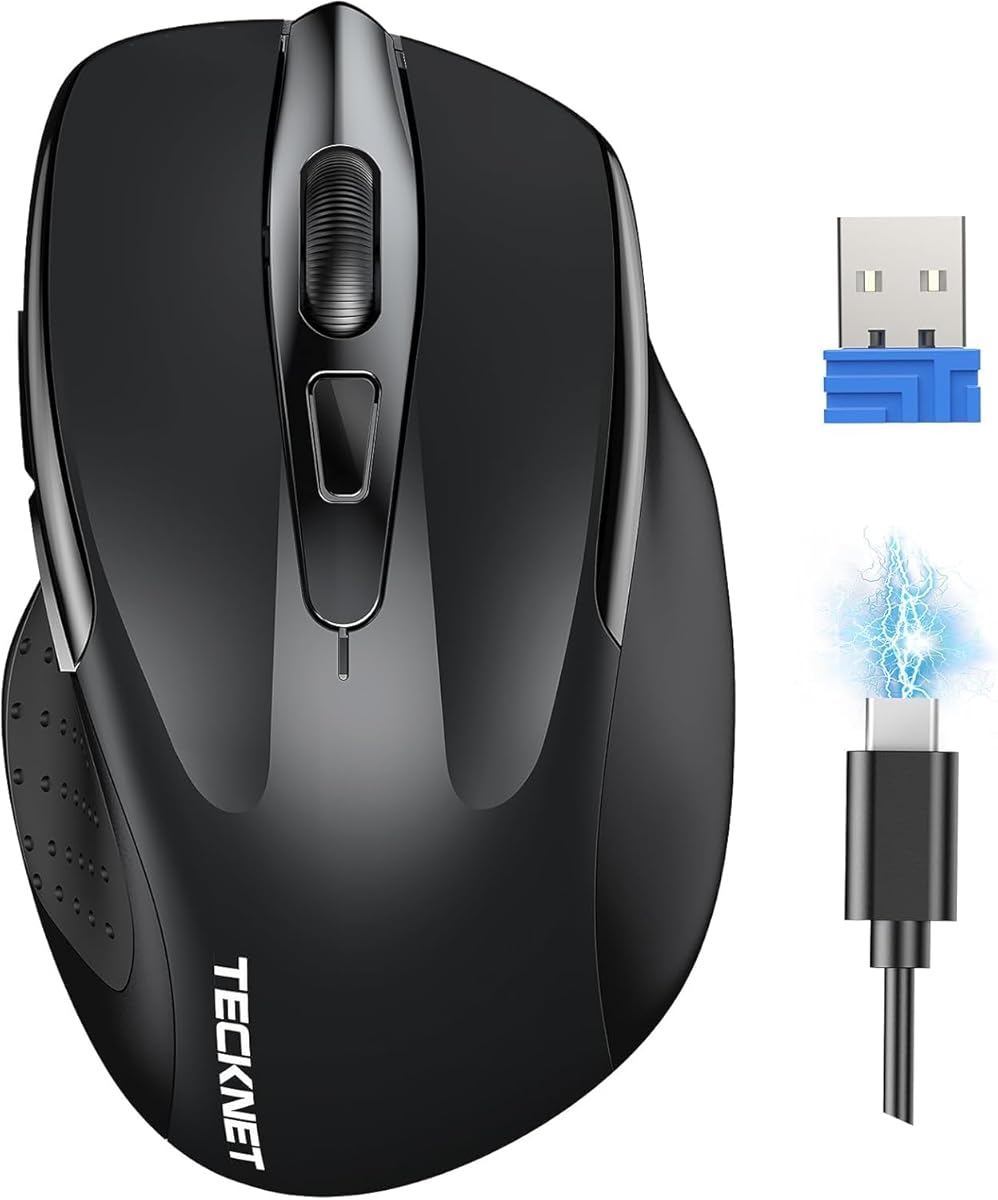
Travel silent mice usually force a choice: compact size or meaningful battery capacity. The TECKNET rechargeable compact mouse attempts both with a 700 mAh cell, fast-charge marketing—five minutes for a full day—and roughly ninety days of endurance on a complete charge. Combined with ninety-percent reduced click sound, it closes our ranked list as the Best Fast-Charge Silent Travel Mouse for commuters who forget cables until the morning of departure.
Compact dimensions near 4.09 by 2.68 by 1.49 inches target small-to-medium hands and tight bags. Rubber side grips add thumb stability during bumpy train-table sessions. Silent click engineering reduces distractions in quiet cars, library stacks, and shared Airbnb desks—aligning with TECKNET's focus and immersion messaging for students and remote workers.
Six-level DPI up to 4800 provides more tuning than most travel mice offer, helpful when you dock into a dual-monitor office after working on a single laptop screen all week. Advanced optical tracking keeps cursor control predictable on typical surfaces. Plug-and-play 2.4 GHz reaches about forty-nine feet with the USB-A mini receiver stored in the mouse back—standard TECKNET convenience that reduces lost-dongle panic.
Recharge happens over USB with a Type-C cable included in box. Note the listing's compatibility emphasis: host machines need USB-A for the receiver, which may require hubs on modern ultrabooks. There is no Bluetooth, so port planning matters before you commit. Fast top-up capability saves students who notice low battery ten minutes before class—five minutes plugged in beats canceling a lecture note session.
Ergonomic contoured shape follows natural hand curves for all-day comfort claims, though large-handed users may still prefer full-size TECKNET 2.4G AA or tri-mode models. Side grips help, but compact length limits palm support compared with WL300 sculpted shells.
Choose this TECKNET when silent travel, fast recharge, and six DPI steps define your purchase. Skip it if you need Bluetooth, three-device switching, horizontal scroll, or maximum palm contact for eight-hour ergonomic marathons.
Commuters and students with small-to-medium hands who recharge frequently and need silent clicks in transit.
Keep the Type-C cable in your backpack. A five-minute top-up before seminar starts beats hunting an outlet mid-lecture when the cursor freezes.
M340 offers brand Silent Touch and included AA with no recharge discipline. TECKNET compact counters with fast lithium top-up, six DPI tiers, and rubber side grips in a similarly small footprint.
We may earn a commission at no additional cost to you.

Silent mice are not equally quiet. Brand technologies like Logitech Silent Touch advertise measurable noise reduction—roughly ninety percent versus standard switches. Budget models often use dampened mechanics that soften clicks without lab certification. Wired and rechargeable TECKNET units mention ninety-percent reduction in marketing copy; Bluetooth value mice describe whisper or quiet operation. Match expectations to environment: shared bedrooms need stronger dampening than solo home offices where only your microphone matters.
Scroll-wheel noise is easy to overlook. WL300 explicitly silences the wheel; many competitors only treat left and right buttons. If you scroll through long documents in quiet spaces, prioritize models that mention scroll silence or read user reviews mentioning wheel acoustics.
Bluetooth 5.0 mice—WL300, Lenovo WL310—free USB ports and pair cleanly with ultrabooks and Chromebooks. They fail when IT disables Bluetooth peripherals or when latency sensitivity spikes on rare occasions. 2.4 GHz USB-A dongles—Logitech M340, VssoPlor, TECKNET 2.4G—offer reliable plug-and-play on managed PCs but consume a port and risk lost receivers. Dual- and tri-mode TECKNET models combine both radios plus multi-device switching for hybrid workers. Wired silent USB eliminates batteries entirely for fixed desks and secure environments.
AA-powered silent mice—WL300 up to twenty-four months, TECKNET 2.4G up to thirty months, M340 eighteen months included—suit set-and-forget buyers and fleet procurement. Rechargeable models—TECKNET dual-mode, INPHIC, tri-mode side scroll—save long-term cell cost but need cable discipline; INPHIC adds a visible indicator to reduce anxiety. Fast-charge compact TECKNET targets travelers who top up minutes before class. Wired mice never die mid-deadline but tether you to the host.
Full-size and sculpted shells—WL300, TECKNET 2.4G AA, INPHIC thumb rest—support longer sessions. Compact travel mice—M340, VssoPlor, TECKNET rechargeable compact—fit bags but may fatigue large hands over full workdays. TECKNET dual-mode explicitly sizes for small-to-medium hands. Try to match mouse length to your palm measurement; silent courtesy does not help if wrist ache forces breaks every hour.
Several mice in this pack—WL300, TECKNET dual-mode, tri-mode side scroll—warn that forward and back side buttons do not work on macOS. Primary silent clicks still function. Mac-primary buyers should plan keyboard shortcuts or choose simpler three-button layouts unless they verify third-party tools. Bluetooth compatibility also splits on older Windows versions for some INPHIC modes—read listing footnotes before ordering for legacy lab hardware.
For most shared-space workers, the WL300 Bluetooth silent mouse balances scroll-wheel silence, sculpted ergonomics, Bluetooth 5.0 dongle-free pairing, and up to twenty-four-month AA battery life. Logitech M340 wins if you want brand-verified Silent Touch in a compact travel shell with included battery. Hybrid two-device desks should consider the TECKNET dual-mode rechargeable model with six DPI steps and slide switching.
Quality silent mice reduce click volume enough that neighbors stop noticing during normal study distances. Logitech claims about ninety-percent reduction on M340; TECKNET markets similar percentages on several rechargeables. Budget whisper-click models like VssoPlor soften sound without certification—usually adequate for courtesy but not silent to the user’s ear. Adding a desk mat further dampens transmission through hard surfaces.
Dampened switches trade sharp tactile feedback for lower acoustics. Most office users adapt within a few days and prefer the softer feel once they hear the room stay calm. Gamers who rely on crisp switch confirmation for rapid clicking may dislike silent mechanics—this guide targets productivity and study, not esports.
Bluetooth suits ultrabooks, MacBooks, and Chromebooks where USB ports are scarce and dongle loss is a risk. 2.4 GHz USB-A receivers offer plug-and-play reliability on managed Windows PCs and often feel slightly snappier on budget hardware. Dual-mode TECKNET mice provide both. Wired silent USB is best when batteries are banned or unwanted.
Often no. WL300, TECKNET dual-mode, and tri-mode side scroll explicitly note forward and back buttons may not register on macOS. Primary silent clicks and scroll still work. Mac users who depend on thumb navigation should verify compatibility or use keyboard shortcuts instead of assuming six-button layouts work out of the box.
AA models in this pack range from about eighteen months on Logitech M340 with included cell to thirty months on TECKNET 2.4G with two AAs. WL300 claims up to twenty-four months on one AA. Rechargeable TECKNET units rate roughly three months at two hours daily use, with compact fast-charge model claiming ninety days on a full charge. Wired mice need no batteries.
Silent mice here target office DPI ranges—typically 1600 to 4800—and lack gaming polling-rate marketing. Casual gaming works fine, but competitive players may prefer louder, faster-switch gaming mice with higher Hz reporting. TECKNET tri-mode at 4800 DPI handles non-competitive titles adequately.
Wired silent USB mice never die mid-task, satisfy secure environments that ban wireless dongles, and cost less to maintain without lithium or AA replacements. The tradeoff is cable drag and zero mobility. Fixed desktop users, labs, and call centers benefit most.
Yes, if you scroll long documents in quiet rooms. Many silent mice only dampen primary buttons. WL300 explicitly mentions silent scroll wheel actuation—a meaningful differentiator for PDF and spreadsheet users. Read listings and reviews for wheel noise if scroll silence equals click silence in your environment.
Office and study work rarely needs more than 1600 DPI on 1080p or 1440p screens. Multi-monitor and ultrawide setups benefit from 2400 to 4800 options available on TECKNET models. Fixed-DPI slim mice like VssoPlor rely on OS sensitivity settings instead—acceptable for light use but less flexible.
The best silent mouse in 2026 depends on where your clicks echo and how many machines you control before lunch. WL300 leads for Bluetooth ergonomics with scroll-wheel silence and long AA life. Logitech M340 remains the brand-name travel answer with verified Silent Touch reduction. TECKNET dual-mode covers two-device hybrid desks, while tri-mode side scroll wins spreadsheet-heavy silent workflows.
Budget buyers and commuters should weigh VssoPlor slim whisper clicks and TECKNET fast-charge compact rechargeables. Fixed-desk users who hate batteries should consider wired silent USB. Lenovo WL310 and INPHIC rechargeables fill brand-trust and visible-battery niches respectively, while TECKNET 2.4G AA delivers multi-year cell stamina for dongle-friendly desktops.
Start with the comparison table, match connection and battery strategy to your ports and habits, then read the full review for hand size and macOS caveats. Every link above uses our affiliate tag at no extra cost to you while supporting independent testing guides like this one.