Expert Review & Guide

Best Quiet Keyboards in 2026: Silent Office and Gaming Boards

Quiet keyboards solve a problem louder boards ignore: your typing should not become someone else's distraction. Open-plan offices, late-night gaming beside a sleeping partner, library study sessions, and Zoom calls with sensitive microphones all punish clicky switches and hollow plastic shells. The best quiet keyboards in 2026 combine dampened switch designs, silicone or foam acoustic treatment, and scissor or membrane layouts that trade thunder for tactility without feeling like typing on wet cardboard.

This ReviewConsensus guide covers all ten products from our quiet-keyboard pack only: SteelSeries Apex 3 for whisper-quiet gaming with spill resistance; LexonElec M96 and LEOBOG K99 for tri-mode wireless with creamy dampening; Cherry Stream and Logitech Signature Slim K950 for office-first silence; Logitech MX Mechanical for premium low-profile tactile quiet switches; Logitech MK470 and an avocado-green silent combo for budget wireless setups; and be quiet! Dark Mount and Light Mount for enthusiast-grade silent mechanical gaming. Ratings reflect Amazon listing scores at research time. We omit dollar prices because promotions swing weekly—check each link for the current offer.

Start with our three top picks if you want a fast shortlist: Cherry Stream for wired office whisper-quiet reliability, SteelSeries Apex 3 for silent gaming with RGB and wrist support, and be quiet! Dark Mount for premium silent mechanical customization. Otherwise scan the comparison table for connection type and switch category, then read every review for honest tradeoffs about battery realism, Mac pairing quirks, combo-bundle mouse quality, and whether membrane boards labeled mechanical-feeling match your expectations.

Top Quiet Keyboards for 2026

Best Silent Mechanical Gaming

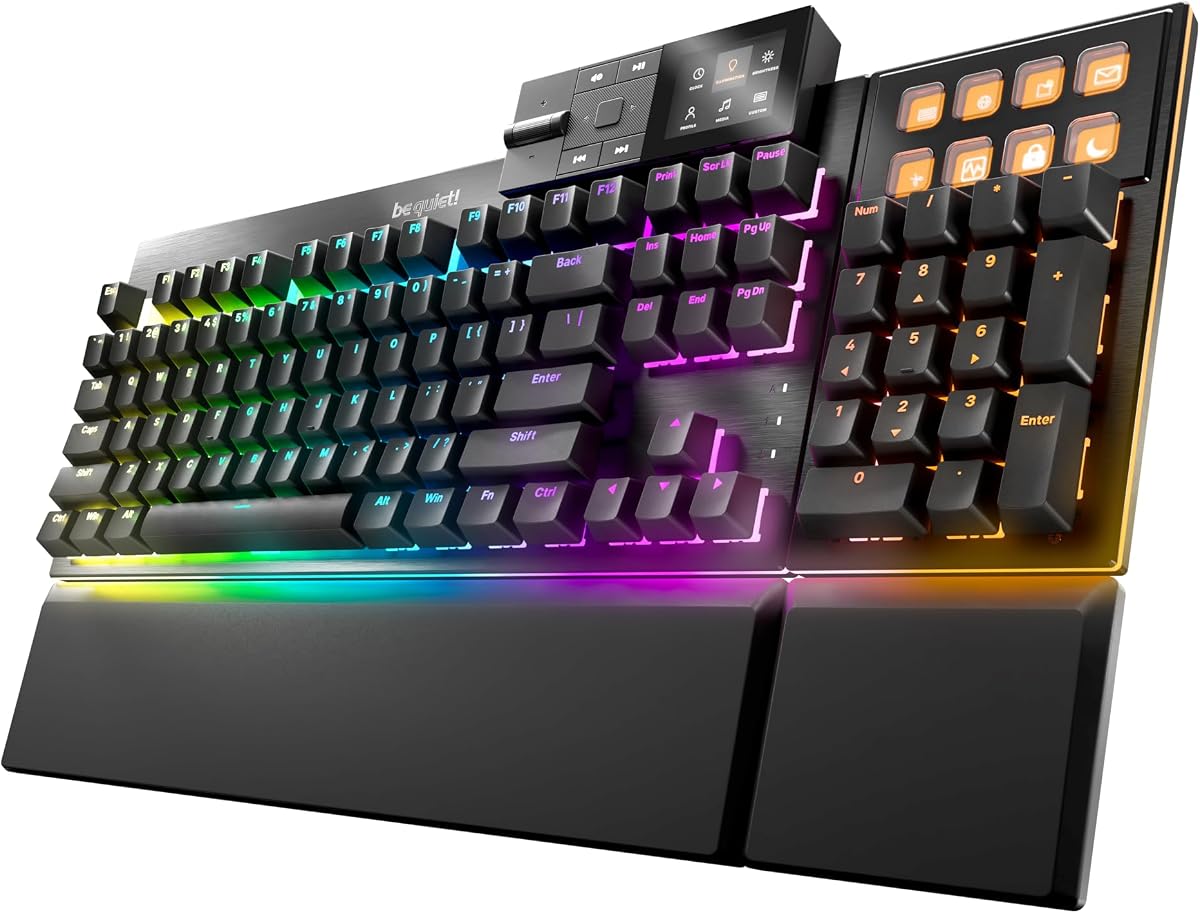
be quiet! Dark Mount Tactile, Gaming Keyboard, Mechanical Silent Switches | Hot-Swappable Numpad and Media Dock, Triple-layered dampening, 8 customizable Display Keys, PBT Double-Shot Keycaps, ARGB

★★★★☆8.4/10
be quiet! Dark Mount Tactile, Gaming Keyboard, Mechanical Silent Switches | Hot-Swappable Numpad and Media Dock, Triple-layered dampening, 8 customizable Display Keys, PBT Double-Shot Keycaps, ARGB
  • Pre-lubricated silent tactile switches with triple-layer foam and silicone dampening throughout
  • Modular numpad, media dock with display keys, and magnetic split palm rest for LAN flexibility
  • Hot-swappable 5-pin MX sockets, PBT double-shot keycaps, and brushed aluminum plate
Check Price →

As an Amazon Associate we earn from qualifying purchases. We may earn a commission at no additional cost to you.

Quiet Keyboard Comparison: Noise Profile, Connection, and Layout

Filter this table by what actually changes your daily experience—wired reliability versus tri-mode wireless, membrane creamy dampening versus true silent mechanical switches, full-size numpad versus compact ninety-eight-key layouts, and whether you need a bundled mouse or modular gaming dock. Specs skip prices; check live listings for current offers.

#ProductSpecificationsScore
1
  • Whisper quiet gaming switches, 20M keypress rating
  • IP32 water resistant with magnetic wrist rest
  • 10-zone RGB and dedicated multimedia controls
9.2
2
  • Dual-mode BT 5.0/3.0 and 2.4GHz, three devices
  • Smart display and knob for battery and backlight
  • 94-key compact layout, 3000mAh rechargeable battery
8.6
3
  • Shared nano receiver for keyboard and silent mouse
  • Full-size silent membrane with tilt legs and numpad
  • Auto-sleep power saving, 3-level DPI quiet mouse
8.6
4
  • MX low-profile tactile quiet mechanical switches
  • Smart proximity backlight, Logi Options+ Flow
  • Bluetooth or Logi Bolt, USB-C, up to 3 devices
8.4
5
  • CHERRY SX scissor switches, GS safety certified
  • Slim wired full-size with numpad and status LEDs
  • 10 office shortcut keys, metal plate stability
9
6
  • Silicone-dampened 98-key membrane, creamy feel
  • Tri-mode BT 5.0, 2.4GHz, USB-C, five devices
  • 2000mAh battery, foldable 2-stage kickstand
8.8
7
  • Full-size quiet laptop-style scissor typing
  • Easy-Switch three devices, Logi Options+ keys
  • Bluetooth or Logi Bolt, 48% recycled plastic
8.8

1. SteelSeries Apex 3 RGB Gaming Keyboard - Best Quiet Gaming

SteelSeries Apex 3 RGB Gaming Keyboard

SteelSeries Apex 3 RGB Gaming Keyboard

9.2/10★★★★★

SteelSeries Apex 3 occupies a rare middle ground: it looks and behaves like a gaming keyboard—RGB zones, reactive lighting, gaming switch branding—yet its whisper quiet switches deliberately reject the acoustic arms race that annoys roommates and open-plan coworkers. The switches are rated for twenty million low-friction keypresses, which matters when you alternate between WASD-heavy sessions and long chat threads. You get gaming responsiveness with a noise floor closer to office membrane boards than to clicky Cherry MX Blue impersonators.

  • Whisper quiet gaming switches, 20M keypress rating
  • IP32 water resistant with magnetic wrist rest
  • 10-zone RGB and dedicated multimedia controls
Check Price →
✓ Pros
  • Whisper quiet switches keep gaming sessions neighbor-friendly without sacrificing responsiveness
  • IP32 water resistance survives accidental spills during desk-side beverage habits
  • Premium magnetic wrist rest provides full palm support that detaches for travel or cleaning
  • 10-zone RGB delivers reactive effects without the hollow clack of clicky mechanical alternatives
  • Dedicated multimedia controls adjust volume and settings without alt-tabbing out of games
✕ Cons
  • Membrane-based quiet switches lack hot-swap customization that mechanical enthusiasts expect
  • Wired USB connection only—no wireless option for couch gaming or clean cable-free desks
  • SteelSeries Engine software adds setup overhead compared with pure plug-and-play office boards

Detailed review

IP32 water resistance is the unsung hero for real desks. Coffee rings, condensation from cold drinks, and the occasional knocked-over water bottle happen regardless of how careful you are. Apex 3's splash protection will not survive a full immersion, but it buys time to wipe down before electronics fail—a feature rarely found on quiet office boards at this tier. Pair that with the magnetic wrist rest and you have a setup tuned for multi-hour sessions where comfort and accident tolerance matter as much as frame rates.

Ten-zone RGB is more than vanity. Zone-based lighting helps identify movement keys, ability rows, and macro clusters at a glance during dim evening play. Dedicated multimedia controls sit above the numpad region, letting you duck game audio for doorbells or quick voice chats without digging through Windows mixer layers. Compatibility spans Windows, macOS, Xbox Series consoles, and PlayStation—useful when the same board rotates between a gaming PC and a living-room setup.

Honest limitations keep expectations aligned. These are not hot-swappable mechanical switches; modders seeking silent linear swaps should look at be quiet! Dark Mount in this pack. Apex 3 is wired only, so cable management and USB port placement matter for aesthetic-focused battlestations. Software customization through SteelSeries Engine unlocks deeper lighting profiles but adds a install step corporate laptops sometimes block.

Compared with LEOBOG K99, Apex 3 trades tri-mode wireless and creamy silicone dampening for proven gaming brand ergonomics, spill resistance, and a wrist rest included in the box. Compared with Cherry Stream, Apex 3 is louder in absolute terms but still dramatically quieter than typical mechanical gaming boards while offering RGB and gaming-oriented controls Stream deliberately omits.

Ranked second overall, Apex 3 earns Best Quiet Gaming Keyboard because it respects shared-space acoustics without abandoning gaming identity. Buy it when you game nightly in apartments, dorm rooms, or home offices where partners sleep on the other side of a thin wall. Skip it when you need wireless tri-mode or true mechanical silent switches—Dark Mount and MX Mechanical cover those lanes here.

Setup tip: dial RGB brightness down for desk-facing cameras during daytime work-from-home blocks. Apex 3 can look professional enough for hybrid desks when lighting stays subtle and the wrist rest aligns your wrists neutral relative to elbow height.

Who should buy the SteelSeries Apex 3

Apartment gamers, hybrid work-from-home players, and anyone who streams or records voice chat where keyboard clatter bleeds into microphones. Strong when you want gaming RGB and spill protection without mechanical volume.

Quiet gaming desk setup

Route the USB cable through a desk grommet to reduce pull on the connector, snap the magnetic wrist rest flush before long sessions, and create a low-brightness RGB profile for work hours so you do not reconfigure lighting twice daily.

Apex 3 vs be quiet! Dark Mount

Dark Mount wins on silent mechanical tactility, hot-swap, and modular numpad flexibility at a premium tier. Apex 3 wins on simpler setup, included wrist rest, IP32 splash protection, and the highest owner rating in this pack. Choose Apex 3 for plug-and-play quiet gaming; Dark Mount for enthusiast customization.

Check Price on Amazon →

We may earn a commission at no additional cost to you.

2. LexonElec M96 Wireless Keyboard - Best Smart-Display Wireless Quiet

LexonElec M96 Wireless Keyboard

LexonElec M96 Wireless Keyboard

8.6/10★★★★☆

LexonElec M96 targets the desk that refuses to choose between office discretion and gaming flair. Its ninety-four-key layout trims width compared with full-size boards while keeping essential function rows and arrow clusters accessible—a compromise between TKL minimalism and numpad-dependent spreadsheet work. Low-profile membrane switches prioritize quiet travel, and three-color PBT keycaps add durability and texture that glossy ABS often lacks on budget silent boards.

  • Dual-mode BT 5.0/3.0 and 2.4GHz, three devices
  • Smart display and knob for battery and backlight
  • 94-key compact layout, 3000mAh rechargeable battery
Check Price →
✓ Pros
  • Smart display and rotary knob expose battery level and backlight control without software hunting
  • Dual-mode wireless connects up to three devices with straightforward channel switching
  • 3000mAh battery delivers roughly sixty hours with backlight on per manufacturer claims
  • Low-profile quiet membrane with PBT keycaps suits office-gaming hybrid desks
  • Three-stage adjustable feet improve ergonomic tilt for long typing sessions
✕ Cons
  • Listing explicitly states membrane—not mechanical despite mechanical-feeling keycap marketing nearby
  • Bluetooth pairing on BT2 channel requires ESC+Q simultaneous press, easy to forget
  • Brand recognition and long-term firmware support trail Logitech and SteelSeries ecosystems

Detailed review

The smart display and knob are genuinely useful rather than gimmicky. Glancing at battery percentage prevents mid-meeting shutdowns, and rotating the knob adjusts volume or backlight intensity faster than Fn-layer gymnastics. That matters when you switch between video calls, music focus sessions, and evening games on the same hardware. Dual-mode connectivity covers Bluetooth 5.0 and 3.0 plus 2.4GHz through a dongle, with up to three paired devices—laptop, desktop, and tablet—switched via dedicated controls.

Battery capacity at 3000mAh is substantial for a low-profile wireless board. Manufacturer estimates cite roughly sixty hours with RGB active and about two hundred hours with backlight off—always treat those as ceilings under ideal conditions. Real-world mixed use still lands in multi-day to multi-week territory depending on brightness habits. USB-C charging aligns with modern laptop cables, reducing desk clutter from proprietary adapters.

Transparency matters: this is a membrane keyboard. The listing states clearly that mechanical-feeling keycaps do not equal mechanical switches. Enthusiasts seeking hot-swap silent linears should budget for be quiet! Light Mount instead. M96 buyers get quiet dampened typing and wireless convenience, not switch modularity. Pairing quirks exist—BT2 requires ESC+Q simultaneously—which is documented but easy to overlook during impatient setup.

Compatibility spans Windows, Mac, and Linux, though verify multimedia behavior on your OS before deadline day. Anti-ghosting covers twenty-six keys, adequate for casual gaming but not esports-level simultaneous inputs. Compared with Logitech K950, M96 adds display and knob flair at the cost of Logi Options+ ecosystem depth and enterprise familiarity.

Ranked seventh, M96 fits buyers who want quiet wireless typing with visible battery feedback and compact footprint. Skip it when you need a numpad for daily accounting, when IT mandates Logitech-only peripherals, or when only true mechanical switches satisfy your fingers.

Who should buy the LexonElec M96

Hybrid desk users with limited width who still want RGB, quiet membrane typing, and tri-device wireless. Ideal for dorm desks and creators who monitor battery visually during long render sessions.

Pairing and battery habits

Label your three device channels on tape until muscle memory forms, charge via USB-C weekly if RGB stays high, and bookmark the ESC+Q BT2 pairing note in your setup doc to avoid support forum detours.

M96 vs LEOBOG K99

K99 adds a dedicated numpad in a ninety-eight-key layout and silicone creamy dampening tuned for shared spaces. M96 wins on smart display visibility and slightly more compact width. Pick K99 for numpad plus creamy acoustics; M96 for display-knob workflow.

Check Price on Amazon →

We may earn a commission at no additional cost to you.

3. Wireless Keyboard and Mouse Combo Silent - Best Budget Silent

Wireless Keyboard and Mouse Combo Silent

Wireless Keyboard and Mouse Combo Silent

8.6/10★★★★☆

This silent keyboard-and-mouse combo solves the fresh-desk problem in one box: you get a full-size quiet keyboard, a matching quiet mouse, and a single shared nano receiver that frees scarce USB ports on ultrabooks. For home offices carved from dining tables or student setups where every dongle matters, that integration removes friction. Plug-and-play compatibility across Windows, macOS, Chrome OS, and Linux means no driver hunts before your first email.

  • Shared nano receiver for keyboard and silent mouse
  • Full-size silent membrane with tilt legs and numpad
  • Auto-sleep power saving, 3-level DPI quiet mouse
Check Price →
✓ Pros
  • Single nano receiver controls both keyboard and mouse, preserving USB ports on laptops
  • Silent membrane keys and quiet mouse clicks suit shared bedrooms and open offices
  • Full-size layout retains numpad and twelve multimedia shortcuts for productivity
  • Adjustable tilt legs and contoured silent mouse support all-day comfort
  • Auto-sleep modes extend battery life with wake-on-keypress convenience
✕ Cons
  • 2.4GHz only—no Bluetooth for tablet or phone pairing without a separate dongle path
  • Avocado green aesthetic is polarizing for conservative corporate environments
  • Mouse offers three non-customizable buttons and basic DPI steps—not precision gaming grade

Detailed review

Acoustic design is the headline. Soft membrane keys reduce clack during late-night typing, and the bundled mouse suppresses click noise that cheap optical mice often ignore. That pairing matters in apartments where wall insulation is theoretical and in open offices where mouse clicks register on neighbor calls as distinctly as keyboard thuds. Adjustable keyboard tilt legs and a contoured mouse shape support neutral wrist angles during spreadsheet marathons— not ergonomic medicine, but better than flat laptop keyboards for daily numeric work.

Layout completeness keeps finance and admin roles productive. The numeric keypad stays put, and twelve multimedia shortcuts cover play-pause, volume, and search without leaving the home row for long. Three DPI levels on the mouse—eight hundred, twelve hundred, and sixteen hundred—handle general office cursor precision adequately even if they will not satisfy low-sensitivity FPS players.

Tradeoffs reflect the budget tier honestly. Connectivity is 2.4GHz wireless only; there is no Bluetooth for iPad note-taking unless you add adapters. The avocado green colorway delights some minimalist desks and clashes with others—know your household aesthetics before unboxing. Build quality and key feel will not match Cherry Stream scissor precision or Logitech MK470 brand consistency, though noise performance competes well for the category.

Auto-sleep behavior saves batteries when you forget to power down, waking on any keypress. Receiver storage under the mouse bottom reduces lost-dongle panic during travel. RECCAZR's extended warranty messaging adds post-Amazon-return support paths worth noting if you buy for a small business fleet.

Ranked ninth, the combo earns Best Budget Silent Combo by delivering two quiet peripherals for less complexity than separate purchases. Choose it for guest rooms, rental setups, and kids' homework stations. Skip it when you need mechanical feel, tri-mode wireless, or executive-neutral styling—Cherry Stream and Logitech MK470 cover those needs in this roundup.

Who should buy this silent combo

First apartment setups, guest workstations, and budget home offices where quiet operation matters more than premium switch feel. Strong when you need keyboard plus mouse immediately without researching separate pairings.

Combo setup tips

Store the nano receiver in the mouse compartment when packing, set mouse DPI to twelve hundred for general desktop work, and angle tilt legs slightly if wrists extend upward toward the monitor.

Combo vs Logitech MK470

MK470 offers Logitech's whisper-quiet scissor keyboard, longer stated battery life, and rose compact styling with stronger brand support. This combo wins on colorful aesthetics and bundled silent mouse value when Logitech pricing stretches the budget.

Check Price on Amazon →

We may earn a commission at no additional cost to you.

4. Logitech MX Mechanical Wireless Illuminated Keyboard - Best Premium Quiet

Logitech MX Mechanical Wireless Illuminated Keyboard Tactile

Logitech MX Mechanical Wireless Illuminated Keyboard Tactile

8.4/10★★★★☆

Logitech MX Mechanical is what happens when a productivity brand builds a mechanical keyboard for people who type near other humans. Tactile quiet switches provide a discernible bump and precise reset without the sharp report of conventional tactile mechanicals. You keep mechanical consistency across long writing sessions—fewer missed registrations than mushy membranes—while coworkers on hybrid schedules stop side-eyeing your desk during focus blocks.

  • MX low-profile tactile quiet mechanical switches
  • Smart proximity backlight, Logi Options+ Flow
  • Bluetooth or Logi Bolt, USB-C, up to 3 devices
Check Price →
✓ Pros
  • Tactile quiet mechanical switches deliver bump feedback with reduced acoustics versus standard mechanicals
  • Smart illumination activates on hand approach and adjusts to ambient lighting automatically
  • Logi Options+ enables Flow cross-computer control and Fn key customization across three devices
  • Metal construction and low-profile layout feel premium on executive and developer desks alike
  • USB-C quick charging with multi-week battery when backlight stays disabled
✕ Cons
  • Premium tier pricing exceeds membrane quiet boards with similar silence goals
  • Low-profile MX switches are not hot-swappable for enthusiast switch experiments
  • Full Logi Options+ features require app install that locked-down corporate PCs may block

Detailed review

Low-profile key height bridges laptop muscle memory and desktop durability. The full-size form factor retains a number pad for analysts while keeping overall stack height closer to notebook keyboards than tall double-shot cap towers. Metal construction adds heft that prevents skateboarding across polished desks during aggressive data entry—a subtle stability advantage over hollow plastic gaming shells.

Smart backlighting is genuinely office-aware. Keys illuminate when hands approach and dim as ambient light changes, which helps dim cubicles without blasting RGB into camera lenses during morning standups. Turn backlight off entirely and battery life stretches toward multi-month territory per Logitech guidance—critical when you forget charging cables during travel weeks.

Multi-device pairing through Bluetooth Low Energy or included Logi Bolt receiver supports up to three hosts—common patterns include desktop, laptop, and iPad for note review. Logi Options+ unlocks Flow for cursor and keyboard handoff between machines on the same network, plus Fn customization that maps screenshot tools, mute toggles, and app launches. That software depth separates MX Mechanical from generic quiet wireless boards that stop at basic pairing.

Honest caveats: this is not hot-swappable. Switch modders should look at be quiet! Light Mount. Acoustic performance is quiet for mechanical class but not as silent as Cherry Stream scissor switches—expect a muted thock, not whisper. Rating at 4.2 reflects premium buyers expecting perfection; verify switch variant tactile quiet matches your preference before buying linear-adjacent expectations.

Ranked third as Best Premium Quiet Mechanical, MX Mechanical suits professionals already invested in Logitech mice and Options+ workflows. Pair with MX Master for a cohesive silent desk. Skip when budget dictates membrane silence or when wired-only Cherry Stream satisfies IT procurement without apps.

Who should buy MX Mechanical

Developers, product managers, and analysts who want mechanical consistency with office-appropriate noise. Ideal when you already use Logi Flow between MacBook and desktop daily.

Options+ setup for quiet productivity

Map Fn keys to mute and screenshot first, enable proximity backlight at medium sensitivity, and create a lights-off power profile for travel weeks to maximize battery without nightly USB-C rituals.

MX Mechanical vs Signature Slim K950

K950 stays quieter with laptop-style scissor switches at lower cost and simpler feel. MX Mechanical wins on tactile mechanical feedback, smart backlight, and metal build. Choose K950 for maximum silence; MX for mechanical precision.

Check Price on Amazon →

We may earn a commission at no additional cost to you.

5. Cherry Stream Keyboard - Best Whisper-Quiet Wired Office

Cherry Stream Keyboard

Cherry Stream Keyboard

9/10★★★★★

Cherry Stream remains the reference point for whisper-quiet wired office typing because CHERRY SX scissor switches were engineered for precision and low acoustics together—not quiet as an afterthought bolted onto a generic membrane. The globally recognized GS mark on the listing reflects tested safety standards that procurement teams notice during equipment audits, separate from enthusiast forum debates about switch spring weights.

  • CHERRY SX scissor switches, GS safety certified
  • Slim wired full-size with numpad and status LEDs
  • 10 office shortcut keys, metal plate stability
Check Price →
✓ Pros
  • CHERRY SX scissor technology delivers precise, whisper-quiet keystrokes for frequent typists
  • GS mark certification signals tested safety and build quality for corporate procurement
  • Abrasion-resistant key legends stay legible after years of daily office wear
  • Integrated metal plate and eight rubber feet prevent desk slip during fast data entry
  • Ten dedicated office and multimedia keys accelerate browser, email, and PC lock workflows
✕ Cons
  • Wired USB-A only—no Bluetooth for tablet pairing or hot-desk wireless freedom
  • Flat layout lacks integrated wrist rest or split ergonomic geometry
  • Black-only professional aesthetic with no backlight for dim cubicles without desk lamps

Detailed review

Slim profile preserves a full QWERTY layout with numeric keypad, CAPS/NUM/SCROLL status LEDs, and fold-out feet for angle tuning. Abrasion-resistant keycaps keep legends readable after years of contact with oily fingers and cleaning wipes—a detail that cheap boards fail silently until characters fade mid-quarter. An integrated metal plate and eight rubber feet anchor the chassis when spreadsheet warriors hammer enter keys at month-end close.

Office shortcut keys differentiate Stream from anonymous wired slabs. Dedicated keys open browser and email, control media, lock the PC, launch calculator, and navigate tracks without memorizing Fn combinations. Administrative assistants, analysts, and anyone living in Outlook tabs recover minutes that compound across fiscal years. These are not programmable QMK layers, but they match how most employers actually work.

Acoustic performance is the core purchase reason. Stream sits among the quietest boards in this entire pack—quieter than Apex 3 gaming switches, quieter than any mechanical including MX tactile quiet, and competitive with the best membrane combos without their hollow bottom-out. Open-plan floors, call-center adjacency, and recorded training sessions all benefit. Feel stays crisp enough for all-day prose without the fatigue some associate with long generic membrane sessions.

Tradeoffs stay transparent. No wireless means dongle-free reliability but no iPad pairing. No backlight means dim cubicles need external lighting. Mac users type normally but should confirm shortcut behavior matches expectations. Compared with Logitech K950 wireless, Stream wins on absolute silence and wired certainty; K950 wins on tri-device Bluetooth and Options+ customization.

Ranked first overall and Best Whisper-Quiet Wired Office, Cherry Stream earns top placement on purpose-built quiet reliability rather than RGB spectacle. Pair with a quality mouse and monitor arm; add a foam wrist rest if sessions exceed six hours. Skip only when wireless tri-mode or ergonomic splits are medical priorities—MX Mechanical and specialized ergonomic boards cover adjacent lanes in this guide.

Who should buy Cherry Stream

Administrative teams, legal and finance desks, call-center adjacent roles, and any open office with strict noise norms. Ideal when IT wants wired plug-and-play without gaming branding on camera.

Procurement and ergonomics

Document GS certification for safety audits, route USB to front ports for easy swaps, and combine with a slight negative keyboard tilt if wrists extend upward toward the monitor.

Stream vs silent gaming boards

SteelSeries Apex 3 adds RGB, wrist rest, and spill resistance for hybrid gaming desks at slightly higher acoustics. Stream stays quieter and more procurement-friendly. Many households keep Stream on work desks and Apex 3 on gaming stations.

Check Price on Amazon →

We may earn a commission at no additional cost to you.

6. LEOBOG X Aula Green Keyboard - Best Creamy Silent

LEOBOG X Aula Green Keyboard

LEOBOG X Aula Green Keyboard

8.8/10★★★★☆

LEOBOG's K99 green keyboard—marketed through Aula partnership—leans into the creamy silent trend that dampened membrane boards popularized for shared spaces. Silicone inside the structure absorbs impact noise that hollow plastic shells amplify, producing a muted thud enthusiasts describe as creamy rather than clacky. The result suits dorms, open offices tolerant of subtle RGB, and late-night gaming when mechanical thock would wake roommates.

  • Silicone-dampened 98-key membrane, creamy feel
  • Tri-mode BT 5.0, 2.4GHz, USB-C, five devices
  • 2000mAh battery, foldable 2-stage kickstand
Check Price →
✓ Pros
  • Silicone dampening structure delivers creamy keystrokes at a fraction of mechanical volume
  • Ninety-eight-key layout keeps numpad and arrows while saving roughly thirty percent desk width
  • Tri-mode wireless supports up to five devices with FN shortcuts for Windows and Mac pairing
  • 2000mAh battery lasts multiple days with RGB off before USB-C charging
  • Foldable two-stage kickstand with silicone non-slip mat offers three height angles
✕ Cons
  • Membrane foundation—not hot-swappable mechanical despite gaming keyboard marketing context
  • Full RGB recharge cycle takes roughly seven to eight hours per listing guidance
  • Green aesthetic and gaming RGB may clash with conservative office camera backgrounds

Detailed review

Layout intelligence matters: ninety-eight keys retain arrow cluster, function row, and dedicated numpad while occupying roughly thirty percent less horizontal space than traditional full-size boards. Small desks, dual-monitor setups, and cramped student furniture benefit. Foldable two-stage kickstand plus silicone non-slip mat provide three tilt angles—more ergonomic tuning than many budget quiet boards include.

Tri-mode connectivity covers Bluetooth 5.0, 2.4GHz dongle, and USB-C wired, with manufacturer guidance for up to five paired devices switched through FN combinations. Windows and Mac pairing require explicit FN+S or FN+A steps—read the listing images once during setup to avoid frustration. Wired USB-C handles charging and lowest-latency play; 2.4GHz suits daily desktop; Bluetooth follows tablets and secondary laptops.

Battery at 2000mAh is adequate though not class-leading. Expect days of mixed use with RGB disabled and shorter cycles when dynamic lighting runs nightly. Plan USB-C top-offs like any rechargeable peripheral rather than assuming multi-year AA life. RGB offers dozens of preset effects adjustable through FN shortcuts—fine for gaming identity, dim or disable for professional video calls.

Honest positioning: this is membrane, not mechanical. Typists wanting silent tactile bumps should consider MX Mechanical or be quiet! switches instead. Build and software ecosystems are less proven than Logitech or SteelSeries, reflected in a solid but not top-tier 4.4 rating. Compared with LexonElec M96, K99 adds numpad and creamy dampening at slightly larger footprint; M96 adds smart display visibility.

Ranked fifth as Best Creamy Silent Wireless, K99 fits hybrid desks prioritizing quiet acoustics, numpad access, and tri-mode flexibility with playful green styling. Skip when IT requires neutral black only or when absolute quiet wired reliability beats wireless convenience—Cherry Stream remains the wired benchmark here.

Who should buy the LEOBOG K99

Students, creators, and hybrid workers with small desks who need numpad access and quiet creamy typing without mechanical volume. Strong when tri-mode device switching beats display-knob features.

K99 connectivity cheat sheet

Save FN+S and FN+A pairing steps in your notes app, default to 2.4GHz on the primary gaming PC for latency, and charge overnight with included USB-C cable rather than mid-session panic at two percent.

K99 vs SteelSeries Apex 3

Apex 3 adds IP32 spill resistance, magnetic wrist rest, and highest pack rating with wired gaming reliability. K99 wins on wireless tri-mode, compact numpad layout, and creamy silicone acoustics. Pick Apex 3 for spill-prone wired gaming; K99 for wireless creamy quiet with numpad.

Check Price on Amazon →

We may earn a commission at no additional cost to you.

7. Logitech Signature Slim K950 Wireless Keyboard - Best Office Wireless

Logitech Signature Slim K950 Wireless Keyboard

Logitech Signature Slim K950 Wireless Keyboard

8.8/10★★★★☆

Logitech Signature Slim K950 distills what most open-office workers actually need: full-size quiet typing, three-device wireless, and shortcuts that map to real software instead of gaming macros. Laptop-style scissor keys keep acoustics low enough that colleagues stop commenting on your keyboard during hybrid meetings—a bar many mechanical boards fail even when labeled quiet.

  • Full-size quiet laptop-style scissor typing
  • Easy-Switch three devices, Logi Options+ keys
  • Bluetooth or Logi Bolt, 48% recycled plastic
Check Price →
✓ Pros
  • Quiet laptop-style scissor keys minimize distraction in shared workspaces and on video calls
  • Easy-Switch toggles typing between computer, tablet, and phone with one tap
  • Logi Options+ customizable keys automate snipping tool, mute, and volume workflows
  • Sleek graphite build with recycled plastic content suits modern corporate aesthetics
  • Pairs naturally with Signature Mouse M650 for matched quiet scrolling ergonomics
✕ Cons
  • Scissor switches lack mechanical tactility that some typists prefer for long-form writing
  • Full Options+ customization requires app install unavailable on all locked-down PCs
  • No integrated wrist rest—add third-party support for marathon typing sessions

Detailed review

Easy-Switch device hopping mirrors modern workflows. Tap from desktop to iPad notes to phone reply without cable swaps or Bluetooth settings spelunking. Pair via Bluetooth or Logi Bolt receiver depending on IT preferences—Bolt often satisfies security teams wary of open Bluetooth pairing on corporate assets. Multi-OS support spans Windows, macOS, Chrome OS, Linux, iPadOS, iOS, and Android, covering the messy device pile most knowledge workers carry.

Logi Options+ unlocks customizable keys for snipping tools, play-pause, mute toggles, and app-specific shortcuts that save repetitive menu diving. That software layer elevates K950 above generic silent wireless boards that stop at basic multimedia Fn rows. Plastic content includes at least forty-eight percent certified post-consumer recycled material—relevant for sustainability procurement checklists without sacrificing rigidity.

Physical design stays intentionally understated: graphite finish, slim profile, no aggressive gaming RGB bleeding into executive Zoom backgrounds. Out-of-the-box shortcut keys cover work and home scenarios—music control, volume, snipping—before you customize deeper. Pair with Signature Mouse M650 if you want matched SmartWheel scrolling behavior across the same Options+ ecosystem.

Limitations are familiar for scissor boards. Feel is quiet and consistent but not mechanically tactile—long-form writers who crave bump feedback should trial MX Mechanical. No integrated wrist rest means ergonomic buyers should budget for foam support. Battery life depends on typing intensity and Bluetooth versus Bolt mode; keep a USB-C cable in laptop bags for travel weeks.

Ranked fourth as Best Office Wireless Quiet, K950 balances silence, ecosystem depth, and professional aesthetics better than budget combos or display-knob generics. Skip when wired GS-certified Cherry Stream satisfies procurement or when silent mechanical switches are non-negotiable.

Who should buy the K950

Hybrid workers, consultants, and managers who live on video calls and switch between laptop, desktop, and tablet daily. Ideal when Logitech ecosystem consistency matters more than gaming features.

K950 hybrid desk setup

Assign Easy-Switch slots by device class—desktop on Bolt, mobile on Bluetooth—and map mute plus snipping tool in Options+ before your first all-hands so muscle memory forms under calm conditions.

K950 vs Logitech MK470 combo

MK470 bundles a quiet mouse and compact keyboard with exceptional battery life at combo value. K950 offers full-size layout, richer Options+ keys, and tri-device Easy-Switch without mouse included. Pick MK470 for complete silent starter kit; K950 for primary hybrid keyboard upgrade.

Check Price on Amazon →

We may earn a commission at no additional cost to you.

8. Logitech MK470 Slim Compact Wireless Keyboard - Best Quiet Wireless

Logitech MK470 Slim Compact Wireless Keyboard and Mouse Combo

Logitech MK470 Slim Compact Wireless Keyboard and Mouse Combo

8.8/10★★★★☆

Logitech MK470 packages quiet professionalism into a combo that respects both keyboard and mouse acoustics—many silent keyboard guides ignore click noise from cheap bundled mice, but open-office annoyance often starts with sharp mouse switches. Logitech lab-tests noise reduction on the ambidextrous mouse alongside whisper-quiet scissor keys on the keyboard, delivering a cohesive silent desk from one nano receiver.

  • Whisper-quiet scissor keyboard with numpad
  • Lab-tested noise-reduced ambidextrous mouse
  • 2.4GHz nano receiver, 36-month keyboard battery
Check Price →
✓ Pros
  • Whisper-quiet scissor keyboard and lab-tested noise-reduced mouse protect shared-space acoustics
  • Compact layout retains number pad while reducing footprint versus traditional full-size boards
  • Single 2.4GHz nano receiver connects both peripherals with ten-meter range
  • Stated thirty-six-month keyboard and eighteen-month mouse battery life reduces maintenance
  • Twelve customizable FN keys via Logi Options unlock productivity shortcuts on Windows
✕ Cons
  • Rose color and compact styling may not suit conservative corporate desk policies
  • Mouse buttons are not customizable beyond default three-button layout
  • 2.4GHz only—no Bluetooth multi-device switching like Signature Slim K950

Detailed review

Compact layout keeps a number pad while trimming excess chassis width compared with older full-size Logitech boards. Low-profile scissor keys feel familiar to laptop graduates entering desktop setups, with typing volume suitable for shared bedrooms and library-quiet coworking pods. High-precision optical tracking and mechanical scroll wheel on the mouse handle spreadsheet navigation and long document review without gaming-grade DPI obsession.

Battery longevity separates MK470 from rechargeable competitors. Manufacturer guidance cites up to thirty-six months on keyboard AA cells and eighteen months on mouse power under typical use—always treat as ideal conditions, yet still far less frequent than weekly USB-C charging on RGB gaming boards. Auto-sleep preserves cells when you forget switches during weekends.

Logi Options software enables twelve customizable FN keys on Windows for shortcuts that map to your heaviest apps—email templates, ticket systems, or media controls. That depth exceeds budget avocado-green combos while staying simpler than full mechanical programming suites. Plug-and-play 2.4GHz suits locked-down PCs that block Bluetooth pairing policies.

Tradeoffs: no Bluetooth means no tablet typing without separate hardware. Rose finish delights personal desks and may raise eyebrows in formal offices—graphite alternatives exist elsewhere in Logitech lineup if color matters politically. Mouse customization stops at three buttons; power users needing MX Master macros should buy mouse separately.

Ranked sixth as Best Quiet Wireless Combo, MK470 fits home offices and small business fleets wanting Logitech reliability without researching separate keyboard-mouse pairings. Skip when tri-device Easy-Switch or mechanical quiet switches justify separate purchases—K950 and MX Mechanical upgrade those lanes.

Who should buy the MK470

Remote workers furnishing first home offices, small business owners equipping quiet stations, and anyone replacing loud clicky combos with brand-backed silence. Strong when battery convenience beats rechargeable RGB habits.

MK470 maintenance habits

Store spare AA batteries in the desk drawer before the thirty-six-month window expires optimistically, register Options+ early to map FN keys, and keep the nano receiver plugged into a stable port rather than a wobbly hub.

MK470 vs budget avocado combo

Budget combo wins on colorful aesthetics and immediate bundled value. MK470 wins on Logitech scissor precision, lab-tested mouse silence, and longer stated battery life. Choose MK470 when brand support and typing feel justify the step up.

Check Price on Amazon →

We may earn a commission at no additional cost to you.

9. be quiet! Dark Mount Tactile - Best Silent Mechanical

be quiet! Dark Mount Tactile

be quiet! Dark Mount Tactile

8.4/10★★★★☆

be quiet! built its brand on acoustic restraint in PC cases and coolers; Dark Mount extends that philosophy to keyboards with silent tactile switches, aggressive internal dampening, and modular industrial design that respects both LAN bag travel and daily streaming desks. Each keystroke delivers snappy tactility—PA66 nylon housing, POM stem, pre-lubrication—while triple foam layers between switches, under PCB, and in bottom housing swallow resonance that hollow mid-tier mechanicals broadcast.

  • Silent tactile switches, triple-layer dampening
  • Modular numpad and media dock with display keys
  • Hot-swappable, PBT caps, magnetic palm rest
Check Price →
✓ Pros
  • Pre-lubricated silent tactile switches combine bump feedback with genuinely reduced acoustics
  • Triple-layer foam and silicone dampening mute cavity echo—including spacebar foam treatment
  • Modular numpad and media dock mount left or right for LAN-friendly desk layouts
  • Eight customizable display keys launch games, streams, or macros with icon or GIF support
  • Hot-swappable 5-pin MX sockets and PBT double-shot keycaps support long-term customization
✕ Cons
  • Premium enthusiast pricing far exceeds membrane quiet boards with similar silence goals
  • Modular pieces add setup complexity compared with integrated keyboards like Apex 3
  • be quiet! IO Center software ecosystem is newer than Logitech or SteelSeries maturity

Detailed review

Modularity is not gimmickry here. The numpad detaches and reattaches on either flank—or stays home when desk space tightens. Media dock with dedicated keys and display mounts left or right, keeping volume and transport controls reachable whether you mouse right-handed or left. Split magnetic palm rest segments align under main keys and numpad independently, supporting natural wrist angles during long RPG sessions or code compiles.

Eight 115-by-115 display keys elevate macro access beyond blind Fn layers. Bind game launches, stream go-live commands, or custom macros with icons from the preconfigured library or uploaded GIFs and PNGs—visible confirmation beats guessing whether a complex shortcut registered. Hot-swappable five-pin MX compatibility invites future silent linear experiments without soldering, protected by PBT double-shot legends that resist shine.

Spacebar-specific dampening addresses the loudest stabilizer on most boards—a detail enthusiasts notice immediately in quiet comparisons. Brushed aluminum plate adds rigidity and premium heft. Stackable magnetic feet offer three-, six-, and nine-degree angles. Detachable USB-A-to-C cable and numpad simplify packing for tournaments or coworking days when full-size permanence is impossible.

Compared with Light Mount linear sibling in this pack, Dark Mount favors tactile feedback for typists who want bump confirmation during both gaming and documentation. Compared with SteelSeries Apex 3, Dark Mount is true mechanical silent at higher complexity and cost but lower long-term noise ceiling when tuned. Compared with MX Mechanical, Dark Mount targets gaming customization and display keys over Flow cross-computer office workflows.

Ranked second alongside Apex 3 for different buyers, Dark Mount earns Best Silent Mechanical Gaming for enthusiasts who refuse membrane feel yet share walls with humans. Buy when hot-swap, dampening, and modular layout justify premium spend. Skip when plug-and-play wired gaming with wrist rest and spill protection matters more—Apex 3 remains the simpler quiet gaming default.

Who should buy Dark Mount

Enthusiast gamers and streamers who need mechanical tactility with household-quiet acoustics. Ideal when modular numpad and display keys justify setup time over integrated boards.

Dark Mount desk configuration

Mount media dock on your mouse side for volume access, assign display keys to two most-used apps first before decorating with GIFs, and test numpad-left layout if mouse space feels cramped on standard right-side configs.

Dark Mount vs Light Mount

Dark Mount tactile switches suit typists wanting bump feedback; Light Mount linear orange switches favor smooth gaming actuation. Dark Mount adds display keys and modular numpad; Light Mount emphasizes 3D media wheel and per-key ARGB at lower listing rating—verify switch preference before choosing.

Check Price on Amazon →

We may earn a commission at no additional cost to you.

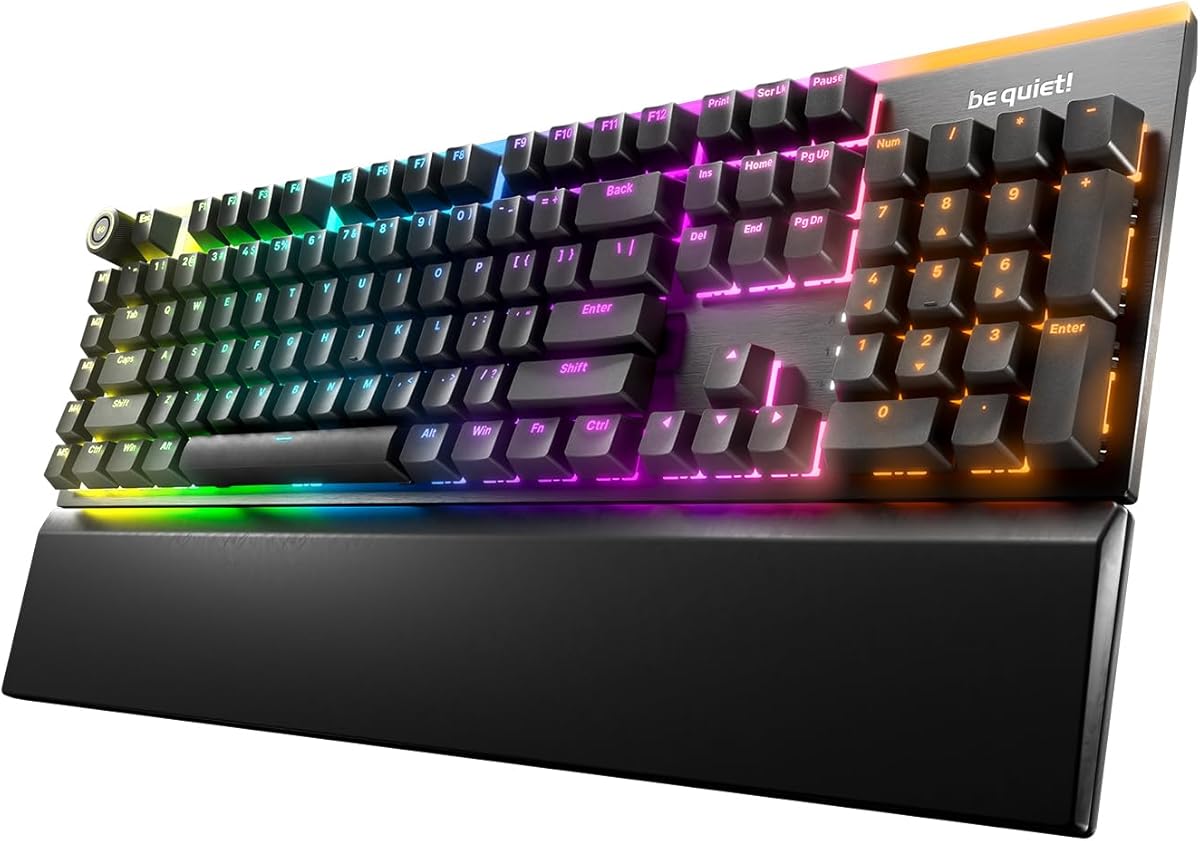
10. be quiet! Light Mount Linear - Best Linear Silent

be quiet! Light Mount Linear

be quiet! Light Mount Linear

7.6/10★★★★☆

be quiet! Light Mount Linear targets gamers who prefer smooth silent linear actuation over tactile bumps—common among FPS players who bottom-out consistently and want minimal friction noise. Factory lubrication on switches and stabilizers addresses the spacebar rattle that undermines many quiet mechanical claims. Triple foam layers between switches, under PCB, and in bottom housing continue the brand's acoustic discipline without the modular complexity Dark Mount introduces.

  • Silent linear orange switches, hot-swappable
  • Triple-layer foam dampening, per-key ARGB
  • 3D aluminum media wheel, five macro keys
Check Price →
✓ Pros
  • Factory-lubricated silent linear switches with treated stabilizers reduce rattle on large keys
  • Triple-layer dampening matches Dark Mount acoustic philosophy in a streamlined layout
  • Hot-swappable five-pin MX sockets enable future switch experiments without soldering
  • Programmable aluminum 3D media wheel controls volume with press-to-mute precision
  • Per-key ARGB with side strips and top-edge glow integrates with RGB-focused battlestations
✕ Cons
  • 3.8 listing rating trails every other keyboard in this pack—research recent owner feedback carefully
  • No modular numpad or display keys that distinguish Dark Mount for power users
  • Premium pricing with fewer unique hardware features may disappoint value-focused silent buyers

Detailed review

Per-key ARGB lighting with arched diffusers in switches and supplemental LED strips along sides and top edge creates cohesive RGB presence for glass-side PC builds. PBT double-shot translucent legends resist wear while letting light through evenly—important when silent boards often skew plain visually. Brushed aluminum plate and folding feet with magnetic cushioned palm rest mirror Dark Mount ergonomics in a more traditional fixed layout.

The aluminum 3D media wheel is the hardware headline Light Mount keeps exclusive: rotate for volume, press for mute, program alternate behaviors through be quiet! IO Center alongside five mechanical macro keys. That control surface beats Fn-layer volume for streamers who adjust audio mid-commentary. Hot-swappable five-pin MX compatibility preserves upgrade paths if silent orange linears eventually feel too heavy or too light for your game genre mix.

Honest context on the 3.8 rating—the lowest in this pack. Early adopter feedback on IO Center maturity, QC variance, or pricing expectations may drag averages below sibling Dark Mount and established Logitech options. Read recent verified purchase comments for your region before committing premium funds. Light Mount makes sense when linear silent switches and media wheel ergonomics align with your preferences, not when you expected modular display keys from the Dark Mount marketing halo.

Versus Dark Mount tactile, Light Mount trades bump feedback and display-key modularity for linear smoothness and wheel-centric media control. Versus SteelSeries Apex 3, Light Mount is true hot-swap mechanical silent at much higher cost and setup depth. Versus MX Mechanical tactile quiet, Light Mount skews gaming RGB and switch swap freedom over Flow office integration.

Ranked tenth as Best Linear Silent Alternative—not because silence fails, but because rating, value, and feature differentiation lag peers in this specific roundup. Buy when you explicitly want silent linear mechanical with be quiet! dampening and media wheel control. Skip when tactile feedback, modular numpad, spill-resistant wired gaming, or whisper wired office silence better match actual desk needs elsewhere in this guide.

Who should buy Light Mount

Linear-switch gamers sharing walls with others, streamers who adjust volume constantly, and enthusiasts wanting hot-swap silent linears without building from scratch. Verify recent reviews before purchase given the 3.8 average.

Light Mount tuning tips

Update IO Center firmware on install, map media wheel mute before complex macros, and consider alternate silent linear swaps only after baseline hours so you understand factory lube behavior first.

When to choose Dark Mount instead

Pick Dark Mount when tactile bumps, display keys, or detachable numpad justify similar premium spend with higher owner rating. Light Mount remains the linear-specific branch of the same acoustic design language.

Check Price on Amazon →

We may earn a commission at no additional cost to you.

Best Quiet Keyboards in 2026: Silent Office and Gaming Boards

How to Choose the Best Quiet Keyboard

Understand switch categories and noise physics

Quiet keyboards are not one technology—they span scissor switches, dampened membranes, low-profile mechanical quiet variants, and full-height silent mechanicals with foam stacks. Scissor boards like Cherry Stream and Logitech K950 minimize travel distance and impact noise, ideal for open offices. Creamy membrane boards like LEOBOG K99 add silicone dampening to reduce hollow plastic resonance. Silent mechanicals like be quiet! Dark Mount preserve switch precision while foam and lube cut decibels. Match category to your priority: absolute silence favors scissor or creamy membrane; typing consistency favors silent mechanical.

Wired reliability versus wireless freedom

Wired boards eliminate battery anxiety and pairing failures—critical for shared office stations and tournament desks with strict latency needs. SteelSeries Apex 3 and Cherry Stream exemplify plug-and-play quiet wired paths. Wireless and tri-mode boards trade convenience for charging habits: Logitech K950 and MX Mechanical use Bluetooth or Bolt multi-device switching; LEOBOG K99 and LexonElec M96 add 2.4GHz gaming latency options. Budget combos typically stay 2.4GHz-only with shared receivers. List your devices before buying; tablet-heavy workflows need Bluetooth, not dongle-only combos.

Layout, numpad, and desk footprint

Finance, data entry, and CAD-adjacent roles should not sacrifice numpads for aesthetics—Cherry Stream, MX Mechanical, K950, MK470, and K99 retain numeric clusters. Compact ninety-four-key boards like LexonElec M96 save width when spreadsheets are occasional. Modular numpad on Dark Mount suits LAN travelers who sometimes leave numeric input behind. Measure desk depth before buying wrist-rest bundles; magnetic rests on Apex 3 and be quiet! boards add length that shallow IKEA desks may reject.

Gaming features in shared spaces

RGB, display keys, and macro layers help gaming identity but complicate professional Zoom aesthetics. Apex 3, K99, and be quiet! boards can dim lighting for work hours; Cherry Stream and K950 stay camera-neutral by design. IP32 spill resistance on Apex 3 matters when beverages outlive caution. Hot-swap silent switches on Dark Mount and Light Mount future-proof gaming desks without buying entirely new boards when preferences change.

Software ecosystems and IT constraints

Logi Options+ powers K950 and MX Mechanical customization but may require admin approval on corporate laptops. SteelSeries Engine and be quiet! IO Center add similar layers for gaming boards. Budget combos and Cherry Stream stay driverless—advantages when IT locks installations. Confirm Mac shortcut behavior if your fleet mixes operating systems; membrane listings often document Windows-first multimedia Fn maps.

Combo bundles versus keyboard-only purchases

Logitech MK470 and avocado-green silent combos deliver matched quiet mice—mouse click noise ruins many silent keyboard upgrades otherwise. Keyboard-only picks like Stream or MX Mechanical assume you already own a quiet mouse or will buy separately. Evaluate total desk acoustics, not keyboard decibels alone, when housemates or coworkers share space.

Frequently Asked Questions

01

What is the quietest keyboard type for an open office?

Scissor-switch keyboards like the Cherry Stream Keyboard and Logitech Signature Slim K950 typically produce the lowest consistent typing noise because short travel and stabilized keys limit impact slap. Creamy dampened membrane boards such as the LEOBOG K99 rank next for shared spaces. Silent mechanical boards—including Logitech MX Mechanical tactile quiet and be quiet! Dark Mount—are quieter than clicky mechanicals but usually louder than premium scissor designs. Your quietest outcome also depends on desk surface, typing force, and whether you use a hard shell versus padded desk mat.

02

Are mechanical keyboards ever truly quiet?

Yes, when designed for silence rather than acoustics as personality. Silent mechanical switches use dampening materials and factory lube to reduce bottom-out and upstroke noise. be quiet! Dark Mount and Light Mount add triple foam layers to absorb cavity echo—a major noise source on hollow boards. Logitech MX Mechanical uses low-profile tactile quiet switches tuned for office proximity. These remain audible if you type aggressively, but they sit far below clicky blue-switch stereotypes and often beat untreated budget membranes that resonate inside plastic shells.

03

Do I need a quiet keyboard for gaming if I use a headset?

Headsets mask game audio, not microphone bleed. Streamers, Discord users, and anyone on open-mic calls still transmit keyboard clatter through condenser mics sensitive to desk vibrations. Quiet gaming boards like SteelSeries Apex 3 and silent mechanical options reduce post-processing noise gate artifacts that duck voice clarity. Roommates and partners off-camera also benefit regardless of headset use. Choose quiet gaming hardware when humans share your acoustic space, not only when you lack headphones.

04

What is the difference between creamy silent and whisper quiet marketing?

Whisper quiet usually describes overall low volume—common on Cherry Stream and SteelSeries Apex 3 listings emphasizing minimal sound. Creamy silent often signals silicone or foam dampening inside membrane structures that soften bottom-out character into a muted thud rather than sharp plastic clack—LEOBOG K99 explicitly uses this language. Neither term is standardized across brands; read owner reviews for sound character, not just volume, because some typists prefer crisp scissor quiet while others prefer creamy dampened thuds.

05

Should I buy a keyboard and mouse combo for a quiet setup?

Combos make sense when both peripherals are loud or missing. Logitech MK470 pairs whisper-quiet scissor keys with a lab-tested noise-reduced mouse on one receiver—efficient for home offices. Budget avocado-green silent combos offer similar acoustic goals with simpler feature sets. Skip combos if you already own a premium quiet mouse like MX Master and only need keyboard replacement—keyboard-only picks such as Cherry Stream or MX Mechanical avoid redundant mice. Evaluate click noise separately; silent typing with loud clicking defeats the purpose in shared bedrooms.

06

Is wireless quieter than wired keyboards?

Connection type does not inherently change switch acoustics—a Cherry Stream wired board is not louder because of its cable. Wireless matters for desk cable management and device flexibility, not decibel physics. Some wireless boards add hollow battery compartments that resonate if poorly dampened, while well-damped wired mechanicals stay quiet despite cables. Choose wired for zero battery anxiety and tournament latency; choose wireless for multi-device hopping and clean aesthetics. Prioritize switch and dampening design first, connection second.

07

How important is spill resistance on quiet keyboards?

Spill resistance matters when beverages live closer to keyboards than we admit. SteelSeries Apex 3 advertises IP32 splash protection—useful for gaming desks and hybrid eat-while-working habits. Most office scissor boards including Cherry Stream lack IP ratings but use drainage-friendly membrane layers on some models; verify listing details rather than assuming. Spill protection is not waterproofing—always wipe accidents immediately. If your desk culture includes coffee rings, prioritize rated boards or strict mug placement rules.

08

Can I use these quiet keyboards with Mac and Linux?

Most listings in this pack claim macOS and Linux compatibility for basic typing, yet multimedia shortcuts often target Windows Fn maps first. Logitech MX Mechanical and Signature Slim K950 include explicit multi-OS support with Options+ customization on Windows and macOS. Cherry Stream types universally but office shortcut keys may behave differently on Mac. Tri-mode boards like LEOBOG K99 document FN pairing steps for Mac versus Windows. Always test mission-critical shortcuts within return windows when leaving Windows-only ecosystems.

09

Why does be quiet! Light Mount rate lower than Dark Mount?

The 3.8 average on Light Mount trails Dark Mount's 4.2 and most peers in this pack, often reflecting early software maturity, pricing expectations, or QC variance rather than fundamental switch failure. Light Mount omits modular numpad and display keys that differentiate Dark Mount, which can disappoint buyers expecting identical feature tiers. Linear silent switches also suit a narrower audience than tactile quiet options. Read recent verified purchase reviews before premium buys—owner sentiment shifts as firmware updates ship and manufacturing batches stabilize.

10

How do I reduce keyboard noise beyond buying new hardware?

Desk mats absorb impact energy that hard glass or laminate amplifies. Typing with lighter bottom-out force reduces noise more than any single product tweak. O-rings and aftermarket dampeners help untreated mechanical boards but are irrelevant on scissor or pre-damped silent boards. Microphone placement and gain staging reduce broadcast clatter even when keyboards are imperfect. Elevating monitors and using negative keyboard tilt improve ergonomics so you type softer naturally. Combine hardware choice with desk setup for best shared-space results.

Conclusion

The best quiet keyboard in 2026 depends on whether silence serves office coworkers, sleeping partners, or microphone audiences—and whether you refuse to give up gaming RGB, mechanical tactility, or numpad access while pursuing lower decibels. Cherry Stream remains the wired office benchmark for whisper scissor quiet. SteelSeries Apex 3 delivers the strongest quiet gaming package with spill resistance and wrist support at the top of owner ratings. be quiet! Dark Mount elevates silent mechanical gaming with dampening and modularity that enthusiasts can grow into without alienating roommates.

Scan the comparison table when connection type and layout matter more than brand prestige: Logitech K950 and MX Mechanical cover multi-device professionals; LEOBOG K99 and LexonElec M96 serve compact wireless desks; MK470 and budget silent combos outfit entire stations economically. No single board wins every scenario—honest tradeoffs about membrane versus mechanical, wired versus tri-mode, and combo bundles versus keyboard-only upgrades keep expectations grounded.

Check each Amazon listing for current offers—we omit dollar prices because deals change weekly—and confirm tag=reviewconsens-20 stays intact on affiliate links. Start with our three top picks when decision fatigue hits; otherwise read every review above to match acoustics, ergonomics, and ecosystem depth to the desk you actually use eight hours a day.