Best Overall
Bluedee Rechargeable Desktop Soundbar
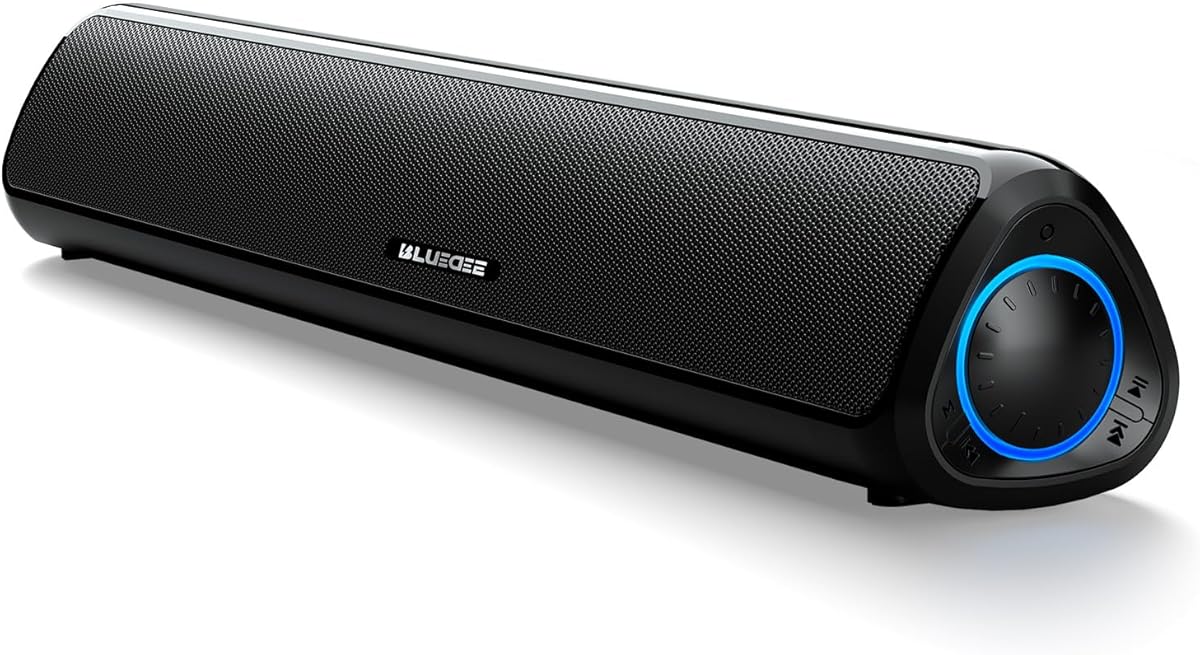
- Rechargeable cordless playback up to 13 hours at moderate volume
- Bluetooth 5.3 plus AUX, USB flash drive, and TF card inputs
- Balanced dual full-range drivers and tweeters for desk work and play
Expert Review & Guide
Thin laptop speakers and the speakers tucked into monitor bezels are fine for a calendar reminder, then collapse when you want music with body, game footsteps with direction, or movie dialogue that does not vanish under effects. The best PC soundbars and speakers fix that at the desk instead of forcing a living-room theater into a home office. In 2026 the category is mostly under-monitor bars: USB-powered stereo slabs, Bluetooth-ready rechargeable units, RGB gaming soundbars from bigger audio brands, and a few true 2.1 kits that add a subwoofer when slim bars still feel thin.
This roundup stays inside one product pack of ten desktop-focused options. We weighed rechargeable freedom against always-plugged reliability, SuperWide and bass-mode marketing against real near-field clarity, and Chroma ecosystems against simple knobs that never need an app. Ratings come from the product listings. Recommendations emphasize how each bar behaves after a week under a monitor: cable clutter, light bleed on webcam calls, whether Bluetooth is a daily habit or a novelty, and how much desk depth a subwoofer or thicker enclosure actually costs.
If you want the short answer first: choose the Bluedee Rechargeable Desktop Soundbar when you want the most flexible everyday under-monitor upgrade with cordless hours and strong listed satisfaction; pick the Creative Sound Blaster GS3 when gaming width, brand audio tuning, and flexible I/O matter more than battery freedom; and shortlist the Nylavee 2.1 Soundbar with Subwoofer when bass is the missing piece and you can place a separate woofer. Everything below expands those picks with comparison specs, honest tradeoffs, buying guidance, and FAQs aimed at real PC desks.


As an Amazon Associate we earn from qualifying purchases. We may earn a commission at no additional cost to you.
Use this table to shortlist by power style, wireless needs, and bass approach before reading the deeper reviews. Specs focus on form factor, connectivity, and what each option does best under a monitor. Ratings reflect listed customer scores at the time of research.
Bluedee Rechargeable Desktop Soundbar
The Bluedee Rechargeable Desktop Soundbar is the Best Overall pick in this pack because it solves the most common modern desk complaint: too many cables for too little audio improvement. Instead of living forever on a USB power tether, it charges and can play for up to about thirteen hours at moderate volume according to the listing. That freedom matters on standing desks, shared tables, and setups where you occasionally slide the bar over to a kitchen counter or secondary monitor without dragging a power brick behind you.
Sound design targets balance rather than gimmick bass. Dual full-range drivers plus tweeters aim for crisp highs, clear vocals, and usable low end for movies, music, gaming, and work-from-home playlists. In near-field use that usually means intelligible Zoom voices, less tinny streaming dialogue, and music that no longer sounds trapped inside a laptop lid. You still should not expect living-room slam; what you get is a cleaner, wider personal stereo that fits under most monitors at roughly 16.5 by 3 by 3 inches.
Connectivity is unusually flexible for an under-monitor bar. Bluetooth 5.3 handles phones and tablets without hunting for a headphone jack. The 3.5 mm AUX path remains the reliable wired lane for PCs and laptops that prefer zero wireless latency. USB flash drive and TF card playback let the bar act as a tiny media player when you are not even at the computer. The listing notes the USB port is for flash playback rather than acting as a universal host for every accessory, which is worth remembering before you assume it replaces a dock.
Living with a rechargeable bar means planning charge habits the same way you plan a wireless mouse. Keep USB-C plugged in during long editing days if you hate mid-session dropouts, then unplug when you want a cleaner desk photo or need to move the speaker. Moderate volume stretches battery life; loud gaming nights will drain faster. For many home offices, plugging in overnight and running cordless through the workday is enough.
Controls sit on the side with buttons and knobs for volume, modes, and playback switching. That physical access beats digging through OS mixers when a meeting starts abruptly. Compatibility spans desktop PCs, laptops, monitors, tablets, and phones, so one bar can serve a primary tower and a phone playlist without buying a second speaker. Responsive customer support is listed as a backup if pairing quirks appear, which is useful on Bluetooth-heavy models.
Compared with the older Bluedee USB-powered bar in this same roundup, the rechargeable version is the clearer long-term buy when cordless flexibility and modern Bluetooth matter. Compared with Creative’s GS3, it trades brand SuperWide processing and a headphone jack for battery freedom and media-card playback. Compared with Nylavee’s 2.1 kit, it keeps the desk simpler and quieter underfoot but cannot match a dedicated 5.25 inch subwoofer. If your desk wants one flexible bar that does not feel stuck in 2018 USB-speaker thinking, start here.
Placement still decides success. Center the bar under the monitor with the drivers aimed toward your seated position, leave a little rear clearance if the chassis vents that way, and avoid burying it behind a thick monitor stand lip. If Bluetooth drops in a crowded 2.4 GHz apartment, fall back to AUX for critical listening and keep wireless for casual phone music. Treated as a daily desk companion rather than a party speaker, this Bluedee earns its Best Overall badge on versatility and listed user satisfaction.
Buy it if you want under-monitor stereo with Bluetooth convenience, occasional cordless use, and enough inputs that a phone, PC, and flash drive can all play through one chassis. It is especially strong for mixed work-and-play desks that change layout often.
Skip it if you need a separate subwoofer, brand RGB ecosystems, or a headphone passthrough on the bar itself. Those needs point to Nylavee, Razer, or the Creative GS3.
Charge fully before first long cordless sessions, then decide whether your default is always-plugged or daily unplugged. Always-plugged mode removes anxiety during marathon streams; cordless mode rewards people who constantly rearrange shallow desks.
If volume suddenly drops near the end of a charge cycle, plug into USB-C instead of blaming the PC audio driver. Treat the battery like any rechargeable desk peripheral and you will avoid most surprises.
Against Tylubio and LENRUE, it wins on wireless and battery flexibility. Against SOULION R50, it feels more modern on Bluetooth generation and cordless play. Against Razer Leviathan V2 X, it is less of a Chroma showpiece and more of a practical multi-input bar for people who do not live in Synapse.
We may earn a commission at no additional cost to you.
Creative’s Sound Blaster GS3 is the Best Gaming Soundbar in this pack because it brings a real audio brand’s tuning ideas into the under-monitor form factor without demanding a separate DAC stack. The listing highlights up to 24W peak power through full-range racetrack drivers and a built-in port tube, which is a more serious acoustic claim than many anonymous USB bars make. For competitive games, story campaigns, and late-night streams, that extra authority helps effects and music feel less compressed.
SuperWide technology is the GS3’s signature pitch: a wider perceived soundstage from a chassis that still slides under a monitor. In practice, that matters for footsteps, panning engines, and cinematic scores that otherwise collapse into a narrow center image. It will not replace a true surround array, but it can make a desk feel less like you are listening through a letterbox. If you have been disappointed by thin bars that only get louder without getting wider, SuperWide is the reason GS3 belongs on a shortlist.
Connectivity is a practical strength. USB-C covers modern PCs and many laptops with a clean digital-friendly path. AUX-in remains the universal wired backup. Bluetooth 5.4 supports phones and secondary devices with a current wireless generation. The headphone-out port is a quiet hero feature: you can park the bar as a hub and switch to headphones without crawling behind the PC. Few budget bars bother with that convenience.
RGB lighting on the GS3 is more intentional than a random rainbow strip. Presets such as Chasers, Aurora, Peak Meter, Glowing, Wave, and Cycle let you match mood without installing a whole lighting ecosystem. Peak Meter style feedback can be fun during music; calmer modes suit evening work. If lights distract on camera, pick a subtle preset or turn them down depending on what the unit allows. The all-black compact shell still looks serious when the LEDs are quiet.
Desk fit is classic PC soundbar: low profile, snug under a monitor, refined enough for a battlestation that already has black peripherals. Creative positions it for PC and console desks, which makes sense when a Switch dock, DualSense, or streaming PC shares the same surface. Keep cable runs tidy so USB-C and AUX do not tangle with monitor stands. Because there is no internal battery, plan a permanent power path rather than expecting cordless freedom like the Bluedee rechargeable model.
Compared with Razer Leviathan V2 X, the GS3 competes on compact gaming identity but differentiates with SuperWide branding, a headphone jack, and Creative’s Sound Blaster lineage rather than Chroma depth. Compared with the Bass Boost RGB USB bar, GS3 feels more like a tuned product than a feature checklist. Compared with Nylavee, it stays cleaner on the desk and sacrifices the dedicated subwoofer punch. Gamers who want width, flexible I/O, and brand-backed acoustics should put GS3 near the top.
Setup advice is simple: start on USB-C if your PC supports it, A/B against AUX if you hear harshness from a noisy motherboard jack, and keep Bluetooth for phone music rather than latency-sensitive ranked matches. Place the bar centered and unobstructed. If SuperWide feels too exaggerated for podcasts, toggle modes or reduce enhancement depending on Creative’s available controls, then leave it engaged for games and movies where the wider stage pays off.
Choose GS3 for gaming PCs, streaming desks, and compact console setups that want under-monitor stereo with more presence than generic USB bars. The headphone-out path is especially useful for hybrid silent-night and loud-day schedules.
Look elsewhere if you need a battery, a separate subwoofer, or deep Chroma integration across dozens of peripherals. Those jobs belong to Bluedee Rechargeable, Nylavee, or Razer respectively.
Use SuperWide for immersive content and consider a more neutral path for voice calls if the effect colors dialogue. RGB presets are best treated as atmosphere, not as proof of audio quality—set them once and stop fidgeting.
If coworkers share a room, avoid the brightest cycle modes during video calls. Sound quality is the product; lighting is optional seasoning.
Against Tylubio and the Bass Boost RGB bar, GS3 offers stronger brand audio identity and more flexible I/O. Against Razer V2 X, pick GS3 for SuperWide and headphone out, or Razer if Synapse and Chroma are already your desk OS.
We may earn a commission at no additional cost to you.
Nylavee 2.1 Soundbar with Subwoofer
Nylavee’s 2.1 computer speakers earn Best Bass Upgrade because they admit what most slim soundbars cannot: deep, defined low end usually needs a dedicated driver with real enclosure volume. The kit pairs a desktop soundbar-style satellite section with a standalone 5.25 inch bass driver rated at 60W peak and 30W RMS in the listing. For FPS explosions, hip-hop playlists, and movie trailers, that architecture is the clearest step up from USB bars that only fake bass with EQ boosts.
Highs and mids are not an afterthought. Dual soft-dome silk tweeters and full-range drivers aim for crystal-clear highs, balanced mids, and punchy bass that still leaves vocals intelligible. That balance matters on PC desks where chat, footsteps, and music compete. A unique cavity design is marketed for consistent desktop and monitor setups, meaning the satellite portion is meant to live near the screen while the sub handles weight elsewhere.
Connectivity stays approachable. Bluetooth 5.4 covers wireless phones and tablets; 3.5 mm AUX covers PCs, MacBooks, iMacs, Xbox, and PS5 according to the listing. There is no labyrinth of optical receivers or HDMI ARC claims to decode—this is a desktop entertainment kit, not a living-room soundbar pretending to be a TV hub. Plug-and-play operation without drivers keeps setup closer to traditional PC speakers than to a home-theater receiver.
Power comes from an AC adapter rather than a battery or USB bus. That is a tradeoff: you gain headroom and continuous output, but you spend an outlet and accept more cable management. The side knob simplifies daily control by combining power, mode switching, volume, and reset. Learn that knob once and you will not miss a remote for desk use. Immersive surround-style presentation is marketed for games, movies, and music; treat that as enhanced stereo width and bass presence rather than true multi-speaker surround.
Placement decides whether Nylavee sounds exciting or boomy. Keep the bar under or near the monitor aimed at your ears. Give the subwoofer a short trial in a few positions—beside the desk, under the desk with clearance, or slightly out from a wall—then settle where kick drums feel tight instead of muddy. Small rooms often prefer the sub away from a hard corner. If neighbors share walls, remember that a real woofer transmits farther than a USB bar ever will.
Compared with every single-chassis bar in this pack, Nylavee is the honest bass answer. Compared with Creative GS3, it trades SuperWide branding and headphone-out convenience for physical low-frequency hardware. Compared with Bluedee Rechargeable, it is less portable and less tidy, but more satisfying when music and movies need weight. If your desk has space for a sub and your ears have been bored by thin bars, this is the upgrade path inside the pack.
Who should pause: people on standing desks with almost no floor clearance, travelers who want one USB stick of a speaker, or offices where deep bass would annoy adjacent cubicles. Everyone else who complained that PC soundbars still sound small should shortlist Nylavee before buying yet another RGB slab with the same limited enclosure physics.
Buy Nylavee if bass is the primary gap after trying USB soundbars, and you can place a separate woofer without blocking chair travel. It is strong for movie-heavy and music-heavy PC desks.
Skip it if cable minimalism or cordless moves define your setup. Bluedee Rechargeable or a single USB bar will frustrate you less day to day.
Start with the sub near the desk but not jammed into a corner, then adjust by ear using a familiar bass track. If dialogue gets masked, lower sub level or move it farther from the wall before blaming the satellites.
Keep power and AUX cables secured so feet and chair wheels cannot yank the system mid-session. A little cable discipline preserves the clean look the soundbar portion tries to create.
Slim bars win on simplicity; Nylavee wins on physical bass. If you are torn, ask whether your last complaint was clutter or thin sound. Clutter points to Bluedee or Tylubio; thin sound points here.
We may earn a commission at no additional cost to you.

The Bass Boost RGB PC Soundbar is the Best Bass Modes pick because it acknowledges that one EQ curve cannot serve Zoom calls and boss-fight soundtracks equally. Four presets—Standard, Movie, Game, and Deep Bass—let you retune low-frequency emphasis with a tap instead of opening a software equalizer. That is a practical desk feature when your afternoon flips from standup meetings to an evening raid.
The acoustic package uses dual 5W 52 mm dynamic drivers and dual symmetric bass reflex ports. Midrange vocals and treble come from the twin drivers, while the reflex ducts strengthen low-end output for a slim chassis. You will not match Nylavee’s dedicated 5.25 inch sub, but among single-bar USB options this design is clearly chasing fuller music and game impact. Distortion-free claims always depend on volume discipline; keep levels reasonable and the reflex ports help more than reckless maximum gain.
Cable strategy is a major selling point. A single USB plug can transmit power and digital audio after a short recognition delay of about five to eight seconds, simplifying PC desktop setups that hate separate power and AUX snakes. Bluetooth 5.4 remains available when you want phone music without touching the PC. That dual personality—USB simplicity plus wireless convenience—covers most daily desk habits.
RGB is unusually deep for this price tier of pack options: twelve ambient modes spanning static colors, flowing dynamics, music rhythm sync, and gradients. The soft bottom light strip is meant to glow against the desk rather than fan your face. Streamers and RGB battlestations will appreciate the variety; office-focused buyers can pick a static dim color or disable lights when possible. Treat lighting as customization, not as evidence the drivers are magical.
The compact roughly sixteen-inch profile fits under many monitors, and a central control knob integrates power, volume, and mute with an independent mute zone for instant silence—handy when a notification blasts during a call. Touch buttons complement the knob for mode changes. Learn the mute control early; it becomes the feature you use more than any light mode.
Compared with Tylubio, this bar pushes harder on bass presets and Bluetooth. Compared with Creative GS3, it offers more EQ personalities but less Sound Blaster brand heritage and no headphone-out convenience. Compared with Bluedee Rechargeable, it stays USB-tethered for power in typical use and leans into RGB spectacle. Feature-hungry gamers who want one USB bar with personality should shortlist it after the top three badges.
Setup tip: begin in Standard mode for workdays, switch to Game or Movie for entertainment, and only use Deep Bass when the track or scene actually needs it. If voices thicken, step back a mode before raising volume. Keep the reflex ports unobstructed by monitor stands or clutter so the low-end engineering can breathe.
Presets help when content types change constantly and you want tactile control. They hurt when Deep Bass stays engaged during podcasts or voice chats and masks consonants.
Make Standard your default boot mode. Treat Deep Bass like a spice you add, not a permanent sauce.
Allow a few seconds for recognition after plugging in. If the PC stays silent, check the output device list before assuming hardware failure. Some systems need a manual default-device selection the first time.
If you prefer zero handshake delay, keep AUX available as a mental backup even when USB audio is the daily path.
We may earn a commission at no additional cost to you.

Tylubio’s RGB Desktop Soundbar is the Best Wired RGB Value in this pack for people who want HiFi-leaning stereo claims, passive radiators, and a hybrid cable without Bluetooth complexity. Dual high-sensitivity drivers and dedicated passive radiators target crisp highs and richer balanced bass for gaming footsteps and cinematic soundtracks. In a crowded field of lit bars, Tylubio’s pitch is relatively focused: plug in, twist a knob, and get stereo that feels more intentional than toy-grade USB junk.
The 2-in-1 hybrid cable with Type-C and USB ends is the practical headline. Modern laptops often abandoned legacy USB-A ports; older towers still have them. Carrying both styles in one cable reduces the adapter drawer problem. The listing emphasizes plug-and-play with no drivers and no latency drama for Windows, macOS, and Chrome OS—ideal when you just want digital-friendly convenience without a software suite.
Front-panel control is refreshingly simple. One integrated knob powers the speakers and adjusts volume with a tactile twist. That matters more than another row of cryptic icons when your hand already knows where the bar sits under the monitor. RGB lighting auto-cycles through modes for gaming mood, yet can be adjusted or turned off with a touch when you need a calm office look. The ability to kill lights is as important as having them.
Dimensions around 15.9 by 3.5 by 2.1 inches plus a roughly 1.8 meter cable make placement flexible on deep and shallow desks alike. The bar can sit under the monitor or in tight side spaces. Passive radiators need a little breathing room; pressing the chassis flush against a wall or stand can choke the low-end contribution they are supposed to provide. Aim the drivers toward your seated ear height as much as the monitor stand allows.
Because this is a wired speaker first, it is not the pick for cordless phone parties. That role belongs to Bluedee Rechargeable or SOULION R50. Tylubio instead wins for battlestations that already route audio from a PC and want RGB without joining a proprietary lighting religion. Compared with LENRUE G11, it emphasizes passive radiators and hybrid cabling over angular touch-light theatrics. Compared with Creative GS3, it is more anonymous on brand audio features but simpler if you do not need Bluetooth or a headphone jack.
Sound expectations should stay honest: this is still a compact soundbar, not a bookshelf pair. Passive radiators help body; they do not create subwoofer physics. For many gamers and office users upgrading from monitor speakers, that body is enough. Keep OS enhancements off at first so you can hear the bar’s native balance, then add light EQ only if your room is harsh.
Choose Tylubio when your checklist reads: USB-C friendly, RGB optional, knob control, no Bluetooth required. Skip it when wireless is mandatory or when bass demands a separate woofer. As a wired RGB desk bar, it is one of the cleaner values in the pack.
Tylubio fits RGB gaming desks, student setups with mixed USB ports, and offices that want simple volume access under the monitor. It is a strong second monitor station speaker when Bluetooth would only add pairing friction.
If your phone is the primary music source all day, prioritize a Bluetooth model instead of forcing AUX dongles forever.
Pick a calmer mode for daytime work and save dynamic cycles for evening games. Turning lights off entirely is valid—audio quality does not require a light show.
On webcam calls, check whether bottom glow reflects on glossy desk mats; a matte surface or lower brightness reduces visual noise.
We may earn a commission at no additional cost to you.

The original-style Bluedee USB Desktop Soundbar remains a sensible Best Classic USB Bar pick for shoppers who want Bluetooth convenience without managing a battery. Dual drivers and dual diaphragms are marketed for a blend of high notes and deeper bass, with anti-magnetic technology aimed at reducing static interference near a PC. In everyday terms, that means a crisper, more immersive desk soundtrack than most built-in laptop speakers manage.
Two connection paths keep compatibility wide. A 3.5 mm plug handles traditional PC and laptop jacks, while Bluetooth 5.0 pairs phones and tablets. USB power from a laptop, PC, power bank, or adapter starts the bar without drivers. The nylon-braided Y-cable combining power and audio is a quality-of-life detail that reduces spaghetti under the monitor. Plug-and-play remains the right philosophy for secondary desks and dorm setups.
Design leans slim and futuristic at about 16.4 inches wide and 2.6 inches deep and tall, sliding under many monitors without stealing keyboard space. Gentle ambiance light strips add desk elegance without the aggressive RGB personality of gaming-first bars. If you want mood lighting that still looks office-acceptable, this approach is easier to live with than rainbow cyclones.
Bluedee also markets eco-friendly ABS content and cardboard packaging plus lifetime after-sales support through Amazon messages or manual contacts. Those claims will matter differently to different buyers, but the after-sales angle is useful when Bluetooth pairing quirks appear months later. Keep expectations grounded: support messaging does not change enclosure physics, yet it can reduce ownership anxiety on value hardware.
Compared with the rechargeable Bluedee in this guide, the USB model is simpler if you always have a power port free and never need cordless relocation. Compared with SOULION R30, it adds Bluetooth. Compared with Creative GS3, it is less powerful and less gaming-feature-rich, but often enough for mixed work and casual entertainment. It is the straightforward Bluetooth USB bar for people who liked the Bluedee idea before batteries entered the lineup.
Setup tips: seat the AUX plug firmly, pair Bluetooth only when you need it so the bar does not steal focus from the PC input, and give the light strips a night test to ensure they do not wash out a matte monitor hood. If interference appears near strong magnetic accessories, reposition slightly—anti-magnetic claims help, but physics still appreciates distance from ugly noise sources.
Choose this Bluedee when you want a slim Bluetooth-capable USB bar with gentle lighting and tidy cabling. Choose the rechargeable sibling when cordless hours matter more. Choose Nylavee when bass is the real complaint. As a classic under-monitor solution, it still earns a place in a 2026 shortlist for simple desks.
Pick USB when the bar will live plugged in forever and you want the older simpler power story. Pick rechargeable when you move the speaker, hate visible cables, or want newer Bluetooth and media-card tricks.
If you already own the USB version and feel limited only by cables, upgrading inside the brand to rechargeable is a coherent path.
Route the braided Y-cable along the monitor stand leg and use a single clip so the bar cannot be yanked forward. A tidy cable preserves the compact profile advantage that made you buy a soundbar instead of bookshelf speakers.
We may earn a commission at no additional cost to you.

LENRUE’s G11 is the Best Touch-Light Wired Bar for buyers who want atmospheric gaming lights and surge-style stereo claims without Bluetooth complexity. The listing leans hard into four large amplifier IC horns for distortion-free, noiseless immersive sound aimed at movies, videos, games, and music. That marketing language is bold for a compact USB bar, so treat it as a promise of cleaner loudness within the size class rather than home-theater authority.
The light story is distinctive: dynamic angular game atmosphere lighting with one-touch on/off instead of hunting through modes every evening. If you like a lit desk but hate seven-button remotes, that design choice is refreshing. Lights become a binary mood switch rather than a hobby. For some people that is a feature; for RGB tinkerers it may feel limited compared with twelve-mode bars or Chroma ecosystems.
Form factor stays all-in-one and compact under the monitor, with cables glued or grouped together to fight desktop clutter. Plug-and-play requires USB power and a 3.5 mm audio cable—no drivers. A top volume knob is easier to find by feel than side micro buttons during a dark game session. USB-C adapter inclusion helps when your PC’s best power port is Type-C rather than legacy USB-A.
Compatibility notes in the listing are unusually honest and important: no Bluetooth, no headphone port, no mic, and not compatible with TVs or headphones. This is a PC and laptop desk speaker, full stop. If your entertainment center needs optical or HDMI ARC, look elsewhere. If you want to plug headsets into the bar, Creative GS3 is the better pack option. LENRUE is for people who accept AUX-from-PC as the whole story.
Operating system coverage spans Windows versions, Mac OS, and Chrome OS according to the listing, which matches the typical student and home-office mix. Because there is no wireless path, latency is generally a non-issue for games—another quiet advantage of staying wired. The tradeoff is phone music requiring a dongle or a separate speaker.
Compared with Tylubio, LENRUE emphasizes angular touch lights and surge-horn marketing over hybrid cable storytelling and passive radiators. Compared with SOULION R30, it is more gaming-forward visually. Compared with Bluedee USB, it loses Bluetooth. Honest shoppers who want a lit wired bar and will never miss wireless should keep G11 in contention; everyone else should read the no-Bluetooth note twice before buying.
Place it centered under the monitor, keep the top knob clear of hanging headphone straps, and decide early whether the angular lights stay on during workdays. If webcam glare becomes an issue, one touch turns them off without dismantling your aesthetic for evenings. That simple ritual makes LENRUE more livable than flashier bars that bury light controls in apps.
Accept the no-Bluetooth, no-headphone-port design if your PC AUX jack is reliable and your phone music lives in earbuds anyway. The G11 then becomes a focused monitor speaker with fun lights.
Reject it if wireless phone pairing or headset passthrough is part of your daily loop. Those features are non-negotiable for some desks and absent here.
Use the top knob for fine volume and leave system volume high enough that you are not amplifying a weak noisy source. Keep the AUX cable from sharing a tight bundle with high-current power bricks when possible to reduce chance of buzz.
We may earn a commission at no additional cost to you.

SOULION R50 Bluetooth PC Soundbar
SOULION’s R50 Bluetooth PC Soundbar is the Best Lit Bluetooth Bar for shoppers who want colorful LED personality and wireless phone pairing in a slanted under-monitor chassis. Four dynamic lighting modes—gradient, breathing, rhythm, and monochrome fixed—plus an on/off light button give more atmosphere control than simple rainbow strips that never stop. Rhythm mode is the fun choice for music; fixed monochrome suits workdays.
Audio connectivity splits into clear modes. USB supplies power; the M key selects AUX mode for the 3.5 mm jack or Bluetooth mode for wireless streaming. Search for R50 on your phone to pair, and hold the light key for three seconds to clear Bluetooth memory when reconnects get messy. That reset trick is worth memorizing because budget Bluetooth speakers often accumulate ghost pairings in busy homes.
Sound marketing focuses on unique boosters and two independent diaphragms for crisp, rich playback across movies, music, and games. The slanted thirty-degree design aims energy toward your ears instead of firing flat into a keyboard deck, while breathable cloth helps resist dust. A volume knob handles level changes without software. These are classic SOULION desk priorities: aim, cloth finish, and simple controls.
Bluetooth stability is specified around ten meters or thirty-three feet, which is plenty for a bedroom desk but not a challenge to physics in interference-heavy apartments. If dropouts appear, move closer, reduce 2.4 GHz congestion, or fall back to AUX for critical listening. USB power remains required even in Bluetooth mode, so cordless freedom is wireless audio only—not battery freedom like Bluedee Rechargeable.
Compared with SOULION R30, R50 adds Bluetooth and richer lighting modes at the cost of a bit more operational complexity. Compared with Bluedee USB, it leans harder into LED customization. Compared with Creative GS3, it is more value-lit Bluetooth bar than brand-tuned gaming soundbar. The lower listed rating versus top picks is a caution to buy with return flexibility if your unit’s Bluetooth manners disappoint.
Desk fit favors people who like the slanted cloth look and want the bar to feel aimed rather than like a flat ruler. Keep cloth free of heavy dust buildup and avoid spilling drinks into the fabric. If you share the desk with a cat, know that fabric tops can become a nap magnet—charming until hair dampens treble.
Choose R50 when lighting modes and Bluetooth matter more than brand ecosystems or battery packs. Choose R30 when you want SOULION’s slanted idea with fewer wireless variables. Choose Bluedee Rechargeable when cordless chassis movement matters as much as wireless audio.
When the bar pairs to the wrong device, clear Bluetooth memory with the listed three-second light-key hold, then re-pair deliberately. Keep the M key habit consistent so you do not wonder why AUX is silent while the bar sits in Bluetooth mode.
Name your phone clearly in Bluetooth settings so household devices are easier to distinguish during pairing.
Use monochrome fixed or breathing modes for daytime productivity, and save rhythm mode for music sessions. Turning lights off entirely remains the best option for camera-facing desks.
We may earn a commission at no additional cost to you.

SOULION’s R30 Wired PC Soundbar is the Best Simple Wired Bar when you want crystal-clear claims, slanted aiming, and almost no configuration overhead. Exclusive booster technology and two full-range speakers are marketed to produce a powerful, crisp soundscape for small rooms. For offices and homework desks, that simple stereo upgrade is often all that is required to make podcasts and light music enjoyable.
Setup is the R30’s personality. Connect USB for power and 3.5 mm for audio, rotate the knob for volume, and use the small switch for LED lights. There is nothing to pair, update, or configure. That reliability is why wired bars still deserve shelf space in 2026 despite Bluetooth hype. When meetings matter more than phone playlists, fewer wireless variables is a feature.
The thirty-degree slant directs sound toward your ears, while breathable dust-proof fabric and a smooth finish add tactile comfort and protection. LED rainbow lights on both sides create atmosphere for music and movies, yet a rear button can disable them for professional hours. Gray coloring reads more office-neutral than aggressive gaming black-and-neon themes, which helps in shared workspaces.
Compatibility covers devices with a standard 3.5 mm jack—PCs, laptops, tablets, and phones—while reminding you that USB power is still required. Phones can play through AUX if you accept a cable; there is no Bluetooth shortcut. Compared with R50, R30 is the calmer sibling. Compared with LENRUE G11, it is less angular-gaming and more everyday slanted bar. Compared with Bluedee USB, it trades Bluetooth for SOULION’s cloth-slant identity.
Sound expectations should match size. R30 can sound surprisingly alive for desktop distance, yet it will not out-bass Nylavee or out-process Creative GS3. Use it as a clarity and convenience upgrade from built-in speakers. Keep the slant aimed at you, leave fabric unblocked, and avoid maxing volume into distortion just to chase bass that the enclosure cannot produce.
This is an easy recommendation for faculty offices, dorm study desks, and secondary PCs where RGB ecosystems would be pointless. It is a weaker recommendation for mobile-first music listeners and gaming maximalists. Read your habits honestly: if you have not used Bluetooth speakers in a year, R30’s wired purity may be perfect.
Maintenance is minimal—wipe cloth gently, check the LED switch if lights suddenly vanish, and reseat AUX when one channel drops. Those tiny habits prevent most ‘broken speaker’ tickets that are actually loose plugs. As a simple gray desk bar, R30 still does an honest job.
Wired AUX avoids pairing delays, codec mysteries, and phone handoff fights. For work PCs that never leave the desk, that stability beats wireless convenience.
If you later need Bluetooth, stepping to R50 or Bluedee keeps a similar under-monitor lifestyle without jumping to bookshelf speakers.
Leave LEDs off during focused deep work and client calls, then enable them for personal music time. The simple rear switch supports that ritual better than app-only lighting.
We may earn a commission at no additional cost to you.

Razer’s Leviathan V2 X is the Best Chroma Ecosystem Bar for desks already living in Synapse. Two full-range drivers and two passive radiators deliver a riveting compact audio experience across games, music, and streams, while the chassis remains the most compact soundbar in Razer’s Leviathan V2 range for clutter-free monitor shelves. If your keyboard, mouse, and case already pulse in Chroma, matching the soundbar is an aesthetic win that generic RGB strips cannot equal.
USB Type-C power and audio delivery keeps setup elegant: one cable, dynamic audio, and a listed volume output up to 90 dB. That single-cable approach is ideal for modern laptops and clean towers with Type-C ports. Bluetooth 5.0 adds smooth low-latency wireless for phones, tablets, and Nintendo Switch pairing via the Razer Audio App, so the bar can serve handheld dock nights without a second speaker.
Software is the Razer difference. Chroma’s fourteen lighting zones support countless patterns and dynamic in-game lighting effects inside a huge device ecosystem. Synapse and the Audio App let you customize RGB, toggle audio devices, and tweak the bar beyond what a hardware knob alone offers. The upside is control; the downside is that buyers who hate background apps may prefer Creative’s more self-contained GS3 or a knob-first Bluedee.
Compact form factor is genuinely useful on shallow desks and ultrawide monitor stands where deeper bars collide with stand feet. Passive radiators help the small enclosure feel fuller, yet physics still caps sub-bass. Ranked gamers who need thump should consider Nylavee’s 2.1 kit; Razer fans who need a matched slim bar should stay here. Waterproofing is explicitly listed as no, which is fine for desks and a reminder not to treat it like bathroom audio.
Compared with Creative GS3, Leviathan V2 X fights in the same compact gaming soundbar arena with different brand strengths: Chroma depth and Razer apps versus SuperWide and headphone-out flexibility. Compared with Tylubio, Razer costs more attention in software but rewards ecosystem users. Compared with Bluedee Rechargeable, Razer lacks battery freedom and focuses on powered USB-C permanence plus brand lighting.
Living with V2 X works best when you install the apps and spend ten minutes on a lighting profile you will not constantly tweak. Set a calm work profile and a reactive game profile, then stop micro-managing LEDs. For audio, try the USB-C path first, use Bluetooth for mobile sessions, and keep OS spatial effects off until you know the bar’s native signature.
Choose Leviathan V2 X if Chroma cohesion and Razer control software are part of why you buy peripherals. Choose GS3 if you want gaming soundbar energy with less ecosystem lock-in. Choose Nylavee if bass weight outranks RGB theater. As a compact Razer soundbar, V2 X is coherent, stylish, and best when the rest of your desk already speaks the same language.
Razer keyboard and mouse owners who already run Synapse will feel the V2 X lighting sync as a natural extension. Buyers with zero Razer devices can still use it as a USB-C Bluetooth bar, but they pay for ecosystem value they may never touch.
If software aversion is strong, prioritize knob-centric bars like Tylubio or Bluedee instead.
Use USB-C as the default PC path for simplicity, then switch to Bluetooth when a phone or Switch takes over entertainment. Practice the handoff once so you are not troubleshooting mid-movie.
If volume feels uneven across sources, check app and system gains before assuming the drivers are weak.
Pick V2 X for Chroma and Razer apps; pick GS3 for SuperWide marketing, headphone-out convenience, and a Sound Blaster-centric feature set. Both are compact black gaming bars—ecosystem preference is the tie-breaker.
We may earn a commission at no additional cost to you.

Measure the gap under your monitor and the depth of your desk before falling in love with any feature list. Under-monitor bars only win if they actually fit without blocking ventilation, webcam views, or keyboard travel. A compact sixteen-inch bar is useless if your monitor stand leaves an eight-inch tunnel. Likewise, a 2.1 kit only makes sense if a subwoofer can sit without becoming a footrest obstacle.
Near-field listening changes priorities. At two to three feet, clarity, aiming angle, and controlled bass matter more than party loudness. Slanted designs like SOULION’s bars and elevated aiming help project sound toward your ears. Flat bars still work when centered and unobstructed. If your desk sits against a wall, expect bass to sound stronger and potentially boomier—especially with reflex ports or a subwoofer.
USB-powered bars keep things simple and portable between rooms with a laptop, but bus power caps how hard drivers can push. AC-adapter systems like Nylavee gain headroom at the cost of an outlet. Rechargeable bars like the Bluedee cordless model split the difference: plug when you need certainty, unplug when you want freedom. Hybrid USB-A and USB-C cables reduce adapter friction on mixed device households.
Count visible cables honestly. A Y-cable that combines power and audio looks cleaner than separate snakes. Single-USB digital audio paths can look cleanest of all, provided your operating system recognizes the device quickly. Bluetooth reduces audio cables but not necessarily power cables unless the chassis is battery powered. Decide which clutter bothers you most—power bricks, AUX lines, or wireless menus—and choose accordingly.
AUX remains the latency-safe hero for competitive games and rock-solid office PCs. USB digital audio can sound cleaner when motherboard jacks are noisy, but may need a one-time device selection in sound settings. Bluetooth shines for phones, tablets, and quick media handoffs; modern 5.3 and 5.4 implementations in this pack are preferable to older generations when all else is equal.
Some bars add USB flash or TF card playback, which is handy for background music without waking a PC. Headphone-out ports, as on the Creative GS3, turn the soundbar into a mini hub for late-night silent sessions. Mic support is rare in this pack—LENRUE explicitly notes no mic—so keep a separate headset for calls if you need a microphone.
Passive radiators and bass reflex ports help slim bars feel less anemic, and bass boost presets can retune a single chassis for movies versus meetings. None of those tricks fully replace a dedicated subwoofer enclosure when you want chest-lightening kick drums. If thin sound is your repeated complaint after two USB bars, stop buying more RGB slabs and consider Nylavee’s 2.1 approach.
Conversely, if neighbors or housemates hate rumble, a controlled slim bar with a Standard or Movie preset may be more socially intelligent than a woofer in a corner. Match bass hardware to room permissions, not only to wishlist fantasies.
RGB can make a battlestation feel finished or make a webcam look like a nightclub. Prefer bars that can dim or disable lights. Ecosystem lighting like Razer Chroma is powerful when you already own matching devices and weaker when it forces software you will resent. Touch-light simplicity, as on LENRUE, can be more livable than a dozen modes you never use.
For shared offices, prioritize neutral finishes, quick mute controls, and light-off defaults. For streaming rooms, rhythm modes and Chroma reactive effects become part of the set design. Buy for the room you actually inhabit most evenings.
We favored flexible everyday usability for Best Overall, gaming width and I/O for Best Gaming Soundbar, and honest low-end hardware for Best Bass Upgrade. Secondary badges highlight bass presets, wired RGB value, classic USB Bluetooth convenience, touch-light gaming style, lit Bluetooth personality, simple wired reliability, and Chroma ecosystem fit.
Listed ratings informed confidence but did not automatically crown winners. A slightly lower-rated ecosystem bar can still be right for a Razer desk, just as a high-rated rechargeable bar can be wrong for someone who needs a subwoofer. Read the tradeoffs in each review against your ports, desk depth, and patience for apps.
They are better when desk depth is limited and you want a single chassis centered under a monitor. A stereo pair can image more widely if you can space speakers at ear height on either side of the screen. In this pack, most options are soundbar-style for a reason: shallow desks and ultrawide stands leave little room for book-shelf footprints. If you have space and care about stereo separation above all, consider whether a true left-right pair outside this under-monitor focus would serve you better. For many PC users, the tidy center bar wins on lifestyle even when a separated pair could win a lab shootout.
Only if you regularly play audio from a phone, tablet, or handheld console without cables. Pure PC desks that always output through AUX or USB can skip Bluetooth and avoid pairing friction entirely—LENRUE G11 and SOULION R30 show that wired still works. Bluetooth becomes valuable on mixed desks where a phone playlist takes over after work, or where a laptop moves but the bar stays. Prefer newer Bluetooth generations when choosing among otherwise similar bars, and keep AUX as a latency-safe backup for games.
For near-field desk listening and small bedrooms, yes—especially models with stronger driver claims, reflex ports, or Creative’s higher peak-power design. For filling a large open living area or competing with household noise, USB bars struggle and an AC-powered 2.1 system like Nylavee makes more sense. Loudness also depends on placement and gain structure: keep system volume healthy and use the bar’s knob for fine control rather than amplifying a tiny noisy source signal.
Important if your favorite content is bass-heavy and every slim bar you have tried still sounds thin. Explosions, engines, and electronic music benefit from a dedicated woofer’s enclosure volume. If you mostly join calls, play indie games, and listen to podcasts, passive radiators and bass modes may be enough without the extra box and adapter. Be honest about room permissions too—real subs annoy neighbors faster than USB bars.
Most USB and AUX models in this pack are explicitly compatible with Windows, macOS, and Chrome OS style computers. Consoles often work through AUX if the console or monitor offers a headphone jack, and some listings call out Xbox and PS5 compatibility for kits like Nylavee. Razer’s V2 X also mentions Nintendo Switch via Bluetooth and app workflows. Always confirm the exact port you own—USB-C versus USB-A, headphone jack presence, and whether a monitor can pass audio—before assuming universal magic.
Crowded 2.4 GHz environments, distance beyond the rated range, low batteries on rechargeable units, and stale pairing memory are the usual causes. Clear the bar’s Bluetooth memory when supported, forget the device on your phone, and re-pair fresh. Move Wi-Fi routers and dense USB 3.0 clusters away if interference is obvious. For critical work or ranked games, switch to AUX or USB audio and reserve Bluetooth for casual listening.
Only if lights can be dimmed or disabled quickly. Bottom glow reflecting off glossy desks can distract coworkers on video calls. Many buyers keep a calm static color or lights-off profile for work hours and enable rhythm or Chroma effects at night. If you know you will never disable lights, prefer subtler ambiance strips like the classic Bluedee USB bar or a non-RGB option.
SuperWide is Creative’s processing approach for widening the perceived soundstage from a compact chassis. It aims to make games and movies feel less narrow than a typical under-monitor bar. Some listeners love the immersion; others prefer a more neutral image for voices. The practical approach is to try it on immersive content, then compare with a flatter setting for calls if dialogue sounds unnatural. It is a feature to evaluate by ear, not a checkbox that automatically means better fidelity.
First reseat USB and AUX connections and try another USB power port—some ports are noisier than others. Lower input gain and raise the speaker volume knob to improve signal-to-noise balance. Disable unused enhancements in the operating system. Keep signal cables away from chunky power bricks when possible. If hiss persists only on AUX from a desktop rear jack, try USB digital audio on bars that support it, or a different source path. Persistent hardware noise after cable swaps may justify a return.
It can still function as a compact USB-C and Bluetooth soundbar with solid driver and radiator hardware, so non-Razer owners are not blocked from using it. However, much of its unique value is Chroma synchronization and Razer app control. If you will never install Synapse, compare it carefully against Creative GS3 and high-rated value bars before paying for ecosystem features you will ignore. If your desk is already a Razer stack, V2 X becomes a much more coherent upgrade.
PC soundbars succeed when they respect desk reality: shallow depth, mixed ports, and the need for clearer everyday sound without a living-room takeover. In this pack, the Bluedee Rechargeable Desktop Soundbar is the most flexible all-around under-monitor upgrade, the Creative Sound Blaster GS3 is the gaming-focused pick with wider staging and thoughtful I/O, and the Nylavee 2.1 kit is the honest answer when bass is the missing ingredient.
Everyone else can match a secondary badge to a narrower need—bass presets, wired RGB value, classic USB Bluetooth convenience, touch-light simplicity, lit Bluetooth personality, no-nonsense wired reliability, or Chroma ecosystem cohesion. Ignore wattage theater long enough to measure your monitor gap, list your required inputs, and decide whether cables, battery freedom, or a subwoofer will still feel smart a month from now.
Choose the bar that fixes your actual complaint, place it with a little care, and your PC will finally sound like part of a setup you enjoy sitting at—not a laptop emergency speaker you tolerate until the next tab closes.