Expert Review & Guide

Best Mini-ITX Motherboards for Compact Builds in 2026

Mini-ITX is the form factor where motherboard choices stop being optional accessories and start defining the entire build. On a 170 mm square you still need a real VRM for modern Ryzen or Intel CPUs, at least one fast M.2 path that does not roast itself, networking that matches how you actually game or serve files, and rear I/O that will not force a USB hub jungle behind the desk. The wrong board turns a beautiful sandwich case into a thermal puzzle; the right one disappears into a quiet living-room PC, a LAN-party cube, or a home lab node that just keeps working.

This guide covers every product in our best-mini-itx-motherboards pack—ten boards spanning AMD AM5 gaming flagships, a still-excellent AM4 B550 option, an Intel LGA1700 board with an uncommon eDP connector for panel and embedded builds, and a low-power onboard-CPU board aimed at NAS and firewall duty. We ranked them on VRM stage quality for sustained boost clocks in tight chassis, DDR5 or DDR4 practicality, PCIe and M.2 generation, wired and wireless networking, builder conveniences like BIOS Flashback and EZ-Latch, and honest fit for small cases rather than brochure fantasy. Ratings mirror Amazon listing averages at writing time.

We skip dollar prices because Mini-ITX street pricing swings with GPU season and new chipset launches. Start with the three top picks if you want a clear AM5 gaming winner, a premium X870 connectivity board, or a proven AM4 value path for Ryzen 5000. Use the comparison table to separate WiFi 7 B850/X870 options from WiFi 6E Lightning boards, the white AORUS ICE aesthetic pick, and the industrial NAS board. Then read each review for cooler clearance notes, who should buy, and who should look elsewhere.

Our Top Mini-ITX Motherboard Picks for 2026

Best Overall Mini-ITX

MSI MPG B850I Edge TI WiFi

★★★★☆8.8/10
MSI MPG B850I Edge TI WiFi
  • AM5 B850 Mini-ITX with 90A SPS VRM tuned for Ryzen 9000/8000/7000 in tight cases
  • DDR5 Memory Boost to 8200+ MT/s OC, PCIe 5.0 x16 Steel Armor, Gen5 plus Gen4 M.2
  • Wi-Fi 7, Bluetooth 5.4, and 5Gbps LAN for compact gaming and creator desktops
Check Price →
Best Premium Flagship

ASUS ROG STRIX X870-I Gaming WiFi

★★★★☆8.2/10
ASUS ROG STRIX X870-I Gaming WiFi
  • X870 Mini-ITX with 10+2+1 stages at 110A and ProCool II for high-core Ryzen loads
  • USB4, WiFi 7, dual M.2, PCIe 5.0, plus ROG Dynamic OC Switcher and Core Flex tools
  • AI Overclocking, AI Cooling II, and AEMP helpers that shrink SFF tuning friction
Check Price →
Best AM4 Compact Value

GIGABYTE B550I AORUS PRO AX

★★★★☆8.6/10
GIGABYTE B550I AORUS PRO AX
  • Proven AM4 Mini-ITX for Ryzen 5000/4000/3000 with DDR4 and mature BIOS support
  • Extended VRM heatsink, aluminum backplate, PCIe 4.0 x16 armor, and dual M.2
  • WiFi 6, 2.5GbE, USB-C, Q-Flash Plus, and RGB Fusion for polished small builds
Check Price →

As an Amazon Associate we earn from qualifying purchases. We may earn a commission at no additional cost to you.

Mini-ITX Motherboard Comparison: Socket, Power, and Networking

Scan this table to separate AM5 B850/X870 gaming boards from the AM4 B550 holdover, the Intel H610 embedded-friendly option, and the onboard-CPU NAS board. Specs highlight socket and chipset class, VRM or storage strengths, and the networking trait that shapes daily use. No prices—open the live Amazon listing for the current offer and case fit notes.

#ProductSpecificationsScore
1
  • AM5 B850 Mini-ITX, Ryzen 9000/8000/7000 ready
  • 10+2+1 stages up to 70A, dual PCIe 5.0 M.2
  • WiFi 7, 2.5G LAN, USB 20Gbps Type-C
8.4
2
  • AM5 B850 Mini-ITX, 10+1+1 110A SPS VRM
  • DDR5 to 8200+ OC, Gen5 + Gen4 M.2
  • Killer 2.5G LAN, WiFi 6E, BIOS Flashback
8
3
  • AM5 B650 Mini-ITX, Ryzen 9000/8000/7000
  • 8+2+1 Dr.MOS, DDR5 7200+ OC, dual M.2
  • 2.5G LAN, WiFi 6E, BIOS Flashback
8.2
4
  • AM5 B850 Mini-ITX, 8-phase 90A SPS VRM
  • DDR5 8200+ OC, Gen5 + Gen4 M.2, PCIe 5.0
  • Wi-Fi 7, Bluetooth 5.4, 5Gbps LAN
8.8
5
  • AM5 X870 Mini-ITX, 10+2+1 110A stages
  • USB4, WiFi 7, dual M.2, PCIe 5.0
  • Dynamic OC Switcher, Core Flex, AI tools
8.2
6
  • AM5 X870 Mini-ITX, Ryzen 9000/8000/7000
  • 8+2+1 110A SPS, dual M.2, PCIe 5.0
  • WiFi 7, 2.5GbE, EZ-Latch, 5-year warranty
8
7
  • AM4 B550 Mini-ITX, Ryzen 5000/4000/3000
  • Digital power, VRM heatsink + backplate
  • WiFi 6, 2.5GbE, dual M.2, PCIe 4.0
8.6
8
  • LGA1700 H610 Mini-ITX, 12th–14th Gen Intel
  • DDR4, PCIe 4.0 x16, Ultra M.2, 4x SATA
  • eDP 1.4, HDMI, DP, Intel GbE, Wi-Fi 5
8.6
9
  • AM5 B850 Mini-ITX, Ryzen 9000/8000/7000
  • 8+2+1 80A SPS, VRM and M.2 guards
  • WiFi 7, 2.5GbE, dual M.2, PCIe 5.0
7
10
  • Onboard U-series quad-core 8-thread, 15W TDP
  • Dual 2.5GbE, 8x SATA, 2x M.2 NVMe, DDR4 SO-DIMM
  • HDMI + DP 4K, PCIe x4, included dual-pipe cooler
7.8

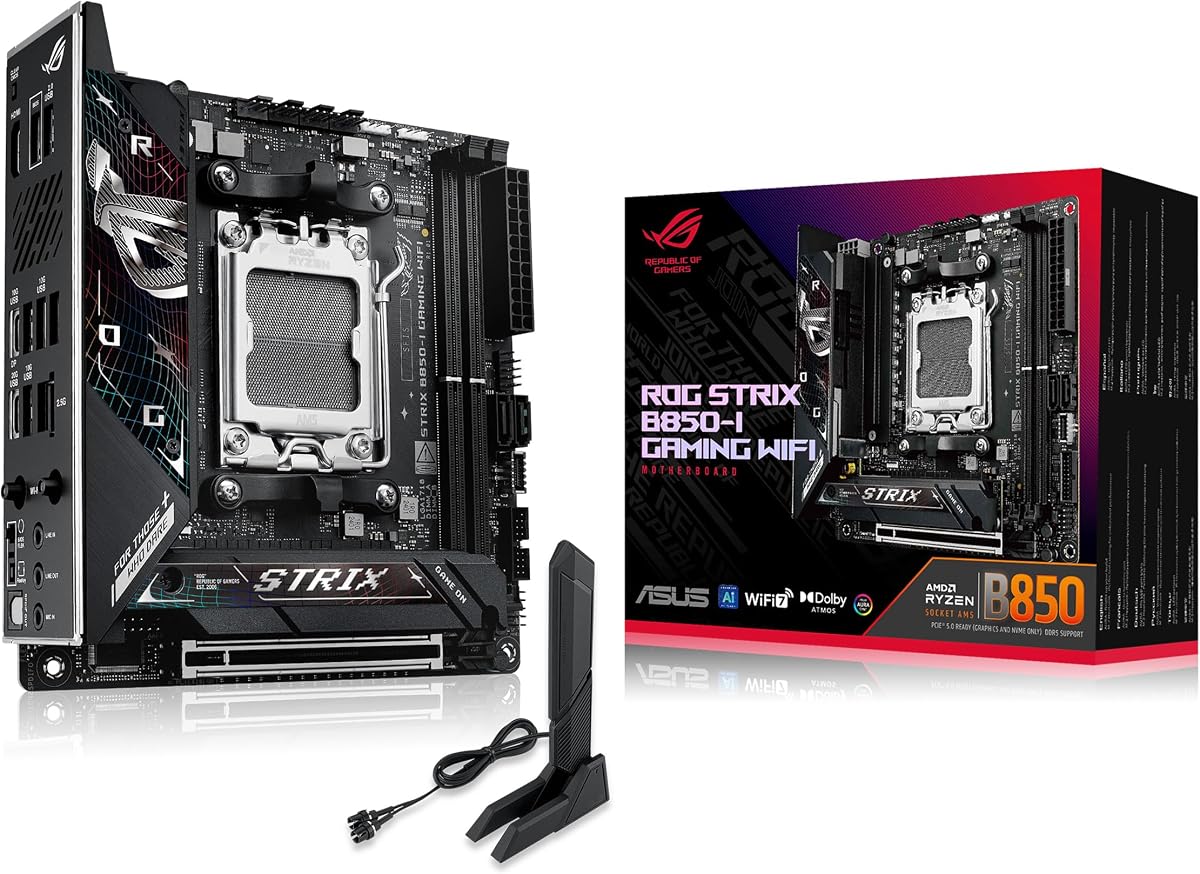
4. ASUS ROG Strix B850-I - Best ROG B850 Compact

ASUS ROG Strix B850-I Gaming WiFi

ASUS ROG Strix B850-I Gaming WiFi

8.4/10★★★★☆

The ASUS ROG Strix B850-I Gaming WiFi is the board you buy when the Mini-ITX PC still needs to feel like a gaming desktop, not a compromise appliance. It targets AMD’s AM5 socket for Ryzen 9000, 8000, and 7000 processors and packs a 10+2+1 power solution rated for up to 70A per stage with ProCool power connectors. In a sandwich case or low-volume cube, that VRM story matters more than RGB slogans: sustained all-core loads and long gaming sessions punish weak power delivery, and ROG’s heatsink-plus-integrated-I/O-cover approach is designed to keep MOSFET temperatures from becoming the silent frame-time killer.

  • AM5 B850 Mini-ITX, Ryzen 9000/8000/7000 ready
  • 10+2+1 stages up to 70A, dual PCIe 5.0 M.2
  • WiFi 7, 2.5G LAN, USB 20Gbps Type-C
Check Price →
✓ Pros
  • ROG feature stack with AI Overclocking, AI Networking II, and AEMP on a true Mini-ITX footprint
  • 10+2+1 power design with ProCool connectors and substantial heatsinks plus integrated I/O cover
  • Two onboard PCIe 5.0 M.2 slots keep storage future-facing without sacrificing the GPU lane
  • WiFi 7 and 2.5G LAN cover modern apartments and multi-gig home networks
  • Aura Sync and USB 20Gbps Type-C suit show builds and fast external docks
✕ Cons
  • ROG branding and feature density can be overkill if you only need a quiet office cube
  • Two DIMM slots still demand careful kit selection for high EXPO profiles in SFF
  • Heatsink and I/O cover height can conflict with the thickest low-profile coolers

Detailed review

Storage is unusually forward-looking for a 170 mm board. Two onboard PCIe 5.0 M.2 slots mean you can run a flagship Gen5 boot drive and still keep a second ultra-fast NVMe for scratch, capture, or game libraries without immediately resorting to adapter gymnastics. One slot sits under a large heatsink to maximize sustained throughput; the other expands capacity when your Steam folder refuses to shrink. Pair that with a PCIe 5.0 x16 graphics path and you have a compact platform that will not feel obsolete the moment the next GPU generation lands—assuming your case and cooler clearances cooperate.

Networking and I/O match the Strix brief. WiFi 7 and 2.5G LAN cover both wireless living-room placement and wired multi-gig home labs. USB 20Gbps Type-C on the rear makes docking a portable SSD or phone less painful than legacy Gen1 ports. ASUS layers AI Advisor, AI Overclocking, AI Networking II, and AEMP on top so first-time AM5 builders can chase better clocks and memory training without living in a spreadsheet. Aura Sync is there if the case window is the point of the build; ignore it if stealth black is the goal.

Thermals and layout are the real SFF filters. The massive heatsinks and integrated I/O cover improve VRM and SSD temperatures, but they also steal vertical space that some dual-tower coolers or thick AIO tubes want. Measure your case’s CPU cooler height and GPU length before you commit. Memory clearance with tall heat spreaders is another classic Mini-ITX gotcha—low-profile or mid-height DDR5 kits usually behave better than showroom skyscrapers when the GPU sits millimeters away.

Who should buy this board? Gamers and creators building AM5 cubes who want ROG software, WiFi 7, and dual Gen5 M.2 without stepping up to X870. Who should skip it? Pure silent HTPC builders who will never touch AI Overclocking, or anyone still on AM4 who would rather keep DDR4. Relative to the MSI MPG B850I Edge TI, the Strix leans harder into ASUS ecosystem tools and dual Gen5 storage; relative to the ROG X870-I, it trades USB4 and the higher 110A stage rating for a B850-focused feature set that still covers most 2026 gaming builds.

Setup tips: update the BIOS before installing a brand-new Ryzen if the board’s out-of-box support is unclear, enable EXPO only after a clean POST, and verify M.2 heatsink screws are snug but not crushing the drive. If you plan a custom loop or thick AIO, mock-fit tubes before final cable routing—ITX builds punish improvisation after the side panel is already on.

Who it is for

Choose the Strix B850-I if you want a ROG-branded AM5 Mini-ITX board with WiFi 7, dual PCIe 5.0 M.2, and AI-assisted tuning helpers in a gaming or creator cube. It fits builders who value Aura Sync aesthetics and ASUS Armoury Crate workflows, and who already own or plan a Ryzen 7000/8000/9000 CPU with a quality low-profile or compact AIO cooler.

Cooler and case checklist

Confirm CPU cooler height against the board’s heatsink stack, check GPU clearance with your chosen DDR5 kit, and make sure the case supports Mini-ITX with a rear I/O cutout that matches the integrated shield. If you run two Gen5 SSDs, prioritize airflow across the primary M.2 heatsink—Gen5 drives can idle warm in sealed SFF shells.

Versus nearby picks

Against the MSI B850I Edge TI, the Strix offers a stronger dual Gen5 M.2 story and ROG software; MSI answers with 5Gb LAN and a higher listing rating. Against the ASRock B850i Lightning, you gain WiFi 7 instead of WiFi 6E and a more polished heatsink presentation, while ASRock counters with 110A SPS stages and Killer LAN for latency-focused players.

Check Price on Amazon →

We may earn a commission at no additional cost to you.

6. ASRock B850i Lightning - Best Lightning Power Density

ASRock B850i Lightning WiFi

ASRock B850i Lightning WiFi

8/10★★★★☆

ASRock’s B850i Lightning WiFi is the power-density play in this Mini-ITX pack. The 170×170 mm board supports Ryzen 9000, 8000, and 7000 series CPUs on AM5 and leads with a 10+1+1 phase design using 110A Smart Power Stages. That is serious current delivery for a board that has to share space with a GPU, two DIMMs, and whatever slim cooler you can fit. If your plan includes a high-core Ryzen in a sandwich case, Lightning’s VRM story is the reason to shortlist it before prettier logos win the shopping cart.

  • AM5 B850 Mini-ITX, 10+1+1 110A SPS VRM
  • DDR5 to 8200+ OC, Gen5 + Gen4 M.2
  • Killer 2.5G LAN, WiFi 6E, BIOS Flashback
Check Price →
✓ Pros
  • 10+1+1 phase design with 110A Smart Power Stage density rare on Mini-ITX
  • DDR5 overclocking headroom up to 8200+ OC with dual-channel 128GB capacity claims
  • Blazing Gen5 and Hyper Gen4 M.2 slots cover boot plus library storage
  • Killer 2.5G LAN plus WiFi 6E and Bluetooth for competitive and apartment networking
  • BIOS Flashback and HDMI plus USB-C DisplayPort Alt Mode ease first boots and displays
✕ Cons
  • WiFi 6E trails WiFi 7 boards if your router already moved to the newest standard
  • Compact layout still requires a compatible SFF case and careful cooler measurement
  • Listing rating sits mid-pack, so early firmware patience may be part of ownership

Detailed review

Memory and graphics lanes match enthusiast expectations. Two DDR5 DIMMs support dual-channel configurations and extreme overclocked speeds up to 8200+ OC, with capacity headroom advertised up to 128GB for creators who keep virtual machines and large datasets local. The PCIe 5.0 x16 slot is ready for next-generation graphics cards, which matters in Mini-ITX because you rarely get a second x16 to fall back on. Storage splits into a Blazing M.2 PCIe Gen5x4 path and a Hyper M.2 PCIe Gen4x4 path—fast boot plus fast secondary without pretending every slot is Gen5.

Networking is a Killer 2.5G LAN and WiFi 6E plus Bluetooth package. That combination still wins for many apartments and dorms, especially if your router is WiFi 6E rather than WiFi 7. Competitive players who like Killer’s prioritization features will feel at home; households already on WiFi 7 mesh gear may prefer the MSI Edge TI or ROG boards instead. Display flexibility includes HDMI and USB Type-C with DisplayPort Alt Mode, useful for iGPU troubleshooting or dual-monitor office cubes before a discrete GPU ships.

USB connectivity includes a USB 3.2 Gen2 Type-C port that can reach very high bandwidth with selected processors, plus multiple USB 3.2 Gen2 Type-A ports for peripherals. BIOS Flashback remains the unsung hero of AM5 Mini-ITX ownership: update firmware with a USB stick and a button even when the CPU is not yet seated. ASRock also reminds buyers—correctly—that Mini-ITX demands a compatible chassis and cooler clearance check before purchase. That note is not legal filler; it is the difference between a clean build and a return label.

Tradeoffs are honest. You do not get WiFi 7 here, and the overall Amazon rating is more reserved than MSI’s Edge TI. Feature naming is classic ASRock marketing, but the underlying silicon choices are coherent for a compact gaming PC. If you want maximum amp-per-square-millimeter and Killer LAN without paying for ROG theater, this board belongs in the final three. If you insist on WiFi 7 and 5Gb Ethernet on day one, look at the MSI MPG B850I Edge TI instead.

Build advice: seat the Gen5 SSD in the primary slot with its thermal plan figured out first, run a conservative EXPO profile before chasing 8200 MT/s screenshots, and keep a USB stick with the latest BIOS in the same drawer as your spare M.2 screws. Lightning rewards builders who treat Mini-ITX like engineering, not impulse shopping.

Ideal builder profile

Pick the B850i Lightning if you want AM5 Mini-ITX with unusually stout 110A SPS power stages, Killer 2.5G LAN, and a Gen5-plus-Gen4 M.2 split. It suits competitive gamers and compact workstation owners who already own WiFi 6E networking and care more about VRM headroom than WiFi 7 branding.

Setup notes

Use BIOS Flashback when installing a brand-new Ryzen SKU, verify your case supports Mini-ITX mounting and rear I/O, and double-check USB-C DisplayPort Alt Mode cables if you rely on the Type-C video output for a secondary screen. Give memory training time on first boot—AM5 ITX boards can sit in training loops longer than ATX boards.

Check Price on Amazon →

We may earn a commission at no additional cost to you.

7. ASRock B650I Lightning - Best B650 Compact Value

ASRock B650I Lightning WiFi

ASRock B650I Lightning WiFi

8.2/10★★★★☆

The ASRock B650I Lightning WiFi is the sensible AM5 Mini-ITX bridge for builders who do not need every B850 checkbox. It keeps the 170×170 mm footprint, supports Ryzen 9000, 8000, and 7000 processors, and uses an 8+2+1 phase design with premium Dr.MOS components. That is enough for mainstream and upper-mainstream Ryzen chips in well-ventilated SFF cases, especially if you prioritize efficiency and thermals over chasing the last percent of overclocking bragging rights.

  • AM5 B650 Mini-ITX, Ryzen 9000/8000/7000
  • 8+2+1 Dr.MOS, DDR5 7200+ OC, dual M.2
  • 2.5G LAN, WiFi 6E, BIOS Flashback
Check Price →
✓ Pros
  • Mature B650 Mini-ITX path that still officially supports Ryzen 9000/8000/7000
  • 8+2+1 Dr.MOS power design balances efficiency and stability in small cases
  • PCIe 5.0 M.2 plus PCIe 4.0 M.2 and two SATA ports for flexible storage mixes
  • Phantom Gaming 2.5G LAN, Intel WiFi 6E, and USB Type-C front/rear convenience
  • BIOS Flashback and Auto Driver Installer reduce first-week friction
✕ Cons
  • 8+2+1 stages trail the beefiest B850 Lightning and MSI Edge TI power designs
  • WiFi 6E and B650 feature set feel a generation behind WiFi 7 B850 competitors
  • DDR5 7200+ OC ceiling is strong but not the pack’s extreme memory headline

Detailed review

Memory support lands at dual DDR5 DIMMs optimized for overclocked speeds up to 7200+ OC in dual-channel mode. That covers the sweet spot where most Ryzen desktop kits actually live day to day. Storage is thoughtfully split: a Blazing M.2 PCIe 5.0 x4 slot for a fast NVMe boot drive, a PCIe 4.0 M.2 companion, and two SATA3 ports for archival disks or optical leftovers in larger Mini-ITX cases that still hide a 2.5-inch bay. Few compact boards bother to remain this flexible once M.2 takes over the marketing slides.

Connectivity includes Phantom Gaming 2.5G LAN, Intel WiFi 6E, and multiple USB 3.2 Gen2 ports with front and rear Type-C options depending on case headers. Audio uses Realtek ALC897 with Nahimic enhancements—fine for headsets and desktop speakers, not a substitute for a dedicated DAC if you are an audiophile. BIOS Flashback and ASRock’s Auto Driver Installer are the quality-of-life pair that make first builds less miserable when Windows still needs chipset and LAN drivers before Wi-Fi feels alive.

Where this board sits in 2026 is important. B650 Mini-ITX remains a valid AM5 choice, especially if you find strong street availability or already standardized on B650 BIOS familiarity. It will not win a pure feature war against WiFi 7 B850 boards with 5Gb LAN, and the VRM is not the 110A Lightning sibling. Treat it as the compact workhorse: capable, cooler-friendly in many cases, and honest about what a mainstream chipset can deliver without pretending to be an X870 showcase.

Buy the B650I Lightning if you want AM5 Mini-ITX value with Gen5 boot storage, WiFi 6E, and SATA flexibility for a home office cube or LAN PC. Skip it if WiFi 7, USB4, or maximum VRM amp ratings are non-negotiable—those paths lead to the MSI Edge TI, ROG X870-I, or B850i Lightning. For many Ryzen 5 and Ryzen 7 SFF builds, this board is still the quieter financial decision without stranding you on an obsolete socket.

Practical tip: enable EXPO after confirming stability at JEDEC defaults, mount the Gen5 SSD with its thermal pad making full contact, and keep SATA cables routed away from GPU intake if your case sandwiches components. Mini-ITX cable chaos is self-inflicted more often than motherboard-inflicted.

Who should choose B650I

This board fits AM5 Mini-ITX builders who want Ryzen 7000/8000/9000 support, a Gen5 M.2 boot path, and WiFi 6E without stepping into flagship B850/X870 pricing tiers. It is especially practical for compact productivity PCs that still deserve a discrete GPU and a clean 2.5G wired link.

Versus the B850i Lightning

The B850i Lightning adds a stronger 110A SPS VRM story, higher DDR5 OC marketing, and B850 chipset positioning. The B650I Lightning answers with a simpler power design, still-relevant feature set, and often a more approachable place in a balanced parts list. Pick B850i for heavy CPUs in hot cases; pick B650I when thermals and budget discipline matter more.

Check Price on Amazon →

We may earn a commission at no additional cost to you.

1. MSI MPG B850I Edge TI - Best Overall Mini-ITX

MSI MPG B850I Edge TI WiFi

MSI MPG B850I Edge TI WiFi

8.8/10★★★★☆

The MSI MPG B850I Edge TI WiFi earns Best Overall in this roundup because it balances the three things Mini-ITX builders actually fight about: power delivery, memory and GPU readiness, and networking that does not feel like a laptop leftover. It supports AMD Ryzen 9000, 8000, and 7000 processors on AM5 with a Direct 8-phase 90A SPS VRM and Core Boost architecture on the B850 chipset. That is a credible answer for high-performance Ryzen chips living inside cases that barely clear a low-profile cooler.

  • AM5 B850 Mini-ITX, 8-phase 90A SPS VRM
  • DDR5 8200+ OC, Gen5 + Gen4 M.2, PCIe 5.0
  • Wi-Fi 7, Bluetooth 5.4, 5Gbps LAN
Check Price →
✓ Pros
  • Highest listing rating in this pack with a coherent MPG B850 Mini-ITX feature set
  • Direct 8-phase 90A SPS VRM plus Frozr Guard thermal pads and extended heatsink
  • DDR5 Memory Boost to 8200+ MT/s OC and PCIe 5.0 x16 with Steel Armor II
  • Gen5 and Gen4 M.2 pair covers modern storage without adapter clutter
  • Wi-Fi 7, Bluetooth 5.4, and rare 5Gbps LAN elevate compact networking
✕ Cons
  • MPG styling and dense I/O can feel busy in ultra-minimal HTPC themes
  • Two DIMM slots still punish poorly chosen high-profile memory kits
  • Combo fan header flexibility helps, but case airflow remains your responsibility

Detailed review

MSI’s Frozr Guard package shows they expect heat. Premium 7W/mK MOSFET thermal pads, extra choke pads, an extended heatsink, and M.2 Shield Frozr target the two failure modes of SFF boards: VRM heat soak and SSD thermal throttling. A combo-fan header rated for pump and system use gives AIO and case-fan flexibility when header count is otherwise brutal on Mini-ITX. These are not brochure ornaments; they are the difference between a Ryzen that holds boost and one that quietly steps down after twenty minutes of a game plus Discord plus Chrome.

Memory and expansion are enthusiast-leaning. Two DDR5 SMT DIMM slots enable extreme Memory Boost speeds for 1DPC 1R configurations up to 8200+ MT/s OC, while a PCIe 5.0 x16 SMT slot with Steel Armor II supports modern graphics cards at full bandwidth claims. Storage includes one M.2 Gen5 x4 slot and one M.2 Gen4 x4 slot—exactly the boot-plus-library split most compact gamers need. You will not turn this into a twelve-drive NAS, and that is fine; Mini-ITX gaming boards should specialize.

Connectivity is where Edge TI pulls ahead of several pack peers. A full-speed Wi-Fi 7 module with Bluetooth 5.4 pairs with 5Gbps LAN—multi-gig wired networking that still feels rare on ITX. Rear USB Type-C at 20Gbps and Audio Boost 5 with S/PDIF support round out a creator-friendly rear panel. If your apartment already has multi-gig switching or you edit off a NAS, that 5G LAN is not trivia; it is weekday workflow.

Why it beats nearby ROG and AORUS options for most people: the feature mix is modern without forcing USB4 tax, the thermal story is explicit, and the listing rating is the strongest signal in this set. The ASUS Strix B850-I may appeal more to ROG loyalists with dual Gen5 M.2, and the ROG X870-I remains the premium connectivity flex, but Edge TI is the board we would actually recommend first for a 2026 AM5 gaming cube.

Build notes: enable Memory Boost or EXPO only after a clean baseline POST, seat the Gen5 drive under Shield Frozr carefully, and plan GPU cable routing before the side panel test fit. If you run a thick 240 mm AIO in a dual-chamber Mini-ITX case, confirm the combo header configuration in MSI’s manual so pump speed does not share an awkward curve with noisy case fans.

Skip Edge TI only if you need onboard USB4 from X870, an AM4 DDR4 cost-down path, Intel LGA1700, or a soldered low-power NAS CPU. Everyone else shopping Mini-ITX AM5 for gaming should start here, then justify moving up or sideways with a specific port or aesthetic requirement.

Who it is for

Buy the MPG B850I Edge TI if you want the most complete everyday AM5 Mini-ITX gaming board in this pack: strong 90A SPS VRM, Wi-Fi 7, 5Gb LAN, Gen5 storage, and thermal padding that acknowledges SFF reality. It fits living-room PCs, LAN cubes, and compact creator desks that still run a full-size GPU.

Versus ROG Strix B850-I

MSI wins on 5Gb LAN and the overall rating signal; ASUS wins on dual onboard PCIe 5.0 M.2 and ROG AI tooling. Choose MSI for networking-forward builds and ASUS if Aura Sync plus dual Gen5 SSDs are the non-negotiables.

Memory and cooler tips

Prefer proven Ryzen DDR5 kits in the mainstream EXPO range before chasing 8200 MT/s screenshots. Keep cooler height honest against the extended heatsink, and avoid the tallest RGB memory if your GPU sits in a raised ITX riser orientation that crowds the DIMMs.

Check Price on Amazon →

We may earn a commission at no additional cost to you.

2. ASUS ROG STRIX X870-I - Best Premium Flagship

ASUS ROG STRIX X870-I Gaming WiFi

ASUS ROG STRIX X870-I Gaming WiFi

8.2/10★★★★☆

The ASUS ROG STRIX X870-I Gaming WiFi is the premium Mini-ITX statement in this pack: AM5 for Ryzen 7000, 8000, and 9000 series, framed for advanced AI PC workloads, and powered by a 10+2+1 solution rated for 110A per stage with ProCool II connectors, alloy chokes, and durable capacitors. If you are putting a high-core Ryzen into a showcase cube and refuse to feel second-class versus an ATX ROG board, this is the intentional spend.

  • AM5 X870 Mini-ITX, 10+2+1 110A stages
  • USB4, WiFi 7, dual M.2, PCIe 5.0
  • Dynamic OC Switcher, Core Flex, AI tools
Check Price →
✓ Pros
  • X870 Mini-ITX flagship with 10+2+1 stages rated 110A and ProCool II connectors
  • USB4 and WiFi 7 future-proof docks, eGPU paths, and high-speed peripherals
  • ROG overclocking stack: Dynamic OC Switcher, Core Flex, Asynchronous Clock, PBO Enhancement
  • AI Overclocking, AI Cooling II, AI Networking, and AEMP reduce SFF tuning busywork
  • Dual M.2 and PCIe 5.0 keep storage and graphics on modern generational rails
✕ Cons
  • Premium positioning can exceed needs for casual 1080p gaming cubes
  • Feature density and ROG software may annoy builders who want a set-and-forget board
  • Cooler and case clearance remain stricter than mid-tower X870 ATX equivalents

Detailed review

ASUS loads the Strix overclocking toolkit unusually deep for ITX. Dynamic OC Switcher, Core Flex, Asynchronous Clock, and PBO Enhancement give enthusiasts levers that matter when case airflow is imperfect and voltage efficiency becomes free performance. AI Overclocking, AI Cooling II, AI Networking, and AEMP sit on top for builders who want assisted tuning rather than manual curve scraping. That dual personality—enthusiast controls plus AI helpers—is classic ROG, and it travels surprisingly well to Mini-ITX where every degree and watt is visible in fan noise.

Connectivity is the other reason to step up from B850. USB4 transforms docking and high-speed external device workflows; WiFi 7 keeps wireless on the newest standard; dual M.2 and PCIe 5.0 cover internal storage and graphics. Q-Release Slim is a quality-of-life gift the first time you need to pull a GPU from a cramped sandwich case without wrestling a conventional latch. These details sound minor in a bullet list and feel major the night you are troubleshooting a build on the dining table.

Compared with the MSI B850I Edge TI, the X870-I is the board you choose when USB4 and ROG’s higher-end OC stack justify the premium. Compared with the GIGABYTE X870I AORUS PRO ICE, ROG leans into software and overclocking theater while AORUS ICE leans into white aesthetics, EZ-Latch DIY helpers, and a five-year warranty pitch. Neither is wrong; they sell different identities of the same chipset class.

Thermals still rule. A 110A-rated stage design does not free you from airflow—Mini-ITX GPU exhaust can cook VRMs if the case is a sealed sculpture. Pair this board with a cooler that clears the ROG armor, prefer memory kits with known AM5 ITX clearance, and do not bury M.2 drives under poorly contacting shields. If your workload is light office duty, this board is luxurious overkill; if you stream, create, and game in one small chassis, the headroom is the point.

Buy it for flagship AM5 Mini-ITX with USB4 and ROG tuning depth. Skip it if B850 WiFi 7 boards already cover your ports, or if you are happier on AM4 DDR4 economics. First-boot ritual: BIOS update via the recommended ASUS method, EXPO enablement after stability, and a quick Armoury Crate decision—install what you need, disable what you do not, and keep the cube quiet.

Who should pay for X870-I

Creators and enthusiasts who need USB4, want ROG’s Dynamic OC Switcher and Core Flex tools, and are building a long-stay AM5 Mini-ITX showcase. It is also a strong pick if your desk workflow depends on high-speed docks and you refuse to add a separate Thunderbolt add-in card that Mini-ITX cannot spare a slot for.

Versus MSI Edge TI

Edge TI wins everyday value with 5Gb LAN and a higher rating; X870-I wins premium connectivity and ROG overclocking depth. If you cannot name a USB4 device you own, Edge TI is probably the smarter cart. If USB4 is already in your laptop-dock life, X870-I feels like continuity.

Check Price on Amazon →

We may earn a commission at no additional cost to you.

5. GIGABYTE X870I AORUS PRO ICE - Best White Aesthetic

GIGABYTE X870I AORUS PRO ICE

GIGABYTE X870I AORUS PRO ICE

8/10★★★★☆

GIGABYTE’s X870I AORUS PRO ICE is the aesthetic flagship for builders who refuse to let Mini-ITX mean all-black stealth forever. It supports Ryzen 9000, 8000, and 7000 series CPUs on AM5, pairs DDR5 with AMD EXPO support across two DIMMs, and uses an 8+2+1 design with 110A Smart Power Stages. That power recipe is competitive for high-performance Ryzen chips in cubes and sandwich cases, especially when paired with the board’s DIY-friendly latch features that make M.2 and PCIe swaps less nail-biting.

  • AM5 X870 Mini-ITX, Ryzen 9000/8000/7000
  • 8+2+1 110A SPS, dual M.2, PCIe 5.0
  • WiFi 7, 2.5GbE, EZ-Latch, 5-year warranty
Check Price →
✓ Pros
  • White ICE aesthetic that actually fits modern white SFF theme builds
  • AM5 X870 Mini-ITX with 8+2+1 110A Smart Power Stage design
  • WiFi 7, 2.5GbE, dual M.2, PCIe 5.0, and front/rear USB-C convenience
  • EZ-Latch, Wi-Fi EZ-Plug, and EZ-Debug Zone reduce DIY friction
  • Five-year warranty pitch adds ownership confidence uncommon in compact boards
✕ Cons
  • Listing rating is mid-pack versus MSI’s stronger review signal
  • White theme boards show dust and cable tint more than black stealth boards
  • 2.5GbE trails 5Gb LAN found on the MSI Edge TI for multi-gig power users

Detailed review

Connectivity covers the 2026 checklist without shouting every buzzword twice: PCIe 5.0, two M.2 slots, front and rear USB-C, WiFi 7, and 2.5GbE LAN. For many homes, 2.5Gb Ethernet remains the practical wired sweet spot—faster than gigabit, widely available on NAS boxes and switches. WiFi 7 keeps the wireless side current when the PC lives across the room from the router. The ICE colorway is the differentiator versus otherwise similar X870 ITX ideas: white builds photograph better and match popular white GPU and case ecosystems.

GIGABYTE’s EZ toolkit is genuinely useful on Mini-ITX. M.2 EZ-Latch and PCIe EZ-Latch reduce screwdriver drama in cramped interiors. Wi-Fi EZ-Plug simplifies antenna module installation. EZ-Debug Zone helps when the first power-on is a black screen and you need a quick breadcrumb. Combined with a five-year warranty pitch, the ownership story feels more premium than the raw rating alone suggests.

Where it sits versus ROG X870-I is mostly philosophy. ROG sells overclocking software depth and USB4 swagger; AORUS ICE sells clean white design, latch conveniences, and warranty confidence. Versus MSI’s B850I Edge TI, you step up chipset class and aesthetics while MSI may still win on 5Gb LAN and community rating momentum. Choose ICE when the finished PC’s look is part of the product, not an afterthought.

Practical caveats: white plastics and shrouds show dust, and cable sleeving color choices become visible in photo builds. Thermals still depend on case airflow—110A SPS stages help, but a sealed show case can undo good VRM design. Memory EXPO profiles should be validated under your cooler’s noise target, not only in a bench harness with unlimited intake.

Buy AORUS PRO ICE for a white AM5 X870 Mini-ITX showpiece with modern networking and DIY latches. Skip it if you prefer black ROG styling, need 5Gb LAN specifically, or are happier saving for GPU budget on a B850 board. Assembly tip: install antennas and M.2 drives before the GPU riser cable locks you out of half the board.

Theme-build fit

ICE is for white or silver SFF themes—bright interiors, white coolers, and pale cable kits. If your case is tinted glass over a black interior, a black B850 board may hide better and free budget for the GPU.

Warranty and DIY angle

The five-year warranty messaging and EZ-Latch features make this a friendlier X870 ITX pick for builders who upgrade SSDs and GPUs often. Keep proof of purchase organized; long warranties only help when paperwork is boringly complete.

Check Price on Amazon →

We may earn a commission at no additional cost to you.

3. GIGABYTE B550I AORUS PRO AX - Best AM4 Compact

GIGABYTE B550I AORUS PRO AX

GIGABYTE B550I AORUS PRO AX

8.6/10★★★★☆

The GIGABYTE B550I AORUS PRO AX remains one of the most sensible Mini-ITX answers if you are still on AM4—or intentionally staying there. It supports Ryzen 5000, 4000, and 3000 series processors, uses DDR4 across two DIMMs with Extreme Memory Profile support, and pairs a pure digital direct power design with an 8-layer PCB and premium chokes and capacitors. In 2026 that reads as mature rather than outdated: AM4 CPUs are widely available, DDR4 kits are easy to source, and the platform’s quirks are well documented.

  • AM4 B550 Mini-ITX, Ryzen 5000/4000/3000
  • Digital power, VRM heatsink + backplate
  • WiFi 6, 2.5GbE, dual M.2, PCIe 4.0
Check Price →
✓ Pros
  • Battle-tested AM4 Mini-ITX platform for Ryzen 5000/4000/3000 with mature BIOS support
  • DDR4 keeps memory kits affordable and plentiful for compact gaming upgrades
  • Extended VRM heatsink, aluminum backplate, and reinforced PCIe armor suit SFF heat
  • WiFi 6, 2.5GbE, USB-C, dual M.2, and Q-Flash Plus cover real builder needs
  • Strong listing rating reflects years of community validation in small cases
✕ Cons
  • AM4 is not the long upgrade runway that AM5 offers into future Ryzen generations
  • DDR4 and WiFi 6 trail DDR5 plus WiFi 7 feature sets on newer boards
  • PCIe 4.0 focus is still excellent for current GPUs but not a Gen5 storage showcase

Detailed review

Thermals and structure are why this board earned a lasting reputation. An extended VRM heatsink and aluminum backplate improve heat spreading in cases that cook motherboards from GPU blowback. The integrated I/O shield speeds assembly. A reinforced PCIe 4.0 x16 slot with UD Armor supports modern graphics cards that still dominate Mini-ITX gaming at 1440p and 1080p. Storage includes a PCIe 4.0 M.2 slot and a PCIe 3.0 M.2 slot—fast enough for snappy boots and game libraries without demanding Gen5 SSD pricing.

Networking and ports stay practical: WiFi 6, 2.5GbE LAN, USB 3.2 Gen 2 Type-C and Type-A, plus additional Gen 1 ports for everyday peripherals. Q-Flash Plus, WiFi EZ-Plug, and RGB Fusion complete the AORUS convenience set. None of this is flashy next to WiFi 7 AM5 flagships, and that is the point—this board exists so a Ryzen 5 5600 or Ryzen 7 5800X3D compact PC can still feel premium without a platform tax.

Who should buy it in 2026? Anyone with AM4 CPUs and DDR4 already on the shelf, LAN-party builders chasing frames-per-dollar, and SFF enthusiasts who know their case ecosystem around B550I. Who should skip it? Builders starting fresh who want years of Ryzen CPU upgrades on one socket—those shoppers should move to AM5 boards in this same roundup. The B550I is a brilliant hold-and-optimize choice, not a clean-sheet future platform.

Versus the AM5 options, you trade upgrade runway for cost efficiency and known thermal behavior. Versus the Intel H610M-ITX/eDP, you stay in the AMD gaming mainstream rather than embedded or panel-PC use cases. Versus the onboard NAS board, you keep a proper desktop CPU socket and discrete GPU path for actual gaming.

Build advice: update BIOS with Q-Flash Plus if your Ryzen 5000 chip needs it, enable XMP carefully with tight ITX memory clearances, and leverage the backplate as a reminder to manage cable pressure against the board’s rear. This platform rewards tidy builds and punishes stacked adapters—keep M.2 simple and let the GPU breathe.

When AM4 still wins

Stay on B550I if you already own a strong Ryzen 5000 CPU, have DDR4 kits, and want a compact gaming PC without migrating platforms. It is also ideal for secondary PCs—LAN boxes, living-room gaming, or a kid’s first serious desktop—where AM5 spend belongs elsewhere.

Upgrade honesty

AM4’s runway is shorter in 2026. If your next CPU purchase is a Ryzen 9000 chip, do not force this board into the plan—buy AM5 Mini-ITX instead. If your next purchase is a better GPU and a quieter cooler, B550I can still be the right motherboard for another season or two.

Versus ASRock H610M-ITX/eDP

Choose B550I for AMD gaming with discrete GPUs and WiFi 6 plus 2.5GbE. Choose the H610M board for Intel 12th–14th Gen office or embedded panel projects that need eDP and more SATA ports rather than X3D gaming priorities.

Check Price on Amazon →

We may earn a commission at no additional cost to you.

8. ASRock H610M-ITX/eDP - Best Intel Embedded SFF

ASRock H610M-ITX/eDP

ASRock H610M-ITX/eDP

8.6/10★★★★☆

The ASRock H610M-ITX/eDP is the pack’s Intel and embedded specialist. It supports 14th, 13th, and 12th Gen Intel Core processors on LGA1700 in a true Mini-ITX footprint aimed at SFF builds, digital signage, and custom panel systems. If your project is an all-in-one style PC, a kiosk, or a quiet office cube with an internal display panel, the dedicated eDP 1.4 connector is the feature that makes this board exist when gaming ITX boards look past industrial needs.

  • LGA1700 H610 Mini-ITX, 12th–14th Gen Intel
  • DDR4, PCIe 4.0 x16, Ultra M.2, 4x SATA
  • eDP 1.4, HDMI, DP, Intel GbE, Wi-Fi 5
Check Price →
✓ Pros
  • LGA1700 Mini-ITX support for 12th, 13th, and 14th Gen Intel Core CPUs
  • Unique eDP 1.4 connector enables panel PCs, AIOs, and embedded displays
  • HDMI 2.1, DisplayPort 1.4, and eDP create flexible multi-display options
  • Four SATA ports plus Ultra M.2 suit storage-heavy small office builds
  • 6-phase Digi Power with 50A Dr.MOS targets efficient compact Intel systems
✕ Cons
  • H610 chipset and Wi-Fi 5 trail gaming-focused B850/X870 feature sets
  • DDR4 and PCIe 4.0 focus is practical but not a bleeding-edge showcase
  • Not the first pick for high-refresh AMD gaming cubes chasing WiFi 7

Detailed review

Power delivery is a 6-phase Digi Power design with 50A Dr.MOS—appropriate for efficient Intel SFF systems rather than extreme overclocking. Dual DDR4 DIMMs support dual-channel configurations up to 3200MHz with XMP 2.0, and ECC UDIMMs can operate in non-ECC mode for certain workstation quirks. That memory story keeps costs predictable and kits easy to source, especially for business refreshes still standardized on DDR4.

Expansion and storage are unusually practical for ITX: a PCIe 4.0 x16 slot for a GPU when needed, one Ultra M.2 slot supporting PCIe Gen3x4 and SATA3 modes, and four SATA3 ports for multi-drive office storage. Triple display outputs—HDMI 2.1 at 4K 60Hz, DisplayPort 1.4 up to 8K 60Hz with compatible CPUs, plus eDP—enable creative multi-monitor or panel configurations. Networking pairs Intel Gigabit LAN with 802.11ac Wi-Fi and Bluetooth 5.1; note that CNVi Bluetooth can share bandwidth with a rear USB 2.0 port, a classic Intel platform detail worth reading before you count ports.

This is not a substitute for the MSI Edge TI or ROG X870-I if your goal is a Ryzen gaming showpiece. It is the correct tool when Intel CPU preference, panel integration, or SATA count matter more than WiFi 7. ASRock’s Super Alloy language—premium chokes, sapphire black PCB, high-density glass fabric—signals durability for always-on embedded duty more than RGB nightlife.

Buy it for Intel SFF office PCs, signage, lab nodes, and custom display projects. Skip it for AM5 gaming upgrades, WiFi 7 living-room PCs, or anyone who needs dual 2.5GbE and eight SATA ports for NAS duty—that is the onboard quad-core board’s job. Verify chassis specs carefully; Mini-ITX is standard, but eDP cabling and panel power are project-specific details Amazon titles cannot solve for you.

Deployment tip: plan display outputs before ordering cables, confirm whether your panel needs additional backlight power beyond eDP signal, and keep Windows driver packs for chipset, LAN, and Wi-Fi offline. Embedded builds often boot in rooms without great internet on day one.

Embedded and panel use cases

The eDP connector is the headline for DIY all-in-ones, industrial panels, and digital signage where a standard HDMI screen is the wrong physical design. Confirm Full HD 60Hz eDP expectations against your panel datasheet before assuming 4K internal displays will just work.

Who should not buy it

High-refresh AMD gamers, WiFi 7 seekers, and DDR5 upgraders should look at the AM5 boards in this guide. H610M-ITX/eDP is a precision tool for Intel compact and embedded work, not a general gaming recommendation.

Check Price on Amazon →

We may earn a commission at no additional cost to you.

9. GIGABYTE B850I AORUS PRO - Solid B850 AORUS Compact

GIGABYTE B850I AORUS PRO

GIGABYTE B850I AORUS PRO

7/10★★★★☆

The GIGABYTE B850I AORUS PRO is the straightforward black B850 Mini-ITX option for AM5 builders who want WiFi 7 and dual M.2 without committing to white ICE styling or ROG software. It supports Ryzen 9000, 8000, and 7000 series CPUs, uses two DDR5 DIMMs, and specifies an 8+2+1 power design with 80A Smart Power Stages. VRM and M.2 thermal guards acknowledge the heat realities of compact cases even when the marketing copy stays short.

  • AM5 B850 Mini-ITX, Ryzen 9000/8000/7000
  • 8+2+1 80A SPS, VRM and M.2 guards
  • WiFi 7, 2.5GbE, dual M.2, PCIe 5.0
Check Price →
✓ Pros
  • AM5 B850 Mini-ITX with Ryzen 9000/8000/7000 support and DDR5 dual-DIMM layout
  • 8+2+1 80A Smart Power Stage design with VRM and M.2 thermal guards
  • WiFi 7, 2.5GbE, USB-C, dual M.2, and PCIe 5.0 for a modern compact checklist
  • EZ-Latch conveniences and a five-year warranty pitch mirror higher AORUS siblings
  • Sensible alternative when Edge TI availability or styling is not the right match
✕ Cons
  • Lowest Amazon rating in this pack—treat early ownership as firmware-aware
  • 80A SPS stages trail the 90A MSI and 110A Lightning/X870 power headlines
  • Feature list is complete but less distinctive than ICE aesthetics or ROG tooling

Detailed review

Connectivity covers PCIe 5.0, two M.2 slots, USB-C, WiFi 7, and 2.5GbE LAN—enough for a modern gaming or creator cube. EZ-Latch features and a five-year warranty pitch align it with GIGABYTE’s broader AORUS convenience story. On paper, that is a clean recommendation. In practice, the listing rating is the weakest in this pack, so we treat the board as capable hardware that may need BIOS updates, careful memory training, or a little community-forum patience depending on your CPU and RAM combination.

How to think about that rating honestly: Mini-ITX AM5 boards can collect early complaints about boot times, EXPO instability, or cooler clearance that are as much ecosystem as PCB. Still, when a board sits at 3.5 while peers sit above 4.0, you should prefer stronger-rated alternatives unless availability or a specific AORUS ecosystem reason pulls you here. If you do buy it, plan a BIOS update path on day one and validate memory at JEDEC before enabling EXPO.

Versus MSI Edge TI, you give up the higher rating signal, 5Gb LAN, and MSI’s Frozr Guard storytelling for a more conventional AORUS PRO package. Versus X870I AORUS PRO ICE, you stay on B850 and typically a black aesthetic instead of white X870 ICE. Versus ASRock B850i Lightning, GIGABYTE offers WiFi 7 while ASRock answers with heavier 110A SPS emphasis and Killer LAN.

We still include it as a legitimate pack product because the spec checklist matches what many SFF buyers ask for in 2026. Just go in with eyes open: prioritize BIOS currency, keep the first memory kit boring and known-good, and ensure your case can cool both the VRM guard zone and the M.2 thermal guard under sustained loads.

Buy it if AORUS PRO features, WiFi 7, and B850 AM5 Mini-ITX availability align and you are comfortable managing firmware. Prefer MSI Edge TI or ASUS Strix B850-I if you want stronger community rating confidence out of the box. Assembly tip: do not skip the M.2 thermal guard contact—fast NVMe drives in ITX shells need that interface more than ATX boards do.

Risk-aware buying advice

If you hate troubleshooting, pick a higher-rated board in this guide first. If you are comfortable flashing BIOS and validating RAM, B850I AORUS PRO can still be a coherent modern Mini-ITX platform with WiFi 7 and dual M.2.

Who it fits anyway

AORUS ecosystem fans building black AM5 cubes, buyers chasing a specific local deal, and SFF gamers who want B850 essentials without ROG branding. Pair it with a proven EXPO kit and a cooler with clear ITX clearance documentation.

Check Price on Amazon →

We may earn a commission at no additional cost to you.

10. Quad-Core Low Power Mini-ITX - Best Onboard NAS Platform

Mini-ITX Quad-Core Low Power Board

Mini-ITX Quad-Core Low Power Board

7.8/10★★★★☆

This Mini-ITX board with an onboard quad-core 8-thread low-power CPU is the odd one in a gaming-heavy pack—and that is why it is valuable. Instead of a desktop socket, you get an 8th-generation U-series style processor story: up to 3.9GHz turbo, 15W TDP class efficiency, and virtualization features with VT-x and VT-d for NAS, firewall, and light lab workloads. It is aimed at people building appliances, not RGB showpieces, and it outperforms the wave of N100/N150 hobby boards when you need more threads for containers or network security stacks.

  • Onboard U-series quad-core 8-thread, 15W TDP
  • Dual 2.5GbE, 8x SATA, 2x M.2 NVMe, DDR4 SO-DIMM
  • HDMI + DP 4K, PCIe x4, included dual-pipe cooler
Check Price →
✓ Pros
  • Soldered low-power quad-core 8-thread CPU with 15W TDP suits always-on NAS duty
  • Dual 2.5GbE LAN ports excel for storage, firewall, and multi-network lab roles
  • Eight SATA ports plus dual M.2 NVMe enable serious home lab disk layouts
  • DDR4 SO-DIMM, HDMI/DP 4K outputs, and PCIe x4 expansion cover appliance builds
  • Includes dual ball-bearing cooler with copper heat pipes for out-of-box thermals
✕ Cons
  • Not a gaming motherboard—no desktop AM5/AM4 socket for high-end Ryzen upgrades
  • Known sleep-mode bug caveat means you should plan power states carefully
  • M.2 lanes at PCIe 3.0 x2 are fine for NAS caches, not Gen5 showcase speeds

Detailed review

Networking is the headline for server duty: dual 2.5GbE RJ45 ports compatible with i226-V class expectations give you clean paths for LAN plus WAN, or storage plus management, without adding a NIC to the limited PCIe x4 Gen3 slot. That slot remains free for a smarter NIC, HBA, or specialty card when your topology demands it. For home labbers, dual multi-gig copper is often worth more than a flashy gaming LAN port you will never fully feed.

Storage flexibility is unusually rich for Mini-ITX: eight SATA 3.0 ports using native and chip-extended controllers, two M.2 NVMe 2280 slots on PCIe 3.0 x2, and DDR4 SO-DIMM slots supporting 2133–3200MHz with up to 32GB per slot. That combination maps to real NAS layouts—boot on NVMe, bulk on SATA arrays—more honestly than a gaming ITX board with two M.2 slots and a couple of SATA connectors. HDMI and DisplayPort dual 4K at 60Hz outputs help during setup even if the finished node lives headless.

The listing includes important honesty notes. A sleep-mode bug may exist on this version, so configure power states deliberately and test wake behavior if you rely on suspend. First boot can take minutes while memory information is read—do not panic-reset too quickly. Power requires both 24-pin and 4-pin connections. A dual ball-bearing cooler with dual copper heat pipes is included, which is welcome on soldered CPU boards where cooler shopping is otherwise awkward.

Do not buy this if you want to game with a Ryzen 7 and a modern discrete GPU in a sandwich case—that is what the AM5 boards are for. Do buy it if you are assembling a quiet NAS, OPNsense-style firewall, media transcoder node, or virtualization appliance that should sip power for years. Compared with the ASRock H610M-ITX/eDP, you gain dual 2.5GbE and far more SATA at the cost of a socketed Intel upgrade path and eDP panel integration.

Deployment advice: validate disks and ECC expectations for your OS, keep firmware and remote access plans realistic without a full BMC, and place the node where dual 2.5GbE cabling is short and clean. Treat the included cooler’s airflow path as sacred—appliance boards fail from dust and heat long before they fail from missing RGB.

Best workloads

Home NAS, firewall and router appliances, lightweight Proxmox labs, and always-on media servers. Virtualization support makes container-heavy homelabs more comfortable than on weaker N-series boards, especially when dual 2.5GbE separates services cleanly.

Known caveats to plan around

Account for the possible sleep-mode bug by preferring full shutdown or tested idle states. Allow extended first-boot memory initialization, confirm 24-pin plus 4-pin power, and size expectations around PCIe 3.0 x2 M.2 bandwidth rather than Gen5 client SSD marketing.

Versus gaming Mini-ITX boards

Gaming AM5 boards win at discrete GPUs, DDR5, and WiFi 7 client features. This board wins at SATA density, dual multi-gig Ethernet, low power, and appliance duty cycles. They are different products that happen to share a screw pattern.

Check Price on Amazon →

We may earn a commission at no additional cost to you.

Best Mini-ITX Motherboards for Compact Builds in 2026

How to Choose a Mini-ITX Motherboard in 2026

Start with socket and platform runway

Pick AM5 if you want Ryzen 7000 through 9000 support and a longer desktop upgrade path. Pick AM4 if you already own Ryzen 3000/5000 parts and DDR4. Pick LGA1700 H610 when Intel office or embedded panel projects matter more than AMD gaming. Pick an onboard low-power CPU board when the motherboard is the appliance—NAS, firewall, lab node—not a gaming socket in disguise.

Platform choice constrains everything else: cooler ecosystem, memory generation, BIOS update habits, and whether next year’s CPU is a drop-in or a new build. Mini-ITX magnifies that decision because swapping motherboards often means redoing riser cables, custom lengths, and case quirks.

Respect VRM and thermals in small cases

On Mini-ITX, VRM stage count and amperage ratings are not abstract. Weak power delivery plus GPU heat soak equals boost clocks that fall off during long sessions. Prefer boards that publish stout SPS or Dr.MOS designs and include real heatsinks or thermal pads—MSI’s Frozr Guard language, ASRock Lightning 110A stages, and ROG’s armored heatsink covers are signals worth reading.

Always mock-fit the cooler. Low-profile air coolers, 120/240 AIOs, and custom loops each collide with different I/O covers and M.2 shields. A board that wins on paper can still lose if your case’s CPU zone is shorter than the cooler stack.

Plan storage before you need adapters

Most gaming Mini-ITX boards offer two M.2 slots with a Gen5 plus Gen4 split. That is enough for boot and games. If you need eight SATA disks, you want the NAS-oriented board, not a ROG Strix. If you need an internal eDP panel, you want the H610M-ITX/eDP. Buy the storage layout that matches the job instead of stacking fragile adapters in a ten-liter shell.

Networking should match the room

WiFi 7 is the forward-looking client standard on MSI and ROG AM5 boards; WiFi 6E remains excellent when your router is still on 6E; WiFi 5 or WiFi 6 is acceptable on office and AM4 boards. Wired side, 2.5GbE is the practical default, 5Gb LAN on the MSI Edge TI is a gift for multi-gig homes, and dual 2.5GbE is the correct answer for firewall and NAS topologies.

Antenna placement matters in metal SFF cases. Route leads to case SMA mounts when available rather than leaving them crumpled behind a GPU.

BIOS helpers and first-boot reality

BIOS Flashback, Q-Flash Plus, and clear debug LEDs save Mini-ITX builds when a new CPU ships ahead of the sticker on the box. Budget five quiet minutes for memory training on AM5. Enable EXPO or XMP only after a clean default POST. Keep a USB stick with firmware in the same bin as spare standoffs—you will need it eventually.

Frequently Asked Questions

01

What is the best Mini-ITX motherboard overall in 2026?

For most AMD gaming and creator cubes in this pack, the MSI MPG B850I Edge TI WiFi is the best overall pick. It combines a credible 90A SPS VRM, Frozr Guard thermal attention, DDR5 Memory Boost headroom, Gen5 plus Gen4 M.2, Wi-Fi 7, and 5Gbps LAN with the strongest listing rating here. Choose the ASUS ROG STRIX X870-I instead if USB4 and deeper ROG overclocking tools are mandatory, or the GIGABYTE B550I AORUS PRO AX if you are staying on AM4 and DDR4.

02

Should I buy B850 or X870 for Mini-ITX AM5?

Buy B850 Mini-ITX when you want modern WiFi 7, PCIe 5.0 graphics and storage paths, and strong everyday gaming features without paying for every premium I/O extra. Buy X870 Mini-ITX when USB4, higher-end ROG or AORUS feature stacks, and flagship positioning matter to your workflow. Many 2026 SFF gamers will be fully happy on B850 boards like the MSI Edge TI or ASUS Strix B850-I; X870 is the intentional upgrade when docks and enthusiast tools are part of daily use.

03

Is AM4 Mini-ITX still worth it?

Yes—if you already own Ryzen 3000/5000 CPUs and DDR4, or you are building a secondary gaming PC where frames-per-dollar beat upgrade runway. The GIGABYTE B550I AORUS PRO AX remains a proven compact platform with WiFi 6, 2.5GbE, dual M.2, and solid thermals. If you are buying a brand-new CPU and want future Ryzen drops on the same board, skip AM4 and enter through AM5 Mini-ITX instead.

04

How important is VRM quality on Mini-ITX?

Very. Small cases trap heat from the GPU and restrict cooler airflow over MOSFET arrays. Boards in this guide that emphasize 80A–110A Smart Power Stages, Dr.MOS designs, extended heatsinks, backplates, or high-conductivity thermal pads are better prepared for sustained Ryzen loads. A weak VRM may POST fine and still lose boost clock stability twenty minutes into a game-plus-stream session.

05

Do I need WiFi 7 on a Mini-ITX board?

Only if your router or mesh system can use it, or you want the board to stay current for a longer ownership cycle. WiFi 6E boards like the ASRock Lightning models remain excellent in many apartments. WiFi 6 on the B550I is still fine for casual wireless. Wired Ethernet—2.5G or 5G—often improves latency and consistency more than a wireless generation bump if you can run a cable.

06

Which Mini-ITX board is best for a home NAS?

The onboard quad-core low-power Mini-ITX board with dual 2.5GbE and eight SATA ports is the NAS and firewall specialist in this pack. Gaming boards with two M.2 slots cannot match that disk density. If you need an Intel socketed office or panel PC instead of a soldered appliance CPU, consider the ASRock H610M-ITX/eDP for eDP display projects and flexible SATA, understanding it is not a dual multi-gig NAS monster.

07

Can these boards fit in any Mini-ITX case?

They share the Mini-ITX mounting standard, but cooler height, GPU length, PSU type, and rear I/O shield alignment vary wildly between sandwich cases, cubes, and console-like chassis. Always check your case’s motherboard support list and cooler clearance. Integrated I/O covers on ROG boards and tall M.2 shields can collide with low-profile coolers that technically fit other ITX boards.

08

How many M.2 drives can I run on Mini-ITX?

Most gaming boards here offer two M.2 slots, often as Gen5 plus Gen4. That covers boot and games for nearly everyone. The NAS-oriented board adds two NVMe slots plus eight SATA ports for bulk storage. The Intel H610M board offers one Ultra M.2 plus four SATA. Plan drive count before purchase; adapters and risers eat space Mini-ITX does not have.

09

What cooler should I pair with these motherboards?

Prefer low-profile air coolers or compact 120/240 mm AIOs with documented clearance for your case and board heatsink stack. High-core Ryzen chips on AM5 benefit from strong coolers, but the best cooler is the one that physically fits without leaning on MOSFET armor. Check both height and memory clearance—wide cooler fins often hit tall DDR5 heat spreaders first.

10

Why are dollar prices omitted from this guide?

Mini-ITX motherboard street pricing moves with new chipset launches, bundle deals, and GPU-season promotions. A fixed number in an article goes stale quickly and can mislead. Use the Amazon links to see live offers, then compare features and ratings in this guide to decide which board earns a place in your case.

Conclusion

Mini-ITX motherboards succeed when they disappear into a cool, quiet, well-connected small PC—and fail when VRM heat, missing ports, or cooler collisions become the build’s personality. In this pack, the MSI MPG B850I Edge TI WiFi is the clearest all-around AM5 gaming choice, the ASUS ROG STRIX X870-I is the premium USB4 and overclocking flagship, and the GIGABYTE B550I AORUS PRO AX remains the smart AM4 compact value path.

The rest of the list fills real niches: ROG and ASRock B850/B650 Lightning boards for different power and software preferences, GIGABYTE’s white X870I ICE for theme builds, AORUS PRO B850I for a conventional WiFi 7 checklist, ASRock’s H610M-ITX/eDP for Intel panel and embedded projects, and the dual-2.5GbE quad-core board for NAS and firewall duty. Match the socket to your CPU plans, the networking to your room, and the storage layout to drives you already own.

Measure twice, flash BIOS once, and enable memory profiles only after a clean POST. Do that, and a 170 mm square board can absolutely carry a serious 2026 desktop—without pretending it has ATX amounts of space to hide mistakes.