Lenovo ThinkPad P16
- 16" UHD+ 100% DCI-P3 display for material boards and precise drawing review
- 64GB DDR5 and RTX 2000 Ada 8GB for large BIM viewports and multitasking
- 2TB SSD plus ThinkPad Pro security for studio archives and client sessions
Expert Review & Guide
Architects ask different things of a laptop than general creators do. A machine that feels snappy in a browser can still crawl when you orbit a linked Revit file, scrub an Enscape path, or keep Rhino, door schedules, and Bluebeam alive together. Viewport speed, memory headroom, display color you can trust for material talks, and cooling that survives regenerations matter more than a marketing Core count alone.
This 2026 roundup reads ten Amazon-listed machines through an architecture lens: ISV-minded workstations for daily BIM, a GeForce option for real-time visualization, color-first ultraportables for presentations and travel, and honest budget laptops for documentation phases. We stay blunt—an 8GB student notebook is not a studio workstation, and a gaming GPU is not automatically a substitute for Ada-class graphics when firms care about driver stability.
Every product below comes from our curated pack with unchanged ASINs, images, titles, ratings, and affiliate URLs. Where listings disclose resealed storage or memory upgrades, we call that out so warranties get registered before the next charette.
As an Amazon Associate we earn from qualifying purchases. We may earn a commission at no additional cost to you.
Scan GPU class, RAM, storage, and display traits that matter for CAD, BIM, and visualization. Specs stay technical and price-free so you can shortlist by workload before reading the full reviews.
Architects punish laptops in ways office benchmarks miss. Orbiting a linked Revit model, scrubbing Enscape, and keeping Rhino, Excel schedules, and Bluebeam alive at once expose weak RAM, thin cooling, and consumer panels that wash out finishes. The ThinkPad P16 in this configuration—i7-14700HX, 64GB DDR5, 2TB SSD, RTX 2000 Ada, and a 16-inch UHD+ DCI-P3 display—is the clearest full-studio answer in our pack.
Viewport feel is where frustration starts. Ada-class professional graphics on an ISV-minded P-series chassis tend to keep pan, zoom, and section views more predictable through long sessions than thin ultrabooks that spike then throttle. You still need clean worksets and view templates, but you spend less time waiting on redraws and more time iterating massing and details.
Memory is the silent killer. Linked models, point clouds, and texture libraries chew RAM quickly; 64GB keeps a primary BIM file, a coordination model, and a viz app resident without mid-afternoon disk thrash. The 2TB drive matters for the same reason: family libraries and render caches stay local instead of fighting cloud sync on every open.
Display quality is unusually strong for a CAD-first pick. Wide gamut, high brightness, and anti-glare coating support finish studies and presentation exports without immediately docking. Cooling is built for charettes—expect audible fans under load, which is preferable to silent thermal collapse. Pair it with a stand for intake and typing comfort during eight-hour detailing days.
Caveats: the listing discloses a resealed SSD upgrade with a separate warranty path—document serials on day one. This is a desk-primary, travel-capable studio machine, not a three-pound café companion. If that matches how you practice, it earns Best Overall.
Choose it for multi-discipline Revit, Rhino plus visualization, or color-capable boards. Firms wanting Windows 11 Pro, biometric login, and Thunderbolt docking will feel at home. Thesis-level digital students benefit if bag weight and budget are acceptable.
Dock with Thunderbolt when possible. Keep active caches on the internal SSD and archive completed packages weekly. Enable hardware acceleration, use section boxes, and close unused links before orbiting large models.
Versus the 64GB Precision 7680, you trade a similar GPU class for a stronger built-in display and ThinkPad input. Versus the ASUS V16, you gain workstation stability and color accuracy over consumer GeForce swagger.
We may earn a commission at no additional cost to you.
Dell Precision 7680 RTX 2000 Ada
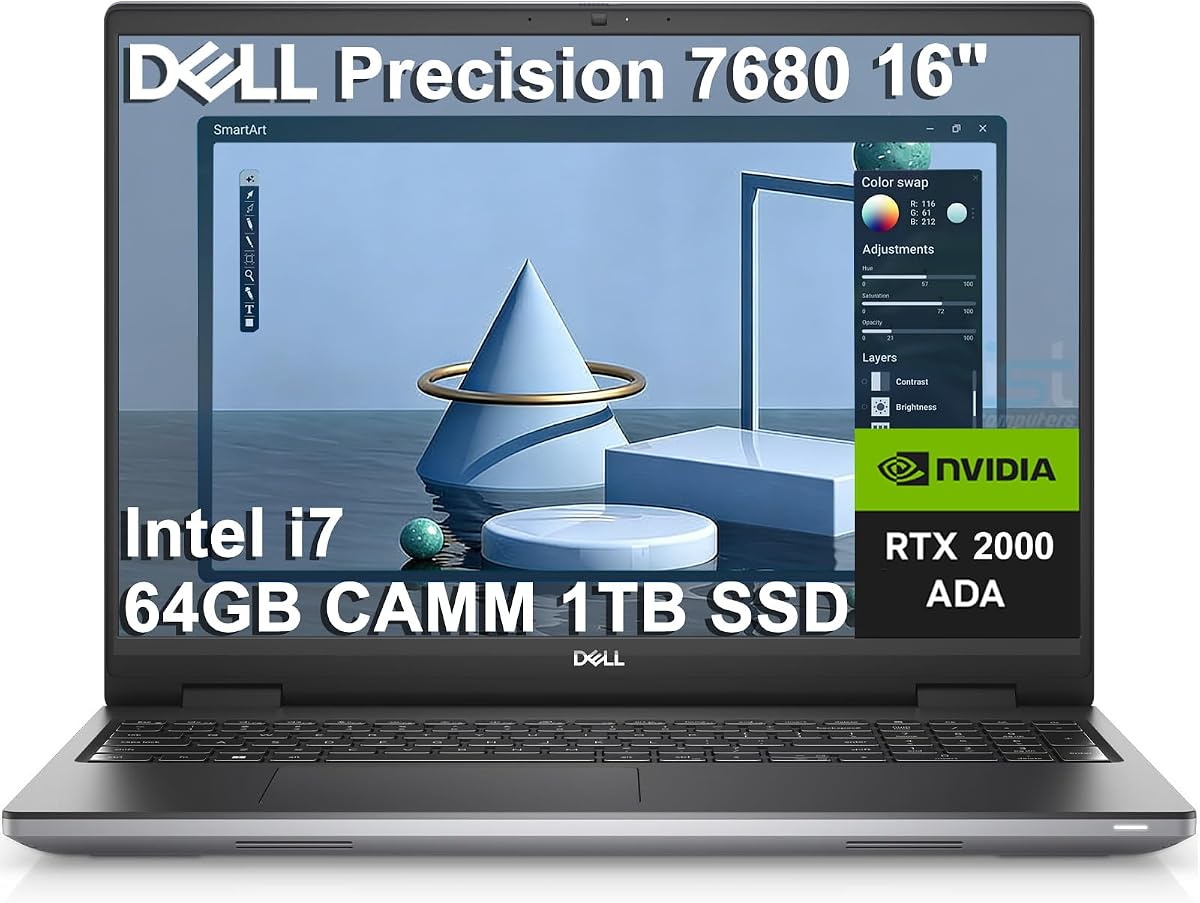
If model size hurts more than presentation polish, the Precision 7680 with i7-13850HX, 64GB DDR5 CAMM, 1TB SSD, and RTX 2000 Ada 8GB is the BIM-first pick. It lands where architecture teams actually work: reliable viewports, memory for linked files, and CPU headroom for schedules and exports.
Firms feel RAM starvation before GPU inadequacy. A 32GB machine can look fine on schematic massing, then collapse when consultants link structural and MEP models. Sixty-four gigabytes keeps orbiting, hide/isolate, and plan-to-3D switching fluid.
CAMM memory reflects Dell’s push toward faster workstation layouts under heavy multitasking. Paired with RTX 2000 Ada, you get the right GPU class for most architectural CAD and mid-scene Enscape without jumping to a loud gaming chassis.
Thermals on a 16-inch Precision exist for multi-hour regenerations. Fans will spin under load, but clocks hold better than slim office lids parked on soft cushions. Give it a hard desk surface and a slight stand angle during charettes.
The honest tradeoff is the display: FHD+ 16:10 anti-glare is excellent for linework, not OLED-level material drama. Storage at 1TB demands archive hygiene. ProSupport coverage into 2029 matters when downtime costs billable hours.
Pick this 7680 for Revit coordination, Navisworks reviews, and multi-app documentation. Freelancers on mid-to-large residential and commercial models get the same headroom without a tower.
Model on the lid; push client color work to an external wide-gamut monitor. Thunderbolt and HDMI support plan-plus-elevation layouts. Wired Ethernet remains a quiet luxury in temporary site offices.
We may earn a commission at no additional cost to you.
Dell Precision 7680 RTX 1000 Ada
Not every architect needs 64GB on day one. This Precision 7680—i5-13600HX, 32GB DDR5, 1TB SSD, RTX 1000 Ada 6GB—is the balanced workstation: professional graphics for daily CAD/BIM and enough memory for concurrent apps in the same 16-inch Precision chassis as the higher sibling.
Viewport speed with RTX 1000 Ada is a step-change from Iris Xe or Radeon 610M. Medium Revit models, AutoCAD 3D, and lighter Enscape scenes become practical when you manage view detail and textures—6GB of VRAM is helpful, not infinite.
Thirty-two gigabytes covers a primary model, PDFs, meetings, and cut-sheet tabs. Large multi-building links will still wish for 64GB; townhouse packages and many interiors scopes remain workable if you unload unused links.
Sustained cooling is a 7680 strength versus slim consumer lids. Use a stand, keep vents clear, and expect audible fans during regenerations rather than silent throttling. Dual Thunderbolt 4 makes external color monitors easy when finishes matter.
The unit is described as resealed for an SSD upgrade—register both warranties and image the drive after setup. For Ada-class graphics without overbuying, this is the pragmatic third pick among our top three.
Ideal for schematic design, documentation-heavy residential work, interiors packages, and teaching loads. If weekly Enscape walkthroughs of dense towers are the norm, step up to the RTX 2000 Ada and 64GB sibling.
You give up VRAM headroom, some GPU throughput, and half the system memory. You keep the chassis, ports, and FHD+ drafting panel. Choose this when “professional enough” beats “maximum headroom.”
We may earn a commission at no additional cost to you.
Many architects discover visualization is hungrier than drafting. The ASUS V16 pairs Core 7 240H with GeForce RTX 5060 8GB, 16GB RAM, and a 16-inch WUXGA 144Hz panel. It is not a Precision or ThinkPad—it is the pack’s best real-time viz performer for Enscape and Twinmotion workflows.
Game-engine-style tools love CUDA and VRAM bandwidth. An RTX 5060-class GPU keeps richer shadows and materials interactive in a lobby walkthrough, which integrated graphics simply cannot fake during a live client review.
The catch is system memory. Sixteen gigabytes is tight for Revit plus Chrome plus a viz app; you may need sequential modes rather than simultaneous ones. Storage at 512GB demands external archives for older project phases.
The 144Hz 16:10 panel is a joy for camera paths. Color is fine indoors but not OLED or 100% DCI-P3 workstation glass, so proof finishes on a calibrated monitor when stakes are high.
Cooling is the gaming laptop’s architectural advantage: these chassis expect GPUs to stay busy. Fan noise rises—acceptable in a home studio. Buy when viz per dollar matters more than ISV badges; skip when firm policy or 32GB+ models define your week.
AutoCAD 2D and lighter 3D are comfortable. Revit works on controlled models if you manage RAM. Heavy coordination exposes the 16GB ceiling quickly—keep only active phases on the internal drive.
Choose GeForce for real-time walkthrough bottlenecks without workstation mandates. Choose Ada Precision/ThinkPad options when driver stability and long CAD viewports matter more than peak consumer raster speed.
We may earn a commission at no additional cost to you.
Architecture is not only model horsepower. Meetings and critiques reward a laptop that looks exceptional and disappears in a tote. The Vivobook S 14 OLED—Ryzen AI 9 365, 24GB, 1TB, and a 14-inch 3K 120Hz Lumina OLED at 100% DCI-P3—is the color-first portable in this pack.
OLED is the headline: deep blacks and wide gamut make mood images and boards look closer to intent in dimmed conference rooms. Pinch-perfect contrast helps material conversations that wash out on cheap FHD IPS panels.
Twenty-four gigabytes keeps Rhino concepts and Adobe apps alive on the road. What it will not replace is discrete Ada or GeForce for dense Revit coordination or high-settings Enscape—know that ceiling before you buy it as a sole machine.
Battery and thermals favor mobility. Dock at the desk and let the OLED become a second color-critical screen rather than your only canvas for eight-hour sheet markups.
Practice OLED hygiene: hide static ribbons when idle and avoid max brightness on white sheets for hours. Many architects will own this beside a desktop workstation—OLED to the meeting, Precision rendering at the office.
Schematic Rhino or SketchUp, Photoshop/Illustrator boards, lighter Bluebeam sets, and client presentation days. Excellent as a thesis presentation lid when heavy rendering happens elsewhere.
Carry a USB4/HDMI travel adapter, a portable SSD for project folders, and a light mouse. Fourteen inches wins on airplane trays where a 16-inch workstation feels oversized.
We may earn a commission at no additional cost to you.
The Precision 3490 targets professionals who refuse to drag a desktop-replacement to every consultant meeting. Roughly three pounds with Ultra 5 135H, 32GB DDR5, 1TB SSD, dual Thunderbolt 4, and a 14-inch FHD panel, it is the compact workstation option here.
Integrated graphics define the ceiling. Draft in AutoCAD, mark up PDFs, run lighter SketchUp or Rhino concepts, and join cloud model reviews with confidence.
Do not expect RTX Ada viewport feel on dense coordination files. Its honest role is portable professional computing with strong RAM and storage, not a GPU workstation replacement.
Where it wins is the around-the-model week: RFIs, specs, Bluebeam, Zoom, and post-site sheet edits. Thirty-two gigabytes and 1TB keep that stack responsive, and Thunderbolt docking restores multi-monitor desks at the office.
Ranking sixth reflects this roundup’s priority on GPU-capable CAD/BIM machines, not disdain for portability. If you already have studio iron waiting at a dock, the 3490 is a sensible travel half of a two-machine kit. Note the resealed memory/SSD disclosure and register warranties promptly.
Project architects and job captains who review and annotate more than they render. Hybrid workers needing Pro features without 16-inch bulk.
Prefer shaded or wireframe modes, unload unused links, and keep a desktop GPU machine for weekly visualization—or remote into studio iron when a massive model must be edited on the road.
We may earn a commission at no additional cost to you.
Lenovo IdeaPad 15.6” FHD Touchscreen
Budget architecture computing usually starves RAM first. This IdeaPad stands out with up to 40GB DDR4 and a 2TB SSD (plus docking storage in the listing), a 10-core Core i5 with Iris Xe, and Windows 11 Pro.
It will not replace a Precision for heavy 3D, but it is a smart low-cost way to keep documentation-heavy coursework and light practice work from thrashing under too many PDFs and browser tabs.
Treat it as a sheet-set and research workhorse. Bluebeam, AutoCAD 2D, schedules, and reference tabs benefit from 40GB in ways 8GB campus laptops never will.
Iris Xe handles light SketchUp; dense Revit and real-time viz will struggle. The 15.6-inch FHD touchscreen is pragmatic for linework and slideshows—proof print-critical color elsewhere.
Thermals target office loads, not vapor-chamber gaming, so keep it on a hard surface during batch publishes. Excellent memory and disk for the money, clear GPU limits, and a bridge while you fund discrete graphics.
CD editing, programming matrices, research, light AutoCAD, PDF coordination, and Zoom critiques. Do not promise clients smooth BIM walkthroughs from this hardware.
Earphones and dock accessories change over time. Validate RAM, storage, CPU, and OS. The architectural value is memory and disk, not the extras in the box.
We may earn a commission at no additional cost to you.
Lenovo IdeaPad Slim 3X Snapdragon
Site visits and workshops punish short-battery workstations. The IdeaPad Slim 3X Copilot+ with Snapdragon X, 16GB, 512GB, and a 15.3-inch WUXGA panel is the field-notes specialist: endurance and a pleasant 16:10 screen over raw CAD horsepower.
Compatibility is the critical question. Many Windows apps run well on Snapdragon Copilot+ PCs, but architecture plugins and license tools can be picky.
Verify your Revit, AutoCAD, Rhino, and Bluebeam versions—or plan this laptop for Microsoft 365, browser coordination, and PDFs while modeling stays on an x86 workstation.
It shines unplugged: notes, minutes, and sheet review without hunting outlets in a job trailer. Copilot can help draft RFI language; it will not magically accelerate viewports.
Expandable storage is welcome as folders grow. Ranked eighth as a specialist recommendation: buy for battery-first mobility after app checks, not as a GPU-heavy thesis-only machine.
Check current ARM guidance for your exact titles, test critical plugins in the return window, and confirm VPN or license-server behavior. If your office is heavily x86-only, choose an Intel/AMD workstation instead.
Use it for Bluebeam, photos, Teams, and cloud viewing. Save heavy edits for the studio GPU machine—the two-device pattern many architects already use, with quieter travel.
We may earn a commission at no additional cost to you.
ASUS Vivobook Go 15.6” FHD Slim
The Vivobook Go with Ryzen 3 7320U, 8GB DDR5, and 256GB SSD is an honest starter for lectures, writing, light 2D, and cloud tools—not a portfolio promise of smooth Revit.
First-year students often need something durable while they learn the difference between a school laptop and a studio workstation. This machine can fill that temporary slot if expectations stay grounded.
Eight gigabytes is the core limit; browsers alone can dominate. External SSD discipline is mandatory if you keep photo surveys and PDF sets nearby.
Integrated Radeon suits video and very light modeling—not textured urban models or BIM viewports. The 15.6-inch FHD panel at roughly 250 nits and 45% NTSC is a basic indoor screen.
MIL-STD testing language helps backpack confidence; a sleeve still matters near model-shop dust. Ninth because architecture workloads outgrow it quickly—stretch to higher RAM before digital studio if you can.
Keep projects on an external SSD, use web tools when viable, and schedule lab time for 3D classes. Prioritize RAM and discrete GPU in the next purchase.
Skip if you are entering a digital-heavy M.Arch, a BIM firm, or Enscape-based presentations. Those paths need discrete GPUs and 32GB-class memory sooner than “student laptop” labels suggest.
We may earn a commission at no additional cost to you.
The Acer Aspire Go 15—Ryzen 3 7320U, 8GB LPDDR5, 128GB SSD, 15.6-inch FHD IPS—closes the list as a budget campus companion for email, LMS portals, light documents, and lectures.
Ranking tenth refuses to market an entry laptop as an architecture workstation. That honesty saves students from buying the wrong tool twice.
Storage vanishes after Windows, Office, and a semester of site photos; an external SSD becomes the real project drive almost immediately.
Windows 11 Home in S Mode can block traditional installs until you switch out—plan that during setup if coursework needs Win32 tools such as Rhino educational builds.
IPS comfort helps long reading sessions; Radeon 610M will not unlock professional visualization. Lean on labs for 3D and plan a next purchase around 32GB RAM and a discrete GPU.
Exit S Mode if required, move project folders to a large external SSD, limit cloud sync to small files, and check free space weekly during studio crunch.
Students in early theory-heavy terms who will not touch heavy 3D until next year. Anyone already in digital studio should look higher in this roundup.
We may earn a commission at no additional cost to you.

Architecture viewports punish inconsistent frame pacing. A laptop that nails a short synthetic score but throttles after fifteen minutes feels worse than a cooler workstation holding a steady redraw. Ask how GPU and cooling behave across a one-hour modeling session. Professional Ada GPUs and well-vented 16-inch chassis generally beat thin office ultrabooks here.
Sixteen gigabytes is an uncomfortable minimum for light work in 2026. Thirty-two is the practical BIM starting point. Sixty-four is the comfort zone for linked multi-discipline models and simultaneous visualization. Compromising elsewhere to afford more RAM usually beats pairing a flashy GPU with a starved configuration.
Linework favors matte, sharp IPS panels. Material presentations favor wide-gamut or OLED. If you present from the lid often, invest in the panel. If you always dock, FHD+ anti-glare can be enough while budget goes to GPU and RAM.
Charettes are thermal torture tests. Larger 16-inch workstation or gaming bodies sustain loads better; expect fan noise under those conditions. Silent machines often stay quiet by slowing down.
Some offices require ISV-oriented workstations and standard docks. Others accept any CUDA box that runs Enscape. Know which world you inhabit before choosing a gaming chassis or ARM ultraportable.
For light 2D and documentation, 16GB can function with discipline. Active Revit or large Rhino with normal multitasking wants 32GB as a floor. Linked consultant models, point clouds, or simultaneous visualization push toward 64GB.
GeForce laptops can excel for Enscape and Twinmotion, often delivering more visualization per dollar for students. Firms that want ISV certifications and long CAD sessions usually prefer RTX Ada Precision or ThinkPad P-series machines.
Yes if you present materials or boards from the laptop screen. If deliverables are mostly CDs on docked monitors, a good FHD+ anti-glare IPS is often enough, and savings can fund RAM and GPU instead.
Small teaching models can open on 16GB with careful link management; 8GB machines here are poor primary Revit computers. Use them for writing and PDFs, and do heavy modeling on lab or remote workstations until you reach 32GB or more.
Sixteen-inch workstations favor all-day modeling. Fourteen-inch machines win for travel and meeting tables. If you model daily on one device, bias toward 16 inches; if you mostly review and present, a vivid 14-inch OLED can win.
Critical. Throttling shows up as sluggish orbiting and longer syncs. Larger discrete-GPU chassis generally sustain loads better than slim ultraportables—audible fans beat quietly dying clocks before a deadline.
Not always. Visualization-heavy students may prefer a GeForce machine like the ASUS V16. BIM-bound interns should prioritize RAM and a professional GPU path. Budget documentation laptops suit early theory terms but become liabilities in digital studios.
Sellers often raise RAM or SSD after factory sealing and disclose the reseal. Warranty may split between seller and manufacturer. Keep paperwork and test immediately—it is manageable process, not automatically a red flag.
They can be outstanding for battery life, notes, and Microsoft 365, but architecture toolchains vary. Verify exact Autodesk, McNeel, and Adobe versions before making Snapdragon your only computer.
If Task Manager shows memory pressure while modeling, more RAM usually helps before a GPU swap. If memory is fine and 3D viewports stutter, GPU is next. If opens and saves crawl, check storage speed and free space—with your real project open.
The best architecture laptop protects attention at the viewport: enough RAM to keep the model resident, a GPU class that matches your CAD or visualization stack, a display that supports how you present, and cooling that survives studio hours. Here the ThinkPad P16 leads overall, the 64GB Precision 7680 with RTX 2000 Ada leads complex BIM, and the RTX 1000 Ada Precision balances professional graphics with a more approachable configuration.
Below those flagships, choose by job story: ASUS V16 for visualization, Vivobook S 14 OLED for color-and-travel communication, Precision 3490 and IdeaPad Slim 3X for portable pro and field notes, the high-RAM IdeaPad for documentation budgets, and the Vivobook Go or Acer Aspire Go only as transitional campus machines.
Shortlist from the comparison table with your heaviest weekly file in mind, confirm software support, and run the checklist before you buy. Architecture deadlines are unforgiving enough without discovering mid-critique that the laptop was only ever meant for slideshows.