Logitech MX Keys S for Mac
- Mac-native layout with Space Grey finish and Logi Options+ Smart Actions
- Laptop-like spherically dished keys with proximity backlighting
- Bluetooth multi-device pairing for up to three Apple computers and tablets
Expert Review & Guide
Choosing the best keyboard for Mac is less about chasing the flashiest RGB board and more about matching how you actually work across Apple devices. A MacBook Pro user who docks at a desk all day wants different keys, shortcuts, and battery habits than someone hopping between an iMac, an iPad, and a phone. In 2026 the strongest Mac-friendly keyboards fall into a few clear camps: refined low-profile wireless boards with proper Mac layouts, full-size Bluetooth keyboards with number pads for spreadsheets, mechanical options that include macOS keycaps and dual-mode connections, and a smaller set of ergonomic or solar-powered boards for comfort and set-and-forget power.
Apple’s own Magic Keyboard remains a clean default, but third-party options often win on programmability, multi-device switching, tactile feedback, USB hubs, or wrist comfort. This guide sticks strictly to the products in our Mac keyboard pack: Logitech’s MX Keys S for Mac and Signature Slim Solar+, Macally’s wireless and wired hub boards, Keychron’s K8 mechanical tenkeyless, Wave Keys for ergonomic typing, seenda’s slim keyboard-and-mouse combos, and AULA’s hot-swappable F99 for people who want a customizable mechanical feel that still works in a mixed setup.
Below you will find three standout top picks, a full comparison table, and detailed reviews covering layout quirks, Bluetooth behavior, backlight usefulness, and who should skip each model. If you care most about Mac Command/Option placement, quiet office typing, or switching between MacBook and iPad without re-pairing, start with the buying guide and checklist before you settle on a favorite.
As an Amazon Associate we earn from qualifying purchases. We may earn a commission at no additional cost to you.
Scan connectivity, layout type, and standout extras before diving into the full reviews. Specs highlight practical Mac-desk differences—layout focus, charging approach, and multi-device behavior—without listing prices.
The Logitech MX Keys S for Mac is the clearest all-around recommendation in this pack for people who live in macOS and want an external board that feels intentional rather than adapted. The Space Grey finish and Mac-specific key layout remove the usual friction of remapping Command and Option or staring at Windows-labeled keys. Out of the box it reads as a companion to a MacBook Pro, MacBook Air, or iMac rather than a generic Bluetooth keyboard that happens to work on Apple silicon.
Typing is the main reason this model earns Best Overall. The low-profile, spherically dished keys are shaped for fingertips and deliver a fast, precise, laptop-like stroke without the stiff travel of many cheap scissor boards. For long writing sessions, spreadsheet work, or code reviews, that consistency matters more than novelty RGB. The keyboard angle and slim profile also support a more comfortable wrist posture than upright mechanical bricks that force you to crane your hands.
Smarter illumination is another practical upgrade. Keys light up as your hands approach and can adapt to ambient lighting, which helps during late editing sessions without leaving a glowing rectangle on the desk when you step away. Through Logi Options+ you get deeper lighting customization plus Smart Actions—macros that collapse repetitive multi-step tasks into a single keystroke. That software layer is where MX Keys S pulls ahead of simpler Macally boards that offer shortcuts but less automation.
Multi-device life is straightforward for Apple households. Bluetooth Low Energy can hold up to three macOS, iPadOS, or iOS devices, so switching from a studio Mac to an iPad draft or a laptop on the couch is a button press instead of a re-pair ritual. If you already use or plan to buy an MX Master 3S for Mac, Options+ can make the keyboard and mouse feel like one workflow, including smoother movement of text and files between machines.
Build quality and materials are in line with Logitech’s MX family. Plastic parts include certified post-consumer recycled content—listed at 26% for Space Gray and 11% for Pale Grey—so the eco note is more than a sticker. USB-C rechargeable power fits modern Mac desks that have already abandoned old proprietary connectors. The board is still a productivity keyboard first: quiet enough for shared offices, refined enough for client-facing setups, and not trying to be a gaming deck.
Choose MX Keys S for Mac if your priority is daily typing quality, Apple-native layout accuracy, and software that actually earns its keep. Skip it only if you specifically want mechanical switches, a built-in USB hub, or a keyboard-and-mouse combo priced as a single starter kit. For most MacBook dockers and iMac users in this roundup, it remains the most complete everyday answer.
Writers, developers, analysts, and hybrid workers who spend hours at a docked MacBook or desktop Mac will get the most from the fluid key feel and Options+ automation. It is also a strong fit for anyone who already standardized on Logitech MX mice and wants the same multi-device habits on the keyboard side.
Pair over Bluetooth, install Logi Options+, then assign Smart Actions to the keys you actually hit during your week instead of loading a dozen unused macros. Create clear Easy-Switch labels in your head—device one for your main Mac, device two for iPad, device three for a travel MacBook—so you are not guessing mid-meeting.
Against Macally full-size boards, MX Keys S feels more polished and software-rich, though those Macally models add a numeric keypad for spreadsheet-heavy desks. Against Keychron K8, it is quieter and more Mac-native visually, but it cannot match mechanical tactile feedback. Against the Solar+ K980, it trades set-and-forget light charging for a more premium typing and lighting experience.
We may earn a commission at no additional cost to you.
Macally Wireless Bluetooth (Silver)
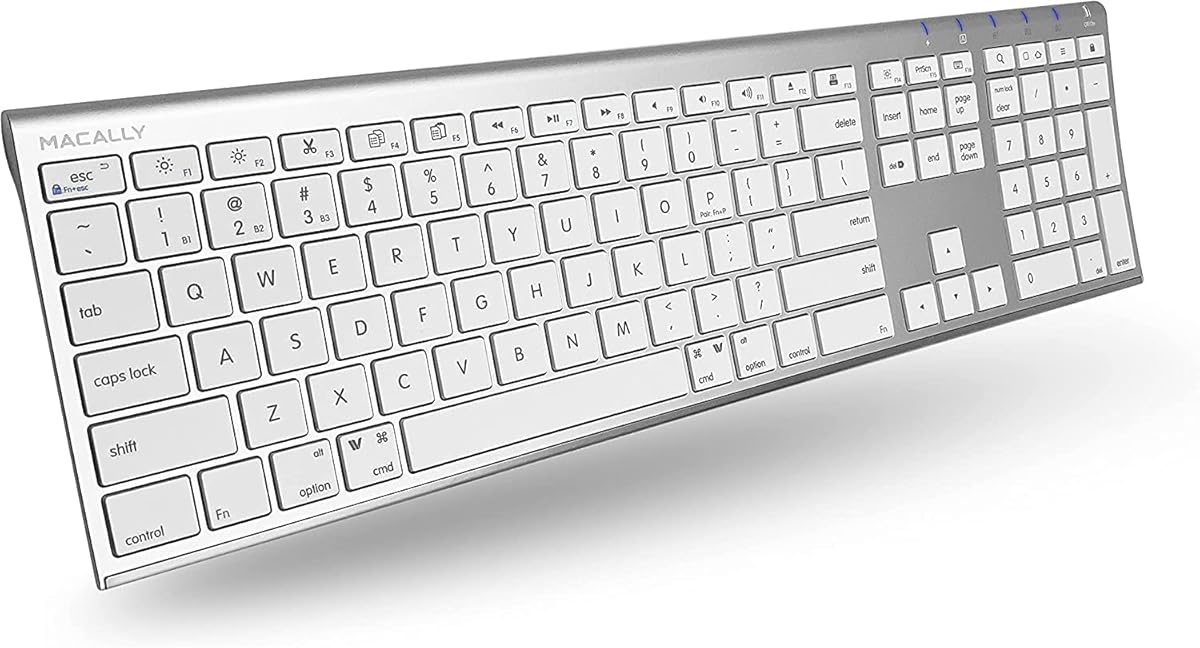
Macally’s silver wireless Bluetooth keyboard is the practical full-size pick when you need a numeric keypad and Mac-friendly shortcuts without moving into premium MX territory. With 110 keys, twenty shortcuts, and a slim 15 mm chassis, it targets iMac desks, spreadsheet workflows, and anyone who finds tenkeyless layouts incomplete for daily number entry.
The typing story is quiet and responsive rather than dramatic. Scissor flexors under thin keycaps keep the stroke fast and muted, which is exactly what many shared offices and home studios want. It will not satisfy mechanical enthusiasts hunting for brown-switch tactility, but for email, documents, browsers, and light creative work it feels familiar and fatigue-friendly.
Connectivity is Bluetooth-first and multi-device capable. You can keep up to three devices ready—MacBook, iPad, and a secondary computer or smart display—then jump between them when your day changes context. Driver-free pairing is a plus for people who dislike installing vendor apps just to type. Compatibility extends beyond Apple to many Bluetooth devices, though this guide evaluates it primarily as a Mac keyboard.
Battery life is one of Macally’s stronger selling points here. The built-in rechargeable cell is rated around three months under an average three-hours-per-day pattern, which means fewer cable rituals than boards you charge weekly. For travel between home and office, that endurance reduces the chance you open your bag to a dead keyboard.
Design-wise, the silver finish aims for Apple-adjacent aesthetics without pretending to be a first-party Magic Keyboard clone in every detail. The ultra-slim body looks tidy on a desk and is easier to stash than chunky mechanical cases. Just remember that slim full-size boards still occupy width; if desk real estate is scarce, a TKL like the Keychron K8 or a compact combo may serve you better.
Buy this Macally if number-pad productivity and Bluetooth convenience matter more than programmable Smart Actions or proximity lighting. It is a strong value-shaped alternative in the pack for students, bookkeepers, and general Mac users who want more keys than Apple’s compact Magic Keyboard without overspending on MX software features they may never open.
Ideal for iMac or MacBook dock setups where Excel, Numbers, QuickBooks, or data-heavy dashboards make a numeric keypad worth the extra width. Also sensible for multi-device households that bounce between a Mac and an iPad during the day.
The scissor mechanism keeps keystrokes subdued compared with linear or clicky mechanical boards in this roundup. If you share a room with calls or content recording, this Macally is easier to live with than the AULA F99 or an unlubed mechanical deck.
This silver model and the aluminum-body Macally later in the list share the same broad feature pitch—110 keys, shortcuts, rechargeable Bluetooth, three-device sync. Choose based on finish preference and listing details; functionally they occupy the same full-size wireless niche.
We may earn a commission at no additional cost to you.
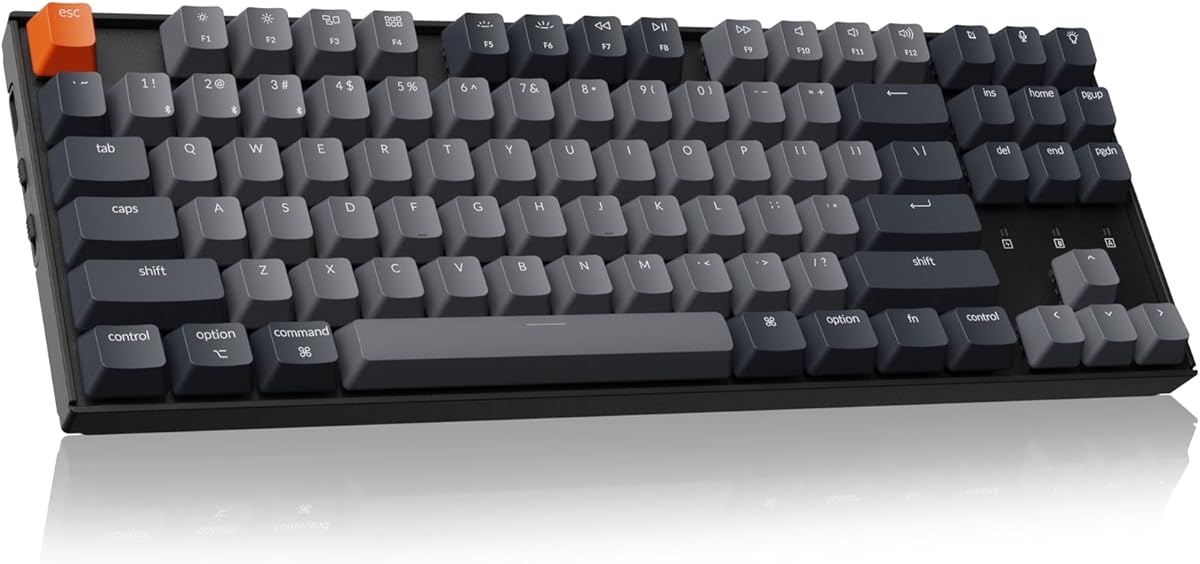
Keychron’s K8 is the mechanical standout for Mac users who refuse to give up tactile switches just because they live in macOS. The 87-key tenkeyless layout keeps Home, End, and Page navigation accessible while reclaiming the right-side desk space a full number pad would consume. For coding, terminal work, and long-form writing, that balance of keys and mouse room is hard to beat.
Brown switches in this configuration offer a noticeable tactile bump without the loud click of blue-style switches. Pre-travel and actuation force are in a mainstream range that most typists can adapt to quickly. Wired mode supports NKRO for dense input, while wireless settles at 6KRO—fine for writing and most productivity, with the usual caveat that competitive gaming is not this pack’s focus.
Mac optimization is thoughtful even if the board is not a clone of Apple’s own keyboards. Essential multimedia and function keys exist for both macOS and Windows, and Keychron includes additional keycaps so Command/Option labeling matches your primary OS. That small kit detail prevents the mental tax of pressing a key that still says Windows while you are on a Mac.
Connectivity is dual-mode in the way mechanical Mac users actually need. Bluetooth 5.1 can store multiple devices and switch among them, while USB-C wired mode delivers rock-solid power and lower latency when you want the keyboard tethered. The 4000 mAh battery is one of the larger cells in common TKL boards and can stretch toward 200 hours with backlight off—excellent for cable-free weeks at a standing desk.
Ergonomics come from a normal-profile case with two-level adjustable feet and an inclined frame. It will feel taller than MX Keys S or the seenda slim combos, so wrist rests or careful desk height matter if you type eight hours a day. Shine-through OEM-profile keycaps help visibility with the white backlight during darker sessions.
Pick the K8 if mechanical feedback is non-negotiable and you still need Mac multitasking. Prefer MX Keys S if silence and Apple-native polish matter more. Prefer AULA F99 if you want hot-swap RGB customization and a 96% layout with a number cluster in a more modern gasket-style package.
Keychron is compatible with macOS and ships the right keycaps, but muscle memory from a Magic Keyboard still takes a day or two to settle—especially around modifier spacing and function-row behavior. Spend ten minutes confirming F-key media controls in System Settings after pairing.
Use USB-C mode during firmware updates, heavy macro testing, or any session where you refuse to risk wireless interference. For pure writing and browsing, Bluetooth is convenient and the battery capacity makes it practical.
Browns are moderate, not silent. Open offices and quiet libraries may still prefer Macally scissor boards or Logitech Wave Keys. If you love mechanical feel but share walls with sleepers, consider desk mats and typing technique before assuming any mechanical board is office-safe.
We may earn a commission at no additional cost to you.
Macally Wired Keyboard with USB Hub
Macally’s wired keyboard with USB hub solves a specifically modern Mac problem: you want dependable keys and a couple of extra ports without buying a separate dock. The board includes two USB-A ports and one USB-C port for peripherals, so a mouse, flash drive, or small accessory can plug into the keyboard instead of hunting for the last free port on a MacBook.
The dual-interface host plug is equally practical. A 2-in-1 USB-C and USB-A connection means the same keyboard can follow you from an older peripheral-rich PC to a USB-C MacBook without carrying adapters for the keyboard itself. For mixed households and IT carts, that flexibility reduces friction.
Because it is wired, latency and pairing drama disappear. Students, labs, and reception desks benefit from plug-and-type reliability. Auto OS detection helps the 107 keys and sixteen shortcuts adapt when you move between Mac and Windows machines—useful if your workplace is not a pure Apple monoculture.
White LED backlighting with three brightness levels covers late-night study sessions and darker editing bays. It is not as clever as MX Keys proximity lighting, but it is predictable and does not depend on Bluetooth sleep behavior. The silver aesthetic stays in Macally’s Apple-adjacent lane.
Treat the hub as convenience expansion rather than a full Thunderbolt dock. High-draw accessories, displays, and fast storage still belong on a proper hub or dock. For a mouse plus occasional USB stick, though, having those ports on the keyboard is genuinely useful on thin MacBooks.
Macally backs the product with accessible U.S.-based support and up to a two-year warranty according to the listing, which adds confidence for office deployments. Choose this model when wireless is unnecessary and port scarcity is the daily annoyance. Choose MX Keys S or Solar+ when clean wireless desks matter more than onboard USB.
MacBook Air and Pro users at fixed desks, classroom Macs, and anyone tired of unplugging a drive every time they need a mouse port will appreciate the hub layout more than travelers who pack ultra-slim Bluetooth combos.
Route the host cable under a desk tray and keep hub accessories short so the keyboard does not become a nest of dongles. A simple under-desk mount can make a wired board look nearly as tidy as wireless.
The wireless Macally boards win on multi-device hopping and cable-free aesthetics. This wired hub model wins on ports, backlight certainty, and zero charging cycles. Match the product to whether ports or portability dominate your week.
We may earn a commission at no additional cost to you.
Logitech Wave Keys exists for Mac and multi-OS users whose wrists file daily complaints before their software does. The wavy keyscape and integrated cushioned palm rest aim to place hands in a more natural posture, while the compact body pulls the mouse closer so shoulders stay happier than they do beside a full-width number-pad keyboard.
Comfort is the headline, but usability is still mainstream Logitech. Easy-Switch hops among up to three devices across Windows, macOS, iPadOS, and ChromeOS, with Bluetooth or the Logi Bolt receiver as connection paths. That makes Wave Keys realistic for people who use a Mac at work and a Windows machine at home, or an iPad for reading markup.
Logi Options+ adds shortcut personalization so the board is not only shaped for comfort but tuned for your apps. The ergonomics story is reinforced by design and testing criteria associated with leading ergonomists and United States Ergonomics approval, which is more assurance than most budget wavy keyboards offer.
Battery life is positioned for long stretches—up to roughly three years depending on use—so this is closer to a set-and-forget peripheral than a weekly recharge ritual. Recycled plastic content varies by colorway, with Graphite and Off-White figures listed higher than some fashion colors; the Rose model in this pack prioritizes the visual match for softer desk themes.
Adaptation takes patience. If you have typed on flat chiclet boards for a decade, the wave will feel odd for a few days. Give it a full work week before judging accuracy. Pairing with a vertical mouse such as Logitech Lift is the brand’s suggested full comfort stack, though any closer mouse placement already helps.
Choose Wave Keys when comfort outranks Mac-specific cosmetics. Choose MX Keys S for Mac when you want the most Apple-native low-profile typing board. Choose Keychron or AULA when only mechanical switches will do.
Set chair height so forearms are roughly parallel to the floor, keep the palm rest supporting without forcing a shrug, and bring the mouse inward until your elbow is not reaching outward. The keyboard alone cannot fix a desk that is far too high.
Wave Keys is excellent when your week spans Mac and Windows. Confirm shortcut expectations in Options+ so Mac Command habits and Windows Control habits do not collide when you Easy-Switch mid-afternoon.
The Rose finish is a deliberate aesthetic choice in this pack. If you want a quieter visual, check other Wave Keys colors from Logitech, but evaluate this listing as the Rose configuration when comparing photos and availability.
We may earn a commission at no additional cost to you.
seenda SKM64-2 Combo (White Silver)
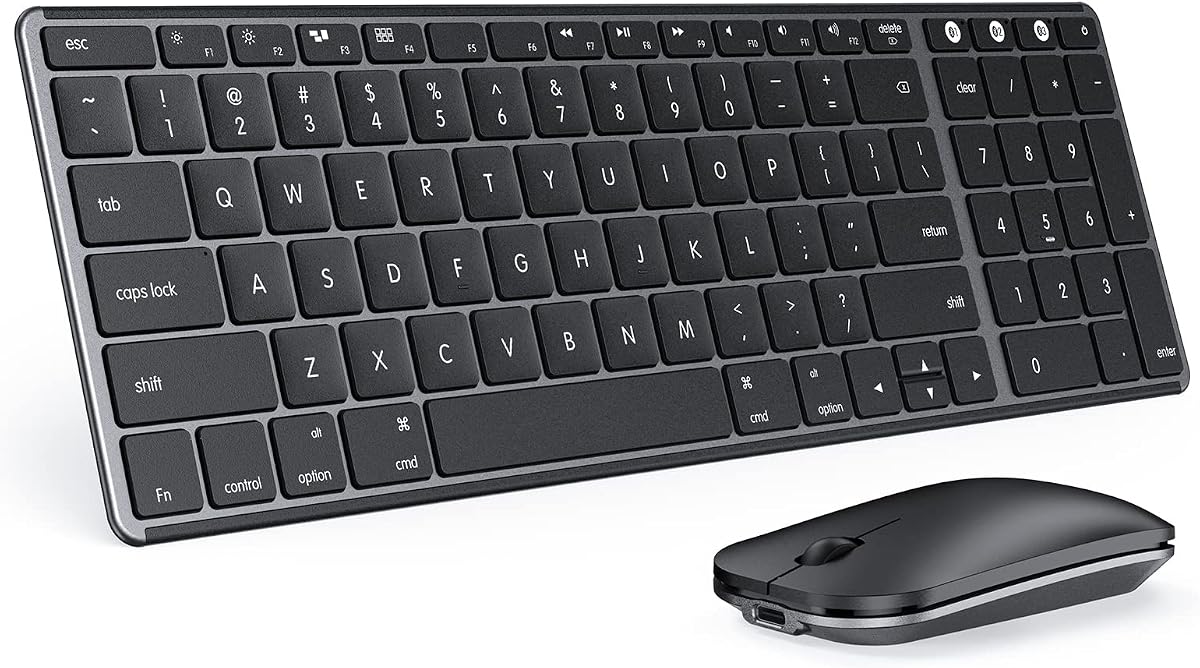
The seenda SKM64-2 White Silver combo is aimed squarely at Apple ecosystem users who want one slim keyboard and mouse set for MacBook, iMac, iPad, and iPhone workflows. Instead of mixing a random Bluetooth keyboard with whatever mouse is in the drawer, you get a visually coherent pair that slips into a bag at 0.12-inch keyboard thickness.
Multi-device behavior uses BT1/BT2/BT3 channels so you can park connections for three Apple devices and switch as your focus moves. That is ideal for students drafting on a MacBook, annotating on an iPad, and answering messages on an iPhone. Important constraint: it is Bluetooth 4.0+ only, with no USB connection or receiver included, and it is not positioned as fully Windows-compatible.
Quiet typing is a genuine feature rather than marketing fluff for this niche. Enhanced key stability aims for a tactile click feel without broadcasting every keystroke across a quiet classroom or open apartment. For shared housing and office libraries, that matters as much as layout.
Power is USB-C rechargeable with roughly 200 hours of standby and auto-sleep plus a physical on/off switch. Travelers and eco-minded users avoid the AAA battery tax that still appears on some compact boards. The metal-and-ABS construction feels more premium than all-plastic bargain combos while staying light.
Compatibility notes deserve a careful read: macOS 10.12+, iPadOS 13.0+, and iOS 13.0+ are the supported lane. If your life is Apple-first, that focus is a strength. If you regularly dual-boot or sit at a Windows desktop, look at Wave Keys, Keychron K8, or Macally boards with broader OS claims instead.
Buy the White Silver seenda when you want a portable matched set that looks bright on white or silver Apple desks. Consider the Black Gray twin later in this guide if you prefer a darker finish for Space Gray hardware. Neither combo replaces a high-end MX mouse for precision design work, but both excel as light, quiet daily drivers.
The slim profile is the reason to choose seenda over full-size Macally boards when you leave the house. Pack a short USB-C cable and confirm Bluetooth permissions on each device before a client session so you are not pairing under pressure.
Treat the Windows incompatibility note as a hard filter. This combo is not the cross-platform tool in the pack; it is the Apple-specialist kit. That honesty is useful—buy it for the ecosystem you actually own.
The included mouse matches the keyboard’s slim quiet brief. Power users who need hyper-custom buttons or studio-grade tracking should plan on a separate MX Master later while still enjoying the keyboard half of the combo.
We may earn a commission at no additional cost to you.
The AULA F99 is the enthusiast mechanical option in a Mac-focused pack: a 99-key 96% board with tri-mode wireless, hot-swap sockets, gasket structure, and an 8000mAh battery that dwarfs many office keyboards. It is less “Apple accessory” and more “custom keyboard that can still live beside a MacBook.”
Connection flexibility is excellent. Bluetooth 5.0, 2.4GHz wireless, and USB-C wired mode can cover up to five devices with FN combination switching. That breadth helps if your desk includes a Mac, a PC, a tablet, and a console-adjacent machine. For pure Mac minimalists, it is more connectivity than you need—but rarely a downside.
Feel comes from pre-lubed linear switches, gasket mounting, PCB slotting, and multi-layer silencing meant to soften hollowness and stabilize the stroke. Double-shot PBT keycaps resist shine and fading better than thin ABS legends. RGB with numerous effects and driver-supported macros will delight customizers and distract anyone who wanted a mute charcoal office board.
Mac users should plan a short remapping session. Unlike MX Keys S for Mac or Macally’s Apple-leaning layouts, the F99 is a multi-platform custom board. Confirm modifier keys, function layers, and whether you prefer 2.4GHz with a receiver or Bluetooth for your MacBook’s limited ports.
Battery capacity is a highlight for wireless mechanical fans who hate charging mid-week. Combined with the compact-but-complete 96% layout, the F99 suits hybrid work-and-play desks that still need a number cluster without a full 100% footprint.
Choose AULA if customization and mechanical gusto are the point. Choose Keychron K8 if you want a simpler Mac/Windows keycap story in a classic TKL. Choose Logitech if you want software polish and quiet low-profile typing more than hot-swap experiments.
Use the included pullers and change one switch at a time so you can compare feel. Keep spare switches labeled. If you share an apartment, try quieter switch swaps before assuming every linear is office-friendly.
Disable flashy reactive lighting for work hours, map a sober layer for screenshots and Mission Control equivalents, and keep a bright RGB profile for evening gaming if you dual-purpose the board.
The F99’s 96% cluster preserves number keys that Keychron’s K8 removes. If your Mac work involves constant numeric entry plus mechanical feel, F99 may beat TKL. If mouse space is sacred, K8 still wins.
We may earn a commission at no additional cost to you.
Macally Wireless Bluetooth (Aluminum)
This Macally wireless model doubles down on Apple-adjacent styling with an aluminum body and thin black keys. If the silver Macally felt a bit bright for a Space Gray MacBook Pro, this darker key-and-metal combination often photographs and sits better on modern desks.
Feature-wise it stays in the same productive lane: 110 scissor-flex keys, twenty Mac shortcuts, a numeric keypad, rechargeable power, and simultaneous pairing for up to three Bluetooth devices. The pitch is a do-it-all wireless Mac keyboard rather than a niche ergonomic experiment.
Quiet, refined keystrokes remain the typing theme. Scissor mechanisms deliver smooth travel without mechanical thock, making the board safer for open offices than AULA or even brown-switch Keychron setups. For writers who want silence plus a number pad, that combination is persuasive.
Battery expectations mirror Macally’s broader rechargeable lineup—about three months between charges at roughly three hours of daily use, with a relatively short recharge window called out in the listing. Multi-sync across Mac, PC, iOS, Android, and TVs gives it broader secondary-device utility than the Apple-only seenda combos.
Because it overlaps so strongly with the silver Macally, treat this review as a finish-and-listing decision more than a second unrelated product category. Compare current photos, included accessories, and reviews on each ASIN, then buy the one that matches your desk. You do not need both.
Skip it if you already prefer MX Keys S for software depth, or if you have committed to mechanical switches. Choose it if aluminum aesthetics and a quiet full-size Bluetooth layout are the brief.
Aluminum plus black keys complements Space Gray and Black Apple hardware. Silver Macally and White Silver seenda better match silver iMac and white accessory themes.
Unlike seenda’s Apple-focused combo, this Macally explicitly embraces mixed Bluetooth environments. That makes it friendlier in households with Android tablets or a Windows secondary PC.
If you find yourself wanting proximity lighting, Smart Actions, and tighter MX ecosystem handoff, the incremental jump to MX Keys S for Mac is the cleaner upgrade path than buying another Macally variant.
We may earn a commission at no additional cost to you.
Logitech Signature Slim Solar+ K980
Logitech’s Signature Slim Solar+ K980 for Mac attacks the most annoying wireless keyboard chore: remembering to recharge. Logi LightCharge combines a light-absorbing strip with an efficient battery so the board can harvest energy from solar or artificial light—including ordinary indoor conditions—rather than demanding a weekly USB-C ritual.
For Mac users, the K980 is a full-size Bluetooth keyboard with laptop-style typing and the familiar Logitech software bridge. Easy device switching among Mac, iPad, and iPhone keeps it in the same productivity family as MX Keys, while Smart Actions in Logi Options+ automate repetitive keystroke sequences for work and life tasks.
Durability messaging is aggressive in a good way for this category: long keystroke lifespan targets and battery durability measured in years rather than months. Plastic parts include a substantial share of certified post-consumer recycled content (minimum 52% called out for this model), aligning with Logitech’s broader sustainability language.
Real-world success still depends on light. A keyboard that lives in a permanently dark closet under a shelf will not charge as intended. On a normal desk near a window or under office lighting, the promise of uninterrupted typing without cable drama is the whole product thesis—and a meaningful differentiator versus USB-C rechargeable MX Keys S.
Typing is slim, solid, and familiar rather than mechanical. Spreadsheet users get a full-size footprint; travelers may find it less packable than seenda’s ultra-slim combo. Graphite coloring suits modern MacBook desks without shouting RGB.
Pick Solar+ when you want Mac-ready Logitech software and the least charging friction in the pack. Pick MX Keys S when typing refinement and proximity backlighting matter more than light harvesting. Pick Macally wired hub when you actually want cables and ports on purpose.
Keep the solar strip unobstructed. Avoid burying the keyboard under papers. Even indoor LED desk light can contribute; total darkness cannot. If your desk faces a bright window, this model becomes especially compelling.
Both boards speak Logi Options+ and Smart Actions. If you already love that ecosystem, Solar+ is the low-maintenance sibling; MX Keys S is the premium typing-and-lighting sibling.
Users who store keyboards in bags most of the day, or who work in intentionally dark studios, may prefer conventional rechargeable or wired boards instead of relying on opportunistic light charging.
We may earn a commission at no additional cost to you.
seenda SKM64-2 Combo (Black Gray)
The Black Gray seenda SKM64-2 is not a secret third product category—it is the darker twin of the White Silver combo, and that is exactly why it earns a distinct finish-focused badge here. Many MacBook Pro desks look better with charcoal accessories than with bright silver sets, and this listing exists for that visual match.
Core capabilities remain Apple-first: macOS, iPadOS, and iOS support ranges match the sibling, three Bluetooth channels handle device switching, and USB-C rechargeable power with long standby keeps the kit travel-ready. Whisper-quiet keys and a slim 0.12-inch keyboard profile continue to define the experience.
Because there is no USB receiver or wired mode, Bluetooth reliability on your specific Mac matters. Keep devices within sensible range, avoid pairing overload with dozens of stale Bluetooth accessories, and update macOS when keyboard connection quirks appear. These are normal Bluetooth hygiene steps, not seenda-only issues.
The mouse remains a convenience pointer rather than a creative-pro tool. For photo retouching or CAD-like precision on a Mac, budget for a better mouse later. For browsing, documents, and general navigation across Mac and iPad, the matched set keeps your bag lighter than carrying mismatched peripherals.
Buy Black Gray when finish matching is the deciding factor and you want the same quiet Apple combo formula. Buy White Silver when your iMac or accessories lean bright. Buy MX Keys S plus a separate mouse when you outgrow combo-class pointing and want deeper keyboard software.
As the final pack product, it closes the roundup with a reminder that Mac keyboard shopping is often about ecosystem fit and aesthetics as much as raw specs. Quiet, slim, Apple-channel Bluetooth combos solve real student and hybrid-worker problems—even if enthusiasts will eventually graduate to MX or Keychron singles.
Space Gray MacBook, black accessories, darker wood desks: Black Gray. Silver iMac, white walls, brighter studios: White Silver. Functional differences are secondary to that visual call.
The combo format is especially sensible for dorm desks and living-room MacBook setups where buying keyboard and mouse separately feels like unnecessary complexity.
If you already love your mouse, skip both seenda combos and put budget into MX Keys S, Solar+, Keychron K8, or Wave Keys depending on whether polish, solar convenience, mechanical feel, or ergonomics is your priority.
We may earn a commission at no additional cost to you.

Mac typists notice modifier keys immediately. Boards like Logitech MX Keys S for Mac and Macally’s Apple-leaning layouts reduce remapping friction, while multi-platform mechanicals such as Keychron K8 and AULA F99 can work brilliantly after you install the right keycaps or layers. If you hate staring at Windows legends, prioritize Mac-specific labeling from day one.
Bluetooth is ideal for MacBook and iPad hopping, especially when a board stores two or three device profiles. Dual-mode mechanicals add USB-C for rock-solid sessions. Wired hub keyboards trade freedom for ports and zero battery drama. Solar+ designs add a fourth path: harvest light so you think about power almost never. Match the connection style to whether your Mac is a fixed desk machine or a bag-resident laptop.
Low-profile scissor and MX-style dishes favor quiet offices and Magic Keyboard muscle memory. Tactile browns on the Keychron K8 add feedback for accuracy. Linear hot-swap boards like the AULA F99 invite customization and generally more sound energy. Ergonomic wave shapes change posture more than switch marketing slogans do. Be honest about your room: shared walls punish loud boards faster than any spec sheet admits.
Number pads accelerate spreadsheets and data entry—see the Macally 110-key boards and Logitech full-size Solar+. Tenkeyless layouts free mouse space for design and code. 96% boards try to keep numbers without the full width. Keyboard-and-mouse combos from seenda simplify shopping for Apple-only users who want one bag-friendly kit. Choose the geometry of your actual tasks, not the layout YouTube currently celebrates.
Logi Options+ Smart Actions on MX Keys S and Solar+ can erase repetitive chores. Macally’s wired hub physically expands ports. Wave Keys adds a cushioned palm rest and certified ergonomic shaping. None of these extras matter if you never use them—but the right one can define the purchase. List your top pain point: automation, ports, wrists, silence, or mechanical fun—then buy for that pain point.
Logitech MX Keys S for Mac is the strongest overall pick because it combines a true Mac layout, fluid low-profile typing, proximity backlighting, USB-C charging, and multi-device Bluetooth that fits MacBook, iMac, and iPad life. It also unlocks Logi Options+ Smart Actions for people who want more than static shortcut keys. Choose something else only when you have a sharper need—mechanical tactility, a USB hub, solar charging, or an ergonomic wave—that MX Keys S does not prioritize.
Most Bluetooth keyboards can type on a Mac, but Mac-specific layouts reduce daily friction. Command and Option placement, screenshot keys, and media controls feel natural on boards designed for Apple. Multi-platform mechanical keyboards can be excellent if they include Mac keycaps or easy remapping, as Keychron does. Apple-focused combos like seenda explicitly trade Windows versatility for better ecosystem fit. If you never leave macOS and iPadOS, Mac-oriented labeling is worth prioritizing.
Yes—if you want tactile feedback and do not require absolute silence. The Keychron K8 with brown switches is the most straightforward mechanical Mac option in this pack, thanks to included Mac keycaps and dual Bluetooth/wired modes. The AULA F99 goes further into hot-swap customization and RGB. Just expect a learning curve versus Magic Keyboard chiclet feel, and be considerate in shared quiet spaces where Macally or Logitech low-profile boards remain safer.
Choose a full-size layout with a numeric keypad. Macally’s 110-key wireless models and Logitech’s full-size Signature Slim Solar+ K980 keep number entry efficient. Tenkeyless boards like the Keychron K8 force you onto the number row, which slows heavy data work. If you need numbers plus mechanical feel, the AULA F99’s 96% layout is the compromise inside this pack.
Logitech Wave Keys is the dedicated ergonomic answer here, with a wave-shaped keywell and cushioned palm rest designed to support a more natural posture. Also fix chair height, desk height, and mouse distance—keyboard shape alone cannot rescue a bad workstation. If you prefer a flat premium board, MX Keys S still offers a comfortable low-profile angle, but it is not an ergonomic wave design.
They are worth it when you want a matched, portable, quiet Apple kit without shopping twice. The seenda SKM64-2 sets excel for students and hybrid workers living in macOS, iPadOS, and iOS. They are less ideal if you already own a premium mouse or need Windows compatibility. In those cases, buy a standalone Mac keyboard and keep your preferred pointing device.
Backlighting matters if you work in dim rooms, edit video at night, or simply dislike hunting for keys. MX Keys S offers approach-sensing illumination with customization, Macally’s wired hub board offers straightforward white LED levels, and Keychron/AULA provide mechanical backlighting or RGB. If you always work in bright daylight, solar harvesting on the K980 or a non-backlit quiet board may matter more than glow.
Yes. Multi-device Bluetooth is one of the best quality-of-life features in this category. MX Keys S for Mac, Macally wireless boards, Wave Keys, Solar+ K980, Keychron K8, seenda combos, and AULA’s multi-device modes all support hopping among saved devices. Set stable device slots—MacBook on channel one, iPad on channel two—so you are not re-pairing during meetings.
Wired makes sense for fixed desks, shared computers, and port expansion. Macally’s wired keyboard with a USB hub is the clearest example: you gain dependable typing plus extra USB-A and USB-C peripheral ports through a dual-interface host plug. You give up multi-device wireless hopping, but you never charge the keyboard and you reduce Bluetooth troubleshooting. Labs, reception Macs, and docked creators who already live on cables often prefer that trade.
Either pick a long-endurance rechargeable board and charge on a calendar reminder, or choose Logitech Signature Slim Solar+ K980 so indoor or natural light tops up the battery during normal desk use. MX Keys S and seenda combos use USB-C; Macally wireless boards also recharge on a long cycle. Solar is the lowest-friction philosophy if your keyboard sits in the light. If it lives in a dark bag all day, conventional rechargeable or wired is more honest.
The best keyboard for Mac in 2026 depends on whether you optimize for Apple-native polish, mechanical feedback, wrist comfort, ports, or zero charging drama. Logitech MX Keys S for Mac remains the most complete everyday recommendation in this pack for docked MacBook and iMac users who want fluid typing and useful software. Keychron K8 and AULA F99 cover the mechanical lane with different layout and customization philosophies, while Wave Keys protects wrists and the Macally wired hub protects scarce USB ports.
Full-size Macally wireless boards and the Solar+ K980 serve number-pad productivity with different power stories, and the seenda SKM64-2 combos deliver quiet Apple-first keyboard-and-mouse kits in two finishes. Use the comparison table to shortlist by layout and connection type, then read the matching review for noise, multi-device behavior, and who should skip the model.
If you only remember one decision framework, buy for the friction you feel every day: remapping modifiers, aching wrists, dead batteries, missing ports, or lifeless typing. The right board from this list should make your Mac setup feel calmer within a week—not merely look different on day one.