Best Overall
Keychron V1 75% Wired Mechanical Keyboard

- QMK/VIA remapping for layers, macros, and OS-specific layouts
- Hot-swappable red switches with double-shot PBT keycaps
- Compact 75% form that keeps F-keys and arrows for coding
Expert Review & Guide
Developers do not type the same way most office workers do. Long stretches in editors and terminals reward layouts that keep arrows, modifiers, and punctuation under the hands, while macros and remapping turn repetitive Git, build, and window-management gestures into single keystrokes. The best keyboard for developers in 2026 is less about flashy RGB and more about switch feel, firmware flexibility, cross-OS layouts, and whether you can trust the board for eight-hour sessions without fighting latency or awkward hand travel.
This roundup sticks to keyboards that show up consistently in developer desks: compact 75% boards that keep a function row without wasting desk space, full-size options when you still need a numpad for spreadsheets or numeric entry, quiet tactile office-friendly mechanicals for shared spaces, and a few specialty boards for security workflows or accessibility. We also include programmable macro boards that sit beside a main keyboard when your job is heavy on streaming, demos, or scripted tool launching.
Every product below comes from our curated pack—ratings, titles, images, and links are taken as listed. We call out honest tradeoffs: wired-only boards that cannot roam with a laptop, large-print models that prioritize visibility over compact coding geometry, and security keyboards that trade customization for smart-card authentication. Use the comparison table for a quick scan, then dig into the reviews for who each board actually fits.


As an Amazon Associate we earn from qualifying purchases. We may earn a commission at no additional cost to you.
Scan layout, connectivity, and customization at a glance. Specs focus on what matters at a coding desk—not marketing fluff. Ratings reflect listed product feedback at research time.
The Keychron K10 HE is the pack’s clearest answer when a developer wants a classic full-size board without giving up modern magnetic-switch performance. Instead of traditional contact switches, Hall Effect sensors read magnetic distance, which is why Keychron can advertise actuation adjustable from roughly 0.2 mm to 3.8 mm with fine sensitivity. For coding, that matters less as a gaming gimmick and more as a way to shorten the travel you need for repeat navigation, autocomplete acceptance, or rapid modifier chords once you settle on a depth that matches your fingers.
Tri-mode connectivity is the other developer-facing win. Bluetooth 5.2 for hopping between a work Mac and a personal Linux box, 2.4 GHz when you want a more stable wireless hop to a docking station, and Type-C wired when you are debugging firmware, charging, or simply refuse latency during a live demo. Pairing up to three Bluetooth devices mirrors how many engineers already live: corporate laptop, home workstation, and a spare for tablets or a secondary machine.
Build presentation is more lifestyle than beige IT plastic. Aluminum plus rosewood-style wood sidings and non-shine-through double-shot PBT OSA keycaps make the K10 HE look intentional on a photographed desk, but the practical piece is wear resistance on legends you stare at for years. South-facing or custom RGB is present for those who want it; many developers will mute effects and keep a dim static layer just bright enough for evening commits.
Software lives in Keychron’s Launcher web configurator. Clear cache before first use if the page behaves oddly—Keychron itself notes that habit—and then treat it like a lightweight VIA alternative: per-key remaps, macros for common Git sequences, rapid trigger and snap-action toggles, and actuation curves you can experiment with on a weekend instead of during a production incident. Hot-swap magnetic switches mean you can service or swap without soldering, which extends the board’s lifespan for tinkerers.
Cross-system support is honest rather than absolute. Dedicated media keys and extra keycaps help Mac and Windows feel native; Linux users will usually remap through Launcher or OS tools, which is normal for this class of board. If your workflow lives inside a 75% footprint and you never touch a numpad, the K10 HE may feel oversized. If you bounce between code, SQL, and spreadsheets—or you simply like full arrow/home clusters without Fn layers—the size becomes a feature.
Who should skip it? Strictly portable backpack typists, people who need silent office membrane feel more than magnetic adjustability, and anyone whose IT policy bans wireless peripherals. Everyone else who wants a 2026-era full-size customizable board with real connectivity flexibility will find the K10 HE hard to dismiss.
If your day starts on a MacBook, moves to a Windows gaming PC for side projects, and ends on a Linux workstation, the K10 HE’s three-device Bluetooth habit plus wired fallback reduces the temptation to keep three separate keyboards. Set one Bluetooth slot per machine, keep 2.4 GHz reserved for the primary dock, and use wired mode when flashing or when conference Wi-Fi is chaotic.
Spend an evening mapping a layer for terminal-friendly shortcuts—split panes, tmux prefixes, or IDE refactor bindings—so the magnetic switches are not the only customization you get from the board.
Start with a moderate actuation depth for alphanumeric keys and a slightly deeper setting for modifiers if you tend to rest fingers heavily. Rapid trigger helps for games, but for prose and code review it can feel twitchy until you raise the reset threshold. Treat the first week as calibration rather than a final config.
Once the board feels stable, lock a profile and stop fiddling mid-sprint. Consistency beats chasing the shallowest possible actuation.
We may earn a commission at no additional cost to you.

Logitech’s MX Mechanical is the board we recommend when a developer’s primary constraint is other humans. Tactile quiet mechanical switches give a clear bump for precision without the clack that earns glares on video calls. The low-profile key height sits closer to a modern laptop deck than a chunky custom, which helps people who alternate between notebook travel and a docked desk avoid constant muscle-memory resets.
Illumination is practical rather than festival-grade. Keys wake as hands approach and brightness adapts to ambient light, so late-night debugging does not require hunting for a backlight key every session. Power claims are strong: roughly two weeks with lighting on, or many months with it off, which matches how battery-conscious remote workers actually live.
Where Logitech still leads the “serious office” category is multi-device software. Pair up to three machines over Bluetooth Low Energy or the included Logi Bolt receiver, then use Logi Options+ to remap Fn behaviors, tune lighting, and lean on Flow-style cross-computer control if you also run a compatible MX mouse. That ecosystem is less open than QMK, but for many engineers it is the difference between a keyboard that merely types and one that orchestrates a two-laptop day.
Compatibility spans macOS, Windows, Linux, iOS, and Android in Logitech’s marketing, which covers the mixed OS reality of modern stacks. Linux remapping depth will vary by distro and Options+ support, so plan on OS-level tools for exotic layers. Graphite builds include a meaningful share of post-consumer recycled plastic, a nice note if sustainability shows up in your team’s purchasing checklist.
This is not the board for deep firmware experiments, gasket-mount acoustics, or hot-swapping into exotic switches. It is the board for staff engineers who need reliability, quiet tactility, and polished wireless behavior more than community firmware. If your desk already includes MX mice and you refuse to disturb teammates, the MX Mechanical remains a top-tier pragmatic pick.
One practical tip: keep Bolt reserved for the machine where Bluetooth is flaky, and use BLE for the others. Charge via USB-C during a long compile rather than waiting for a dead battery mid-standup.
Pick Logitech when silence, polished multi-device software, and low-profile comfort matter more than open-source remapping. Pick Keychron when you want VIA layers, hot-swap experiments, and a more enthusiast typing sound and feel.
Shared offices, consulting desks, and hybrid workers who hop between company-managed laptops tend to prefer the MX path.
Use Options+ to put high-friction actions—mute, screenshot, virtual desktop switches—on easy Fn combinations. Keep Caps Lock remapped at the OS level if Logitech’s tools cannot reach the binding you want.
Disable overly aggressive backlight if you charge infrequently; the keyboard’s longevity claims assume disciplined lighting habits.
We may earn a commission at no additional cost to you.

The VSD K1 Pro is less “one keyboard to rule them all” and more “the companion deck serious creators and automation-minded developers keep to the left of their main board.” Full-key programmability through a web interface or VSD Craf software lets you record multi-step flows—open a terminal, jump directories, run a script, mute Discord—and bind them where your muscle memory wants them. That is the developer angle: treat macros as interfaces to your personal toolchain.
Stream-controller mode is the headline differentiator. Unlimited switchable pages with LCD keys and knobs turn the board into a visual launcher. Assign images or GIFs so you can see which page is for deploy scripts versus media control versus game/demo shortcuts. For engineers who livestream coding, teach workshops, or run frequent demos, labeled LCD keys beat remembering opaque Fn layers.
Hardware feel is more ambitious than a cheap plastic pad. Hot-swap 3-pin/5-pin compatibility, pre-lubed stabilizers, gasket mounting, and a five-layer dampening stack aim for a creamier sound and softer bottom-out than typical membrane macro pads. RGB covers the usual 16.8 million-color expectations; use it for page cues if you want, or keep it calm for office hours.
The smart TFT display and multi-function knobs handle volume, lighting, date/time, and connection-oriented feedback, though the listing is clear that screen imagery and time calibration need software over a wired link. That wired-only design is both a limitation and a reliability feature: no batteries to die mid-stream, and fewer wireless failure modes when you are screen-sharing.
Think of the K1 Pro as infrastructure next to a Keychron or NuPhy, not as the sole input for writing prose. Keep alphanumeric typing on a layout you trust, and park the K1 Pro for verbs—build, deploy, scene switch, clip, mute, launch dashboard. Teams that standardize OBS scenes or local k8s shortcuts will get more value than someone who only needs a quiet office QWERTY.
If you buy this listing (ASIN B0FVLWP6YJ), confirm packaging contents and firmware notes on arrival, and reset after software updates as the manufacturer suggests. Macro boards live or die by software stability; budget an hour for first setup rather than expecting plug-and-play perfection.
Good fits include one-key deploys to staging, toggling VPN profiles, launching IDE layouts, switching audio devices, and paging through documentation bookmarks. Avoid stuffing every possible shortcut onto page one; group by context so recognition stays instant.
Teachers and conference speakers can dedicate a page to demo resets—clear terminal, open repo, start slides—so recovery from a live mishap takes one press.
Because it is wired-only and software-dependent for the flashiest features, the K1 Pro is a desk appliance. Do not plan to toss it in a backpack as your only keyboard. Pair it with a portable 75% board if you split time between home and travel.
Also note this pack includes a second K1 Pro listing with a different image/ASIN; treat them as sibling SKUs and compare seller details before purchasing.
We may earn a commission at no additional cost to you.

Most “best keyboard for developers” lists ignore security hardware. That is a mistake for engineers in finance, healthcare, government contracting, or any shop that still issues smart cards for VPN, disk unlock, or thin-client login. Cherry’s Secure Board 1.0 integrates a reader for smart cards and RF/NFC tags into a wired USB QWERTY keyboard, collapsing two desk objects into one cable path.
Protocol support is the serious part of the listing: PC/SC reader behavior, CCID compatibility, and T=0 / T=1 / T=CL protocols, with read/write for ISO 7816 and ISO 14443 A/B cards. If your identity stack already speaks those standards, the Secure Board is a known quantity rather than a DIY USB reader taped beside a cheap keyboard.
Secure mode with authentication and encryption—especially relevant for thin clients—is why IT teams specify boards like this. Developers may not love the lack of RGB or VIA, but they will love not wrestling with a flaky separate reader when a certificate login fails five minutes before a release window. Wired USB also matches policies that ban wireless keyboards in sensitive rooms.
Typing experience is secondary to trustworthiness here. Expect a conventional office keyboard feel rather than gasket-mounted creaminess. That is acceptable when the job is compliance first, comfort second. If you also need a joyous mechanical for personal projects, keep a second board at home and treat the Cherry as the machine that touches production credentials.
Buy this when your badge, PIV/CAC-style card, or NFC credential is part of daily authentication. Skip it when you are a freelance app developer choosing switches for vibe coding. The Secure Board earns its place in this pack precisely because developer work is not only IDEs—it is also identity.
Before rollout, confirm your OS and middleware recognize the reader under your existing smart-card software. Enterprise keyboards succeed when they disappear into the login path; validate that on a spare machine before you unplug someone’s daily driver.
Common scenarios include certificate-based VPN, smart-card disk encryption unlock, shared thin-client farms, and lab machines that require badge presence. If two or more of those appear in your week, an integrated reader keyboard reduces cable clutter and support tickets.
Pair with your organization’s approved middleware; do not assume consumer password managers replace card auth.
You give up hot-swap hobbies, elaborate RGB storytelling, and deep open firmware. In exchange you get a purpose-built security peripheral from a brand IT departments already recognize.
That trade is correct for regulated work and wrong for a personal mechanical endgame hunt.
We may earn a commission at no additional cost to you.

Accessibility belongs in developer gear conversations. The SABLUTE large-print keyboard targets eyestrain and mis-hits with oversized legends that are easier to parse at a glance—useful for seniors returning to code mentorship, students building muscle memory, or anyone whose vision makes tiny lasered legends a daily tax. It will not win a mechanical enthusiast forum fight, and it does not need to.
Comfort extras are practical. A palm rest and supportive bottom design aim to reduce wrist fatigue during long typing, which matters when you spend more time in tickets and docs than in golf-club Vim motions. The phone holder is a small quality-of-life win for authenticator apps, Slack huddles, or watching a conference talk while following along in an editor.
Backlighting offers seven colors and seven brightness levels, with on/off control for low-light rooms. Note the candid caveat: lights do not have a memory function, so expect to reselect preferences after power cycles. That is annoying but better than discovering the limitation in a review comment after purchase.
Wired USB plug-and-play keeps latency and drivers out of the story. The listing also mentions an automatic sleep behavior after inactivity; wake with a couple of key presses if the board goes quiet. For a secondary household PC, a classroom machine, or a developer who prioritizes legibility over customization, SABLUTE is a coherent tool.
Do not buy it as your only board if you crave 75% travel, QMK layers, or premium switch acoustics. Do buy it when large print and wrist support are the actual requirement—those needs are real, and pretending every developer wants a NuPhy is how roundups become dishonest.
If you split time between this board and a compact mechanical, keep the SABLUTE on the documentation machine and the mechanical on the build machine so each keyboard’s strengths stay obvious.
Helpful for accessibility accommodations, shared family PCs used for light coding homework, and anyone recovering from eye strain who still needs a full keyboard with a numpad.
Managers equipping lab or tutoring spaces should consider large-print boards before defaulting to the flashiest RGB option.
Both chase oversized legends and colorful backlights. SABLUTE leans into wrist rest plus phone holder; QUASIO adds a multimedia knob and quieter click marketing. Choose based on which desk accessories you actually use daily.
We may earn a commission at no additional cost to you.
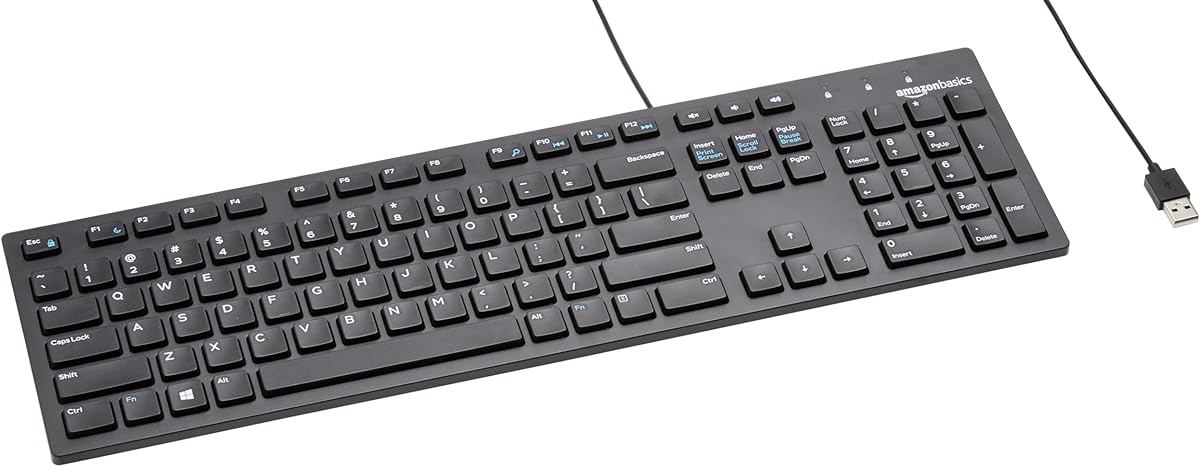
Every developer eventually needs a keyboard that is boring on purpose. The Amazon Basics wired QWERTY is that tool: USB in, type, done. Hotkeys for media, My Computer, mute, volume, and calculator cover the mundane controls you still want without opening a settings panel. Broad Windows version compatibility makes it a safe drawer spare for older lab machines and newer desktops alike.
The elegant black full-size design will not photograph like a custom artisan board, but it will not confuse a contractor who sits down for an afternoon either. Familiar QWERTY geometry means you can debug a machine without first explaining Fn-layer arrow keys. That alone earns it a place on this list.
As a primary daily driver for a senior engineer who lives in nested Vim motions, it falls short—no QMK, no Hall Effect, no multi-device Bluetooth. As a rated 4.5 backup that refuses to fail during an outage bridge call, it is excellent. Keep one in the office go-bag next to a spare HDMI cable.
Students and early-career developers on a hard budget can start here and upgrade later without shame. Typing skill matters more than switch brand in the first year. When you do upgrade, this board remains useful for a secondary Windows box or a relative’s PC you support remotely.
Sleek is relative; function is absolute. If your purchase criterion is “will this still work after I drop it in a moving box,” Amazon Basics is the honest answer in a pack full of specialty instruments.
Pair it with a basic mouse and you have a complete emergency input kit that costs little mental overhead. That is infrastructure thinking, which is very developer.
Assign it to build agents’ physical consoles, loaner laptops, or the living-room PC you occasionally SSH from. Do not force it to be your endgame typing joy.
If you teach workshops, a stack of simple wired keyboards beats a pile of half-charged wireless boards.
Upgrade when wrist fatigue, lack of remapping, or noisy shared-space needs push you toward MX Mechanical or a Keychron. Keep the Basics unit as the spare—you will use it again.
We may earn a commission at no additional cost to you.

QUASIO’s large-print backlit keyboard doubles down on visibility: legends marketed as about four times larger than traditional keys, plus evenly lit color options for dim offices and evening study. If SABLUTE is the comfort-and-holder pick, QUASIO is the “see every key from across a slightly messy desk” pick with a multimedia knob as the fun differentiator.
The knob is more than decoration for developers who scrub podcasts, conference talks, or local video while coding. Twist for volume, press for play/pause, and keep focus closer to the keyboard instead of the OS volume HUD. Round raised keycaps and spill-resistant positioning give it a retro typewriter vibe that some people love and others will hide under a monitor shelf.
Ergonomics claims focus on full-size familiarity with a numeric keypad so you do not relearn typing. Quiet click behavior is called out for shared spaces—valuable in libraries, special-needs labs, and open offices where a loud mechanical would be antisocial. Plug-and-play USB removes charging rituals.
Compatibility messaging spans older Windows versions through modern ones and includes Mac and other systems. As always with budget wired boards, media keys and special functions can vary by OS; test the knob and backlight shortcuts on your machine early. A two-year support claim in the listing is a confidence signal for classrooms and institutions buying multiples.
For a primary software engineer keyboard, QUASIO is niche. For accessibility, education, and comfortable illuminated typing without diving into custom firmware, it is a thoughtful inclusion. Developers mentoring parents or stocking a community workshop should shortlist it beside SABLUTE rather than defaulting to RGB gaming boards nobody asked for.
If your must-haves are VIA, portable 75%, or Hall Effect actuation curves, look higher in this roundup. If your must-have is reading the letter M without squinting, stay here.
Oversized legends and quiet keys match environments where many users share machines and cannot calibrate personal mechanical preferences. Spill-resistant framing is a bonus when coffee is inevitable.
Standardize backlight color per room if you want visual consistency for support staff.
Because the board is full-size, measure depth including the raised key profile before placing it on a shallow laptop tray. Pair with a simple mouse and a monitor arm so the large legends sit at a comfortable viewing angle.
We may earn a commission at no additional cost to you.
The NuPhy Air75 V2 is the wireless developer board in this pack that feels current: compact 75% layout, aluminum frame, translucent bottom case that shows internal structure, and dual height stands for a more comfortable typing angle. It keeps function keys and a tight arrow cluster without the acreage of a full-size board—ideal when a laptop and a notebook already compete for desk real estate.
Connectivity is built for people with too many machines. Bluetooth 5.1, 2.4 GHz, and USB-C cover café tables, docked desktops, and firmware sessions. Connecting up to four devices and switching among them matches a common engineering pattern: work laptop, personal laptop, desktop, and a tablet for docs. RGB side bars communicate caps lock, connection mode, battery, and system mode at a glance so you spend less time guessing why input is going to the wrong computer.
Cowberry switches in this listing give a specific NuPhy flavor—check feel samples if you are picky—but the bigger story is QMK/VIA. Open remapping, macros, and lighting control mean the Air75 V2 can grow into your workflow instead of trapping you in vendor-only software. That is why it earns Best Wireless over more closed office boards: portability without surrendering programmability.
Battery capacity at 4000 mAh underpins the mobility pitch. With backlight on, experimental figures land in the multi-dozen-hour range; with lights off, NuPhy cites up to roughly 220 hours. Real life varies with effects and connection mode, but the takeaway is that you can work a week without treating charging like a daily chore if you are reasonable with RGB.
Aesthetic details matter on developer desks that appear on video calls. The translucent bottom and side light bars look intentional; PBT keycaps resist shine. Remember legends are not backlit through the caps—side indicators and per-key LEDs still provide presence, but night typists who need glowing letters may prefer other boards.
Choose Air75 V2 if you want a portable mechanical that still speaks QMK. Choose MX Mechanical if you need quieter tactility and Logitech’s multi-computer Flow habits. Choose Keychron V1 if you prefer wired simplicity and a more traditional custom kit feel at the desk.
The Air75 V2 shines in backpacks and hot desks. Use 2.4 GHz at the primary workstation for snappier wireless, Bluetooth for secondary devices, and wired when hotel USB hubs behave badly.
Create a VIA layer dedicated to window management so unfamiliar monitors do not slow you down.
Portable 75% boards often feel different from heavy desktop customs. Give yourself a few days before judging switch and case resonance. Foam and stands already in the design do a lot; a separate wrist rest is optional for long prose days.
NuPhy wins on wireless and battery. Keychron V1 wins on wired purity, hot-swap red switch simplicity in this pack, and a slightly more traditional custom-keyboard kit narrative. Many developers eventually own both roles: wireless travel, wired home.
We may earn a commission at no additional cost to you.
If we must crown a single best keyboard for developers from this pack, the Keychron V1 is the safest, most capable default. An 81-key 75% layout keeps the function row and navigation cluster developers actually use, while reclaiming the desk space a full-size numpad wastes for people who rarely touch spreadsheets. Acoustic silicone padding and a gasket-oriented structure aim at typing comfort during long sessions rather than harsh plate ping.
QMK and VIA are the reason this board outranks prettier but closed competitors for coding work. Remap Caps to Escape or Control, build a symbol layer for languages that spam brackets, create a numpad layer if you occasionally need digits, and save Mac versus Windows layouts onboard with the system toggle and included keycap sets. Linux users get the same firmware flexibility everyone else does—open source is the point.
Hot-swap support means the included pre-lubed linear red switches are a starting point, not a life sentence. Rated around fifty million keystrokes and compatible with a wide world of 3-pin and 5-pin MX-style switches, the V1 invites experimentation without soldering. Screw-in PCB-mounted stabilizers on large keys reduce the rattle that makes cheap boards feel unfinished.
South-facing RGB helps illumination from the typist’s angle and plays nicer with many aftermarket Cherry-profile keycap sets. Double-shot PBT OSA caps resist shine and keep legends readable after years of coffee-fueled sprints. Carbon black styling stays professional on camera.
Wired-only is the honest limitation. If you live in airports, look at NuPhy Air75 V2 or Keychron K10 HE instead. If you sit at a desk with a reliable USB cable and care about remapping more than battery meters, wired is a feature: zero wireless dropouts during a deploy.
Linear reds suit fast typists who dislike bumps; tactile fans should plan a switch swap. That flexibility is why the V1 teaches custom-keyboard literacy better than locked office boards. Highest listing rating in the enthusiast tier of this pack matches the consensus: it is the developer workhorse.
Budget an evening for VIA, back up your layout JSON, and resist changing everything weekly. A stable personal layout compounds productivity more than endless tinkering.
Layer 0: nearly stock QWERTY with Caps remapped to Escape or Control based on your editor faith. Layer 1: arrows on Vim keys if you want, plus media and screenshot bindings. Layer 2: numpad and function shortcuts for rare but painful tasks.
Keep macros short and obvious. A macro that types a whole email signature is less valuable than one that inserts a ticket prefix you use fifty times a day.
Ideal first custom for Mac/Windows dual-boot developers, students entering mechanical keyboards, and anyone who wants hot-swap without assembling a kit from bare parts. Skip only if wireless is mandatory or you need integrated smart-card security.
We may earn a commission at no additional cost to you.

This second K1 Pro entry (ASIN B0FVLVG99M) exists because product packs sometimes include alternate storefront listings of the same platform with different imagery or fulfillment paths. Feature copy matches the companion K1 Pro: full-key programmable macros, VSD Craf stream-controller pages with LCD keys and knobs, TFT status display, hot-swap PCB, gasket mount, five-layer dampening, and RGB. Evaluate it as a twin, not a mystery third genre of keyboard.
For developers, the purchase advice is procedural. Compare both ASINs side by side—photos, seller, bundle contents, and recent questions—then buy one. Do not assume you need both unless you are outfitting two desks (for example, a streaming machine and a quiet office machine) and want identical muscle memory on each.
Once you pick a unit, the workflow advice mirrors the earlier review. Use the board as a verb deck: deploys, scene switches, mute toggles, script launchers. Keep prose typing on Keychron V1, NuPhy Air75 V2, or MX Mechanical. Reset after software updates, and install the Windows/macOS tools if you care about GIFs and clock calibration on the TFT.
Gasket feel and hot-swap flexibility still make this more pleasant than plastic membrane pads, which matters if your fingers bounce between the macro deck and your main board all day. RGB can color-code pages—blue for build tools, red for danger actions like prod deploy—so visual memory reinforces safety.
If Amazon listings diverge over time, trust the live product page over any roundup snapshot. Our job here is to map the pack honestly: two K1 Pro doorways into one product idea. Choose the listing that looks correct and ships from a seller you trust.
Teams standardizing demo carts can buy identical K1 Pro units so every presenter sees the same LCD iconography. Consistency beats clever one-off macro layouts that only one engineer understands.
Open both product URLs, compare images and option selectors, and check whether accessories differ. If they are functionally identical, pick based on fulfillment speed and return policy.
Save your macro profiles externally so switching hardware later does not erase months of bindings.
Place the K1 Pro to the left or right of your main 75% board at the same height. Angle the screen toward your eyeline so page changes are peripheral-vision obvious during talks.
Label dangerous macros carefully—LCD images help prevent the classic “wrong button, wrong environment” mistake.
We may earn a commission at no additional cost to you.
Developers feel layout mistakes every minute. A 75% board like the Keychron V1 or NuPhy Air75 V2 keeps function keys and arrows without a numpad tax. Full-size boards like the Keychron K10 HE or Logitech MX Mechanical help when SQL, spreadsheets, or numeric entry still matter. Macro companions like the K1 Pro should sit beside a primary layout, not replace it unless your work is almost entirely shortcut-driven.
If you live in Vim-style navigation, confirm arrow keys and modifiers are reachable without gymnastics. If you context-switch into Excel weekly, deleting the numpad may cost more time than it saves.
QMK/VIA boards (V1, Air75 V2) and web configurators (K10 HE Launcher, K1 Pro tools) let you encode your personal language of work. That is worth more over a year than a slightly prettier case. Closed ecosystems like Logitech Options+ can still be excellent if they match the rest of your desk and you do not need open firmware.
Security-focused boards trade remapping for authentication hardware—the right call only when credentials demand it.
Wired wins for zero-battery anxiety and fewer RF surprises during screen shares. Wireless wins for clean docks and multi-device hopping. Tri-mode boards cover both moods. If IT bans wireless in secure rooms, plan a wired daily driver (V1, Cherry Secure Board, Amazon Basics) and keep wireless for home.
Mac users should confirm Command/Option keycaps or easy remaps. Windows-centric Basics keyboards are fine spares but weaker as Mac primaries. Linux users should prefer open firmware or accept OS-level remapping. Thin-client and smart-card shops should evaluate Cherry’s Secure Board with their middleware before bulk buying.
For most developers who want a durable, remappable mechanical without wireless complexity, the Keychron V1 is the best overall pick in this pack. Its 75% layout, QMK/VIA support, hot-swap reds, and Mac/Windows keycap flexibility cover the majority of coding desks. Choose NuPhy Air75 V2 if wireless portability is mandatory, Keychron K10 HE if you want full-size Hall Effect tuning, and Logitech MX Mechanical if quiet multi-device office manners matter more than open firmware.
Often yes. A 75% board keeps the function row and arrows while cutting the numpad width that pushes mice too far right, which can reduce shoulder strain. Full-size still wins if you enter lots of numbers, work in spreadsheets beside your editor, or hate Fn layers for Home/End/PgUp/PgDn. Many developers eventually keep a 75% as the primary and accept a software numpad layer for rare cases.
You do not need them to write code, but they massively help once your shortcuts stabilize. Layers for symbols, Escape on Caps, OS-specific layouts, and short macros for repetitive terminal phrases compound over months. If you prefer zero tinkering, Logitech’s Options+ or even a simple Amazon Basics board can be enough—especially for secondary machines.
They can be. Adjustable actuation lets you find a shallower or deeper reset that matches your fingers, and contactless sensing may reduce certain wear patterns. The Keychron K10 HE is the Hall Effect option here. The tradeoff is a learning curve and a larger full-size footprint. If you do not care about tuning actuation, a solid hot-swap mechanical like the V1 delivers most of the daily joy with less conceptual overhead.
Prioritize quieter switches and controlled volume. The Logitech MX Mechanical’s tactile quiet design is the strongest open-office mechanical in this pack. Large-print quiet wired boards like QUASIO can also work when accessibility matters. Save louder custom acoustics for home offices, or add dampening and quieter switch swaps if you insist on a hot-swap board at work.
Usually no—buy both roles. The K1 Pro listings excel as companions for stream control, demo resets, and scripted tool launchers with LCD pages you can see. They are wired-only and software-dependent for the flashiest features, so they complement a NuPhy or Keychron rather than replace the alphanumeric experience you trust for writing code and documentation.
When smart cards, NFC badges, or thin-client authentication are part of your daily login path. Cherry Secure Board 1.0 integrates reader hardware and secure-mode features that consumer mechanicals lack. If you only use passwords or phone authenticators, a security keyboard is unnecessary weight and cost. Always validate PC/SC and card protocols against your company’s middleware before you standardize on it.
No. Anyone with visual strain, fluorescent office lighting headaches, or frequent hunt-and-peck moments can benefit. SABLUTE and QUASIO target oversized legends and backlights for broader audiences including students and accessibility programs. They are not enthusiast mechanicals, but they solve a real problem that RGB gaming boards ignore.
If you roam between rooms and devices, wireless tri-mode boards like NuPhy Air75 V2 or Keychron K10 HE reduce cable friction. If you dock in one place and hate battery management—or work under policies that restrict wireless—Keychron V1 or a simple wired board is cleaner. Many developers keep a wireless travel board and a wired home board; that combination is not overkill if both see weekly use.
The pack includes two ASINs that describe the same K1 Pro macro keyboard platform with different images and storefront entries. Feature sets align: programmable macros, stream-style LCD pages, knobs, TFT screen, hot-swap gasket construction, and wired operation. Compare both listings at purchase time and buy a single unit unless you intentionally want matching decks on two desks.
The best keyboard for developers is the one that disappears under reliable muscle memory while still letting you encode the shortcuts your toolchain demands. In this pack, Keychron V1 is the clearest everyday champion for remappable wired coding, NuPhy Air75 V2 is the wireless portable upgrade, and Keychron K10 HE brings full-size Hall Effect flexibility when you want to tune actuation and keep a numpad.
Around those pillars, Logitech MX Mechanical covers quiet multi-device offices, Cherry Secure Board 1.0 covers credential-heavy enterprise desks, the K1 Pro boards cover visual macro and stream control, and the large-print or Amazon Basics options cover accessibility and backup duty without apology.
Pick from the constraints you actually have—noise, OS mix, security policy, desk size, and appetite for VIA—then spend your energy on a stable layout instead of endless gear churn. A thoughtful keyboard compounds like a good editor config: boring in the best way, every single day.