Expert Review & Guide

Best Gaming PC Cases for Airflow and Builds in 2026

A gaming PC case is not just a box that holds parts. It decides how cool your GPU runs after a three-hour raid, how easy cable routing feels on a Saturday build night, and whether your desk looks like a showcase or a tangled shoebox. In 2026, mid-tower ATX cases still dominate because they fit mainstream motherboards, long modern graphics cards, and either chunky air coolers or 360mm liquid coolers—yet the differences between a mesh airflow brick, a panoramic glass fishbowl, and a modular frame chassis are larger than marketing photos suggest.

This guide uses only the ten cases in our best-gaming-pc-cases pack. We weighed pre-installed fan counts and ARGB control, GPU and cooler clearance, radiator support, dual-chamber versus classic layouts, dust filtration, front I/O usefulness (especially USB-C), and how forgiving each chassis is for first-time builders versus showpiece enthusiasts. Lian Li and Corsair lead on polish and flexibility; NZXT keeps compact airflow honest; value brands such as FOIFKIN, RUIX, ANSAITE, darkFlash, HYXN, MOROVOL, and DARKROCK stack fans and glass for builds that want presence without boutique pricing.

Skip dollar chasing—case street prices swing with fan bundles and glass configurations. Start with our three top picks if you already know you want a balanced Lian Li mid-tower, a Corsair FRAME modular system, or a compact NZXT Flow. Use the comparison table to separate seven-to-nine-fan showcases from quieter three-or-four-fan daily drivers. Then read every review for clearance gotchas, who should buy, and how to plan intake versus exhaust before you order radiators that will not fit.

Our Top Gaming PC Case Picks for 2026

Best Overall Mid-Tower

Lian Li V100-ATX Mid-Tower V100RX

★★★★★9.6/10
Lian Li V100-ATX Mid-Tower V100RX
  • Four pre-installed 120mm ARGB PWM fans plus an integrated 26-LED ARGB strip for sync-ready lighting
  • Room for GPUs up to 420mm, CPU coolers up to 178mm, and a top radiator up to 360mm
  • Tool-less side panels and support for ATX through Mini-ITX plus back-connect boards
Check Price →
Best Modular Customization

CORSAIR 4000D RS ARGB Frame Mid-Tower

★★★★★9.4/10
CORSAIR 4000D RS ARGB Frame Mid-Tower
  • FRAME modular system lets you evolve I/O, trays, and layout as your build grows
  • Three CORSAIR RS ARGB PWM fans with daisy-chain PWM and Zero RPM low-load silence
  • InfiniRail mounts fans flexibly; 3D Y-pattern front panel prioritizes high airflow
Check Price →
Best Compact Airflow Build

NZXT H5 Flow Compact ATX Mid-Tower

★★★★★9.4/10
NZXT H5 Flow Compact ATX Mid-Tower
  • Ultra-fine mesh on top, front, and side panels for maximum airflow with dust filtering
  • Two quiet 120mm fans included; supports 360mm front and 240mm top radiators
  • Perforated PSU shroud and wide cable channels make a clean first high-airflow build
Check Price →

As an Amazon Associate we earn from qualifying purchases. We may earn a commission at no additional cost to you.

Gaming PC Case Comparison: Fans, Clearance, and Layout

Scan fan count, glass style, and clearance before you fall for a product photo. Specs below highlight what matters for gaming builds—pre-installed cooling, motherboard and GPU room, and radiator or dual-chamber cues. No prices—open the live listing for the current offer.

#ProductSpecificationsScore
1
  • 4× 120mm ARGB PWM fans + LED strip
  • GPU to 420mm; cooler to 178mm; 360mm top rad
  • ATX / mATX / ITX; back-connect ready
9.6
2
  • 3× CORSAIR RS ARGB PWM fans included
  • FRAME modular + InfiniRail fan mounting
  • Y-pattern high-airflow front; ASUS BTF ready
9.4
3
  • 2× 120mm Quiet Airflow fans included
  • 360mm front / 240mm top radiator support
  • Mesh panels; perforated PSU shroud for GPU air
9.4
4
  • 7× 120mm ARGB PWM fans pre-installed
  • 270° panoramic glass; dual-chamber layout
  • Up to 3× 360mm rads; GPU to 400mm
9
5
  • 4× 120mm Prism ARGB PWM fans included
  • Panoramic tempered glass; GPU to 420mm
  • USB-C + USB 3.0; built-in GPU support bracket
9.4
6
  • 4× 120mm fixed RGB fans (not ARGB)
  • Diamond mesh front; tempered glass side
  • GPU to 300mm; cooler to 155mm; USB 3.0 I/O
8.4
7
  • 4× PWM ARGB fans; dual-chamber layout
  • Angled panoramic glass; vertical GPU mount
  • GPU to 410mm; up to 2× 360mm radiators
9.2
8
  • 3× ARGB fans (2 reverse, 1 forward)
  • Compact dual chamber; Type-C 3.2 front I/O
  • GPU to 400mm; 360mm radiator support
8.2
9
  • 9× PWM ARGB prism fans pre-installed
  • 270° glass; GPU to 460mm; 420/360mm rads
  • USB-C Gen2 + USB 3.0; back-connect ready
9
10
  • 1× pre-installed fan; mesh front panel
  • Up to 8× 120mm fans; 360mm front radiator
  • GPU to 340mm; Type-C ready; magnetic filters
8.8

1. Lian Li V100-ATX - Best Overall Mid-Tower

Lian Li V100-ATX

Lian Li V100-ATX

9.6/10★★★★★

The Lian Li V100RX earns Best Overall because it hits the sweet spot most gaming builders actually need in 2026: enough pre-installed cooling to avoid an immediate fan shopping trip, clearance that respects long GPUs and tall air coolers, and Lian Li’s habit of making panels and lighting feel intentional rather than bolted on. Four 120mm ARGB PWM fans with daisy-chain connectivity mean you can set intake and exhaust curves from day one instead of living with a single stock spinner and hoping thermals behave. The hydraulic-bearing fans are rated around 1800 RPM with roughly 60 CFM-class airflow and mid-20s to low-30s dBA noise figures—quiet enough for desk-side use when you curve them down, yet capable when you ask for heat soak recovery after heavy GPU sessions.

  • 4× 120mm ARGB PWM fans + 26-LED ARGB strip
  • GPU 420mm / cooler 178mm / 360mm top rad
  • ATX, Micro-ATX, Mini-ITX, back-connect boards
Check Price →
✓ Pros
  • Four PWM ARGB fans arrive ready for daisy-chain sync and adaptable airflow
  • Generous GPU and cooler clearance covers most high-end air and liquid setups
  • Integrated ARGB strip adds polish without buying a separate light kit
  • Tool-less side panels speed upgrades and weekend maintenance
  • Back-connect motherboard support keeps the visible chamber cleaner
✕ Cons
  • Four fans plus a strip still need motherboard headers or a hub planned in advance
  • Mid-tower footprint is larger than compact Flow-style cases for small desks
  • Showpiece glass and lighting may matter less if you want a closed, silent office look

Detailed review

Clearance is the quiet reason this chassis rises above prettier fishbowls with tighter interiors. Support for graphics cards up to 420mm covers nearly every mainstream and enthusiast card length you will meet outside of exotic water blocks and vertical riser experiments. CPU cooler height up to 178mm gives dual-tower air coolers room to breathe, while a top radiator up to 360mm keeps AIO and custom loop paths realistic without forcing a full-tower purchase. That combination matters more than another glass panel when your build plan includes a thick 360mm cooler and a long triple-fan GPU at the same time.

Motherboard flexibility is broader than classic ATX-only mid-towers. The V100 supports ATX, Micro-ATX, Mini-ITX, and back-connect ATX or Micro-ATX boards, so builders chasing cleaner front chambers can route power and data behind the tray instead of draping cables across the glass view. Pair that with tool-less side panels and you get a case that respects both the first install and the inevitable GPU swap six months later. Display-platform tempered glass keeps the hardware visible without turning the chassis into a fragile display-only sculpture.

Lighting is handled with restraint that still photographs well. Beyond the four fans, an integrated 26-LED ARGB strip offers full-spectrum control and motherboard software synchronization, so you can match Lian Li fans to MSI, ASUS, Gigabyte, or ASRock RGB ecosystems without buying a separate strip kit. If you prefer a calmer look, PWM control lets you dim speed and, depending on software, tone lighting down for night sessions. The point is choice: the case does not force a permanent rainbow parade, but it arrives ready for one.

Who should skip it? Builders who need a true compact footprint for a shallow desk, or showpiece hunters who want seven-to-nine fans and wraparound glass out of the box, may prefer FOIFKIN, ANSAITE, or darkFlash options later in this list. Everyone else—especially gamers building a balanced ATX system with modern clearance needs—should treat the V100RX as the default recommendation. It is the case we would buy for a friend who wants Lian Li credibility without a research spiral.

Build tip: plan front intake and rear or top exhaust before you seat the motherboard. Daisy-chain the PWM ARGB fans into a single clean run, reserve a +5V ARGB header for the strip, and confirm your cooler’s radiator thickness against the top mount before you order tubing or an AIO. A little planning preserves the clean look the V100 is designed around.

Who should buy the Lian Li V100RX

Choose this case if you want a polished mid-tower that ships with real cooling value, not a bare shell. It suits high-refresh gaming PCs, creator towers that run long encodes, and anyone building on ATX or back-connect boards who still wants tempered-glass presence. It is also a strong upgrade path from older plastic-front cases that choke airflow.

Setup notes for ARGB and airflow

Map fan direction before cable ties go permanent. Typically run three intake and one exhaust or a balanced top-exhaust plan if you mount a 360mm AIO up top. Sync fans and the LED strip through your motherboard’s ARGB software, then create a quiet fan curve for idle desktop use and a more aggressive curve for GPU-bound games.

V100 versus compact mesh rivals

Against the NZXT H5 Flow, the Lian Li wins on included fan count, lighting completeness, and maximum cooler height. The H5 Flow stays smaller and more mesh-obsessed for pure thermals on a tight desk. If modular longevity matters more than Lian Li’s out-of-box kit, look at the Corsair 4000D RS Frame instead.

Check Price on Amazon →

We may earn a commission at no additional cost to you.

2. CORSAIR 4000D RS ARGB - Best Modular Customization

CORSAIR 4000D RS ARGB

CORSAIR 4000D RS ARGB

9.4/10★★★★★

Corsair’s 4000D RS ARGB Frame is the pick for builders who refuse to treat a case as disposable. The FRAME modular system is the headline: instead of locking you into one motherboard tray and one front I/O forever, Corsair designed a chassis that can grow—swap to a billet aluminum tray later, change I/O for more USB ports, or reconfigure mounting as your needs shift. That matters if you rebuild every generation or if you simply hate throwing away a good steel shell because one panel aged out of your taste.

  • FRAME modular mid-tower with InfiniRail mounts
  • 3× CORSAIR RS ARGB PWM fans; Zero RPM mode
  • ASUS BTF / MSI Zero / Gigabyte Stealth ready
Check Price →
✓ Pros
  • FRAME system lets you upgrade trays, I/O, and layout over years instead of replacing the whole case
  • Three quality RS ARGB PWM fans with daisy-chain and near-silent Zero RPM behavior
  • InfiniRail mounting places fans where your GPU and CPU actually need air
  • 3D Y-pattern front panel keeps restriction low for high-airflow gaming builds
  • Internal side panel can hide cables or become extra fan mounts for turbo cooling
✕ Cons
  • Modular ecosystem upside implies optional parts and a learning curve versus fixed cases
  • Three included fans are excellent but fewer than seven-to-nine-fan glass showcases
  • Premium modular design may feel like overkill for a simple office-plus-gaming box

Detailed review

Out of the box you still get a serious cooling kit. Three CORSAIR RS ARGB PWM fans sit in the front with daisy-chainable 4-pin PWM connections and Zero RPM mode for near-silent operation at low loads. Each fan carries eight LEDs controllable from a motherboard +5V ARGB header, so lighting sync stays simple. For gamers who idle on Discord for hours and only spike fans during ranked matches, Zero RPM is more than a marketing line—it is the difference between a quiet living-room PC and a constant mid-tower hum.

InfiniRail is the practical cooling feature most photos undersell. The steel multi-point mounting system lets you slide rails and place fans up to 200mm in the front (140mm in the roof) where your components need targeted airflow. That flexibility helps when a thick radiator or an oddly tall cooler would otherwise fight fixed fan holes. Combined with the 3D Y-pattern perforated front panel, the 4000D RS is aimed at high airflow with minimal restriction rather than sealed aesthetic panels that look sleek and cook GPUs.

Cable management versus turbo cooling is a deliberate fork. The internal side panel near the motherboard tray can act as a cable cover for clean photography and tidy daily use, or you can remove it and mount fans for increased cooling potential. Few mid-towers make that tradeoff so explicit. Back-connect friendly support for ASUS BTF, MSI Zero, and Gigabyte Stealth boards further reduces visible cable clutter if you invest in those motherboards.

This is not the cheapest path to a glowing glass cube, and it is not trying to be. If you want nine pre-installed fans and wraparound tempered glass for a show shelf, ANSAITE or FOIFKIN will feel more instantly dramatic. If you want a Corsair ecosystem case that stays relevant through multiple GPU generations and accessory upgrades, the 4000D RS Frame is the smarter long game. Plan your first build with the included fans, then decide later whether modular upgrades are worth chasing.

Practical advice: decide early whether the internal side panel stays as a cable cover. Once sleeved cables and ARGB runs are tied down, reopening that path is annoying. Also inventory your motherboard headers—three ARGB fans want a clean PWM daisy chain and a single ARGB feed if you can manage it.

Who the 4000D RS Frame is for

Buyers who upgrade GPUs often, experiment with fan layouts, or want a case that can accept future Corsair modular parts. Also strong for high-airflow ATX gaming PCs that still need a mature brand’s documentation and accessory ecosystem.

Airflow strategy with InfiniRail

Slide front fans to align with GPU intake height when possible, especially on long dual- or triple-slot cards. Use roof mounts for exhaust or AIO radiators, and keep the Y-pattern front clear of furniture that blocks the perforated steel. Dust filters still need occasional cleaning even on high-airflow panels.

Check Price on Amazon →

We may earn a commission at no additional cost to you.

3. NZXT H5 Flow - Best Compact Airflow Build

NZXT H5 Flow

NZXT H5 Flow

9.4/10★★★★★

NZXT markets the H5 Flow as a great first airflow build, and that framing is honest. Ultra-fine mesh on the top, front, and side panels creates maximum airflow while still filtering dust, which is exactly what hot modern GPUs want. If your last case was a solid front panel that looked sleek and thermal-throttled under load, the H5 Flow will feel like opening a window. It is compact for an ATX mid-tower, so it earns a spot on desks that cannot absorb a full panoramic dual-chamber cube.

  • Compact ATX mid-tower; 2× 120mm Quiet fans
  • 360mm front / 240mm top radiator support
  • Mesh top, front, side; perforated PSU shroud
Check Price →
✓ Pros
  • Mesh-first design prioritizes GPU and CPU cooling over sealed showpiece aesthetics
  • Compact mid-tower footprint fits smaller desks without going true SFF
  • 360mm front radiator support makes serious liquid cooling realistic
  • Perforated PSU shroud improves GPU intake from below and the side
  • Wide cable channels, hooks, and straps simplify a clean first build
✕ Cons
  • Only two fans included—expect to buy more for a fully balanced high-end config
  • Less out-of-box ARGB spectacle than Lian Li, FOIFKIN, or nine-fan glass cases
  • Compact dimensions can feel tight with very thick radiator-and-fan stacks

Detailed review

Cooling hardware support is stronger than the modest included fan count suggests. You get two 120mm Quiet Airflow fans—one front, one rear—for solid out-of-the-box performance, plus support for a 360mm radiator in front and a 240mm radiator up top. That path lets first-time liquid-cooling buyers mount a serious AIO without jumping to a full-tower. The perforated PSU shroud on the side and bottom is a thoughtful GPU-focused detail: cool air can reach the graphics card from below instead of treating the shroud as a sealed shelf.

Cable management is where NZXT’s builder-friendly reputation shows. Wide channels, hooks, and straps make it realistic to hide ATX power, GPU power, and front-panel wiring on a first attempt. Tempered glass still gives you a clean hardware view, but the mesh language makes it clear this chassis values temperatures over aquarium maximalism. That balance is why we call it Best Compact Airflow rather than Best Showcase.

The honest tradeoff is kit completeness. Two fans are enough to boot and game, yet a high-wattage GPU build often benefits from additional front intake. Budget for one or two more fans if you chase lower GPU hotspot numbers. Lighting enthusiasts may also want an ARGB kit later; the H5 Flow is not competing with seven-fan rainbow fishbowls on day one.

Choose the H5 Flow if you want NZXT’s compact silhouette, mesh thermals, and a trustworthy first liquid-cooling path. Skip it if you need 400mm-plus GPU clearance showcases with nine fans included, or if you specifically want Lian Li’s four-fan ARGB bundle without buying extras. For dorm rooms, streaming desks, and living-room PCs that sit close to the wall, the smaller footprint is a genuine advantage.

Build tip: measure your front 360mm AIO thickness including fans against GPU length before purchase. Compact cases punish optimistic stacking. Keep mesh panels clean—fine mesh works best when dust is wiped on a schedule rather than ignored for a year.

Ideal buyer for the H5 Flow

First-time ATX builders who care about thermals, streamers with limited desk depth, and gamers who prefer quiet mesh cases over dense ARGB glass cubes. Also a smart pick when you already own spare fans and want the chassis budget to go toward airflow design.

Versus Lian Li V100 and Corsair 4000D

The H5 Flow is smaller and more mesh-forward than the Lian Li V100, but it includes fewer fans and less lighting. Against the Corsair 4000D RS, NZXT is simpler and less modular; Corsair wins if you want InfiniRail flexibility and FRAME upgrades over years.

Check Price on Amazon →

We may earn a commission at no additional cost to you.

4. FOIFKIN F600 - Best Fan-Packed Showcase

FOIFKIN F600

FOIFKIN F600

9/10★★★★★

The FOIFKIN F600 is for builders who want the case to look finished the moment the side glass goes on. Seven pre-installed 120mm ARGB PWM fans—six reverse and one forward—create a dense lighting field and a ready-made airflow map without a separate fan shopping cart. Reverse-blade fans are popular in panoramic builds because the decorative side of the impeller faces the glass while still acting as intake, so the F600 leans into that showroom logic.

  • 7× 120mm ARGB PWM fans (6 reverse, 1 forward)
  • 270° panoramic tempered glass; dual-chamber
  • Up to 3× 360mm radiators; GPU to 400mm
Check Price →
✓ Pros
  • Seven PWM ARGB fans deliver an instant showcase look and dense airflow potential
  • Dual-chamber layout separates PSU and drives for cleaner thermals and cable paths
  • 270° panoramic glass turns the build into a desk centerpiece
  • Triple 360mm radiator capacity suits ambitious liquid-cooling plans
  • Type-C front I/O and ATX/mATX/ITX support cover modern connectivity needs
✕ Cons
  • Panoramic glass and many fans mean more dusting and fingerprint maintenance
  • Seven-fan ARGB wiring still requires careful hub or motherboard planning
  • Drive capacity is modest at 1× HDD and 2× SSD versus storage-heavy towers

Detailed review

Dual-chamber design is the functional backbone under the glass. Separating hardware from the power supply and drives improves cable management and can help thermal organization by keeping hot PSU exhaust from bathing the motherboard chamber as freely. Fully transparent high-hardness tempered glass shows every detail, which rewards sleeved cables, tidy GPU seating, and coordinated ARGB themes—and punishes messy routing that cheaper mesh cases would hide.

Cooling headroom is aggressive on paper: the F600 can accommodate three 360mm radiators simultaneously, which is enthusiast territory. GPU support up to 400mm covers most current gaming cards, and PSU length up to 200mm fits mainstream units. Dimensions around 420 × 285 × 430mm make it a substantial mid-tower presence on a desk; measure shelf height if the PC lives in a cabinet.

Storage is the compromise. With support for one HDD and two SSDs, this is not a NAS-in-a-tower substitute. Gamers who keep a big game library on a single NVMe plus one SSD will be fine; collectors of multiple spinning disks should look elsewhere. Front Type-C is welcome for modern peripherals and phone tethering.

Buy the F600 when the visual result matters as much as thermals and you want seven fans included. Skip it if you prefer quiet minimal mesh like the H5 Flow, or if you want a longer brand modular ecosystem like Corsair FRAME. For Discord screenshots and LAN party table presence, few packs in this list deliver more immediate theater.

Setup advice: unify fan control early. Seven ARGB PWM fans can become a nest of splitters if you improvise. Use the reverse fans as the glass-facing intake wall, keep exhaust coherent at the rear or top, and confirm radiator mounts before ordering three 360mm coolers you may never need.

Who should choose the F600

RGB-forward gamers, content creators who film desktop tours, and builders who want dual-chamber cable separation without assembling fans from scratch. Ideal when the PC is a visible room object, not hidden under a desk.

Radiator and clearance planning

Triple 360mm support is a ceiling, not a requirement. Most gamers will run one AIO plus case fans. Verify GPU length against thick front radiator stacks, and leave service loops so glass panels can come off without fighting tubes.

Check Price on Amazon →

We may earn a commission at no additional cost to you.

5. RUIX OV303 - Best Panoramic Value ARGB

RUIX OV303

RUIX OV303

9.4/10★★★★★

RUIX’s OV303 lands as Best Panoramic Value ARGB because it packages the features people screenshot—prism fans, multi-panel glass, Type-C, GPU bracket—without requiring a boutique budget. Four high-performance 120mm ARGB prism fans arrive installed, so the case looks alive before you even seat the motherboard. For builders who want glass aesthetics but cannot justify nine-fan kits, four quality PWM ARGB units are a practical middle ground.

  • 4× 120mm Prism ARGB PWM fans pre-installed
  • Front and side panoramic tempered glass panels
  • GPU to 420mm; USB-C + USB 3.0; GPU bracket
Check Price →
✓ Pros
  • Four prism ARGB PWM fans included at a value-focused panoramic price point
  • 420mm GPU clearance and built-in GPU support bracket address heavy modern cards
  • Supports up to 10 fans or 7 fans with a 360mm AIO for expandable cooling
  • Magnetic dust filters on top and bottom simplify maintenance
  • Type-C and USB 3.0 front ports cover everyday peripheral needs
✕ Cons
  • Value-brand finish and documentation may feel less polished than Lian Li or Corsair
  • Panoramic glass shows fingerprints and cable mistakes clearly
  • Drive bays are limited compared with older storage-heavy mid-towers

Detailed review

Panoramic tempered glass on the front and side adds depth and a more dimensional look than a single side window. That design choice turns the OV303 into a display piece, especially with prism fan lighting. Ventilation remains a priority: the chassis can support up to ten fans, or seven fans alongside a 360mm AIO liquid cooler, which is enough headroom for hot GPUs and high-core CPUs if you expand beyond the included quartet.

Clearance and GPU care are stronger than many value cases. Graphics cards up to 420mm fit, matching Lian Li’s long-card hospitality, and a built-in GPU support bracket fights sag on heavy modern boards. That bracket also doubles as a visual stabilizer in the glass chamber. Storage lands at two 3.5-inch drives and one 2.5-inch drive—adequate for mixed libraries, if not archival.

Magnetic dust filters on the top and bottom are the maintenance detail that keeps panoramic cases livable. Glass looks worse when dust fogs the inside edges; filters you can actually remove and wash matter. Front I/O with USB 3.0 and Type-C means fewer dongles for SSDs and phones.

The OV303 is a strong pick when you want panoramic presence, long GPU support, and four ARGB fans without stepping into full dual-chamber fishbowl territory like FOIFKIN or darkFlash. It is less of a modular forever-chassis than Corsair and less of a brand-polished default than Lian Li, but the feature checklist is hard to ignore for glass-first gamers.

Build tip: install the GPU support bracket after the card is seated and PCIe power is connected so you set height correctly. Route ARGB as one chain if possible, and clean magnetic filters monthly if the PC sits on carpet.

Best use cases for the OV303

1440p and 4K gaming towers with heavy GPUs, RGB-themed desks, and builders who want Type-C without paying for premium modular ecosystems. Also good when you plan to add more fans later but need a complete look on day one.

OV303 versus FOIFKIN F600

FOIFKIN includes more fans and a dual-chamber panoramic approach; RUIX counters with excellent GPU length support, a sag bracket, and a slightly more conventional mid-tower workflow. Pick FOIFKIN for maximum glass theater, OV303 for long-card practicality with four prism fans.

Check Price on Amazon →

We may earn a commission at no additional cost to you.

6. MOROVOL 621 - Best Budget Mesh Starter

MOROVOL 621

MOROVOL 621

8.4/10★★★★☆

MOROVOL’s 621-N4 exists for honest budget builds: four pre-installed 120mm RGB fans, a diamond-shaped mesh front, and a tempered glass side panel that makes an entry gaming PC look intentional. If you are assembling a first desktop around a midrange GPU and a tower air cooler, this case can carry that mission without forcing a separate fan kit. Just read the clearance numbers carefully before you fall for the product photos.

  • 4× 120mm fixed RGB fans (not addressable)
  • Diamond mesh front; tempered glass side panel
  • GPU to 300mm; cooler 155mm; PSU to 160mm
Check Price →
✓ Pros
  • Four included fans make a complete-looking starter tower without extra purchases
  • Diamond mesh front prioritizes airflow for hot budget and midrange GPUs
  • Tempered glass side panel still shows the build for a low-cost case
  • Supports ATX, Micro-ATX, and Mini-ITX for flexible board choices
  • Straightforward USB 3.0 and dual USB 2.0 I/O for basic peripherals
✕ Cons
  • Lighting is fixed RGB, not motherboard-sync ARGB addressable
  • 300mm GPU and 155mm cooler limits exclude many high-end parts
  • Build quality and refinement trail Lian Li, Corsair, and NZXT

Detailed review

The lighting note is critical. These fans use fixed RGB lighting, not addressable ARGB synced through a +5V motherboard header. Colors and effects are more limited; you will not get the per-LED rainbow control Lian Li, Corsair, FOIFKIN, or ANSAITE buyers expect. For many first builds that is fine—the fans still add glow and airflow—but sync enthusiasts should look elsewhere.

Airflow is the 621’s best argument. The diamond mesh front is designed as a high-airflow panel with a stereo contour that also shows lighting. Removable tempered glass makes component installs easier than sealed steel sides. Motherboard support covers ATX, Micro-ATX, and Mini-ITX, which is the right flexibility for builders who might downsize boards later.

Clearance is where the case shows its budget lane. GPU length up to 300mm, PSU length up to 160mm, and CPU cooler height up to 155mm will not host the longest triple-fan flagship cards or the tallest dual-tower coolers. Storage supports two 2.5-inch SSDs and two 3.5-inch HDDs, which is actually friendly for mixed drive users. Front I/O includes one USB 3.0, two USB 2.0, HD audio, reset, and power—serviceable, not luxurious.

Buy the MOROVOL 621 when you need four fans and mesh airflow on a tight component budget and your GPU is within 300mm. Skip it for 400mm-class cards, thick 360mm showpiece loops, or ARGB sync showcases. As a cost-effective mesh starter, it still earns a place in this pack for builders who prioritize function over brand prestige.

Compatibility checklist: measure your GPU from bracket to end fin, confirm cooler height against 155mm, and verify PSU length if you bought a long modular unit. Those three checks prevent the majority of returns on compact budget towers.

Who the MOROVOL 621 fits

Students, first-time builders, and secondary gaming PCs using mainstream GPUs under the 300mm mark. Great when you want mesh airflow and four fans included without paying for panoramic dual-chamber designs.

ARGB expectations versus reality

If your motherboard marketing photos show synchronized rainbow ecosystems, this case will not fully participate. Enjoy the fixed RGB glow, or plan an ARGB upgrade path in a different chassis later. Do not buy the 621 expecting Lian Li-style software control.

Check Price on Amazon →

We may earn a commission at no additional cost to you.

7. darkFlash DY470 - Best Dual-Chamber Showpiece

darkFlash DY470

darkFlash DY470

9.2/10★★★★★

The darkFlash DY470 is the pack’s full-tower theater pick. Unique top-angled glass changes how you see the interior—components read as a display sculpture rather than a side window peek. Four PWM ARGB fans ship with the black configuration we reviewed, but darkFlash notes that an RGB hub controller is not included. Budget a motherboard with enough ARGB/PWM capacity or add a hub so lighting control does not become a day-two frustration.

  • Full-tower dual-chamber; 4× PWM ARGB fans
  • Angled panoramic glass; vertical GPU mounting
  • GPU to 410mm; up to 2× 360mm radiators
Check Price →
✓ Pros
  • Distinctive top-angled glass makes the DY470 a visual centerpiece
  • Dual-chamber layout with vertical GPU mounting options for showcase builds
  • Supports back-mounted motherboards and GPUs up to 410mm
  • Dual 360mm radiator capacity suits serious liquid cooling
  • Velcro straps, dust filter, and roomy interior ease cable-heavy installs
✕ Cons
  • RGB hub controller is not included—plan motherboard headers or a separate hub
  • Full-tower angled glass footprint needs more desk and shelf space
  • Showcase orientation can complicate simple under-desk office placement

Detailed review

Dual-chamber architecture separates the main hardware stage from power and storage paths, which pairs naturally with panoramic glass. Vertical GPU mounting support lets you show the card’s face instead of only its edge, a favorite move for RTX-class builds when you accept riser-cable tradeoffs. Back plug-in motherboard compatibility continues the clean-chamber theme for builders investing in reverse-connector boards.

Space is the DY470’s comfort zone. GPUs up to 410mm, dual 360mm radiators, snap-on design cues, and plenty of room to work make installation less knuckle-busting than compact mid-towers. Bottom dust filtration, velcro straps, and a back cover for tidy cables show that darkFlash expects enthusiasts to actually build in this thing, not only photograph the empty shell.

Choose this case when the PC is furniture. The angled glass and full-tower presence want open air and a desk that can handle the footprint. It is overkill for a hidden HTPC cabinet and less practical than the H5 Flow or DARKROCK EC2 when stealth size matters. For creators and gamers who want a dual-chamber showpiece with vertical GPU drama, it is one of the most distinctive options in the pack.

Build advice: dry-fit the vertical GPU path and riser before final cable management. Confirm your motherboard’s back-connect compatibility if that is part of your plan. Because the hub is omitted, map fan power and ARGB wires on paper first—four PWM ARGB fans plus strips or pump lighting can exhaust headers quickly.

Warranty context: darkFlash highlights a one-year assurance on computer cases. Keep your proof of purchase and inspect glass carefully on arrival; panoramic panels deserve a careful unboxing on a soft surface.

Who should buy the DY470

Showcase builders, vertical-GPU fans, and dual-chamber liquid-cooling enthusiasts who have desk space for a full-tower silhouette. Excellent when the PC sits beside a monitor as part of the room aesthetic.

Lighting control reality check

Do not assume a bundled hub. Use motherboard software if headers suffice, or add a PWM/ARGB hub before you close the glass. That single preparatory step prevents the most common setup complaint on hub-optional panoramic cases.

Check Price on Amazon →

We may earn a commission at no additional cost to you.

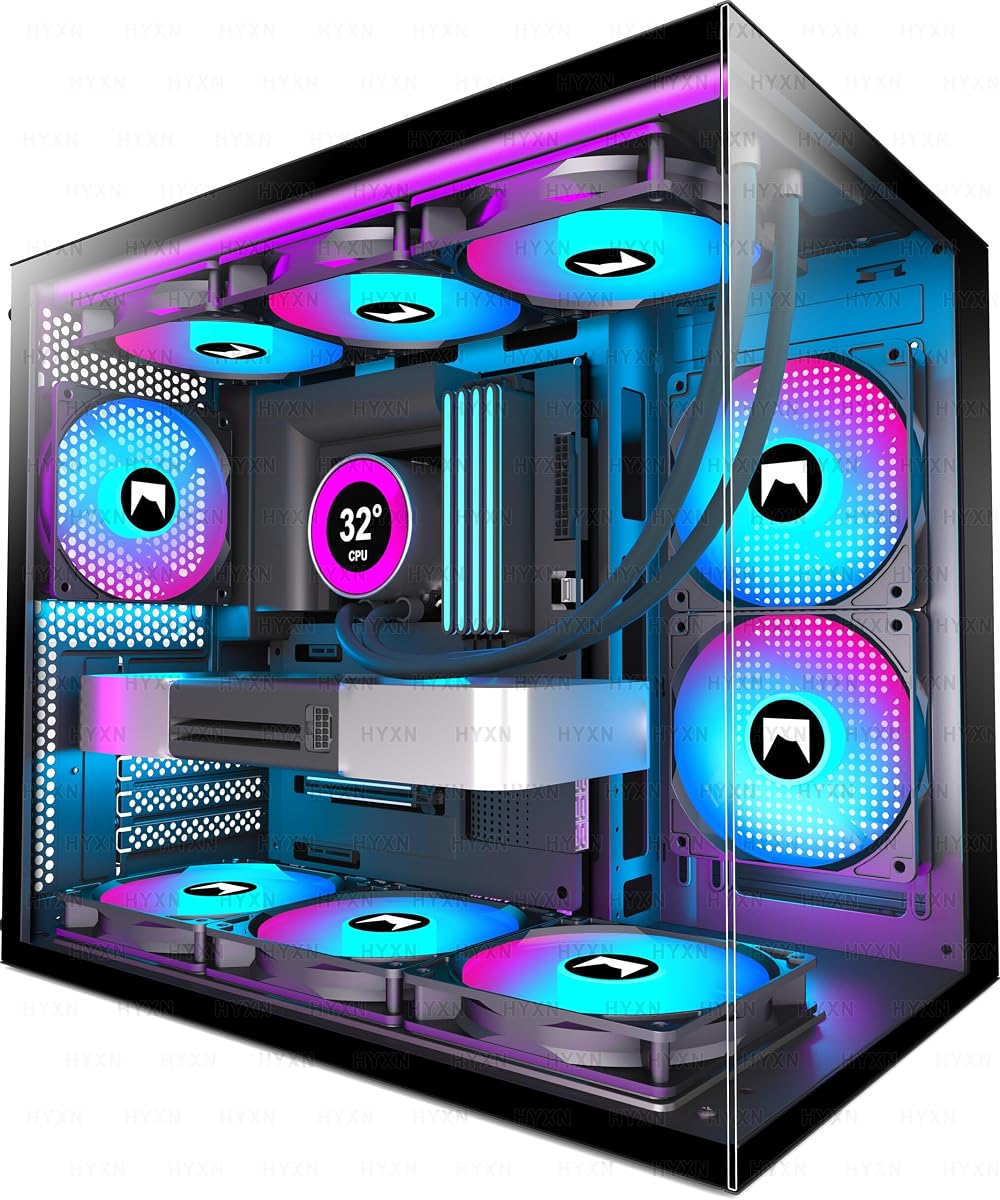
8. H3 HYXN - Best Compact Dual-Chamber

H3 HYXN

H3 HYXN

8.2/10★★★★☆

The H3 HYXN targets builders who like dual-chamber glass ideas but refuse a full-tower footprint. At roughly 420 × 285 × 370mm, it is shorter than many panoramic mid-towers while still claiming ATX compatibility, GPU lengths up to 400mm, and 360mm radiator support. Fully transparent tempered glass keeps the hardware visible; the dual cavity separates PSU and drives from the main chamber for tidier thermals and cables.

  • Compact dual-cavity; 3× ARGB fans included
  • Type-C 3.2 + USB 3.0/2.0 front I/O
  • GPU to 400mm; 360mm rad; back-mount boards
Check Price →
✓ Pros
  • Compact dual-chamber footprint brings fishbowl organization to smaller desks
  • Three ARGB fans included with reverse-blade styling for glass-facing intake
  • Type-C 3.2 front port is faster-friendly for modern storage sticks and phones
  • Supports GPUs up to 400mm and 360mm radiators despite compact height
  • A/B partition design and anchor points simplify cleaner cable routing
✕ Cons
  • Lower review rating than premium Lian Li and Corsair options in this pack
  • Only three fans versus seven-to-nine-fan panoramic rivals
  • Drive capacity limited to 1× HDD and 2× SSDs

Detailed review

Three ARGB fans ship in the box—two 120mm reverse and one 120mm forward—which is a smaller kit than FOIFKIN or ANSAITE but enough to establish intake aesthetics and basic exhaust. Reverse fans again help the glass view. Front I/O is comparatively modern: Type-C 3.2, USB 3.0, USB 2.0, audio, restart, and power. That Type-C 3.2 mention is a practical win for people who actually move large game installs on external SSDs.

Motherboard support includes ATX, mATX, and ITX plus back-mounted boards, and the A/B partition design with built-in anchor points aims to simplify cable management. PSU length up to 200mm covers mainstream units. Storage is limited—one HDD and two SSDs—so plan NVMe-first libraries.

The rating and brand familiarity sit below the pack leaders, so buy with clear eyes: inspect packaging, verify standoff alignment, and do not expect Corsair-level modular documentation. Still, as a compact dual-cavity option with Type-C 3.2 and 400mm GPU room, the HYXN fills a niche between tiny Flow cases and giant angled-glass full towers.

Pick it when desk height is constrained but you still want dual-chamber cable separation and panoramic glass. Skip it if you need nine fans included, maximum brand polish, or heavy multi-HDD storage. For apartment builds that sit on a shelf, the reduced height can be the deciding spec.

Build tip: because the cavity is compact, dry-fit your 360mm AIO and GPU together. Confirm B-mode mATX notes in the listing if you run dual-fan cooler quirks, and use the anchor points early so cables do not float into fan paths.

Best fit for the HYXN H3

Apartment and dorm builders who want dual-chamber style in a shorter chassis, plus anyone who values a Type-C 3.2 front port on a value panoramic case.

Compared with FOIFKIN F600

FOIFKIN is taller on fan count and raw showcase density. HYXN is the compact dual-cavity alternative with fewer included fans and a stronger emphasis on fitting constrained spaces while still clearing long GPUs.

Check Price on Amazon →

We may earn a commission at no additional cost to you.

9. ANSAITE K9 - Best Max Fan Bundle

ANSAITE K9

ANSAITE K9

9/10★★★★★

If your priority is maximum included fans, the ANSAITE K9 (also referenced as H09 in the listing copy) is the pack’s blunt instrument. Nine high-quality prismatic ARGB PWM fans arrive pre-installed: three forward-blade fans on top, three reverse-blade fans on the bottom, and three reverse fans on the side panel. Combined with 270° panoramic tempered glass, the case is engineered to look saturated with light and air the moment you power on.

  • 9× PWM ARGB prism fans pre-installed
  • 270° panoramic glass; GPU to 460mm
  • 420mm/360mm top rads; USB-C Gen2 I/O
Check Price →
✓ Pros
  • Nine prism ARGB PWM fans create unmatched out-of-box airflow and lighting density
  • 460mm GPU clearance welcomes the longest mainstream graphics cards
  • 420mm and 360mm radiator support plus multi-channel airflow design
  • USB 3.2 Gen 2 Type-C and USB 3.0 cover high-speed front connectivity
  • Back-connect ready layout with magnetic dust filters on top and bottom
✕ Cons
  • Nine fans increase noise potential if you leave them at full speed
  • ARGB and PWM wiring complexity is highest in this pack
  • Value-brand panoramic builds need careful QC checks on arrival

Detailed review

Airflow design uses multiple channels—horizontal emphasis for the CPU path and vertical movement with top exhaust—to keep cool air moving across hot parts. Magnetic dust filters on top and bottom try to keep that airflow from becoming a dust magnet. Back-connect readiness and ample cable space help the front chamber stay clean even when nine fans need power and data.

Clearance numbers are enthusiast-friendly. Graphics cards up to 460mm, CPU coolers up to 175mm, top radiators at 420mm or 360mm, PSUs up to 220mm, up to eleven 120mm fan mounts, and three side-by-side radiator sets describe a chassis meant for ambitious hardware. Seven PCIe slots and drive brackets cover mainstream expandability. Front I/O with USB 3.2 Gen 2 Type-C, USB 3.0, HD audio, power, and restart is stronger than many budget towers.

Lighting sync runs through a +5V ARGB motherboard header without requiring a separate controller according to the listing—welcome news compared with hub-optional cases. Still, nine PWM ARGB devices deserve a deliberate cable plan and a sane fan curve. Full speed on nine fans can sound like a workstation under stress; curve them down for desktop use.

Buy the K9 when you want the densest included fan kit and longest GPU hospitality in this roundup. Skip it if you prefer quiet minimalism, fewer fingerprints on glass, or premium modular ecosystems. For black-themed RGB gaming PCs that sit in the open, it is the maximalist choice.

Setup guidance: identify which of the nine fans are intake versus exhaust before you enable sync profiles. Keep reverse side and bottom fans as intake if that matches the intended prism look, use top fans as exhaust unless a thick top radiator changes the plan, and clean magnetic filters on a schedule proportional to how hard those nine fans pull air.

Who the ANSAITE K9 serves

RGB maximalists, long-GPU owners, and builders who hate buying fans separately. Ideal when the case must look complete in photos without aftermarket cooling kits.

Noise and fan-curve discipline

Nine PWM fans are a gift only if you control them. Create a silent profile under 40% for browsing and creative apps, then a gaming profile that ramps with GPU temperature. That habit matters more on this case than on two-fan mesh towers.

Check Price on Amazon →

We may earn a commission at no additional cost to you.

10. DARKROCK EC2 - Best Barebones Airflow Shell

DARKROCK EC2

DARKROCK EC2

8.8/10★★★★☆

The DARKROCK EC2 is the blank canvas of this pack: mesh front airflow, tempered glass side panel, Type-C readiness, and room to grow to eight 120mm fans with a 360mm front radiator—yet only one fan arrives pre-installed. That makes it Ideal when you already own ARGB fans, prefer choosing your own cooling brands, or want a simple shell without paying for seven lights you did not specify.

  • Mesh front; 1× pre-installed fan included
  • Up to 8× 120mm fans; 360mm front radiator
  • GPU to 340mm; Type-C ready; magnetic filters
Check Price →
✓ Pros
  • Mesh front panel keeps airflow honest for gaming thermals
  • Scales to eight 120mm fans and a 360mm front radiator as you expand
  • Type-C ready front connectivity for modern peripherals
  • Magnetic top and bottom dust filters simplify cleaning
  • Tempered glass side panel shows the build without panoramic complexity
✕ Cons
  • Only one fan included—plan a fan budget immediately
  • 340mm GPU limit is tighter than Lian Li, RUIX, or ANSAITE options
  • Less out-of-box spectacle than ARGB multi-fan glass cases

Detailed review

Mesh-front design targets efficient cooling for PC components, which is the right philosophy for 50-series-class graphics cards called out in the listing. Magnetic dust filters on top and bottom help the mesh stay useful instead of clogging. The tempered glass side offers a clean view without committing you to a full 270° fishbowl that demands perfect cable cosmetics on every surface.

Compatibility covers ATX, mATX, and ITX boards, GPUs up to 340mm, and PSUs up to 200mm. That GPU number is the main constraint: many modern cards fit, but the longest triple-fan monsters that sail into 400mm-plus cases may not. If your card is near 340mm, measure twice including the power plug bend.

Who benefits? Builders with spare fans, quiet-PC tinkerers who want specific PWM models, and gamers who like mesh thermals without panoramic maintenance. Who should skip? Anyone expecting a complete ARGB kit in the box—buy Lian Li, RUIX, FOIFKIN, or ANSAITE instead. The EC2’s value is flexibility and airflow structure, not included accessories.

As a tenth option it still matters. Not every best-list should crown only fully loaded showcases; barebones mesh towers remain how many experienced builders prefer to work. Pair the EC2 with three-to-six quality fans, a clear intake/exhaust plan, and a 360mm AIO if you liquid cool, and it becomes a focused gaming chassis rather than a compromise.

Purchasing tip: add fans to the cart the same day so you are not tempted to run a high-wattage GPU on a single stock spinner. Confirm Type-C internal header compatibility with your motherboard so the front port actually works after the build.

When to choose the EC2

Choose it if you already have a fan drawer, want mesh-first thermals, and prefer a simpler glass-side mid-tower over dual-chamber panoramas. Strong for custom fan ecosystems and understated black builds.

Minimum fan plan that works

Start with three front intakes and one rear exhaust, then add top exhaust if temperatures climb. If you mount a 360mm front AIO, treat the radiator fans as your primary intake and keep rear exhaust clear. That basic map outperforms a lonely single stock fan every time.

Check Price on Amazon →

We may earn a commission at no additional cost to you.

Best Gaming PC Cases for Airflow and Builds in 2026

How to Choose a Gaming PC Case in 2026

Airflow mesh versus panoramic glass

Mesh-first cases such as the NZXT H5 Flow and DARKROCK EC2 prioritize cool air over wraparound visibility. Panoramic dual-chamber cases such as FOIFKIN, darkFlash, HYXN, and ANSAITE prioritize the hardware as décor. Neither approach is wrong: pick mesh when the PC sits close to a wall or you chase minimum GPU temperatures; pick panoramic glass when the tower is part of the desk aesthetic and you are willing to manage cables and dust more carefully.

Count the fans you actually get

Pre-installed fan count changes the true cost of a case. Lian Li’s four PWM ARGB fans, Corsair’s three RS ARGB fans, and value kits with four, seven, or nine fans can eliminate a separate shopping trip. Barebones shells like the EC2 look cheaper until you add a full fan set. Also distinguish fixed RGB (MOROVOL) from addressable ARGB sync—software control expectations should match the fan type in the listing.

GPU length, cooler height, and radiators

Modern graphics cards are long and heavy. Match your card’s length to case clearance with margin for power connectors: 300mm-class limits (MOROVOL) exclude many flagship cards, while 400mm-plus cases (Lian Li, RUIX, FOIFKIN, ANSAITE, darkFlash) leave breathing room. Check CPU cooler height for air builds and front/top radiator support for AIOs. A 360mm marketing line means nothing if your thick radiator plus fans collide with the GPU.

Dual-chamber, back-connect, and modular futures

Dual-chamber layouts separate PSU and drives for cleaner fronts and often better cable discipline. Back-connect motherboard support (Lian Li, Corsair BTF/Zero/Stealth paths, darkFlash, ANSAITE, HYXN) can nearly empty the visible chamber if you buy a compatible board. Corsair’s FRAME system goes further by letting the case itself evolve. Buy modular and back-connect features only if you will use them—otherwise a straightforward mesh mid-tower may serve you with less complexity.

I/O, dust, and desk fit

Front Type-C is increasingly non-negotiable for phones and external SSDs; prefer cases that include it when your motherboard has the header. Magnetic dust filters on top and bottom are worth more than RGB gimmicks for long-term thermals. Finally, measure desk depth and shelf height: compact Flow and HYXN footprints behave differently from angled full-tower glass like the DY470.

Frequently Asked Questions

01

What is the best gaming PC case overall in 2026 from this list?

The Lian Li V100RX is our Best Overall pick because it combines four pre-installed ARGB PWM fans, an integrated ARGB strip, tool-less panels, and clearance for GPUs up to 420mm with coolers up to 178mm and a 360mm top radiator. It suits more builders than pure showpiece fishbowls or barebones shells. If you specifically want modular longevity, choose the Corsair 4000D RS Frame; if you want compact mesh thermals, choose the NZXT H5 Flow.

02

Do I need a panoramic glass case for good gaming performance?

No. Panoramic glass is about visibility and desk aesthetics. Gaming performance depends more on airflow path, fan setup, and cooler clearance. Mesh-focused cases like the NZXT H5 Flow and DARKROCK EC2 can run excellent thermals with less fingerprint theater. Choose panoramic dual-chamber cases when you want the hardware on display and are willing to route cables cleanly.

03

How many case fans do I actually need for a gaming PC?

A practical minimum for many ATX gaming builds is three to four fans establishing clear intake and exhaust. Two can work in a well-meshed case for moderate hardware, which is why the H5 Flow ships that way, but high-wattage GPUs often benefit from more front intake. Seven-to-nine-fan kits look dramatic and can move a lot of air, yet they need disciplined fan curves to stay quiet. Match fan count to heat output and noise tolerance, not only to product photos.

04

What GPU length clearance should I look for?

Check your graphics card’s official length and add margin for power connectors. Cases limited to around 300mm, such as the MOROVOL 621, fit many mainstream cards but exclude longer flagship boards. Clearance around 340mm (DARKROCK EC2) covers a wide mid-high range. Clearance at 400–460mm (Lian Li, FOIFKIN, RUIX, darkFlash, HYXN, ANSAITE) is the safer zone for current long triple-fan GPUs and future upgrades.

05

Is ARGB the same as the RGB fans on budget cases?

Not usually. Addressable ARGB typically connects to a +5V header and allows per-LED effects synced through motherboard software. Fixed RGB fans, such as those on the MOROVOL 621, light up but do not offer the same addressable control. If synchronized themes across fans, strips, and memory matter to you, verify ARGB PWM language in the listing before you buy.

06

Should I buy a dual-chamber case?

Dual-chamber cases help when you want cleaner cable separation, a showcased motherboard side, and organized PSU or drive placement. FOIFKIN, darkFlash, and HYXN follow that approach. Classic single-chamber mid-towers remain easier and often smaller for hidden under-desk PCs. Buy dual-chamber for presentation and cable discipline; buy classic mesh mid-towers for simplicity and compact desks.

07

Can these cases fit 360mm AIO liquid coolers?

Several can, but mount location and thickness matter. The NZXT H5 Flow supports a 360mm radiator in front and 240mm up top. Lian Li supports a 360mm top radiator. FOIFKIN claims up to three 360mm radiators, darkFlash up to two, ANSAITE supports large top radiators including 420mm-class options, and DARKROCK supports a 360mm front radiator. Always compare your AIO’s fan-plus-radiator thickness against GPU length so the stack fits.

08

What is Corsair FRAME and who needs it?

FRAME on the 4000D RS is a modular case system that lets you change elements such as motherboard trays and front I/O over time instead of replacing the entire chassis. You need it if you rebuild often, want a future upgrade path, or value Corsair’s ecosystem flexibility. If you build once and leave the PC alone for years, a fixed high-quality mid-tower like the Lian Li V100 may be simpler.

09

Which case is best if I already own my own fans?

The DARKROCK EC2 is the clearest barebones airflow shell in this pack: mesh front, tempered glass, Type-C readiness, and expansion up to eight fans with only one included. The NZXT H5 Flow also works if you like its compact mesh design and plan to add intakes. Avoid paying primarily for seven-to-nine-fan bundles if you will replace them immediately with your own set.

10

How important are dust filters in a gaming case?

Very important for mesh and high-fan-count cases because strong intake pulls dust with the cool air. Magnetic top and bottom filters, as seen on RUIX, ANSAITE, DARKROCK, and similar designs, make cleaning realistic. Panoramic glass looks worse when dust coats interior edges, and GPUs throttle more easily when heatsink fins are felted with carpet fuzz. Clean filters on a schedule that matches how dusty your room is.

Conclusion

For most gamers building an ATX system in 2026, start with the Lian Li V100RX: four ARGB PWM fans, strong clearance, back-connect readiness, and tool-less access make it the most complete default in this pack. Choose the Corsair 4000D RS ARGB Frame when you want modular longevity and InfiniRail airflow flexibility, or the NZXT H5 Flow when compact mesh thermals matter more than bundled lighting.

If your PC is a desk centerpiece, step into panoramic territory with FOIFKIN’s seven-fan dual-chamber kit, RUIX’s bracket-equipped glass value pick, darkFlash’s angled full-tower showpiece, HYXN’s compact dual cavity, or ANSAITE’s nine-fan maximalist bundle. Budget mesh builders can start on MOROVOL’s four-fan 621 if clearance fits, while experienced tinkerers who already own fans can treat the DARKROCK EC2 as a clean airflow shell.

Measure GPU length, cooler height, and desk space before you click buy, plan intake versus exhaust on day one, and match RGB versus ARGB expectations to the fans in the box. Do that, and any of these ten cases can become a cool, maintainable home for a gaming PC instead of a thermal bottleneck with expensive glass.